2019 CHEVROLET BOLT EV lock
[x] Cancel search: lockPage 46 of 371

Chevrolet BOLT EV Owner Manual (GMNA-Localizing-U.S./Canada/Mexico-
12163003) - 2019 - crc - 5/18/18
Keys, Doors, and Windows 45
Safety Locks
If equipped, the safety lock is on the
inside edge of the rear doors. To
use the safety lock:1. Move the lever forward to the lock position.
2. Close the door.
3. Do the same for the other rear door.
To open a rear door when the safety
lock is on: 1. Unlock the door by using the
inside handle, the power door
lock switch, or the Remote
Keyless Entry (RKE)
transmitter.
2. Open the door from the outside.
When the safety lock is enabled,
adults and older children will not be
able to open the rear door from the
inside. Cancel the safety locks to
enable the doors to open from the
inside.
To cancel the safety lock: 1. Unlock the door and open it from the outside.
2. Move the lever rearward to unlock. Do the same for the
other door.
KeyPass
If equipped, this feature allows a
smartphone to be connected to the
vehicle and remote vehicle functions
to be requested. Features vary
depending on availability.
Features include: .
Remote commands –Use to
lock/unlock the vehicle, remote
start for the cabin climate,
or sound or cancel the horn and
flash the lights.
. Vehicle status –View the
vehicle’s range and battery level,
charging status, and tire
pressure.
. Welcome lighting –Request light
when approaching the vehicle.
. Location services –Save the
parked location or start
navigation at the vehicle’s GPS
coordinates.
Setup Function
. KeyPass Setup
‐Managing Priority Setting
‐ Modifying Priority Setting
. Revocation
Active Remote Function
. Door Lock/Unlock
. Remote Start/Stop
. Panic Alarm Activation/
Termination
Page 48 of 371
Chevrolet BOLT EV Owner Manual (GMNA-Localizing-U.S./Canada/Mexico-
12163003) - 2019 - crc - 5/18/18
Keys, Doors, and Windows 47
3. The vehicle must be on and inP (Park).
4. Open the app and touch Search for New Vehicles.
5. Choose your vehicle and touch Done.
6. Aim the smartphone camera at the QR code on the
infotainment display to scan
the security key. If the camera
is not working, the QR code
can be entered manually.
7. The infotainment display provides confirmation that the
pairing process was completed
successfully.
Deleting a Paired Smartphone 1. Select Settings from the Home Page on the infotainment
display.
2. Select KeyPass.
3. Select Manage KeyPass Devices.
4. Touch Delete next to the smartphone to be deleted, and
follow the prompts.Doors
Liftgate
Caution
To avoid damage to the liftgate or
liftgate glass, make sure the area
above and behind the liftgate is
clear before opening it.
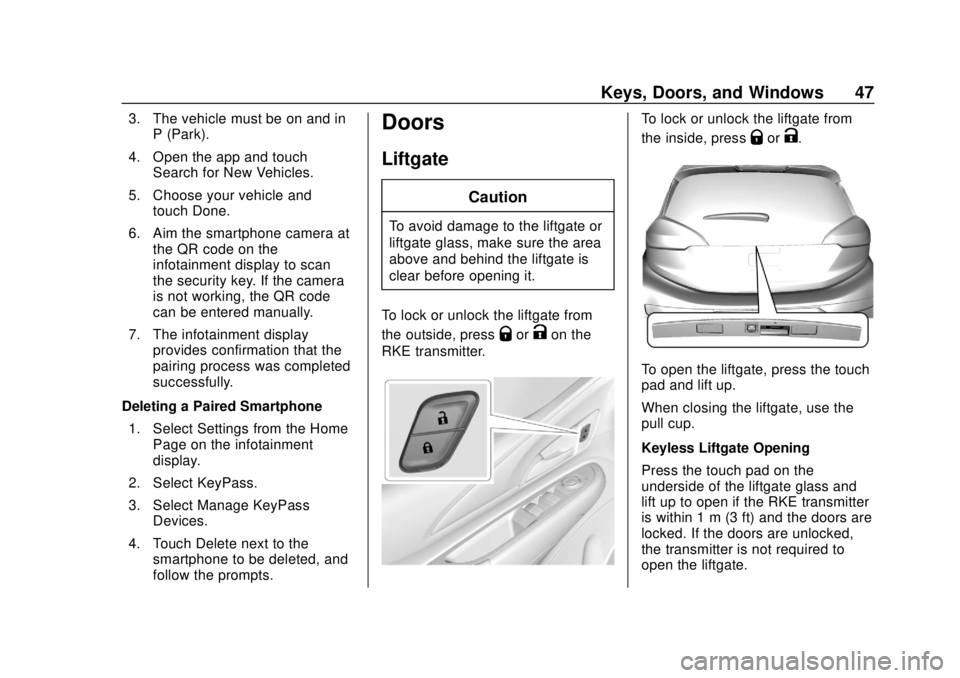
To lock or unlock the liftgate from
the outside, press
QorKon the
RKE transmitter.
To lock or unlock the liftgate from
the inside, press
QorK.
To open the liftgate, press the touch
pad and lift up.
When closing the liftgate, use the
pull cup.
Keyless Liftgate Opening
Press the touch pad on the
underside of the liftgate glass and
lift up to open if the RKE transmitter
is within 1 m (3 ft) and the doors are
locked. If the doors are unlocked,
the transmitter is not required to
open the liftgate.
Page 49 of 371
Chevrolet BOLT EV Owner Manual (GMNA-Localizing-U.S./Canada/Mexico-
12163003) - 2019 - crc - 5/18/18
48 Keys, Doors, and Windows
Vehicle Security
This vehicle has theft-deterrent
features; however, they do not make
the vehicle impossible to steal.
Vehicle Alarm System
This vehicle has an anti-theft alarm
system.
Arming the Alarm System
1. Close the liftgate, then turn offthe vehicle.
2. Lock the vehicle in one of three ways:
.Use the RKE transmitter.
. Use the Keyless Access
system.
. With a door open, press the
inside
Q.
3. After 30 seconds the alarm system will arm. Pressing
Qon
the RKE transmitter a second
time will bypass the 30-second
delay and immediately arm the
alarm system. The vehicle alarm system will not
arm if the doors are locked with
the key.
If the driver door is opened without
first unlocking with the RKE
transmitter, the horn will chirp and
the lights will flash to indicate
pre-alarm. If the vehicle is not
started, or the door is not unlocked
by pressing
Kon the RKE
transmitter during the 10-second
pre-alarm, the alarm will be
activated.
If a door or the liftgate is opened
without first disarming the system,
the turn signals will flash and the
horn will sound for about
30 seconds. The alarm system will
then re-arm to monitor for the next
unauthorized event.
Disarming the System
Do one of the following to disarm
the alarm system or turn off the
alarm if it has been activated:
. Press
Kon the RKE transmitter.
. Unlock the vehicle using the
Keyless Access system. .
Start the vehicle.
To avoid setting off the alarm by
accident:
. Lock the vehicle after all
occupants have left the vehicle.
. Always unlock a door with the
RKE transmitter.
Unlocking the driver door with the
key will not disarm the system or
turn off the alarm.
How to Detect a Tamper
Condition
IfKis pressed on the RKE
transmitter and the horn chirps and
the lights flash three times, an alarm
occurred previously while the alarm
system was armed.
If the alarm has been activated, a
message will appear on the DIC.
Immobilizer
See Radio Frequency Statement
0 343.
Page 53 of 371
Chevrolet BOLT EV Owner Manual (GMNA-Localizing-U.S./Canada/Mexico-
12163003) - 2019 - crc - 5/18/18
52 Keys, Doors, and Windows
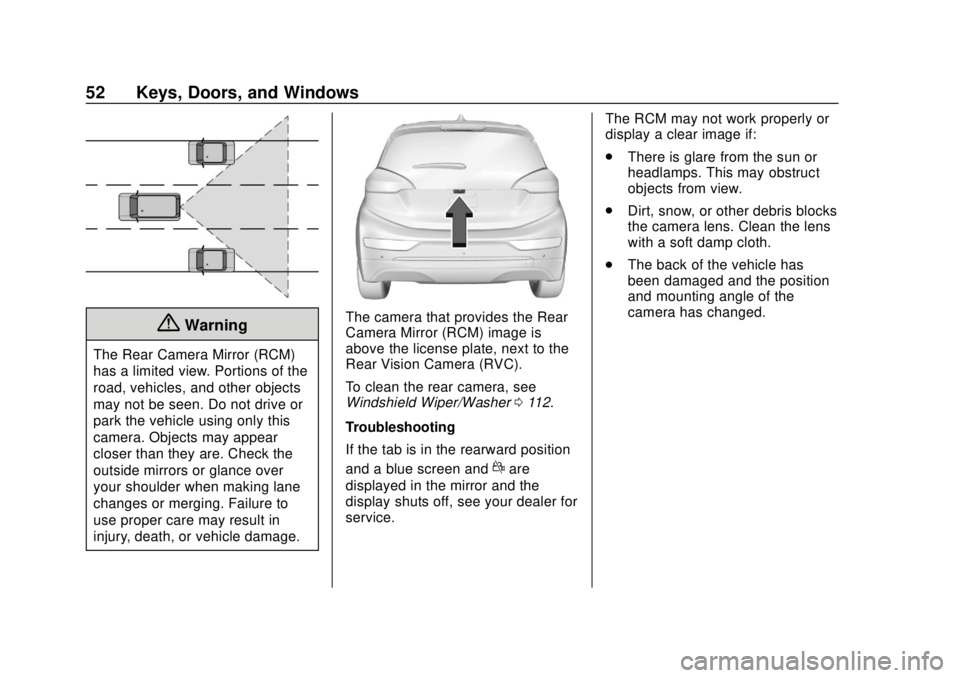
{Warning
The Rear Camera Mirror (RCM)
has a limited view. Portions of the
road, vehicles, and other objects
may not be seen. Do not drive or
park the vehicle using only this
camera. Objects may appear
closer than they are. Check the
outside mirrors or glance over
your shoulder when making lane
changes or merging. Failure to
use proper care may result in
injury, death, or vehicle damage.
The camera that provides the Rear
Camera Mirror (RCM) image is
above the license plate, next to the
Rear Vision Camera (RVC).
To clean the rear camera, see
Windshield Wiper/Washer0112.
Troubleshooting
If the tab is in the rearward position
and a blue screen and
dare
displayed in the mirror and the
display shuts off, see your dealer for
service. The RCM may not work properly or
display a clear image if:
.
There is glare from the sun or
headlamps. This may obstruct
objects from view.
. Dirt, snow, or other debris blocks
the camera lens. Clean the lens
with a soft damp cloth.
. The back of the vehicle has
been damaged and the position
and mounting angle of the
camera has changed.
Page 54 of 371
Chevrolet BOLT EV Owner Manual (GMNA-Localizing-U.S./Canada/Mexico-
12163003) - 2019 - crc - 5/18/18
Keys, Doors, and Windows 53
Windows
{Warning
Never leave a child, a helpless
adult, or a pet alone in a vehicle,
especially with the windows
closed in warm or hot weather.
They can be overcome by the
extreme heat and suffer
permanent injuries or even death
from heat stroke.
The vehicle aerodynamics are
designed to improve electric range
performance. This may result in a
pulsing sound when either rear
window is down and the front
windows are up. To reduce the
sound, open a front window.
Power Windows
{Warning
Leaving children in a vehicle with
the RKE transmitter is dangerous
for many reasons; children or
others could be badly injured or
even killed. They could operate
the power windows or other
controls or even make the vehicle
move. The windows will function
with the RKE transmitter in the
vehicle and they could be
seriously injured or killed if caught
in the path of a closing window.
Do not leave the RKE transmitter
in a vehicle with children.(Continued)
Warning (Continued)
When there are children in the
rear seat, use the window lockout
switch to prevent unintentional
operation of the windows.
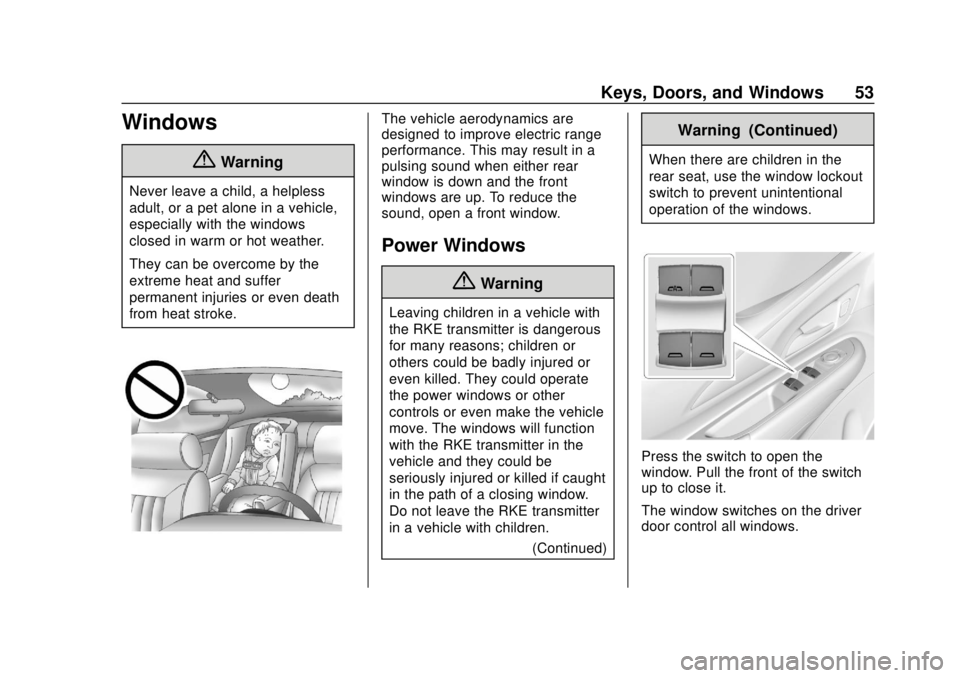
Press the switch to open the
window. Pull the front of the switch
up to close it.
The window switches on the driver
door control all windows.
Page 55 of 371

Chevrolet BOLT EV Owner Manual (GMNA-Localizing-U.S./Canada/Mexico-
12163003) - 2019 - crc - 5/18/18
54 Keys, Doors, and Windows
The power windows only operate
with the vehicle on or in Service
Mode, or when Retained Accessory
Power (RAP) is active.
Express Window Operation
The driver window has an express
feature which allows the window to
be lowered or raised without holding
the switch. To automatically raise or
lower the window, pull the driver
window switch up or press it down
all the way and release. Stop the
window by pressing or pulling the
switch in the same direction a
second time, or by briefly operating
the switch to the first position in
either direction. The front and rear
passenger windows have express
open only.
Safety Function
This is for vehicles with the
express-up feature. If any object is
in the path of the window when the
express-up feature is active, the
window will stop and auto-reverse to
a preset position. Weather
conditions may cause the window to
auto-reverse. The window switchmay be held up to the second
position to close the window. The
window will return to normal
operation once the obstruction or
condition is removed.
Safety Function Override
This is for vehicles with the
express-up feature. If the battery on
the vehicle has been recharged or
disconnected, or is not working, the
windows will need to be
reprogrammed for the express-up
feature to work. Before
reprogramming, replace or recharge
the vehicle's battery.
To program the driver window:
1. Close all doors with the vehicle on or in Service Mode.
2. Press and hold the power window switch until the window
is fully open.
3. Pull the power window switch up until the window is fully
closed. 4. Continue holding the switch up
for approximately two seconds
after the window is completely
closed.
Window Lockout
This feature prevents the rear
passenger windows from operating,
except from the driver position.
Press2on the driver door to
activate the window lockout. The
indicator light in the switch will
illuminate when activated.
Press
2again to deactivate the
window lockout.
Page 56 of 371
Chevrolet BOLT EV Owner Manual (GMNA-Localizing-U.S./Canada/Mexico-
12163003) - 2019 - crc - 5/18/18
Keys, Doors, and Windows 55
Sun Visors
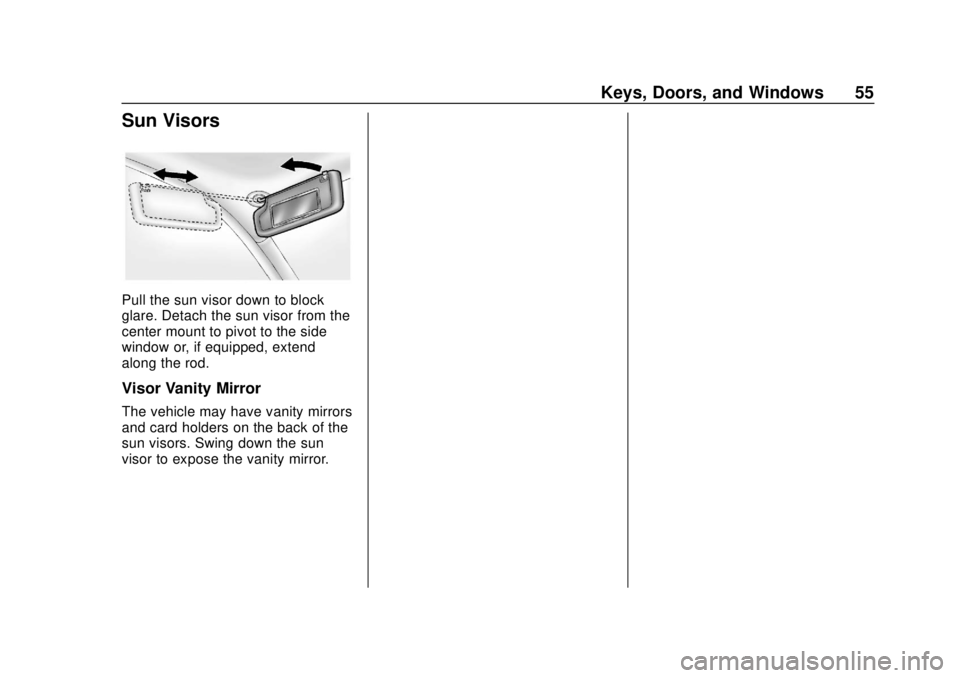
Pull the sun visor down to block
glare. Detach the sun visor from the
center mount to pivot to the side
window or, if equipped, extend
along the rod.
Visor Vanity Mirror
The vehicle may have vanity mirrors
and card holders on the back of the
sun visors. Swing down the sun
visor to expose the vanity mirror.
Page 58 of 371
Chevrolet BOLT EV Owner Manual (GMNA-Localizing-U.S./Canada/Mexico-
12163003) - 2019 - crc - 5/18/18
Seats and Restraints 57
Head Restraints
The vehicle's front and rear seats
have adjustable head restraints in
the outboard seating positions.
{Warning
With head restraints that are not
installed and adjusted properly,
there is a greater chance that
occupants will suffer a neck/
spinal injury in a crash. Do not
drive until the head restraints for
all occupants are installed and
adjusted properly.
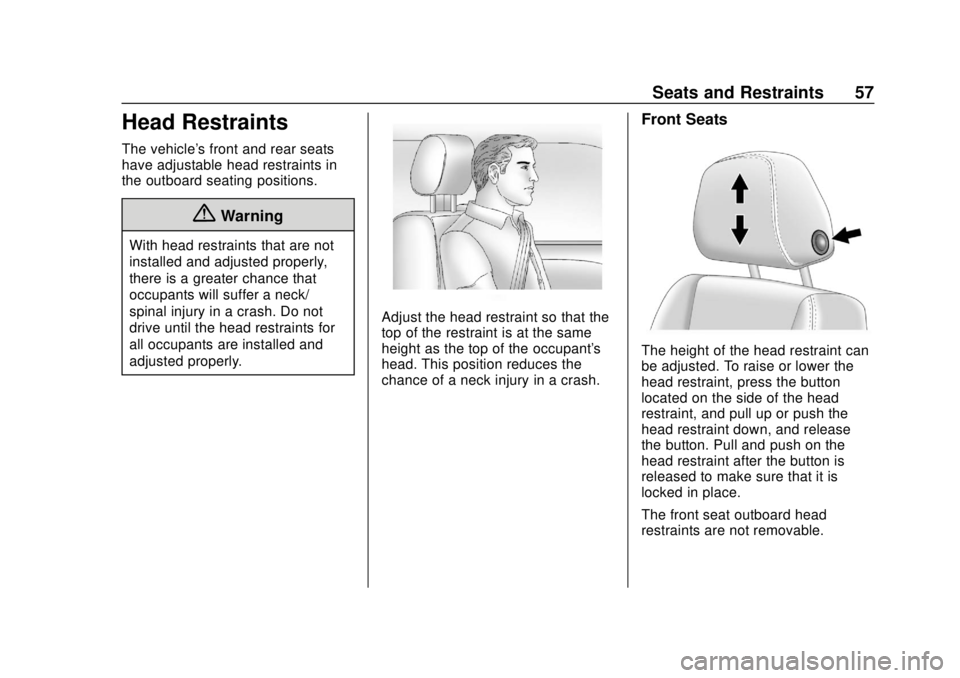
Adjust the head restraint so that the
top of the restraint is at the same
height as the top of the occupant's
head. This position reduces the
chance of a neck injury in a crash.
Front Seats
The height of the head restraint can
be adjusted. To raise or lower the
head restraint, press the button
located on the side of the head
restraint, and pull up or push the
head restraint down, and release
the button. Pull and push on the
head restraint after the button is
released to make sure that it is
locked in place.
The front seat outboard head
restraints are not removable.