2019 CHEVROLET BOLT EV radio
[x] Cancel search: radioPage 111 of 371
Chevrolet BOLT EV Owner Manual (GMNA-Localizing-U.S./Canada/Mexico-
12163003) - 2019 - crc - 5/18/18
110 Instruments and Controls
Controls
Steering Wheel
Adjustment
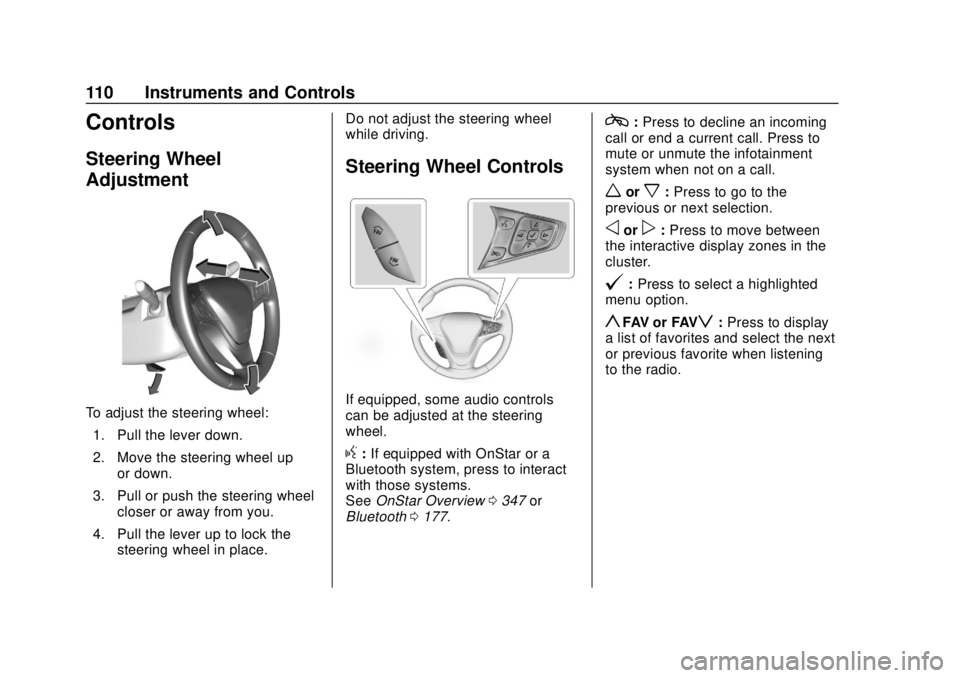
To adjust the steering wheel:1. Pull the lever down.
2. Move the steering wheel up or down.
3. Pull or push the steering wheel closer or away from you.
4. Pull the lever up to lock the steering wheel in place. Do not adjust the steering wheel
while driving.
Steering Wheel Controls
If equipped, some audio controls
can be adjusted at the steering
wheel.
g:
If equipped with OnStar or a
Bluetooth system, press to interact
with those systems.
See OnStar Overview 0347 or
Bluetooth 0177.
c:Press to decline an incoming
call or end a current call. Press to
mute or unmute the infotainment
system when not on a call.
worx: Press to go to the
previous or next selection.
oorp: Press to move between
the interactive display zones in the
cluster.
@: Press to select a highlighted
menu option.
yFAV or FAVz: Press to display
a list of favorites and select the next
or previous favorite when listening
to the radio.
Page 117 of 371

Chevrolet BOLT EV Owner Manual (GMNA-Localizing-U.S./Canada/Mexico-
12163003) - 2019 - crc - 5/18/18
116 Instruments and Controls
Certain accessory power plugs may
not be compatible with the
accessory power outlet and could
overload vehicle or adapter fuses.
If a problem is experienced, see
your dealer.
When adding electrical equipment,
be sure to follow the proper
installation instructions included with
the equipment. SeeAdd-On
Electrical Equipment 0254.
Caution
Hanging heavy equipment from
the power outlet can cause
damage not covered by the
vehicle warranty. The power
outlets are designed for
accessory power plugs only, such
as cell phone charge cords.
Wireless Charging
The vehicle may have a wireless
charging pocket outside the armrest
of the center console. The system
operates at 145 kHz and wirelessly
charges one Qi compatible mobile device. The power output of the
system is capable of charging at a
rate up to 3 amp (19.5W), as
requested by the compatible mobile
device. See
Radio Frequency
Statement 0343.
{Warning
Wireless charging can affect the
operation of an implanted
pacemaker or other medical
devices. If you have one, it is
recommended to consult with
your doctor before using the
wireless charging system.
The vehicle must be on, in Service
Mode, or Retained Accessory
Power (RAP) must be active. The
wireless charging feature may not
correctly indicate charging when the
vehicle is in RAP. See Retained
Accessory Power (RAP) 0208.
The operating temperature is −20 °C
(−4 °F) to 60 °C (140 °F) for the
charging system and 0 °C (32 °F) to
35 °C (95 °F) for the mobile phone.
{Warning
Remove all objects from the
charging pocket before charging
your mobile phone. Objects, such
as coins, keys, rings, paper clips,
or cards, between the mobile
phone and the charger will
become very hot. On the rare
occasion that the charging system
does not detect an object, and the
object gets wedged between the
mobile phone and the charger,
remove the mobile phone and
allow the object to cool before
removing it from the charging
pocket, to prevent burns.
Page 122 of 371

Chevrolet BOLT EV Owner Manual (GMNA-Localizing-U.S./Canada/Mexico-
12163003) - 2019 - crc - 5/18/18
Instruments and Controls 121
Reconfigurable Instrument
Cluster
The cluster layout can be changed.
There are three display
configurations to choose from:
Classic, Modern, and Enhanced.
Use the steering wheel control to
move between the different display
zones and scroll through the
different displays. See“Layout”
under “Cluster Menu” following.
. Classic configuration displays
the speedometer with a
simplified battery gauge and
efficiency light.
. Modern configuration displays
the speedometer with a battery
gauge and efficiency gauge.
. Enhanced configuration displays
the speedometer with battery
gauge, efficiency ring, and
power gauge.
Cluster Menu
There is an interactive display area
in the center of the instrument
cluster.
Use the right steering wheel control
to open and scroll through the
different items and displays.
Press
oto access the cluster
applications. Use
worxto scroll
through the list of available
applications. Press
Vto select the
application, then press
pto enter
the application menu. Exit the menu
by pressing
o.
Not all applications will be available
on all vehicles. Cluster Menu Applications
.
Vehicle info. This is where the
Driver Information Center (DIC)
displays can be viewed. See
Driver Information Center (DIC)
0143.
. Audio
. Phone
. Onstar Navigation
. Layout
. Options
Audio
In the main view of the Audio
application, press
worxto scroll
through radio stations or move to
the next/previous track of a USB/
Bluetooth device that is connected
to the vehicle. Press
Vto select the
Audio app, then press
pto enter
the Audio menu. In the Audio menu
browse for music, select from the
favorites, or change the audio
source.
Page 128 of 371
Chevrolet BOLT EV Owner Manual (GMNA-Localizing-U.S./Canada/Mexico-
12163003) - 2019 - crc - 5/18/18
Instruments and Controls 127
If a short distance must be driven
with the light on, be sure to turn off
all accessories, such as the radio.
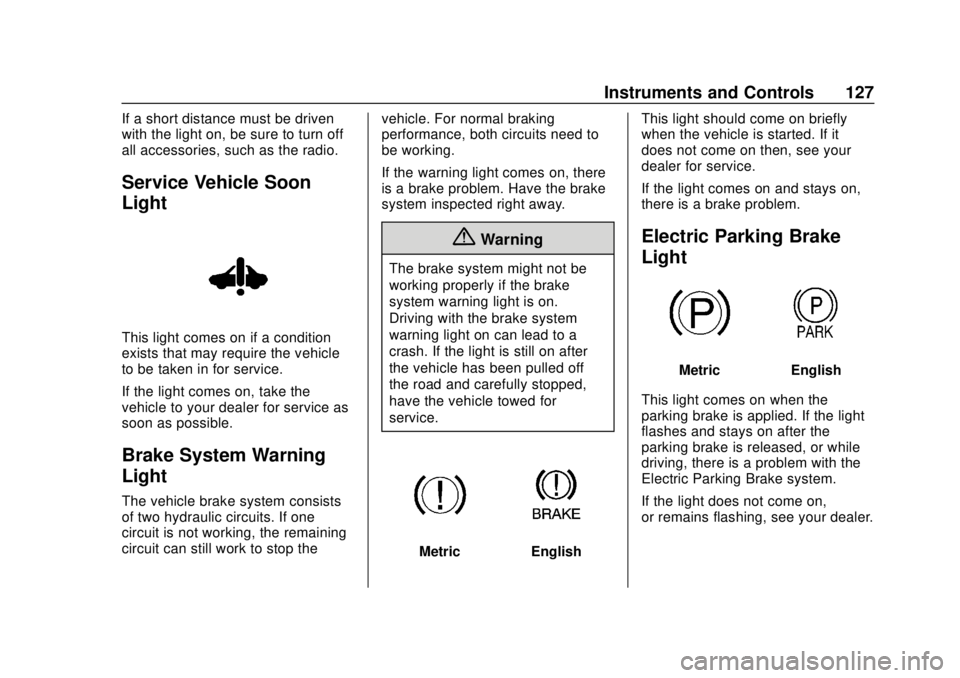
Service Vehicle Soon
Light
This light comes on if a condition
exists that may require the vehicle
to be taken in for service.
If the light comes on, take the
vehicle to your dealer for service as
soon as possible.
Brake System Warning
Light
The vehicle brake system consists
of two hydraulic circuits. If one
circuit is not working, the remaining
circuit can still work to stop thevehicle. For normal braking
performance, both circuits need to
be working.
If the warning light comes on, there
is a brake problem. Have the brake
system inspected right away.
{Warning
The brake system might not be
working properly if the brake
system warning light is on.
Driving with the brake system
warning light on can lead to a
crash. If the light is still on after
the vehicle has been pulled off
the road and carefully stopped,
have the vehicle towed for
service.
MetricEnglishThis light should come on briefly
when the vehicle is started. If it
does not come on then, see your
dealer for service.
If the light comes on and stays on,
there is a brake problem.
Electric Parking Brake
Light
MetricEnglish
This light comes on when the
parking brake is applied. If the light
flashes and stays on after the
parking brake is released, or while
driving, there is a problem with the
Electric Parking Brake system.
If the light does not come on,
or remains flashing, see your dealer.
Page 143 of 371
Chevrolet BOLT EV Owner Manual (GMNA-Localizing-U.S./Canada/Mexico-
12163003) - 2019 - crc - 5/18/18
142 Instruments and Controls
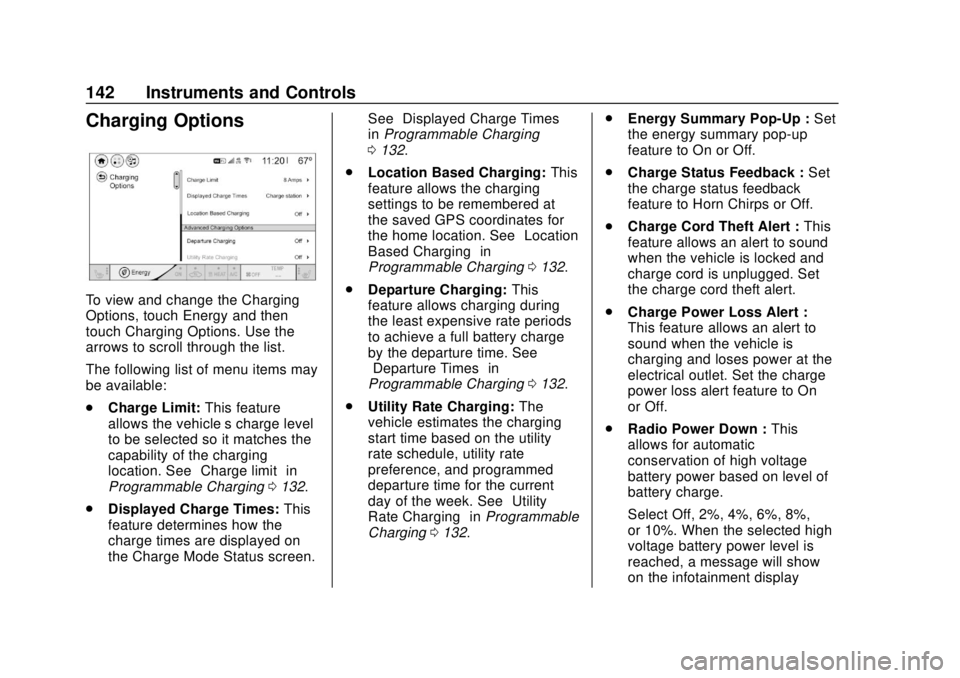
Charging Options
To view and change the Charging
Options, touch Energy and then
touch Charging Options. Use the
arrows to scroll through the list.
The following list of menu items may
be available:
.Charge Limit: This feature
allows the vehicle’s charge level
to be selected so it matches the
capability of the charging
location. See “Charge limit” in
Programmable Charging 0132.
. Displayed Charge Times: This
feature determines how the
charge times are displayed on
the Charge Mode Status screen. See
“Displayed Charge Times”
in Programmable Charging
0 132.
. Location Based Charging: This
feature allows the charging
settings to be remembered at
the saved GPS coordinates for
the home location. See “Location
Based Charging” in
Programmable Charging 0132.
. Departure Charging: This
feature allows charging during
the least expensive rate periods
to achieve a full battery charge
by the departure time. See
“Departure Times” in
Programmable Charging 0132.
. Utility Rate Charging: The
vehicle estimates the charging
start time based on the utility
rate schedule, utility rate
preference, and programmed
departure time for the current
day of the week. See “Utility
Rate Charging” inProgrammable
Charging 0132. .
Energy Summary Pop-Up : Set
the energy summary pop-up
feature to On or Off.
. Charge Status Feedback : Set
the charge status feedback
feature to Horn Chirps or Off.
. Charge Cord Theft Alert : This
feature allows an alert to sound
when the vehicle is locked and
charge cord is unplugged. Set
the charge cord theft alert.
. Charge Power Loss Alert :
This feature allows an alert to
sound when the vehicle is
charging and loses power at the
electrical outlet. Set the charge
power loss alert feature to On
or Off.
. Radio Power Down : This
allows for automatic
conservation of high voltage
battery power based on level of
battery charge.
Select Off, 2%, 4%, 6%, 8%,
or 10%. When the selected high
voltage battery power level is
reached, a message will show
on the infotainment display
Page 144 of 371
Chevrolet BOLT EV Owner Manual (GMNA-Localizing-U.S./Canada/Mexico-
12163003) - 2019 - crc - 5/18/18
Instruments and Controls 143
asking if the radio should enter
Low Power Mode. Touch Yes
or No.
Low Power Mode
To enter Low Power Mode manually:
1. Press and hold
O. A message
will show on the infotainment
display asking if the radio
should enter Low Power Mode.
2. Touch Yes. The screen will turn off.
3. Press
Oagain to turn the
radio on.
Driver Information
Center (DIC)
The DIC is displayed in the
instrument cluster. It shows the
status of many vehicle systems. The
controls for the DIC are on the right
steering wheel control. See
Instrument Cluster 0119.
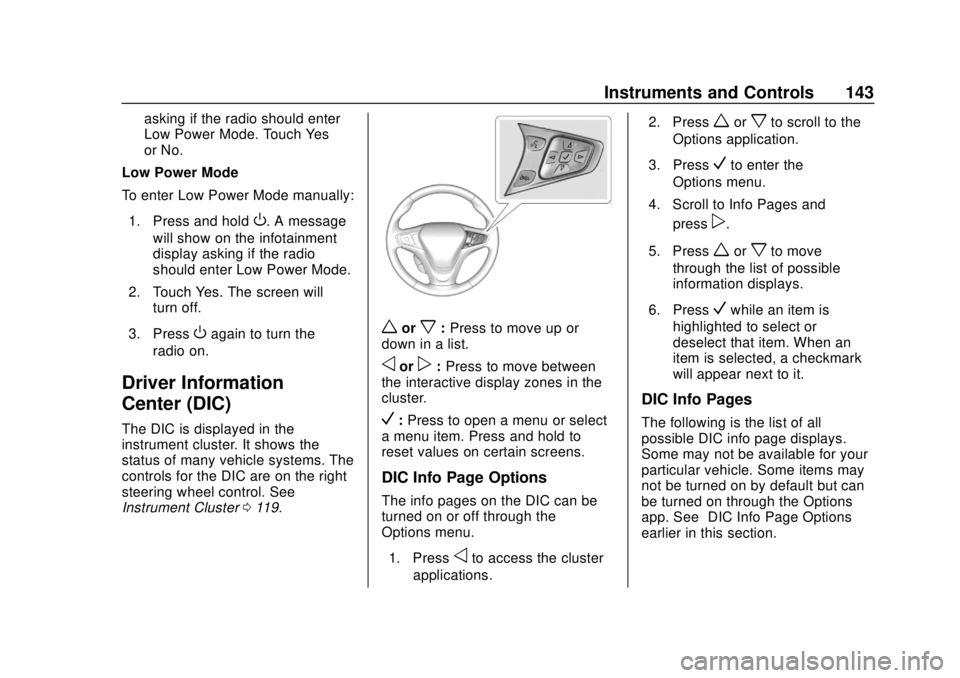
worx:Press to move up or
down in a list.
oorp: Press to move between
the interactive display zones in the
cluster.
V: Press to open a menu or select
a menu item. Press and hold to
reset values on certain screens.
DIC Info Page Options
The info pages on the DIC can be
turned on or off through the
Options menu.
1. Press
oto access the cluster
applications. 2. Press
worxto scroll to the
Options application.
3. Press
Vto enter the
Options menu.
4. Scroll to Info Pages and press
p.
5. Press
worxto move
through the list of possible
information displays.
6. Press
Vwhile an item is
highlighted to select or
deselect that item. When an
item is selected, a checkmark
will appear next to it.
DIC Info Pages
The following is the list of all
possible DIC info page displays.
Some may not be available for your
particular vehicle. Some items may
not be turned on by default but can
be turned on through the Options
app. See “DIC Info Page Options”
earlier in this section.
Page 147 of 371

Chevrolet BOLT EV Owner Manual (GMNA-Localizing-U.S./Canada/Mexico-
12163003) - 2019 - crc - 5/18/18
146 Instruments and Controls
Vehicle
Personalization
Use the audio system controls to
access the personalization menus
for customizing vehicle features.
The following are all possible
personalization features. Depending
on the vehicle, some may not be
available.
{:Press to access the
Home Page.
T: Touch to access the Icon view.
Y: Drag the scroll bar to navigate
the list.
0 :Touch to exit or return to the
previous screen or menu.
To access the menu:
1. Touch
T.
2. Touch Settings.
3. Touch the menu item to select it.
Each of the menus is detailed in the
following information.
Personalization Menu
The following list of menu items may
be available:
. Time and Date
. Rear Seat Reminder
. Language (Language)
. Teen Driver
. Radio Settings
. Vehicle
. Devices
. Device Remote Access
. Bluetooth Phone
. Apple CarPlay
. Android Auto
. KeyPass
. USB Auto Launch
. Wi-Fi
. Display Settings
. Rear Camera
. Return to Factory Settings
. Audible Touch Feedback .
Text Scroll
. Software Information
Each menu is detailed in the
following information.
Time and Date
Manually set the time and date. See
Clock 0114.
Rear Seat Reminder
This message displays under
certain conditions indicating there
may be an item or passenger in the
rear seat. Check before exiting the
vehicle.
This feature allows for a chime and
a message when the rear door has
been opened before or during
operation of the vehicle.
Select Off or On.
Language (Language)
Select Language, then select from
the available language(s).
Teen Driver
See Teen Driver 0183.
Page 148 of 371

Chevrolet BOLT EV Owner Manual (GMNA-Localizing-U.S./Canada/Mexico-
12163003) - 2019 - crc - 5/18/18
Instruments and Controls 147
Radio Settings
To manage the radio features, see
“Radio Settings”underSettings
0 182.
Vehicle
Select and the following may
display:
.
Climate and Air Quality
. Comfort and Convenience
. Collision / Detection Systems
. Lighting
. Power Door Locks
. Remote Lock / Unlock / Start
Climate and Air Quality
Select and the following may
display:
. Auto Fan Speed
. Auto Heated Seats
. Auto Defog
Auto Fan Speed
This feature will set the maximum
auto fan speed. Select Low, Medium, or High.
Auto Heated Seats
When set to On and it is cold
outside, both the heated seats and
the heated steering wheel will
automatically turn on when the
vehicle is started. See
Automatic
Climate Control System 0188.
Select Off or On.
Auto Defog
When set to On, the front defog will
automatically come on when the
vehicle is started. See Automatic
Climate Control System 0188.
Select Off or On.
Comfort and Convenience
Select and the following may
display:
. Chime Volume
. Auto Wipe in Reverse Gear
Chime Volume
This allows the selection of the
chime volume level.
Select + or −to adjust the volume. Auto Wipe in Reverse Gear
This allows the feature to be turned
on or off. See
Rear Window Wiper/
Washer 0113.
Select Off or On.
Collision / Detection Systems
Select and the following may
display:
. Forward Collision System
. Front Pedestrian Detection
. Park Assist
. Rear Cross Traffic Alert
. Lane Change Alert
Forward Collision System
This feature will turn on or off the
Forward Collision Alert (FCA) and
Forward Automatic Braking (FAB).
The Off setting disables all FCA and
FAB functions. With the Alert and
Brake setting, both FCA and FAB
are available. The Alert setting
disables FAB. See Forward
Automatic Braking (FAB) 0229.
Select Off, Alert, or Alert and Brake.