2019 CADILLAC XT5 service
[x] Cancel search: servicePage 183 of 388

Cadillac XT5 Owner Manual (GMNA-Localizing-U.S./Canada/Mexico-
12146119) - 2019 - crc - 7/27/18
182 DRIVING AND OPERATING
.Turn on Traction Control. See
Traction Control/Electronic Stability
Control 0205.
. Antilock Brake System (ABS)
improves vehicle stability during
hard stops, but the brakes should
be applied sooner than when on
dry pavement. See Antilock Brake
System (ABS) 0202.
. Allow greater following distance
and watch for slippery spots. Icy
patches can occur on otherwise
clear roads in shaded areas. The
surface of a curve or an overpass
can remain icy when the
surrounding roads are clear. Avoid
sudden steering maneuvers and
braking while on ice.
. Turn off cruise control.
. Select All-Wheel Drive (AWD)
mode.
See Driver Mode Control 0207 and
All-Wheel Drive 0201.
Blizzard Conditions
Stop the vehicle in a safe place and
signal for help. Stay with the vehicle
unless there is help nearby. If possible, use Roadside Service. See
Roadside
Service 0354. To get help and keep
everyone in the vehicle safe:
. Turn on the hazard warning
flashers.
. Tie a red cloth to an outside
mirror.
{Warning
Snow can trap engine exhaust
under the vehicle. This may cause
exhaust gases to get inside. Engine
exhaust contains carbon monoxide
(CO), which cannot be seen or
smelled. It can cause
unconsciousness and even death.
If the vehicle is stuck in snow:
. Clear snow from the base of
the vehicle, especially any
blocking the exhaust pipe.
. Open a window about 5 cm
(2 in) on the vehicle side that
is away from the wind, to
bring in fresh air.
(Continued)
Warning (Continued)
.Fully open the air outlets on
or under the instrument
panel.
. Adjust the climate control
system to circulate the air
inside the vehicle and set the
fan speed to the highest
setting. See “Climate Control
Systems.”
For more information about CO, see
Engine Exhaust 0194.
To save fuel, run the engine for short
periods to warm the vehicle and then
shut the engine off and partially close
the window. Moving about to keep
warm also helps.
If it takes time for help to arrive,
when running the engine, push the
accelerator pedal slightly so the
engine runs faster than the idle speed.
This keeps the battery charged to
restart the vehicle and to signal for
help with the headlamps. Do this as
little as possible, to save fuel.
Page 189 of 388

Cadillac XT5 Owner Manual (GMNA-Localizing-U.S./Canada/Mexico-
12146119) - 2019 - crc - 7/27/18
188 DRIVING AND OPERATING
SHIFT TO PARK in the Driver
Information Center (DIC). When the
vehicle is shifted into P (Park), the
ignition will turn off.
{Warning
Turning off the vehicle while
moving may cause loss of power
assist in the brake and steering
systems and disable the airbags.
While driving, only shut the vehicle
off in an emergency.
If the vehicle must be shut off in an
emergency: 1. Brake using a firm and steady pressure. Do not pump the
brakes repeatedly. This may
deplete power assist, requiring
increased brake pedal force.
2. Shift the vehicle to N (Neutral). This can be done while the
vehicle is moving. After shifting
to N (Neutral), firmly apply the
brakes and steer the vehicle to a
safe location. 3. Come to a complete stop and
shift to P (Park).
4. Set the parking brake. See Electric Parking Brake 0202.
Press ENGINE START/STOP to
turn the vehicle off.
If the vehicle cannot be pulled over
and must be shut off while driving,
press and hold ENGINE START/STOP
for longer than two seconds, or press
twice in five seconds.
ACC/ACCESSORY (Amber Indicator
Light) : This mode allows you to use
some electrical accessories when the
engine is off.
With the ignition off, pressing
ENGINE START/STOP once without
the brake pedal applied will place the
ignition system in ACC/ACCESSORY.
The ignition will switch from ACC/
ACCESSORY to OFF after 10 minutes
to prevent battery rundown.
ON/RUN/START (Green Indicator
Light) : This mode is for driving and
starting. With the ignition off and the
brake pedal applied, pressing ENGINE
START/STOP once will place the ignition system in ON/RUN/START.
Once engine cranking begins, release
the button. Engine cranking will
continue until the engine starts. The
ignition will then remain on. See
Starting the Engine
0189.
Service Mode
This mode is available to verify the
proper operation of the malfunction
indicator lamp as may be required for
emissions inspection purposes and for
service and diagnostics. See Automatic
Transmission 0195.
With the vehicle off, and the brake
pedal not applied, pressing and
holding ENGINE START/STOP for
more than five seconds will place the
vehicle in Service Mode. The
instruments and audio systems will
operate as they do in ON/RUN, but
the vehicle will not be able to be
driven. The engine will not start in
Service Mode. Press ENGINE START/
STOP again to turn the vehicle off.
Page 194 of 388

Cadillac XT5 Owner Manual (GMNA-Localizing-U.S./Canada/Mexico-
12146119) - 2019 - crc - 7/27/18
DRIVING AND OPERATING 193
If you have to leave the vehicle with
the engine running, be sure the
vehicle is in P (Park) and the parking
brake is set before you leave it.
If you are towing a trailer and parking
on a hill, seeDriving Characteristics
and Towing Tips 0240.
Shifting out of Park
This vehicle is equipped with an
electronic transmission. The shift lock
release button is designed to prevent
inadvertent shifting out of P (Park)
unless the ignition is on, the brake
pedal is applied, and the shift lock
release button is pressed.
The shift lock control is always
functional except in the case of an
uncharged or low voltage (less than
9-volt) battery.
If the vehicle has an uncharged
battery or a battery with low voltage,
try charging or jump starting the
battery. See Jump Starting - North
America 0319.
To shift out of P (Park): 1. Apply the brake pedal. 2. Press ENGINE START/STOP.
3. Press the shift lock release
button.
4. Move the shift lever to the desired position.
5. The P indicator will turn white and the gear indicator on the
shift lever will turn red when the
vehicle is no longer in P (Park).
6. After releasing the shift lever, it will return to the center position.
If the vehicle cannot shift from
P (Park), a Driver Information
Center (DIC) message will be
displayed. See your dealer for service.
Parking over Things
That Burn
{Warning
Things that can burn could touch
hot exhaust parts under the vehicle
and ignite. Do not park over papers,
leaves, dry grass, or other things
that can burn.
Active Fuel Management
This vehicle's engine may be equipped
with Active Fuel Management, which
allows the engine to operate on either
all of its cylinders, or in reduced
cylinder operation, depending on the
driving conditions.
When less power is required, such as
cruising at a constant vehicle speed,
the system will operate in reduced
cylinder operation mode, allowing the
vehicle to achieve better fuel economy.
When greater power demands are
required, such as accelerating from a
stop, passing, or merging onto a
freeway, the system will maintain
full-cylinder operation.
If the vehicle has an Active Fuel
Management indicator, see Driver
Information Center (DIC) for more
information on using this display.
Page 197 of 388
Cadillac XT5 Owner Manual (GMNA-Localizing-U.S./Canada/Mexico-
12146119) - 2019 - crc - 7/27/18
196 DRIVING AND OPERATING
{Warning
It is dangerous to get out of the
vehicle if the transmission is not in
P (Park) with the parking brake set.
The vehicle can roll.
Do not leave the vehicle when the
engine is running. If the engine has
been left running, the vehicle can
move suddenly. You or others could
be injured. To be sure the vehicle
will not move, even when on fairly
level ground, always set the parking
brake and place the transmission
into P (Park).
SeeShifting Into Park 0192 and
Driving Characteristics and Towing
Tips 0240.
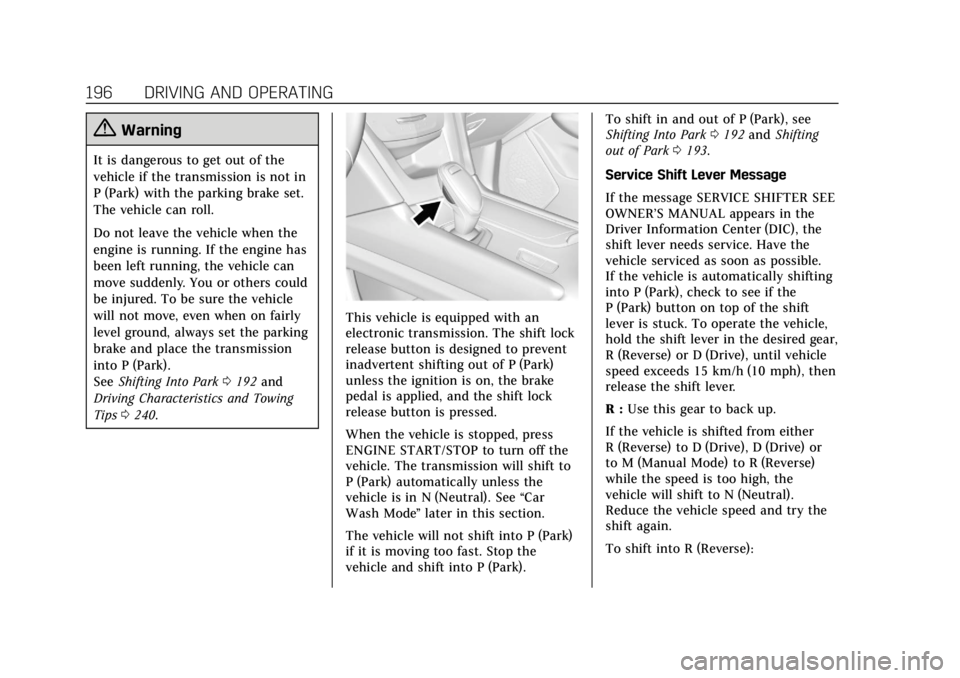
This vehicle is equipped with an
electronic transmission. The shift lock
release button is designed to prevent
inadvertent shifting out of P (Park)
unless the ignition is on, the brake
pedal is applied, and the shift lock
release button is pressed.
When the vehicle is stopped, press
ENGINE START/STOP to turn off the
vehicle. The transmission will shift to
P (Park) automatically unless the
vehicle is in N (Neutral). See “Car
Wash Mode ”later in this section.
The vehicle will not shift into P (Park)
if it is moving too fast. Stop the
vehicle and shift into P (Park). To shift in and out of P (Park), see
Shifting Into Park
0192 and Shifting
out of Park 0193.
Service Shift Lever Message
If the message SERVICE SHIFTER SEE
OWNER’S MANUAL appears in the
Driver Information Center (DIC), the
shift lever needs service. Have the
vehicle serviced as soon as possible.
If the vehicle is automatically shifting
into P (Park), check to see if the
P (Park) button on top of the shift
lever is stuck. To operate the vehicle,
hold the shift lever in the desired gear,
R (Reverse) or D (Drive), until vehicle
speed exceeds 15 km/h (10 mph), then
release the shift lever.
R : Use this gear to back up.
If the vehicle is shifted from either
R (Reverse) to D (Drive), D (Drive) or
to M (Manual Mode) to R (Reverse)
while the speed is too high, the
vehicle will shift to N (Neutral).
Reduce the vehicle speed and try the
shift again.
To shift into R (Reverse):
Page 204 of 388

Cadillac XT5 Owner Manual (GMNA-Localizing-U.S./Canada/Mexico-
12146119) - 2019 - crc - 7/27/18
DRIVING AND OPERATING 203
The vehicle has an Electric Parking
Brake (EPB). The EPB can always be
activated, even if the ignition is off. To
prevent draining the battery, avoid
repeated cycles of the EPB system
when the engine is not running.
The system has a
Yor PARK
Electric Parking Brake light, and a
8
Service Parking Brake light.
See Electric Parking Brake Light 0135
and Service Electric Parking Brake Light
0 135.
Before leaving the vehicle, check for
the
Yor PARK light to ensure that
the parking brake is applied.
EPB Apply
To apply the EPB:
1. Be sure the vehicle is at a complete stop.
2. Press the EPB switch momentarily. The
Yor PARK light will flash and
then stay on once the EPB is fully
applied. If the
Yor PARK light
flashes continuously, then the EPB is
only partially applied or there is a
problem with the EPB. A DIC message
will display. Release the EPB and try
to apply it again. If the light does not
come on, or keeps flashing, have the
vehicle serviced. Do not drive the
vehicle if the
Yor PARK light is
flashing. See your dealer. See Electric
Parking Brake Light 0135.
If the
8light is on, press the EPB
switch and hold it. Continue to hold
the switch until the
Yor PARK light
remains on. If the
8light remains on,
see your dealer.
If the EPB is applied while the vehicle
is moving, the vehicle will decelerate
as long as the switch is pressed. If the
switch is pressed until the vehicle
comes to a stop, the EPB will remain
applied. The vehicle may automatically apply
the EPB in some situations when the
vehicle is not moving. This may occur
when shifting to P (Park) on a hill or
with a cold transmission. This is
normal, and is done to periodically
check the correct operation of the EPB
system.
If the EPB fails to apply, block the rear
wheels to prevent vehicle movement.
EPB Release
To release the EPB:
1. Turn the ignition on or to ACC/ ACCESSORY.
2. Apply and hold the brake pedal.
3. Press the EPB switch momentarily.
The EPB is released when the
Yor
PARK light is off.
If the
8light is on, release the EPB by
pressing and holding the EPB switch.
Continue to hold the switch until
the
Yor PARK light is off. If either
light stays on after release is
attempted, see your dealer.
Page 218 of 388

Cadillac XT5 Owner Manual (GMNA-Localizing-U.S./Canada/Mexico-
12146119) - 2019 - crc - 7/27/18
DRIVING AND OPERATING 217
automatic braking will not occur. ACC
will resume operation when the
accelerator pedal is not being pressed.
{Warning
The ACC will not automatically
apply the brakes if your foot is
resting on the accelerator pedal.
You could crash into a vehicle
ahead of you.
Curves in the Road
{Warning
On curves, ACC may not detect a
vehicle ahead in your lane. You
could be startled if the vehicle
accelerates up to the set speed,
especially when following a vehicle
exiting or entering exit ramps. You
could lose control of the vehicle or
crash. Do not use ACC while driving
on an entrance or exit ramp. Always
be ready to use the brakes if
necessary.
{Warning
On curves, ACC may respond to a
vehicle in another lane, or may not
have time to react to a vehicle in
your lane. You could crash into a
vehicle ahead of you, or lose control
of your vehicle. Give extra attention
in curves and be ready to use the
brakes if necessary. Select an
appropriate speed while driving in
curves.
ACC may operate differently in a
sharp curve. It may reduce the vehicle
speed if the curve is too sharp.
When following a vehicle and entering
a curve, ACC may not detect the
vehicle ahead and may accelerate to
the set speed. When this happens, the
vehicle ahead indicator will not
appear.
ACC may detect a vehicle that is not
in your lane and apply the brakes.
ACC may occasionally provide an alert
and/or braking that is considered
unnecessary. It could respond to
vehicles in different lanes, signs,
guardrails, and other stationary
objects when entering or exiting a
curve. This is normal operation. The
vehicle does not need service.
Page 227 of 388

Cadillac XT5 Owner Manual (GMNA-Localizing-U.S./Canada/Mexico-
12146119) - 2019 - crc - 7/27/18
226 DRIVING AND OPERATING
is maneuvering the vehicle into a
previously detected space. The APA
system does not need service.
APA will instruct the vehicle to stop
once a large enough space is found.
Follow the displayed instructions.
When instructed, shift to R (Reverse)
to engage automatic steering. The
steering wheel will briefly vibrate as a
reminder to remove hands from the
steering wheel. Check surroundings
and continue braking or accelerating
as needed, and be prepared to stop to
avoid vehicles, pedestrians, or objects.
If the vehicle exceeds 10 km/h
(6 mph), APA is automatically
disengaged and automatic steering
will turn off. A progress arrow displays
the status of the parking maneuver.Depending on the space size,
additional maneuvers may be
required, and there will be additional
instructions. When changing gears,
allow the automatic steering to
complete before continuing the
parking maneuver. Upon successful
completion of a maneuver, APA will
beep and display a PARKING
COMPLETE message. Place the vehicle
in P (Park).
APA may automatically disengage if:
.
The steering wheel is used by the
driver.
. The maximum allowed speed is
exceeded.
. There is a failure with the APA
system.
. Electronic stability control or
antilock brakes are activated.
. A high priority vehicle message is
displayed in the DIC.
To cancel APA, touch
Oagain. When the System Does Not Seem to
Work Properly
The APA system may require a short
period of driving along curves to
calibrate.
Assistance Systems for
Driving
If equipped, when driving the vehicle
in a forward gear, Forward Collision
Alert (FCA), Lane Departure Warning
(LDW), Lane Keep Assist (LKA), Side
Blind Zone Alert (SBZA), Lane Change
Alert (LCA), Forward Automatic
Braking (FAB), and/or the Front
Pedestrian Braking (FPB) System can
help to avoid a crash or reduce crash
damage.
Forward Collision Alert
(FCA) System
If equipped, the FCA system may help
to avoid or reduce the harm caused by
front-end crashes. When approaching
a vehicle ahead too quickly, FCA
provides a red flashing alert on the
windshield and rapidly beeps or pulses
Page 230 of 388

Cadillac XT5 Owner Manual (GMNA-Localizing-U.S./Canada/Mexico-
12146119) - 2019 - crc - 7/27/18
DRIVING AND OPERATING 229
Driver Information Center (DIC). See
Driver Information Center (DIC)0140.
The minimum following time is
0.5 seconds away. If there is no vehicle
detected ahead, or the vehicle ahead is
out of sensor range, dashes will be
displayed.
Unnecessary Alerts
FCA may provide unnecessary alerts
for turning vehicles, vehicles in other
lanes, objects that are not vehicles,
or shadows. These alerts are normal
operation and the vehicle does not
need service.
Cleaning the System
If the FCA system does not seem to
operate properly, this may correct the
issue:
. Clean the outside of the
windshield in front of the rearview
mirror.
. Clean the entire front of the
vehicle.
. Clean the headlamps.
Forward Automatic
Braking (FAB)
If the vehicle has Forward Collision
Alert (FCA), it also has FAB, which
includes Intelligent Brake Assist (IBA).
When the system detects a vehicle
ahead in your path that is traveling in
the same direction that you may be
about to crash into, it can provide a
boost to braking or automatically
brake the vehicle. This can help avoid
or lessen the severity of crashes when
driving in a forward gear. Depending
on the situation, the vehicle may
automatically brake moderately or
hard. This forward automatic braking
can only occur if a vehicle is detected.
This is shown by the FCA vehicle
ahead indicator being lit. See Forward
Collision Alert (FCA) System 0226.
The system works when driving in a
forward gear between 8 km/h (5 mph)
and 80 km/h (50 mph), or on vehicles
with Adaptive Cruise Control (ACC),
above 4 km/h (2 mph). It can detect
vehicles up to approximately 60 m
(197 ft).
{Warning
FAB is an emergency crash
preparation feature and is not
designed to avoid crashes. Do not
rely on FAB to brake the vehicle.
FAB will not brake outside of its
operating speed range and only
responds to detected vehicles.
FAB may not: . Detect a vehicle ahead on
winding or hilly roads.
. Detect all vehicles, especially
vehicles with a trailer,
tractors, muddy vehicles, etc.
. Detect a vehicle when
weather limits visibility, such
as in fog, rain, or snow.
. Detect a vehicle ahead if it is
partially blocked by
pedestrians or other objects.
Complete attention is always
required while driving, and you
should be ready to take action and
apply the brakes and/or steer the
vehicle to avoid crashes.