2019 CADILLAC XT5 English
[x] Cancel search: EnglishPage 146 of 388
Cadillac XT5 Owner Manual (GMNA-Localizing-U.S./Canada/Mexico-
12146119) - 2019 - crc - 7/27/18
INSTRUMENTS AND CONTROLS 145
English
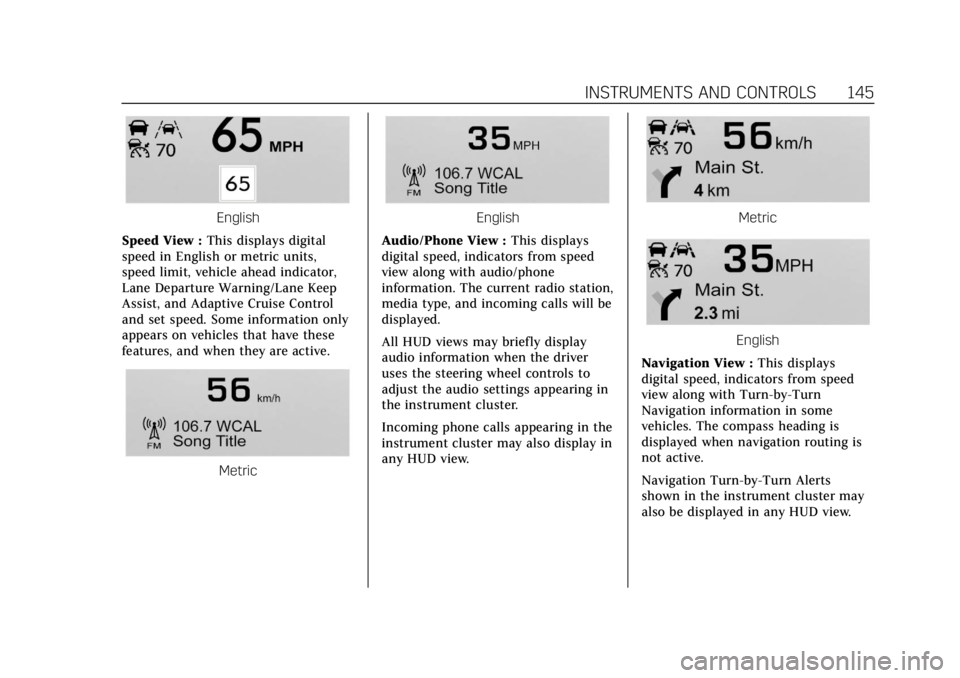
Speed View : This displays digital
speed in English or metric units,
speed limit, vehicle ahead indicator,
Lane Departure Warning/Lane Keep
Assist, and Adaptive Cruise Control
and set speed. Some information only
appears on vehicles that have these
features, and when they are active.
Metric
English
Audio/Phone View : This displays
digital speed, indicators from speed
view along with audio/phone
information. The current radio station,
media type, and incoming calls will be
displayed.
All HUD views may briefly display
audio information when the driver
uses the steering wheel controls to
adjust the audio settings appearing in
the instrument cluster.
Incoming phone calls appearing in the
instrument cluster may also display in
any HUD view.Metric
English
Navigation View : This displays
digital speed, indicators from speed
view along with Turn-by-Turn
Navigation information in some
vehicles. The compass heading is
displayed when navigation routing is
not active.
Navigation Turn-by-Turn Alerts
shown in the instrument cluster may
also be displayed in any HUD view.
Page 147 of 388
Cadillac XT5 Owner Manual (GMNA-Localizing-U.S./Canada/Mexico-
12146119) - 2019 - crc - 7/27/18
146 INSTRUMENTS AND CONTROLS
Metric
English
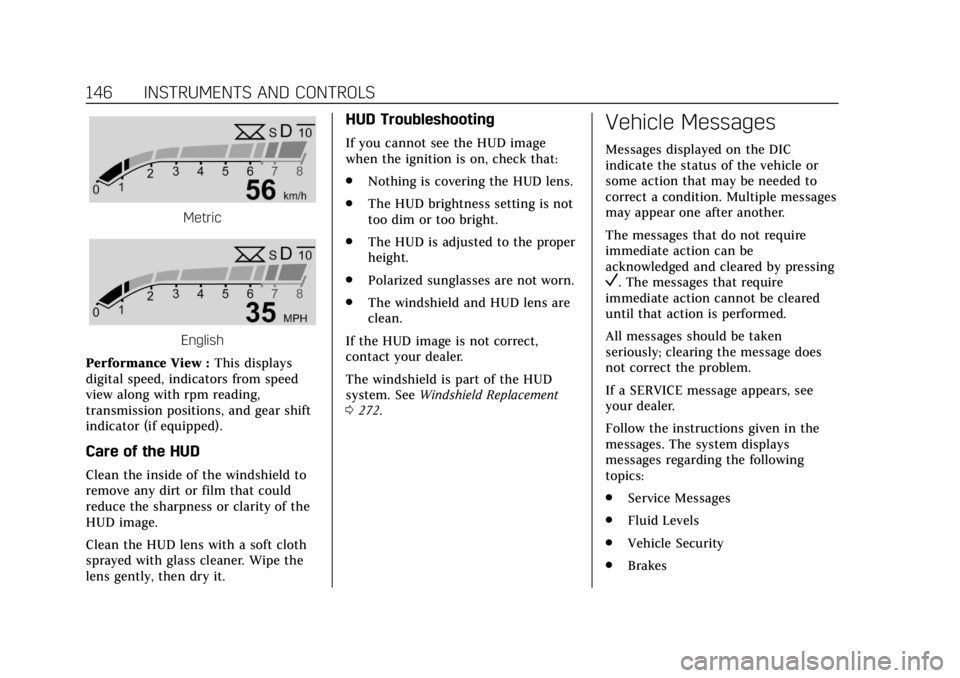
Performance View : This displays
digital speed, indicators from speed
view along with rpm reading,
transmission positions, and gear shift
indicator (if equipped).
Care of the HUD
Clean the inside of the windshield to
remove any dirt or film that could
reduce the sharpness or clarity of the
HUD image.
Clean the HUD lens with a soft cloth
sprayed with glass cleaner. Wipe the
lens gently, then dry it.
HUD Troubleshooting
If you cannot see the HUD image
when the ignition is on, check that:
. Nothing is covering the HUD lens.
. The HUD brightness setting is not
too dim or too bright.
. The HUD is adjusted to the proper
height.
. Polarized sunglasses are not worn.
. The windshield and HUD lens are
clean.
If the HUD image is not correct,
contact your dealer.
The windshield is part of the HUD
system. See Windshield Replacement
0 272.
Vehicle Messages
Messages displayed on the DIC
indicate the status of the vehicle or
some action that may be needed to
correct a condition. Multiple messages
may appear one after another.
The messages that do not require
immediate action can be
acknowledged and cleared by pressing
V. The messages that require
immediate action cannot be cleared
until that action is performed.
All messages should be taken
seriously; clearing the message does
not correct the problem.
If a SERVICE message appears, see
your dealer.
Follow the instructions given in the
messages. The system displays
messages regarding the following
topics:
. Service Messages
. Fluid Levels
. Vehicle Security
. Brakes
Page 170 of 388

Cadillac XT5 Owner Manual (GMNA-Localizing-U.S./Canada/Mexico-
12146119) - 2019 - crc - 7/27/18
CLIMATE CONTROLS 169
not come on. Press@to select
recirculation; press it again to select
outside air.
English units can be changed to
metric units through the instrument
cluster. See “Cluster Application
Displays” underInstrument Cluster
(Uplevel Cluster) 0124 orInstrument
Cluster (Base Level Cluster) 0122.
OFF : Press to turn the fan on or off.
The front and rear climate displays
turn off when the fan is turned off
and the system will stop air from
flowing into the cabin. If on is
selected, or any other buttons are
pressed, the climate control system
will turn on and operate at the
current setting. The temperature
control and air delivery mode can still
be adjusted.
w/x: The temperature can be
adjusted separately for the driver and
the passenger. Press to increase or
decrease the temperature. Press and
hold to rapidly increase or decrease
the temperature. The driver and passenger
temperatures can also be adjusted by
touching the buttons on the climate
control display.
SYNC :
Touch SYNC on the climate
control display to link all climate zone
settings to the driver settings. Adjust
the driver side temperature control to
change the linked temperature. When
the front or rear passenger settings
are adjusted, the SYNC indicator light
turns off when the temperatures are
unlinked.
Rear : If equipped, touch Rear on the
front climate control display to open
the rear climate control display. The
rear climate control settings can now
be adjusted from the front passenger
area. See Rear Climate Control System
0 172.
Manual Operation
Q 9 R:Press the fan controls on the
center stack or the climate control
display to increase or decrease the fan
speed. Press and hold the controls to
adjust speed more quickly. The fan
speed setting displays. Pressing either
button cancels automatic fan control and the fan can be controlled
manually. Press AUTO to return to
automatic operation. To turn off the
fan and climate control system, press
and hold the fan down control on the
center stack or the climate control
display until it goes off.
Air Delivery Mode Control :
When
the climate information is displayed,
touch the desired air delivery mode on
the climate control display to change
the direction of the airf low. The
selected air delivery mode button is
lit. Touching any of the air delivery
buttons cancels automatic air delivery
control and the direction of the
airf low can be controlled manually.
Press AUTO to return to automatic
operation.
To change the current mode, select
one of the following:Y: Air is directed to the instrument
panel outlets.
\: Air is divided between the
instrument panel outlets and the floor
outlets.
[: Air is directed to the floor
outlets.
Page 210 of 388

Cadillac XT5 Owner Manual (GMNA-Localizing-U.S./Canada/Mexico-
12146119) - 2019 - crc - 7/27/18
DRIVING AND OPERATING 209
1. PressJ.
2. Get up to the desired speed.
3. Press and release SET−. The desired set speed briefly appears
in the instrument cluster.
4. Remove your foot from the accelerator.
When the cruise control has been set
to the desired speed, a green cruise
control indicator appears on the
instrument cluster and a cruise set
speed message appears on the
Head-Up Display (HUD), if equipped.
Resuming a Set Speed
If the cruise control is set at a desired
speed and then the brakes are applied
or
*is pressed, the cruise control is
disengaged without erasing the set
speed from memory.
Once the vehicle speed reaches about
40 km/h (25 mph) or more, press RES+
briefly. The vehicle returns to the
previous set speed. Increasing Speed While Using
Cruise Control
If the cruise control system is already
activated:
.
Press and hold RES+ until the
desired speed is reached, then
release it.
. To increase vehicle speed in small
increments, briefly press RES+ to
the first detent. For each press, the
vehicle goes about 1 km/h (1 mph)
faster.
. To increase vehicle speed in larger
increments, briefly press RES+ to
the second detent. For each press,
the vehicle speed increases to the
next 5 km/h (5 mph) mark on the
speedometer.
The speedometer reading can be
displayed in either English or metric
units.
See Instrument Cluster (Uplevel Cluster)
0 124 orInstrument Cluster (Base Level
Cluster) 0122. The increment value
used depends on the units displayed. Reducing Speed While Using Cruise
Control
If the cruise control system is already
activated:
.
Press and hold SET− until the
desired lower speed is reached,
then release it.
. To decrease the vehicle speed in
small increments, briefly press
SET− to the first detent. For each
press, the vehicle goes about
1 km/h (1 mph) slower.
. To decrease the vehicle speed in
larger increments, briefly press
SET− to the second detent. For
each press, the vehicle speed
decreases to the next 5 km/h
(5 mph) mark on the speedometer.
The cruise control system may
automatically brake to slow the
vehicle down.
The speedometer reading can be
displayed in either English or metric
units. See Instrument Cluster (Uplevel
Cluster) 0124 orInstrument Cluster
Page 215 of 388
Cadillac XT5 Owner Manual (GMNA-Localizing-U.S./Canada/Mexico-
12146119) - 2019 - crc - 7/27/18
214 DRIVING AND OPERATING
The speedometer reading can be
displayed in either English or metric
units.
SeeInstrument Cluster (Uplevel Cluster)
0 124 orInstrument Cluster (Base Level
Cluster) 0122. The increment value
used depends on the units displayed.
Reducing Speed While ACC is at a
Set Speed
If ACC is already activated, do one of
the following:
. Use the brake to get to the desired
lower speed. Release the brake and
press SET– . The vehicle will now
cruise at the lower speed.
. Press and hold SET– until the
desired lower speed is reached,
then release it.
. To decrease the vehicle speed in
smaller increments, press SET− to
the first detent. For each press, the
vehicle goes about 1 km/h (1 mph)
slower.
. To decrease the vehicle speed in
larger increments, press SET− to
the second detent. For each press, the vehicle speed decreases to the
next 5 km/h (5 mph) mark on the
speedometer.
. To decrease speed while the
vehicle is stopped, press SET−
until the desired set speed is
displayed.
The speedometer reading can be
displayed in either English or metric
units.
See Instrument Cluster (Uplevel Cluster)
0 124 orInstrument Cluster (Base Level
Cluster) 0122. The increment value
used depends on the units displayed.
Selecting the Follow Distance Gap
When a slower moving vehicle is
detected ahead within the selected
following gap, ACC will adjust the
vehicle's speed and attempt to
maintain the follow distance gap
selected.
Press
[on the steering wheel to
adjust the following gap. Each press
cycles the gap button through three
settings: Far, Medium, or Near. When pressed, the current gap setting
displays briefly on the instrument
cluster and HUD. The gap setting will
be maintained until it is changed.
Since each gap setting corresponds to
a following time (Far, Medium,
or Near), the following distance will
vary based on vehicle speed. The
faster the vehicle speed, the further
back your vehicle will follow a vehicle
detected ahead. Consider traffic and
weather conditions when selecting the
following gap. The range of selectable
gaps may not be appropriate for all
drivers and driving conditions.
Changing the gap setting
automatically changes the alert timing
sensitivity (Far, Medium, or Near) for
the Forward Collision Alert (FCA)
feature. See
Forward Collision Alert
(FCA) System 0226.
Page 348 of 388

Cadillac XT5 Owner Manual (GMNA-Localizing-U.S./Canada/Mexico-
12146119) - 2019 - crc - 7/27/18
TECHNICAL DATA 347
Vehicle Data
Capacities and Specifications
The following approximate capacities are given in metric and English conversions. SeeRecommended Fluids and Lubricants
0 343 for more information.
Application Capacities
Metric English
Air Conditioning Refrigerant For the air conditioning system refrigerant type and charge amount, see the refrigerant label under thehood. See your dealer for more information.
Cooling System –Engine 11.37 L 12.0 qt
Engine Oil with Filter 5.7 L6.0 qt
Fuel Tank Front-Wheel Drive 73.4 L19.4 gal
All-Wheel Drive 82.1 L21.7 gal
Wheel Nut Torque 190Y 140 lb ft
All capacities are approximate. When adding, be sure to fill to the approximate level, as recommended in this manual.
Recheck fluid level after filling.
Page 353 of 388

Cadillac XT5 Owner Manual (GMNA-Localizing-U.S./Canada/Mexico-
12146119) - 2019 - crc - 7/27/18
352 CUSTOMER INFORMATION
arbitration of owner disputes involving
factory-related vehicle service claims.
The program provides for the review
of the facts involved by an impartial
third party arbiter, and may include
an informal hearing before the arbiter.
The program is designed so that the
entire dispute settlement process,
from the time you file your complaint
to the final decision, should be
completed in about 70 days. We
believe our impartial program offers
advantages over courts in most
jurisdictions because it is informal,
quick, and free of charge.
For further information concerning
eligibility in the Canadian Motor
Vehicle Arbitration Plan (CAMVAP),
call toll-free 1-800-207-0685, or call
the Cadillac Customer Care Centre,
1-888-446-2000, or write to:
General Motors Cadillac Customer
Care Centre
General Motors of Canada Company
Mail Code: CA1-163-005
1908 Colonel Sam Drive
Oshawa, Ontario L1H 8P7The inquiry should be accompanied
by the Vehicle Identification
Number (VIN).
Customer Assistance
Offices
Cadillac encourages customers to call
the toll-free number for assistance.
However, if a customer wishes to
write or e-mail Cadillac, the letter
should be addressed to:
United States and Puerto Rico
Cadillac Customer Assistance Center
Cadillac Motor Car Division
P.O. Box 33169
Detroit, MI 48232-5169
www.Cadillac.com
1-800-458-8006
1-800-833-2622 (For Text Telephone
devices (TTYs))
Roadside Service: 1-800-224-1400
From U.S. Virgin Islands:
1-800-496-9994
Canada
General Motors of Canada Company
Cadillac Customer Care Centre, Mail
Code: CA1-163-005
1908 Colonel Sam Drive
Oshawa, Ontario L1H 8P7
www.gm.ca
1-888-446-2000 (English/French)
Cadillac Roadside Service:
1-800-882-1112
Overseas
Contact the local General Motors
Business Unit.
Customer Assistance for
Text Telephone (TTY)
Users
To assist customers who are deaf,
hard of hearing, or speech-impaired
and who use Text Telephones (TTYs),
Cadillac has TTY equipment available
at its Customer Assistance Center. Any
TTY user can communicate with
Cadillac by dialing: 1-800-833-2622.
TTY users in Canada can dial
1-800-263-3830.
Page 361 of 388

Cadillac XT5 Owner Manual (GMNA-Localizing-U.S./Canada/Mexico-
12146119) - 2019 - crc - 7/27/18
360 CUSTOMER INFORMATION
and Economic Development (ISED)
Canada's RSP-100 / license-exempt
RSS's / ICES-001.
Operation is subject to the following
two conditions:1. The device may not cause harmful interference.
2. The device must accept any interference received, including
interference that may cause
undesired operation of the
device.
Changes or modifications to any of
these systems by other than an
authorized service facility could void
authorization to use this equipment.Reporting Safety
Defects
Reporting Safety Defects
to the United States
Government
If you believe that your vehicle
has a defect which could cause a
crash or could cause injury or
death, you should immediately
inform the National Highway
Traffic Safety Administration
(NHTSA) in addition to notifying
General Motors.
If NHTSA receives similar
complaints, it may open an
investigation, and if it finds that a
safety defect exists in a group of
vehicles, it may order a recall and
remedy campaign. However,
NHTSA cannot become involved
in individual problems between
you, your dealer, or General
Motors. To contact NHTSA, you may call
the Vehicle Safety Hotline toll-free
at 1-888-327-4236 (TTY:
1-800-424-9153); go to
http://www.safercar.gov;
or write to:
Administrator, NHTSA
1200 New Jersey Avenue, S.E.
Washington, D.C. 20590
You can also obtain other
information about motor vehicle
safety from http://www.safercar.gov
.
Reporting Safety Defects
to the Canadian
Government
If you live in Canada, and you
believe that the vehicle has a
safety defect, notify Transport
Canada immediately, and notify
General Motors of Canada
Company. Call Transport Canada
at 1-800-333-0510; go to:
www.tc.gc.ca/recalls (English)
www.tc.gc.ca/rappels (French)
or write to: