2019 CADILLAC XT4 tank
[x] Cancel search: tankPage 133 of 381
Cadillac XT4 Owner Manual (GMNA-Localizing-U.S./Canada/Mexico-
12017481) - 2019 - CRC - 11/5/18
INSTRUMENTS AND CONTROLS 129
Units :Choose English or metric units
by pressing the thumbwheel while the
desired item is highlighted.
Info Page Options : Press the
thumbwheel to select the items to be
displayed in the Info app. See Driver
Information Center (DIC) 0142.
Display : Press the thumbwheel to
enter the Display menu. Select to turn
on or off the speedometer, time, fuel
range, or, if equipped, compass or
speed sign.
Speed Warning : The Speed Warning
display allows the driver to set a
warning at a speed that they do not
want to exceed. To set the Speed
Warning press the thumbwheel when
Speed Warning is displayed. Use the
thumbwheel to adjust the value and
press to set the speed.
Once the speed is set, this feature can
be turned off by pressing the
thumbwheel while viewing this page.
If the selected speed limit is exceeded,
a pop-up warning is displayed with a
chime.
Software Information : Displays open
source software information.Speedometer
The speedometer shows the vehicle's
speed in either kilometers per hour
(km/h) or miles per hour (mph).
Odometer
The odometer shows how far the
vehicle has been driven, in either
kilometers or miles.
Trip Odometer
The trip odometer shows how far the
vehicle has been driven since the trip
odometer was last reset.
The trip odometer is accessed and
reset through the Driver Information
Center (DIC). See Driver Information
Center (DIC) 0142.
Tachometer
The tachometer displays the engine
speed in revolutions per minute (rpm).
For vehicles with the Stop/Start
system, when the ignition is on, the
tachometer indicates the vehicle
status. When pointing to AUTO STOP, the engine is off but the vehicle is on
and can move. The engine could auto
start at any time. When the indicator
points to OFF, the vehicle is off.
When the engine is on, the
tachometer will indicate the engine’s
revolutions per minute (rpm). The
tachometer may vary by several
hundred rpm’s, during Auto Stop
mode, when the engine is shutting off
and restarting.
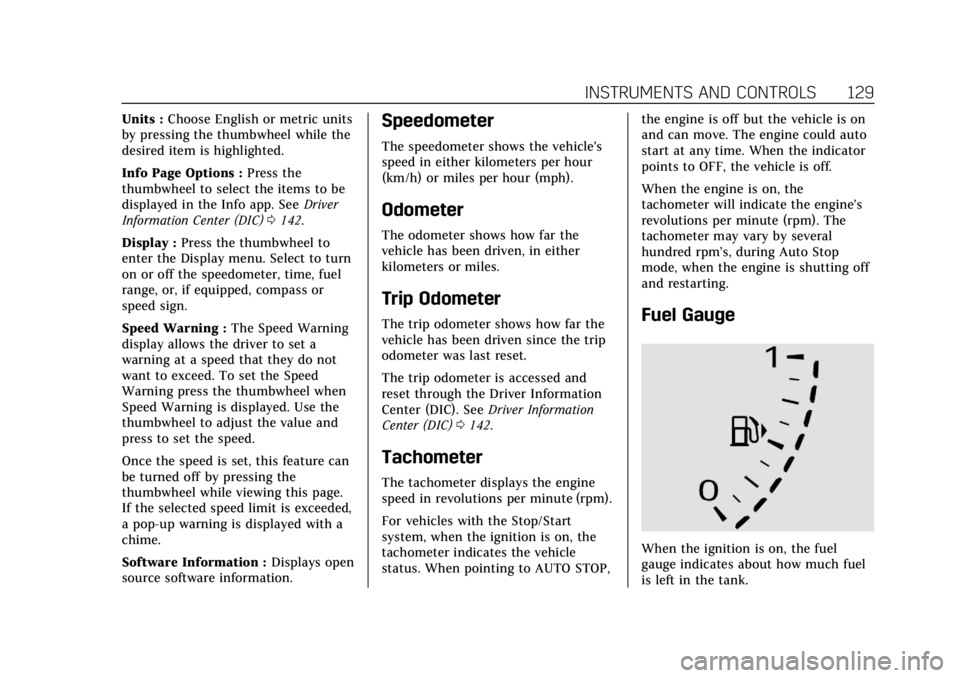
Fuel Gauge
When the ignition is on, the fuel
gauge indicates about how much fuel
is left in the tank.
Page 134 of 381

Cadillac XT4 Owner Manual (GMNA-Localizing-U.S./Canada/Mexico-
12017481) - 2019 - CRC - 11/5/18
130 INSTRUMENTS AND CONTROLS
There is an arrow near the fuel gauge
pointing to the side of the vehicle the
fuel door is on.
When the indicator nears empty, the
low fuel light comes on. There still is
a little fuel left, but the vehicle should
be refueled soon.
Here are four things that some owners
ask about. None of these show a
problem with the fuel gauge:
.At the service station, the fuel
pump shuts off before the gauge
reads full.
. It takes a little more or less fuel to
fill up than the gauge indicated.
For example, the gauge may have
indicated the tank was half full,
but it actually took a little more or
less than half the tank's capacity
to fill the tank. .
The gauge moves a little while
turning a corner or speeding up.
. The gauge takes a few seconds to
stabilize after the ignition is
turned on, and goes back to empty
when the ignition is turned off.
Engine Coolant
Temperature Gauge
English
Metric
This gauge measures the temperature
of the vehicle's engine.
While driving under normal operating
conditions, if the red LED is
illuminated, the engine is too hot. Pull
off the road, stop the vehicle, and turn
off the engine as soon as possible.
Page 138 of 381

Cadillac XT4 Owner Manual (GMNA-Localizing-U.S./Canada/Mexico-
12017481) - 2019 - CRC - 11/5/18
134 INSTRUMENTS AND CONTROLS
If the light is f lashing :A
malfunction has been detected that
could damage the emission control
system and increase vehicle
emissions. Diagnosis and service may
be required.
To help prevent damage, reduce
vehicle speed and avoid hard
accelerations and uphill grades.
If towing a trailer, reduce the amount
of cargo being hauled as soon as
possible.
If the light continues to flash, find a
safe place to park. Turn the vehicle off
and wait at least 10 seconds before
restarting the engine. If the light is
still flashing, follow the previous
guidelines and see your dealer for
service as soon as possible.
If the light is on steady : A
malfunction has been detected.
Diagnosis and service may be
required.
Check the following:
. If fuel has been added to the
vehicle using the capless fuel
funnel adapter, make sure that it
has been removed. See “Filling theTank with a Portable Gas Can
”
under Filling the Tank 0238. The
diagnostic system can detect if the
adapter has been left installed in
the vehicle, allowing fuel to
evaporate into the atmosphere.
A few driving trips with the
adapter removed may turn off the
light.
. Poor fuel quality can cause
inefficient engine operation and
poor driveability, which may go
away once the engine is warmed
up. If this occurs, change the fuel
brand. It may require at least one
full tank of the proper fuel to turn
the light off. See Recommended
Fuel 0237.
If the light remains on, see your
dealer.
Emissions Inspection and
Maintenance Programs
If the vehicle requires an Emissions
Inspection/Maintenance test, the test
equipment will likely connect to the
vehicle's Data Link Connector (DLC).
The DLC is under the instrument
panel to the left of the steering wheel.
Connecting devices that are not used
to perform an Emissions Inspection/
Maintenance test or to service the
vehicle may affect vehicle operation.
See Add-On Electrical Equipment 0250.
See your dealer if assistance is needed.
The vehicle may not pass
inspection if:
. The light is on when the engine is
running.
. The light does not come on when
the ignition is in Service Mode.
. Critical emission control systems
have not been completely
diagnosed. If this happens, the
vehicle would not be ready for
inspection and might require
several days of routine driving
before the system is ready for
inspection. This can happen if the
Page 144 of 381

Cadillac XT4 Owner Manual (GMNA-Localizing-U.S./Canada/Mexico-
12017481) - 2019 - CRC - 11/5/18
140 INSTRUMENTS AND CONTROLS
A Driver Information Center (DIC) tire
pressure message may also display.
Stop as soon as possible, and inflate
the tires to the pressure value shown
on the Tire and Loading Information
label. SeeTire Pressure 0288.
When the Light Flashes First and
Then Is On Steady
If the light flashes for about a minute
and then stays on, there may be a
problem with the TPMS. If the
problem is not corrected, the light will
come on at every ignition cycle. See
Tire Pressure Monitor Operation 0291.
Engine Oil Pressure Light
Caution
Lack of proper engine oil
maintenance can damage the
engine. Driving with the engine oil
low can also damage the engine.
The repairs would not be covered
by the vehicle warranty. Check the
oil level as soon as possible. Add oil
if required, but if the oil level is
(Continued)
Caution (Continued)
within the operating range and the
oil pressure is still low, have the
vehicle serviced. Always follow the
maintenance schedule for changing
engine oil.
This light should come on briefly as
the engine is started. If it does not
come on, have the vehicle serviced by
your dealer.
If the light comes on and stays on, it
means that oil is not flowing through
the engine properly. The vehicle could
be low on oil and might have some
other system problem. See your dealer.
Low Fuel Warning Light
This light is near the fuel gauge and
comes on briefly when the ignition is
turned on as a check to show it is
working.
It also comes on when the fuel tank is
low on fuel. The light turns off when
fuel is added. If it does not, have the
vehicle serviced.
Security Light
The security light should come on
briefly as the engine is started. If it
does not come on, have the vehicle
Page 147 of 381

Cadillac XT4 Owner Manual (GMNA-Localizing-U.S./Canada/Mexico-
12017481) - 2019 - CRC - 11/5/18
INSTRUMENTS AND CONTROLS 143
DIC Information Displays
The following is the list of all possible
DIC information displays. Some of the
information displays may not be
available for your particular vehicle.
While in the Info Page Options menu,
the info pages can be restored to the
default factory settings by pressing
and holding
Ron the left steering
wheel controls and the thumbwheel
on the right steering wheel controls at
the same time.
Speed : Shows the vehicle speed in
either kilometers per hour (km/h) or
miles per hour (mph).
Trip 1 or Trip 2 and Average Fuel
Economy : The Trip display shows the
current distance traveled, in either
kilometers (km) or miles (mi), since
the trip odometer was last reset. The
trip odometer can be reset by pressing
Vand selecting yes or no while this
display is active. Shows the approximate average liters
per 100 kilometers (L/100 km) or
miles per gallon (mpg). This number
is calculated based on the number of
L/100 km (mpg) recorded since the
last time this menu item was reset.
This number reflects only the
approximate average fuel economy
that the vehicle has right now, and
will change as driving conditions
change. The Average Fuel Economy
can be reset by pressing
Vand
selecting yes or no while this display
is active.
Fuel Range : Shows the approximate
distance the vehicle can be driven
without refueling. LOW will be
displayed when the vehicle is low on
fuel. The fuel range estimate is based
on an average of the vehicle's fuel
economy over recent driving history
and the amount of fuel remaining in
the fuel tank.
Oil Life : Shows an estimate of the
oil's remaining useful life.
If REMAINING OIL LIFE 99% is
displayed, that means 99% of the
current oil life remains. When the remaining oil life is low, the
CHANGE ENGINE OIL SOON message
will appear on the display. The oil
should be changed as soon as
possible. See
Engine Oil0257. In
addition to the engine oil life system
monitoring the oil life, additional
maintenance is recommended. See
Maintenance Schedule 0326.
The Oil Life display must be reset
after each oil change. It will not reset
itself. Do not reset the Oil Life display
accidentally at any time other than
when the oil has just been changed.
It cannot be reset accurately until the
next oil change. To reset the engine
oil life system, press
Vand then
select yes or no. See Engine Oil Life
System 0259.
Tire Pressure : Shows the
approximate pressures of all four tires.
Tire pressure is displayed in either
kilopascal (kPa) or in pounds per
square inch (psi). If the pressure is
low, the value for that tire is shown in
amber. See Tire Pressure Monitor
System 0290 and Tire Pressure
Monitor Operation 0291.
Page 176 of 381

Cadillac XT4 Owner Manual (GMNA-Localizing-U.S./Canada/Mexico-
12017481) - 2019 - CRC - 11/5/18
172 DRIVING AND OPERATING
Driving and
Operating
Driving Information
Driver Behavior . . . . . . . . . . . . . . . . . . . 173
Driving Environment . . . . . . . . . . . . . 173
Vehicle Design . . . . . . . . . . . . . . . . . . . . 173
Distracted Driving . . . . . . . . . . . . . . . . 174
Defensive Driving . . . . . . . . . . . . . . . . 174
Drunk Driving . . . . . . . . . . . . . . . . . . . . 174
Control of a Vehicle . . . . . . . . . . . . . . 175
Braking . . . . . . . . . . . . . . . . . . . . . . . . . . . . 175
Steering . . . . . . . . . . . . . . . . . . . . . . . . . . . 175
Off-Road Recovery . . . . . . . . . . . . . . . . 176
Loss of Control . . . . . . . . . . . . . . . . . . . 176
Driving on Wet Roads . . . . . . . . . . . 177
Hill and Mountain Roads . . . . . . . . 178
Winter Driving . . . . . . . . . . . . . . . . . . . . 178
If the Vehicle Is Stuck . . . . . . . . . . . 179
Vehicle Load Limits . . . . . . . . . . . . . . 180
Starting and Operating
New Vehicle Break-In . . . . . . . . . . . . 184
Ignition Positions . . . . . . . . . . . . . . . . 184
Starting the Engine . . . . . . . . . . . . . . 186
Stop/Start System . . . . . . . . . . . . . . . . 187
Engine Heater . . . . . . . . . . . . . . . . . . . . 188Retained Accessory
Power (RAP) . . . . . . . . . . . . . . . . . . . . 189
Shifting Into Park . . . . . . . . . . . . . . . . 190
Shifting out of Park . . . . . . . . . . . . . . 190
Parking over Things That Burn . . . . . . . . . . . . . . . . . . . . . . . 192
Active Fuel Management . . . . . . . . 192
Extended Parking . . . . . . . . . . . . . . . . . 192
Engine Exhaust
Engine Exhaust . . . . . . . . . . . . . . . . . . . 193
Running the Vehicle While Parked . . . . . . . . . . . . . . . . . . . . . . . . . . . 194
Automatic Transmission
Automatic Transmission . . . . . . . . . 194
Manual Mode . . . . . . . . . . . . . . . . . . . . . 198
Drive Systems
All-Wheel Drive . . . . . . . . . . . . . . . . . . 200
Brakes
Antilock Brake System (ABS) . . . . 200
Electric Parking Brake . . . . . . . . . . . . 201
Brake Assist . . . . . . . . . . . . . . . . . . . . . . . 202
Hill Start Assist (HSA) . . . . . . . . . . . 203
Ride Control Systems
Traction Control/ElectronicStability Control . . . . . . . . . . . . . . . . 203
Driver Mode Control . . . . . . . . . . . . . 205
Cruise Control
Cruise Control . . . . . . . . . . . . . . . . . . . . 206
Adaptive Cruise Control . . . . . . . . . 209
Driver Assistance Systems
Driver Assistance Systems . . . . . . . 217
Assistance Systems for Parking or Backing . . . . . . . . . . . . . . . . . . . . . . . 219
Assistance Systems for Driving . . . . . . . . . . . . . . . . . . . . . . . . . . 226
Forward Collision Alert (FCA) System . . . . . . . . . . . . . . . . . . . . . . . . . . 226
Forward Automatic Braking (FAB) . . . . . . . . . . . . . . . . . . . 228
Front Pedestrian Braking (FPB) System . . . . . . . . . . . . . . . . . . . . . . . . . . 230
Side Blind Zone Alert (SBZA) . . . . 232
Lane Change Alert (LCA) . . . . . . . . 232
Lane Departure Warning (LDW) . . . . . . . . . . . . . . . . . 234
Lane Keep Assist (LKA) . . . . . . . . . . 234
Fuel
Top Tier Fuel . . . . . . . . . . . . . . . . . . . . . 236
Recommended Fuel . . . . . . . . . . . . . . 237
Prohibited Fuels . . . . . . . . . . . . . . . . . . 237
Fuels in Foreign Countries . . . . . . . 237
Fuel Additives . . . . . . . . . . . . . . . . . . . . 237
Filling the Tank . . . . . . . . . . . . . . . . . . 238
Filling a Portable Fuel Container . . . . . . . . . . . . . . . . . . . . . . . . 239
Page 241 of 381
Cadillac XT4 Owner Manual (GMNA-Localizing-U.S./Canada/Mexico-
12017481) - 2019 - CRC - 11/5/18
DRIVING AND OPERATING 237
Recommended Fuel
Do not use any fuel labeled E85 or
FlexFuel. Do not use gasoline with
ethanol levels greater than 15% by
volume.
Premium unleaded gasoline meeting
ASTM specification D4814 with a
posted octane rating of 93 is highly
recommended for best performance
and fuel economy. Unleaded gasoline
with an octane rated as low as 87 can
be used. Using unleaded gasoline
rated below 93 octane, however, will
lead to reduced acceleration and fuel
economy. If knocking occurs, use a
gasoline rated at 93 octane as soon as
possible, otherwise, the engine could
be damaged. If heavy knocking is
heard when using gasoline with a
93 octane rating, the engine needs
service.
Prohibited Fuels
Caution
Do not use fuels with any of the
following conditions; doing so may
damage the vehicle and void its
warranty:. For vehicles that are not
FlexFuel, fuel labeled greater
than 15% ethanol by volume,
such as mid-level ethanol
blends (16–50% ethanol), E85,
or FlexFuel.
. Fuel with any amount of
methanol, methylal, ferrocene,
and aniline. These fuels can
corrode metal fuel system
parts or damage plastic and
rubber parts.
. Fuel containing metals such
as methylcyclopentadienyl
manganese tricarbonyl
(MMT), which can damage
the emissions control system
and spark plugs.
(Continued)
Caution (Continued)
.Fuel with a posted octane
rating of less than the
recommended fuel. Using this
fuel will lower fuel economy
and performance, and may
decrease the life of the
emissions catalyst.
Fuels in Foreign Countries
The U.S., Canada, and Mexico post
fuel octane ratings in anti-knock index
(AKI). For fuel not to use in a foreign
country, see Prohibited Fuels 0237.
Fuel Additives
TOP TIER Detergent Gasoline is highly
recommended for use with your
vehicle. If your country does not have
TOP TIER Detergent Gasoline, add
ACDelco Fuel System Treatment Plus
−Gasoline to the vehicle’s gasoline fuel
tank at every oil change or 15,000 km
(9,000 mi), whichever occurs first. TOP
TIER Detergent Gasoline and ACDelco
Fuel System Treatment Plus−Gasoline
Page 242 of 381

Cadillac XT4 Owner Manual (GMNA-Localizing-U.S./Canada/Mexico-
12017481) - 2019 - CRC - 11/5/18
238 DRIVING AND OPERATING
will help keep your vehicle’s engine
fuel deposit free and performing
optimally.
Filling the Tank
{Warning
Fuel vapors and fuel fires burn
violently and can cause injury or
death.
Follow these guidelines:. To help avoid injuries to you
and others, read and follow
all the instructions on the
fuel pump island.
. Turn off the engine when
refueling.
. Keep sparks, flames, and
smoking materials away
from fuel.
. Do not leave the fuel pump
unattended.
. Avoid using electronic devices
while refueling.
(Continued)
Warning (Continued)
.Do not reenter the vehicle
while pumping fuel.
. Keep children away from the
fuel pump and never let
children pump fuel.
. Fuel can spray out if the
refueling nozzle is inserted
too quickly. This spray can
happen if the tank is nearly
full, and is more likely in hot
weather. Insert the refueling
nozzle slowly and wait for any
hiss noise to stop prior to
beginning to flow fuel.
To open the fuel door, push and
release the rearward center edge of
the door.
The vehicle has a capless refueling
system and does not have a fuel cap.
The filling nozzle must be fully
inserted and latched prior to starting
fuel flow.