2019 CADILLAC CTS run
[x] Cancel search: runPage 102 of 401

Cadillac CTS/CTS-V Owner Manual (GMNA-Localizing-U.S./Canada/Mexico-
12460273) - 2019 - CRC - 5/8/18
SEATS AND RESTRAINTS 101
If the vehicle has the LATCH system
and it was being used during a crash,
new LATCH system parts may be
needed.
New parts and repairs may be
necessary even if the LATCH system
was not being used at the time of the
crash.
Securing Child Restraints
(With the Seat Belt in the
Rear Seat)
When securing a child restraint with
the seat belts in a rear seat position,
study the instructions that came with
the child restraint to make sure it is
compatible with this vehicle.
If the child restraint has the LATCH
system, seeLower Anchors and Tethers
for Children (LATCH System) 095 for
how and where to install the child
restraint using LATCH. If a child
restraint is secured in the vehicle
using a seat belt and it uses a top
tether, see Lower Anchors and Tethers
for Children (LATCH System) 095 for
top tether anchor locations. Do not secure a child seat in a
position without a top tether anchor if
a national or local law requires that
the top tether be anchored, or if the
instructions that come with the child
restraint say that the top tether must
be anchored.
In Canada, the law requires that
forward-facing child restraints have a
top tether, and that the tether be
attached.
If the child restraint or vehicle seat
position does not have the LATCH
system, you will be using the seat belt
to secure the child restraint. Be sure to
follow the instructions that came with
the child restraint.
If more than one child restraint needs
to be installed in the rear seat, be sure
to read
Where to Put the Restraint 094.
1. Put the child restraint on the seat.
2. Pick up the latch plate, and run the lap and shoulder portions of
the vehicle seat belt through or
around the child restraint. The
child restraint instructions will
show you how.
Tilt the latch plate to adjust the
belt, if needed.
Page 105 of 401

Cadillac CTS/CTS-V Owner Manual (GMNA-Localizing-U.S./Canada/Mexico-
12460273) - 2019 - CRC - 5/8/18
104 SEATS AND RESTRAINTS
When using the lap-shoulder belt to
secure the child restraint in this
position, follow the instructions that
came with the child restraint and the
following instructions:1. Move the seat as far back as it will go before securing the
forward-facing child restraint.
Move the seat upward or the
seatback to an upright position,
if needed, to get a tight
installation of the child restraint.
When the passenger sensing
system has turned off the front
outboard passenger frontal
airbag and knee airbag, the OFF
indicator on the passenger airbag
status indicator should light and
stay lit when you start the
vehicle. See Passenger Airbag
Status Indicator 0127.
2. Put the child restraint on the seat.
3. Pick up the latch plate, and run the lap and shoulder portions of
the vehicle's seat belt through or around the child restraint. The
child restraint instructions will
show you how.
Tilt the latch plate to adjust the
belt if needed.
4. Push the latch plate into the
buckle until it clicks.
Position the release button on
the buckle, away from the child
restraint, so that the seat belt
could be quickly unbuckled if
necessary.
Page 109 of 401

Cadillac CTS/CTS-V Owner Manual (GMNA-Localizing-U.S./Canada/Mexico-
12460273) - 2019 - CRC - 5/8/18
108 STORAGE
Additional Storage
Features
Cargo Tie-Downs
The cargo tie-downs can be used to
secure small loads inside the trunk.
Convenience Net
If equipped, the convenience net is in
the rear. Put small loads behind the
net. It can also be positioned into an
envelope style to hold smaller items.
The net is not for heavier loads. Store
items as far forward as you can.
Page 113 of 401

Cadillac CTS/CTS-V Owner Manual (GMNA-Localizing-U.S./Canada/Mexico-
12460273) - 2019 - CRC - 5/8/18
112 INSTRUMENTS AND CONTROLS
had been activated. SeeWasher Fluid
0 280 for information on filling the
windshield washer fluid reservoir.
{Warning
In freezing weather, do not use the
washer until the windshield is
warmed. Otherwise the washer fluid
can form ice on the windshield,
blocking your vision.
Clear snow and ice from the wiper
blades and windshield before using
them. If frozen to the windshield,
carefully loosen or thaw them.
Damaged blades should be replaced.
See Wiper Blade Replacement 0286.
Heavy snow or ice can overload the
wiper motor. See Electrical System
Overload 0291.
Wiper Parking
If the ignition is turned off while the
wipers are on LO, HI, or INT, they will
immediately stop. If the windshield wiper lever is then
moved to OFF before the driver door is
opened or within 10 minutes, the
wipers will restart and move to the
base of the windshield.
If the ignition is turned off while the
wipers are performing wipes due to
windshield washing or Rainsense
wipes, the wipers continue to run
until they reach the base of the
windshield.
Rainsense
If equipped, there is a sensor near the
top center of the windshield detects
the amount of water on the
windshield and controls the frequency
of the windshield wiper. To turn this
feature on or off, see
“Rain Sense
Wipers ”under Vehicle Personalization
0 145.
Keep this area of the windshield clear
of debris to allow for best system
performance.
INT : When enabled, move the
windshield wiper lever to INT. Turn
the
xINT band on the wiper lever
to adjust the sensitivity.
. Turn the band up for more
sensitivity to moisture.
. Turn the band down for less
sensitivity to moisture.
. Move the windshield wiper lever
out of the INT position to
deactivate Rainsense.
Wiper Arm Assembly Protection
If equipped with wiper arm assembly
protection, when using an automatic
car wash, move the windshield wiper
lever to OFF. This disables the
automatic Rainsense windshield
wipers.
With Rainsense, if the transmission is
in N (Neutral) and the vehicle speed is
very slow, the wipers will
automatically stop at the base of the
windshield.
Page 129 of 401
Cadillac CTS/CTS-V Owner Manual (GMNA-Localizing-U.S./Canada/Mexico-
12460273) - 2019 - CRC - 5/8/18
128 INSTRUMENTS AND CONTROLS
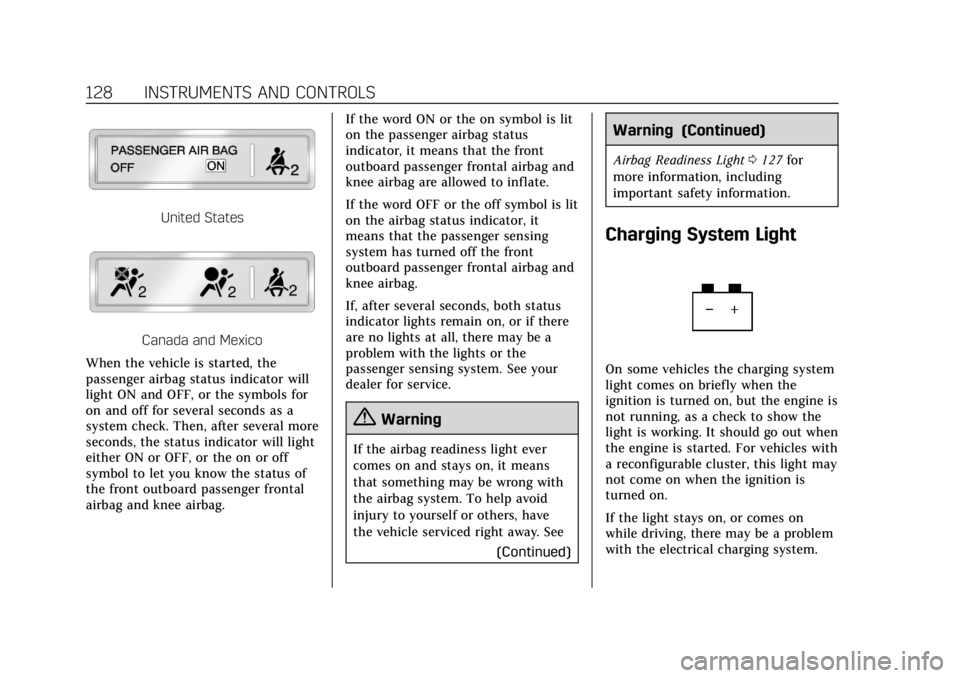
United States
Canada and Mexico
When the vehicle is started, the
passenger airbag status indicator will
light ON and OFF, or the symbols for
on and off for several seconds as a
system check. Then, after several more
seconds, the status indicator will light
either ON or OFF, or the on or off
symbol to let you know the status of
the front outboard passenger frontal
airbag and knee airbag. If the word ON or the on symbol is lit
on the passenger airbag status
indicator, it means that the front
outboard passenger frontal airbag and
knee airbag are allowed to inflate.
If the word OFF or the off symbol is lit
on the airbag status indicator, it
means that the passenger sensing
system has turned off the front
outboard passenger frontal airbag and
knee airbag.
If, after several seconds, both status
indicator lights remain on, or if there
are no lights at all, there may be a
problem with the lights or the
passenger sensing system. See your
dealer for service.
{Warning
If the airbag readiness light ever
comes on and stays on, it means
that something may be wrong with
the airbag system. To help avoid
injury to yourself or others, have
the vehicle serviced right away. See
(Continued)
Warning (Continued)
Airbag Readiness Light0127 for
more information, including
important safety information.
Charging System Light
On some vehicles the charging system
light comes on briefly when the
ignition is turned on, but the engine is
not running, as a check to show the
light is working. It should go out when
the engine is started. For vehicles with
a reconfigurable cluster, this light may
not come on when the ignition is
turned on.
If the light stays on, or comes on
while driving, there may be a problem
with the electrical charging system.
Page 130 of 401

Cadillac CTS/CTS-V Owner Manual (GMNA-Localizing-U.S./Canada/Mexico-
12460273) - 2019 - CRC - 5/8/18
INSTRUMENTS AND CONTROLS 129
Have it checked by your dealer.
Driving while this light is on could
drain the battery.
When this light comes on, or is
flashing, the Driver Information
Center (DIC) also displays a message.
If a short distance must be driven
with the light on, be sure to turn off
all accessories, such as the radio and
air conditioner.
Malfunction Indicator Lamp
(Check Engine Light)
This light is part of the vehicle’s
emission control on-board diagnostic
system. If this light is on while the
engine is running, a malfunction has
been detected and the vehicle may
require service. The light should come
on to show that it is working when
the ignition is in Service Mode. See
Ignition Positions0193.
Malfunctions are often indicated by
the system before any problem is
noticeable. Being aware of the light
and seeking service promptly when it
comes on may prevent damage.
Caution
If the vehicle is driven continually
with this light on, the emission
control system may not work as
well, the fuel economy may be
lower, and the vehicle may not run
smoothly. This could lead to costly
repairs that might not be covered
by the vehicle warranty.
Caution
Modifications to the engine,
transmission, exhaust, intake,
or fuel system, or the use of
replacement tires that do not meet
the original tire specifications, can
cause this light to come on. This
could lead to costly repairs not
covered by the vehicle warranty.
This could also affect the vehicle’s
ability to pass an Emissions
Inspection/Maintenance test. See
Accessories and Modifications 0259.
If the light is f lashing : A
malfunction has been detected that
could damage the emission control
system and increase vehicle
emissions. Diagnosis and service may
be required.
To help prevent damage, reduce
vehicle speed and avoid hard
accelerations and uphill grades.
If towing a trailer, reduce the amount
of cargo being hauled as soon as
possible.
Page 131 of 401

Cadillac CTS/CTS-V Owner Manual (GMNA-Localizing-U.S./Canada/Mexico-
12460273) - 2019 - CRC - 5/8/18
130 INSTRUMENTS AND CONTROLS
If the light continues to flash, find a
safe place to park. Turn the vehicle off
and wait at least 10 seconds before
restarting the engine. If the light is
still flashing, follow the previous
guidelines and see your dealer for
service as soon as possible.
If the light is on steady :A
malfunction has been detected.
Diagnosis and service may be
required.
Check the following:
. If fuel has been added to the
vehicle using the capless fuel
funnel adapter, make sure that it
has been removed. See “Filling the
Tank with a Portable Gas Can ”
under Filling the Tank 0246. The
diagnostic system can detect if the
adapter has been left installed in
the vehicle, allowing fuel to
evaporate into the atmosphere.
A few driving trips with the
adapter removed may turn off the
light.
. Poor fuel quality can cause
inefficient engine operation and
poor driveability, which may go away once the engine is warmed
up. If this occurs, change the fuel
brand. It may require at least one
full tank of the proper fuel to turn
the light off. See
Recommended
Fuel (LGX 3.6L V6 Engine) 0245 or
Recommended Fuel (LTG 2.0L L4
Engine) 0245 orRecommended
Fuel (LF3 3.6L V6 Twin Turbo and
LT4 6.2L V8 Engines) 0245.
If the light remains on, see your
dealer.
Emissions Inspection and
Maintenance Programs
If the vehicle requires an Emissions
Inspection/Maintenance test, the test
equipment will likely connect to the
vehicle's Data Link Connector (DLC).
The DLC is under the instrument
panel to the left of the steering wheel.
Connecting devices that are not used to perform an Emissions Inspection/
Maintenance test or to service the
vehicle may affect vehicle operation.
See
Add-On Electrical Equipment 0255.
See your dealer if assistance is needed.
The vehicle may not pass
inspection if:
. The light is on when the engine is
running.
. The light does not come on when
the ignition is in Service Mode.
. Critical emission control systems
have not been completely
diagnosed. If this happens, the
vehicle would not be ready for
inspection and might require
several days of routine driving
before the system is ready for
inspection. This can happen if the
12-volt battery has recently been
replaced or run down, or if the
vehicle has been recently serviced.
See your dealer if the vehicle will not
pass or cannot be made ready for
the test.
Page 140 of 401

Cadillac CTS/CTS-V Owner Manual (GMNA-Localizing-U.S./Canada/Mexico-
12460273) - 2019 - CRC - 5/8/18
INSTRUMENTS AND CONTROLS 139
change. The Average Fuel Economy
can be reset along with the trip
odometer by pressing and holding SEL
while this display is active.
Fuel Range :Shows the approximate
distance the vehicle can be driven
without refueling. LOW will be
displayed when the vehicle is low on
fuel. The fuel range estimate is based
on an average of the vehicle's fuel
economy over recent driving history
and the amount of fuel remaining in
the fuel tank.
Average Fuel Economy (Base
Cluster) : Shows the approximate
average liters per 100 kilometers
(L/100 km) or miles per gallon (mpg).
This number is calculated based on
the number of L/100 km (mpg)
recorded since the last time this menu
item was reset. This number reflects
only the approximate average fuel
economy that the vehicle has right
now, and will change as driving
conditions change. The Average Fuel
Economy can be reset by pressing and
holding SEL while this display is
active. Instantaneous Fuel Economy :
Shows
the current fuel economy in either
liters per 100 kilometers (L/100 km) or
miles per gallon (mpg). This number
reflects only the approximate fuel
economy that the vehicle has right
now and changes frequently as driving
conditions change.
Average Speed : Shows the average
speed of the vehicle in kilometers per
hour (km/h) or miles per hour (mph).
This average is calculated based on
the various vehicle speeds recorded
since the last reset of this value. The
average speed can be reset by pressing
and holding SEL while this display is
active.
Timer : This display can be used as a
timer. To start the timer, press SEL
while this display is active. The
display will show the amount of time
that has passed since the timer was
last reset. To stop the timer, press SEL
briefly while this display is active and
the timer is running. To reset the
timer to zero, press and hold SEL
while this display is active.
Compass : Shows the direction the
vehicle is driving. Turn Arrow :
Shows the next
maneuver when using route guidance.
Estimated Time to Arrival : Shows
the approximate time of arrival to the
destination when using route
guidance.
Distance to Destination : Shows the
distance to the destination when
using route guidance.
Speed Limit : Shows the current
speed limit on vehicles with the
navigation system. The information
for this page comes from a roadway
database.
Speed Warning : Allows the driver to
set a speed that they do not want to
exceed. To set the Speed Warning,
press SEL when Speed Warning is
displayed. Press
yorzto adjust the
value. This feature can be turned off
by pressing and holding SEL while
viewing this page. If the selected
speed limit is exceeded, a pop-up
warning is displayed and a chime may
sound.