2019 CADILLAC ATS transmitter pocket
[x] Cancel search: transmitter pocketPage 31 of 384

Cadillac ATS/ATS-V Owner Manual (GMNA-Localizing-U.S./Canada/Mexico-
12460272) - 2019 - crc - 5/8/18
30 KEYS, DOORS, AND WINDOWS
With Remote Start Shown, WithoutSimilar
Q:Press to lock all doors and if
equipped, the fuel door. The turn
signal indicators may flash and/or the
horn may sound on the second press
to indicate locking. See Vehicle
Personalization 0135.
If the driver door is open when
Qis
pressed and enabled through vehicle
personalization, all doors will lock and
then the driver door will immediately
unlock. See Vehicle Personalization
0 135. If a passenger door is open
when
Qis pressed, all doors lock. Pressing
Qmay also arm the alarm
system. See Vehicle Alarm System 043.
K:Press to unlock the driver door
and if equipped, the fuel door. Press
unlock again within five seconds to
unlock all doors. The RKE transmitter
can be programmed to unlock all
doors on the first button press. See
Vehicle Personalization 0135.
When remotely unlocking the vehicle
at night, the headlamps and back-up
lamps will come on for about
30 seconds to light your approach to
the vehicle. The turn signal indicators
may flash to indicate unlocking.
See Vehicle Personalization 0135.
Pressing
Kwill disarm the alarm
system. See Vehicle Alarm System 043.
If equipped with remote windows,
press and hold
Kuntil the windows
fully open, if enabled. See Vehicle
Personalization 0135.
/:If equipped, press and releaseQand then immediately press and hold
/for at least four seconds to start the engine from outside the vehicle
using the RKE transmitter. See
Remote
Vehicle Start 035.
7:Press and release to initiate
vehicle locator. The exterior lamps
flash and the horn chirps three times.
Press and hold
7for three seconds to
sound the panic alarm. The horn
sounds and the turn signal lamps
flash for 30 seconds, or until
7is
pressed again or the vehicle is started.
X: Press twice quickly to release the
trunk.
Keyless Access Operation
The Keyless Access system allows the
doors to be locked and unlocked and
the trunk to be accessed without
removing the RKE transmitter from
your pocket, purse, briefcase, etc. The
RKE transmitter must be within 1 m
(3 ft) of the trunk or door being
opened. There will be a button on the
outside door handles.
Page 34 of 384

Cadillac ATS/ATS-V Owner Manual (GMNA-Localizing-U.S./Canada/Mexico-
12460272) - 2019 - crc - 5/8/18
KEYS, DOORS, AND WINDOWS 33
4. Place the new transmitter intothe transmitter pocket. Open the
center console storage area to
access the transmitter pocket.
5. Press ENGINE START/STOP. When the transmitter is learned,
the DIC display will show that it
is ready to program the next
transmitter.
6. Remove the transmitter from the transmitter pocket and press
K
orQon the transmitter.
To program additional
transmitters, repeat Steps 4–6. When all additional transmitters
are programmed, press and hold
ENGINE START/STOP for
approximately 12 seconds to exit
programming mode.
7. Return the vehicle key back into the transmitter.
8. Replace the key lock cylinder cap. See Door Locks 037.
Programming without Recognized
Transmitters
If two currently recognized
transmitters are not available, follow
this procedure to program up to eight
transmitters. This feature is not
available in Canada. This procedure
will take approximately 30 minutes to
complete. The vehicle must be off and
all transmitters to be programmed
must be with you. 1. Remove the vehicle key from the transmitter.
2. Remove the key lock cylinder cap. See Door Locks 037. Insert
the vehicle key into the key lock
cylinder on the driver door
handle, then turn the key counterclockwise to the unlock
position five times within
10 seconds.
The DIC displays REMOTE
LEARN PENDING,
PLEASE WAIT.
3. Wait for 10 minutes until the DIC displays PRESS ENGINE
START BUTTON TO LEARN and
then press ENGINE
START/STOP.
The DIC display will again show
REMOTE LEARN PENDING,
PLEASE WAIT.
4. Repeat Step 3 two additional times. After the third time all
previously known transmitters
will no longer work with the
vehicle. Remaining transmitters
can be relearned during the next
steps.
The DIC display should now
show READY FOR REMOTE # 1.
Page 35 of 384

Cadillac ATS/ATS-V Owner Manual (GMNA-Localizing-U.S./Canada/Mexico-
12460272) - 2019 - crc - 5/8/18
34 KEYS, DOORS, AND WINDOWS
5. Place the new transmitter in thetransmitter pocket. Open the
center console storage area to
access the transmitter pocket.
6. Press ENGINE START/STOP. When the transmitter is learned,
the DIC display will show that it
is ready to program the next
transmitter.
7. Remove the transmitter from the transmitter pocket and press
K
orQon the transmitter.
To program additional
transmitters, repeat Steps 5–7. When all additional transmitters
are programmed, press and hold
ENGINE START/STOP for
approximately 12 seconds to exit
programming mode.
8. Return the vehicle key back into the transmitter.
9. Replace the key lock cylinder cap. See Door Locks 037.
Starting the Vehicle with a Low
Transmitter Battery
If the transmitter battery is weak or if
there is interference with the signal,
the DIC may display a message when
you try to start the vehicle.
To start the vehicle:
1. Open the center console storage area.2. Place the transmitter in thetransmitter pocket.
3. With the vehicle in P (Park) or N (Neutral), press the brake pedal
and ENGINE START/STOP.
Replace the transmitter battery
as soon as possible.
Battery Replacement
Caution
When replacing the battery, do not
touch any of the circuitry on the
transmitter. Static from your body
could damage the transmitter.
Page 46 of 384

Cadillac ATS/ATS-V Owner Manual (GMNA-Localizing-U.S./Canada/Mexico-
12460272) - 2019 - crc - 5/8/18
KEYS, DOORS, AND WINDOWS 45
undamaged, try another transmitter.
Or, you may try placing the
transmitter in the transmitter pocket
located in the center console.
If the ignition modes will not change
with the other transmitter or in the
transmitter pocket, your vehicle needs
service. If the ignition does change
modes, the first transmitter may be
faulty. See your dealer.
It is possible for the immobilizer
system to learn new or replacement
RKE transmitters. Up to eight
transmitters can be programmed for
the vehicle. To program additional
transmitters, see“Programming
Transmitters to the Vehicle ”under
Remote Keyless Entry (RKE) System
Operation 029.
Do not leave the key or device that
disarms or deactivates the
theft-deterrent system in the vehicle.Exterior Mirrors
Convex Mirrors
{Warning
A convex mirror can make things,
like other vehicles, look farther
away than they really are. If you cut
too sharply into the right lane, you
could hit a vehicle on the right.
Check the inside mirror or glance
over your shoulder before changing
lanes.
The passenger side mirror is convex
shaped. A convex mirror's surface is
curved so more can be seen from the
driver seat.
Power Mirrors
1. Move the selector switch to L (Left) or R (Right) to choose the
driver or passenger mirror.
2. Press one of the four arrows to move the mirror.
3. Move the selector switch to
)to
deselect the mirror.
Automatic Dimming Mirror
If equipped, the driver side outside
rearview mirror will automatically
adjust for the glare of headlamps
behind.
Page 151 of 384
Cadillac ATS/ATS-V Owner Manual (GMNA-Localizing-U.S./Canada/Mexico-
12460272) - 2019 - crc - 5/8/18
150 LIGHTING
ON :Turns the lamp on.
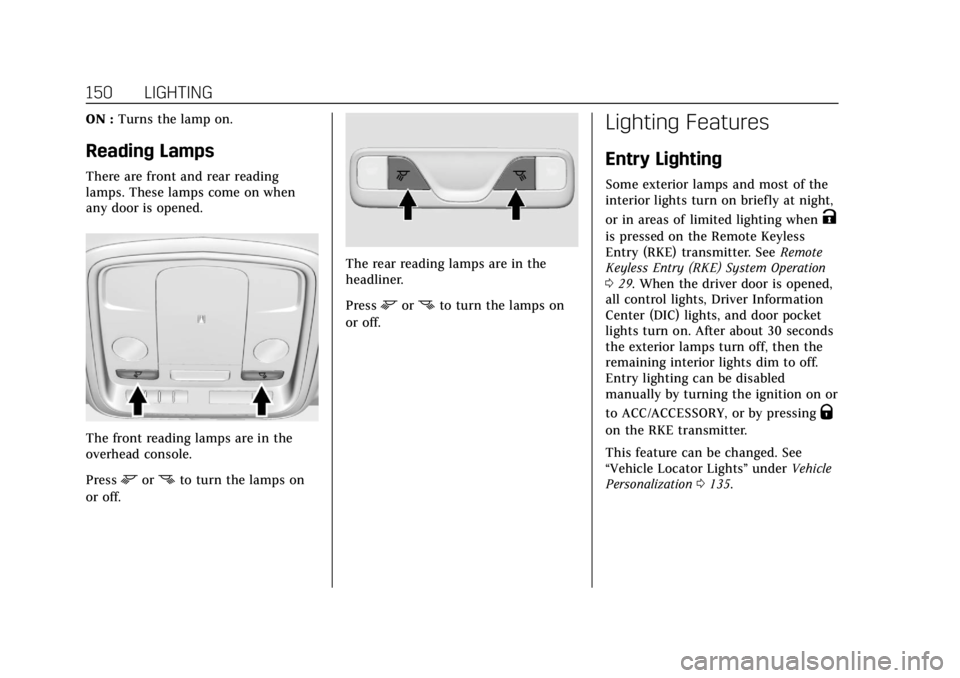
Reading Lamps
There are front and rear reading
lamps. These lamps come on when
any door is opened.
The front reading lamps are in the
overhead console.
Press
mornto turn the lamps on
or off.
The rear reading lamps are in the
headliner.
Press
mornto turn the lamps on
or off.
Lighting Features
Entry Lighting
Some exterior lamps and most of the
interior lights turn on briefly at night,
or in areas of limited lighting when
K
is pressed on the Remote Keyless
Entry (RKE) transmitter. See Remote
Keyless Entry (RKE) System Operation
0 29. When the driver door is opened,
all control lights, Driver Information
Center (DIC) lights, and door pocket
lights turn on. After about 30 seconds
the exterior lamps turn off, then the
remaining interior lights dim to off.
Entry lighting can be disabled
manually by turning the ignition on or
to ACC/ACCESSORY, or by pressing
Q
on the RKE transmitter.
This feature can be changed. See
“Vehicle Locator Lights” underVehicle
Personalization 0135.