2019 BUICK REGAL SPORTBACK start stop button
[x] Cancel search: start stop buttonPage 8 of 391

Buick Regal Owner Manual (GMNA-Localizing-U.S./Canada-12163021) -
2019 - CRC - 11/14/18
In Brief 7
1.Air Vents 0176.
2. Turn and Lane-Change Signals
0165.
3. Instrument Cluster 0124.
Driver Information Center (DIC)
Display. See Driver Information
Center (DIC) 0144.
4. Windshield Wiper/Washer
0117.
5. Hazard Warning Flashers
0165.
6. Light Sensor. See Automatic
Headlamp System 0163.
7. Infotainment 0170.
8. Traction Control/Electronic
Stability Control 0205.
9. Dual Automatic Climate Control
System 0171.
10. Transmitter Pocket. See Remote Keyless Entry (RKE)
System Operation 029.
11. Lane Keep Assist (LKA) 0229
(If Equipped). Park Assist Button (If
Equipped). See
Driver
Assistance Systems 0217.
Selective Ride Control (GS
Models Only) 0207.
12. Wireless Charging 0120 (If
Equipped).
13. Shift Lever. See Automatic
Transmission 0198.
14. Electric Parking Brake 0202.
15. ENGINE START/STOP Button (Out of View). See Ignition
Positions 0190.
16. Steering Wheel Controls 0117.
Driver Information Center (DIC)
Controls. See Driver
Information Center (DIC) 0144.
17. Horn 0117.
18. Steering Wheel Adjustment
0117 (Out of View).
19. Cruise Control 0208 (If
Equipped).
Adaptive Cruise Control 0210
(If Equipped). Forward Collision Alert (FCA)
System
0221 (If Equipped).
Heated Steering Wheel 0117
(If Equipped).
20. Hood Release. See Hood
0 247.
21. Exterior Lamp Controls 0162.
Fog Lamps 0166.
22. Instrument Panel Fuse Block Cover. See Instrument Panel
Fuse Block 0276.
23. Data Link Connector (DLC) (Out of View). See Malfunction
Indicator Lamp (Check Engine
Light) 0135.
24. Head-Up Display (HUD) 0149
(If Equipped).
25. Instrument Panel Illumination
Control 0166.
Page 9 of 391
Buick Regal Owner Manual (GMNA-Localizing-U.S./Canada-12163021) -
2019 - CRC - 11/14/18
8 In Brief
Initial Drive
Information
This section provides a brief
overview about some of the
important features that may or may
not be on your specific vehicle.
For more detailed information, refer
to each of the features which can be
found later in this owner’s manual.
Stop/Start System
This vehicle has a Stop/Start
system to shut off the engine to help
conserve fuel. It has components
designed for the increased number
of starts.
When the brakes are applied and
the vehicle is at a complete stop,
the engine may turn off. When
stopped, the tachometer displays
AUTO STOP. SeeTachometer
0 130. When the brake pedal is
released or the accelerator pedal is
pressed, the engine will restart. See
Starting the Engine 0192.
Remote Keyless Entry
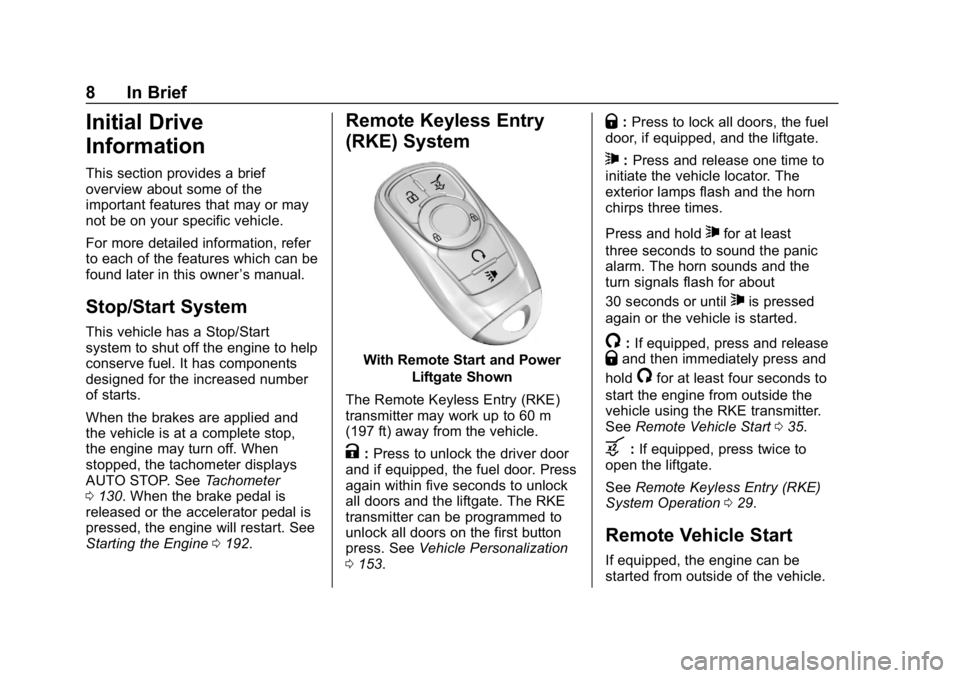
(RKE) System
With Remote Start and Power
Liftgate Shown
The Remote Keyless Entry (RKE)
transmitter may work up to 60 m
(197 ft) away from the vehicle.
K: Press to unlock the driver door
and if equipped, the fuel door. Press
again within five seconds to unlock
all doors and the liftgate. The RKE
transmitter can be programmed to
unlock all doors on the first button
press. See Vehicle Personalization
0 153.
Q:Press to lock all doors, the fuel
door, if equipped, and the liftgate.
7: Press and release one time to
initiate the vehicle locator. The
exterior lamps flash and the horn
chirps three times.
Press and hold
7for at least
three seconds to sound the panic
alarm. The horn sounds and the
turn signals flash for about
30 seconds or until
7is pressed
again or the vehicle is started.
/: If equipped, press and releaseQand then immediately press and
hold
/for at least four seconds to
start the engine from outside the
vehicle using the RKE transmitter.
See Remote Vehicle Start 035.
b:If equipped, press twice to
open the liftgate.
See Remote Keyless Entry (RKE)
System Operation 029.
Remote Vehicle Start
If equipped, the engine can be
started from outside of the vehicle.
Page 11 of 391
Buick Regal Owner Manual (GMNA-Localizing-U.S./Canada-12163021) -
2019 - CRC - 11/14/18
10 In Brief
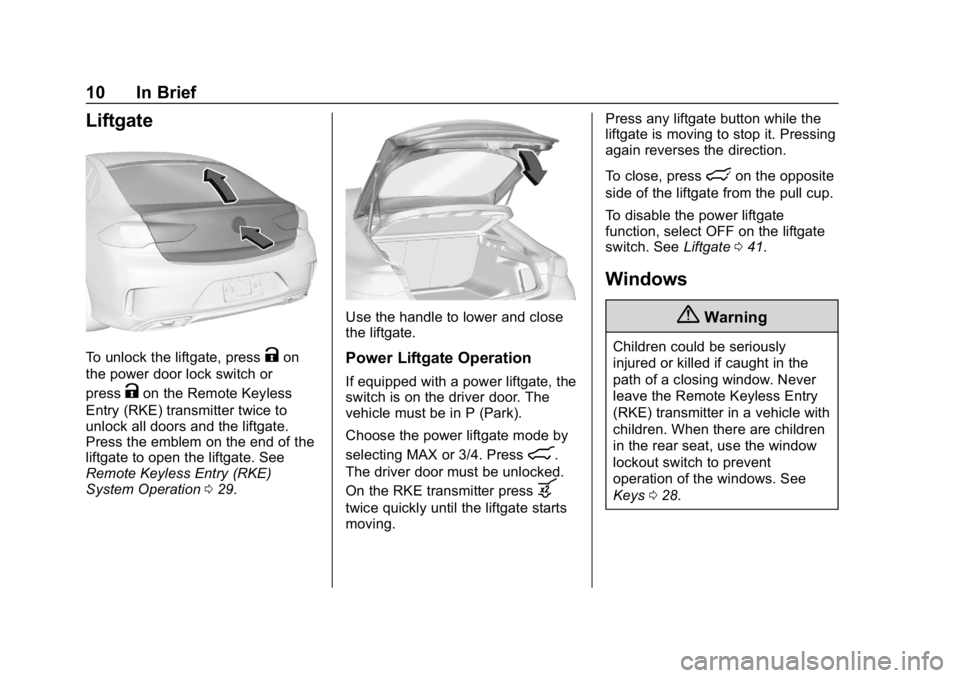
Liftgate
To unlock the liftgate, pressKon
the power door lock switch or
press
Kon the Remote Keyless
Entry (RKE) transmitter twice to
unlock all doors and the liftgate.
Press the emblem on the end of the
liftgate to open the liftgate. See
Remote Keyless Entry (RKE)
System Operation 029.
Use the handle to lower and close
the liftgate.
Power Liftgate Operation
If equipped with a power liftgate, the
switch is on the driver door. The
vehicle must be in P (Park).
Choose the power liftgate mode by
selecting MAX or 3/4. Press
8.
The driver door must be unlocked.
On the RKE transmitter press
b
twice quickly until the liftgate starts
moving. Press any liftgate button while the
liftgate is moving to stop it. Pressing
again reverses the direction.
To close, press
lon the opposite
side of the liftgate from the pull cup.
To disable the power liftgate
function, select OFF on the liftgate
switch. See Liftgate041.
Windows
{Warning
Children could be seriously
injured or killed if caught in the
path of a closing window. Never
leave the Remote Keyless Entry
(RKE) transmitter in a vehicle with
children. When there are children
in the rear seat, use the window
lockout switch to prevent
operation of the windows. See
Keys 028.
Page 34 of 391
Buick Regal Owner Manual (GMNA-Localizing-U.S./Canada-12163021) -
2019 - CRC - 11/14/18
Keys, Doors, and Windows 33
Programming Transmitters to
the Vehicle
Only RKE transmitters programmed
to the vehicle will work. If a
transmitter is lost or stolen, a
replacement can be purchased and
programmed through your dealer.
The vehicle can be reprogrammed
so that lost or stolen RKE
transmitters no longer work. Any
remaining RKE transmitters will
need to be reprogrammed. Each
vehicle can have up to eight
transmitters matched to it.
Programming with Recognized
Transmitters
A new RKE transmitter can be
programmed to the vehicle when
there are two recognized RKE
transmitters. To program, the vehicle
must be off and all of the RKE
transmitters, both currently
recognized and new, must be
with you.
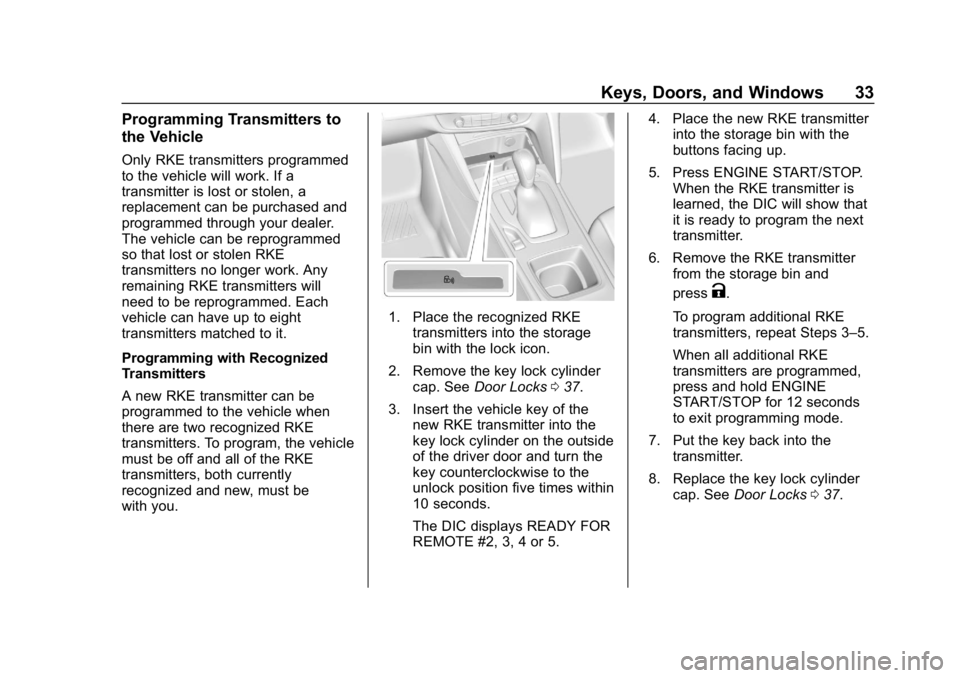
1. Place the recognized RKEtransmitters into the storage
bin with the lock icon.
2. Remove the key lock cylinder cap. See Door Locks 037.
3. Insert the vehicle key of the new RKE transmitter into the
key lock cylinder on the outside
of the driver door and turn the
key counterclockwise to the
unlock position five times within
10 seconds.
The DIC displays READY FOR
REMOTE #2, 3, 4 or 5. 4. Place the new RKE transmitter
into the storage bin with the
buttons facing up.
5. Press ENGINE START/STOP. When the RKE transmitter is
learned, the DIC will show that
it is ready to program the next
transmitter.
6. Remove the RKE transmitter from the storage bin and
press
K.
To program additional RKE
transmitters, repeat Steps 3–5.
When all additional RKE
transmitters are programmed,
press and hold ENGINE
START/STOP for 12 seconds
to exit programming mode.
7. Put the key back into the transmitter.
8. Replace the key lock cylinder cap. See Door Locks 037.
Page 35 of 391
Buick Regal Owner Manual (GMNA-Localizing-U.S./Canada-12163021) -
2019 - CRC - 11/14/18
34 Keys, Doors, and Windows
Programming without Recognized
Transmitters
If there are no currently recognized
RKE transmitters available, follow
this procedure to program up to
eight RKE transmitters. This
procedure will take approximately
30 minutes to complete. The vehicle
must be off and all of the RKE
transmitters you wish to program
must be with you.1. Remove the key lock cylinder cap. See Door Locks 037.
2. Insert the vehicle key of the RKE transmitter into the key
lock cylinder on the outside of
the driver door and turn the key
to the unlock position,
counterclockwise, five times
within 10 seconds.
The DIC displays REMOTE
LEARN PENDING,
PLEASE WAIT.
3. Wait for 10 minutes until the DIC displays PRESS ENGINE
START BUTTON TO LEARN
and then press ENGINE
START/STOP. The DIC will again display
REMOTE LEARN PENDING,
PLEASE WAIT.
4. Repeat Step 2 two additional times. After the third time all
previously known RKE
transmitters will no longer work
with the vehicle. Remaining
RKE transmitters can be
relearned during the next
steps.
The DIC should now display
READY FOR REMOTE # 1.
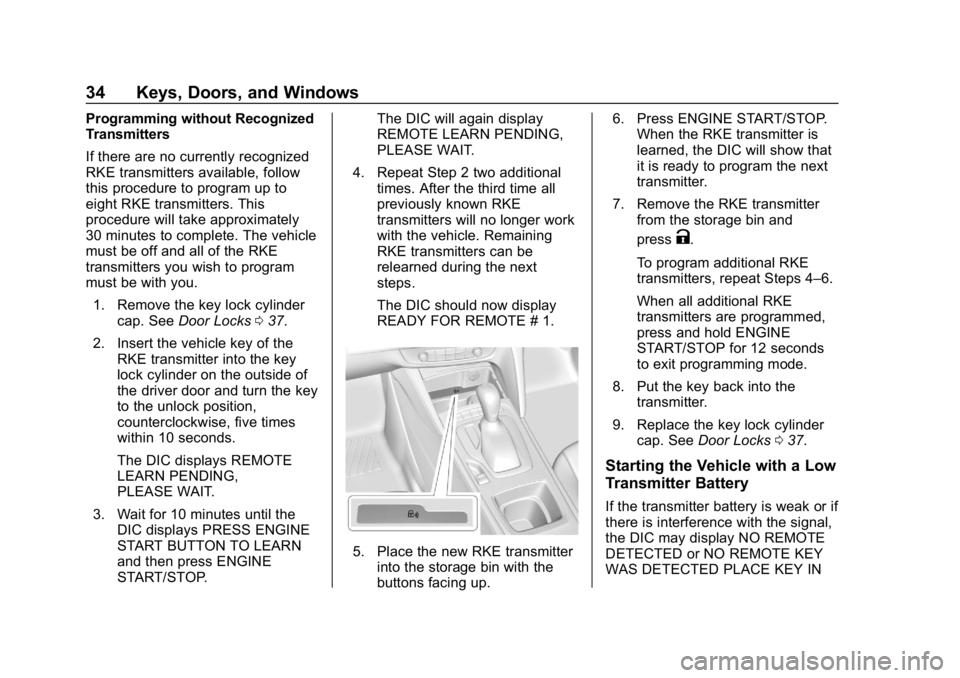
5. Place the new RKE transmitterinto the storage bin with the
buttons facing up. 6. Press ENGINE START/STOP.
When the RKE transmitter is
learned, the DIC will show that
it is ready to program the next
transmitter.
7. Remove the RKE transmitter from the storage bin and
press
K.
To program additional RKE
transmitters, repeat Steps 4–6.
When all additional RKE
transmitters are programmed,
press and hold ENGINE
START/STOP for 12 seconds
to exit programming mode.
8. Put the key back into the transmitter.
9. Replace the key lock cylinder cap. See Door Locks 037.
Starting the Vehicle with a Low
Transmitter Battery
If the transmitter battery is weak or if
there is interference with the signal,
the DIC may display NO REMOTE
DETECTED or NO REMOTE KEY
WAS DETECTED PLACE KEY IN
Page 36 of 391
Buick Regal Owner Manual (GMNA-Localizing-U.S./Canada-12163021) -
2019 - CRC - 11/14/18
Keys, Doors, and Windows 35
TRANSMITTER POCKET THEN
START YOUR VEHICLE when you
try to start the vehicle. The DIC may
also display REPLACE BATTERY
IN REMOTE KEY.
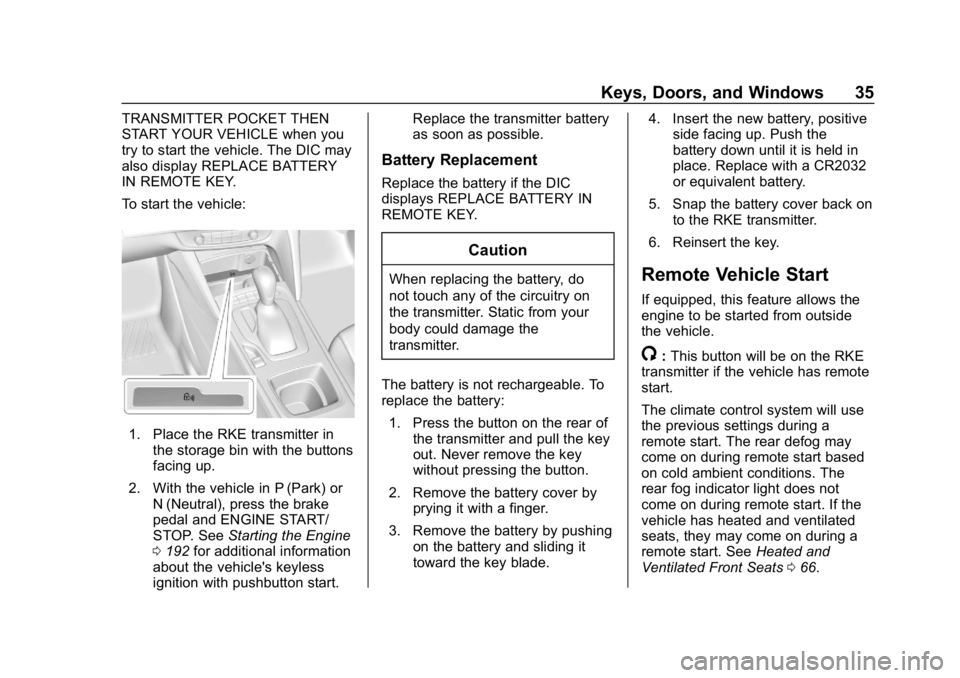
To start the vehicle:
1. Place the RKE transmitter inthe storage bin with the buttons
facing up.
2. With the vehicle in P (Park) or N (Neutral), press the brake
pedal and ENGINE START/
STOP. See Starting the Engine
0 192 for additional information
about the vehicle's keyless
ignition with pushbutton start. Replace the transmitter battery
as soon as possible.
Battery Replacement
Replace the battery if the DIC
displays REPLACE BATTERY IN
REMOTE KEY.
Caution
When replacing the battery, do
not touch any of the circuitry on
the transmitter. Static from your
body could damage the
transmitter.
The battery is not rechargeable. To
replace the battery: 1. Press the button on the rear of the transmitter and pull the key
out. Never remove the key
without pressing the button.
2. Remove the battery cover by prying it with a finger.
3. Remove the battery by pushing on the battery and sliding it
toward the key blade. 4. Insert the new battery, positive
side facing up. Push the
battery down until it is held in
place. Replace with a CR2032
or equivalent battery.
5. Snap the battery cover back on to the RKE transmitter.
6. Reinsert the key.Remote Vehicle Start
If equipped, this feature allows the
engine to be started from outside
the vehicle.
/: This button will be on the RKE
transmitter if the vehicle has remote
start.
The climate control system will use
the previous settings during a
remote start. The rear defog may
come on during remote start based
on cold ambient conditions. The
rear fog indicator light does not
come on during remote start. If the
vehicle has heated and ventilated
seats, they may come on during a
remote start. See Heated and
Ventilated Front Seats 066.
Page 47 of 391
Buick Regal Owner Manual (GMNA-Localizing-U.S./Canada-12163021) -
2019 - CRC - 11/14/18
46 Keys, Doors, and Windows
Operate the liftgate manually with a
smooth motion and moderate
speed. The system includes a
feature that limits the manual
closing speed to protect the
components.
Hands-Free Operation
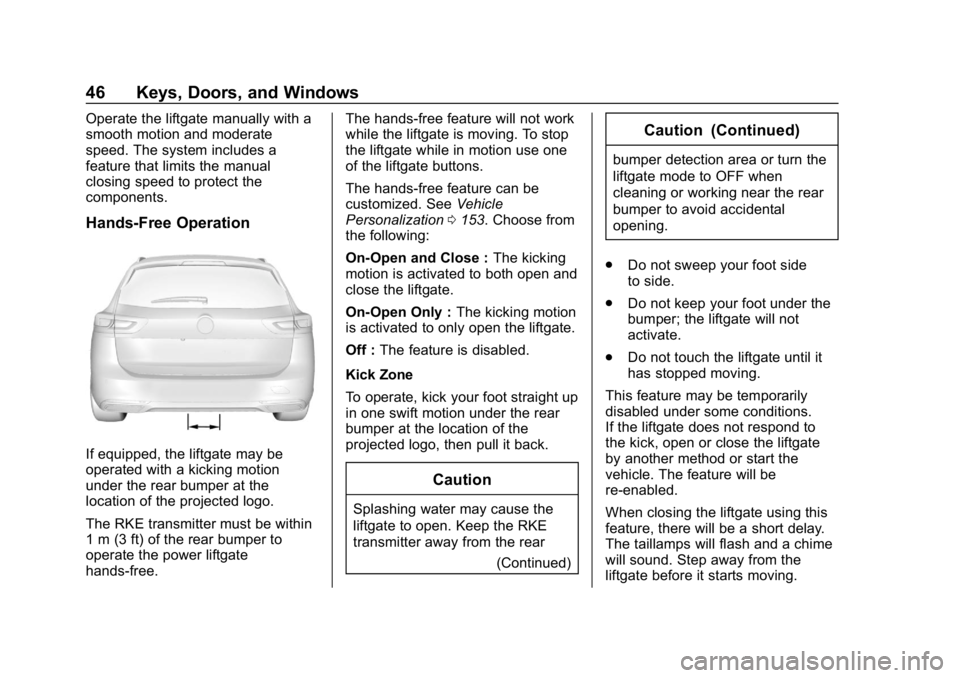
If equipped, the liftgate may be
operated with a kicking motion
under the rear bumper at the
location of the projected logo.
The RKE transmitter must be within
1 m (3 ft) of the rear bumper to
operate the power liftgate
hands-free.The hands-free feature will not work
while the liftgate is moving. To stop
the liftgate while in motion use one
of the liftgate buttons.
The hands-free feature can be
customized. See
Vehicle
Personalization 0153. Choose from
the following:
On-Open and Close : The kicking
motion is activated to both open and
close the liftgate.
On-Open Only : The kicking motion
is activated to only open the liftgate.
Off : The feature is disabled.
Kick Zone
To operate, kick your foot straight up
in one swift motion under the rear
bumper at the location of the
projected logo, then pull it back.
Caution
Splashing water may cause the
liftgate to open. Keep the RKE
transmitter away from the rear (Continued)
Caution (Continued)
bumper detection area or turn the
liftgate mode to OFF when
cleaning or working near the rear
bumper to avoid accidental
opening.
. Do not sweep your foot side
to side.
. Do not keep your foot under the
bumper; the liftgate will not
activate.
. Do not touch the liftgate until it
has stopped moving.
This feature may be temporarily
disabled under some conditions.
If the liftgate does not respond to
the kick, open or close the liftgate
by another method or start the
vehicle. The feature will be
re-enabled.
When closing the liftgate using this
feature, there will be a short delay.
The taillamps will flash and a chime
will sound. Step away from the
liftgate before it starts moving.
Page 66 of 391
Buick Regal Owner Manual (GMNA-Localizing-U.S./Canada-12163021) -
2019 - CRC - 11/14/18
Seats and Restraints 65
Identifying Driver Number
To identify the driver number:
To identify the driver number, start
the vehicle with a key or RKE
transmitter. The DIC will display the
driver number, either 1 or 2. The
other key or RKE transmitter will
correspond to the driver number that
was not displayed.
Saving Memory Positions
Read these instructions completely
before saving memory positions.
To save preferred driving positions
1 and 2:1. Turn the ignition on or to ACC/ ACCESSORY.
A DIC welcome message may
be displayed indicating number
1 or 2 for memory recalls.
2. Adjust all available memory features to the desired driving
position.
3. Press and release MEM; a beep will sound. 4. Immediately press and hold the
1 or 2 memory button matching
the above DIC welcome
message until two beeps
sound.
If too much time passes
between releasing MEM and
pressing 1, the memory
position will not be saved and
two beeps will not sound.
Repeat Steps 3 and 4.
1 or 2 corresponds to the driver
number. See “Identifying Driver
Number” previously in this
section.
5. Repeat Steps 1–4 for a second driver using the other 1 or
2 memory button.
Positions are not saved for the Seat
Exit Memory feature, which moves
the driver seat rearward.
Save preferred memory feature
positions to both 1 and 2 if you are
the only driver. Manually Recalling Memory
Positions
Press and hold 1 or 2 to recall the
previously saved memory positions.
To stop Manual Memory Recall
movement, release 1 or 2 or press
any of the following controls:
.
Power seat
. Memory MEM
. Power mirror, with the driver or
passenger side mirror selected
. Power steering wheel,
if equipped
Seat Entry Memory Recall
The vehicle identifies the number of
the current driver ’s RKE transmitter
(1–8). See Remote Keyless Entry
(RKE) System Operation 029. If the
RKE transmitter is 1 or 2, and Seat
Entry Memory is programmed on in
vehicle personalization, the
positions saved to the same
memory button number 1 or 2 are
automatically recalled when the
ignition is turned on, or turned from