2019 BUICK REGAL SPORTBACK personalization
[x] Cancel search: personalizationPage 9 of 391
Buick Regal Owner Manual (GMNA-Localizing-U.S./Canada-12163021) -
2019 - CRC - 11/14/18
8 In Brief
Initial Drive
Information
This section provides a brief
overview about some of the
important features that may or may
not be on your specific vehicle.
For more detailed information, refer
to each of the features which can be
found later in this owner’s manual.
Stop/Start System
This vehicle has a Stop/Start
system to shut off the engine to help
conserve fuel. It has components
designed for the increased number
of starts.
When the brakes are applied and
the vehicle is at a complete stop,
the engine may turn off. When
stopped, the tachometer displays
AUTO STOP. SeeTachometer
0 130. When the brake pedal is
released or the accelerator pedal is
pressed, the engine will restart. See
Starting the Engine 0192.
Remote Keyless Entry
(RKE) System
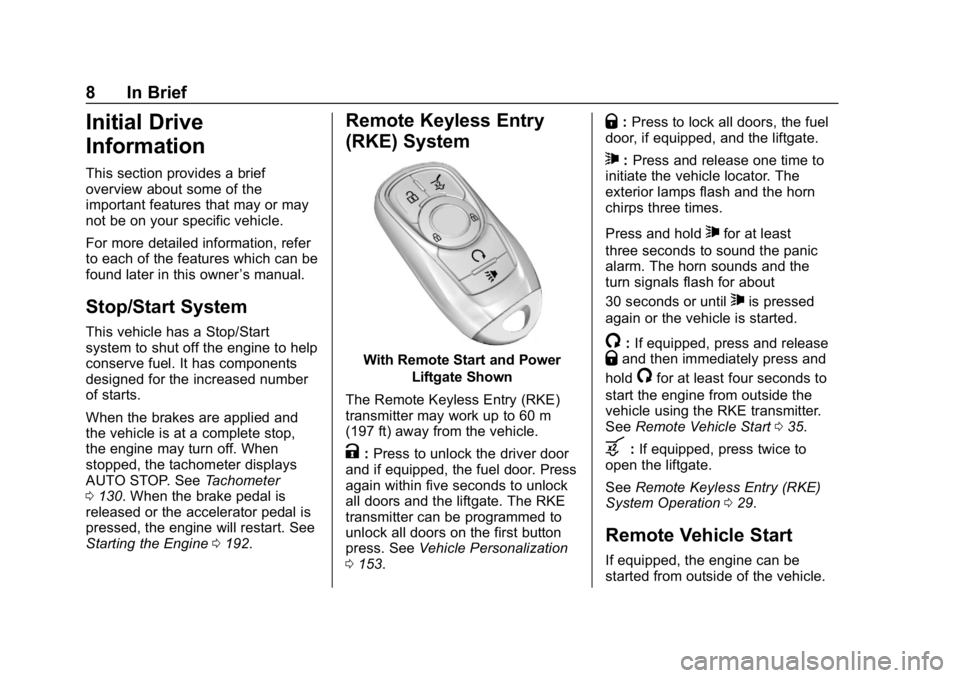
With Remote Start and Power
Liftgate Shown
The Remote Keyless Entry (RKE)
transmitter may work up to 60 m
(197 ft) away from the vehicle.
K: Press to unlock the driver door
and if equipped, the fuel door. Press
again within five seconds to unlock
all doors and the liftgate. The RKE
transmitter can be programmed to
unlock all doors on the first button
press. See Vehicle Personalization
0 153.
Q:Press to lock all doors, the fuel
door, if equipped, and the liftgate.
7: Press and release one time to
initiate the vehicle locator. The
exterior lamps flash and the horn
chirps three times.
Press and hold
7for at least
three seconds to sound the panic
alarm. The horn sounds and the
turn signals flash for about
30 seconds or until
7is pressed
again or the vehicle is started.
/: If equipped, press and releaseQand then immediately press and
hold
/for at least four seconds to
start the engine from outside the
vehicle using the RKE transmitter.
See Remote Vehicle Start 035.
b:If equipped, press twice to
open the liftgate.
See Remote Keyless Entry (RKE)
System Operation 029.
Remote Vehicle Start
If equipped, the engine can be
started from outside of the vehicle.
Page 14 of 391
Buick Regal Owner Manual (GMNA-Localizing-U.S./Canada-12163021) -
2019 - CRC - 11/14/18
In Brief 13
Memory Features
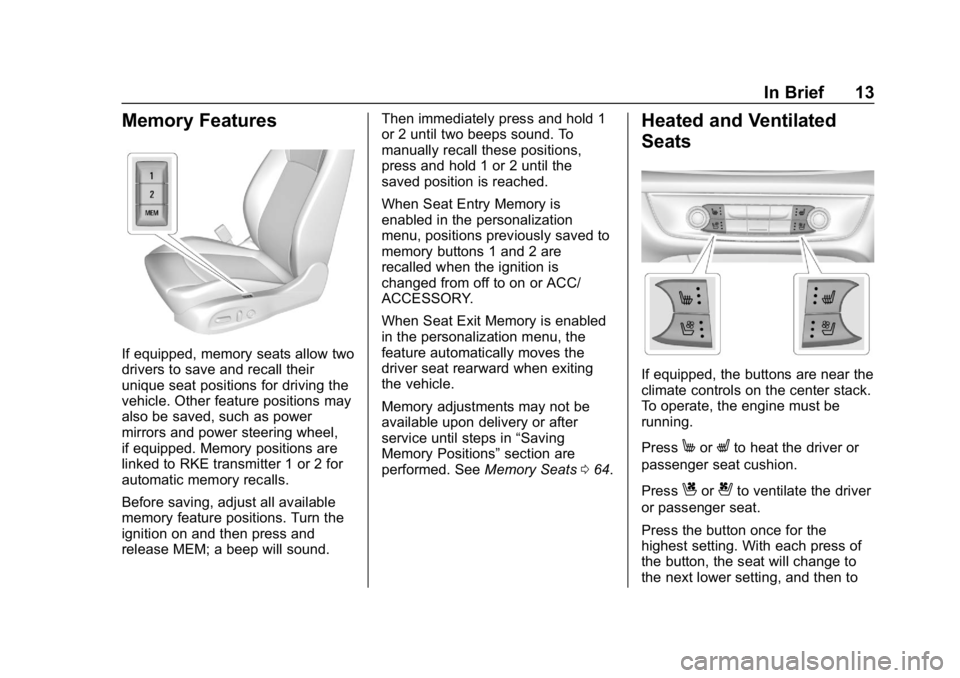
If equipped, memory seats allow two
drivers to save and recall their
unique seat positions for driving the
vehicle. Other feature positions may
also be saved, such as power
mirrors and power steering wheel,
if equipped. Memory positions are
linked to RKE transmitter 1 or 2 for
automatic memory recalls.
Before saving, adjust all available
memory feature positions. Turn the
ignition on and then press and
release MEM; a beep will sound.Then immediately press and hold 1
or 2 until two beeps sound. To
manually recall these positions,
press and hold 1 or 2 until the
saved position is reached.
When Seat Entry Memory is
enabled in the personalization
menu, positions previously saved to
memory buttons 1 and 2 are
recalled when the ignition is
changed from off to on or ACC/
ACCESSORY.
When Seat Exit Memory is enabled
in the personalization menu, the
feature automatically moves the
driver seat rearward when exiting
the vehicle.
Memory adjustments may not be
available upon delivery or after
service until steps in
“Saving
Memory Positions” section are
performed. See Memory Seats064.
Heated and Ventilated
Seats
If equipped, the buttons are near the
climate controls on the center stack.
To operate, the engine must be
running.
Press
MorLto heat the driver or
passenger seat cushion.
Press
Cor{to ventilate the driver
or passenger seat.
Press the button once for the
highest setting. With each press of
the button, the seat will change to
the next lower setting, and then to
Page 31 of 391
Buick Regal Owner Manual (GMNA-Localizing-U.S./Canada-12163021) -
2019 - CRC - 11/14/18
30 Keys, Doors, and Windows
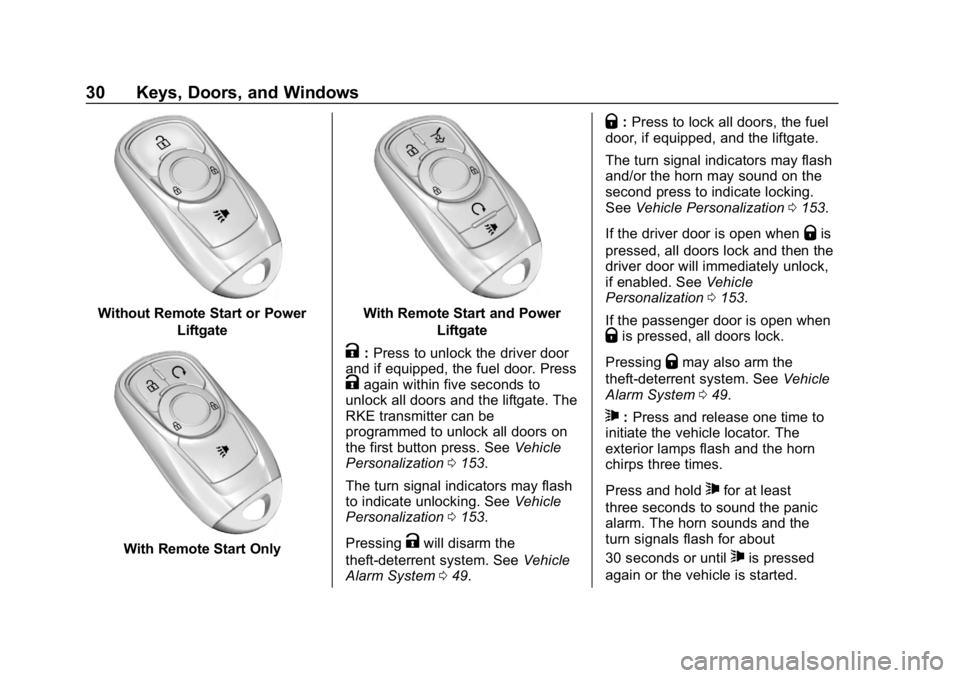
Without Remote Start or PowerLiftgate
With Remote Start Only
With Remote Start and PowerLiftgate
K:Press to unlock the driver door
and if equipped, the fuel door. Press
Kagain within five seconds to
unlock all doors and the liftgate. The
RKE transmitter can be
programmed to unlock all doors on
the first button press. See Vehicle
Personalization 0153.
The turn signal indicators may flash
to indicate unlocking. See Vehicle
Personalization 0153.
Pressing
Kwill disarm the
theft-deterrent system. See Vehicle
Alarm System 049.
Q:Press to lock all doors, the fuel
door, if equipped, and the liftgate.
The turn signal indicators may flash
and/or the horn may sound on the
second press to indicate locking.
See Vehicle Personalization 0153.
If the driver door is open when
Qis
pressed, all doors lock and then the
driver door will immediately unlock,
if enabled. See Vehicle
Personalization 0153.
If the passenger door is open when
Qis pressed, all doors lock.
Pressing
Qmay also arm the
theft-deterrent system. See Vehicle
Alarm System 049.
7:Press and release one time to
initiate the vehicle locator. The
exterior lamps flash and the horn
chirps three times.
Press and hold
7for at least
three seconds to sound the panic
alarm. The horn sounds and the
turn signals flash for about
30 seconds or until
7is pressed
again or the vehicle is started.
Page 32 of 391
Buick Regal Owner Manual (GMNA-Localizing-U.S./Canada-12163021) -
2019 - CRC - 11/14/18
Keys, Doors, and Windows 31
/:If equipped, press and releaseQand then immediately press and
hold
/for at least four seconds to
start the engine from outside the
vehicle using the RKE transmitter.
See Remote Vehicle Start 035.
b:If equipped, press twice to
open the liftgate.
Keyless Access Operation
The Keyless Access system allows
you to lock and unlock the doors
and access the liftgate without
removing the RKE transmitter from
your pocket, purse, briefcase, etc.
The RKE transmitter should be
within 1 m (3 ft) of the liftgate or door
being opened. There are buttons on
the outside door handles.
Keyless Access can be
programmed to unlock all doors on
the first lock/unlock press from the
driver door. See Vehicle
Personalization 0153.
If equipped with memory seats, RKE
transmitters 1 and 2 are linked to
seating positions of memory 1 or 2.
See Memory Seats 064. Keyless Unlocking/Locking from
the Driver Door
When the doors are locked and the
RKE transmitter is within 1 m (3 ft)
of the driver door handle, pressing
the lock/unlock button on the driver
door handle will unlock the driver
door. If the lock/unlock button is
pressed again within five seconds,
all passenger doors will unlock. Pull
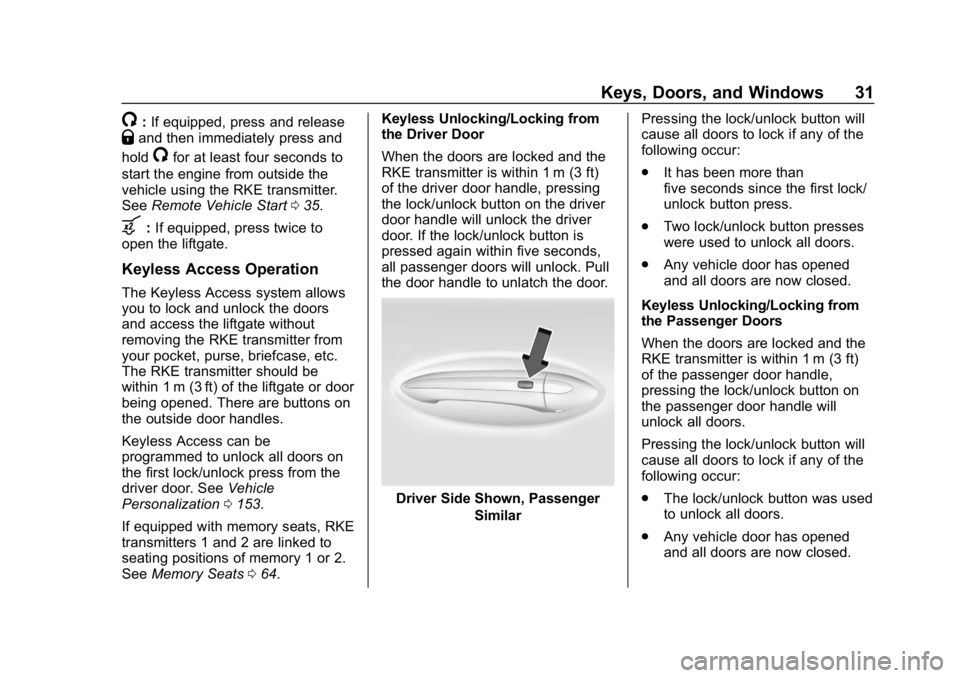
the door handle to unlatch the door.
Driver Side Shown, Passenger
Similar Pressing the lock/unlock button will
cause all doors to lock if any of the
following occur:
.
It has been more than
five seconds since the first lock/
unlock button press.
. Two lock/unlock button presses
were used to unlock all doors.
. Any vehicle door has opened
and all doors are now closed.
Keyless Unlocking/Locking from
the Passenger Doors
When the doors are locked and the
RKE transmitter is within 1 m (3 ft)
of the passenger door handle,
pressing the lock/unlock button on
the passenger door handle will
unlock all doors.
Pressing the lock/unlock button will
cause all doors to lock if any of the
following occur:
. The lock/unlock button was used
to unlock all doors.
. Any vehicle door has opened
and all doors are now closed.
Page 33 of 391
Buick Regal Owner Manual (GMNA-Localizing-U.S./Canada-12163021) -
2019 - CRC - 11/14/18
32 Keys, Doors, and Windows
Anti-Theft Locking from Any Door
When all doors are locked using the
lock/unlock button, a second press
of the button within five seconds will
activate the Anti-Theft Locking
system.
Anti-Theft Unlocking from
Any Door
When all doors are unlocked using
the lock/unlock button, the
Anti-Theft Locking system will be
deactivated.
Passive Locking
This feature will lock the vehicle
several seconds after all doors are
closed, if the vehicle is off and at
least one RKE transmitter has been
removed from the interior or none
remain in the interior.
If equipped, the fuel door will lock.
If other electronic devices interfere
with the RKE transmitter signal, the
vehicle may not detect the RKE
transmitter inside the vehicle.
If passive locking is enabled, the
doors may lock with the RKEtransmitter inside the vehicle. Do
not leave the RKE transmitter in an
unattended vehicle.
To customize the doors to
automatically lock when exiting the
vehicle, see
Vehicle Personalization
0 153.
Temporary Disable of Passive
Locking
Temporarily disable passive locking
by pressing and holding
Kon the
interior door switch with a door open
for at least four seconds, or until
three chimes are heard. Passive
locking will then remain disabled
until
Qon the interior door is
pressed, or until the vehicle is
turned on.
Remote Left in Vehicle Alert
When the vehicle is turned off and
an RKE transmitter is left in the
vehicle, the horn will chirp three
times after all doors are closed. To
turn on or off, see Vehicle
Personalization 0153. Remote No Longer in Vehicle Alert
If the vehicle is on with a door open,
and then all doors are closed, the
vehicle will check for RKE
transmitters inside. If an RKE
transmitter is not detected, the
Driver Information Center (DIC) will
display NO REMOTE DETECTED
and the horn will chirp three times.
This occurs only once each time the
vehicle is driven. To turn on or off,
see
Vehicle Personalization 0153.
Keyless Liftgate Opening
When the doors are locked, press
the touch pad under the emblem to
open the liftgate if the RKE
transmitter is within 1 m (3 ft).
Key Access
To access a vehicle with a weak
transmitter battery, see Door Locks
0 37.
Page 40 of 391
Buick Regal Owner Manual (GMNA-Localizing-U.S./Canada-12163021) -
2019 - CRC - 11/14/18
Keys, Doors, and Windows 39
To replace the cap:1. Position the bottom edge of the cap under the lower edge of
the metal piece (2). The
tabs (3) attach to the metal
piece (2) at the positions (1).
2. Rotate the cap upward and install into place.
3. Check that the cap is secure.
Free-Turning Locks
The door key lock cylinder turns
freely when either the wrong key is
used, or the correct key is not fully
inserted. The free-turning door lock
feature prevents the lock from being
forced open. To reset the lock, turn
it to the vertical position with the
correct key fully inserted. Remove
the key and insert it again. If this
does not reset the lock, turn the key
halfway around in the cylinder and
repeat the reset procedure.
Power Door Locks
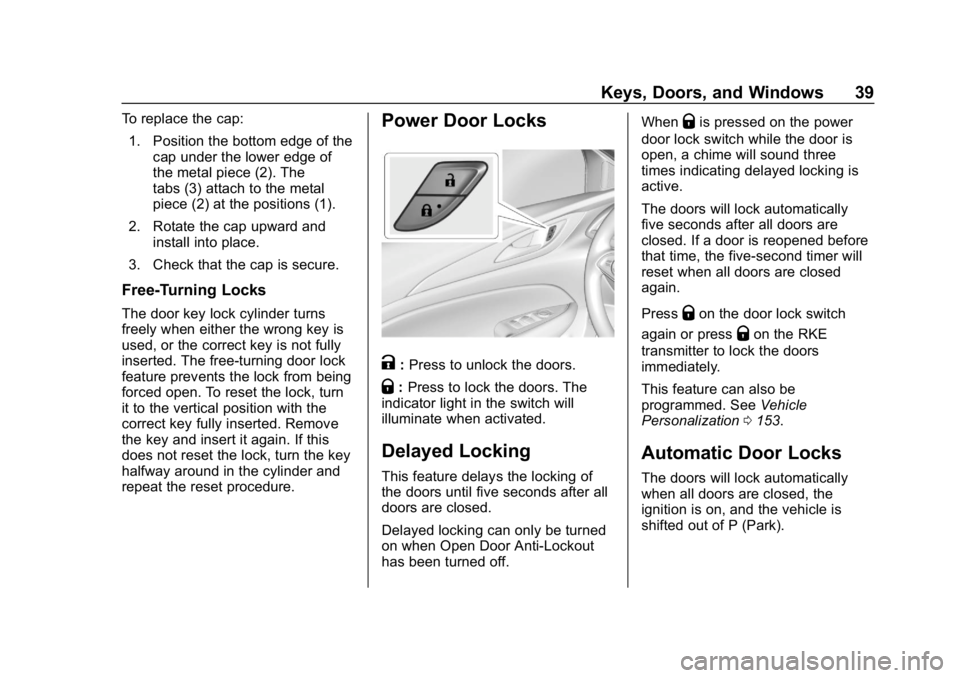
K: Press to unlock the doors.
Q: Press to lock the doors. The
indicator light in the switch will
illuminate when activated.
Delayed Locking
This feature delays the locking of
the doors until five seconds after all
doors are closed.
Delayed locking can only be turned
on when Open Door Anti-Lockout
has been turned off. When
Qis pressed on the power
door lock switch while the door is
open, a chime will sound three
times indicating delayed locking is
active.
The doors will lock automatically
five seconds after all doors are
closed. If a door is reopened before
that time, the five-second timer will
reset when all doors are closed
again.
Press
Qon the door lock switch
again or press
Qon the RKE
transmitter to lock the doors
immediately.
This feature can also be
programmed. See Vehicle
Personalization 0153.
Automatic Door Locks
The doors will lock automatically
when all doors are closed, the
ignition is on, and the vehicle is
shifted out of P (Park).
Page 41 of 391
Buick Regal Owner Manual (GMNA-Localizing-U.S./Canada-12163021) -
2019 - CRC - 11/14/18
40 Keys, Doors, and Windows
If a vehicle door is unlocked, and
then opened and closed, the doors
will lock either when your foot is
removed from the brake or the
vehicle speed becomes faster than
13 km/h (8 mph).
To unlock the doors:
.Press
Kon a power door lock
switch.
. Shift the transmission into
P (Park).
Automatic Door Unlock can be
programmed. See “Power Door
Locks" in Vehicle Personalization
0 153.
Lockout Protection
When locking is requested with the
driver door open and the vehicle is
on or in ACC/ACCESSORY, all the
doors will lock and then the driver
door will unlock. If the vehicle is off and locking is
requested while a door is open,
when all doors are closed the
vehicle will check for RKE
transmitters inside. If an RKE
transmitter is detected and the
number of RKE transmitters inside
has not reduced, the driver door will
unlock and the horn will sound three
times.
This can be manually overridden by
pressing and holding
Qon the
power door lock switch.
Open Door Anti-Lockout
If Open Door Anti-Lockout is turned
on and the vehicle is off, the driver
door is open, and locking is
requested, all the doors will lock and
the driver door will remain open.
Press the button again to lock the
driver door. The Open Door
Anti-Lockout feature can be turned
on or off. See Vehicle
Personalization 0153.
Safety Locks
The rear door safety locks prevent
passengers from opening the rear
doors from inside the vehicle.
Manual Safety Locks
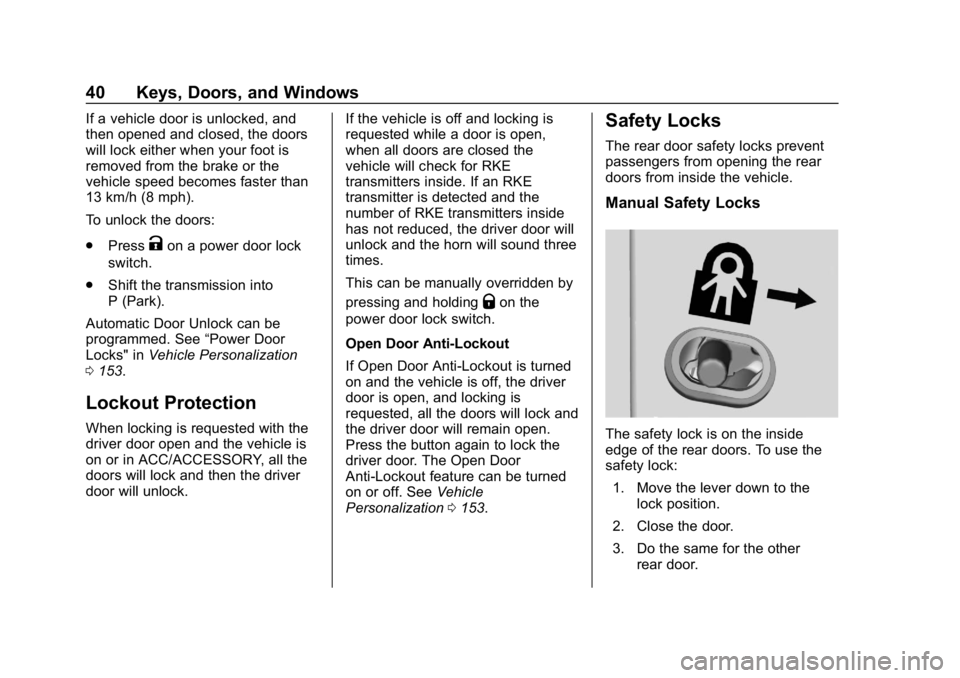
The safety lock is on the inside
edge of the rear doors. To use the
safety lock:
1. Move the lever down to the lock position.
2. Close the door.
3. Do the same for the other rear door.
Page 47 of 391
Buick Regal Owner Manual (GMNA-Localizing-U.S./Canada-12163021) -
2019 - CRC - 11/14/18
46 Keys, Doors, and Windows
Operate the liftgate manually with a
smooth motion and moderate
speed. The system includes a
feature that limits the manual
closing speed to protect the
components.
Hands-Free Operation
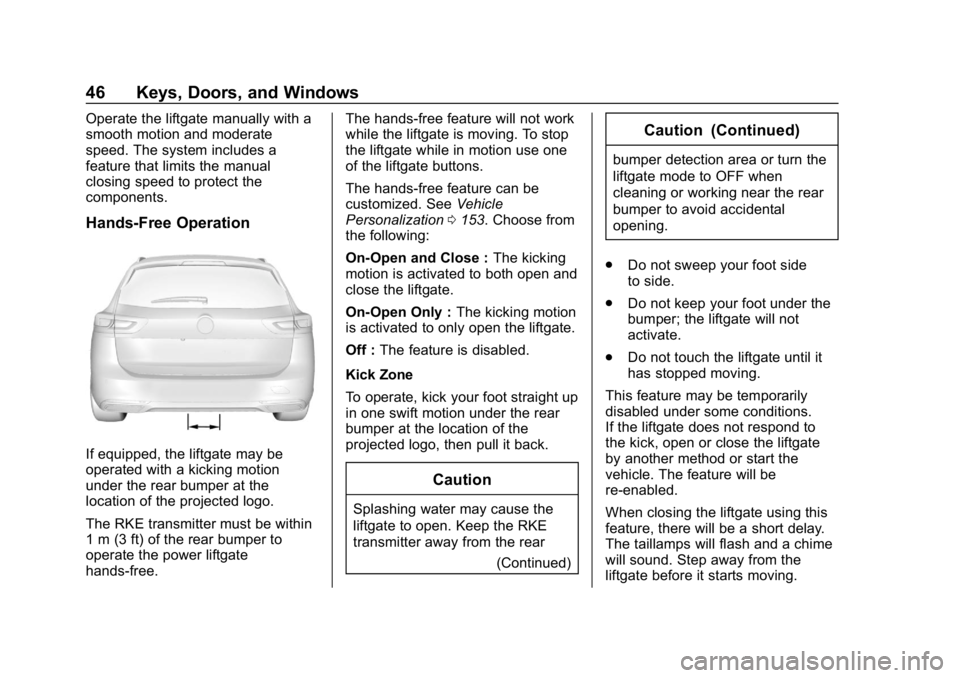
If equipped, the liftgate may be
operated with a kicking motion
under the rear bumper at the
location of the projected logo.
The RKE transmitter must be within
1 m (3 ft) of the rear bumper to
operate the power liftgate
hands-free.The hands-free feature will not work
while the liftgate is moving. To stop
the liftgate while in motion use one
of the liftgate buttons.
The hands-free feature can be
customized. See
Vehicle
Personalization 0153. Choose from
the following:
On-Open and Close : The kicking
motion is activated to both open and
close the liftgate.
On-Open Only : The kicking motion
is activated to only open the liftgate.
Off : The feature is disabled.
Kick Zone
To operate, kick your foot straight up
in one swift motion under the rear
bumper at the location of the
projected logo, then pull it back.
Caution
Splashing water may cause the
liftgate to open. Keep the RKE
transmitter away from the rear (Continued)
Caution (Continued)
bumper detection area or turn the
liftgate mode to OFF when
cleaning or working near the rear
bumper to avoid accidental
opening.
. Do not sweep your foot side
to side.
. Do not keep your foot under the
bumper; the liftgate will not
activate.
. Do not touch the liftgate until it
has stopped moving.
This feature may be temporarily
disabled under some conditions.
If the liftgate does not respond to
the kick, open or close the liftgate
by another method or start the
vehicle. The feature will be
re-enabled.
When closing the liftgate using this
feature, there will be a short delay.
The taillamps will flash and a chime
will sound. Step away from the
liftgate before it starts moving.