2019 BUICK REGAL SPORTBACK display
[x] Cancel search: displayPage 8 of 391

Buick Regal Owner Manual (GMNA-Localizing-U.S./Canada-12163021) -
2019 - CRC - 11/14/18
In Brief 7
1.Air Vents 0176.
2. Turn and Lane-Change Signals
0165.
3. Instrument Cluster 0124.
Driver Information Center (DIC)
Display. See Driver Information
Center (DIC) 0144.
4. Windshield Wiper/Washer
0117.
5. Hazard Warning Flashers
0165.
6. Light Sensor. See Automatic
Headlamp System 0163.
7. Infotainment 0170.
8. Traction Control/Electronic
Stability Control 0205.
9. Dual Automatic Climate Control
System 0171.
10. Transmitter Pocket. See Remote Keyless Entry (RKE)
System Operation 029.
11. Lane Keep Assist (LKA) 0229
(If Equipped). Park Assist Button (If
Equipped). See
Driver
Assistance Systems 0217.
Selective Ride Control (GS
Models Only) 0207.
12. Wireless Charging 0120 (If
Equipped).
13. Shift Lever. See Automatic
Transmission 0198.
14. Electric Parking Brake 0202.
15. ENGINE START/STOP Button (Out of View). See Ignition
Positions 0190.
16. Steering Wheel Controls 0117.
Driver Information Center (DIC)
Controls. See Driver
Information Center (DIC) 0144.
17. Horn 0117.
18. Steering Wheel Adjustment
0117 (Out of View).
19. Cruise Control 0208 (If
Equipped).
Adaptive Cruise Control 0210
(If Equipped). Forward Collision Alert (FCA)
System
0221 (If Equipped).
Heated Steering Wheel 0117
(If Equipped).
20. Hood Release. See Hood
0 247.
21. Exterior Lamp Controls 0162.
Fog Lamps 0166.
22. Instrument Panel Fuse Block Cover. See Instrument Panel
Fuse Block 0276.
23. Data Link Connector (DLC) (Out of View). See Malfunction
Indicator Lamp (Check Engine
Light) 0135.
24. Head-Up Display (HUD) 0149
(If Equipped).
25. Instrument Panel Illumination
Control 0166.
Page 9 of 391
Buick Regal Owner Manual (GMNA-Localizing-U.S./Canada-12163021) -
2019 - CRC - 11/14/18
8 In Brief
Initial Drive
Information
This section provides a brief
overview about some of the
important features that may or may
not be on your specific vehicle.
For more detailed information, refer
to each of the features which can be
found later in this owner’s manual.
Stop/Start System
This vehicle has a Stop/Start
system to shut off the engine to help
conserve fuel. It has components
designed for the increased number
of starts.
When the brakes are applied and
the vehicle is at a complete stop,
the engine may turn off. When
stopped, the tachometer displays
AUTO STOP. SeeTachometer
0 130. When the brake pedal is
released or the accelerator pedal is
pressed, the engine will restart. See
Starting the Engine 0192.
Remote Keyless Entry
(RKE) System
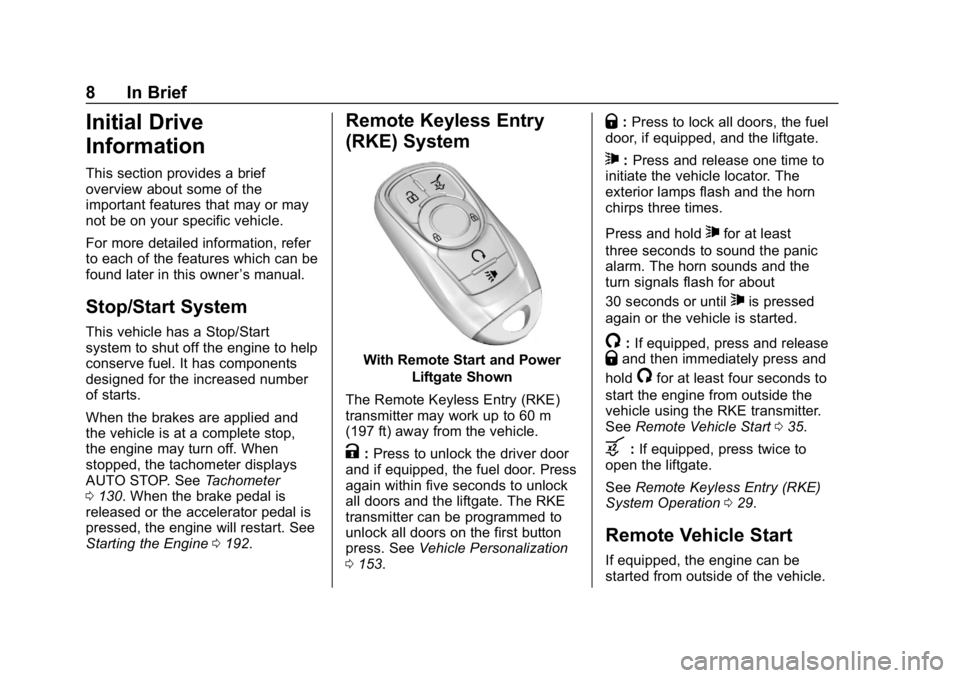
With Remote Start and Power
Liftgate Shown
The Remote Keyless Entry (RKE)
transmitter may work up to 60 m
(197 ft) away from the vehicle.
K: Press to unlock the driver door
and if equipped, the fuel door. Press
again within five seconds to unlock
all doors and the liftgate. The RKE
transmitter can be programmed to
unlock all doors on the first button
press. See Vehicle Personalization
0 153.
Q:Press to lock all doors, the fuel
door, if equipped, and the liftgate.
7: Press and release one time to
initiate the vehicle locator. The
exterior lamps flash and the horn
chirps three times.
Press and hold
7for at least
three seconds to sound the panic
alarm. The horn sounds and the
turn signals flash for about
30 seconds or until
7is pressed
again or the vehicle is started.
/: If equipped, press and releaseQand then immediately press and
hold
/for at least four seconds to
start the engine from outside the
vehicle using the RKE transmitter.
See Remote Vehicle Start 035.
b:If equipped, press twice to
open the liftgate.
See Remote Keyless Entry (RKE)
System Operation 029.
Remote Vehicle Start
If equipped, the engine can be
started from outside of the vehicle.
Page 20 of 391
Buick Regal Owner Manual (GMNA-Localizing-U.S./Canada-12163021) -
2019 - CRC - 11/14/18
In Brief 19
Climate Controls
Dual Automatic Climate Control System
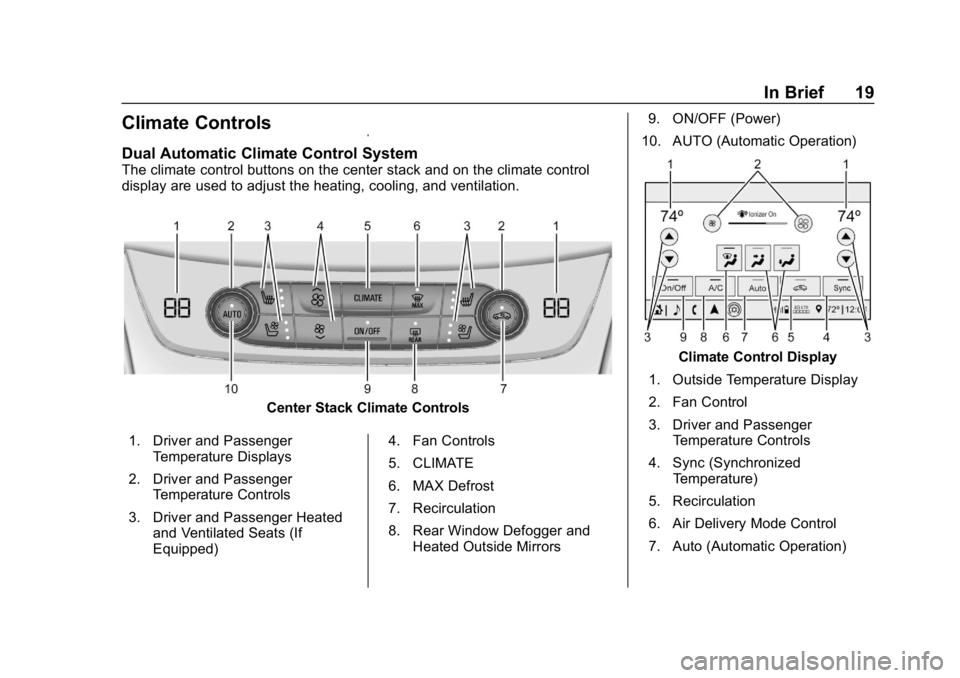
The climate control buttons on the center stack and on the climate control
display are used to adjust the heating, cooling, and ventilation.
Center Stack Climate Controls
1. Driver and Passenger Temperature Displays
2. Driver and Passenger Temperature Controls
3. Driver and Passenger Heated and Ventilated Seats (If
Equipped) 4. Fan Controls
5. CLIMATE
6. MAX Defrost
7. Recirculation
8. Rear Window Defogger and
Heated Outside Mirrors 9. ON/OFF (Power)
10. AUTO (Automatic Operation)
Climate Control Display
1. Outside Temperature Display
2. Fan Control
3. Driver and Passenger Temperature Controls
4. Sync (Synchronized Temperature)
5. Recirculation
6. Air Delivery Mode Control
7. Auto (Automatic Operation)
Page 22 of 391
Buick Regal Owner Manual (GMNA-Localizing-U.S./Canada-12163021) -
2019 - CRC - 11/14/18
In Brief 21
Cruise Control
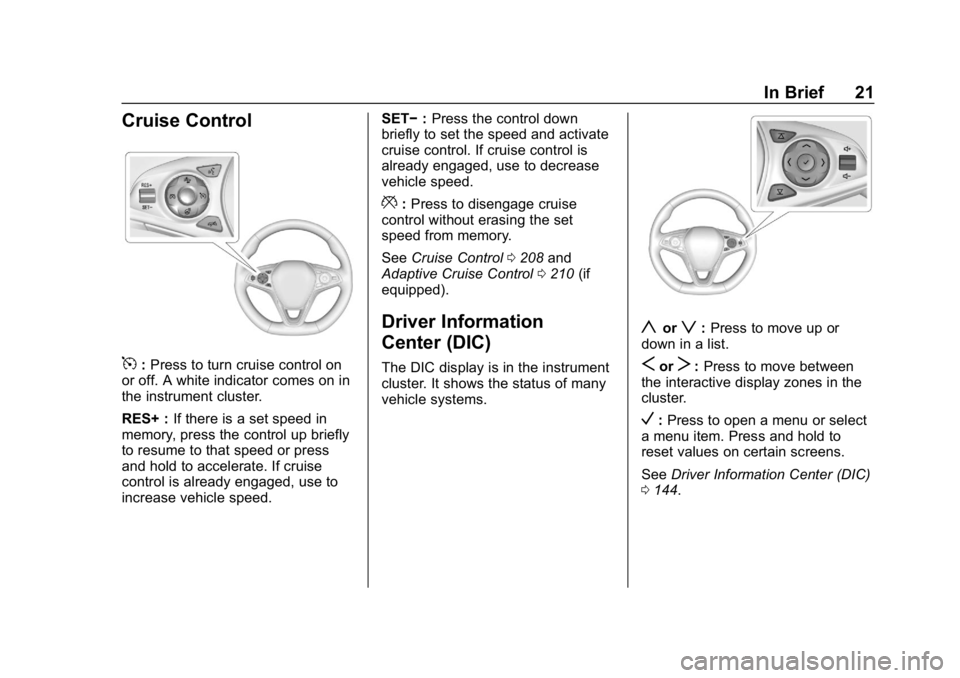
5:Press to turn cruise control on
or off. A white indicator comes on in
the instrument cluster.
RES+ : If there is a set speed in
memory, press the control up briefly
to resume to that speed or press
and hold to accelerate. If cruise
control is already engaged, use to
increase vehicle speed. SET−
:Press the control down
briefly to set the speed and activate
cruise control. If cruise control is
already engaged, use to decrease
vehicle speed.
*: Press to disengage cruise
control without erasing the set
speed from memory.
See Cruise Control 0208 and
Adaptive Cruise Control 0210 (if
equipped).
Driver Information
Center (DIC)
The DIC display is in the instrument
cluster. It shows the status of many
vehicle systems.
yorz: Press to move up or
down in a list.
SorT: Press to move between
the interactive display zones in the
cluster.
V: Press to open a menu or select
a menu item. Press and hold to
reset values on certain screens.
See Driver Information Center (DIC)
0 144.
Page 23 of 391
Buick Regal Owner Manual (GMNA-Localizing-U.S./Canada-12163021) -
2019 - CRC - 11/14/18
22 In Brief
Forward Collision Alert
(FCA) System
If equipped, FCA may help avoid or
reduce the harm caused by
front-end crashes. FCA provides a
green indicator,
V, when a vehicle
is detected ahead. This indicator
displays amber if you follow a
vehicle much too closely. When
approaching a vehicle ahead too
quickly, FCA provides a red flashing
alert on the windshield and rapidly
beeps.
See Forward Collision Alert (FCA)
System 0221.
Forward Automatic
Braking (FAB)
If the vehicle has Adaptive Cruise
Control (ACC), it also has FAB,
which includes Intelligent Brake
Assist (IBA). When the system
detects a vehicle ahead in your path
that is traveling in the same
direction that you may be about to
crash into, it can provide a boost to
braking or automatically brake the vehicle. This can help avoid or
lessen the severity of crashes when
driving in a forward gear.
See
Forward Automatic Braking
(FAB) 0223.
Front Pedestrian Braking
(FPB) System
If equipped, the FPB system may
help avoid or reduce the harm
caused by front-end crashes with
nearby pedestrians when driving in
a forward gear. FPB displays an
amber indicator,
~, when a nearby
pedestrian is detected directly
ahead. When approaching a
detected pedestrian too quickly,
FPB provides a red flashing alert on
the windshield and rapidly beeps.
FPB can provide a boost to braking
or automatically brake the vehicle.
See Front Pedestrian Braking (FPB)
System 0225.
Lane Keep Assist (LKA)
If equipped, LKA may help avoid
crashes due to unintentional lane
departures. It may assist by gently
turning the steering wheel if the
vehicle approaches a detected lane
marking without using a turn signal
in that direction. It may also provide
a Lane Departure Warning (LDW)
alert as the lane marking is crossed.
The system will not assist or alert if
it detects that you are actively
steering. Override LKA by turning
the steering wheel. LKA uses a
camera to detect lane markings
between 60 km/h (37 mph) and
180 km/h (112 mph).
See Lane Departure Warning (LDW)
0 229 andLane Keep Assist (LKA)
0 229.
Lane Change Alert (LCA)
If equipped, the LCA system is a
lane-changing aid that assists
drivers with avoiding lane change
crashes that occur with moving
vehicles in the side blind zone (or
spot) areas or with vehicles rapidly
Page 24 of 391
Buick Regal Owner Manual (GMNA-Localizing-U.S./Canada-12163021) -
2019 - CRC - 11/14/18
In Brief 23
approaching these areas from
behind. The LCA warning display
will light up in the corresponding
outside mirror and will flash if the
turn signal is on. The Side Blind
Zone Alert (SBZA) system is
included as part of the LCA system.
SeeSide Blind Zone Alert (SBZA)
0 227 andLane Change Alert (LCA)
0 227.
Rear Vision
Camera (RVC)
RVC displays a view of the area
behind the vehicle on the
infotainment display when the
vehicle is shifted into R (Reverse) to
aid with parking and low-speed
backing maneuvers.
See Assistance Systems for Parking
or Backing 0219.
Rear Cross Traffic Alert
(RCTA) System
If equipped, the RCTA system
shows a triangle with an arrow on
the infotainment display to warn of traffic behind your vehicle that may
cross your vehicle's path while in
R (Reverse). In addition, beeps will
sound, or the driver seat will pulse.
See
Assistance Systems for Parking
or Backing 0219.
Park Assist
If equipped, Rear Park Assist (RPA)
uses sensors on the rear bumper to
assist with parking and avoiding
objects while in R (Reverse).
It operates at speeds less than
8 km/h (5 mph). RPA may show a
warning triangle on the infotainment
display and a graphic on the
instrument cluster to provide the
object distance. In addition, multiple
beeps may occur if very close to an
object.
The vehicle may also have the Front
Park Assist (FPA) system.
See Assistance Systems for Parking
or Backing 0219.
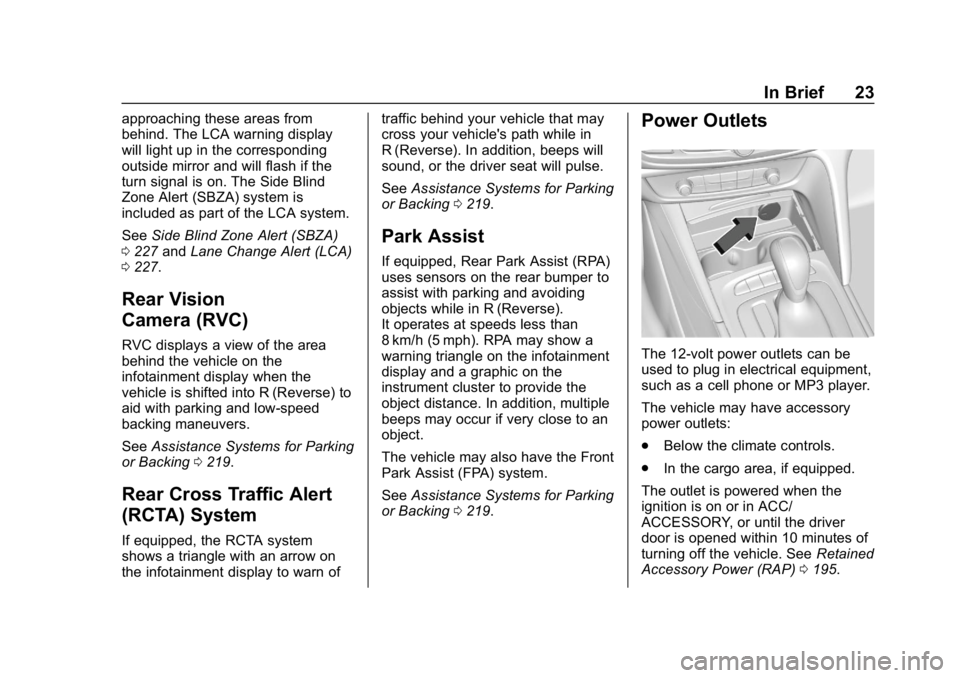
Power Outlets
The 12-volt power outlets can be
used to plug in electrical equipment,
such as a cell phone or MP3 player.
The vehicle may have accessory
power outlets:
.
Below the climate controls.
. In the cargo area, if equipped.
The outlet is powered when the
ignition is on or in ACC/
ACCESSORY, or until the driver
door is opened within 10 minutes of
turning off the vehicle. See Retained
Accessory Power (RAP) 0195.
Page 26 of 391
Buick Regal Owner Manual (GMNA-Localizing-U.S./Canada-12163021) -
2019 - CRC - 11/14/18
In Brief 25
If an object is in the path of the
sunroof while it is closing, the
automatic reversal feature will
detect the object and stop the
sunroof. The sunroof will then return
to the full-open or vent position.
Vent (If Equipped) :Press
E(2) to
vent the sunroof. Press
g(2) to
close the sunroof vent.
Sunshade
If equipped with a manual
sunshade, slide the sunshade to
open or close it. The sunshade is
always open when the sunroof
is open.
Power Sunshade Switch
Open/Close (If Equipped) :
Press
Q(2) to open the power
sunshade. Press
Q(2) to close
the power sunshade.
The sunroof has an automatic
reversal feature.
See Sunroof 055.
Performance and
Maintenance
Traction Control/
Electronic Stability
Control
The Traction Control System (TCS)
limits wheel slip. The system turns
on automatically every time the
vehicle is started.
The StabiliTrak/Electronic Stability
Control (ESC) system assists with
directional control of the vehicle in
difficult driving conditions. The
system turns on automatically every
time the vehicle is started.
.
To turn off TCS, press and
release
gon the center stack.
iilluminates and the
appropriate Driver Information
Center (DIC) message may
display.
. To turn TCS on again, press and
release
g. .
To turn off both TCS and
StabiliTrak/ESC, press and
hold
guntiliandgilluminate
in the instrument cluster. A DIC
message may display.
. Press and release
gto turn on
both systems.
See Traction Control/Electronic
Stability Control 0205.
Tire Pressure Monitor
This vehicle may have a Tire
Pressure Monitor System (TPMS).
The low tire pressure warning light
alerts to a significant loss in
pressure of one of the vehicle's
tires. If the warning light comes on,
stop as soon as possible and inflate
the tires to the recommended
Page 28 of 391
Buick Regal Owner Manual (GMNA-Localizing-U.S./Canada-12163021) -
2019 - CRC - 11/14/18
In Brief 27
Engine Oil Life System
The engine oil life system calculates
engine oil life based on vehicle use
and displays the CHANGE ENGINE
OIL SOON message when it is time
to change the engine oil and filter.
The oil life system should be reset
to 100% only following an oil
change.
Resetting the Oil Life System1. Using the DIC controls on the right side of the steering wheel,
display REMAINING OIL LIFE
on the DIC. See Driver
Information Center (DIC) 0144.
When remaining oil life is low,
the CHANGE ENGINE OIL
SOON message will appear on
the display.
2. Press
Von the DIC controls
and hold down for a few
seconds to clear the CHANGE
ENGINE OIL SOON message
and reset the oil life at 100%.
Be careful not to reset the oil
life display accidentally at any
time other than after the oil is changed. It cannot be reset
accurately until the next oil
change.
See Engine Oil Life System 0253.
Driving for Better Fuel
Economy
Driving habits can affect fuel
mileage. Here are some driving tips
to get the best fuel economy
possible:
.
Set the climate controls to the
desired temperature after the
engine is started, or turn them
off when not required.
. Avoid fast starts and accelerate
smoothly.
. Brake gradually and avoid
abrupt stops.
. Avoid idling the engine for long
periods of time.
. When road and weather
conditions are appropriate, use
cruise control. .
Always follow posted speed
limits or drive more slowly when
conditions require.
. Keep vehicle tires properly
inflated.
. Combine several trips into a
single trip.
. Replace the vehicle's tires with
the same TPC Spec number
molded into the tire's sidewall
near the size.
. Follow recommended scheduled
maintenance.
Roadside Assistance
Program
U.S.: 1-800-252-1112
TTY Users (U.S. Only):
1-888-889-2438
Canada: 1-800-268-6800
New Buick owners are automatically
enrolled in the Roadside Assistance
Program.
See Roadside Assistance Program
0 356.