2019 BUICK ENCORE vin
[x] Cancel search: vinPage 25 of 333

Buick Encore Owner Manual (GMNA-Localizing-U.S./Canada/Mexico-
12163005) - 2019 - crc - 9/17/18
24 In Brief
Regular Unleaded Fuel
Use only Regular 87 octane—
(R+M)/2 —or higher unleaded
gasoline in your vehicle. TOP TIER
Detergent Gasoline is
recommended. Do not use gasoline
with an octane rating lower as it will
result in reduced performance and
lower fuel economy. See
Recommended Fuel 0196.
E85 or FlexFuel
No E85 or FlexFuel
Gasoline-ethanol fuel blends greater
than E15 (15% ethanol by volume),
such as E85, cannot be used in this
vehicle.
Engine Oil Life System
The engine oil life system calculates
engine oil life based on vehicle use
and displays the CHANGE ENGINE
OIL SOON DIC message when it is
necessary to change the engine oil
and filter.
Remember, the oil life display must
be reset after each oil change. It will
not reset itself. Also, be careful not
to reset the oil life display
accidentally at any time other than
when the oil has just been changed.
It cannot be reset accurately until
the next oil change.
Resetting the Oil Life System
1. Press the MENU button to show Remaining Oil Life on the
display. This display shows an
estimate of the oil’s remaining
useful life. If 99% is displayed,
that means that 99% of the
current oil life remains.
2. To reset the engine oil life system, press the SET/CLR
button while the oil life display
is active. After a few seconds, there will be a single chime and
the oil life will be reset
to 100%.
Be careful not to reset the oil life
display accidentally at any time
other than after the oil is changed.
It cannot be reset accurately.
See Engine Oil Life System 0211.
Driving for Better Fuel
Economy
Driving habits can affect fuel
mileage. Here are some driving tips
to get the best fuel economy
possible:
.
Set the climate controls to the
desired temperature after the
engine is started, or turn them
off when not required.
. Avoid fast starts and accelerate
smoothly.
. Brake gradually and avoid
abrupt stops.
. Avoid idling the engine for long
periods of time.
Page 27 of 333

Buick Encore Owner Manual (GMNA-Localizing-U.S./Canada/Mexico-
12163005) - 2019 - crc - 9/17/18
26 Keys, Doors, and Windows
Keys, Doors, and
Windows
Keys and Locks
Keys . . . . . . . . . . . . . . . . . . . . . . . . . . . 26
Remote Keyless Entry (RKE)System . . . . . . . . . . . . . . . . . . . . . . . 27
Remote Keyless Entry (RKE) System Operation . . . . . . . . . . . . 27
Remote Vehicle Start . . . . . . . . . . 33
Door Locks . . . . . . . . . . . . . . . . . . . . 35
Power Door Locks . . . . . . . . . . . . . 36
Delayed Locking . . . . . . . . . . . . . . . 36
Automatic Door Locks . . . . . . . . . 36
Lockout Protection . . . . . . . . . . . . . 36
Safety Locks . . . . . . . . . . . . . . . . . . . 37
Doors
Liftgate . . . . . . . . . . . . . . . . . . . . . . . . 38
Vehicle Security
Vehicle Security . . . . . . . . . . . . . . . . 39
Vehicle Alarm System . . . . . . . . . 39
Immobilizer . . . . . . . . . . . . . . . . . . . . 40
Immobilizer Operation . . . . . . . . . 40
Exterior Mirrors
Convex Mirrors . . . . . . . . . . . . . . . . 41
Power Mirrors . . . . . . . . . . . . . . . . . . 41 Folding Mirrors . . . . . . . . . . . . . . . . . 42
Heated Mirrors . . . . . . . . . . . . . . . . . 42
Reverse Tilt Mirrors . . . . . . . . . . . . 42
Interior Mirrors
Interior Rearview Mirrors . . . . . . . 42
Manual Rearview Mirror . . . . . . . . 42
Automatic Dimming Rearview
Mirror . . . . . . . . . . . . . . . . . . . . . . . . . 43
Windows
Windows . . . . . . . . . . . . . . . . . . . . . . . 43
Power Windows . . . . . . . . . . . . . . . 43
Sun Visors . . . . . . . . . . . . . . . . . . . . . 45
Roof
Sunroof . . . . . . . . . . . . . . . . . . . . . . . . 45
Keys and Locks
Keys
{Warning
Leaving children in a vehicle with
a Remote Keyless Entry (RKE)
transmitter is dangerous and
children or others could be
seriously injured or killed. They
could operate the power windows
or other controls or make the
vehicle move. The windows will
function with the RKE transmitter
in the vehicle, and children or
others could be caught in the path
of a closing window. Do not leave
children in a vehicle with an RKE
transmitter.
Page 29 of 333

Buick Encore Owner Manual (GMNA-Localizing-U.S./Canada/Mexico-
12163005) - 2019 - crc - 9/17/18
28 Keys, Doors, and Windows
With Remote Start Shown
The following may be available:
Q: Press to lock all doors and the
fuel door, if equipped.
The turn signal indicators may flash
and/or the horn may sound on the
second press to indicate locking.
See Vehicle Personalization 0130.
If the driver door is open when
Qis
pressed and Unlocked Door
Anti-Lockout is enabled, all doors
will lock and then the driver door will immediately unlock. See
Vehicle
Personalization 0130. If the
passenger door is open when
Qis
pressed, all doors lock.
Pressing
Qmay also arm the
theft-deterrent system. See Vehicle
Alarm System 039.
K:Press to unlock the driver door
and the fuel door, if equipped. Press
again within five seconds to unlock
all doors. The RKE transmitter can
be programmed to unlock all doors
on the first button press. See
Vehicle Personalization 0130.
The turn signal indicators will flash
to indicate unlocking. See Vehicle
Personalization 0130.
Pressing
Kwill disarm the
theft-deterrent system. See Vehicle
Alarm System 039.
7:Press and release one time to
initiate vehicle locator. The exterior
lamps flash and the horn chirps
three times. Press and hold
7for at
least three seconds to sound the
panic alarm. The horn sounds and the turn signals flash for
30 seconds, or until
7is pressed
again or the vehicle is started.
/: If equipped, pressQand then
press and hold
/for at least
four seconds to start the engine
from outside the vehicle using the
RKE transmitter. See Remote
Vehicle Start 033.
Keyless Access Operation
The Keyless Access system lets
you lock and unlock the doors and
access the liftgate without removing
the RKE transmitter from your
pocket, purse, briefcase, etc. The
RKE transmitter must be within 1 m
(3 ft) of the liftgate or door being
opened. There is a button on each
door handle.
Keyless Access can be
programmed to unlock all doors on
the first lock/unlock press from the
driver door. See Vehicle
Personalization 0130.
Page 36 of 333

Buick Encore Owner Manual (GMNA-Localizing-U.S./Canada/Mexico-
12163005) - 2019 - crc - 9/17/18
Keys, Doors, and Windows 35
.Two remote vehicle starts, or a
single remote start with an
extension, have already
been used.
. The vehicle is not in P (Park).
Door Locks
{Warning
Unlocked doors can be
dangerous.
. Passengers, especially
children, can easily open
the doors and fall out of a
moving vehicle. The doors
can be unlocked and
opened while the vehicle is
moving. The chance of
being thrown out of the
vehicle in a crash is
increased if the doors are
not locked. So, all
passengers should wear
seat belts properly and the
(Continued)
Warning (Continued)
doors should be locked
whenever the vehicle is
driven.
. Young children who get into
unlocked vehicles may be
unable to get out. A child
can be overcome by
extreme heat and can suffer
permanent injuries or even
death from heat stroke.
Always lock the vehicle
whenever leaving it.
. Outsiders can easily enter
through an unlocked door
when you slow down or stop
the vehicle. Locking the
doors can help prevent this
from happening.
To lock or unlock the doors from the
outside:
. Press
KorQon the Remote
Keyless Entry (RKE) transmitter.
See Remote Keyless Entry
(RKE) System Operation 027. .
Use the key in the driver door.
To lock or unlock the doors from
inside the vehicle:
. Press
KorQon the power door
lock switch.
. Pulling an interior door handle
will unlock the door. Pulling the
door handle again unlatches it.
Keyless Access
The RKE transmitter must be within
1 m (3 ft) of the liftgate or door being
opened.
Press the button on the door handle
to open. See “Keyless Access
Operation” underRemote Keyless
Entry (RKE) System Operation 027.
Free-Turning Locks
The door key lock cylinder turns
freely when either the wrong key is
used, or the correct key is not fully
inserted. The free-turning door lock
feature prevents the lock from being
forced open. To reset the lock, turn
it to the vertical position with the
correct key fully inserted. Remove
the key and insert it again. If this
Page 50 of 333

Buick Encore Owner Manual (GMNA-Localizing-U.S./Canada/Mexico-
12163005) - 2019 - crc - 9/17/18
Seats and Restraints 49
Rear Seats
The rear seats have head restraints
in the outboard seating positions
that can be lowered for better
visibility when the rear seat is
unoccupied.
To lower the head restraint, press
the button, located on the top of the
seatback, and push the head
restraint down.
When an occupant is in the seat,
always return the head restraint to
the upright position. Pull the head
restraint up and push it rearwarduntil it locks into place. Push and
pull on the head restraint to make
sure that it is locked.
If you are installing a child restraint
in the rear seat, see
“Securing a
Child Restraint Designed for the
LATCH System” underLower
Anchors and Tethers for Children
(LATCH System) 087.
Front Seats
Seat Adjustment
{Warning
You can lose control of the
vehicle if you try to adjust a driver
seat while the vehicle is moving.
Adjust the driver seat only when
the vehicle is not moving.
To adjust a manual seat:
1. Pull the handle at the front of the seat.
Page 51 of 333

Buick Encore Owner Manual (GMNA-Localizing-U.S./Canada/Mexico-
12163005) - 2019 - crc - 9/17/18
50 Seats and Restraints
2. Slide the seat to the desiredposition and release the
handle.
3. Try to move the seat back and forth to be sure it is locked in
place.
Power Seat Adjustment
{Warning
The power seats will work with
the ignition off. Children could
operate the power seats and be
injured. Never leave children
alone in the vehicle.To adjust a power seat:
.Move the seat forward or
rearward by sliding the control
forward or rearward.
. Raise or lower the front part of
the seat cushion by moving the
front of the control up or down.
. Raise or lower the entire seat by
moving the rear of the control up
or down.
To adjust the seatback, see
Reclining Seatbacks 050.
To adjust the lumbar support, see
Lumbar Adjustment 050.
Lumbar Adjustment
If available, press the front or rear of
the switch to increase or decrease
lumbar support. Release the switch
when the desired level of support is
reached.
Reclining Seatbacks
{Warning
If either seatback is not locked, it
could move forward in a sudden
stop or crash. That could cause
(Continued)
Page 52 of 333

Buick Encore Owner Manual (GMNA-Localizing-U.S./Canada/Mexico-
12163005) - 2019 - crc - 9/17/18
Seats and Restraints 51
Warning (Continued)
injury to the person sitting there.
Always push and pull on the
seatbacks to be sure they are
locked.
Manual Seat Shown, Power SeatSimilar
To recline the seatback: 1. Lift the lever. If necessary, move the seat
belt out of the way to access
the lever. 2. Move the seatback to the
desired position, then release
the lever to lock the seatback
in place.
3. Push and pull on the seatback to make sure it is locked.
To return the seatback to an upright
position: 1. Lift the lever fully without applying pressure to the
seatback, and the seatback
returns to the upright position.
2. Push and pull on the seatback to make sure it is locked.
{Warning
Sitting in a reclined position when
the vehicle is in motion can be
dangerous. Even when buckled
up, the seat belts cannot do
their job.
(Continued)
Warning (Continued)
The shoulder belt will not be
against your body. Instead, it will
be in front of you. In a crash, you
could go into it, receiving neck or
other injuries.
The lap belt could go up over
your abdomen. The belt forces
would be there, not at your pelvic
bones. This could cause serious
internal injuries.
For proper protection when the
vehicle is in motion, have the
seatback upright. Then sit well
back in the seat and wear the
seat belt properly.
Page 53 of 333
Buick Encore Owner Manual (GMNA-Localizing-U.S./Canada/Mexico-
12163005) - 2019 - crc - 9/17/18
52 Seats and Restraints
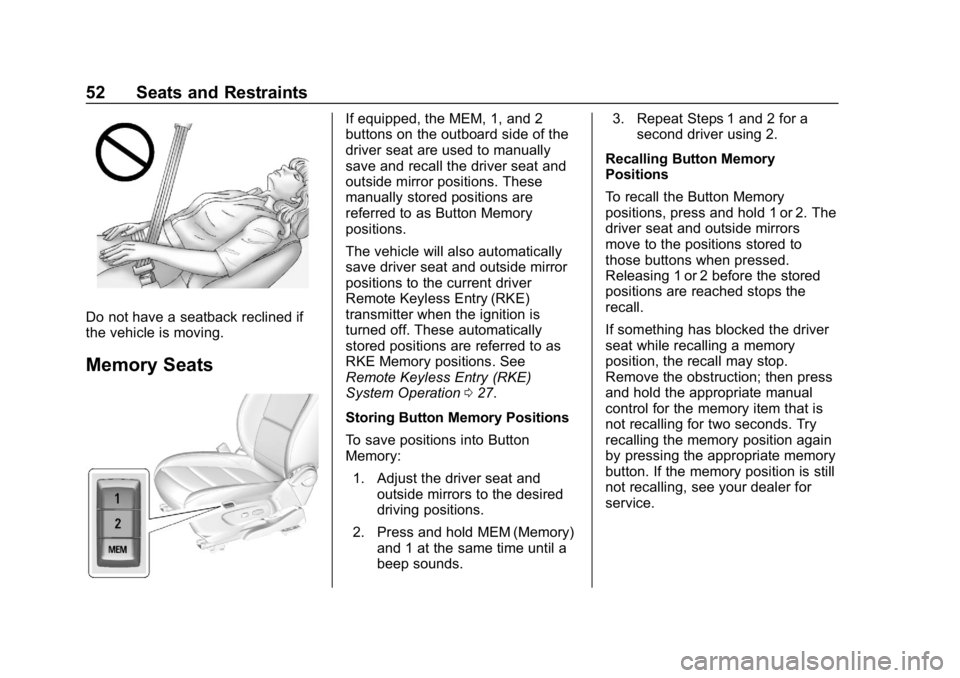
Do not have a seatback reclined if
the vehicle is moving.
Memory Seats
If equipped, the MEM, 1, and 2
buttons on the outboard side of the
driver seat are used to manually
save and recall the driver seat and
outside mirror positions. These
manually stored positions are
referred to as Button Memory
positions.
The vehicle will also automatically
save driver seat and outside mirror
positions to the current driver
Remote Keyless Entry (RKE)
transmitter when the ignition is
turned off. These automatically
stored positions are referred to as
RKE Memory positions. See
Remote Keyless Entry (RKE)
System Operation027.
Storing Button Memory Positions
To save positions into Button
Memory: 1. Adjust the driver seat and outside mirrors to the desired
driving positions.
2. Press and hold MEM (Memory) and 1 at the same time until a
beep sounds. 3. Repeat Steps 1 and 2 for a
second driver using 2.
Recalling Button Memory
Positions
To recall the Button Memory
positions, press and hold 1 or 2. The
driver seat and outside mirrors
move to the positions stored to
those buttons when pressed.
Releasing 1 or 2 before the stored
positions are reached stops the
recall.
If something has blocked the driver
seat while recalling a memory
position, the recall may stop.
Remove the obstruction; then press
and hold the appropriate manual
control for the memory item that is
not recalling for two seconds. Try
recalling the memory position again
by pressing the appropriate memory
button. If the memory position is still
not recalling, see your dealer for
service.