2019 BUICK CASCADA manual mode
[x] Cancel search: manual modePage 112 of 307

Buick Cascada Owner Manual (GMNA-Localizing-U.S.-12461774) - 2019 -
CRC - 3/26/18
Instruments and Controls 111
High-Beam On Light
The high‐beam on light comes on
when the high-beam headlamps are
in use.
SeeHeadlamp High/Low-Beam
Changer 0122 for more information.
Adaptive Forward
Lighting (AFL) Light
This light should come on briefly as
the vehicle is started. If it does not
come on, have the vehicle serviced
by your dealer. This light comes on solid when
there is a problem with the AFL
system. It flashes when the system
is switching between lighting
modes. See
Adaptive Forward
Lighting (AFL) 0123.
Front Fog Lamp Light
If equipped, this light comes on
when the fog lamps are on.
The light goes out when the fog
lamps are turned off. See Fog
Lamps 0125.
Lamps On Reminder
This light comes on when the
exterior lamps are in use. See
Exterior Lamp Controls 0121.
Cruise Control Light
For vehicles with cruise control, the
cruise control light is white when the
cruise control is on and ready, and
turns green when the cruise control
is set and active.
The light turns off when the cruise
control is turned off. See Cruise
Control 0160.
Page 122 of 307

Buick Cascada Owner Manual (GMNA-Localizing-U.S.-12461774) - 2019 -
CRC - 3/26/18
Lighting 121
Lighting
Exterior Lighting
Exterior Lamp Controls . . . . . . . 121
Headlamp High/Low-BeamChanger . . . . . . . . . . . . . . . . . . . . 122
Flash-to-Pass . . . . . . . . . . . . . . . . 122
Daytime Running Lamps (DRL) . . . . . . . . . . . . . . . 122
Automatic Headlamp System . . . . . . . . . . . . . . . . . . . . . . 123
Adaptive Forward Lighting (AFL) . . . . . . . . . . . . . . . 123
Headlamp Leveling Control . . . 124
Hazard Warning Flashers . . . . . 124
Turn and Lane-Change Signals . . . . . . . . . . . . . . . . . . . . . . 124
Fog Lamps . . . . . . . . . . . . . . . . . . . 125
Interior Lighting
Instrument Panel Illumination Control . . . . . . . . . . . . . . . . . . . . . . 125
Courtesy Lamps . . . . . . . . . . . . . . 126
Dome Lamps . . . . . . . . . . . . . . . . . 126
Reading Lamps . . . . . . . . . . . . . . 126
Lighting Features
Entry Lighting . . . . . . . . . . . . . . . . 126
Exit Lighting . . . . . . . . . . . . . . . . . . 126
Battery Load Management . . . 127
Battery Power Protection . . . . . 127
Exterior Lighting Battery Saver . . . . . . . . . . . . . . . . . . . . . . . 127Exterior Lighting
Exterior Lamp Controls
The exterior lamp control is to the
left of the steering column on the
instrument panel.
There are four positions:
O: Turns the exterior lamps off and
deactivates the AUTO mode. Turn
to
Oagain to reactivate the
AUTO mode.
In Canada, the headlamps will
automatically reactivate when the
vehicle is shifted out of P (Park).
Page 131 of 307

Buick Cascada Owner Manual (GMNA-Localizing-U.S.-12461774) - 2019 -
CRC - 3/26/18
130 Climate Controls
Climate Controls
Climate Control Systems
Dual Automatic ClimateControl System . . . . . . . . . . . . . 130
Air Vents
Air Vents . . . . . . . . . . . . . . . . . . . . . 133
Maintenance
Passenger Compartment AirFilter . . . . . . . . . . . . . . . . . . . . . . . . 134
Service . . . . . . . . . . . . . . . . . . . . . . . 134
Climate Control
Systems
Dual Automatic Climate
Control System
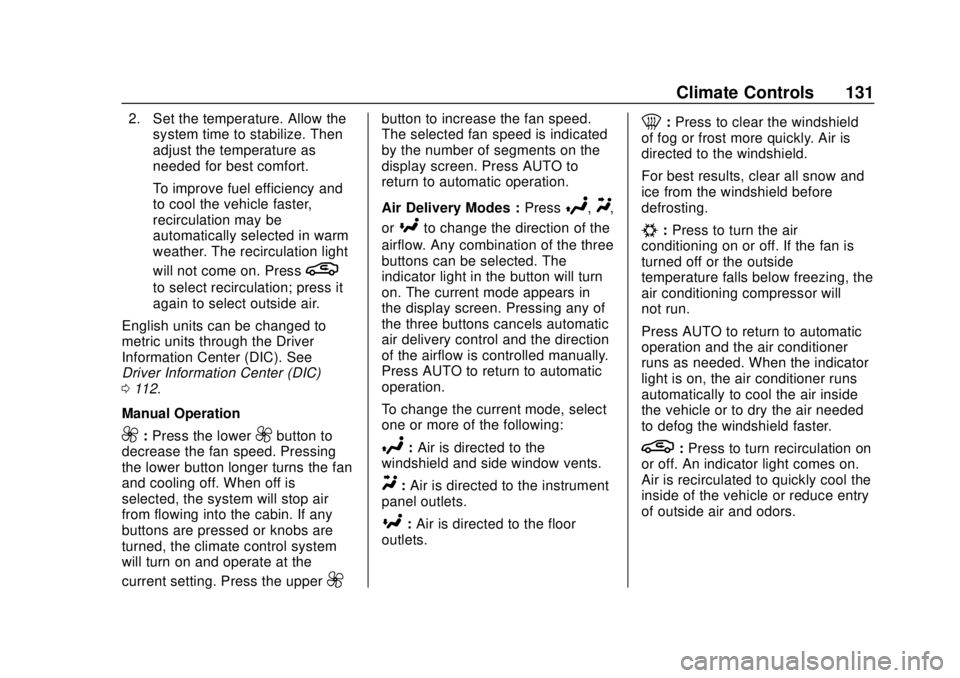
The heating, cooling, and ventilation
for the vehicle can be controlled
with this system.
1. Driver and Passenger Heated
Seats (If Equipped)
2. Driver and Passenger Temperature Controls
3. AUTO (Automatic Operation) 4. Air Delivery Modes
5. Fan Controls
6. Defrost
7. Rear Window Defogger
8. Recirculation
9. Heated Steering Wheel (If
Equipped)
10. Air Conditioning
Automatic Operation
The system automatically controls
the fan speed, air delivery, air
conditioning, and recirculation in
order to heat or cool the vehicle to
the desired temperature.
When AUTO is lit, all four functions
operate automatically. Each function
can also be manually set and the
setting is displayed. Functions not
manually set will continue to be
automatically controlled, even if the
AUTO indicator is not lit.
For automatic operation: 1. Press AUTO.
Page 132 of 307
Buick Cascada Owner Manual (GMNA-Localizing-U.S.-12461774) - 2019 -
CRC - 3/26/18
Climate Controls 131
2. Set the temperature. Allow thesystem time to stabilize. Then
adjust the temperature as
needed for best comfort.
To improve fuel efficiency and
to cool the vehicle faster,
recirculation may be
automatically selected in warm
weather. The recirculation light
will not come on. Press
L
to select recirculation; press it
again to select outside air.
English units can be changed to
metric units through the Driver
Information Center (DIC). See
Driver Information Center (DIC)
0 112.
Manual Operation
9: Press the lower9button to
decrease the fan speed. Pressing
the lower button longer turns the fan
and cooling off. When off is
selected, the system will stop air
from flowing into the cabin. If any
buttons are pressed or knobs are
turned, the climate control system
will turn on and operate at the
current setting. Press the upper
9
button to increase the fan speed.
The selected fan speed is indicated
by the number of segments on the
display screen. Press AUTO to
return to automatic operation.
Air Delivery Modes : Press
%,Y,
or
[to change the direction of the
airflow. Any combination of the three
buttons can be selected. The
indicator light in the button will turn
on. The current mode appears in
the display screen. Pressing any of
the three buttons cancels automatic
air delivery control and the direction
of the airflow is controlled manually.
Press AUTO to return to automatic
operation.
To change the current mode, select
one or more of the following:
%: Air is directed to the
windshield and side window vents.
Y: Air is directed to the instrument
panel outlets.
[: Air is directed to the floor
outlets.
0: Press to clear the windshield
of fog or frost more quickly. Air is
directed to the windshield.
For best results, clear all snow and
ice from the windshield before
defrosting.
#: Press to turn the air
conditioning on or off. If the fan is
turned off or the outside
temperature falls below freezing, the
air conditioning compressor will
not run.
Press AUTO to return to automatic
operation and the air conditioner
runs as needed. When the indicator
light is on, the air conditioner runs
automatically to cool the air inside
the vehicle or to dry the air needed
to defog the windshield faster.
L: Press to turn recirculation on
or off. An indicator light comes on.
Air is recirculated to quickly cool the
inside of the vehicle or reduce entry
of outside air and odors.
Page 136 of 307

Buick Cascada Owner Manual (GMNA-Localizing-U.S.-12461774) - 2019 -
CRC - 3/26/18
Driving and Operating 135
Driving and
Operating
Driving Information
Distracted Driving . . . . . . . . . . . . 136
Defensive Driving . . . . . . . . . . . . . 136
Drunk Driving . . . . . . . . . . . . . . . . . 137
Control of a Vehicle . . . . . . . . . . . 137
Braking . . . . . . . . . . . . . . . . . . . . . . . 137
Steering . . . . . . . . . . . . . . . . . . . . . . 137
Off-Road Recovery . . . . . . . . . . . 138
Loss of Control . . . . . . . . . . . . . . . 138
Driving on Wet Roads . . . . . . . . 139
Hill and Mountain Roads . . . . . 140
Winter Driving . . . . . . . . . . . . . . . . 140
If the Vehicle Is Stuck . . . . . . . . 142
Vehicle Load Limits . . . . . . . . . . . 142
Starting and Operating
New Vehicle Break-In . . . . . . . . . 146
Ignition Positions . . . . . . . . . . . . . 146
Starting the Engine . . . . . . . . . . . 148
Retained AccessoryPower (RAP) . . . . . . . . . . . . . . . . 149
Shifting Into Park . . . . . . . . . . . . . 150
Shifting out of Park . . . . . . . . . . . 150
Parking over Things That Burn . . . . . . . . . . . . . . . . . . . 151
Engine Exhaust
Engine Exhaust . . . . . . . . . . . . . . 151
Running the Vehicle WhileParked . . . . . . . . . . . . . . . . . . . . . . 152
Automatic Transmission
Automatic Transmission . . . . . . 152
Manual Mode . . . . . . . . . . . . . . . . . 154
Brakes
Antilock BrakeSystem (ABS) . . . . . . . . . . . . . . . 155
Electric Parking Brake . . . . . . . . 156
Brake Assist . . . . . . . . . . . . . . . . . . 157
Hill Start Assist (HSA) . . . . . . . . 158
Ride Control Systems
Traction Control/Electronic Stability Control . . . . . . . . . . . . . 158
Cruise Control
Cruise Control . . . . . . . . . . . . . . . . 160
Driver Assistance Systems
Driver Assistance Systems . . . 163
Assistance Systems forParking or Backing . . . . . . . . . . 164
Forward Collision Alert (FCA) System . . . . . . . . . . . . . . . . . . . . . . 167
Lane Departure Warning (LDW) . . . . . . . . . . . . . 168
Fuel
Top Tier Fuel . . . . . . . . . . . . . . . . . 170
Recommended Fuel . . . . . . . . . . 170
Prohibited Fuels . . . . . . . . . . . . . . 170
Fuels in Foreign Countries . . . 171
Fuel Additives . . . . . . . . . . . . . . . . 171
Filling the Tank . . . . . . . . . . . . . . . 171
Filling a Portable FuelContainer . . . . . . . . . . . . . . . . . . . 173
Trailer Towing
General TowingInformation . . . . . . . . . . . . . . . . . . 173
Conversions and Add-Ons
Add-On ElectricalEquipment . . . . . . . . . . . . . . . . . . 174
Page 155 of 307

Buick Cascada Owner Manual (GMNA-Localizing-U.S.-12461774) - 2019 -
CRC - 3/26/18
154 Driving and Operating
Caution (Continued)
the vehicle warranty. Be sure the
engine is not running at high
speed when shifting the vehicle.
D : This position is for normal
driving. It provides the best fuel
economy. If more power is needed
for passing, and the vehicle is:
. Going less than 56 km/h
(35 mph), push the accelerator
pedal about halfway down.
. Going about 56 km/h (35 mph) or
more, push the accelerator all
the way down.
Caution
If the vehicle does not shift gears,
the transmission could be
damaged. Have the vehicle
serviced right away.
Caution
A transmission hot message may
display if the automatic
transmission fluid is too hot.
Driving under this condition can
damage the vehicle. Stop and idle
the engine to cool the automatic
transmission fluid. This message
clears when the transmission fluid
has cooled sufficiently.
Manual Mode
Driver Shift Control (DSC)
Caution
Driving with the engine at a high
rpm without upshifting while using
Driver Shift Control (DSC), could
damage the vehicle. Always
upshift when necessary while
using DSC. DSC allows you to shift an
automatic transmission similar to a
manual transmission. To use the
DSC feature:
1. Move the shift lever from
D (Drive) to the left into the (+)
or (−) manual position.
Page 156 of 307

Buick Cascada Owner Manual (GMNA-Localizing-U.S.-12461774) - 2019 -
CRC - 3/26/18
Driving and Operating 155
2. Press the shift lever forward (+)to upshift or rearward (−) to
downshift. An M and the
current gear will be displayed
in the DIC.
While using the DSC feature, the
vehicle will have firmer, quicker
shifting. You can use this for sport
driving or when climbing or
descending hills, to stay in gear
longer, or to downshift for more
power or engine braking. The transmission will only allow you
to shift into gears appropriate for the
vehicle speed and engine
revolutions per minute (rpm). The
transmission will not automatically
shift to the next lower gear if the
engine rpm is too high, nor to the
next higher gear when the maximum
engine rpm is reached.
If shifting is prevented for any
reason, the currently selected gear
will flash multiple times, indicating
that the transmission has not shifted
gears.
While in the DSC mode, the
transmission will automatically
downshift when the vehicle comes
to a stop. This will allow for more
power during take-off.
When accelerating the vehicle from
a stop in snowy and icy conditions,
you may want to shift into second
gear. A higher gear allows the
vehicle to gain more traction on
slippery surfaces.
Brakes
Antilock Brake
System (ABS)
This vehicle has an Antilock Brake
System (ABS), an advanced
electronic braking system that helps
prevent a braking skid.
When the vehicle begins to drive
away, ABS checks itself.
A momentary motor or clicking noise
may be heard while this test is going
on, and it may even be noticed that
the brake pedal moves a little. This
is normal.
If there is a problem with ABS, this
warning light stays on. See
Antilock
Brake System (ABS) Warning Light
0 107.
Page 212 of 307

Buick Cascada Owner Manual (GMNA-Localizing-U.S.-12461774) - 2019 -
CRC - 3/26/18
Vehicle Care 211
FusesUsage
22 –
23 Convertible control module/Left
power rail
24 Selective catalytic reduction system
25 –
26 Non-logistic mode
27 Passive entry/ Passive start
28 –
29 Hydraulic unit
30 –
31 –
32 –Wheels and Tires
Tires
Every new GM vehicle has
high-quality tires made by a
leading tire manufacturer. See
the warranty manual for
information regarding the tire
warranty and where to get
service. For additional
information refer to the tire
manufacturer.
{Warning
.Poorly maintained and
improperly used tires are
dangerous.
.Overloading the tires can
cause overheating as a
result of too much
flexing. There could be a
blowout and a serious
crash. See Vehicle Load
Limits 0142.
(Continued)
Warning (Continued)
.Underinflated tires pose
the same danger as
overloaded tires. The
resulting crash could
cause serious injury.
Check all tires frequently
to maintain the
recommended pressure.
Tire pressure should be
checked when the tires
are cold.
.Overinflated tires are
more likely to be cut,
punctured, or broken by
a sudden impact —such
as when hitting a pothole.
Keep tires at the
recommended pressure.
.Worn or old tires can
cause a crash. If the
tread is badly worn,
replace them.
(Continued)