2019 AUDI Q5 radio
[x] Cancel search: radioPage 232 of 392
![AUDI Q5 2019 Owners Manual Media
Onlinemediaand
Internetradio
Appliesto:vehicleswithAudiconnect
Youcanplaybackandoperatevariousonlineme-
diaservicesandInternetradiousingtheMMI.
Fig.208Onlinemedia
> Pressthe[MEDIA]button.](/manual-img/6/57631/w960_57631-231.png "AUDI Q5 2019 Owners Manual Media
Onlinemediaand
Internetradio
Appliesto:vehicleswithAudiconnect
Youcanplaybackandoperatevariousonlineme-
diaservicesandInternetradiousingtheMMI.
Fig.208Onlinemedia
> Pressthe[MEDIA]button.")
Media
Onlinemediaand
Internetradio
Appliesto:vehicleswithAudiconnect
Youcanplaybackandoperatevariousonlineme-
diaservicesandInternetradiousingtheMMI.
Fig.208Onlinemedia
> Pressthe[MEDIA]button.Presstheleftcontrol
buttonuntilthesourcesoverview>fig.208is
displayed.
Appliesto:onlinemediaandInternetradiousage
Requirement:
—ThemyAudiappmustbeinstalledandopenon
yourmobiledevice.
—YoumustbeloggedintoyourmyAudiaccount
inthemyAudiapp andyoumusthaveselected
yourvehicle.
—TheWi-Fifunctiononthemobiledeviceandon
theMMImustbe switchedon.
—Ifnecessary,checkinthe connectionmanager
=>page246ifthemobiledeviceyouconnected
isselectedundertheMMIconnectapp().
—TheMMImustbeconnectedtothenetwork.
—ThesymbolfortheOnlinemediasource(@)
=>fig.208isshownintheMMI.
Appliesto:onlinemediausage
Additionalrequirement:
— Asupportedonlinemediaservicemustbeavail-
ableinthecountrywherethevehicleisbeing
operated.
—Youmusthave anaccountwithasupportedon-
linemediaservice.
—Dependingontheonlinemediaservice,you
mayneedtoinstallandopenanapponyour
mobiledevice.
StartingOnlinemedia
—Pressthe[MEDIA]button.Presstheleftcontrol
buttonuntilthesourcesoverview>page234is
displayed.
230
—Selectandconfirm anonlinemediaservice.
StartingInternetradio
—Pressthe[MEDIA]button.Presstheleftcontrol
buttonuntilthesourcesoverview>page234is
displayed.
—SelectandconfirmInternetradio.TheInternet
radiobrowserorthelaststationthatwasplay-
ingisshown.
—Selectingthestation:ifnecessary,selectand
confirmacategoryintheInternetradioBrows-
er>astation.
OnlinemediaandInternetradio:additionalop-
tions
—Presstherightcontrolbutton.
Thefollowingoptionsmaybeavailable,depend-
ingontheinformationshown(suchasthesta-
tion/trackthatiscurrentlyplaying):
—Soundsettings:see>page249.
—Wi-Fisettings:see>page198,Wi-Fisettings.
—Connectionmanager:see>page246.
—Additionaloptionsmaybeavailable,depending
ontheactiveonlinemediaserviceorInternet
radio.
ZA\WARNING
—Itisonlysafe tousetablets,laptops,mobile
devicesandothersimilardeviceswhenthe
vehicleisstationarybecause,likeallloose
objects,theycouldbethrownaroundthein-
sideofthevehicleinacrashandcauseseri-
ousinjuries.Storethesetypesofdevicesse-
curelywhiledriving.
—Donotuseanywirelessdevicesonthefront
seatswithinrangeoftheairbagswhiledriv-
ing.Also readandfollowthewarningsin
=>page270,Frontairbags.
C)Note
—Alwaysfollowtheinformationfoundin>®
inGeneralinformationonpage192.
—Theregenerallyareadditionalcostswhen
usinganonlinemediaserviceaccount,espe-
ciallywhenitisusedinternationally.
Page 233 of 392

80A012721BG
Media
@TipsYoucanpurchasetheUSBadapter>fig.209
fromanauthorizedAudidealeroratspecialty
— Depending ontheInternetconnectionandstores:
networktraffic,the connectionmaydiscon-
nectedwhenonlinemediasourcesareplay-@USBadapterfordeviceswithamicroUSBcon-
ing.nection
—OnlinemediaandInternetradiousagede-@USBadapterfordeviceswithanAppleLight-
pendsontheserviceavailabilityofthethirdningconnection
partyprovider.
—AudiAGsimplymakestheaccesstoonlinehaaSeadsterfardevicesaitUSBGmeEcon
mediaservicespossiblethroughtheMMInection
anddoesnottakeanyresponsibilityfortheDepending onthevehicleequipment,youmaybe
contentsoftheonlinemediaservices.abletoconnectyourmobiledevicesthroughthe
—Alwaysreadthe chapter>page192,AudiAudimusicinterfacetotheMMIusingtheUSB
connect.adaptersandchargethebatteryatthesame
— Depending onthemobiledevicebeingused, time.
theremaybeinterruptionsduringmediaAppliesto:vehicleswithAudimusicinterface
playbackandwhenusingthemyAudiapp.—Audimusicinterface:see>page231.
TopreventinterruptionswhenSSeeAppliesto:vehicleswithUSBchargingportsintherear
biledevice,donotlockthescreenonyour—USBchargingportsintherear:referto
mobiledeviceandkeepthemyAudiappin>page233.
theforeground.
—ContactanauthorizedAudidealeror au-@)Note
thorizedAudiServiceFacilityforadditional
HandletheUSBadaptercarefully.Donotal-
informationaboutonlinemedia.
lowittobepinched.
MultimediaconnectionsG)Tips
—TheUSBadapteronthe Audimusicinter-
USBchargingportfacewillsupportiPodtouchoriPhonedevi-
cesfromthe 5thgenerationornewerwith
thelightningconnector.
—MobiledeviceswithanAppleDockconnec-
torcanonlybechargedusingaUSBadapter
designedfordeviceswithanAppleDock
connector.Datacannotbetransmitted.
Audimusicinterface
ConnectyourmobiledevicestotheAudimusic
interfaceinordertooperatethemthroughthe
MMIandchargethebattery.
Dependingonthevehicleequipment,youcan
connectyourmobiledevices(suchas asmart-
phoneorMP3player)totheAudimusicinterface
oraUSBchargingportusingaspecialUSB
adapter.
af
a|=
TheAudimusicinterfaceUSBportsarelocatedin
o—«thestoragecompartmentunderthecenterarm-
restandatthefront* ofthecenterconsole.They
Fig.209AudiGenuineAccessories:USBadapterarelabeledwiththe«
[RAH-9202
\
231
Page 236 of 392

Media
UsingAudiGenuineAccessoriesisrecommended.
Audihasverifiedtheirreliability,safety,andsuit-
ability.
Wecannotevaluateorendorseotherproductsin
thisway,eveniftheproductisapprovedbyacer-
tifiedtestingagencyorgovernmentagency.
@)Note
Onlyusedevicesthatareapprovedforthe
Rear SeatEntertainmentpreparation.Unap-
provedequipmentcan causedamagetothe
vehicleelectricalsystem.
G)Tips
—Contact anauthorizedAudidealerorau-
thorizedAudiServiceFacilityforadditional
informationonAudiEntertainmentmo-
bile.
—Alwaysreadthechapter>page367.
—TheRear SeatEntertainmentpreparationis
notintendedtochargeexternalelectronic
devices.
Playingmedia
Accessingmedia
Youcanstartandoperatevariousmediathrough
theMMIcontrolpanel.
PNWTeatCeMial<1aile
fiiEeneN(ta
Fig.210Diagram:possiblesourcesintheMediamenu
Sis3<9 =|Z|
cc|
))DependingontheDVD,thismaynotbepossibleduring
playback.
234
Eltrones
SeeaerEg
Cinetacic)
Fig.211Diagram:possiblesourcesintheMediamenu
Requirement:amediasourcemustcontainau-
dio/video*files>page226.
>Pressthe[MEDIA]button.Presstheleftcontrol
buttonuntilthesourcesoverviewisdisplayed.
>Selectandconfirmthedesiredsource.Or:press
the[MEDIA]buttonrepeatedlyuntilthedesired
sourceisselected.
Dependingonthevehicleequipment,thefollow-
ingsourcesmaybedisplayedintheMediamenu:
@Jukebox*...00...ee.227
DD,DVD/CDidtive®sinoscece¢wieones226,226
@SDeardreader................226
@Audimusicinterface*...........231
suchasaniPhone,USBstick
©®Externalaudioplayer...........231
suchasanMP3playerconnectedto
theAUXinput
©Bluetoothaudioplayer*........228
@Wi-Fiaudioplayer*............229
Onlinemedia*andInternetradio”.230
—Playingaudio/videofiles:selectasourceinthe
Mediamenu>Category(suchasartists>al-
bum>track).
—Movingonelevelupinthefolderstructure:
pressthe[BACK]button.Or:selectandconfirm
Folderup.
—Selectingtheprevious/nexttrack/chapter*)):
PresstheOn/OffknobfortheMMIcontrolpan-
elbrieflytotheleftKdor totherightPHI.
—Fast-forwardingandrewindingaudio/video*
files:pressandholdtheOn/Offknobonthe
MMIcontrolpaneltotheleftKdorrightPofor
alongertime.
Page 237 of 392

80A012721BG
Media
—Pausingorresumingplayback:pressthe
On/OffknobontheMMIcontrolpanelbriefly.
@Tips
—Youcanscrollthroughlong listsquicklyby
turningthecontrolknobquickly.Thescroll-
ingspeeddependsonthenumberoflisten-
tries.
—For safetyreasons,thevideoimageisonly
displayedwhenthevehicleisstationary.On-
lythesoundfromthevideoplayswhiledriv-
ing.
Variouscategoriesfor selectingaudio/video*
filesareavailableinthemediacenter.
3)Favorites
7‘Artists
‘alHeyTsar)
enres
Fig.212Example:USBstickcategories
Track
@|zat
Playlists
Videos
Fig.213Example:USBstickcategories
>Pressthe[MEDIA]button.Presstheleftcontrol
buttonuntilthesourcesoverviewisdisplayed.
Selectandconfirmthedesiredsource.
@Activesource
Theactivesourceishighlighted.Theactive
sourcesymbol(@)maychangedependingonthe
connecteddevice,theonlinemediaservice*,or
Internetradio*.Thedevicenamemaybedis-
played(forexample:myPhone).Asanexample,a
USBstickisshown>fig.212connectedtothe
Audimusicinterface*.
Depending ontheactivesource,youcanselect
audio/videofiles*fromthefollowingcategories
and addthemtotheplaylist:
@Favorites
TheFavoritescategoryappearsifatleastoneen-
tryisstoredinthefavoriteslist.See>page237,
Favorites.
@Artists
Allavailableartistsaredisplayed.Selectandcon-
firmanartist,analbumandthena track.
@Albums
Allavailablealbumsaredisplayed.Selectand
confirm analbumandthenatrack.
©Genres
Allavailablegenresaredisplayed.Selectandcon-
firm
agenre(suchasPop),anartist,analbum
andthenasong.
©Tracks
Allavailabletracksaredisplayed.Selectandcon-
firm
atrack.
@Folders
Thefolderstructureortrack/chapterlistisdis-
played.Selectafolder,ifnecessary. Selectand
confirmatrack.
Playlists
Allavailableplaylistsfromthesourceandthe
smartplaylistsaredisplayed.Selectandconfirm
aplaylistandthena track.
Smartplaylists:
—Lastplayedtracks:thelasttracksplayedinthe
selectedsourcearedisplayed.
— Mostplayed:themostplayedsongsinthese-
lectedsourcearedisplayed.
—5starsto 1star:tracksfromtheselected
sourcearedisplayedaccordingtotheirrating.
—Unrated:allfilesfromtheselectedsource
withoutratinginformation(forexample,inthe
ID3tag)aredisplayed.
235
>
Page 238 of 392
Media
©Videos*
Allavailablevideofilesaredisplayed.Selectand
confirmavideofile.
@)Note
Appliesto:vehicleswithAudiconnectInfotainmentand
useoftheradiocategorywithiPod/iPhone
Alwaysfollowtheinformationfoundin>@in
Generalinformationonpage192.
G@)Tips
—Onlythecategoriessupportedbythemedi-
umareavailable.Forexample,CD/DVD-
ROMtrackscannotbeselectedwithcatego-
riessuchasArtists,AlbumsorGenres.
WithaniPod/iPhone(source:Audimusicin-
terface>page231),the Podcasts,Audio
booksandComposerscategoriesarealso
available.
—For safetyreasons,thevideoimageisonly
displayedwhenthevehicleisstationary.On-
lythesoundfromthevideoplayswhiledriv-
ing.
—Whensynchronizingaportabledevicewith
"Cloud“services,playlistsmaydisplayincor-
rectly
intheMMI.Usethemediacenterin
thedevice.
—WithaniPod/iPhone(mediasource:Audi
musicinterface>page231),the Podcasts,
Audio booksandComposerscategoriesare
alsoavailable.
G)Tips
Appliesto:iPod/iPhoneonAudimusicinterface
—AnInternetconnectionisrequiredtouse
theadditionalRadiocategory,anonline
mediaservice.Alsoseethe chapter
=>page198,Wi-Fisettings.Also readthe
informationonthe Audimusicinterfaceand
thesupporteddevices>page231.
— DependingontheInternetconnectionand
networktraffic,theconnectionmaydiscon-
nectedwhenonlinemediasourcesareplay-
ing.
—Theuseofonlinemediaservicesdependson
theserviceavailabilityofthethirdparty
provider.
236
—AudiAGsimplymakestheaccesstoonline
mediaservicespossiblethroughtheMMI
anddoesnottakeanyresponsibilityforthe
contentsoftheonlinemediaservices.
ac-\Bx-yaestla)
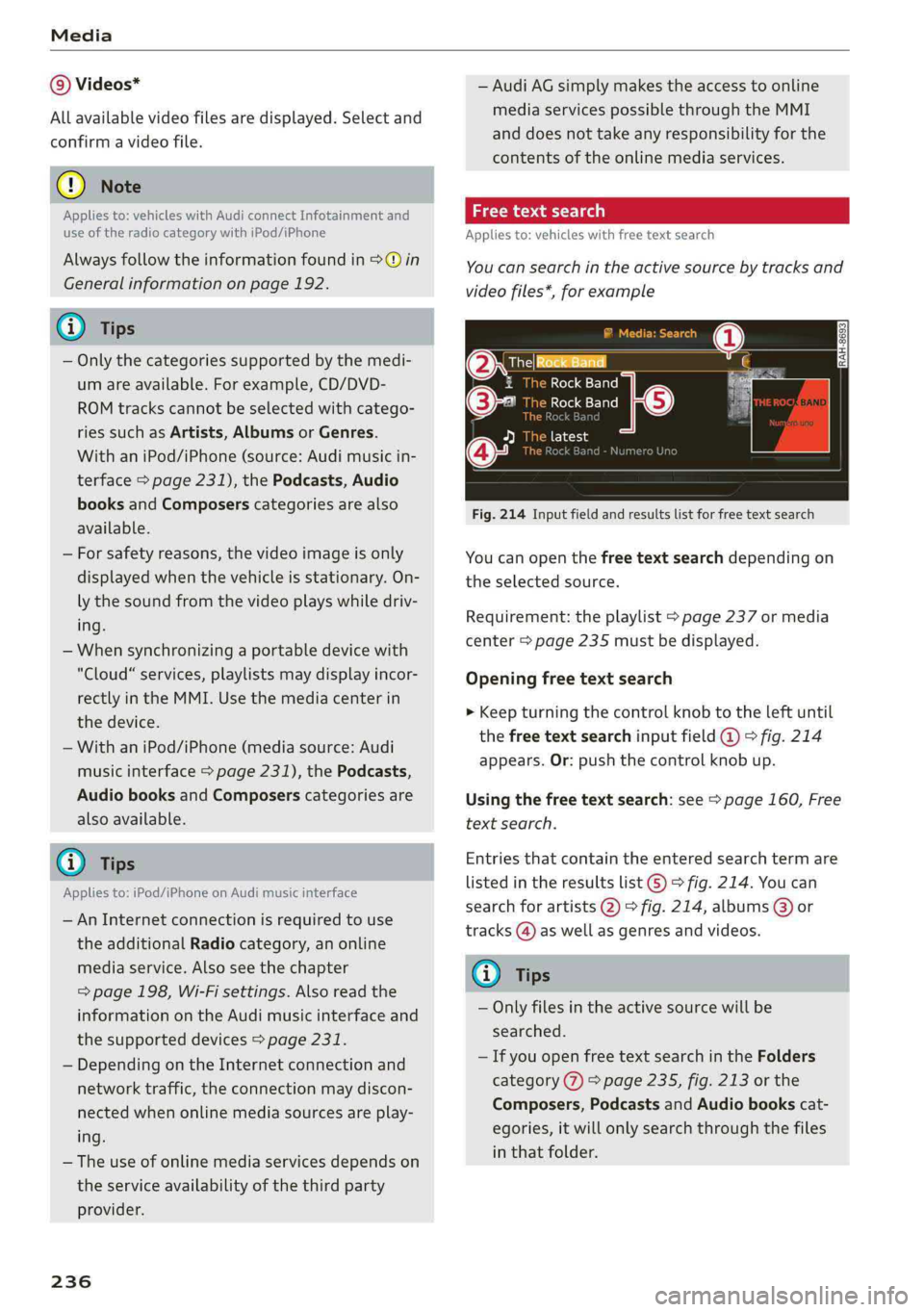
Appliesto:vehicleswithfree textsearch
Youcansearchintheactivesourcebytracksand
videofiles*,forexample
OresRockBandq
1RockBand:
©-RockBand
[eie-hie
a
Fig.214Inputfieldandresultslistforfreetextsearch
Youcanopenthefreetextsearchdependingon
theselectedsource.
Requirement:theplaylist>page237ormedia
center>page235mustbedisplayed.
Openingfreetextsearch
>Keepturningthecontrolknobtotheleftuntil
thefreetextsearchinputfield@°fig.214
appears.Or:pushthecontrolknobup.
Usingthefreetextsearch:see>page160,Free
textsearch.
Entriesthatcontaintheenteredsearchtermare
listedintheresultslist©>fig.214.Youcan
searchforartists2)°fig.214,albums@)or
tracks@)aswellasgenresandvideos.
Gi)Tips
—Onlyfilesintheactivesourcewillbe
searched.
—IfyouopenfreetextsearchintheFolders
category(7)>page235,fig.213orthe
Composers,PodcastsandAudiobookscat-
egories,itwillonlysearchthroughthefiles
inthatfolder.
Page 244 of 392

Media
ProblemSolution
Audimusicinterface:themobile
deviceisnotrecognizedasa
source.
Formanycellphonesormobiledevices,playbackisnotpossible
when
thebatterylevelistoolow(lessthan5%ofitscapacity).
ThemobiledevicewillonlyberecognizedasasourceintheMMI
afterconnectingifthebatterychargeissufficient.
Audimusicinterface:malfunc-
tionsduringaudioplayback
throughaniPod/iPhone.
TheBluetoothaudioplayerfunctionisswitchedon.Switchthis
functionoff>page248whenyouarenotusingtheBluetoothau-
dioplayer.
Audimusicinterface:Changed
contentonamobiledevice®that
isconnectedtothe Audimusicin-
terfaceisnotdisplayedintheme-
diacenter.
Reset theMediasettingstothefactorydefaultsettings
=>page246.
AUXinput:thereisstaticwhen
connectinganddisconnectingthe
AUXconnectioncable.
Whenconnectinganddisconnecting,theExternalaudioplayer
sourceisalreadyselected.Beforeconnectingordisconnectingthe
mobiledevice,eithermutethedevice(see>page250)orswitch
toadifferentaudiosource(forexample>page220,Openingthe
radio).
Bluetoothaudioplayer*/Wi-Fi
audioplayer*:audioplaybackin-
terference.
Onlyoneinterfaceshouldbeactivelyusedatatimetoensure
problem-freeplayback.
Jukebox®*:tracks ontheimported
playlistaregrayedout.
Whenimportingplaylists,allofthefilesthemselvesmustbeim-
ported.
Jukebox*:importedtrackscannot
beplayedorfound.
Ifyoucannotfindimportedtracksinthemediacenter,theymay
notbesupported.Onlycopysupportedfiles>page240tothe
Jukebox.
Onlinemedia*:connectionfailed
betweentheMMIandthemyAudi
app.
ToestablishaconnectiontotheMMI,theMMIconnectionswitch
mustbe switchedoninthemyAudiappstatusscreen.
Bluetoothaudioplayer*:interfer-
encewithtrackdisplayandaudio
playback.
PlaybackinterferencecanoccurwhenusingtheBluetoothaudio
playerifamusicplayerappfromathirdpartyproviderisopen.
Audi
recommendsusingtheintegratedmediaplayeronyourBlue-
toothdevice(suchasasmartphone).
Wi-Fihotspot*:yourWi-Fidevice
isdisconnectedfromtheWi-Fi
hotspot.
Makesurethenetworkoptimizationfunctionsareswitchedoffin
theWi-FisettingsorinthenetworksettingsforyourWi-Fidevice.
ForadditionalinformationrefertotheuserguideforyourWi-Fi
device.
Audimusicinterface:audioplay-
backthroughtheconnectedmo-
biledeviceisnotpossible.
MakesuretheUSBmodeMTPisselectedinthesettingsonyour
mobiledevice.
2)Applies onlytoMTPdevices.DoesnotapplytoAppledevicesandUSBmassstoragedevices.
242
Page 248 of 392

Systemsettings
Switchoffpop-up:whenthefunctionisswitched
on[¥,themessagesintheInfotainmentsystem
displayregardingthechargingstatusofyourcell
phoneinthe Audiphonebox*arehidden.There-
mindernottoforgetyourcellphonewhenleav-
ingthevehicleisalsoswitchedoff.
Tooltips
WhenthisfunctionisswitchedonM,yourMMI
showsyoutipsforinput.Thefrequencyofhow
oftenitdisplaysdecreaseswithtime.
Speechdialogsystem
Appliesto:vehicleswithvoicerecognitionsystem
Dependingonvehicleequipment,thefollowing
functions
maybeavailable:
Commanddisplay:whenthisfunctionisswitch-
edonM,theMMIwillshowyouthepossible
commandsforvoiceinputintherespective
menu.
Shortdialog:whenthisfunctionisswitchedon
,ashorterformofthepromptsisused.
Commandduringvoiceoutput*:thisfunctionis
switchedonatthefactory.Whenthisfunctionis
switchedon[M,youcansaynewcommandsdur-
ingannouncements.Youdonotneedtowaitfor
thesignaltone(beep)duringanannouncement.
Whenthefunctionisswitchedoff(J,youneedto
waitforthesignaltone(beep)tosayanewcom-
mand.
Volume:youcanadjustthevolumeofthe
promptsbyturningthecontrolknob.
Individualspeechtraining(onlywhenthevehi-
cleisstationary):youcanadaptthevoicerecog-
nitionsystemtoyourvoiceorpronunciationinor-
dertoimprovethesystem'sabilitytorecognize
yourspeech.Individualspeechtrainingiscom-
prisedof20speechentriesthatconsistofcom-
mandsandsequencesofnumbers.Youcande-
letetheprogrammedvoicetrainingwiththeRe-
setindividualspeechtrainingfunction.
Displaybrightness
YoucanadjustthebrightnessoftheInfotain-
mentsystemdisplaybyturningthecontrolknob.
246
Factorysettings
Dependingonthevehicleequipment,thefollow-
ingfunctionscanberesettofactorysettings:
—Soundsettings
—Radio
—Mediasettings
—Jukebox*
—Directory
—Telephone
—BluetoothandWi-Fi*
—Navigationsettings*
—Navigationandonlinememory*
—Speechdialogsystem*
—Shortcutkeys
—Messagesettings*
—Apps*
—Tooltips
—Audiconnect*
—Audismartphoneinterface*
Youcanselectthedesiredfunctionsindividually
orallatoncewiththeoptionSelectallentries.
Selectandconfirm Restorefactorysettings.
Gi)Tips
Makesurethatnotonlythesettingswerede-
letedbutalsothestoreddata,ifnecessary.
Connectionmanager
Introduction
Theconnectionmanagerprovidesanoverviewof
yourconnecteddevicesandtheirnetworkstatus.
>Select:[MENU]button>Settings>leftcontrol
button>MMIsettings>Connectionmanager.
>Selectandconfirmamenuitem.
If amobiledevicewasalreadyconnectedandyou
selectandconfirmthecorrespondingmenuitem,
thedevicenameandconnectionstatusaredis-
playedunderthemenuitem.
Youcanindividuallyconnect(M)ordisconnect
(L))apaireddevice.
Page 283 of 392
80A012721BG
Airbagsystem
OFF3%;lightcomesonandstaysonallthe
timewhenever theignitionisswitchedon.
ZAWARNING
—IfthePASSENGERAIRBAGOFF%;light
doesnotgooutwhenanadultissittingon
thefrontpassengerseataftertakingthe
stepsdescribed above,makesuretheadult
isproperlyseatedandrestrainedatoneof
therearseatingpositions.
—Havetheairbagsysteminspectedbyyour
authorizedAudidealer before transporting
anyoneonthefrontpassengerseat.
@®Tips
Ifthecapacitivepassengerdetectionsystem
determinesthatthefrontpassengerseatis
empty,thefrontalairbagonthepassenger
sidewillbeturnedoff,andthePASSENGER
AIRBAGOFF%;lightwillstayon.
Repair,careanddisposaloftheairbags
Partsoftheairbagsystemareinstalledatmany
differentplacesonyourAudi.Installing,remov-
ing,servicingorrepairingapartinanareaofthe
vehiclecandamageapartofanairbagsystem
andpreventthatsystemfromworkingproperly
inacollision.
Therearesomeimportantthingsyouhaveto
knowtomakesurethattheeffectivenessofthe
systemwillnot beimpairedandthatdiscarded
componentsdonotcauseinjuryorpollutethe
environment.
ZAWARNING
Impropercare,servicingandrepairproce-
durescanincreasetheriskofpersonalinjury
anddeathbypreventinganairbagfromde-
ployingwhenneededordeployinganairbag
unexpectedly:
—Nevercover,obstruct,orchangethesteer-
ingwheelhornpadorairbagcoverorthein-
strumentpanelormodifytheminanyway.
—Neverattachanyobjectssuchascupholders
ortelephonemountingstothesurfacescov-
eringtheairbagunits.
—Forcleaningthehornpadorinstrument
panel,useonlyasoft,dryclothoronemois-
tenedwithplainwater.Solventsorcleaners
coulddamagetheairbagcoverorchange
thestiffnessorstrengthofthematerial so
that
theairbagcannotdeployandprotect
properly.
—Neverrepair,adjust,orchangeanypartsof
theairbagsystem.
—Allworkonthesteeringwheel,instrument
panel,frontseatsorelectricalsystem(in-
cludingtheinstallationofaudioequipment,
cellulartelephonesandCBradios,etc.)
mustbeperformedbyaqualifiedtechnician
whohasthetrainingandspecialequipment
necessary.
—Foranyworkontheairbagsystem,we
stronglyrecommendthatyouseeyourau-
thorizedAudidealerorqualifiedworkshop.
—Nevermodifythefrontbumperorpartsof
thevehiclebody.
—Alwaysmakesurethatthesideairbagcan
inflatewithoutinterference:
—Neverinstallseatcoversorreplacement
upholsteryoverthefrontseatbacksthat
havenotbeenspecificallyapprovedbyAu-
di.
—Neveruseadditionalseatcushionsthat
covertheareaswherethesideairbagsin-
flate.
—Damagetotheoriginalseatcoversor to
theseamintheareaofthesideairbag
modulemustalwaysberepairedimmedi-
atelyby anauthorizedAudidealer.
— Theairbagsystemcandeployonlyonce.Af-
teranairbaghasbeendeployed,it mustbe
replacedwithnewreplacementpartsde-
signedandapprovedespeciallyforyourAudi
model
version.Replacementofcomplete
airbagsystemsorairbagcomponentsmust
beperformedbyqualifiedworkshopsonly.
Makesurethatanyairbagserviceactionis
enteredinyourAudiWarranty&Mainte-
nancebookletunderAIRBAGREPLACEMENT
RECORD.
—Forsafetyreasonsinsevereaccidents,the
alternatorandstarterareseparatedfrom
281