2019 AUDI Q5 battery
[x] Cancel search: batteryPage 197 of 392

80A012721BG
Audiconnect
AboutAudiconnect
Hereyouwillfindlegalinformationregarding
AudiconnectInfotainmentusage.
Login
See>page193.
Connectionmanager
See>page246.
Licensesubscription
Thevalidityandexpirationdateofyourlicenses
aredisplayed.
Refresh
ThecontentoftheselectedAudiconnectInfo-
tainmentserviceortheentireAudiconnectInfo-
tainmentlistisupdated.
Dataprivacy
Requirement:theignitionmustbe switchedon.
Location,vehicle,andpersonal dataaretransmit-
tedwhenusingAudiconnectservices.
Allowingsendingofdata
—SelectandconfirmActivatedataconnection.
Thedatamoduleforthe useofallAudiconnect
serviceswillbeactive.
Restrictingsendingofdata
—SelectandconfirmActivateprivacy.Thedata
connectionislimitedordeactivateddepending
ontheequipment.ThemajorityofAudiconnect
serviceswillnot beavailable.
Thefollowinginterfacesarenotaffectedbythis
setting:Bluetooth,BluetoothLowEnergy(BLE),
Wi-Ficonnection,Audismartphoneinterface
(ASI),NearFieldCommunication(NFC),charging
communication(e-tron),ElectronicTollCollect
(ETC),ifequipped.
@)Note
Alwaysfollowtheinformationfoundin>@in
Generalinformationonpage192.
)Dependsonthecountryand equipment. Theseservices
are availableforalimitedtime.
@Tips
—Ifthetransmissionofdataislimited,data
willstillbetransmittedtoverifysubscrip-
tions.
—Ifthetransmissionofdataislimited,itwill
havethefollowingeffectsontheexchange
ofdataforAudiconnectservicesandemer-
gencycalls,ifequipped:
—Theemergencycallfunctionwillremain
availablewithoutrestrictionsandwillcon-
tinuetotransmitdata.
—Ifanonlineroadsideassistancecallisini-
tiated,nodatawillbetransmitted,buta
callwillbemade.
—IftheGeofencingAlert,SpeedAlert,
and/orValetAlertserviceshavebeenacti-
vatedbythekeyuser,thentheywillre-
mainavailablewithoutrestrictionsand
continuetotransmitdata.
Audiconnectvehicle
controlservices
Appliesto:vehicleswith Audiconnectvehiclecontrol
WithAudiconnectvehiclecontrolservices)),you
canutilizevariousservicesusingthemyAudiapp
oronlineatwww.audiusa.com/myaudi.
Z\WARNING
Alwaysfollowtheinformationfoundin>AV
inGeneralinformationonpage192.
@Tips
—Accessingspecificdataorcontrollingfunc-
tionsremotelydependsonthechargelevel
ofthevehiclebattery.Therefore,these
functionsonlyhavelimitedavailabilityafter
switchingofftheignition.
— AneSIMcardestablishestheInternetcon-
nectionforAudiconnectvehiclecontrol
services.Thecostsforthisareincludedin
thepriceofAudiconnectvehiclecontrol
195
>
Page 230 of 392

Media
—Thestatusofthedeletingprocessisshownin
theMMI.Jukeboxplaybackstopsduringthede-
letingprocessandstartsagainautomatically
oncethedeletioniscomplete.
@)Note
Donotimportaudio/videofileswhentheen-
gineisturnedoffbecausethiswilldrainthe
vehiclebattery.
@)Tips
—TracksfromaudioCDscannotbeimported
totheJukeboxforlegalreasons.
—Filesthathavealreadybeenimportedare
automaticallyrecognizedandcannotbe
copiedtotheJukeboxagain.
—Itisnotpossible toplay audio/video*files
intheCD/DVD*drivewhileimportingthem.
— TheJukeboxdoesnotprovidean export
functionduetolegalreasons.
—Filesortrackswithoutadditionalstoredin-
formationarelistedasUnknown.Audirec-
ommendsaddingadditionalinformation
(such asID3tags)toaudiofiles.
—ResettheJukeboxtothefactorydefaultset-
tingswhensellingyourvehicle>page246.
Bluetoothaudioplayer
Appliesto:vehicleswithBluetoothaudioplayer
WiththeBluetoothaudioplayer,youcanplay
musicwirelesslyfrom yourBluetooth-capable
device(suchasacellphone)throughtheMMI.
Requirement:thevehiclemustbestationaryand
theignitionmustbe switchedon.TheBluetooth
settingswillopenonyourmobiledeviceduring
theconnectionsetup.TheBluetoothfunctionand
visibilityoftheMMI>page248andmobilede-
vicemustbe switchedon.TheBluetoothaudio
player>page248mustbe switchedoninthe
MMI.
—ConnectingaBluetoothplayer:pressthe
MEDIA]button.Presstheleftcontrolbutton
untilthesourcesoverviewisdisplayed.Select
andconfirmBluetoothaudioplayer@)
=>page234,fig.211.
228
—Ifnecessary,selectandconfirm,Notconnected
>ConnectBluetoothaudioplayer.TheBlue-
toothdevicesearchstarts.Followtheinstruc-
tionsintheMMI.
—SelectandconfirmthedesiredBluetoothdevice
fromthelist.TheMMIgeneratesaPINforthe
connection.
—SelectandconfirmYes.
—EnterthePINforconnectingonyourBluetooth
device.Or:ifthePINisalreadydisplayedon
yourBluetoothdevice,confirmitintheBlue-
toothdeviceandintheMMI.Thetimeallowed
forenteringthePINislimitedtoapproximately
30seconds.
Themediaisstartedandoperatedthroughthe
mobiledeviceortheMMI,dependingonthede-
vicebeingused.
(i)Tips
—Checkforanyconnectionrequestsonyour
Bluetoothdevice.
—MultipleBluetoothaudioplayerscan be
connectedtotheMMI,butonlyonemobile
devicecanbeactive.
—BluetoothprotocolsAVRCP(1.0/1.3/1.4)
andA2DParesupported.
—NotethevolumesettingonyourBluetooth
device.Audirecommendssettingyourmo-
biledevicetothemaximumvolumewhen
usingitasaBluetoothaudioplayer.
— Thesupportedmediafunctions(suchas
shuffle)dependontheBluetoothdevicebe-
ingused.
—Formoreinformationonsupporteddevices,
visitwww.audiusa.com/bluetoothorcon-
tactanauthorizedAudidealerorauthorized
AudiServiceFacility.
Page 233 of 392

80A012721BG
Media
@TipsYoucanpurchasetheUSBadapter>fig.209
fromanauthorizedAudidealeroratspecialty
— Depending ontheInternetconnectionandstores:
networktraffic,the connectionmaydiscon-
nectedwhenonlinemediasourcesareplay-@USBadapterfordeviceswithamicroUSBcon-
ing.nection
—OnlinemediaandInternetradiousagede-@USBadapterfordeviceswithanAppleLight-
pendsontheserviceavailabilityofthethirdningconnection
partyprovider.
—AudiAGsimplymakestheaccesstoonlinehaaSeadsterfardevicesaitUSBGmeEcon
mediaservicespossiblethroughtheMMInection
anddoesnottakeanyresponsibilityfortheDepending onthevehicleequipment,youmaybe
contentsoftheonlinemediaservices.abletoconnectyourmobiledevicesthroughthe
—Alwaysreadthe chapter>page192,AudiAudimusicinterfacetotheMMIusingtheUSB
connect.adaptersandchargethebatteryatthesame
— Depending onthemobiledevicebeingused, time.
theremaybeinterruptionsduringmediaAppliesto:vehicleswithAudimusicinterface
playbackandwhenusingthemyAudiapp.—Audimusicinterface:see>page231.
TopreventinterruptionswhenSSeeAppliesto:vehicleswithUSBchargingportsintherear
biledevice,donotlockthescreenonyour—USBchargingportsintherear:referto
mobiledeviceandkeepthemyAudiappin>page233.
theforeground.
—ContactanauthorizedAudidealeror au-@)Note
thorizedAudiServiceFacilityforadditional
HandletheUSBadaptercarefully.Donotal-
informationaboutonlinemedia.
lowittobepinched.
MultimediaconnectionsG)Tips
—TheUSBadapteronthe Audimusicinter-
USBchargingportfacewillsupportiPodtouchoriPhonedevi-
cesfromthe 5thgenerationornewerwith
thelightningconnector.
—MobiledeviceswithanAppleDockconnec-
torcanonlybechargedusingaUSBadapter
designedfordeviceswithanAppleDock
connector.Datacannotbetransmitted.
Audimusicinterface
ConnectyourmobiledevicestotheAudimusic
interfaceinordertooperatethemthroughthe
MMIandchargethebattery.
Dependingonthevehicleequipment,youcan
connectyourmobiledevices(suchas asmart-
phoneorMP3player)totheAudimusicinterface
oraUSBchargingportusingaspecialUSB
adapter.
af
a|=
TheAudimusicinterfaceUSBportsarelocatedin
o—«thestoragecompartmentunderthecenterarm-
restandatthefront* ofthecenterconsole.They
Fig.209AudiGenuineAccessories:USBadapterarelabeledwiththe«
[RAH-9202
\
231
Page 234 of 392

Media
TheAudimusicinterfaceAUXinputislocatedin
thestoragecompartmentunderthecenter
armrestandislabeledwithAUX.
USBInput
—Connectingorchargingmobiledevicesusinga
USBadapter:ConnectthematchingUSBadapt-
ertothe AudimusicinterfaceUSBportand
thenconnectittothemobiledevice,forexam-
pleaniPhone.Thebatterywillchargeautomat-
ically.
—DisconnectingamobiledevicefromtheAudi
musicinterface:RemovetheUSBadapterfrom
the AudimusicinterfaceUSBport.
Themediaarestartedandoperatedthroughthe
mobiledeviceortheMMI,dependingonthede-
vicebeingused>page234.
Connectingmultiplemobiledevices:ifamobile
device(suchasasmartphone)isconnectedatthe
respectiveUSBportontheAudimusicinterface,
thenalldevicescanbeusedasa playbacksource.
AUXInput
—Connectingamobiledevice totheAUXinput:
ConnecttheAUXcabletotheAUXinputonthe
Audimusicinterfaceandthenconnectittothe
mobiledevice(forexample,anMP3playerora
smartphone).
—DisconnectingamobiledevicefromtheAUX
input:RemovetheAUXcablefromtheAUXin-
putonthe Audimusicinterface.
—Operation:selectandconfirmtheExternalau-
dioplayersource©)>page234,fig.210.Me-
diaisstartedandoperatedonthemobilede-
vice.
ZAWARNING
Drivingrequiresyourcompleteandundivided
attention.Asthedriver,youhavecompletere-
sponsibilityforsafetyintraffic.Neveroperate
mobiledeviceswhiledriving,becausethisin-
creasestheriskofanaccident.
1)Applies onlytoMTPdevices.DoesnotapplytoAppledevi-
cesandUSBmassstoragedevices.
232
@)Note
—UseaUSBextensioncabletoconnectdevi-
cesthathaveanintegratedUSBconnector
(suchasaUSBstick)topreventdamageto
yourUSBdeviceandthe Audimusicinter-
face.
—Extremelyhighorlow temperaturesthat
canoccurinsidevehiclescandamagemobile
devicesand/orimpairtheirperformance.
Neverleavemobiledevicesinthevehiclein
extremelyhighorlowtemperatures.
G)Tips
—Alwaysfollowtheinformationfoundin
=page59.
—Whenyouswitchtheignitionoff,theUSB
portsarestillsuppliedwithpoweruntilthe
energymanagementintervenes.
—DonotuseanadditionaladapterorUSBex-
tensioncabletoconnectmobiledevicesto
theAudimusicinterfacethatalreadyhavea
cableorthatmustbeconnectedwithaUSB
adapter(>page231).Using anadditional
adapterorUSextensioncablemayimpair
functionality.
—YoucanpurchasetheAUXconnectorcable
fromanauthorizedAudidealeror atspe-
cialtystores.
—Audirecommendssettingthevolumeofa
mobiledeviceconnectedtotheAUXinputto
approximately70%ofthemaximumvol-
ume.
—Functionalityisnotguaranteedformobile
devicesthatdonotconformtotheUSB2.0
specification.
—USBhubsarenotsupported.
—SomeversionsoftheiPodsuchastheiPod
shufflecannotbeconnectedtotheUSB
adapterfordeviceswithAppleDockconnec-
tor.ConnectthesedevicesusingaAUXcon-
nectorcable.
—Changedcontentonamobiledevice»)that
isconnectedtotheAudimusicinterface
maynotbedisplayedinthemediacenter.In>
Page 235 of 392

80A012721BG
Media
thiscase,resettheMediasettingsbackto
Factorysettings>page246.
—VideoplaybackthroughtheAudimusicin-
terfaceisonlysupportediftheconnected
deviceisrecognizedasaUSBstoragedevice
(forexampleaUSBstick).Appledevicesand
MTPdevices(such assmartphones)arenot
recognizedasUSBstoragedevices.
—iPod oriPhonemalfunctionsalsoaffectthe
operationoftheMMI.ResetyouriPodor
iPhoneifthishappens.
—AudirecommendsupdatingtheiPod or
iPhonesoftwaretothelatestversion.For
importantinformationonoperatingyour
iPod oriPhone,refertotheuserguidefor
thedevice.
— TheUSBadapteronthe Audimusicinter-
facewillsupportiPodtouchoriPhonedevi-
cesfromthe5thgenerationornewerwith
thelightningconnector.
—Formoreinformationaboutthe Audimusic
interfaceandsupporteddevices,checkthe
Audidatabaseformobiledevicesatwww.
audiusa.com/mp3orcontactanauthorized
AudidealerorauthorizedAudiServiceFa-
cility.
USBchargingportsintherear
Appliesto:vehicleswithUSBchargingportsintherear
Youcanchargethebatteryon yourmobiledevice
throughaUSBchargingport.
TwoUSBchargingportsarelocatedatthebackof
thecenterconsole.
—USBadapter:referto>page231,USBadapter
forAudimusicinterfaceorUSBchargingport.
—ChargingamobiledeviceusingtheUSB
adapter:connectyourmobiledevice toaUSB
chargingportusingasuitableUSBadapter.
—Disconnectingamobiledevicefromthecharg-
ingport:removetheUSBadapterfromtheUSB
chargingport.
—Disconnectingmobiledeviceswith anApple
Dockconnector:removetheAppleDockcon-
nectorfromtheAppledevicewiththerelease
tabspressedin.
ZAWARNING
Drivingrequiresyourcompleteandundivided
attention.Asthedriver,youhavecompletere-
sponsibilityforsafetyintraffic.Neveroperate
yourmobiledeviceswhiledriving,because
thisincreasestheriskofanaccident.
@)Note
Extremelyhighorlowtemperaturesthatcan
occurinsidevehiclescandamagemobiledevi-
cesand/orimpairtheirperformance.Never
leavemobiledevicesinthevehicleinex-
tremelyhighorlowtemperatures.
G)Tips
—Inpreparationatthetimeofprinting.
—Alwaysfollowtheinformationfoundin
=>page59.
—Whenyouswitchtheignitionoff,theUSB
portsarestillsupplied withpoweruntilthe
energymanagementintervenes.
—DonotuseanyadditionalUSBextensionca-
blesoradapterstoconnectmobiledevices
totheUSBchargingport thathavealready
beenconnectedbyaUSBadapter.Usingan
additionaladapterorUSextensioncable
mayimpairfunctionality.
— USBhubsarenotsupported.
—Refertothemanufacturer'soperatingman-
ual forimportantinformationregardingthe
operationofyourmobiledevice.
—Correctfunctionofallmobiledevicescan-
notbeguaranteed.
—Thevehiclebatterydrainswhenmobilede-
vicesareturnedonbuttheengineisoff.
Tat)eaedeSelaCol
Appliesto:vehicleswith Rear SeatEntertainmentpreparation
TheRear SeatEntertainmentpreparationin-
cludescablesandamountforAudiEntertain-
mentmobileinthedriver'sandfrontpassenger's
seatbackrests.
ThesuitableAudiEntertainmentmobileRear
SeatEntertainmentpackageisavailablethrough
AudiGenuineAccessories.
233
>
Page 244 of 392

Media
ProblemSolution
Audimusicinterface:themobile
deviceisnotrecognizedasa
source.
Formanycellphonesormobiledevices,playbackisnotpossible
when
thebatterylevelistoolow(lessthan5%ofitscapacity).
ThemobiledevicewillonlyberecognizedasasourceintheMMI
afterconnectingifthebatterychargeissufficient.
Audimusicinterface:malfunc-
tionsduringaudioplayback
throughaniPod/iPhone.
TheBluetoothaudioplayerfunctionisswitchedon.Switchthis
functionoff>page248whenyouarenotusingtheBluetoothau-
dioplayer.
Audimusicinterface:Changed
contentonamobiledevice®that
isconnectedtothe Audimusicin-
terfaceisnotdisplayedintheme-
diacenter.
Reset theMediasettingstothefactorydefaultsettings
=>page246.
AUXinput:thereisstaticwhen
connectinganddisconnectingthe
AUXconnectioncable.
Whenconnectinganddisconnecting,theExternalaudioplayer
sourceisalreadyselected.Beforeconnectingordisconnectingthe
mobiledevice,eithermutethedevice(see>page250)orswitch
toadifferentaudiosource(forexample>page220,Openingthe
radio).
Bluetoothaudioplayer*/Wi-Fi
audioplayer*:audioplaybackin-
terference.
Onlyoneinterfaceshouldbeactivelyusedatatimetoensure
problem-freeplayback.
Jukebox®*:tracks ontheimported
playlistaregrayedout.
Whenimportingplaylists,allofthefilesthemselvesmustbeim-
ported.
Jukebox*:importedtrackscannot
beplayedorfound.
Ifyoucannotfindimportedtracksinthemediacenter,theymay
notbesupported.Onlycopysupportedfiles>page240tothe
Jukebox.
Onlinemedia*:connectionfailed
betweentheMMIandthemyAudi
app.
ToestablishaconnectiontotheMMI,theMMIconnectionswitch
mustbe switchedoninthemyAudiappstatusscreen.
Bluetoothaudioplayer*:interfer-
encewithtrackdisplayandaudio
playback.
PlaybackinterferencecanoccurwhenusingtheBluetoothaudio
playerifamusicplayerappfromathirdpartyproviderisopen.
Audi
recommendsusingtheintegratedmediaplayeronyourBlue-
toothdevice(suchasasmartphone).
Wi-Fihotspot*:yourWi-Fidevice
isdisconnectedfromtheWi-Fi
hotspot.
Makesurethenetworkoptimizationfunctionsareswitchedoffin
theWi-FisettingsorinthenetworksettingsforyourWi-Fidevice.
ForadditionalinformationrefertotheuserguideforyourWi-Fi
device.
Audimusicinterface:audioplay-
backthroughtheconnectedmo-
biledeviceisnotpossible.
MakesuretheUSBmodeMTPisselectedinthesettingsonyour
mobiledevice.
2)Applies onlytoMTPdevices.DoesnotapplytoAppledevicesandUSBmassstoragedevices.
242
Page 246 of 392
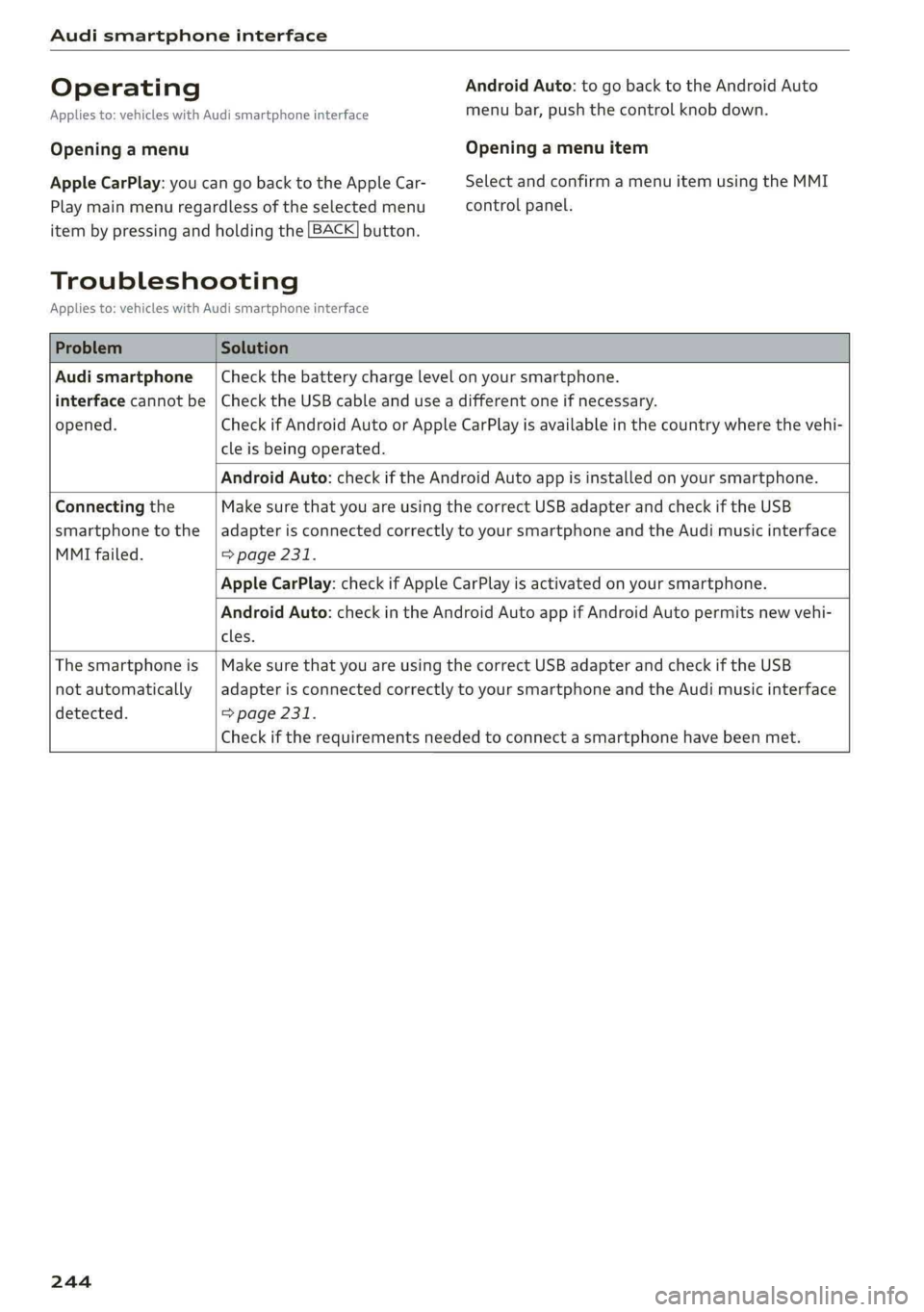
Audismartphoneinterface
OperatingAndroidAuto:togobacktotheAndroidAuto
Appliesto:vehicleswithAudismartphoneinterfacemenubar,pushthecontrolknob down.
OpeningamenuOpeningamenuitem
AppleCarPlay:youcangobacktotheAppleCar-SelectandconfirmamenuitemusingtheMMI
Playmainmenuregardlessoftheselectedmenucontrolpanel.
itembypressingandholdingthe[BACK]button.
Troubleshooting
Appliesto:vehicleswithAudismartphoneinterface
ProblemSolution
Audismartphone
interfacecannotbe
opened.
Checkthebatterychargelevelonyoursmartphone.
ChecktheUSBcableanduseadifferentoneifnecessary.
CheckifAndroidAutoorAppleCarPlayisavailableinthecountrywherethevehi-
cleisbeingoperated.
AndroidAuto:checkiftheAndroidAutoappisinstalledonyoursmartphone.
Connectingthe
smartphonetothe
MMIfailed.
MakesurethatyouareusingthecorrectUSBadapterandcheckiftheUSB
adapterisconnectedcorrectlytoyoursmartphoneandtheAudimusicinterface
=>page231.
AppleCarPlay:checkifAppleCarPlayisactivatedonyoursmartphone.
AndroidAuto:checkintheAndroidAutoappifAndroidAutopermitsnewvehi-
cles.
Thesmartphoneis
notautomatically
detected.
MakesurethatyouareusingthecorrectUSBadapterandcheckiftheUSB
adapterisconnectedcorrectlytoyoursmartphoneandtheAudimusicinterface
=>page231.
Checkiftherequirementsneededtoconnectasmartphonehavebeenmet.
244
Page 284 of 392

Airbagsystem
thevehiclebatterywithapyrotechniccircuit
interrupter.
—Workonthepyrotechniccircuitinterrupter
mustonlybeperformedbyaqualified
technicianswhohavetheexperience,in-
formationandspecialtoolsnecessaryto
performtheworksafely.
—Ifthevehicleorthecircuitinterrupteris
scrapped,allapplicablesafetyprecautions
mustbefollowed.
OldtmeaeMar eeelaaNCle-\e)
Airbagperformance
Changingthevehicle'ssuspensionsystemcan
changethewaythattheAdvancedAirbagSystem
performsinacrash.Forexample,usingtire-rim
combinationsnotapprovedbyAudi,loweringthe
vehicle,changingthestiffnessofthesuspension,
includingthesprings,suspensionstruts,shock
absorbersetc.canchangetheforcesthatare
measuredbytheairbagsensorsandsenttothe
electroniccontrolunit.Somesuspensionchanges
can,forexample,increasetheforcelevelsmeas-
uredbythesensorsandmaketheairbagsystem
deployincrashesinwhichitwouldnotdeployif
thechangeshadnotbeenmade.Otherkindsof
changesmayreducetheforcelevelsmeasuredby
thesensorsandpreventtheairbagfromdeploy-
ingwhenitshould.
Z\WARNING
Changingthevehicle'ssuspensionincluding
useof unapprovedtire-rimcombinationscan
changeAdvancedAirbagperformanceandin-
creasetheriskofseriouspersonalinjuryina
crash.
—Neverinstallsuspensioncomponentsthat
donothavethesameperformancecharac-
teristicsasthecomponentsoriginallyinstal-
ledonyourvehicle.
—Neverusetire-rimcombinationsthathave
notbeenapprovedbyAudi.
282
Sideairbags
eyegydaUrey
Theairbagsystemcanprovidesupplemental
protectiontoproperlyrestrainedoccupants.
QS
2
==ao
Fig.235Sideairbaglocationinthedriver'sseat
Thesideairbagsarelocatedinthesidesofthe
frontseatbackrests>fig.235andtherearback-
rest*facingthedoors.
Thesideairbagsinstalled forthefrontseating
positionshavebeendesignedandcertifiedto
helpreducetheriskofinjurythatcanbecaused
byairbagswhentheyinflate,particularlywhen
theoccupantsittingnexttoitisnot seatedprop-
erly.Thesideairbagforthefrontpassengerseat
canbeusedwithproperlyinstalledchildre-
straints.Pleasebesuretoreadtheimportantin-
formationandwarningswheneverusingachild
restraintinavehicle:Safetybelts>page258,
Airbagsystem>page266,Childsafety
=>page288.
Thesideairbagsystembasicallyconsistsof:
—theelectroniccontrolmoduleandexternalside
impactsensors
—thetwosideairbags locatedinthesidesofthe
frontbackrests
—tworearsideairbags*
—theairbagwarninglightintheinstrumentclus-
ter.
Theairbagsystemismonitoredelectronicallyto
makecertainthatitisfunctioningproperlyatall
times.Eachtimeyouturnontheignition,theair-
bagsystemindicatorlightwillcomeonforafew
seconds(selfdiagnostics).