2019 AUDI Q5 audio
[x] Cancel search: audioPage 200 of 392

Audiconnect
Dependingonthecountry,vehicleequipment,
andconnectiontype,thefollowingfunctionsmay
beavailable:
Dataconnectionsettings
UsingtheDataconnectionsettingsmenu,you
cansetwhenthesystemshouldconnecttothe
Internet.TheInternetconnectiondisconnects
automaticallyoncetherequested Audiconnect
Infotainmentservicenolongerrequiresanydata.
—Connectionsetup:youcanselectwhenadata
connection should beestablished.
—Audiconnect(MMI):whenthisfunctionis
switchedon,adataconnectionisautomatically
establishedinordertouseAudiconnectInfo-
tainmentservices.
—Wi-Fidevices:whenthisfunctionisswitched
on,youcanallowordenyInternetconnections.
ZAWARNING
Alwaysfollowtheinformationfoundin>A\
inGeneralinformationonpage192.
@)Note
Alwaysfollowtheinformationfoundin>@in
Generalinformationonpage192.
@Tips
Formoreinformationonroamingcharges,
contactyourcellphoneserviceprovider.
Wi-Fisettings
Appliesto:vehicleswithWi-Fihotspot
YoucanusetheMMIasaWi-Fihotspottocon-
nect
uptoeight Wi-FidevicestotheInternet.
Requirement:theignitionmustbe switchedon.
>Select:[MENU]button>Telephone>rightcon-
trolbutton>Wi-Fisettings.
Dependingonthecountryandthevehicleequip-
ment,thefollowing functionsmaybeavailable:
198
Wi-Fi
Whenthisfunctionisswitchedon,theMMIWi-Fi
hotspotisactiveandvisibletootherdevices(for
example,laptopsandcellphones).Youcancon-
nectyourWi-FidevicetotheMMIandusetheIn-
ternetconnectionifnecessary.Ifyouswitchoff
theWi-FiintheMMI,theWi-Fihotspotwillbe
deactivated.Therefore,anyotherdevicesaccess-
ingtheWi-Fihotspotwillnolongerbeconnected
totheWi-Fi.
Networkkey
TheWi-Ficonnectionbetweenyourvehicleand
yourWi-Fideviceisencrypted.Toestablishacon-
nection,youmustenterthefollowingvalues
whensettingupyourwirelessdevice.Youcan
changethemifnecessary.
—Accesspoint(SSID):NameoftheWi-Finet-
work.
—Password:arandompasswordwassetinthe
MMIatthefactory.Thepasswordcanbe
changed.Theencryptionmethodrequiresa
passwordtobeatleasteightcharacterslong.
Chooseasecurepassword.
—Visibletoothers:ThevisibilityofyourWi-Fi
networkcanbeswitchedonandoff.
Z\WARNING
Alwaysfollowtheinformationfoundin>A\
inGeneralinformationonpage192.
()Note
Alwaysfollowtheinformationfoundin©in
Generalinformationonpage192.
G)Tips
InvehicleswithoutAudiconnectInfotain-
ment,theuseoftheWi-Fihotspotisonly
possiblefortheWi-Fiaudioplayer*.Adata
connectiontotheInternetcannotbeestab-
lished.
Page 205 of 392

80A012721BG
Navigation
Navigation
Openingnavigation
Appliesto:vehicleswithnavigationsystem
Thenavigationsystemdirectsyoutoyourdesti-
nation,aroundtrafficincidents,andonalterna-
tiveroutes,ifdesired.
Homeaddress
2)Gasstation
4
Senet
Fig.187Diagram:Enterdestinationmenu
>Pressthe [NAV/MAP]button.
TheEnterdestinationmenuisdisplayedafter
openingnavigation.Thefollowinginformation
canbedisplayedintheInfotainmentsystemdis-
play:
@Inputfieldforfreetextsearch....203
@Homeaddress.................205
@®Lastdestinations...............204
@Storedfavoritescos:ncesynewss205
Assoonasyouselectanentryfromthelist(de-
pendingonthevehicleequipment),thecorre-
spondingdestinationdisplaysasamappreview*
©fig.187.
Ifyouhaveconnectedamobiledevicetothe
MMI,yourdirectorycontactswillalsobelistedif
they havenavigationdataassignedtothem.
TheFavorites(4)>fig.187menuitemaswellas
thedirectory/contactsareonlyshowninthe En-
terdestinationmenuifyouhaveenteredoneor
morecharactersusingtheinputfield.
Switchingbetweendestinationentryandthe
map:
—Pressthe [NAV/MAP|buttonrepeatedlyuntil
themapisdisplayed.Or:Select:leftcontrol
button>Switchtomap.
ZAWARNING
— Thedemandsoftrafficrequireyourfullat-
tention.Alwaysreadthechapter
=page151,Trafficsafetyinformation.
—Obeyalltrafficlawswhendriving.
— Theroutecalculatedbythenavigationsys-
temisarecommendationforreachingyour
destination.Obeytrafficlights,stoppingre-
strictions,one-waystreets,lanechangere-
strictions,etc.
—Adjustthevolumeoftheaudiosystemso
thatsignalsfromoutsidethevehicle,such
aspoliceandfiresirens,can beheardeasily
atalltimes.
C)Note
Ifthedrivingdirectionsconflictwithtraffic
laws,obeythetrafficlaws.
G@)Tips
—SnowandobstructionsontheGPSantenna
or interferencecausedbytreesandlarge
buildingscanimpairsatellitereceptionand
affectthesystem'sabilitytodeterminethe
vehicleposition.Severaldeactivatedormal-
functioningsatellitescanalsointerruptGPS
receptionandaffectthesystem'sabilityto
determinethevehicleposition.
—Becausestreetnamessometimeschange,
thenamesstoredintheMMImayinrare
casesdifferfromtheactualstreetname.
Enteringadestination
Freetextsearchfordestinations
Appliesto:vehicleswithnavigationsystem
Withthefreetextsearch,youcanenterthenavi-
gationdestinationdataallatonceinanyorder
usingtheMMItouchcontrolpad*ortheletter/
numberspeller(forexample,20MainSt.,Los
Angeles).Likewise,youcansearchforpointsof
interest,contacts,previousdestinationsorfa-
voritestonavigatetothedesiredaddress.
Pressthe [NAV/MAP]buttonrepeatedlyuntilthe
Enterdestinationmenuisdisplayed>page203,
fig.187.
203
>
Page 227 of 392

80A012721BG
Media
Media
Introduction
Therearevariousmediadrivesandconnections
availableintheMMI.Forexample,youcanplay
audio/video*filesfromtheJukebox*orconnect
yourmobiledevicetotheAudimusicinterface*
andoperateitthroughtheMMI.
Notes
Mediaandformatrestrictions:theMMI(includ-
ingtheSDcardreaderandtheUSBstoragede-
viceconnection*)wastestedwithavarietyof
productsandmediaavailableinthemarket.
However,theremaybecaseswhereindividualde-
vicesormediaandaudio/video*filesmaynot be
recognized,mayplayonlywithrestrictionsor
maynotplayatall.
DigitalRightsManagement:pleasenotethat
theaudio/video*filesaresubjecttocopyright
protection.
Themediadrivesdonotplayfilesthatarepro-
tectedbyDRMandthatareidentifiedwiththe
symbolfi.
Datasecurity:neverstoreimportantdataonSD
cards,theJukebox*,CDs/DVDsormobiledevices.
AudiAGisnotresponsiblefordamagedorlost
filesandmedia.
Loadingtimes:themorefiles/folders/playlists
thatareonastoragemedium,thelongeritwill
taketo loadtheaudio/video*files.Audirecom-
mendsusingstoragemediathatonlycontainau-
dio/videofiles*.To decreasethetimeittakesto
loadaudio/videofiles*,createsubfolders(forex-
ample,fortheartistoralbum).Theloadingtime
willalsoincreasewhenimportingfiles.
Additionalinformation:whenplaying,audio
filesareautomaticallydisplayedwithanyaddi-
tionalinformationthatisstored(suchasthear-
tist,trackandalbumcover).Ifthisinformationis
notavailableonthestoragemedium,theMMI
willchecktheGracenotemetadatadatabase.
However,insomecases,theadditionalinforma-
tionmaynotbedisplayed.
Restrictedfunctionality:resettheMediaset-
tingstothefactorydefaultsettingsiffunctional-
ityisrestricted>page246.
Iffunctionalityisrestricted,resettheJukebox*
tothefactorydefaultsettings>page246.
Forinformationaboutthepropertiesofsupport-
edmediaandfileformats,see>page240.
CG)Note
Alwaysfollowtheinformationfoundin>@in
Generalinformationonpage192.
CD/DVDoperation
CD/DVDandformatrestrictions:thefunctionali-
tyofindividualstoragemediamaybelimiteddue
tothevarietyofblankCDs/DVDsavailable and
thevariouscapacities.AudioCDsorvideoDVDs
withcopyprotection,CDs/DVDsthatdonotcon-
formtothestandard,andmultisessionCDsmay
havelimitedplaybackormaynotplayatall.Audi
recommendsfinalizingtherecordingprocess
whencreatingmultisession CDs.Multisession
DVDsarenotsupported.
UsingCDs/DVDs,theCDdrive ortheDVDdrive:
toensurecorrect,high-qualityplaybackandto
preventdamagetothedriveordiscreadinger-
rors,alwaysstoreCDs/DVDsinaprotective
sleeveanddonotexposethemtodirectsunlight.
Donotuse:
—Damaged,dirtyorscratchedCDs/DVDs
—
SingleCDs/DVDswith3in(8cm)diameter
—CD/DVDsthatarenotround
—CDs/DVDswithlabels
—Protectiverings
—CleaningCDs
Thermalprotectionswitch:CD/DVDplayback
maybetemporarilyunavailableifoutsidetem-
peraturesareextremelyhotorcold.Athermal
protectionswitchisinstalledtoprotectthe
CD/DVDandthelaser.
Laserdevices:laserdevicesare dividedintosafe-
tyclasses1to4inaccordancewithDINIEC76
225
>
Page 228 of 392
Media
(CO)6/VDE0837.Theopticalreadersthatarein-
stalledconformto safetyclass1.Lasersinthis
classareveryweakandwell-shielded,sothereis
nodangerifusedcorrectly.
Mediadrives
SDcardreader
TheSDcardreaderislocatedintheglovecom-
partment.
—InsertingtheSDcard:Theangledcornerofthe
SDcard mustfacetowardtherightfrontside
whenbeinginserted.SlidetheSDcardintothe
cardreaderslotuntiltheSDcardclicksinto
place.
—Automaticplayback:playbackwillstartauto-
maticallyiftheinsertedSDcardcontainssup-
portedaudio/videofiles*>page240.
—RemovingtheSDcard: pressbrieflyontheSD
card.
TheSDcardreaderisaccessedandoperated
throughtheMMI@)&page234,fig.210.
@Note
Onlyuseone-pieceSDcards.Ifadaptercards
(SDcardswithmorethanonepiece)areused,
thecardcouldfalloutoftheadapterwhen
drivingbecauseofvibrations.Individual
piecescouldthenbecomestuckinthedrive
andimpairthefunctionality.
G@)Tips
TheSIMcardreaderthendoesnotfunction.
DVDdrive
Appliesto:vehicleswithaDVDdrive
—
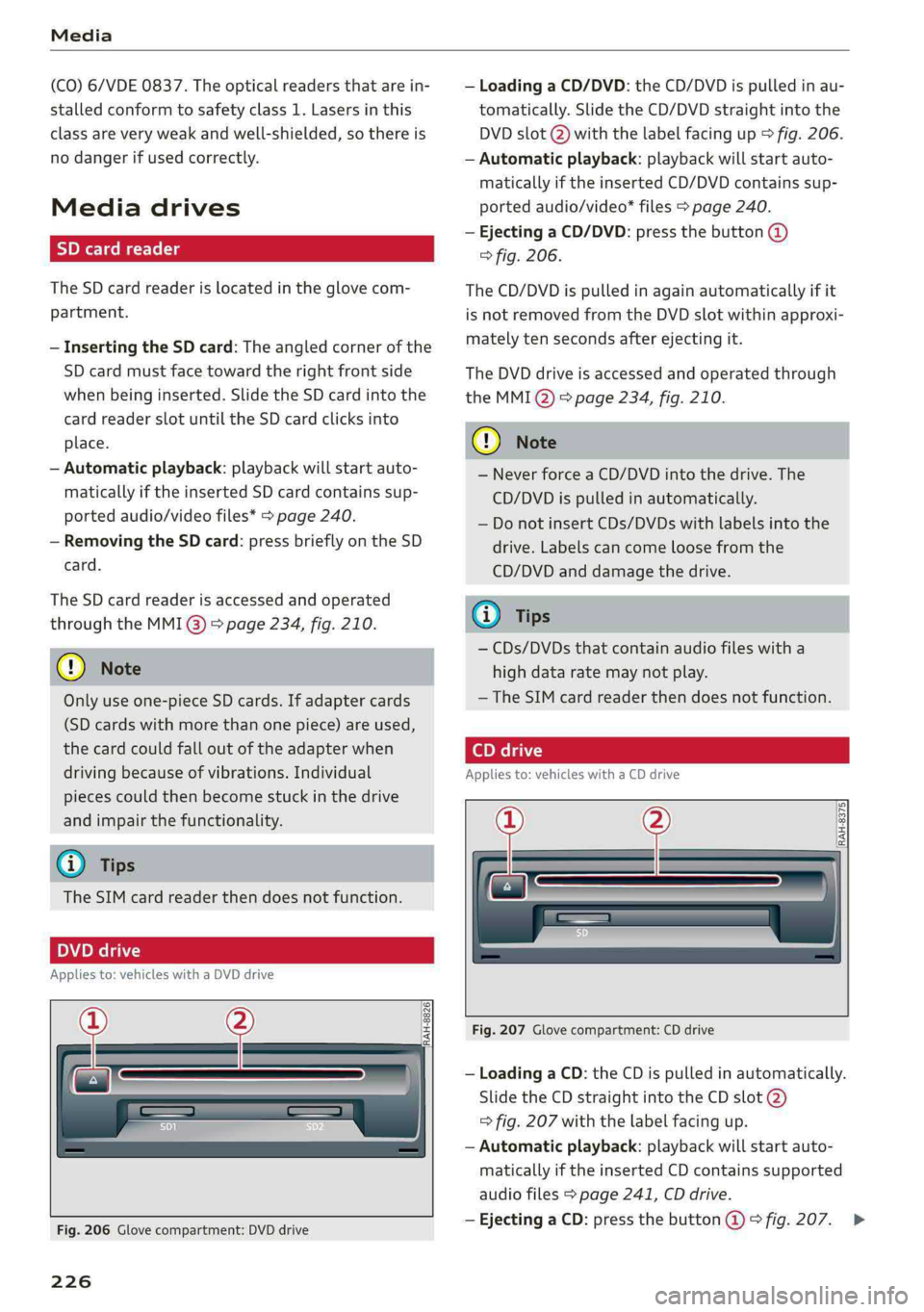
RAH-8826|
Fig.206Glovecompartment:DVDdrive
226
—LoadingaCD/DVD:theCD/DVDispulledinau-
tomatically.SlidetheCD/DVDstraightintothe
DVDslot@)withthelabelfacingup>fig.206.
—Automaticplayback:playbackwillstartauto-
maticallyiftheinsertedCD/DVDcontains sup-
portedaudio/video*files>page240.
—EjectingaCD/DVD:pressthebutton@
>fig.206.
TheCD/DVDispulledinagainautomaticallyifit
isnotremovedfromtheDVDslotwithinapproxi-
matelytensecondsafterejectingit.
TheDVDdriveisaccessedandoperatedthrough
theMMIQ)>page234,fig.210.
@)Note
—NeverforceaCD/DVDintothedrive.The
CD/DVDispulledinautomatically.
—DonotinsertCDs/DVDswithlabelsintothe
drive.Labelscancomeloosefromthe
CD/DVDanddamagethedrive.
@Tips
—CDs/DVDsthatcontainaudiofileswitha
highdataratemaynotplay.
— TheSIMcardreaderthendoesnotfunction.
Appliesto:vehicleswithaCDdrive
——
RAH-8375|
Fig.207Glovecompartment:CDdrive
—LoadingaCD:theCDispulledinautomatically.
SlidetheCDstraightintotheCDslot@)
=>fig.207withthelabelfacingup.
—Automaticplayback:playbackwillstartauto-
maticallyiftheinsertedCDcontainssupported
audiofiles>page241,CDdrive.
—EjectingaCD:pressthebutton@>fig.207.>
Page 229 of 392

80A012721BG
Media
TheCDispulledinagainautomaticallyifitisnot
removedfromtheslotwithin tensecondsof
ejectingit.
TheCDdriveisaccessedandoperatedthrough
theMMI>page234.
@)Note
—NeverforceaCDintothedrive.TheCDis
pulledinautomatically.
—DonotinsertCDswithlabelsintothedrive.
LabelscancomeloosefromtheCDand
damagethedrive.
i)Tips
CDplaybackcannotbeguaranteedwithaudio
filesthathaveahighdatarate.
Appliesto:vehicleswithJukebox
AfteryouhavefilledtheJukeboxwithmusic
and/orvideos,forexamplefromyourSDcard,
youcanplaythesefilesdirectlyfromtheJuke-
box.TheJukeboxmemorycapacityisapproxi-
mately10GB.
>Pressthe[MEDIA]button.Presstheleftcontrol
buttonuntilthesourcesoverview>page234is
displayed.SelectandconfirmJukebox.
AddingfilestotheJukebox
—Pressthe[MEDIA]button.Presstheleftcontrol
buttonuntilthesourcesoverview>page234is
displayed.Selectoneofthefollowingsources
tocopytotheJukebox:SDcard*,CD-ROM*,
DVD-ROM*,USBstoragedevice*.
Requirement:themediacenter(forexample,
tracks,albums)mustbeopen.
—Selectinganentry: selectanentryfromthe
mediacenter.Select:rightcontrolbutton>
Copytojukebox>Thisentryor Entirelist.
Requirement:theplaylistmustbe open.See
=>page237.
—Selectingatrack:selectthetrackthatiscur-
rentlyplaying.Select:rightcontrolbutton>
NotinthePlaybackview.
Copytojukebox>ThistrackorEntirealbumor
Thisartist.
Requirement:avideofilemustbeplaying.
—Select:rightcontrolbutton>Copytojukebox.
Thecopyingprocessbegins.Thestatusofthe
copyingprocessisshownintheMMI.
—Hidingtheimportingprocess:selectandcon-
firm
Continuecopyinginbackground.Theim-
portingprocessishidden.
—Cancelingtheimportingprocess:selectand
confirmCancelcopying:Or:removethesource
thatisbeingimported.Filesalreadycopiedre-
main.
Requirement:thecopyingprocessmustbeactive
inthebackground.
—Showingthecopyingprocess:select:right
controlbutton>Copyinginprogress.
Whenimporting,theaudiofilesareautomatical-
lysortedintothemediacentercategoriesbased
onthestoredadditionalinformation>page235.
Thecopiedvideofilesarestoredinthemedia
centerundertheVideoscategory.
PlayingtheJukebox
Requirement:theJukeboxmustcontainaudio/
videofiles>page227,AddingfilestotheJuke-
box.
TheJukeboxisaccessedandoperatedthrough
theMMI@)&page234,fig.210.
DisplayingJukeboxmemorycapacity
Select:rightcontrolbutton>Jukeboxmemory
capacity.InformationabouttheJukeboxmemory
capacityandthenumberofstoredtracksisdis-
played.
DeletingtracksfromtheJukebox!)
Requirement:theJukeboxmustcontainaudio/
videofiles.
—Deletinganentry: selectanentryfromthe
Jukeboxmediacenter.Select:rightcontrolbut-
ton>Deletefromjukebox>ThisentryorEn-
tirelist.>
227
Page 230 of 392

Media
—Thestatusofthedeletingprocessisshownin
theMMI.Jukeboxplaybackstopsduringthede-
letingprocessandstartsagainautomatically
oncethedeletioniscomplete.
@)Note
Donotimportaudio/videofileswhentheen-
gineisturnedoffbecausethiswilldrainthe
vehiclebattery.
@)Tips
—TracksfromaudioCDscannotbeimported
totheJukeboxforlegalreasons.
—Filesthathavealreadybeenimportedare
automaticallyrecognizedandcannotbe
copiedtotheJukeboxagain.
—Itisnotpossible toplay audio/video*files
intheCD/DVD*drivewhileimportingthem.
— TheJukeboxdoesnotprovidean export
functionduetolegalreasons.
—Filesortrackswithoutadditionalstoredin-
formationarelistedasUnknown.Audirec-
ommendsaddingadditionalinformation
(such asID3tags)toaudiofiles.
—ResettheJukeboxtothefactorydefaultset-
tingswhensellingyourvehicle>page246.
Bluetoothaudioplayer
Appliesto:vehicleswithBluetoothaudioplayer
WiththeBluetoothaudioplayer,youcanplay
musicwirelesslyfrom yourBluetooth-capable
device(suchasacellphone)throughtheMMI.
Requirement:thevehiclemustbestationaryand
theignitionmustbe switchedon.TheBluetooth
settingswillopenonyourmobiledeviceduring
theconnectionsetup.TheBluetoothfunctionand
visibilityoftheMMI>page248andmobilede-
vicemustbe switchedon.TheBluetoothaudio
player>page248mustbe switchedoninthe
MMI.
—ConnectingaBluetoothplayer:pressthe
MEDIA]button.Presstheleftcontrolbutton
untilthesourcesoverviewisdisplayed.Select
andconfirmBluetoothaudioplayer@)
=>page234,fig.211.
228
—Ifnecessary,selectandconfirm,Notconnected
>ConnectBluetoothaudioplayer.TheBlue-
toothdevicesearchstarts.Followtheinstruc-
tionsintheMMI.
—SelectandconfirmthedesiredBluetoothdevice
fromthelist.TheMMIgeneratesaPINforthe
connection.
—SelectandconfirmYes.
—EnterthePINforconnectingonyourBluetooth
device.Or:ifthePINisalreadydisplayedon
yourBluetoothdevice,confirmitintheBlue-
toothdeviceandintheMMI.Thetimeallowed
forenteringthePINislimitedtoapproximately
30seconds.
Themediaisstartedandoperatedthroughthe
mobiledeviceortheMMI,dependingonthede-
vicebeingused.
(i)Tips
—Checkforanyconnectionrequestsonyour
Bluetoothdevice.
—MultipleBluetoothaudioplayerscan be
connectedtotheMMI,butonlyonemobile
devicecanbeactive.
—BluetoothprotocolsAVRCP(1.0/1.3/1.4)
andA2DParesupported.
—NotethevolumesettingonyourBluetooth
device.Audirecommendssettingyourmo-
biledevicetothemaximumvolumewhen
usingitasaBluetoothaudioplayer.
— Thesupportedmediafunctions(suchas
shuffle)dependontheBluetoothdevicebe-
ingused.
—Formoreinformationonsupporteddevices,
visitwww.audiusa.com/bluetoothorcon-
tactanauthorizedAudidealerorauthorized
AudiServiceFacility.
Page 231 of 392
80A012721BG
Media
Wi-Fiaudioplayer
Appliesto:vehicleswithWi-Fiaudioplayer
UsingtheWi-Fiaudioplayermediasourceonthe
MMI, youcanconnectandoperateyourWi-Fi-ca-
pablemediaplayer(suchasasmartphone)to
wirelesslyplaymusicfromyourmediaplayerli-
brary.Themediaplayerisconnectedthroughthe
vehicle'sWi-Fihotspot.AUPnPServerapporan
integratedUPnP/DLNAserveronyourmedia
playerisrequiredtoaccessyourmediaplayerli-
brary.
Requirement:theWi-Fifunctiononyourmedia
playermustbe switchedon.ThemyAudiappora
UPnPserverappmustbeinstalledonyourmedia
player.Or:youmustbeusingamediaplayerwith
anintegratedUPnP/DLNAserver.
—Connectingamediaplayer:pressthe[MEDIA
button.Presstheleftcontrolbuttonuntilthe
sourcesoverview>page234isdisplayed.Se-
lectandconfirm Wi-Fiaudioplayer(7)
=>page234,fig.211.
—Ifnecessary,selectandconfirmWi-Fiturned
off>TurnonWi-FitoactivateWi-Fiinthe
MMI.SelectWi-Fisettings,ifnecessary.Select
thesamesettingsonthewirelessmediaplayer
thatareusedfortheWi-Fihotspot.
—StartingtheWi-Fiaudioplayer:Startthe
myAudiapporanUPnPserverapp,orallow
mediasharingonyourdevice.
Operatingthemediaplayer:themediaplayeris
operatedthroughtheMMI.
—Presstheleftcontrolbuttonrepeatedlyuntil
theFoldersmenuitemappears.Selectandcon-
firmFolders.
—Playingmusicfromthemediaplayer:select
andconfirmMediacenter.
Webradio:see>page230.
objects,theycouldbethrownaroundthein-
sideofthevehicleinacrashandcauseseri-
ousinjuries.Storethesetypesofdevicesse-
curelywhiledriving.
—Donotuseanywirelessdevicesonthefront
seatswithinrangeoftheairbagswhiledriv-
ing.Also readandfollowthewarningsin
=page270,Frontairbags.
ZAWARNING
—Asthedriver,donotallowusageoftheWi-
Fihotspottodistractyoufromdriving,as
thiscouldincreasetheriskofanaccident.
—Itisonlysafe tousetablets,laptops,mobile
devicesandothersimilardeviceswhenthe
vehicleisstationarybecause,likeallloose
C)Note
Alwaysfollowtheinformationfoundin>@in
Generalinformationonpage192.
G)Tips
—Alwaysreadthechapter>page192,Audi
connect.
—PleasenotethataWi-Ficonnectiondoes
notautomaticallymakeitpossible touse
the
Internet.Foradditionalinformation,
see>page193.
—Toavoidinterruptionsduringplayback,de-
activatethepowersavingfunctiononthe
mediaplayer orconnectittoacharger.
—Theloadingtimesfortheaudiodatadepend
onthemediaplayerusedandthenumberof
filesthatitcontains.
—Amaximumof2,000entriesperdirectory
aredisplayedintheMMI.
—Songsdownloadedforofflineuseusingmu-
sicstreamingservicesarestoredonyour
mobiledevice(suchasasmartphone)and
maybeDRMprotected.TheWi-Fiaudio
playerwillnotplayDRMprotectedfiles.
—ContactanauthorizedAudidealeror au-
thorizedAudiServiceFacilityforadditional
informationontheWi-Fiaudioplayer.
229
Page 236 of 392

Media
UsingAudiGenuineAccessoriesisrecommended.
Audihasverifiedtheirreliability,safety,andsuit-
ability.
Wecannotevaluateorendorseotherproductsin
thisway,eveniftheproductisapprovedbyacer-
tifiedtestingagencyorgovernmentagency.
@)Note
Onlyusedevicesthatareapprovedforthe
Rear SeatEntertainmentpreparation.Unap-
provedequipmentcan causedamagetothe
vehicleelectricalsystem.
G)Tips
—Contact anauthorizedAudidealerorau-
thorizedAudiServiceFacilityforadditional
informationonAudiEntertainmentmo-
bile.
—Alwaysreadthechapter>page367.
—TheRear SeatEntertainmentpreparationis
notintendedtochargeexternalelectronic
devices.
Playingmedia
Accessingmedia
Youcanstartandoperatevariousmediathrough
theMMIcontrolpanel.
PNWTeatCeMial<1aile
fiiEeneN(ta
Fig.210Diagram:possiblesourcesintheMediamenu
Sis3<9 =|Z|
cc|
))DependingontheDVD,thismaynotbepossibleduring
playback.
234
Eltrones
SeeaerEg
Cinetacic)
Fig.211Diagram:possiblesourcesintheMediamenu
Requirement:amediasourcemustcontainau-
dio/video*files>page226.
>Pressthe[MEDIA]button.Presstheleftcontrol
buttonuntilthesourcesoverviewisdisplayed.
>Selectandconfirmthedesiredsource.Or:press
the[MEDIA]buttonrepeatedlyuntilthedesired
sourceisselected.
Dependingonthevehicleequipment,thefollow-
ingsourcesmaybedisplayedintheMediamenu:
@Jukebox*...00...ee.227
DD,DVD/CDidtive®sinoscece¢wieones226,226
@SDeardreader................226
@Audimusicinterface*...........231
suchasaniPhone,USBstick
©®Externalaudioplayer...........231
suchasanMP3playerconnectedto
theAUXinput
©Bluetoothaudioplayer*........228
@Wi-Fiaudioplayer*............229
Onlinemedia*andInternetradio”.230
—Playingaudio/videofiles:selectasourceinthe
Mediamenu>Category(suchasartists>al-
bum>track).
—Movingonelevelupinthefolderstructure:
pressthe[BACK]button.Or:selectandconfirm
Folderup.
—Selectingtheprevious/nexttrack/chapter*)):
PresstheOn/OffknobfortheMMIcontrolpan-
elbrieflytotheleftKdor totherightPHI.
—Fast-forwardingandrewindingaudio/video*
files:pressandholdtheOn/Offknobonthe
MMIcontrolpaneltotheleftKdorrightPofor
alongertime.