2019 AUDI Q5 rear view mirror
[x] Cancel search: rear view mirrorPage 131 of 392

80A012721BG
Parkingaid
Parkingaid
Generalinformation
Appliesto:vehicleswitharearparkingsystem/parkingsys-
templus/rearviewcamera/peripheralcameras/parkassist.
Dependingonyourvehicle'sequipment,various
parkingaidswillhelpyouwhenparkingandma-
neuvering.
Therearparkingsystemisanaudible parkingaid
thatwarnsyouofobstaclesbehindthevehicle
=>page130.
Theparkingsystemplusassistsyouwhilepark-
ingusingaudioandvisualsignalstowarnyou
aboutobjectsdetectedinfrontof,behind,andat
thesides*ofthevehicle>page130.
Therearviewcamerashowstheareabehindthe
vehicleintheInfotainmentsystemdisplay.The
linesintherearviewcameraimagehelpyouto
parkormaneuver>page132.
Theperipheralcamerasgivevariousviewsto
helpyouwhenparkingormaneuvering
=page134.Theparkingsystemplusfunctions
arealsoavailable>page130.
Parkassisthelpsyoutolocatesuitableparking
spaceswhenparallelorperpendicularparking,
andalsohelpswhenleavingaparallelparking
space>page137.
ingsystemmaybe impairedasaresult.
HaveanauthorizedAudidealerorauthor-
izedAudiServiceFacilitychecktheirfunc-
tion.
ZA\WARNING
—Alwayslookfortrafficandcheckthearea
aroundyourvehiclebylookingatitdirectly
aswell.Theparkingsystemcannotreplace
thedriver'sattention.Thedriverisalways
responsiblewhenenteringorexitingapark-
ingspaceandduringsimilarmaneuvers.
—Pleasenotethatsomesurfaces,suchas
clothing,arenotdetectedbythesystem.
—Sensorsandcamerashaveblindspotsin
whichpeopleandobjectscannotbedetect-
ed.Beespeciallycautiousofsmallchildren
andanimals.
—Alwayskeepyoureyesonthevehicle'ssur-
roundings,usingtherearviewmirroraswell.
— Thesensorscanbedisplacedbyimpactsor
damagetotheradiatorgrille,bumper,
wheelhousingandtheunderbody.Thepark-
@)Note
—Someobjectsarenotdetectedordisplayed
bythesystemundercertaincircumstances:
—objectssuchasbarrierchains,trailerdraw
bars,verticalpolesorfences
—objectsabovethesensorssuchaswallex-
tensions
—objectswithcertainsurfacesorstructures
suchaschainlinkfencesorpowdersnow
—Ifyoucontinuedrivingclosertoalowob-
ject,itmaydisappearfromthe sensor
range.NotethatyouwillnoLongerbe
warnedaboutthisobstacle.
—Maintainenoughdistancefromthecurbto
reducetheriskofdamagetotherims.
@)Tips
—Thesystemmayprovideawarningeven
thoughtherearenoobstaclesinthecover-
ageareainsomesituations,suchas:
—certainroadsurfacesor whenthereistall
grass
—externalultrasonicsourcessuchasfrom
cleaningvehicles
—inheavyrain,snow,orthickvehicleex-
haust
—Werecommendthatyoupracticeparkingin
atraffic-freelocationorparkinglottobe-
comefamiliarwiththesystem.Practice
parkingingoodlightand weathercondi-
tions.
—Youcanchangethevolumeofthesignals
andthedisplay>page142.
—Whatappearsintheinfotainmentdisplayis
somewhattime-delayed.
—Thesensorsmustbekeptcleanandfreeof
snowandicefortheparkingaidtooperate.
— Therearviewcameraiscleanedwhenclean-
ingtherearwindow©page50.
129
Page 135 of 392

80A012721BG
Parkingaid
—Onlyuse therearviewcameratoassistyouif
itshowsagood,clearpicture.Forexample,
theimagemaybeaffectedbythesunshin-
ingintothelens,dirtonthelens,orifthere
isamalfunction.
—Usetherearviewcameraonlyiftheluggage
compartmentlidiscompletelyclosed.Make
sureanyobjectsyoumayhavemountedon
theluggagecompartmentliddonotblock
therearviewcamera.
— Thecameralensenlargesanddistortsthe
fieldofvision.Theobjectappearsbothal-
teredandinaccurateonthescreen.
—Incertainsituations,peopleorobjectsin
thedisplayappearcloserorfartheraway:
—Forobjectsthatdonottouchtheground,
suchasthebumperofaparkedvehicle,a
trailerhitchortherearofatruck.Donot
use the
orientationlinesinthiscase.
—Ifdrivenfromalevelsurfaceontoanin-
cline,oradownwardslope.
—Ifdriventowardprotrudingobjects.
—Ifthevehicleiscarryingtoomuchloadin
therear.
—Appliesto:vehicleswithairsuspension:the
accuracyoftheorientationlinesandblue
surfacesdecreaseswhenthevehicleis
raised/lowered>page125.
@)Note
—Alwaysreadandfollowtheapplicablewarn-
ings>@inGeneralinformationon
page129.
— Theorange-coloredorientationlinesinthe
Infotainmentdisplayshowthevehiclepath
basedonthesteeringwheelangle.The
front ofthevehicleswingsoutmorethan
therearofthevehicle.Maintainplentyof
distanceso thatanexteriormirrororacor-
nerofthevehicledoesnotcollidewithany
obstacles.
@)Tips
Thereisnodistancewarningfortherearand
thesides*whentrailertowingmodeisdetect-
ed.Thefrontsensorsremainactivated.The
visualdisplayswitchestotrailermode.The
rearviewcameraimagewillnotshowtheori-
entationlinesandthebluesurfaces.Thereis
noguaranteethefunctionswillswitchoff
whenusingaretrofittedtrailerhitch.
SicaReRol
Appliesto:vehicleswithrearviewcamera
Switchingonandoff
Requirement:thevehiclespeedmustbeunder
approximately6mph(10km/h).
>PressthePvbuttoninthecenterconsole
=>page131,fig.130.Ashortconfirmation
tonesoundsandtheLEDinthebuttonturns
on.
Switchingonautomatically
Thesystemswitchesonautomaticallywhenre-
versegearisengagedwhiletheengineisrun-
ning.Abrieftonewillsound.
Switchingoffautomatically
Thesystemswitchesoffautomaticallywhendriv-
ingforwardfasterthan6mph(10km/h).
Perpendicularparking
Applies
to:vehicleswithrearviewcamera
Thisviewmaybeusedwhenparkinginagarage
orinaparkingspace.
Fig.135Infotainmentsystem:aligningthevehicle
133
Page 136 of 392
Parkingaid
>Turn theInfotainmentsystemonandshiftinto
reversegear.
>Theorangeorientationlines@showthevehi-
cle'sdirectionoftravel.Turn thesteeringwheel
untiltheorangeorientationlinesalignwiththe
parkingspace>fig.134.Usethemarkings@)
tohelpyouestimatethedistancetoanobsta-
cle.Eachmarkingrepresentsapproximately3
feet(1m).Thebluearearepresentsanexten-
sionofthevehicle'soutlinebyapproximately
16feet(5meters)totherear.
>Whiledrivinginreversegear,adjustthesteer-
ingwheelangletofittheparkingspaceusing
theorangeorientationlinesforassistance>A\
inGeneralinformationonpage132,>@)in
Generalinformationonpage133.Area@)rep-
resentstherearbumper.Attheverylatest,
stopthevehiclewhentheredorientationline
@bordersanobject.
NirliCimUCW
Appliesto:vehicleswith rearviewcamera/peripheralcameras
andtrailerhitch
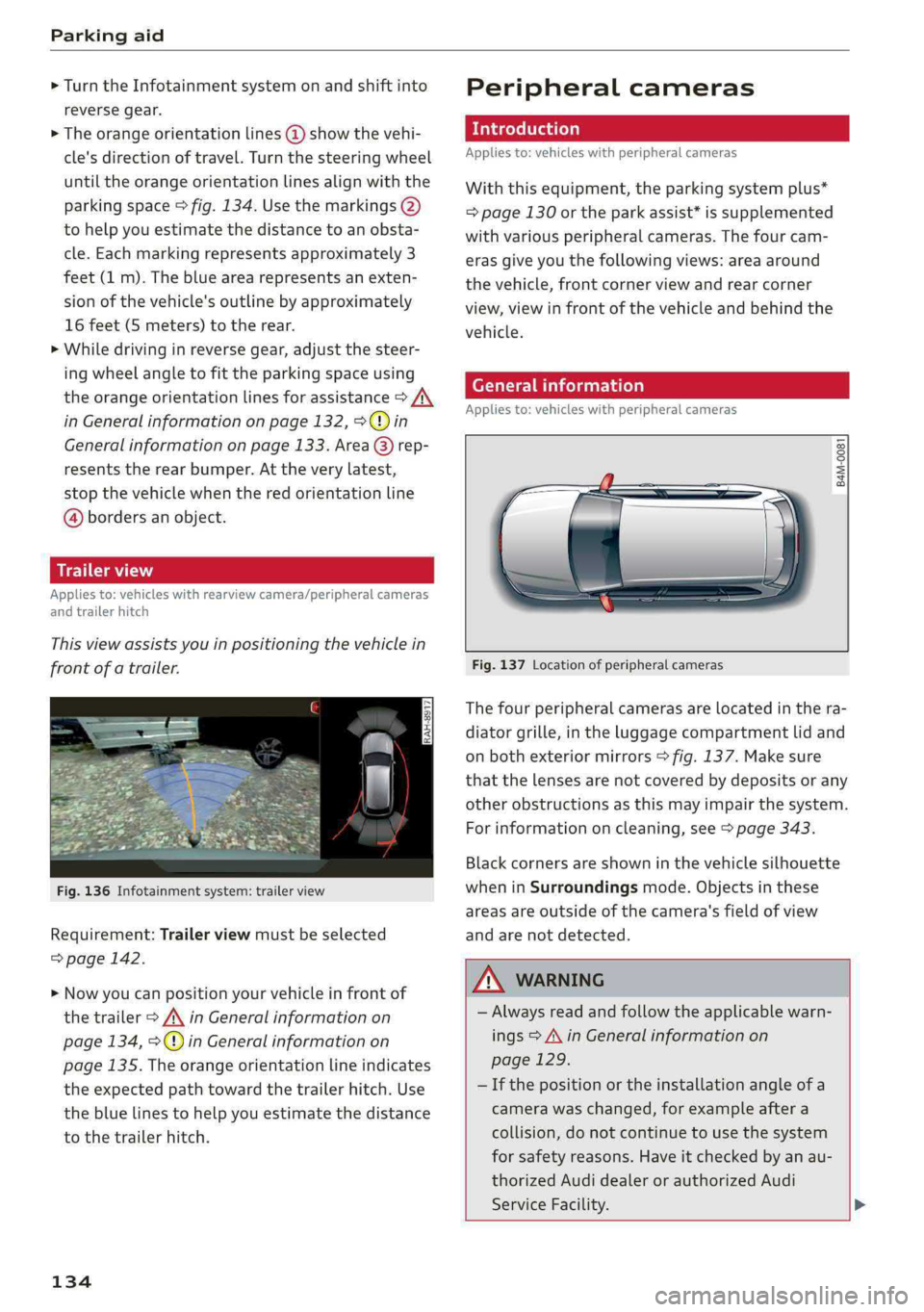
Thisviewassistsyouinpositioningthevehiclein
frontofatrailer.
Fig.136Infotainmentsystem:trailerview
Requirement:Trailerviewmustbeselected
=>page142.
>Nowyoucanpositionyourvehicleinfrontof
thetrailer>/\inGeneralinformationon
page134,>@)inGeneralinformationon
page135.Theorangeorientationlineindicates
theexpectedpathtowardthetrailerhitch.Use
thebluelinestohelpyouestimatethedistance
tothetrailerhitch.
134
Peripheralcameras
Introduction
Appliesto:vehicleswithperipheralcameras
Withthisequipment,theparkingsystemplus*
=page130ortheparkassist*issupplemented
withvariousperipheralcameras.Thefourcam-
erasgiveyouthefollowingviews:areaaround
thevehicle,frontcornerviewandrearcorner
view,viewinfrontofthevehicleandbehindthe
vehicle.
Generalinformation
Appliesto:vehicleswithperipheralcameras
B4M-0081
Fig.137Locationofperipheralcameras
Thefourperipheralcamerasarelocatedinthera-
diatorgrille,intheluggagecompartmentlidand
onbothexteriormirrors>fig.137.Makesure
thatthelensesarenotcoveredbydepositsorany
otherobstructionsasthismayimpairthesystem.
Forinformationoncleaning,see>page343.
Blackcornersareshowninthevehiclesilhouette
wheninSurroundingsmode.Objectsinthese
areasareoutsideofthecamera'sfieldofview
andarenotdetected.
Z\WARNING
—Alwaysreadandfollowtheapplicablewarn-
ings>A\inGeneralinformationon
page129.
—Ifthepositionortheinstallationangleofa
camerawaschanged,forexampleaftera
collision,donotcontinuetouse thesystem
forsafety reasons.Haveitcheckedby anau-
thorizedAudidealerorauthorizedAudi
ServiceFacility.>
Page 137 of 392

80A012721BG
Parkingaid
—Keepinmindthattheimageinthedisplayis
incorrectiftheexteriormirrorhousinghas
beenmovedoutofplace.
—Onlyuse theimagesprovidedby thecamera
ontherearofthevehiclewhentheluggage
compartmentlidiscompletelyclosed.Make
sureanyobjectsyoumayhavemountedon
theluggagecompartmentliddonotblock
therearviewcamera.
— Theareaaroundthevehicleisshownusing
thecameraimages.Thevehicleimageis
shownbythesystem.Objectsandobstacles
abovethecameraarenotdisplayed.
—Cameralensesenlargeanddistortthefield
ofvision.Theobjectsappearbothaltered
andinaccurateonthescreen.
—Appliesto:vehicleswithairsuspension:the
accuracyoftheorientationlinesandblue
surfacesdecreaseswhenthevehicleis
raised/lowered>page125.
@)Note
—Alwaysreadandfollowtheapplicablewarn-
ings>@inGeneralinformationon
page129.
— TheInfotainmentdisplayshowsthedirec-
tioninwhichtherearofthevehicleistravel-
ingbasedonthesteeringwheelangle.The
frontofthevehicleswings outmorethan
therearofthevehicle.Maintainplentyof
distanceso thatanexteriormirrororacor-
nerofthevehicledoesnotcollidewithany
obstacles.
G)Tips
—Ifthe2/&8/
grayedout,thenthepowerexteriormirrors
werefoldedinorthedriver'sdoor/front
passenger'sdoor/luggagecompartmentlid
wasopened.
—Thereisnodistancewarningfortherear
andthesides*whentrailertowingmodeis
detected.Thefrontsensorsremainactivat-
ed.Thevisualdisplayswitchestotrailer
mode.Therearviewcameraimagewillnot
showtheorientationlinesandthebluesur-
faces.Thereisnoguaranteethefunctions
willswitchoffwhenusingaretrofittedtrail-
erhitch.
ice
Appliesto:vehicleswithperipheralcameras
Fig.138Infotainmentsystem:selectthemode
Switchingonandoff
Requirement:thevehiclespeedmustbeunder
approximately6mph(10km/h).
>PressthePsbuttoninthecenterconsole
=>page131,fig.130.Ashortconfirmation
tonesoundsandtheLEDinthebuttonturns
on.
Switchingonautomatically
Thesystemswitchesonautomaticallywhenre-
versegearisengagedwhiletheengineisrun-
ning.Abrieftonewillsound.
Switchingoffautomatically
Thesystemswitchesoffautomaticallywhendriv-
ingforwardfasterthan6mph(10km/h).
Selectingthemode
>Turn thecontrolknobtothesymbolforthede-
siredmode(A)through©)>fig.138andpress
thecontrolknob.
Youmayselectfromthefollowingmodes:
@-Cornerview(front)>page136
-Front>page136
©-Area>page136
©-Rear>page136
@®-Cornerview(rear)>page136
Youcanalsoswitchtotrailerview>page134.
135
Page 361 of 392
Fusesandbulbs
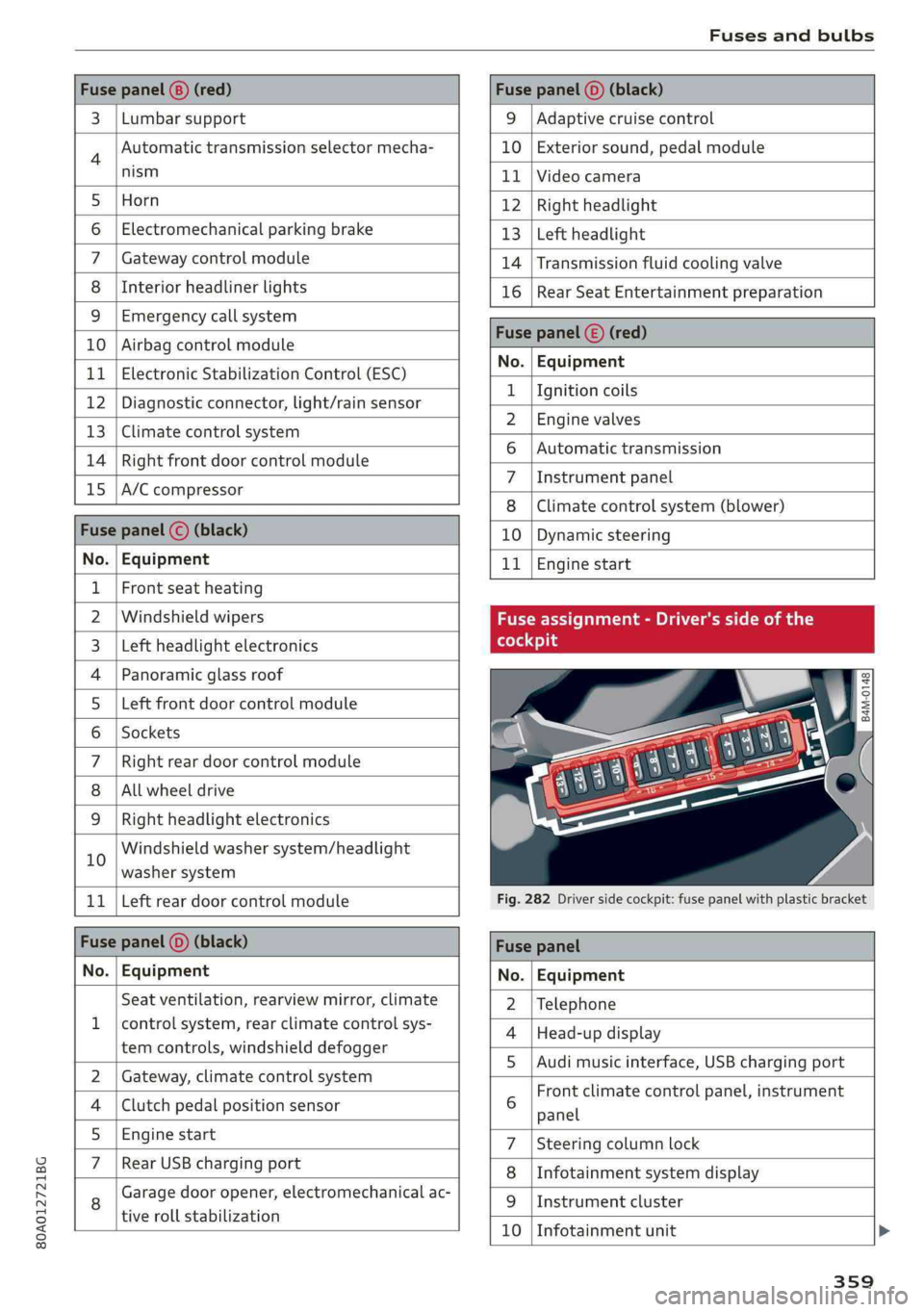
Fusepanel(8)(red)Fusepanel(0)(black)
3|Lumbarsupport9|Adaptivecruisecontrol
4Automatictransmissionselectormecha-10|Exteriorsound,pedalmodule
nism11|Videocamera
5|Horn12|Rightheadlight
6|Electromechanicalparkingbrake13|Leftheadlight
7|Gatewaycontrolmodule14|Transmissionfluidcoolingvalve
8|Interiorheadlinerlights16|Rear SeatEntertainmentpreparation
9|Emergencycallsystem
10|AirbagcontrolmoduleSeeman
No.|Equit
11|ElectronicStabilizationControl(ESC)o:|Fampmen
12|Diagnosticconnector,light/rainsensor2_|HeplbarseB18
13|Climatecontrolsystem2|Engrswaves—
14|RightfrontdoorcontrolmoduleBi,|sukOnneaeeneent
15|A/Ccompressor7|Instrumentpanel
8|Climatecontrolsystem(blower)
Fusepanel©(black)10|Dynamicsteering
No.
|
Equipment11|Enginestart
1|Frontseatheating
2|WindshieldwipersFuseassignment-Driver'sside ofthe
3|Leftheadlightelectronics(foedo}g
4|Panoramicglassroof2
5|LeftfrontdoorcontrolmoduleZ
6|Sockets:
7
|Rightreardoorcontrolmodule
8|Allwheeldrive
9|Rightheadlightelectronics
Windshieldwashersystem/headlight
10
washersystem|
11
|
LeftreardoorcontrolmoduleFig.282Driversidecockpit:fusepanelwithplasticbracket
Fusepanel(0)(black)Fusepanel
No.
|
EquipmentNo.
|
Equipment
Seatventilation,rearviewmirror,climate2
|
Telephone
1|controlsystem,rearclimatecontrolsys-
4|Head-updisplay
temcontrols,windshielddefogger
5|Audimusicinterface,USBchargingport
2|Gateway,climatecontrolsystem-=
—Frontclimatecontrolpanel,instrument
4|Clutchpedalpositionsensor 6
panel
5._|Enginestart7|Steeringcolumnlock
7|RearUSBchargingpart8|Infotainmentsystemdisplay
8Garagedooropener,electromechanicalac-9|Instrumentcluster
tiverollstabilization
80A012721BG
10|Infotainmentunit
359
Page 379 of 392

80A012721BG
Connections
refertoMedia.............00eeee225,234
Consumerinformation.................-367
Consumption’GUel)«cree«anemeieoieeewosuas19
CONGAGScscswvswansowcevasemeeSHOR187
Additionaldirectory.............-..005247
Importing/exporting................--189
Memoryicapacityios2cvesxsmanosa @enews«190
Storingasdestination.................211
Controlbuttons(operatingtheMMI)......154
Controlknobwithjoystickfunction(MMIop-
eration)...6.eee
Conveniencekey
Switchingtheignitionon...............75
Unlockingandlocking...............00531
Convenienceopeningandclosing
Setting«wwea«cmcum«2meme©omeemecome640
Windowsorroof............2-2-5-000s40
Convertiblechildsafetyseats............296
Convertiblelockingretractor
Activating............0..00.0.ceee301
Deactivating«snes¢«emussoeeeveeeeoe302
Usingtosecureachildsafetyseat.......301
Coolingsystem
Addingcoolant................000005318
GOOlaiitwrs:« xsoups4nueeEEEgeeT318
Coolantlevelchecking.................318
Coolanttemperatureindicator...........14
Crosshairs...2...2...eeeeee eeeeee205
Gruisecontrolisystem« svcess20asnene«sem093
Cupholdersticaasicaoansvvwouvwanesos59
CurrentCONSUMPTIONsissosessoocowersrem19
D
Dataplans¢2oss+ vewaeyo enyeees199
DataPrivacy’:seassecies5eesxoreevce199
Dat@ron& 2aan¢ sSweEo wRBeeReG19,245
Datedisplay.........0.0.0.ccee eee eee245
Daytimerunninglights..................44
Declarationofcompliance...............370
DEF(instrumentcluster)..............00415
Demomode
refertoPresentationmode.............211
Destinationonthemap
UsingtheMMItouch..................205
Determiningcorrectloadlimit...........338
DigitalCOMPASSessevesesveeeseeeesve53
DigitalRightsManagement.............. 225
DIMENSIONS’:« +aac»2gonex xmewsoegeeea372
Dimmingtheexteriormirrors.............49
Dimmingtherearviewmirror.............49
Directory
refertoContacte.+ 2cauyogaeecee187
Displays« xeeu«emeen¢ eeees&toeBeSew15
Cleanings2 aswissx enunex 2erenceoowennoo345
Infotainmentsystemdisplay.......152,246
THStFUMENECLUSEGRears¢ ¢coe2 smeme2eae18
Multifunctionsteeringwheel............is
Versions(MMI)............0000seceee152
Disposal....0... ceceeeeeeeeeeee367
DistamGeisissssienooaennava6 0orenive6 0avira¥ 2 a19
Doors
Childsafetylock...2.0.0...0.0...eeeee39
Mechanicallyunlockingandlocking.......33
Driverinformationsystem
Changingviews.«.=seve.seseeeeeeseee15
EM@FGYCONSUIMENS)ciciese«exeveine6 +sesvene© +snares20
Outsidetemperaturedisplay.............13
TripCOMPUtErss=sesx 2seemooewe& xes19
VICWssoisons© oaresia6 6aria© @marineWosoREEDE17
Driverseat
refertoSeatingposition...............253
Drives
refertoMedia.............000005225,234
Driveselect
refertoAudidriveselect...............125
DrivinigvortrOad: «
Drivingonhills...1.0...ceceeee eeeee82
Drivingsafely...1.2...0.00.eeeeeee252
Drivingthroughwater.............00000-73
DIIVIMQSENINGS.6wcnees+cenceoocrowoweer©19
Drivingtips
Efficientdriving...........eceee eeeeee73
DVDdrive(mediadrives)..............-.226
DyMamicsteering«sesveice« ©emer© oconseoosiete125
Dynamicvolume
refertoSystemvolume.........-..0065250
E
|186
Easyiseatiemttyiinoocmsoonem©evamenewotvexem75
Economicalinoute«ssc2«semawe2 0ammoooxen210