2019 AUDI Q3 transmission
[x] Cancel search: transmissionPage 87 of 280

83A012721BA
Driving
Manually releasing the parking lock
RAZ-0492
Releasing the parking lock using the
emergency release
> Use the screwdriver to press the yellow release
button downward.
> At the same time, press the unlock button on
the
selector lever and move the selector lever
to the “N” position.
Attaching the shift cover
> Clip the shift cover back into the shift gate.
RAZ-0497
Fig. 85 Selector lever: Releasing the parking lock using the
emergency release
The emergency release is located under the selec-
tor lever shift gate on the left side. Using the
emergency release can be complicated. See an
authorized Audi dealer or authorized Audi Service
Facility for assistance.
You will need the screwdriver from the vehicle
tool kit to release it > page 242. Use the flat side
of the reversible screwdriver blade.
Removing the shifter boot
> Set the parking brake to secure your vehicle
from rolling away. If this is not possible, secure
your vehicle from rolling using another meth-
od.
> Switch the ignition off.
> To loosen the shifter boot, carefully insert the
flat side of the screwdriver sideways into the
slit near the shifter boot > fig. 84.
> Carefully pry the shifter boot out with the
screwdriver while gripping the boot at the fold
with your hand and pulling it upward and out
until all four corners are released > fig. 85.
> Fold the shifter boot up around the shifter
knob.
/\ WARNING
— The parking lock may only be released using
the emergency release if the parking brake
is set. If it is not working, secure the vehicle
from rolling using the brake pedal or other
suitable means, such as blocking a front and
a rear wheel. An unsecured vehicle may roll
away, which increases the risk of an acci-
dent.
— Only activate the emergency release while
ona level surface or a slight slope.
—To reduce the risk of an accident, you must
not drive when the emergency release is ac-
tivated.
& Transmission: malfunction! Safely stop vehi-
cle
Do not continue driving. Stop the vehicle as soon
as possible in a safe location and secure it so it
does not roll. See an authorized Audi dealer or
authorized Audi Service Facility for assistance.
& Transmission: too hot. Please stop vehicle
Do not continue driving. Select "P" and contact an
authorized Audi dealer or authorized Audi Service
Facility for assistance.
fl Transmission: too hot. Please adapt driving
style
The transmission temperature has increased sig-
nificantly. Drive very cautiously or take a break
from driving until the temperature returns to the
normal range and the indicator light turns off.
8s
>
Page 88 of 280

Driving
i Transmission: malfunction! You can contin-
ue driving. See owner's manual
There is a system malfunction in the transmis-
sion. You may continue driving. Drive to an au-
thorized Audi dealer or authorized Audi Service
Facility soon to have the malfunction corrected.
fs} Transmission: malfunction! You can contin-
ue driving with limited function. Please contact
Service
There is a system malfunction in the transmis-
sion. The transmission is switching to emergency
mode. This mode only shifts into certain gears or
may no longer shift at all. The engine may stall.
Drive to an authorized Audi dealer or authorized
Audi Service Facility immediately to have the
malfunction corrected.
fs} Transmission: malfunction! You can contin-
ue driving with limited function. No reverse
gear
There is a system malfunction in the transmis-
sion. The transmission is switching to emergency
mode. This mode only shifts into certain gears or
may no longer shift at all. The engine may stall.
You cannot engage the reverse gear. Drive to an
authorized Audi dealer or authorized Audi Service
Facility immediately to have the malfunction cor-
rected.
[8] Transmission: malfunction! You can contin-
ue driving in D until engine is off
There is a system malfunction in the transmis-
sion. The transmission is switching to emergency
mode. If you turn the engine off, you will not be
able to select any other gears after restarting the
engine. Drive to an authorized Audi dealer or au-
thorized Audi Service Facility immediately to have
the malfunction corrected.
fs} Danger of rolling away! P not possible.
Please apply parking brake
— The parking lock was released using the emer-
gency
release > page 85. Or
— The parking lock can no longer be engaged.
Drive to an authorized Audi dealer or author-
ized Audi Service Facility immediately to have
the malfunction corrected.
86
fs] Clutch: malfunction! Please contact service
There is an ongoing malfunction in the clutch.
The engine torque that can be transferred is re-
duced. You may continue driving. Avoid using the
clutch in any way that will place a heavy load on
it. Do not let the clutch rub for a long time. Drive
immediately to an authorized Audi dealer or au-
thorized Audi Service Facility to have the mal-
function repaired.
i Clutch: temperature too high. Adapt driving
style
There is a malfunction in the clutch. The engine
torque
that can be transferred is reduced. You
may continue driving. Avoid using the clutch in
the future in any way that will place a heavy load
on it. Do not let the clutch rub for a long time.
The indicator light turns off once the clutch is
fully operable again.
Clutch: check pedal. You can continue driv-
ing
The clutch is not transferring all of the engine
torque. If necessary, remove your foot from the
clutch pedal.
Drive system
A new vehicle must be broken in within the first
1,000 miles (1,500 km) so that all moving parts
work smoothly together, which helps to increase
the service life of the engine.
Do not drive higher than two-thirds of the maxi-
mum permitted engine RPM during the first 600
miles (1,000 km) and do not use full accelera-
tion. The engine can be increased RPM gradually
during the next 300 miles (500 km).
ieee LR deollaCil el Meda LaCe Lig
driving
Your driving style greatly influences the amount
of fuel and energy consumed, the environmental
impact, and the wear on the engine, brakes, and
tires. Note the following information for efficient
and environmentally-conscious driving:
Page 98 of 280

Driving dynamic
Driving dynamic
Audi drive select
Introduction
Applies to: vehicles with Audi drive select
Drive select makes it possible to experience dif
ferent types of vehicle settings in one vehicle.
With different driving modes, the driver can
switch the setting, for example from sporty to
comfortable. In the individual* mode, the set-
tings can be adjusted to your personal preferen-
ces. This makes it possible to combine settings
such as a sporty drivetrain setting with light
steering.
Selecting the driving mode
Applies to: vehicles with Audi drive select
The sie button is located above the selector lever
in the center console.
> Press the 4a button repeatedly until the de-
sired mode appears in the instrument cluster or
center display, or:
> Select on the home screen: VEHICLE > Audi
drive select.
You can change the driving mode when the vehi-
cle is stationary or while driving. If traffic per-
mits, briefly remove your foot from the accelera-
tor pedal after changing modes so that the mode
you have selected will be activated for the drive
system.
offroad - Provides assistance when driving off-
road. The vehicle will exit this mode after the ig-
nition is switched off.
comfort - Provides a comfort-oriented vehicle
setup and is suited for long drives on highways.
auto - Provides an overall comfortable yet dy-
namic driving feel and is suited for everyday use.
dynamic - Gives the driver a sporty driving feel
and is suited to a sporty driving style. The “S”
driving program is selected on vehicles with an
automatic transmission
individual > page 96.
96
G) Tips
Certain vehicle settings will be reset when the
ignition is switched off.
Adjusting the “individual” mode
Applies to: vehicles with Audi drive select
You can adjust details about the vehicle settings.
> Select on the home screen: VEHICLE > Audi
drive select.
> Press individual %.
The equipment in your vehicle will determine
which settings you can adjust.
Drive
The drive system will react to accelerator pedal
moves more quickly or in a more balanced man-
ner. The shift points are located in higher or low-
er engine speed ranges on vehicles with automat-
ic transmissions.
Depending on the equipment, certain driver as-
sistance systems can also become more sporty or
efficient.
Steering
The power steering will adapt. Indirect steering
that moves easily is especially suited to long
drives on highways.
Suspension
The suspension adjusts to be tighter or more
comfort-oriented when it comes to compensat-
ing for uneven spots on the road.
Engine sound
The engine sound adapts and can be subtle to
sporty.
Suspension
Adaptive dampers
Applies to: vehicles with adaptive dampers
The adaptive dampers are an electronically-con-
trolled damping system. The firmness of the sus-
pension will adapt to the driving conditions and >
Page 100 of 280

Driving dynamic
@ Tips
If the & or Al indicator light only stays on
for a short time, you may continue driving.
All wheel drive (quattro)
Applies to: vehicles with all wheel drive
The all-wheel drive system distributes the driving
power variably to the front and rear axle to im-
prove the driving characteristics. It works togeth-
er with selective wheel torque control, which can
activate when driving through curves
=> page 99.
The all-wheel drive system is designed for high
engine power. Your vehicle is exceptionally pow-
erful and has excellent driving characteristics
both under normal driving conditions and on
snow and ice. Always read and follow safety pre-
cautions > A\.
ZA WARNING
— Even in vehicles with all wheel drive, you
should adapt your driving style to the cur-
rent road and traffic conditions to reduce
the risk of an accident.
— The braking ability of your vehicle is limited
to the traction of the wheels. In this way, it
is not different from a two wheel drive vehi-
cle. Do not drive too fast because this in-
creases the risk of an accident.
— Note that on wet streets, the front wheels
can “hydroplane” if driving at speeds that
are too high. Unlike front wheel drive vehi-
cles, the engine does not rev higher sudden-
ly when the vehicle begins hydroplaning. For
this reason, adapt your speed to the road
conditions to reduce the risk of an accident.
Messages
i All-wheel drive: malfunction! You can con-
tinue driving. Please contact Service
Drive immediately to an authorized Audi dealer
or authorized Audi Service Facility to have the
malfunction repaired.
98
73} All-wheel drive: too hot. Please adapt driv-
ing style. See owner's manual
The transmission temperature has increased sig-
nificantly due to the sporty driving manner. Drive
in a less sporty manner until the temperature re-
turns to the normal range and the indicator light
switches of.
Electronic Stabilization
Control
Electronic Stabilization Control (ESC) supports
driver safety. It reduces the risk of slipping and
improves driving stability. ESC detects critical sit-
uations, such as if the vehicle is oversteering or
understeering, or if the wheels are spinning. The
vehicle is stabilized by applying the brakes or re-
ducing engine torque.
If the Eq indicator light blinks while driving, the
ESC is actively regulating.
If the B indicator light turns on, the system has
switched the ESC off. In this case, you can switch
the ignition off and then on to switch the ESC on
again. The indicator light turns off when the sys-
tem is functioning fully.
If the B indicator light turns on, ESC was limit-
ed or switched off manually > page 99.
The following systems are integrated in the ESC:
Anti-lock braking system (ABS)
ABS prevents the wheels from locking when brak-
ing. The vehicle can still be steered even during
hard braking. Apply steady pressure to the brake
pedal. Do not pump the pedal. A pulsing in the
brake pedal indicates that the system is acting to
stabilize the vehicle.
Brake assist
The brake assist system can decrease braking dis-
tance. It increases braking power when the driver
presses the brake pedal quickly in emergency sit-
uations. You must press and hold the brake pedal
until the dangerous situation is over. Depending
on the activated driver assistance systems, the >
Page 110 of 280
Driving information
Driving information
Speed warning system
Applies to: vehicles with speed warning system
The speed warning system helps the driver to
stay below a specified maximum speed. A warn-
ing threshold can be set for this purpose.
Once the speed slightly exceeds the stored
threshold, the speed warning system will alert
the driver with an indicator in the instrument
cluster and a warning tone. Once the speed drops
below the stored maximum speed, the indicator
will turn off.
Setting a threshold is recommended if you would
like to be reminded when you reach a certain
maximum speed. Situations where you may want
to do so include driving in a country with a gener-
al speed limit or if there is a specified maximum
speed for winter tires.
G) Tips
Regardless of the speed warning system, you
should always monitor your speed using the
speedometer and make sure you are following
the legal speed limit.
Setting the warning threshold
Applies to: vehicles with speed warning system
» Applies to: MMI: Select on the home screen:
VEHICLE > Driver assistance > Speed warning.
CEE Tel
Applies to: vehicles with speed warning system
cy Manually set XX speed limit warning
threshold exceeded
The stored speed was exceeded.
108
Traffic light information
Applies to: vehicles with traffic light information
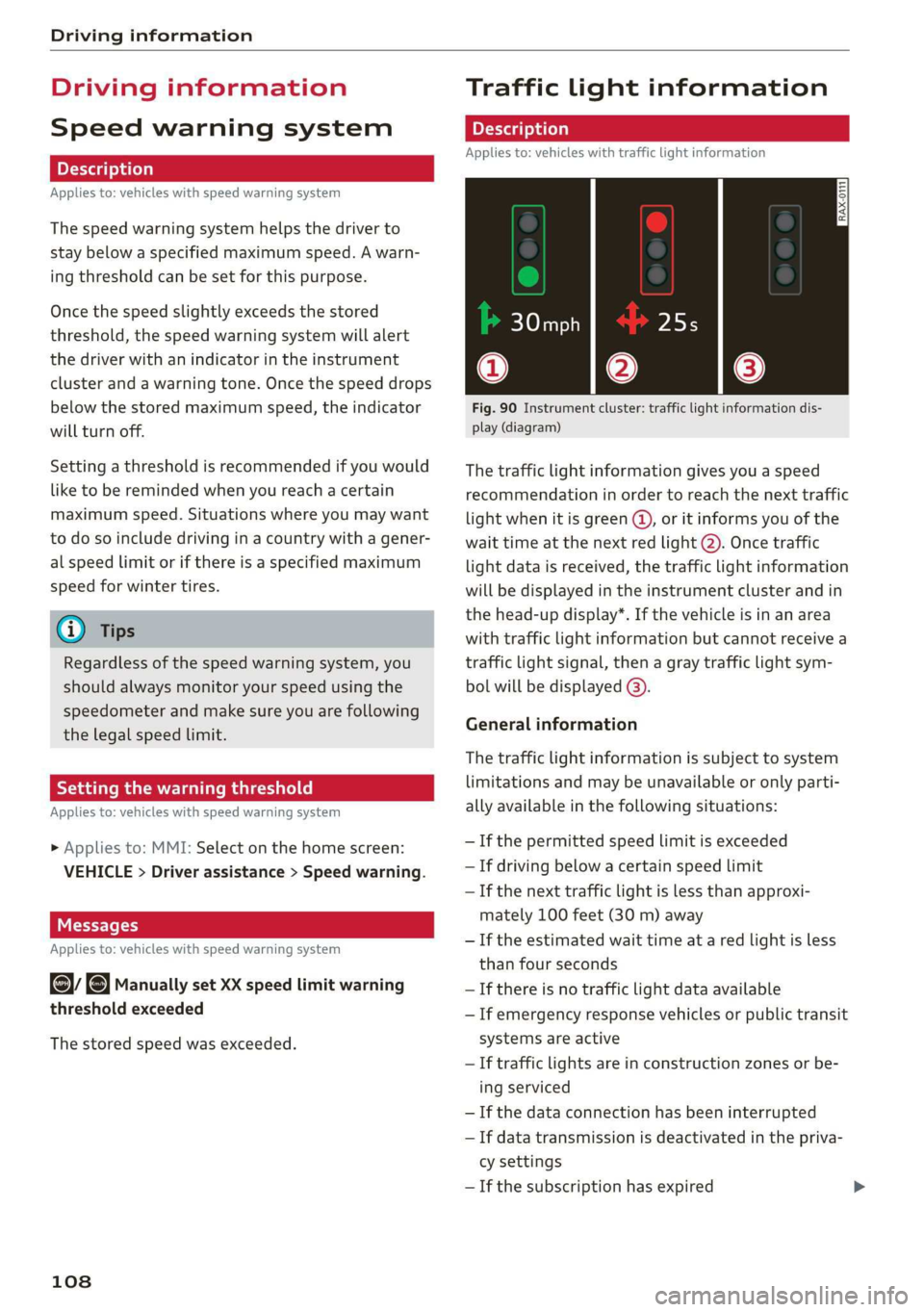
Fig. 90 Instrument cluster: traffic light information dis-
play (diagram)
The traffic light information gives you a speed
recommendation in order to reach the next traffic
light
when it is green ©, or it informs you of the
wait time at the next red light 2). Once traffic
light data is received, the traffic light information
will be displayed in the instrument cluster and in
the head-up display*. If the vehicle is in an area
with traffic light information but cannot receive a
traffic light signal, then a gray traffic light sym-
bol will be displayed @).
General information
The traffic light information is subject to system
limitations and may be unavailable or only parti-
ally available in the following situations:
— Ifthe permitted speed limit is exceeded
— If driving below a certain speed limit
—If the next traffic light is less than approxi-
mately 100 feet (30 m) away
—If the estimated wait time at a red light is less
than four seconds
—If there is no traffic light data available
— If emergency response vehicles or public transit
systems are active
— If traffic lights are in construction zones or be-
ing serviced
— If the data connection has been interrupted
— If data transmission is deactivated in the priva-
cy settings
— If the subscription has expired
Page 111 of 280

83A012721BA
Driving information
If this is the case, the menu item will be grayed-
out or it will not be possible to select it.
Z\ WARNING
— When traffic light information is shown, al-
so always pay attention to the traffic situa-
tion, the distance to other vehicles and the
area around the vehicle. The driver is always
responsible for assessing the traffic situa-
tion.
— Always adapt your speed to the current
weather, road and traffic conditions. The dis-
played information must never cause you to
ignore legal traffic regulations and pose a
safety risk.
— Regardless of the traffic light information,
you should always monitor your speed using
the speedometer and make sure you are ad-
hering to the legal speed limit.
— The traffic light information does not adjust
your vehicle's speed to the speed recom-
mendation shown in the display.
— Follow the safety precautions and note the
limits of the assist systems, sensors, and
cameras > page 104.
@) Tips
— Traffic light information was only available
in select cities at the time this manual was
printed.
— Traffic light information is not available na-
tionwide.
— These functions depend on how up-to-date
the navigation data’ is.
— Outdated map content in the navigation
system can cause information on the display
to be omitted or incorrect.
— Certain traffic lights can automatically ad-
just to the current traffic situation. If this
occurs, the display of traffic light informa-
tion can change suddenly.
— The traffic signs on the road always take pri-
ority over the display. The driver is always
responsible for adhering to the regulations
applicable in the country where the vehicle
is being operated.
— Units of measurement and language set-
tings are displayed based on how they were
set in the MMI system settings > page 195.
Applies to: vehicles with traffic light information
Switching traffic light information on and
off
The system and be switched on and off in the
MMI.
> Applies to: MMI: Select on the home screen:
VEHICLE > Driver assistance > Traffic light in-
formation.
Accessing traffic light information
> Select in the instrument cluster: Vehicle func-
tions tab > Traffic signs.
@) Tips
If another tab or another function is selected
in the instrument cluster, the traffic light in-
formation will appear in the status bar on the
instrument cluster.
WEE Te
Applies to: vehicles with traffic light information
Malfunction! See owner's manual
The system could not be configured, for example
due to a network malfunction. Switch the igni-
tion off and shut down the vehicle to restart the
system. Wait several minutes until the vehicle
has shut down completely and then switch the
ignition back on.
Function currently unavailable. See owner's
manual
There is a temporary system malfunction. Check
if one or more of the following situations applies
and correct the issue if necessary:
— Traffic light information is switched off
— Data transmission is deactivated
— There is no valid license
— Traffic light information is not available in that
area
109
Page 145 of 280

83A012721BA
Telephone
— WARNING: E911 location information may
not be provided or may be inaccurate for
calls served by using this device.
@ Note
Applicable to Canada
In Canada, operation of a Zone Enhancer,
such as an Audi Phone Box, is subject to the
following requirements of the Innovation,
Science and Economic Development Canada
(ISED):
— This is a CONSUMER device.
— BEFORE USE, you MUST meet all require-
ments set out in CPC-2-1-05.
— You MUST operate this device with approved
antennas
and cables as specified by the
manufacturer. Antennas MUST NOT be in-
stalled within 20 cm of any person.
— You MUST cease operating this device im-
mediately if requested by ISED or a licensed
wireless service provider.
— WARNING: £911 location information may
not be provided or may be inaccurate for
calls served by using this device.
@ Tips
— The Audi phone box is not available in all
countries. For additional information, con-
tact an authorized Audi dealership.
— Only one mobile device at a time can be
charged wirelessly in the Audi phone box.
— Strong transmission quality cannot be guar-
anteed if more than one mobile device is in
the box.
—To reduce the risk of malfunctions, make
sure the mobile device is positioned correct-
ly in the Audi phone box.
— Make sure there are no objects between the
Audi phone box and the mobile device.
— Placing the mobile device in a bag or protec-
tive sleeve inside the Audi phone box can in-
terfere with the connection to the exterior
antenna.
— Metallic objects in the Audi phone box block
the wireless charging of your mobile device
and calls made using the exterior antenna.
—The maximum charging output is 5 watts.
— The charging time and temperature will vary
depending on the mobile device being used.
— You can purchase a USB adapter from an au-
thorized Audi dealer or authorized Audi
Service Facility, or at specialty stores.
— Audi recommends using Audi Genuine Ac-
cessories. Audi has verified their reliability,
safety, and suitability.
Using the telephone
Telephone functions
Applies to: vehicles with telephone
wy
Paes ee Call ist
ae —Q@® =<)
Fig. 120 Center display: selection menu
Using telephone functions
Requirement: A mobile device must be connected
to the MMI > page 140.
> Applies to: MMI: Select on the home screen:
PHONE
The following phone functions will be available:
Search
Call list > page 144
Favorites > page 144
Contacts > page 144
Voicemail > page 146
Dial number > page 146
COOOOHO Switching between two mobile devices
=> page 150
The device name for your mobile device, such as
MyPhone, is displayed in the PHONE menu.
143
Page 221 of 280

83A012721BA
Wheels
Glossary of tire and loading
terminology
Accessory weight
means the combined weight (in
excess of those standard items
which may be replaced) of auto-
matic transmission, power steer-
ing, power brakes, power win-
dows, power seats, radio, and
heater, to the extent that these
items are available as factory-in-
stalled equipment (whether in-
stalled or not).
Aspect ratio
means the ratio of the height to
the width of the tire in percent.
Numbers of 55 or lower indicate a
low sidewall for improved steer-
ing response and better overall
handling on dry pavement.
Bead
means the part of the tire that is
made of steel wires, wrapped or
reinforced by ply cords and that is
shaped to fit the rim.
Bead separation
means a breakdown of the bond
between components in the bead.
Cord
means the strands forming the
plies in the tire.
Cold tire inflation pressure
means the tire pressure recom-
mended by the vehicle manufac-
turer for a tire of a designated
size that has not been driven for
more than a couple of miles (kilo-
meters) at low speeds in the three
hour period before the tire pres-
sure is measured or adjusted.
Curb weight
means the weight of a motor ve-
hicle with standard equipment in-
cluding the maximum capacity of
fuel, oil, and coolant, air condi-
tioning and additional weight of
optional equipment.
Extra load tire
means a tire designed to operate
at higher loads and at higher in-
flation pressures than the corre-
sponding standard tire. Extra load
tires may be identified as “XL”,
“xL’, “EXTRA LOAD”, or “RF” on
the sidewall.
219