2019 AUDI E-TRON glove
[x] Cancel search: glovePage 3 of 310

4KE012721BB
Foreword
Thank you for choosing an Audi - we value your trust in us.
Your new Audi will allow you to experience the best in groundbreaking technology and premium quality
equipment that a vehicle has to offer. We recommend that you read your Owner's Manual thoroughly
so that you quickly become acquainted with your Audi and make use of all of its features.
In addition to explaining how the different features work, we provide many useful tips and information
concerning your safety, how to care for your vehicle, and how to maintain your vehicle's value. We also
give you useful tips and information on how to drive your vehicle more efficiently and in an environ-
mentally-friendly manner.
We hope you enjoy driving your Audi and we wish you safe and pleasant motoring.
AUDI AG
A WARNING
Operating, servicing and maintaining a passenger vehicle or
off-highway motor vehicle can expose you to chemicals includ-
ing engine exhaust, carbon monoxide, phthalates, and lead,
which are known to the State of California to cause cancer and
birth defects or other reproductive harm. To minimize expo-
sure, avoid breathing exhaust, do not idle the engine except as
necessary, service your vehicle in a well-ventilated area and
wear gloves or wash your hands frequently when servicing
your vehicle. For more information go to www.P65Warnings.
ca.gov/passenger-vehicle.
Page 8 of 310
Quick access
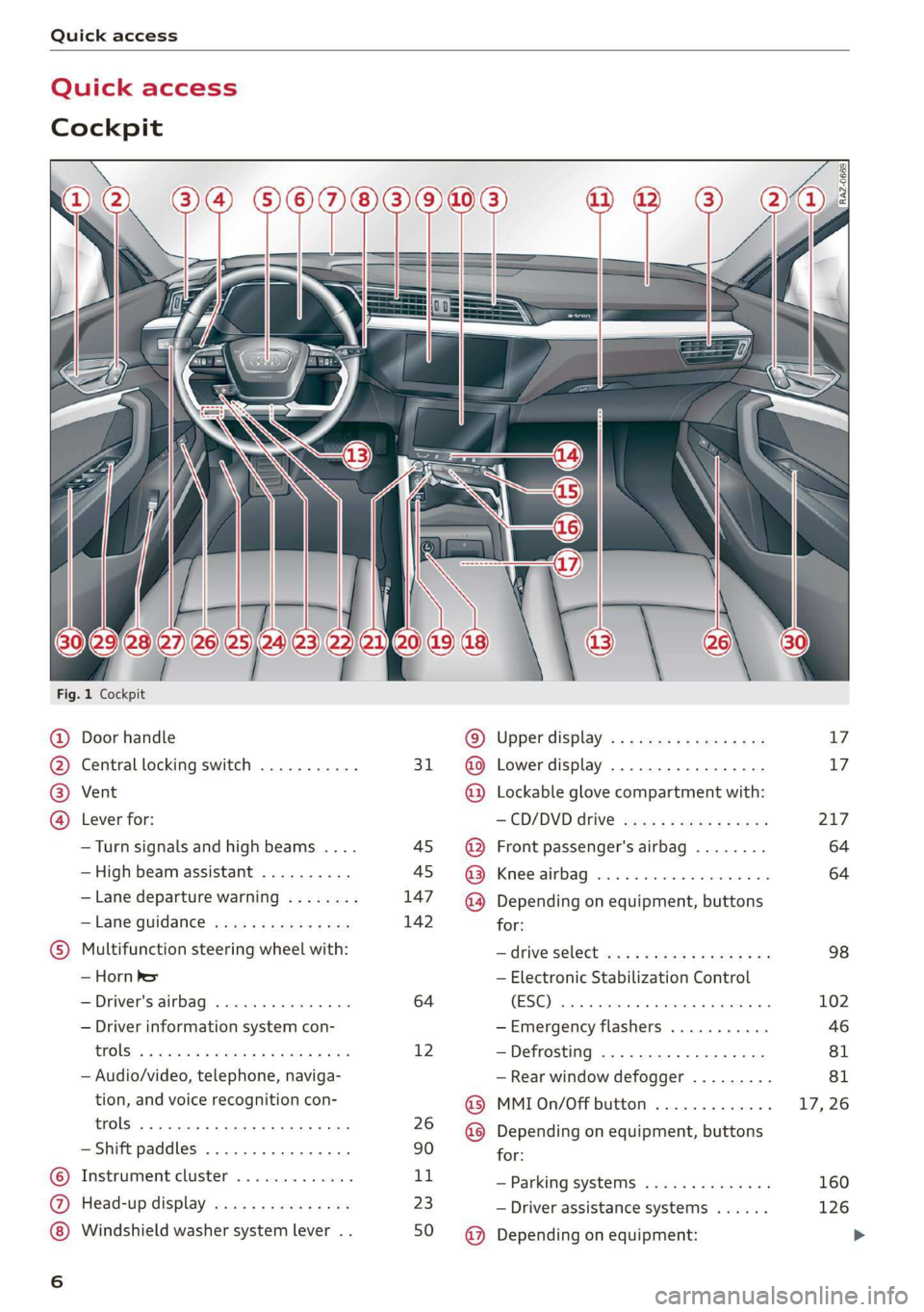
Quick access
Cockpit
Fig. 1 Cockpit
@ @ @ @
©C®
oa
Door handle
Central locking switch ...........
Vent
Lever for:
—Turn signals and high beams ....
— High beam assistant ..........
— Lane departure warning ........
—Lane guidance ...............
Multifunction steering wheel with:
— Horn Pe
— Driver's airbag .............0.
— Driver information system con-
CGS! « = 2 eeu go oes eee ez ee
— Audio/video, telephone, naviga-
tion, and voice recognition con-
trols... eee eee
— Shift paddles .............00.
Instrument cluster .............
Head-up display ...............
Windshield washer system lever . .
31
45 45
147
142
64
12
26
90
1,
23
50
© @ @ ® ® @ ® ®
@
Upper display, « « x sees x = aaa + ox
Lower display ................-
Lockable glove compartment with:
CD/DVD drive sess ¢ s saws 9 « ame
Front passenger's airbag ........
Kees AG wisn v 6 ores o soca oi ans
Depending on equipment, buttons
for:
— ‘drive SelGCt sce ss gewy so eee a oe
— Electronic Stabilization Control
(ESE) sess co ssenionn as comune «of auanane 0
—Emergency flashers ...........
—Defrosting ..................
— Rear window defogger .........
MMI On/Off button .............
Depending on equipment, buttons
for:
— Parking systems ..............
— Driver assistance systems ......
Depending on equipment:
17 17
217
64
64
98
102
Page 35 of 310

4KE012721BB
Opening and closing
difficult for emergency workers to enter the
vehicle, which puts lives at risk.
Keys
LET
RAZ-0021
Fig. 25 Your vehicle key set
@ Vehicle key
You can unlock and lock your vehicle with the ve-
hicle key.
@ Mechanical key and release button for
mechanical key
A mechanical key is integrated in the vehicle key.
To remove it, press the release button and re-
move the mechanical key.
Using the mechanical key, you can:
— Lock or unlock the glove compartment.
— Manually unlock and lock the doors > page 32.
— Unlock the luggage compartment lid using the
emergency release > page 38.
@® Key fob with vehicle code
Applies to: vehicles with Audi connect vehicle control
Open the key tag and scratch to reveal the vehicle
code. You can unlock the Audi connect vehicle
control services* for your vehicle with this vehicle
code. For additional information, see
=> page 186. If a key fob is lost, contact an au-
thorized Audi dealer or authorized Audi Service
Facility.
@ PANIC button
In an emergency, you can press the PANIC button
to trigger the alarm for the anti-theft alarm sys-
tem. The vehicle horn and emergency flashers
will turn on if you trigger the alarm.
—To trigger the alarm, press the [PANIC] but-
ton @) © fig. 25.
—To turn the alarm off, press the red
ton again.
PANIC] but-
Lost key/replacing a key
If a vehicle key is lost, contact an authorized Audi
dealer or authorized Audi Service Facility. Have
this vehicle key deactivated. It is important to
bring all keys with you.
If a key is lost, you should report it to your insur-
ance company.
Electronic immobilizer
The immobilizer prevents unauthorized use of
the vehicle.
In some cases, it may not be possible to start the
vehicle if there is a vehicle key from a different
vehicle manufacturer on the key chain.
Data in the vehicle key
When driving, service and maintenance-relevant
data is continuously stored in your vehicle key. An
authorized Audi dealer or authorized Audi Service
Facility can read out this data and tell you about
the work your vehicle needs.
Z\ WARNING
Follow the safety precautions > page 29.
@® Note
Protect the key against high temperatures
and direct sunlight.
(@) For the sake of the environment
X Do not dispose of vehicle keys in household
trash. They contain materials that can be re-
cycled. Contact an authorized Audi dealer or
authorized Audi Service Facility for more in-
formation.
@) Tips
— The vehicle key function can be temporarily
disrupted by interference from transmitters
33
>
Page 79 of 310

4KE012721BB
Stowing and using
Additional storage
You will find a variety of storage compartments
and holders at various locations in the vehicle.
— Glove compartment: the glove compartment
can be locked using the mechanical key
=> page 33.
— Holders for a notepad, pen, and coins in the
glove compartment
— Storage compartment in the cockpit on the
driver's side
— Storage compartments in the door trim panel
— Storage compartments in the front center con-
sole
— Storage compartment under the front center
armrest*
— Nets on the back of the front seats
— Garment hooks in the rear
— Storage compartment in the rear center arm-
rest*
— Removable box* under the cargo floor in the
luggage compartment
— Bag hooks* in the luggage compartment
— Net* in luggage compartment
ZA\ WARNING
—To reduce the risk of injury, make sure all
storage compartments are always closed
while driving.
— Loose objects can be thrown around the ve-
hicle interior during sudden driving or brak-
ing maneuvers, which increases the risk of
an accident. Store objects securely while
driving.
— Only use the storage compartments in the
door trim panels to store small objects that
will not stick out of the compartment and
impair the function of the side airbags.
— Only lightweight clothing should be hung
from the garment hooks in the vehicle. Do
not use clothes hangers to hang clothing.
The pockets of the clothing must not con-
tain any heavy, breakable, or sharp-edged
objects. This could impair the effectiveness
of the side curtain airbags.
— Make sure your view toward the rear is not
blocked, for example by hanging clothing or
objects in the vehicle.
Luggage compartment
General information
All pieces of luggage or objects must be securely
fastened in the luggage compartment. Note the
following to maintain good vehicle handling:
> Distribute the load evenly in the luggage com-
partment.
> Stow heavy luggage as far forward in the lug-
gage compartment as possible.
> Use non-elastic cords attached to the tie-downs
to secure objects.
ZA\ WARNING
— The luggage compartment cover is not a
surface for storing objects. Objects placed
on the cover increase the risk of injury to all
vehicle occupants during sudden driving or
braking maneuvers or in the event of an ac-
cident.
— Loose objects can be thrown around the ve-
hicle interior during sudden driving or brak-
ing maneuvers, which increases the risk of
an accident. Always stow objects securely in
the luggage compartment and secure them
at the tie-downs. Use straps suitable for
heavy objects.
— If pieces of luggage or objects are secured
to the tie-downs with unsuitable or dam-
aged straps, this can increase the risk of in-
jury during braking maneuvers or accidents.
— When transporting heavy objects, the vehi-
cle characteristics will change due to the
shift in the center of gravity, which increases
the risk of an accident. You may need to
adapt your driving style and speed to the
current conditions.
— The cargo net is only strong enough to se-
cure light objects. Heavy objects are not ade-
quately secured. Attempting to secure heavy
objects increases the risk of injury.
— Never exceed the permitted axle and load
and vehicle weight > page 292.
77
Page 220 of 310

To reduce the risk of damaging the drive and
data carriers:
— Always store data carriers in a protective
sleeve and do not expose them to direct
sunlight
— Do not use damaged, dirty, or laminated da-
ta carriers
— Do not use single CDs/DVDs with an 8 cm
diameter, non-circular CDs/DVDs (shaped
CDs), cleaning CDs, and protective rings
— Never force CDs/DVDs into the drive. Discs
are pulled in automatically.
@ Tips
The thermal protection switch stops playback
temporarily when outside temperatures are
too high.
peel)
Applies to: vehicles with a DVD drive
RAH-9153
Fig. 152 Glove compartment: DVD drive
Loading a CD/DVD
> Slide the CD/DVD straight into the DVD slot @
with the label facing up. The CD/DVD will be au-
tomatically pulled in.
Ejecting a CD/DVD
> Press the button @).
The CD/DVD is pulled in again automatically if it
is not removed from the DVD slot within approxi-
mately ten seconds after ejecting it.
The DVD drive is accessed and operated through
the MMI > page 221.
218
G) Tips
— Playback cannot be guaranteed with media
files that have a high data rate.
— Always read the chapter > page 217, Gener-
al information.
Bluetooth audio player
Applies to: vehicles with Bluetooth audio player
With the Bluetooth audio player, you can play
music wirelessly through the MMI from your
Bluetooth-capable mobile device (such as a cell
phone).
Requirement: the vehicle must be stationary and
the ignition must be switched on. The Bluetooth
settings will open on your mobile device during
the connection setup. The Bluetooth function and
visibility of the MMI = page 232 and mobile de-
vice must be switched on.
Connecting a mobile device
> Applies to: MMI: Select on the home screen:
MEDIA > Source > Connect external device >
New connection. The available Bluetooth devi-
ces will be displayed after several seconds.
> Press on the desired mobile device in the list of
displayed Bluetooth devices.
> To update the list, press OQ.
> A PIN for a secure Bluetooth connection will be
generated.
> Confirm the PIN on your mobile device, or enter
the PIN for the connection setup on your mo-
bile device. The time allowed for entering the
PIN is limited to approximately 30 seconds.
After connecting successfully, the mobile device
will be displayed in the Connected devices menu
as a Bluetooth audio player.
> Playing media > page 221.
G) Tips
— Check for any connection requests on your
Bluetooth device.
— Multiple Bluetooth audio players can be
connected to the MMI, but only one ata
time can be active as a Bluetooth audio
player > page 232.
Page 243 of 310

4KE012721BB
Checking and Filling
ZA\ WARNING
California Proposition 65 Warning:
— Battery posts, terminals and related acces-
sories contain lead and lead compounds,
chemicals known to the State of California
to cause cancer and reproductive harms.
Wash hands after handling.
@) Note
If the vehicle will be parked for long periods
of time, protect the 12 Volt vehicle battery
against the cold so that it will not “freeze”
and become damaged. Have the battery
charged by an authorized Audi dealer or au-
thorized Audi Service Facility > page 241,
Charging the 12 Volt vehicle battery.
12 Volt vehicle battery
Explanation of warnings:
Always wear eye protection.
Battery acid is highly corrosive. Always
wear protective gloves and eye protection.
forbidden.
A highly explosive mixture of gases can
A» form when charging batteries.
Always keep children away from battery
@) acid and the battery.
Always follow the instructions in the oper-
® Fire, sparks, open flame, and smoking are
@/
fQ | ating manual.
@) For the sake of the environment
» ¥ Do not dispose of lead batteries in
household trash. They contain harmful sub-
stances, such as sulfuric acid and lead, and al-
so recyclable raw materials. Contact an au-
thorized Audi dealer or authorized Audi Serv-
ice Facility for more information.
Charging the 12 Volt vehicle battery
The vehicle cannot be operated when the 12 Volt
vehicle battery is drained. The vehicle battery
must not be charged under any circumstances.
Contact an authorized Audi dealer or authorized
Audi Service Facility.
() Note
The charging of the vehicle battery requires
specialized knowledge and technology.
— The vehicle battery may only be charged by
an
authorized Audi dealer or authorized Au-
di Service Facility. Otherwise, the electronic
systems in the vehicle may be severely dam-
aged.
— The jump start pins in the motor compart-
ment are designed specifically for qualified
technicians.
Windshield washer
system
B4M-0135)
Fig. 161 Motor compartment: washer fluid reservoir cap
Follow the safety precautions > page 235, Gener-
al information.
The windshield washer fluid reservoir contains
the cleaning solution for the windshield and the
headlight washer system > fig. 161, > page 237.
The reservoir capacity can be found in
=> page 291.
To reduce the risk of lime scale deposits on the
spray nozzles, use clean water with low amounts
of calcium. Always add window cleaner to the wa-
ter. When the outside temperatures are cold, an
anti-freezing agent should be added to the water
so that it does not freeze.
Messages
| Please add washer fluid
241
Page 299 of 310

4KE012721BB
FraQranGe ices 2s ewes 2 2 comes ¥ 6 ssvoee w & eee 83, 84
Free text search
Media... . 0... cece eee eee eee 225
RodiGven « 3 savon ¢ @ sama se nave 4 2 BeAD 7 ae 212
also refer to Intelligent search.......... 194
Freeze protection
COOLAM Brees 5 x snswas ox seems oo cmseens a 2 mena o 237
Eronticenterarmrest « sce 2 x came 2 0 mes 3 wa 58
Front passenger’s seat adjustment
FRONESs « scomene « ¢ exeseus © #2 aneeem 2 8 manors nw amaze «0 58
Rear... cece eee 58
Fuel
Fuel tank Capacity’: « sas « x gaan x «meme x 2 291
Fueling
Fuel tank capacity...............00005 291
G
Garage door'opener' sss kiss ss eee se veess 41
Garivierit HOOKS: < neues se ees 5 o ou ¥ a 77
GAWR
refer to Gross Axle Weight Rating (GAWR) . 292
Gear's 2 sues « 2 euwa xo eee 7 a geen 2 Keres 4 we 88
Glossary of tire and loading terminology... 246
GLOVE COMPAIMENE asec ss aces s & Hee = bee 77
Gross Axle Weight Rating (GAWR)........ 292
Gross Vehicle Weight Rating (GVWR)...... 292
GVWR
refer to Gross Vehicle Weight
Rating (GVWR) aces 0 2 sues & 2 wai 2 o coum 292
H
Handstree's « sees « 2 gawn « came © neem 4 2 new 169
Head-up display
AGjUSEING ics & & esesees ve soeees en secon wo muons a 23
Adjusting the brightness................ 48
Operating s x semen se ewes s ¥ meee v HEE os es 23.
Headlight range control...............005 44
Headlights
Cleaning « + sess « = sews ¢ e ees ce eee ee 264
Headlight range control..............4. 44
Washer systemM......... 2-0. e eee eee eee 50
Head restraints
ACIUSTING x: « » wees & & ean «eee Be mee ee 60
Removing and installing................ 60
Heated rear Window scies ¢ «mwas x ¢ caw 9 2 ee 83
Heated steering wheel................... 83
H@AGING bins oe somes & amiss 6 erie oon Desa sw He 81
High-voltage battery................005 104
Advanced charging settings............ 111
Audi e-tron compact charging system.... 114
Charging cc : s ewes = = eee = x eee 105, 108
Charging display on the vehicle......... 109
Charging equipment................0. 112
Charging :triethods « sce x «seus & x cease © « 105
Charging ports on the vehicle........... 105
Charging time..............0.020000. 106
Connecting the charging cable.......... 108
Messages while driving................ 112
Not running for long periods of time..... 107
Quick Charging ss ¢ sees +s seen se reese 2? 105
Setting the charging target............ 110
Setting the timer.................005. 111
Transporting charging equipment....... 113
High-voltage system ...... 0... eee eee 104
High beams
High beam assistant................... 45
Highway lights: «sce: ss eees sv eeea s weeees 44
Hill descent assist.............0 00-0 97
Hill hold assist... 0.0... ccc eee eee 95
also refer to Hill hold assist............. 95
HOlG:4SSISts 2 « acas 2 5 sawn 2B ieee 2 aeRA 4 BE 94
also refer to Hold assist................ 94
Hold Assist
refer to Hold assist..............000 005 94
Home
refer to Home address.............04. 202
Hommerad@nessy. «a wise » oxeeonee « stieeaun a wanes 202
HomeLink
refer to Garage door opener............. 41
Home screen... 2... eee eee eee ee 16
ORIN s & cosuves 2 at cesvecs 2 a animes oo emer 2 8 aero © orate 6
Hotspot
refer to Wi-Fi...........0.-. 0c eee eee 189
I
Idle
(eer to. Gals « eaee ss eens sv eens spews es 88
Ignition
Switching on and off...............0-0- 86
Imbalance (Wheels) yi iv isas s neu a sean a 252
297