2019 Alfa Romeo Giulia key
[x] Cancel search: keyPage 112 of 232

STARTING THE ENGINE
STARTING THE ENGINE
Before starting the engine, adjust the
seat, the interior rear view mirrors, the
door mirrors and fasten the seat belt
correctly.
Never press the accelerator pedal for
starting the engine.
If necessary, messages indicating the
starting procedure can be shown on the
display.
103) 104) 105)
33) 34) 35)
Versions with manual gearbox
Proceed as follows:
engage the parking brake and set the
gear in neutral, on diesel versions turn the
ignition switch to ON, the
symbol will
appear on the instrument panel: wait until
it goes off;
fully depress the clutch pedal, without
touching the accelerator;
briefly press the ignition button;
if the engine doesn't start within a few
seconds, you need to repeat the
procedure.
if the problem persists, contact an Alfa
Romeo Dealership.Versions with automatic transmission
Proceed as follows:
engage the electric parking brake and
set the gear lever to P (Park) or N
(Neutral),
fully depress the brake pedal without
touching the accelerator;
briefly press the ignition button;
if the engine doesn't start within a few
seconds, you need to repeat the
procedure.
if the problem persists, contact an Alfa
Romeo Dealership.
ENGINE STARTING FAILURE
Starting the engine with electronic key
battery (Keyless Start) run down or flat
If the ignition device does not respond
when the relevant button is pressed the
electronic key battery might be run down
or flat. Therefore, the system does not
detect the presence of the electronic key
on board the car and displays a dedicated
message.
In this case, follow the instructions in
paragraph "Starting with flat key battery"
in the "Knowing your car" chapter and
start the engine normally.
STOPPING THE ENGINE
36)
To stop the engine, proceed as follows:
park the car in a position that is not
dangerous for oncoming traffic;
engage a gear (versions with manual
gearbox) or activate P (Park) mode
(versions with automatic transmission);
with engine idling, press the start
button.
Cars with electronic key (Keyless Start)
If the car speed is above 5 mph (8 km/h),
it is still possible to stop the engine if a
gear operating mode other than P (Park)
is selected. To switch off the engine in
this situation, hold down the ignition
device button for a while or press it
3 times in a row within a few seconds.
WARNING
103)It is dangerous to run the engine in
enclosed areas. The engine takes in oxygen
and releases carbon dioxide, carbon
monoxide and other toxic gases.
104)The electro-hydraulic braking system
is not active until the engine starts running.
So, the brake pedal travel will be longer than
normal. This does not indicate a fault.
105)Do not start the engine by pushing,
towing or driving downhill. These
manoeuvres may damage the catalytic
converter.
110
STARTING AND DRIVING
Page 113 of 232

IMPORTANT
33)We recommend that during the initial
period, or during the first 1600 km
(1000 miles), you do not drive to full car
performance (e.g. excessive acceleration,
long journeys at top speed, sharp braking,
etc.).
34)When the engine stopped never leave
the ignition device in the ON position to
prevent useless current draw from draining
the battery.
35)Warning light
will flash after starting
or during prolonged cranking to indicate a
fault with the glow plug heating system. If
the engine starts, the vehicle can be regularly
used, but an Alfa Romeo Dealership must be
contacted as soon as possible.
36)A quick burst on the accelerator before
turning off the engine serves absolutely no
practical purpose; it wastes fuel and is
damaging for the engine.
PARKING THE VEHICLE
106) 107) 108)
IMPORTANT In addition to parking the
vehicle with the parking brake always
engaged, the wheel steered, chocks or
stones positioned in front of the wheels
(when on a steep slope), you must always
engage:
Manual transmission:
Engage 1stgear if the car is parked
uphill or reverse gear if the car is parked
downhill.
Automatic transmission:
engage P (Park) mode;
always take the key with you when
leaving the vehicle.
IMPORTANT Always engage the electric
parking brake before leaving the vehicle.
ELECTRIC PARKING BRAKE
The car is equipped with electric parking
brake to guarantee better use and
optimal performance compared to a
manually operated parking brake.
The electric parking brake features a
switch, located on the central tunnel
fig. 93, a motor with caliper for each rear
wheel and an electronic control module.The electric parking brake can be
engaged in two ways:
manually, by pulling the switch on the
central tunnel;
automaticallyin "Safe Hold" or "Auto
Park Brake" conditions.
IMPORTANT Normally, the electric
parking brake is engaged automatically
when the engine is stopped. This function
can be deactivated/activated on the
Connect system by selecting the
following items in sequence on the main
menu: "Settings", "Driver assistance" and
"Automatic parking brake".
IMPORTANT Should the vehicle battery
be faulty, to unlock the electric parking
brake the battery must be replaced.
9307046S0001EM
111
Page 115 of 232

carbon-ceramic discs, before using “Drive
Away Release” mode and moving the
vehicle, it is necessary to buckle the seat
belts or manually release the electric
handbrake to prevent damage to the
carbon-ceramic discs themselves.
"Safe Hold": if the vehicle speed is
lower than 2 mph (3 km/h), on vehicles
with automatic transmission, the gear
lever is not in P (Park) position and the
driver's intention of leaving the vehicle is
detected, the electric parking brake will
automatically engage to hold the vehicle
in safety conditions;
"Auto Park Brake": if the vehicle speed
is below 2 mph (3 km/h), the electric
parking break will automatically engage
when the gear lever is in P (Park) position.
The LED on the switch located on the
central tunnel fig. 93 switches on
together with the warning light
on
the instrument panel when the parking
brake is engaged and applied to the
wheels. Each automatic parking brake
engagement can be cancelled by pressing
the switch on the central tunnel and at
the same time moving the gear lever for
the transmission to position P (Park).
SAFE HOLD
It is a safety function that automatically
engages the electric parking brake in the
event of a dangerous condition for the
car.
If:
the car speed is below 2 mph (3 km/h);
on cars with automatic transmission, a
transmission operating mode different
from P (Park) is activated;
the driver's seat belt is not fastened;
the driver side door is open;
no attempts to apply pressure on the
brake pedal have been detected;
the car is parked on roads which
gradient higher than 4%;
the electric parking brake engages
automatically to prevent car movement.
The Safe Hold function can be
temporarily disabled by pressing the
switch located on the central tunnel and
the brake pedal at the same time, with
the vehicle stationary and the driver side
door open.
Once disabled, the function will activate
again when the vehicle speed reaches
18 mph (20 km/h) or the ignition device is
moved to STOP and then to ON.
WARNING
106)In the case of parking manoeuvres on
roads on a gradient, the front wheels must
be steered towards the pavement (when
parking downhill), or in the opposite
direction if the vehicle is parked uphill. Block
the wheels with a wedge or a stone if the car
is parked on a steep slope.
107)Never leave children alone in an
unattended vehicle; make sure that when
you move away from the vehicle, you have
the key with you.
108)The electric parking brake must
always be engaged when leaving the vehicle.
113
Page 213 of 232
MEDIA MODE
IMPORTANT Applications used on
portable devices may be not compatible
with the Connect system.
Track selection (Browse)
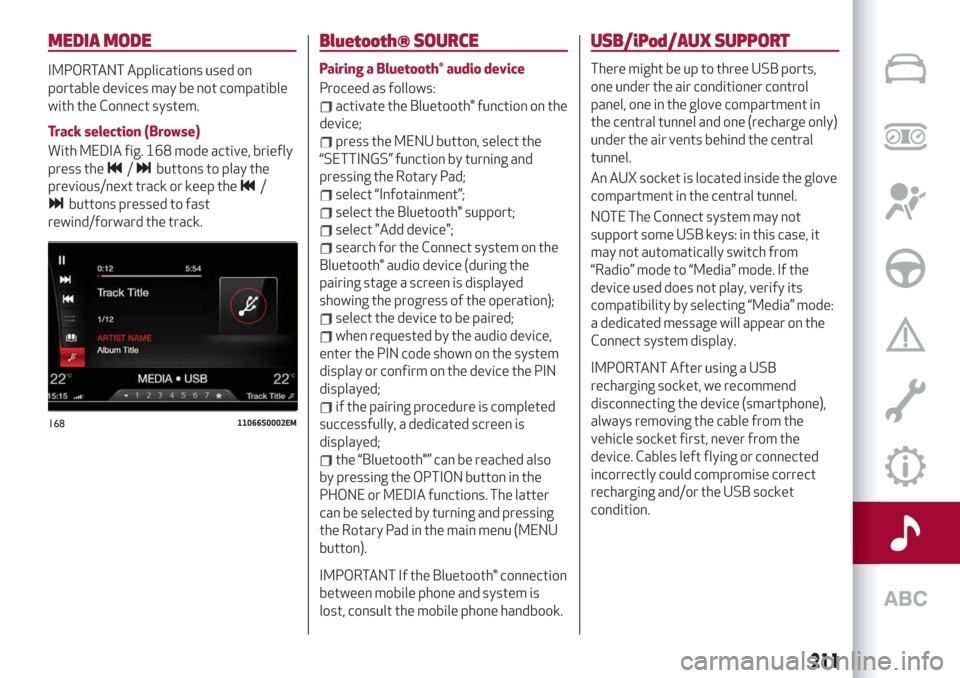
With MEDIA fig. 168 mode active, briefly
press the
/buttons to play the
previous/next track or keep the
/
buttons pressed to fast
rewind/forward the track.
Bluetooth® SOURCE
Pairing a Bluetooth® audio device
Proceed as follows:
activate the Bluetooth® function on the
device;
press the MENU button, select the
“SETTINGS” function by turning and
pressing the Rotary Pad;
select “Infotainment”;
select the Bluetooth® support;
select "Add device";
search for the Connect system on the
Bluetooth® audio device (during the
pairing stage a screen is displayed
showing the progress of the operation);
select the device to be paired;
when requested by the audio device,
enter the PIN code shown on the system
display or confirm on the device the PIN
displayed;
if the pairing procedure is completed
successfully, a dedicated screen is
displayed;
the “Bluetooth®” can be reached also
by pressing the OPTION button in the
PHONE or MEDIA functions. The latter
can be selected by turning and pressing
the Rotary Pad in the main menu (MENU
button).
IMPORTANT If the Bluetooth® connection
between mobile phone and system is
lost, consult the mobile phone handbook.
USB/iPod/AUX SUPPORT
There might be up to three USB ports,
one under the air conditioner control
panel, one in the glove compartment in
the central tunnel and one (recharge only)
under the air vents behind the central
tunnel.
An AUX socket is located inside the glove
compartment in the central tunnel.
NOTE The Connect system may not
support some USB keys: in this case, it
may not automatically switch from
“Radio” mode to “Media” mode. If the
device used does not play, verify its
compatibility by selecting “Media” mode:
a dedicated message will appear on the
Connect system display.
IMPORTANT After using a USB
recharging socket, we recommend
disconnecting the device (smartphone),
always removing the cable from the
vehicle socket first, never from the
device. Cables left flying or connected
incorrectly could compromise correct
recharging and/or the USB socket
condition.
16811066S0002EM
211
Page 215 of 232

NAVIGATION MODE
(where provided)
IMPORTANT In the interest of safety and
to reduce distractions while you are
driving, you should always plan a route
before you start driving.
To plan a route, do the following:
Activate the NAVIGATION mode by
selecting it on the main menu fig. 170;
Activate the "Set destination"
function;
To insert the address, select the item to
add (Country, City) on the circular keypad,
choosing the keys to compose the
desired name; proceeding with keying in
the letters, the system automatically
completes the word and on the right of
the display offers a list of options that
apply to the entered letters. You can now
either complete the word or go to the list
of suggestions by moving the Rotary Padrightwards or by pointing to “OK” and
pressing the Rotary Pad.
Or
Select an address on the "Recent
destinations" list.
Or
Select an address on the "Favourite
destinations" list.
Once the desired destination has been
set, select "Start navigation" function.
The system suggests three alternatives
according to the set criteria (fastest, no
toll routes etc.); select the preferred
alternative using the Rotary Pad.
With navigation started, using the control
bar on the display, you can choose from
the following options:
Interrupt navigation: lets you interrupt
navigation;
Navigation volume: allows to set the
message volume;
Route management: lets you refine
your route choice, offering a series of
options;
Route Preview: this is used to see a
preview of the planned route;
Zoom: lets you enlarge/reduce the
map;
Map explore: lets you move within the
map.
SETTINGS
To access the user-programmable
functions, open the main menu by
pressing the MENU button, then select
SETTINGS by turning and pressing the
Rotary Pad.
The following menu items can be found
here fig. 171:
Lights;
Units & Language;
Time and Date;
Safety;
Driver assistance;
Doors & Locks;
Cluster;
Infotainment;
System.17011186S0003EM
17111126S0009EM
213
Page 228 of 232
Fuel consumption............200
Fuel cut-off system...........156
Fuse boxes................146
Fuses (replacement)...........146
Hazard warning lights..........140
Emergency braking..........140
Headlight alignment adjustment....30
Headlight alignment corrector......30
Headrests..................23
HSA (Hill Start Assist) system......73
Identification data............182
Ignition device...............13
Important information and
recommendations..........221
Interior lights................31
Interiors (cleaning)............179
ISOFIX child restraint system
(installation)...............94
Jump starting...............155
Keys
electronic key..............12
Lane Change................29
Lane Departure Warning System . . .130
Lifting the vehicle............176
Light bulbs
types of bulbs.............141
Light switch.................26
Main beam headlights..........28Main beam headlights (changing a
bulb)...................143
Manual gearbox..............114
Occupant protection systems......85
Paintwork (cleaning and
maintenance).............178
Park Sensors system..........128
Parking lights................28
Parking the vehicle............111
Passive Entry (system)..........16
PBA (Panic Brake Assist) system....73
Performance (top speed)........198
Power Lock (device)............17
Pretensioners................88
Load limiters..............88
Rain sensor.................32
RCP system.................77
Rear Back-up Camera / Dynamic
Gridlines................131
Rear seats..................21
Rear view mirrors.............25
Reconfigurable TFT display.......46
Refuelling.................192
Refuelling procedure..........133
Refuelling the vehicle..........132
Replacing an external bulb.......143
Rims and tyres..............186
Rims and tyres provided........186
Roof rack / Ski rack............41Run Flat Tyres . ..............153
Saving fuel................136
SBA (Seat Belt Alert) system......87
SBL function . . ..............30
Scheduled servicing...........160
Scheduled servicing plan (2.2 JTD
diesel engine versions) . . ......164
Screen wiper/washer...........31
Smart washing function........32
Seat belts..................85
Seats.....................19
Service schedule (2.0 T4 MAir
petrol engine versions) . . ......161
Servicing procedures..........174
Side bag..................106
Snow chains................177
Speed Limiter . ..............119
Split folding rear seat...........22
SRS (supplementary restraint
system).................102
Start & Stop Evo.............118
Starting the engine............110
Starting with flat key battery......14
Steering lock . . ..............14
Steering wheel...............24
Suggestions for driving .........136
Symbols....................5
Tailgate...................39
INDEX
Page 229 of 232

TC (Traction Control) system.......73
The keys . ..................12
Tire Repair Kit...............151
Topping up AdBlue® diesel
emissions additive..........133
Towing the vehicle............157
Towing trailers..............138
TPMS (Tyre Pressure Monitoring
System)..................82
Tyres (inflation pressure)........188
Use of the Owner Handbook.......4
Vehicle changes/alterations.......5
Vehicle identification number.....182
Warning lights and messages......51
Washer fluid for
windscreen/headlights........171
Weights..................191
Wheels...................186
Wheels and tyres.............177
Window bag................106
Windscreen wiper .............31
replacing blades............175
Xenon gas discharge headlights
(bulb replacement)..........145