Page 24 of 292

To Disarm The System
Deactivation
Push the unlock button.
The following operations are performed:
•Two brief flashes of the direction indicators.
• Unlocking of the doors.
NOTE:
• If the central door locking system is released using
the metal insert of the key, the alarm is not disabled.
• In the event of accidental activation of the alarm, or
in any case to interrupt the visual signal cycle when
activated, it is possible to push the unlock button or
turn the ignition key to MAR (ON/RUN) for at least
five seconds, after which the system will deactivate.
Disarming
To completely disable the alarm (e.g. during a lengthy
period of vehicle inactivity), lock the vehicle by turning
the metal insert of the key in the door lock. NOTE:
If the batteries of the key fob run out or there is
a fault in the system, the alarm can be switched off by
inserting the key in the ignition switch and turning it to
MAR (ON/RUN).
DOORS
Central Door Locking/Unlocking
Locking/Unlocking Doors From The Inside
Push the lock LED indicator button . The button has an
LED that indicates whether the doors are locked or
unlocked.
Pushing the lock LED indicator button again centrally
unlocks all doors and switches off the LED.
Pushing the lock LED indicator button again centrally
locks all the doors. The doors will be locked only if all
the doors are properly shut.
Once the doors have been locked using the remote
control or the key, it will no longer be possible to unlock
them by pushing the lock LED indicator button.
NOTE: In the absence of electrical power supply (blown
fuse, battery disconnected, etc.), it is still possible to
lock the doors manually.
22 GETTING TO KNOW YOUR VEHICLE
Page 25 of 292

Locking Doors From The Outside
With the doors closed, push the lock button on the key
fob or turn the metal insert (located inside the key fob)
in the door lock.
The door lock LED indicator button will illuminate to
indicate that the doors have locked.
NOTE:Door locking is carried out with all doors shut.
Unlocking Doors From The Outside
Push the unlock button on the key fob or turn the metal
insert (located inside the key fob) in the driver side door
lock.WARNING!
• For personal security and safety in the event of a
collision, lock the vehicle doors before you drive
as well as when you park and leave the vehicle.
• Never leave children alone in a vehicle, or with
access to an unlocked vehicle. Allowing children
to be in a vehicle unattended is dangerous for a
number of reasons. A child or others could be
seriously or fatally injured. Children should be
warned not to touch the parking brake, brake
pedal or the transmission gear selector.
• Do not leave the key fob in or near the vehicle, or
in a location accessible to children. A child could
operate power windows, other controls, or move
the vehicle.
Door Opening/Closing Mechanism Reset
If the battery is disconnected or the protection fuse
blows, the door opening/closing mechanism must be
reset as follows:
1. Close all the doors.
Door Lock LED Indicator
3
GETTING TO KNOW YOUR VEHICLE 23
Page 26 of 292
2. Push the unlock button on the key fob or the doorlocking/unlocking LED indicator button on the
dashboard.
3. Push the lock button on the key fob or the door locking/unlocking LED indicator button on the
dashboard.
Emergency Door Locking Device
Passenger Side Door
The passenger side door has a device to lock it when the
vehicle’s battery is discharged.
To lock it, place the metal insert of the ignition key into
the emergency lock and turn it clockwise. To restore the starting condition of the door locks (only
if battery charge is restored), proceed as follows:
•
Push the unlock button on the key fob.
• Push the door locking/unlocking LED indicator but-
ton on the dashboard.
• Introduce the metal insert of the ignition key in the
front door pawl.
• Pull the internal door handle.
Emergency Door Locking Device
24 GETTING TO KNOW YOUR VEHICLE
Page 33 of 292

Headlights
Rotate the end of the multifunction lever upward to the
first detent for headlight operation.
NOTE:When the headlights are turned on, the Daytime
Running Lights will be deactivated.
Daytime Running Lights
To activate the Daytime Running Lights (DRL), rotate
the end of the multifunction lever to the Osymbol.
NOTE: The low beams and side/tail lights will not be
on with DRL.
High Beams
With the low beams activated, pull the multifunction
lever towards the steering wheel to turn on the high
beams. A high beam symbol will illuminate in the
cluster to indicate the high beams are on. Pull the
multifunction lever a second time to switch the head-
lights back to low beam.
NOTE: If the vehicle’s ignition is turned OFF, both high
and low beam headlights will also turn off.
Flash-To-Pass
You can signal another vehicle with your headlights by
partially pulling the multifunction lever toward the
steering wheel. This will cause the high beam head-
lights to turn on until the lever is released.
Parking Lights
To turn on the parking lights, remove the key or turn
the ignition to OFF/LOCK position and turn on the
headlights.
Headlight Operation
3
GETTING TO KNOW YOUR VEHICLE 31
Page 34 of 292

Follow Me Home/Headlight Delay
When this feature is selected, the driver can choose to
have the headlights remain on for a preset period of
time after the engine is turned OFF.
Activation
Remove the key or turn the ignition to the STOP
(OFF/LOCK) position, and pull the multifunction lever
toward the steering wheel within two minutes. Each
time the lever is pulled, the activation of the lights will
be extended by 30 seconds. The activation of the lights
can be extended to a maximum of 210 seconds.
Deactivation
Pull the multifunction lever toward the steering wheel
and hold it for more than two seconds.
Turn Signals
Move the multifunction lever up or down and the
arrows on each side of the instrument cluster flash to
show proper operation of the front and rear turn signal
lights.NOTE:
If either light remains on and does not flash, or
there is a very fast flash rate, check for a defective
outside light bulb. If an indicator fails to light when the
lever is moved, it would suggest that the indicator bulb
is defective.
Lane Change Assist
Tap the lever up or down once, without moving beyond
the detent, and the turn signal (right or left) will flash
five times then automatically turn off.
INTERIOR LIGHTS
Interior Light
The interior light is located in the headliner in between
the sun visors. The interior light can be set to three
different positions (off/left position, center position,
on/right position).
Using the interior light lens, push the lens to the right
from its center position and the lights are always on.
Push the lens to the left from its center position and the
lights are always off. Leave the lens in the center
position, and the light is turned on and off when the
doors are opened or closed.
32 GETTING TO KNOW YOUR VEHICLE
Page 35 of 292
CAUTION!
Before getting out of the vehicle be sure that the
Overhead Dome Lamp is in the center position or
that the lights are off to avoid draining the battery.
Interior Light Timing (Center Position)
There are four different modes of operation that can be
activated in this position:
•When one door is opened, a three minute timer is
activated. •
When the key is removed from the ignition (within
two minutes of the ignition being turned OFF), a 10
second timer is activated.
• When the doors are unlocked with the key fob, a 10
second timer is activated.
• When the doors are locked with the key fob, the
lights will turn off.
Dimmer Controls
The dimmer controls are located on the left side of the
instrument panel below the instrument cluster.
Interior Light (Off Position Shown)
Dimmer Controls
3
GETTING TO KNOW YOUR VEHICLE 33
Page 43 of 292
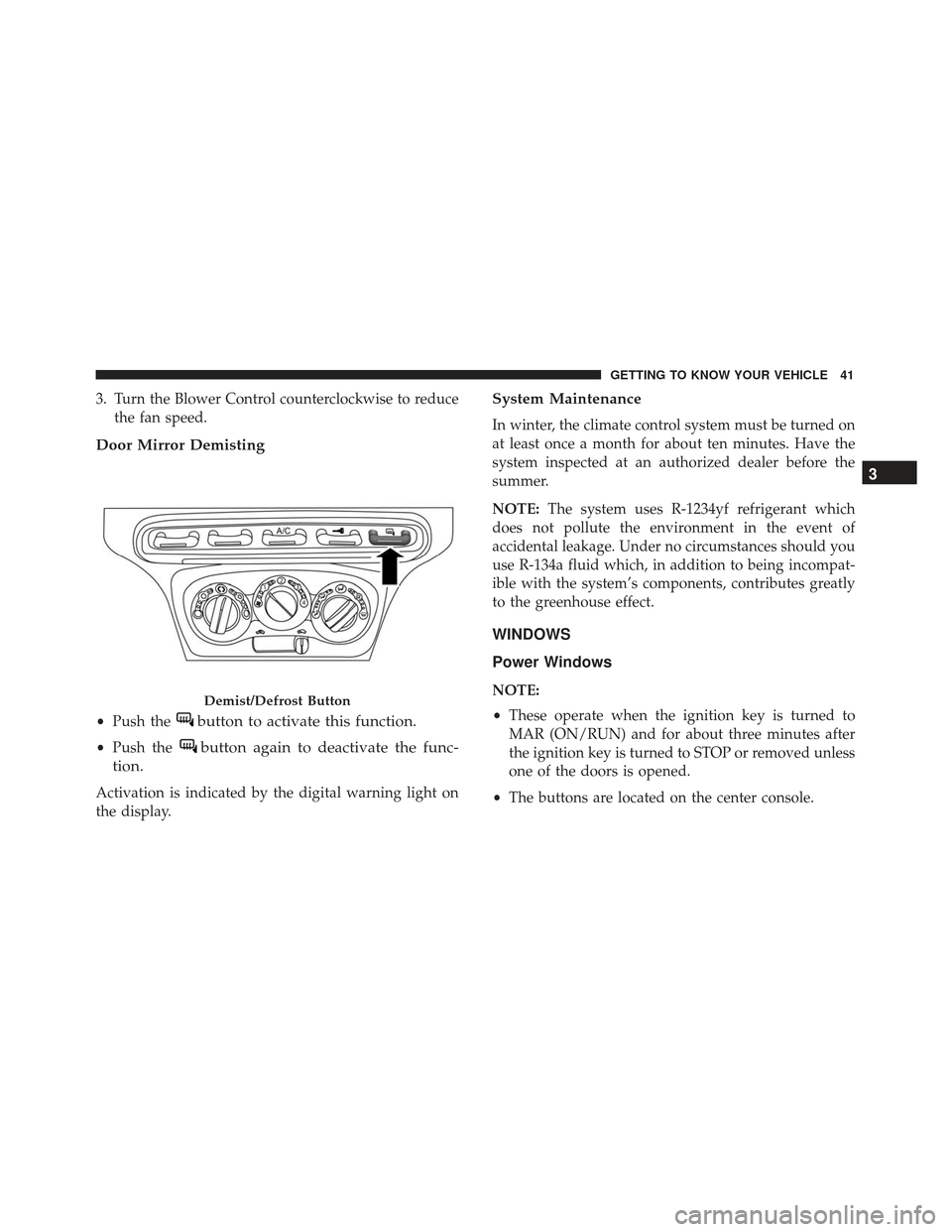
3. Turn the Blower Control counterclockwise to reducethe fan speed.
Door Mirror Demisting
•Push thebutton to activate this function.
•Push thebutton again to deactivate the func-
tion.
Activation is indicated by the digital warning light on
the display.
System Maintenance
In winter, the climate control system must be turned on
at least once a month for about ten minutes. Have the
system inspected at an authorized dealer before the
summer.
NOTE: The system uses R-1234yf refrigerant which
does not pollute the environment in the event of
accidental leakage. Under no circumstances should you
use R-134a fluid which, in addition to being incompat-
ible with the system’s components, contributes greatly
to the greenhouse effect.
WINDOWS
Power Windows
NOTE:
• These operate when the ignition key is turned to
MAR (ON/RUN) and for about three minutes after
the ignition key is turned to STOP or removed unless
one of the doors is opened.
• The buttons are located on the center console.Demist/Defrost Button
3
GETTING TO KNOW YOUR VEHICLE 41
Page 44 of 292

Push/pull the corresponding buttons to open/close the
desired window.
When one of the two buttons is pushed briefly, the
window moves in stages; if the button is held down to
open,�continuous automatic� operation is activated.
If the button is pushed again, the window will stop in
its current position. If the button is pushed for several
seconds, the window lowers automatically (only with
ignition key in MAR [ON/RUN] position). Continuous Automatic Operation
This is activated by pushing one of the two buttons for
longer than half a second. The window will stop when
it is fully opened, or when the button is pushed again.
It can be used on both the driver side and passenger
side, only for lowering the window.
Electric Window System Reset
After a break in power supply for the control units
(battery replaced or disconnected or protective fuses for
the electric window control units replaced), the auto-
matic operation of the windows must be restored.
The restoration procedure must be performed as de-
scribed below with the doors closed:
1. Completely open the driver’s door window keeping
the operating button pushed for at least three sec-
onds after the (lower) end of travel position is
reached.
2. Completely raise the driver side window and hold the button down for at least three seconds once the
(upper) end of travel position has been reached.
3. Proceed in the same way as described in points 1 and 2 for the passenger side door.
Power Window Switch
1 — Driver Power Window Switch
2 — Passenger Power Window Switch 42 GETTING TO KNOW YOUR VEHICLE

