Page 291 of 591

289
uuGeneral Information on the Audio System uLegal Information on Apple CarPlay/Android Auto
Continued
Features
Legal Information on Appl e CarPlay/Android Auto
USE OF APPLE CARPLAY IS SUBJECT TO YOUR AGREEMENT TO THE CARPLAY TERMS OF USE, WHICH ARE INCLUDED AS PART OF THE
APPLE iOS TERMS OF USE. IN SUMMARY, THE CARPLAY TERMS OF USE DISCLAIM APPLE AND ITS SERVICE PROVIDERS’ LIABILITY IF THE
SERVICES FAIL TO PERFORM CORRECTLY OR ARE DISCONTINUED, STRICTLY LIMIT APPLE AND ITS SERVICE PROVIDERS’ OTHER
LIABILITIES, DESCRIBE THE KINDS OF USER INFORMATION (INCLUDING, FOR EXAMPL E, VEHICLE LOCATION, VEHICLE SPEED, AND
VEHICLE STATUS) BEING GATHERED AND STORED BY APPLE AND IT S SERVICE PROVIDERS, AND DISCLOSE CERTAIN POSSIBLE RISKS
ASSOCIATED WITH THE USE OF CARPLAY, INCLUDING THE POTENTIAL FOR DRIVER DISTRACTION. SEE APPLE’S PRIVACY POLICY FOR
DETAILS REGARDING APPLE'S USE AND HANDL ING OF DATA UPLOADED BY CARPLAY.
USE OF ANDROID AUTO IS SUBJECT TO YOUR AGREEMENT TO THE ANDROID AUTO TERMS OF USE WHICH MUST BE AGREED TO WHEN\
THE ANDROID AUTO APPLICATION IS DOWNLOADED TO YOUR ANDR OID PHONE. IN SUMMARY, THE ANDROID AUTO TERMS OF USE
DISCLAIM GOOGLE AND ITS SERVICE PROVIDERS’ LIABILITY IF THE SERVICES FAIL TO PERFORM CORRECTLY OR ARE DISCONTINUED,
STRICTLY LIMIT GOOGLE AND ITS SERVICE PROV IDERS’ OTHER LIABILITIES, DESCRIBE THE KINDS OF USER INFORMATION (INCLUDING,
FOR EXAMPLE, VEHICLE LOCATION, VEHI CLE SPEED, AND VEHICLE STATUS) BEING GATHERED AND STORED BY GOOGLE AND ITS
SERVICE PROVIDERS, AND DISCLOSE CERTAIN POSSIBLE RISKS ASSOCIATED WITH THE USE OF ANDROID AUTO, INCLUDING THE
POTENTIAL FOR DRIVER DISTRACTION. SEE GOOGLE’S PRIVACY PO LICY FOR DETAILS REGARDING GOOGLE’S USE AND HANDLING OF
DATA UPLOADED BY ANDROID AUTO.
■OWNER’S MANUAL LICENSE/LIABILITY STATEMENTS
19 ACURA TLX-31TZ36400.book 289 ページ 2018年2月16日 金曜日 午後12時22分
Page 295 of 591
293
uuCustomized Features u
Continued
Features
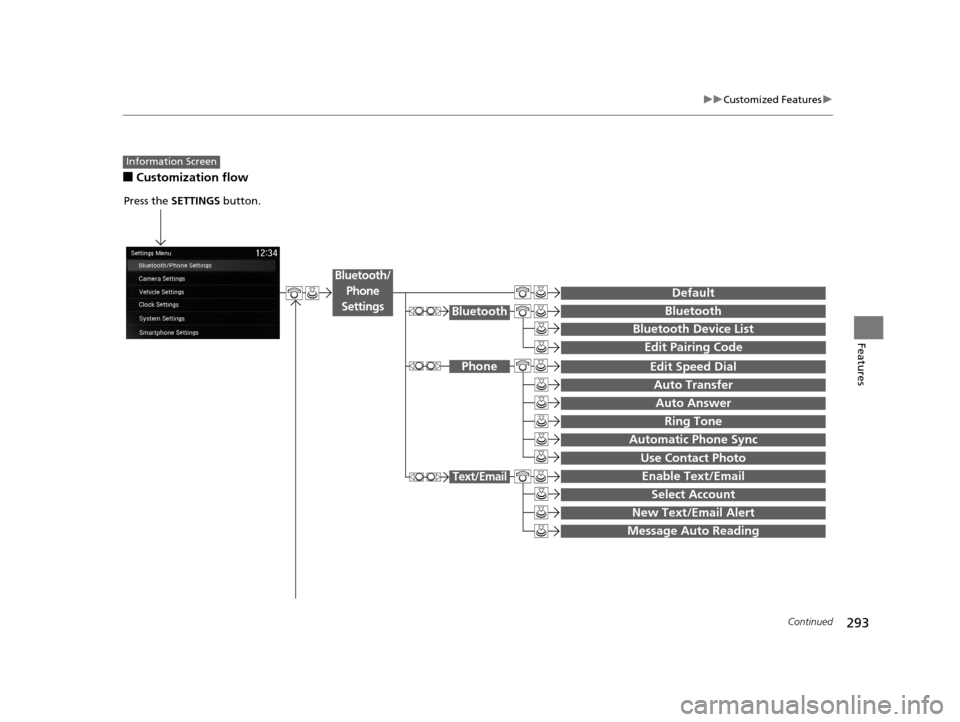
■Customization flow
Information Screen
Press the SETTINGS button.
BluetoothBluetooth
Bluetooth Device List
Edit Speed Dial
Auto Transfer
Auto Answer
Ring Tone
Automatic Phone Sync
Use Contact Photo
Enable Text/Email
Select Account
New Text/Email Alert
Text/Email
Message Auto Reading
Default
Edit Pairing Code
Phone
Bluetooth/
Phone
Settings
19 ACURA TLX-31TZ36400.book 293 ページ 2018年2月16日 金曜日 午後12時22分
Page 298 of 591
296
uuCustomized Features u
Features
Clock Reset
Clock/Wallpaper Type
Clock Adjustment
Clock
Settings
Clock Format
Default
Voice Prompt
Brightness
Contrast
Black Level
Default
Display
System
Settings
Voice Reco.
Sync Display Brightness
Factory Data Reset
Header Clock Display
Language
Operation Restriction Tips*
Others
Default
Apple CarPlay Device List
Android Auto Device List
Smartphone
Settings
Smartphone Volume
* Not available on all models
19 ACURA TLX-31TZ36400.book 296 ページ 2018年2月16日 金曜日 午後12時22分
Page 299 of 591
297
uuCustomized Features u
Continued
Features
■List of customizable options
*1:Default Setting Setup
Group Customizable Features Description Selectable Settings
Bluetooth/
Phone
Settings
DefaultCancels/Resets all customized items in the
Bluetooth/Phone Settings
group as default.Yes/No
Bluetooth
BluetoothTurns the Bluetooth® on and off.On*1/Off
Bluetooth Device List
Pairs a new phone to HFL, edits or deletes a
paired phone, or creates a security PIN.
2 Phone Setup P. 325
—
Edit Pairing CodeChanges a pairing code.
2To change the pairing code setting P. 327Random /Fixed*1
Phone
Edit Speed DialEdits, adds or deletes a speed dial entry.
2 Phone Setup P. 325—
Auto TransferSets calls to automatically transfer from your
phone to HFL when you enter the vehicle.On*1/Off
Auto AnswerSets whether to automatically answer an
incoming call after about four seconds.On /Off*1
Information Screen
19 ACURA TLX-31TZ36400.book 297 ページ 2018年2月16日 金曜日 午後12時22分
Page 300 of 591
298
uuCustomized Features u
Features
*1:Default SettingSetup
Group Customizable Features Descri
ption Selectable Settings
Bluetooth/
Phone
Settings
Phone
Ring ToneSelects the ring tone.Fixed/Mobile
Phone*1/ Off
Automatic Phone SyncSets a phonebook data to be automatically
imported when a phone is paired to HFL.On/Off
Use Contact PhotoDisplays a caller’s picture on an incoming call
screen.On*1/Off
Text/
Email
Enable Text/EmailTurns the text/e-mail message function on and
off.On*1/Off
Select AccountSelects a mail or text message account.—
New Text/Email Alert
Selects whether a pop-up alert comes on the
screen when HFL receives a new text message/E-
mail.
—
Message Auto Reading
Selects whether the system automatically reads
out messages, and, if selected, whether only
when driving.
On*1/ Off
19 ACURA TLX-31TZ36400.book 298 ページ 2018年2月16日 金曜日 午後12時22分
Page 310 of 591

308
uuCustomized Features u
Features
*1:Default SettingSetup
Group Customizable Features Descri
ption Selectable Settings
System
SettingsOthers
LanguageChanges the display language.English*1/Français /
Español
Operation Restriction Tips*Alerts you when manual control of the system is
disabled to prevent distraction while driving. Only
voice commands are available.
On*1/ Off
Header Clock DisplaySelects whether the clock display comes on.On*1/Off
Factory Data ResetResets all the settings to their factory default.
2 Defaulting All the Settings P. 313—
Smartphone
Settings
Default Cancels/Resets all cust
omized items in the
Smartphone Settings group as default. Yes
/No
Apple CarPlay Device List Sets up the Apple CarPlay connection. —
Android Auto Device List Sets up the Android Auto connection. —
Smartphone Volume Adjusts the volume of the smartphone function. 1~8
*1~11
Version Shows software version of Apple CarPlay and
Android Auto unit. —
* Not available on all models
19 ACURA TLX-31TZ36400.book 308 ページ 2018年2月16日 金曜日 午後12時22分
Page 315 of 591
313
uuCustomized Features uDefaulting All the Settings
Features
Defaulting All the Settings
You can reset all the menu and customized settings as the factory defaults.
1.Press the SETTINGS button.
2. Rotate to select System Settings, then
press .
3. Rotate to select Factory Data Reset ,
then press .
u The pop-up menu appears on the screen.
4. Rotate to select Yes, then press .
u The confirmation message will appear.
5. Rotate to select Yes, then press
again to reset the settings.
u The confirmation message will appear.
Press to select OK.1Defaulting All the Settings
When you transfer the vehicle to a third party, reset
all settings to default a nd delete all personal data.
The following settings will be reset:
•Audio preset settings•Phonebook entries
•Other display and ea ch item settings
19 ACURA TLX-31TZ36400.book 313 ページ 2018年2月16日 金曜日 午後12時22分
Page 319 of 591

317Continued
Features
Bluetooth® HandsFreeLink ®
Bluetooth® HandsFreeLink ® (HFL) allows you to place and receive phone calls using
your vehicle’s audio system, without handling your cell phone.
Using HFL
(Pick-up) button: Press to go to the Speed Dial/Call History on the multi-
information display or to answer an incoming call.
(Hang-up/back) button: Press to end a call, to cancel a command or to clear
the phone information on the multi-information display.
(Talk) button: Press to give HFL voice commands.
PHONE button: Press to go directly to the phone menu screen.
Interface dial (E NTER/MENU button): Rotate to select an item on the screen,
then press . Move , , or to select secondary menu.
■HFL Buttons
1 Bluetooth ® HandsFreeLink ®
Place your phone where y ou can get good reception.
To use HFL, you need a Bluetooth-compatible cell
phone. For a list of compatible phones, pairing
procedures, and special feature capabilities:
•U.S.: Visit www.handsfreeli nk.com/Acura, or call 1-
888-528-7876.
•Canada: For more info rmation on smartphone
compatibility, call 1-888-528-7876.
To use HFL, the Bluetooth setting must be On. If
there is an active connecti on to Apple CarPlay, HFL is
unavailable. 2 Customized Features P. 292
Voice control tips:
•Aim the vents away from the ceiling and close the
windows, as noise coming fr om them may interfere
with the microphone.
•Press and release the but ton when you want to
call a number using a stored voice tag, a
phonebook name, or a numbe r. Speak clearly and
naturally after a beep.
•If the microphone picks up vo ices other than yours,
the command may be misinterpreted.
•To change the volume level, use the audio system’s
volume knob or the remote audio controls on the
steering wheel.
State or local laws may pr ohibit the operation of
handheld electronic devices while operating a
vehicle.
Talk Button
Volume up
Microphone
Hang-up/Back Button
Pick-up
Button
Volume down
Interface
DialPHONE
Button
19 ACURA TLX-31TZ36400.book 317 ページ 2018年2月16日 金曜日 午後12時22分