Page 85 of 591

83
uuIndicators u
Continued
Instrument Panel
IndicatorNameOn/BlinkingExplanationMessage*1
Immobilizer
System Indicator
●Comes on briefly when you set the
power mode to ON, then goes off.
●Comes on if the immobilizer system
cannot recognize the key
information.
●Blinks - You cannot start the engine. Set
the power mode to VEHICLE OFF (LOCK),
then select the ON mode again.
●Repeatedly blinks - The system may be
malfunctioning. Have your vehicle checked
by a dealer.
●Do not attempt to alter this system or add
other devices to it. Electrical problems can
occur.
—
Security System
Alarm Indicator
●Blinks when the security system
alarm has been set.
2 Security System Alarm P. 152—
Keyless Access
System Indicator
●Comes on for a few seconds when
you set the power mode to ON, then
goes off.
●Comes on as soon as a problem is
detected in the keyless access system
or keyless starting system.
●Stays on constantly or does not come
on at all - Have your vehicle checked by a
dealer.
Indicator
19 ACURA TLX-31TZ36400.book 83 ページ 2018年2月16日 金曜日 午後12時22分
Page 86 of 591
84
uuIndicators u
Instrument Panel
IndicatorNameOn/BlinkingExplanationMessage
Road Departure
Mitigation (RDM)
Indicator
●Comes on for a few seconds when
you change the power mode to ON,
then goes off.
●Comes on if there is a problem with
the RDM system.
●Stays on constantly - Have your vehicle
checked by a dealer.
●Comes on when the RDM system
shuts itself off.●Stays on - The temperature inside the
camera is too high.
Use the climate control system to cool down
the camera.
The system activates when the temperature
inside the camera cools down.
2 Front Sensor Camera P. 388
●Stays on - The area around the camera is
blocked by dirt, mud, etc. Stop your vehicle
in a safe place, and wipe it off with a soft
cloth.
●Have your vehicle checked by a dealer if the
indicator and message come back on after
you cleaned the area around the camera.
2 Front Sensor Camera P. 388
19 ACURA TLX-31TZ36400.book 84 ページ 2018年2月16日 金曜日 午後12時22分
Page 88 of 591

86
uuIndicators u
Instrument Panel
IndicatorNameOn/BlinkingExplanationMessage
Adaptive Cruise
Control (ACC )
with Low Speed
Follow (LSF)
Indicator (Green)
●Comes on when you press the MAIN
button.2 Adaptive Cruise Control (ACC) with
Low Speed Follow (LSF) P. 390—
●Comes on if anything covers the
radar sensor cover and prevents the
sensor from detecting a vehicle in
front.
●May come on when driving in bad
weather (rain, snow, fog, etc.)
●ACC has been automatically
canceled.
●When the radar sensor gets dirty, stop your
vehicle in a safe place, and wipe off dirt
using a soft cloth.
●Have your vehicle checked by a dealer if the
message does not disappear even after you
clean the sensor cover.
●Comes on when ACC with LSF is in
operation, but the temperature
inside the front sensor camera is too
high. ACC with LSF cancels
automatically. The beeper sounds
simultaneously.●Use the climate control system to cool down
the camera.
●Goes off - The camera has been cooled
down and the system activates normally.
●Comes on when the area around the
camera is blocked by dirt, mud, etc.
Stop your vehicle in a safe place, and
wipe it off with a soft cloth.
●May come on when driving in bad
weather (rain, snow, fog, etc.)
●Have your vehicle checked by a dealer if the
indicator and message come back on after
you cleaned the area around the camera.
19 ACURA TLX-31TZ36400.book 86 ページ 2018年2月16日 金曜日 午後12時22分
Page 89 of 591

87
uuIndicators u
Continued
Instrument Panel
IndicatorNameOn/BlinkingExplanationMessage
Lane Keeping
Assist System
(LKAS ) Indicator
(Amber)●Comes on for a few seconds when
you set the power mode to ON, then
goes off.
●Comes on if there is a problem with
the LKAS.
●Stays on constantly - Have your vehicle
checked by a dealer.
Lane Keeping
Assist System
( LKAS ) Indicator
(Green)
●Comes on when you press the MAIN
button.2 Lane Keeping Assist System (LKAS)
P. 409—
●Comes on when the LKAS is in
operation, or the LKAS button is
pressed, but the temperature inside
the front sensor camera is too high.
The LKAS cancels automatically. The
beeper sounds simultaneously.●Use the climate control system to cool down
the camera.
●Goes off - The camera has been cooled
down and the system activates normally.
2 Front Sensor Camera P. 388
●Comes on when the area around the
camera is blocked by dirt, mud, etc.
Stop your vehicle in a safe place, and
wipe it off with a soft cloth.
●May come on when driving in bad
weather (rain, snow, fog, etc.)
●Have your vehicle checked by a dealer if the
indicator and message come back on after
you cleaned the area around the camera.
19 ACURA TLX-31TZ36400.book 87 ページ 2018年2月16日 金曜日 午後12時22分
Page 93 of 591
91
uuIndicators u
Instrument Panel
IndicatorNameOn/BlinkingExplanationMessage
Collision
Mitigation
Braking System
TM
(CMBSTM)
Indicator
●Comes on when the CMBSTM system
shuts itself off.●Stays on - The area around the camera is
blocked by dirt, mud, etc. Stop your vehicle
in a safe place, and wipe it off with a soft
cloth.
2 Front Sensor Camera P. 388
●When the radar sensor gets dirty, stop your
vehicle in a safe place, and wipe off dirt
using a soft cloth.
●Have your vehicle checked by a dealer if the
message does not disappear even after you
clean the sensor cover.
2Collision Mitigation Braking SystemTM
(CMBSTM) P. 436
●Stays on - The temperature inside the
camera is too high. Use the climate control
system to cool down the camera. The
system activates wh en the temperature
inside the camera cools down.
2 Front Sensor Camera P. 388
19 ACURA TLX-31TZ36400.book 91 ページ 2018年2月16日 金曜日 午後12時22分
Page 96 of 591
94
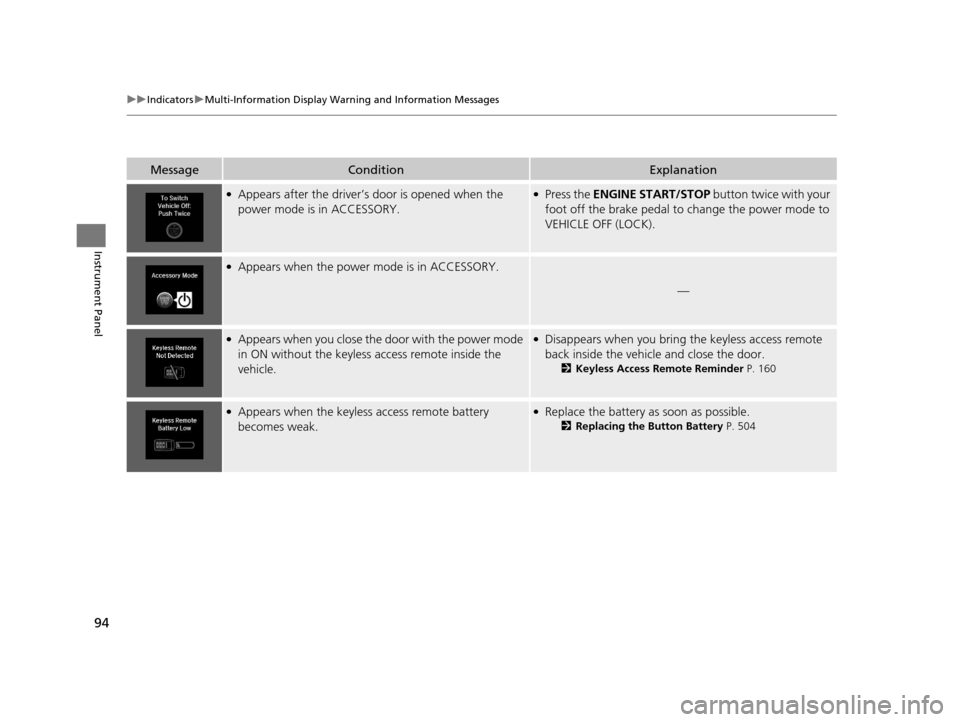
uuIndicators uMulti-Information Display Warn ing and Information Messages
Instrument Panel
MessageConditionExplanation
●Appears after the driver’s door is opened when the
power mode is in ACCESSORY.●Press the ENGINE START/STOP button twice with your
foot off the brake pedal to change the power mode to
VEHICLE OFF (LOCK).
●Appears when the power mode is in ACCESSORY.
—
●Appears when you close the door with the power mode
in ON without the keyless access remote inside the
vehicle.●Disappears when you bring the keyless access remote
back inside the vehicle and close the door.
2 Keyless Access Remote Reminder P. 160
●Appears when the keyless access remote battery
becomes weak.●Replace the battery as soon as possible.
2Replacing the Button Battery P. 504
19 ACURA TLX-31TZ36400.book 94 ページ 2018年2月16日 金曜日 午後12時22分
Page 97 of 591

95
uuIndicators uMulti-Information Display Warning and Information Messages
Continued
Instrument Panel
MessageConditionExplanation
●Appears if the keyless access remote’s battery is too
weak to start the engine or the key is not within
operating range to start the engine.
A beeper sounds six times.●Bring the keyless access remote in front of the ENGINE
START/STOP button to be touched with.
2 If the Keyless Access Remote Battery is Weak P. 538
●Appears three seconds after the To Start, Hold
Remote Near Start Button , then To Start Engine
messages appears sequentially.●Unless you bring the keyless access remote in front of
the ENGINE START/STOP button, this message does
not appear.
2 If the Keyless Access Remote Battery is Weak P. 538
●Appears when the power mode is in ACCESSORY or
ON.2Starting the Engine P. 362
●Appears when the engine does not restart automatically
due to the following reason:
• The hood is open.
• There is a problem in the sy stem that disables Auto
Idle Stop.●Follow the normal procedure to start the engine.
2 Starting the Engine P. 362●Close the hood.
●Appears when the steering wheel is locked.●Move the steering wheel left and right while pressing
the ENGINE START/STOP button.
Models with Auto Idle StopModels with Auto Idle Stop
Canadian models
19 ACURA TLX-31TZ36400.book 95 ページ 2018年2月16日 金曜日 午後12時22分
Page 101 of 591

99
uuIndicators uMulti-Information Display Warning and Information Messages
Continued
Instrument Panel
MessageConditionExplanation
●Appears if there is a problem with the auto high-beam.●Manually operate the headlight switch.●If you are driving with the high-beam headlights when
this happens, the headlights are changed to low beams.
●Appears if the temperature inside the camera is too high
and either the auto high beam s are in operation or the
headlight switch is turned to AUTO.●Use the climate control sy stem to cool down the
camera.
●Goes off - The camera has cooled down. To resume the
system, turn the he adlight switch to AUTO .
2Front Sensor Camera P. 388
●Appears when the area around the camera is blocked by
dirt, mud, etc. Stop your ve hicle in a safe place, and
wipe it off with a soft cloth.
●May appear when driving in bad weather (rain, snow,
fog, etc.)
●Have your vehicle checked by a dealer if the message
comes back on after you have cleaned the area around
the camera.
19 ACURA TLX-31TZ36400.book 99 ページ 2018年2月16日 金曜日 午後12時22分