Page 281 of 609
280
uuGeneral Information on the Audio System uCompatible iPod, iPhone, and USB Flash Drives
Features
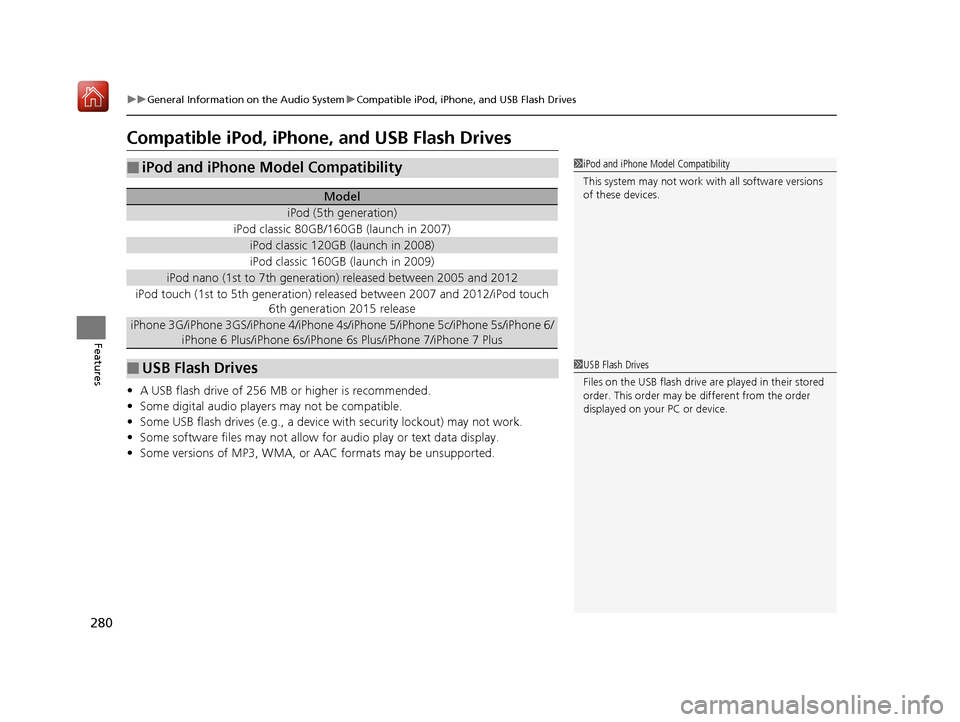
Compatible iPod, iPhone, and USB Flash Drives
• A USB flash drive of 256 MB or higher is recommended.
• Some digital audio players may not be compatible.
• Some USB flash drives (e.g., a device with security lockout) may not work.
• Some software files may not allow for audio play or text data display.
• Some versions of MP3, WMA, or AAC formats may be unsupported.
■iPod and iPhone Model Compatibility
Model
iPod (5th generation)
iPod classic 80GB/160GB (launch in 2007)
iPod classic 120GB (launch in 2008)
iPod classic 160GB (launch in 2009)
iPod nano (1st to 7th generation) released between 2005 and 2012
iPod touch (1st to 5th generation) released between 2007 and 2012/iPod touch
6th generation 2015 release
iPhone 3G/iPhone 3GS/iPhone 4/iPhone 4s /iPhone 5/iPhone 5c/iPhone 5s/iPhone 6/
iPhone 6 Plus/iPhone 6s/iPhone 6s Plus/iPhone 7/iPhone 7 Plus
■USB Flash Drives
1 iPod and iPhone Model Compatibility
This system may not work with all software versions
of these devices.
1USB Flash Drives
Files on the USB flash drive are played in their stored
order. This order may be different from the order
displayed on your PC or device.
19 ACURA RLX HYBRID CSS-31TY36500.book 280 ページ 2018年3月7日 水曜日 午後4時19分
Page 298 of 609
297
uuCustomized Features u
Continued
Features
System Device Information
Factory Data Reset
Background Color
Header Clock Display
Clock Reset
Auto Time Zone
Auto Daylight
Clock
Clock Adjustment
Clock Format
Clock
Units
Language
Operation Restriction Tips
Others
Wallpaper
Clock/Wallpaper
Type
19 ACURA RLX HYBRID CSS-31TY36500.book 297 ページ 2018年3月7日 水曜日 午後4時19分
Page 299 of 609
298
uuCustomized Features u
Features“Trip B” Reset Timing
Language Selection
Adjust Outside Temp. Display
Forward Collision Warning Distance
ACC Forward Vehicle Detect Beep
Turn By Turn Display
Default
Memory Position Link
Door Unlock Mode
Keyless Access Light Flash
Interior Light Dimming Time
Headlight Auto Off Timer
Auto Light Sensitivity
Vehicle
Settings
Driver Assist
System Setup
Keyless Access
Setup
Lighting Setup
Keyless Access Beep
Lane Keeping Assist Suspend Beep
Blind Spot Info
Easy Entry/Exit
Auto Seatbelt Tension
Driving
Position Setup
Display Speed Unit
Reactive Force Pedal
Head-up Warning
Road Departure Mitigation Setting
Remote Start System On/Off
Reverse Alert Tone
“Trip A” Reset TimingMeter/
Head-up Display Setup
Walk Away Auto Lock
19 ACURA RLX HYBRID CSS-31TY36500.book 298 ページ 2018年3月7日 水曜日 午後4時19分
Page 300 of 609
299
uuCustomized Features u
Continued
Features
Fixed Guideline
Dynamic Guideline
Default
Rear
Camera
Cross Traffic Monitor
*1: Models with multi-view rear camera
Maintenance ResetMaintenance Info.
Wiper ActionWiper Setup
Key And Remote Unlock Mode
Keyless Lock Answer Back
Security Relock Timer
Auto Door Lock
Auto Door Unlock
Door
Setup
Auto Folding Door Mirror
Camera
Settings*1
19 ACURA RLX HYBRID CSS-31TY36500.book 299 ページ 2018年3月7日 水曜日 午後4時19分
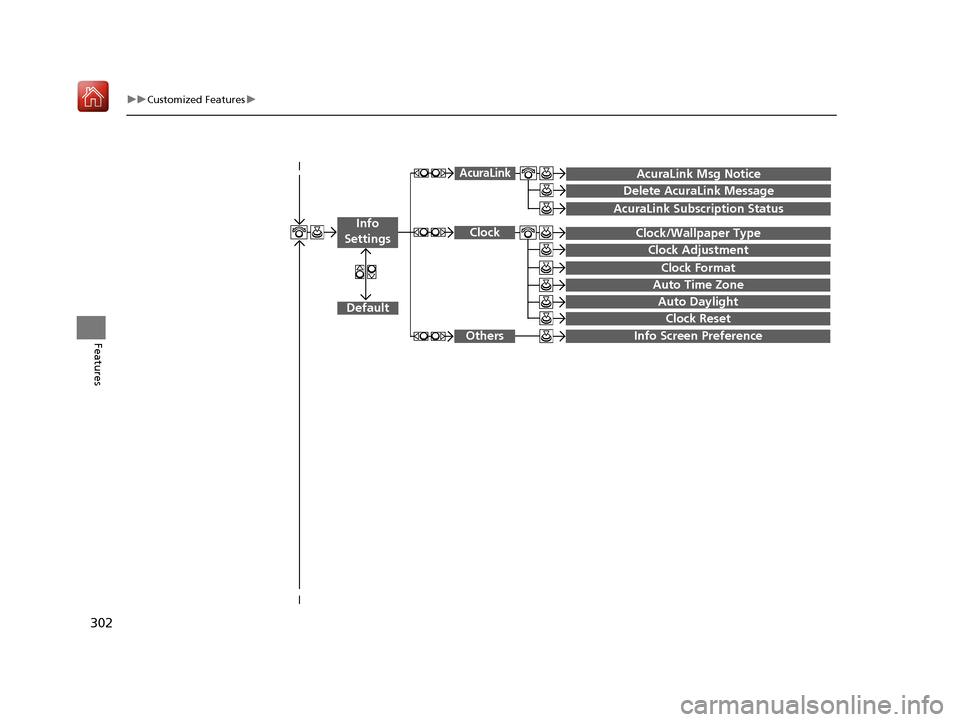
Page 303 of 609
302
uuCustomized Features u
Features
Auto Daylight
Clock Reset
Info Screen Preference
Clock Format
Auto Time Zone
Clock/Wallpaper Type
Clock Adjustment
Clock
Default
Others
Info
Settings
AcuraLink Subscription Status
AcuraLink Msg Notice
Delete AcuraLink Message
AcuraLink
19 ACURA RLX HYBRID CSS-31TY36500.book 302 ページ 2018年3月7日 水曜日 午後4時19分
Page 306 of 609

305
uuCustomized Features u
Continued
Features
*1:Default SettingSetup
Group Customizable Features Description Selectable Settings
System
Settings
Blue-
tooth
Bluetooth StatusTurns the
Bluetooth® on and off.On*1/Off
Bluetooth Device List
Pairs a new phone to HFL, edits and deletes a
paired phone, and creates a security PIN.
2 Phone Setup P. 330
—
Edit Pairing CodeChanges a pairing code.
2To change the pairing code setting P. 332Random/Fixed*1
OpeningSound VolumeChanges the volume of the system’s startup
sound.0 ~ 6*1 ~ 11
Clock
Clock/
Wallpaper
Type
ClockChanges the clock display type.Analog /Digital*1/
Small Digital/ Off
Wallpaper
•Changes the wallpaper type.
• Imports an image file for a new wallpaper.
• Deletes an image file for a wallpaper.
2 Wallpaper Setup P. 228
Blank/Galaxy*1/
Metallic
Clock AdjustmentAdjusts Clock.
2 Clock P. 128—
Clock FormatSelects the digital clock display from 12H to 24H.12H*1/24H
Auto Time Zone
Sets the navigation syst em to automatically
adjust the clock when driving through different
time zones.
On*1/ Off
19 ACURA RLX HYBRID CSS-31TY36500.book 305 ページ 2018年3月7日 水曜日 午後4時19分
Page 307 of 609

306
uuCustomized Features u
Features
*1:Default SettingSetup
Group Customizable Features Description Selectable Settings
System
Settings
ClockAuto Daylight
Sets the navigation system
to automatically adjust
the clock (“spring ahead” or “fall back” by one
hour) when a daylight saving time change occurs.
On*1/ Off
Clock ResetResets the settings of all items in the Clock group.—
Others
UnitsChanges the distance unit on the navigation map
screen.mile*1/km (U.S.)
mile /km*1 (Canada)
LanguageChanges the display language.English*1/Français /
Español
Operation Restriction Tips
Alerts you when manual control of the system is
disabled to prevent distraction while driving. Only
voice commands are available.
On*1/ Off
Background Color
Changes the background color of the audio/
information screen and the On Demand Multi-Use
Display
TM.
Blue*1/ Amber /Red /
Green
Header Clock DisplaySelects whether the clock display comes on.On /Off*1
System Device InformationDisplays the system /device information.—
Factory Data ResetResets all the settings to their factory default.
2Defaulting All the Settings P. 319—
DefaultCancels /Resets all customized items in the
System Settings group as default.Default/OK
19 ACURA RLX HYBRID CSS-31TY36500.book 306 ページ 2018年3月7日 水曜日 午後4時19分
Page 310 of 609
309
uuCustomized Features u
Continued
Features
*1:Default SettingSetup
Group Customizable Features Desc
ription Selectable Settings
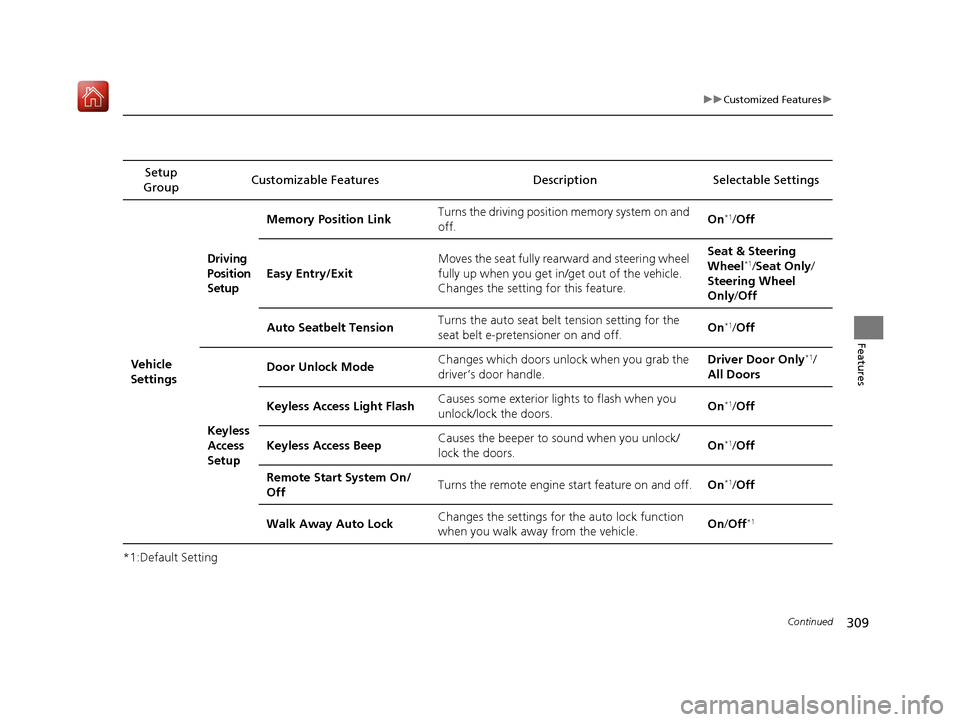
Vehicle
Settings
Driving
Position
Setup
Memory Position Link Turns the driving position memory system on and
off. On*1/
Off
Easy Entry/Exit Moves the seat fully rear
ward and steering wheel
fully up when you get in/get out of the vehicle.
Changes the setting for this feature. Seat & Steering
Wheel
*1/
Seat Only /
Steering Wheel
Only /Off
Auto Seatbelt Tension Turns the auto seat belt
tension setting for the
seat belt e-pretensioner on and off. On
*1/
Off
Keyless
Access
Setup Door Unlock Mode
Changes which doors unlock when you grab the
driver’s door handle. Driver Door Only
*1/
All Doors
Keyless Access Light Flash Causes some exterior lights to flash when you
unlock/lock the doors. On
*1/
Off
Keyless Access Beep Causes the beeper to sound when you unlock/
lock the doors.
On
*1/
Off
Remote Start System On/
Off Turns the remote engine start feature on and off.
On
*1/Off
Walk Away Auto Lock Changes the settings for th
e auto lock function
when you walk away from the vehicle. On
/Off
*1
19 ACURA RLX HYBRID CSS-31TY36500.book 309 ページ 2018年3月7日 水曜日 午後4時19分