Page 312 of 649
311
uuGeneral Information on the Audio System uCompatible iPod, iPad, iPhone, and USB Flash Drives
Continued
Features
Compatible iPod, iPad, iP hone, and USB Flash Drives
■iPod, iPad, and iPhone Model Compatibility
Model
iPod nano (7th generation) (launch in 2012)
iPod touch (5th to 6th generation) released between 2012 and 2015
iPhone 4s/iPhone 5/iPhone 5c/iPhone 5s/iPhone 6/iPhone 6 Plus/iPhone 6s/iPhone
6s Plus/iPhone SE/iPhone 7/iPhone 7 Plus
iPad 2/iPad (3rd generation)/iPad (4th generation)
iPad Pro (9.7-inch)/iPad Pro (12.9-inch) 1st Generation
iPad Air/iPad Air 2
iPad mini/iPad mini 2/iPad mini 3/iPad mini 4
1iPod, iPad, and iPhone Model Compatibility
This system may not work with all software versions
of these devices.
19 ACURA RDX-31TJB6000.book 311 ページ 2018年4月26日 木曜日 午後4時51分
Page 334 of 649
333
uuCustomized Features u
Continued
Features
■Customization flow
Press the (Home) button.
Select Settings.
Touchpad Sensitivity
System
System SoundsSystem Volumes
Phone Calls
Voice Recognition
Navigation Guidance*
Date & Time
System Units
Factory Data Reset
Language
Time Format
Set Date & Time
Set Time
Set Date
Automatic Date &
Time
About
(Select Time Zone)
Automatic Time ZoneSet Time Zone
* Not available on all models
19 ACURA RDX-31TJB6000.book 333 ページ 2018年4月26日 木曜日 午後4時51分
Page 340 of 649
339
uuCustomized Features u
Continued
Features
■List of customizable options
*1:Default Setting Setup Group Customizable Features
Description Selectable Settings
System
System
Volumes
System SoundsChanges the system sounds volume.—
Phone CallsChanges the phone call volume.—
Voice RecognitionChanges the voice recognition volume.—
Navigation Guidance*Changes the navigation guidance
volume.—
Touchpad SensitivitySets the sensitivity of the true
touchpad.High/Low*1
Date & Time
Time FormatSelects the digital clock display from
12H to 24H.12 Hour*1/24 Hour
Set Date &
Time
Automatic
Date & TimeSelects On to have the GPS
automatically adjust the clock. Select
Off to cancel this function.
On*1/Off
Set DateAdjusts date.
2 Adjusting the Clock P. 144—
Set TimeAdjusts clock.
2Adjusting the Clock P. 144—
* Not available on all models
19 ACURA RDX-31TJB6000.book 339 ページ 2018年4月26日 木曜日 午後4時51分
Page 371 of 649
370
uuBluetooth ® HandsFreeLink ®u HFL Menus
Features
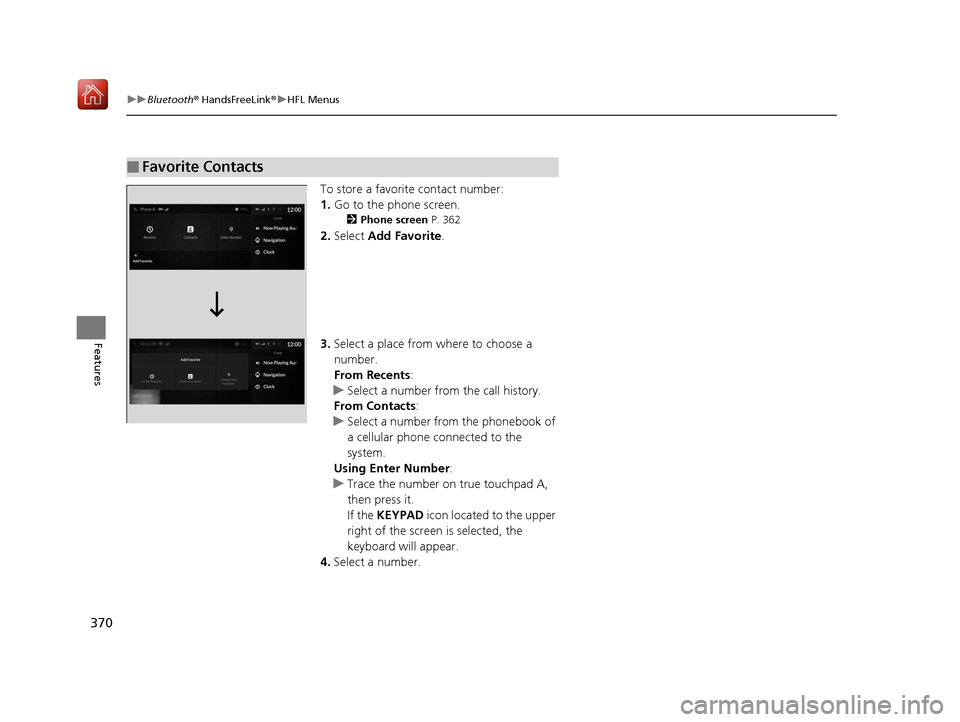
To store a favorite contact number:
1. Go to the phone screen.
2 Phone screen P. 362
2.Select Add Favorite .
3. Select a place from where to choose a
number.
From Recents:
u Select a number from the call history.
From Contacts:
u Select a number from the phonebook of
a cellular phone connected to the
system.
Using Enter Number :
u Trace the number on true touchpad A,
then press it.
If the KEYPAD icon located to the upper
right of the screen is selected, the
keyboard will appear.
4. Select a number.
■Favorite Contacts
19 ACURA RDX-31TJB6000.book 370 ページ 2018年4月26日 木曜日 午後4時51分
Page 372 of 649

Continued371
uuBluetooth ® HandsFreeLink ®u HFL Menus
Features
■To edit a Favorite Contact
1. Go to the phone screen.
2 Phone screen P. 362
2.Select and hold a desired favorite contact.
3. Select the following options:
• Remove Favorite : Delete the favorite
contact.
• Add to Home Page : Add a favorite
contact shortcut icon to the home
screen.
• Add to Heads-Up Display
*: Add a
favorite contact shortcut icon to the
head-up display menu.
4. Press the (back) button on the true
touchpad A.
u The screen will return to the previous
screen.
You can make calls by inputting any phone
number, or by using the imported
phonebook, call history, or Favorite Contact
entries.
■Making a Call1 Making a Call
Once a call is connected, you can hear the voice of
the person you are call ing through the audio
speakers.
While there is an active connection with Apple
CarPlay, phone calls ca nnot be made with
HandsFreeLink ® and are only made from Apple
CarPlay.
* Not available on all models
19 ACURA RDX-31TJB6000.book 371 ページ 2018年4月26日 木曜日 午後4時51分
Page 373 of 649

uuBluetooth ® HandsFreeLink ®u HFL Menus
372
Features
■To make a call using the imported
phonebook
1. Go to the phone screen.
2 Phone screen P. 362
2.Select Contacts .
3. Select a name.
u You can sort by First Name or Last
Name. Select the icon on the upper right
of the screen.
4. Select a number.
u Dialing starts automatically.
■To make a call using a phone number
1. Go to the phone screen.
2 Phone screen P. 362
2.Select Enter Number .
3. Trace the number on true touchpad A, then
press it.
u You can enter the number using the on-
screen keyboard. Select KEYPAD located
to the upper right of the screen.
4. Press the true touchpad A.
u Dialing starts automatically.
u If the on screen keyboard is displayed,
select Call.
1To make a call using the imported phonebook
You can send a message or set a navigation
* route to
contact address other than making a call on this
feature. 2 Text Message P. 376
2 Refer to Navigation System Manual
* Not available on all models
19 ACURA RDX-31TJB6000.book 372 ページ 2018年4月26日 木曜日 午後4時51分
Page 378 of 649
377
uuBluetooth ® HandsFreeLink ®u Text Message
Continued
Features
■To edit a Favorite Contact
1. Press the (home) button.
2. Select Messages.
3. Select and hold a desired favorite contact.
4. Select following options.
• Remove Favorite : Delete a favorite
contact.
• Add to Home Page : Add the shortcut
icon of a favorite contact to the home
screen.
5. Press the (back) button on the true
touchpad A.
u The screen will return to the previous
screen.
19 ACURA RDX-31TJB6000.book 377 ページ 2018年4月26日 木曜日 午後4時51分
Page 384 of 649
Continued383
uuBluetooth ® HandsFreeLink ®u Text Message
Features
■To edit a reply message
1. Press the (home) button.
2. Select Messages.
3. Select MENU .
4. Select Saved Replies .
5. Select Create New Message .
6. Use true touchpad A to write a reply. When
you finish writing you message, press the
true touchpad.
u You can enter the number using the on-
screen keyboard. Select KEYBOARD
located to the upper right of the screen.
■To delete a reply message
1. Press the (home) button.
2. Select Messages.
3. Select MENU .
4. Select Saved Replies .
5. Select a reply message you want to delete.
u A confirmation screen appears on the
screen. Select Delete.
u To cancel the delete, press the
(back) button.1To delete a reply message
Reset to Default
Select to reset all reply messages to their factory
default.
19 ACURA RDX-31TJB6000.book 383 ページ 2018年4月26日 木曜日 午後4時51分