Page 3 of 701

Contents
This owner’s manual should be considered a permanent part of the
vehicle and should remain with the vehicle when it is sold.
This owner’s manual covers all models of your vehicle. You may find
descriptions of equipment and features that are not on your
particular model.
Images throughout this owner’s manu al (including the front cover)
represent features and equipment that are available on some, but
not all, models. Your particular mo del may not have some of these
features.
This owner’s manual is for vehicles sold in the United States and
Canada.
The information and specifications in cluded in this publication were
in effect at the time of approval for printing. Honda Motor Co., Ltd.
reserves the right, however, to discontinue or change specifications
or design at any time without notice and without incurring any
obligation.2 Safe Driving P. 27
For Safe Driving P. 28 Seat Belts P. 33 Airbags P. 41
2Instrument Panel P. 77
Indicators P. 78 Gauges and Multi-Information Display (MID) P. 119
2Controls P. 137
Clock P. 138 Locking and Unlocking the Doors P. 139
Opening and Closing the Windows P. 166 Moonroof P. 168
Adjusting the Seats P. 192
2 Features P. 233
Audio System P. 234 Audio System Basic Operation P. 241
Rear Entertainment System (RES)* P. 337 Customized Features P. 360
Compass* P. 445
2 Driving P. 447
Before Driving P. 448 Towing a Trailer P. 454
Parking Your Vehicle P. 548Multi-View Rear Camera* P. 559
Fuel Economy and CO
2 Emissions P. 574
2 Maintenance P. 575
Before Performing Maintenance P. 576 Maintenance MinderTM P. 579
Checking and Maintaining Wiper Blades P. 600
Remote Control and Wireless Headphone Care
* P. 617
2 Handling the Unexpected P. 627
Tools P. 628 If a Tire Goes Flat P. 629
Indicator, Coming On/Blinking P. 657 Fuses P. 662
When You Cannot Open the Tailgate P. 672 Refueling P. 673
2Information P. 675
Specifications P. 676 Identification Numbers P. 678
Emissions Testing P. 681 Warranty Coverages P. 683
19 ACURA MDX-31TZ56510.book 2 ページ 2018年12月11日 火曜日 午後4時47分
Page 4 of 701

Contents
Child Safety P. 56Exhaust Gas Hazard P. 74Safety Labels P. 75
Opening and Closing the Tailgate P. 155 Security System P. 163
Operating the Switches Around the Steering Wheel P. 169 Adjusting the Mirrors P. 189
Interior Lights/Interior Convenience It ems P. 207 Climate Control System P. 220
Audio Error Messages P. 310 General Information on the Audio System P. 318
HomeLink ® Universal Transceiver P. 392 Bluetooth® HandsFreeLink ® P. 395 AcuraLink ®* P. 437
Off-Highway Driving Guidelines P. 465 When Driving P. 467 Braking P. 531
Surround View Camera System* P. 561 Refueling P. 571
Maintenance Under the Hood P. 583 Replacing Light Bulbs P. 595
Checking and Maintaining Tires P. 604 Battery P. 613 Remote Transmitter Care P. 615
Climate Control System Maintenance P. 619 Cleaning P. 620Accessories and Modifications P. 625
Engine Does Not Start P. 650 Jump Starting P. 653Overheating P. 655
Emergency Towing P. 670 When You Cannot Unlock the Fuel Fill Door P. 671
Devices that Emit Radio Waves P. 679 Reporting Safety Defects P. 680
Authorized Manuals P. 685 Client Service Information P. 686
Quick Reference GuideP. 4
Safe DrivingP. 27
Instrument PanelP. 77
ControlsP. 137
FeaturesP. 233
DrivingP. 447
MaintenanceP. 575
Handling the UnexpectedP. 627
InformationP. 675
IndexP. 690
19 ACURA MDX-31TZ56510.book 3 ページ 2018年12月11日 火曜日 午後4時47分
Page 5 of 701
4
Quick Reference Guide
Quick Reference Guide
Visual Index
❙Steering Wheel Adjustments (P188)
❙ENGINE START/STOP Button (P169)
❙Navigation System*
() See the Navigation System Manual
❙Information Screen (P246)
❙Hazard Warning Button
❙On Demand Multi-Use DisplayTM (P242)
❙Audio System (P234)
❙System Indicators (P78)
❙Gauges (P119)
❙Multi-Information Display
(MID)
(P120)
❙Climate Control System (P220)
❙Rear Defogger/Heated Door Mirror
Button
(P185)
❙ (Surround View Camera) Button*
(P562)
❙ (Vehicle Stability Assist ® (VSA ®)
System OFF) Button
(P521)
❙Parking Sensor System Button* (P551)
❙Collision Mitigation Braking SystemTM
(CMBSTM) OFF Button (P542)
❙Headlight Washer Button* (P183)
❙Heated Windshield Button* (P185)
❙Electric Parking Brake Switch (P531)
❙Road Departure Mitigation (RDM)
Button
(P509)
❙Automatic Brake Hold Button (P535)
19 ACURA MDX-31TZ56510.book 4 ページ 2018年12月11日 火曜日 午後4時47分
Page 7 of 701
Visual Index
6
Quick Reference Guide❙Power Window Switches (P166)
❙Hood Release Handle (P584)
❙Driver’s Side Interior Fuse Box (P665)
❙Driver’s Knee Airbag (P48)
❙Memory Buttons (P187)
❙SET Button (P187)
❙Shift Button
Electronic Gear Selector
(P475)
❙Rearview Mirror (P189)
❙Driver’s Front Airbag (P44)
❙Accessory Power Socket (P214)
❙Passenger’s Side Interior Fuse
Box
(P667)
❙Glove Box (P209)
❙Door Mirror Controls (P190)
❙Power Door Lock Master Switch (P153)
❙Driver’s Side Interior Fuse Box (P666)
❙Passenger’s Front Airbag (P44)
❙Power Tailgate Button (P158)
❙Fuel Fill Door Release Button
(P572)
❙Auto Idle Stop OFF Button (P484)
❙Dynamic Mode Button (P489)
❙USB Ports (P235)
❙Accessory Power Socket* (P214)
❙Auxiliary Input Jack (P238)
❙AC Power Outlet* (P215)
19 ACURA MDX-31TZ56510.book 6 ページ 2018年12月11日 火曜日 午後4時47分
Page 9 of 701
Visual Index
8
Quick Reference Guide
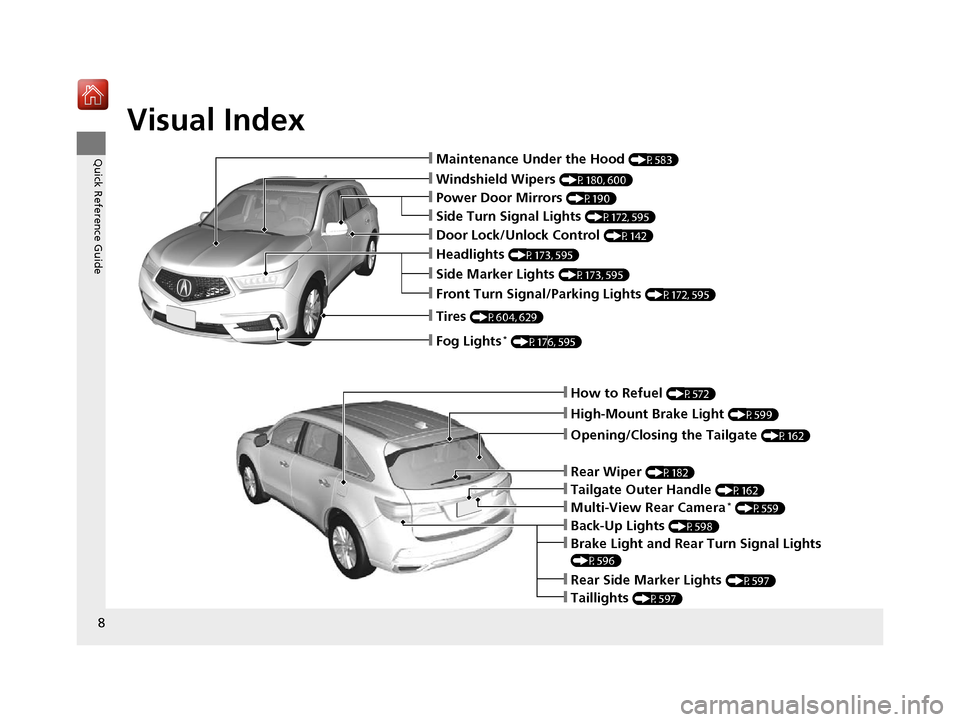
❙How to Refuel (P572)
❙High-Mount Brake Light (P599)
❙Opening/Closing the Tailgate (P162)
❙Back-Up Lights (P598)
❙Multi-View Rear Camera* (P559)
❙Tailgate Outer Handle (P162)
❙Rear Side Marker Lights (P597)
❙Taillights (P597)
❙Brake Light and Rear Turn Signal Lights
(P596)
❙Rear Wiper (P182)
❙Maintenance Under the Hood (P583)
❙Windshield Wipers (P180, 600)
❙Tires (P604, 629)
❙Power Door Mirrors (P190)
❙Headlights (P173, 595)
❙Side Marker Lights (P173, 595)
❙Front Turn Signal/Parking Lights (P172, 595)
❙Fog Lights* (P176, 595)
❙Door Lock/Unlock Control (P142)
❙Side Turn Signal Lights (P172, 595)
19 ACURA MDX-31TZ56510.book 8 ページ 2018年12月11日 火曜日 午後4時47分
Page 14 of 701

13
Quick Reference Guide
Wipers and Washers
(P180)
*1:Models with automatic intermittent wipers
*2:Models without automatic intermittent wipers
Wiper/Washer Control Lever
MIST
OFF
AUTO
*1: Wiper speed varies
automatically
INT
*2: Low speed with
intermittent
LO : Low speed wipe
HI: High speed wipe
Pull toward
you to spray
washer fluid.
Adjustment Ring
(-: Low Sensitivity*1
: Lower speed, fewer sweeps*2
(+: High Sensitivity*1
: Higher speed, more sweeps*2
AUTO should always be turned OFF before
the following situations in order to prevent
severe damage to the wiper system:
● Cleaning the windshield
● Driving through a car wash
● No rain present
Steering Wheel (P188)
● To adjust, push and hold the adjustment
switch to move the steering wheel to the
desired position.
Models with automatic intermittent wipersUnlocking the Front
Doors from the Inside
(P152)
●Pull either front door inner handle to
unlock and open it at the same time.
Tailgate (P162, 157)
● Press the tailgate outer handle to unlock
and open the tailgate when you carry the
keyless access remote.
● Press the power tailgate button on the
driver’s door or the remote transmitter to
open and close the power tailgate.
Tailgate Outer Handle
19 ACURA MDX-31TZ56510.book 13 ページ 2018年12月11日 火曜日 午後4時47分
Page 15 of 701
14
Quick Reference Guide
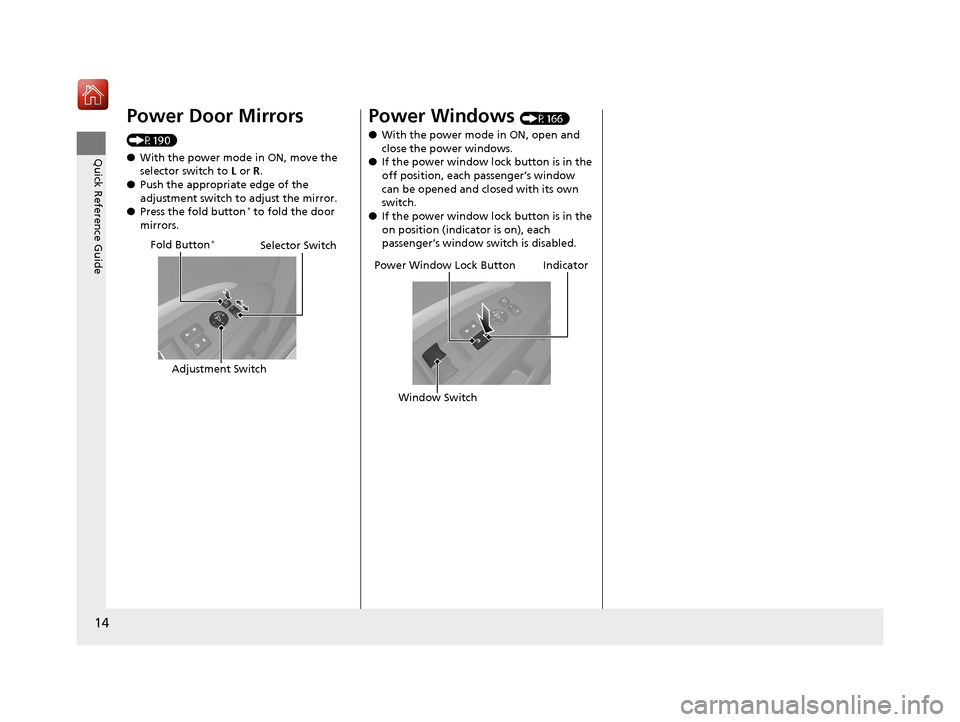
Power Door Mirrors
(P190)
●With the power mode in ON, move the
selector switch to L or R .
● Push the appropriate edge of the
adjustment switch to adjust the mirror.
● Press the fold button
* to fold the door
mirrors.
Selector Switch
Adjustment Switch
Fold Button*
Power Windows (P166)
● With the power mode in ON, open and
close the power windows.
● If the power window lock button is in the
off position, each passenger’s window
can be opened and closed with its own
switch.
● If the power window lock button is in the
on position (indicator is on), each
passenger’s window switch is disabled.
Power Window Lock Button
Window SwitchIndicator
19 ACURA MDX-31TZ56510.book 14 ページ 2018年12月11日 火曜日 午後4時47分
Page 21 of 701

20
Quick Reference Guide
VSA® On and Off (P521)
● The Vehicle Stability Assist ® (VSA ®) system
helps stabilize the vehicle during
cornering, and helps maintain traction
while accelerating on loose or slippery
road surfaces.
● VSA ® comes on automatically every time
you start the engine.
● To partially disable or fully restore VSA ®
function, press and hold the button until
you hear a beep.
CMBSTM On and Off
(P542)
● When a possible collision is likely
unavoidable, the CMBS
TM can help you to
reduce the vehicle sp eed and the severity
of the collision.
● The CMBS
TM is turned on every time you
start the engine.
● To turn the CMBS
TM on or off, press and
hold the button until you hear a beep.
Tire Pressure Monitoring System (TPMS) with Tire
Fill Assist
(P527, 661)
● The TPMS monitors tire pressure.
● TPMS is turned on automatically every time you start the engine.
● TPMS fill assist provides audible and visual guidance during tire pressure adjustment.
Refueling (P571)
aPress the fuel fill door
release button.
bAfter refueling, wait for
about five seconds
before removing the
filler nozzle.
Fuel recommendation: Unleaded premium gasoline, pump octane number 91 or
higher recommended
Fuel tank capacity: 19.5 US gal (73.8 L)
Wait for five seconds
19 ACURA MDX-31TZ56510.book 20 ページ 2018年12月11日 火曜日 午後4時47分