2019 Acura MDX HYBRID power system
[x] Cancel search: power systemPage 177 of 685
176
uuOperating the Switches Around the Steering Wheel uLight Switches
Controls
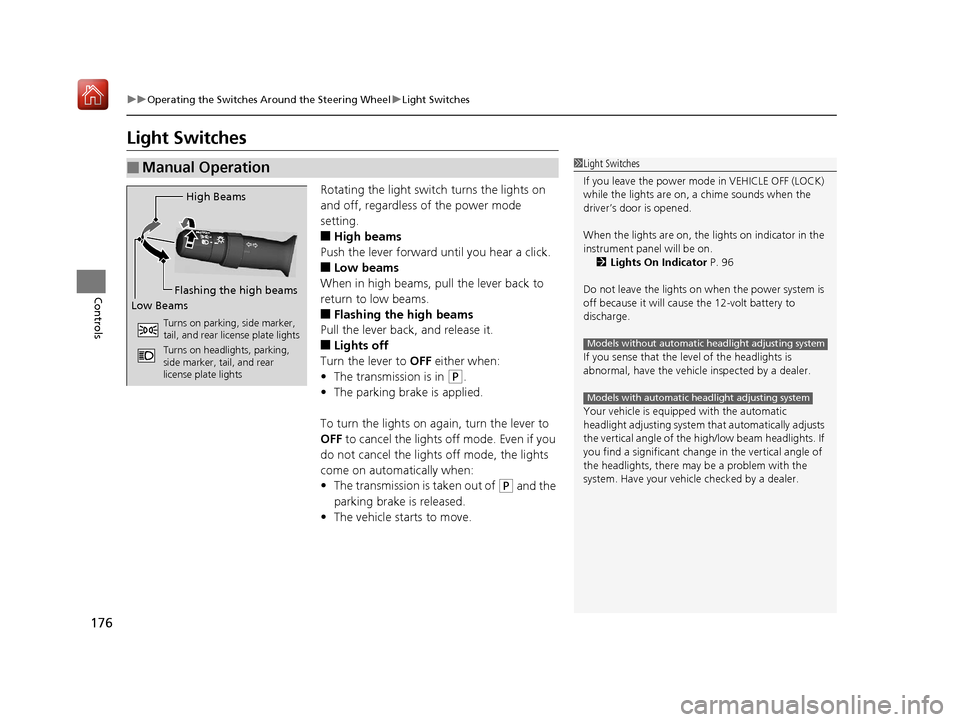
Light Switches
Rotating the light switch turns the lights on
and off, regardless of the power mode
setting.
■High beams
Push the lever forward until you hear a click.
■Low beams
When in high beams, pull the lever back to
return to low beams.
■Flashing the high beams
Pull the lever back, and release it.
■Lights off
Turn the lever to OFF either when:
• The transmission is in
(P.
• The parking brake is applied.
To turn the lights on again, turn the lever to
OFF to cancel the lights off mode. Even if you
do not cancel the lights off mode, the lights
come on automatically when:
• The transmission is taken out of
(P and the
parking brake is released.
• The vehicle starts to move.
■Manual Operation1Light Switches
If you leave the power mode in VEHICLE OFF (LOCK)
while the lights are on, a chime sounds when the
driver’s door is opened.
When the lights are on, the lights on indicator in the
instrument pane l will be on.
2 Lights On Indicator P. 96
Do not leave the lights on when the power system is
off because it will caus e the 12-volt battery to
discharge.
If you sense that the le vel of the headlights is
abnormal, have the vehicl e inspected by a dealer.
Your vehicle is equipped with the automatic
headlight adjusting system that automatically adjusts
the vertical angle of the high/low beam headlights. If
you find a significant change in the vertical angle of
the headlights, there may be a problem with the
system. Have your vehicle checked by a dealer.
Models without automatic headlight adjusting system
Models with automatic headlight adjusting system
High Beams
Flashing the high beams
Low Beams
Turns on parking, side marker,
tail, and rear license plate lights
Turns on headlights, parking,
side marker, tail, and rear
license plate lights
19 ACURA MDX E-AWD-31TRX6200.book 176 ページ 2018年6月22日 金曜日 午後7時42分
Page 183 of 685

uuOperating the Switches Around the Steering Wheel uAuto High-Beam
182
Controls
Disable or re-enable the system when the
vehicle is parked with the power mode in ON
and the light switch is in the AUTO position.
Disabling the system: Pull the light switch
lever toward you and hold it for at least 40
seconds. The auto high-beam indicator in the
meter will blink twice.
Re-enabling the system: Pull the light
switch lever toward you and hold it for at least
30 seconds. The auto high-beam indicator in
the meter will blink once.
■Disabling or Re-enabling the System1 Disabling or Re-enabling the System
The auto high-beam is in the previously selected
disabled or re-enabled sett ing each time you start the
power system.
AUTO Position
19 ACURA MDX E-AWD-31TRX6200.book 182 ページ 2018年6月22日 金曜日 午後7時42分
Page 189 of 685

188
uuOperating the Switches Around the Steering Wheel uRear Defogger/Heated Door Mirror Button
Controls
Rear Defogger/Heated Door Mirror Button
Press the rear defogger and heated door mirror button to defog the rear window
and mirrors when the power mode is in ON.
The rear defogger and heated door mirrors
automatically switch off after 10-30 minutes
depending on the outside temperature.
Heated Windshield Button*
Press the heated windshield button to deice
the windshield when the power mode is in
ON.
1Rear Defogger/Heated Door Mirror Button
This system consumes a lot of power, so turn it off
when the window has been defogged. Also, do not
use the system for a long time while the power
system is stopped. This may weaken the 12-volt
battery, making it difficult to turn the power system
on.
When the power mode is se t to ON and the outside
temperature is below 41°F (5°C), the heated door
mirror may automatically activate for 10 minutes.
1 Heated Windshield Button*
This system consumes a lot of power, so turn it off
when the window has been deiced. Also, do not use
the system for a long period when the power system
is stopped. This may weak en the 12-volt battery,
making it difficult to turn the power system on.
When the outside temperature is below 39°F (4°C),
the heated windshield may automatically activate.
The system deactivates itself once the outside
temperature reaches 43°F (6°C).
* Not available on all models
19 ACURA MDX E-AWD-31TRX6200.book 188 ページ 2018年6月22日 金曜日 午後7時42分
Page 190 of 685

189
uuOperating the Switches Around the Steering Wheel uDriving Position Memory System
Continued
Controls
Driving Position Memory System
You can store two driver’s seat (except for power lumbar), steering wheel and door
mirror positions with the driv ing position memory system.
When you unlock and open the driver’s door with a remote transmitter, or keyless
access system, door mirrors adjust to one of the two preset positions and the seat
adjusts to retracted positions of one of the two preset positions automatically.
The steering wheel and the seat will move to the stored position when you set the
power mode to ACCESSORY.
When you enter the vehicle, the MID br iefly shows you which remote transmitter
you used to unlock the vehicle.
• DRIVER 1 transmitter is linked to memory button 1.
• DRIVER 2 transmitter is linked to memory button 2.
The driver’s seat moves rearward and steering
wheel fully up depending on the set seating
position once you
•Stop the vehicle.
• Put the transmission in
(P.
• Turn the power system off.
• Then open the driver’s door.
Once the power mode is in the ACCESSORY
position, the driver’s s eat and steering wheel
moves to the DRIVER 1 or 2 preset position.
1 Driving Position Memory System
Using the information screen or MID, you can disable
the automatic seat, steeri ng wheel and door mirrors
adjustment function. 2 Customized Features P. 131, 362
The driver’s seat easy exit feature can be turned ON/
OFF. 2 Customized Features P. 131, 362
System Operation
The system will not operate if:
•The vehicle speed is above 3 mph (5 km/h).•Either memory position button is pressed while the
seat or steering wheel is in motion.
•The seat or steering wheel position is adjusted
while in operation.
•The memory 1 or 2 position is set fully to the rear.
DRIVER 1 DRIVER 2
19 ACURA MDX E-AWD-31TRX6200.book 189 ページ 2018年6月22日 金曜日 午後7時42分
Page 191 of 685

uuOperating the Switches Around the Steering Wheel uDriving Position Memory System
190
Controls
1. Set the power mode to ON. Adjust the
driver’s seat, the steering wheel and the
door mirrors to the desired position.
2. Press the SET button.
u You will hear the beeper, and the
memory button indicator light will blink.
3. Press and hold memory button
(1 or (2
within five seconds of pressing the SET
button.
u Once the seat, the steering wheel and
the outside mirror positions have been
memorized, the indicator light on the
button you pressed stays on and you will
hear the double-beep.
1. Put the transmission into
(P.
2. Apply the parking brake.
3. Press a memory button (
(1 or (2).
u You will hear the beeper, and the
indicator light will blink.
The seat, the steering wheel and the door
mirrors will automatically move to the
memorized positions. When it has finished
moving, you will hear the beeper, and the
indicator light stays on.
■Storing a Position in Memory1 Storing a Position in Memory
After you press the SET button, the storing operation
will be canceled when:
•You do not press the memory button within five
seconds.
•You readjust the seat, the steering wheel or the
outside mirror position before the double-beep.
•You set the power mode to any position except
ON.
Memory Button 1
Memory Button 2SET Button
■Recalling the Stored Position1Recalling the Stored Position
The seat, the steering wheel and the door mirrors will
stop moving if you:
•Press the SET button or memory button (1 or (2.
•Adjust the seat position, door mirrors, or steering
wheel.
•Put the transmission into a position other than ( P.
Memory Buttons
19 ACURA MDX E-AWD-31TRX6200.book 190 ページ 2018年6月22日 金曜日 午後7時42分
Page 207 of 685

206
uuAdjusting the Seats uMaintain a Proper Sitting Position
Controls
Maintain a Proper Sitting Position
After all occupants have adjusted their seats and head restraints, and put on their
seat belts, it is very important that they continue to sit upright, well back in their
seats, with their feet on the floor until the vehicle is safely parked and the power
system is off.
Sitting improperly can increase the chance of injury during a crash. For example, if
an occupant slouches, lies down, turns si deways, sits forward, leans forward or
sideways, or puts one or both feet up, the chance of injury during a crash is greatly
increased.
In addition, an occupant who is out of position in the front seat can be seriously or
fatally injured in a crash by striking interior parts of the vehicle or being struck by an
inflating front airbag.1 Maintain a Proper Sitting Position
3WARNING
Sitting improperly or out of position can
result in serious injury or death in a crash.
Always sit upright, well back in the seat,
with your feet on the floor.
19 ACURA MDX E-AWD-31TRX6200.book 206 ページ 2018年6月22日 金曜日 午後7時42分
Page 211 of 685

210
Controls
Interior Lights/Interior Convenience Items
Interior Lights
■ON
The interior lights come on regardless of
whether the tailgate and doors are open or
closed.
■Door activated
The interior lights come on in the following
situations:
• When the tailgate or any of the doors are
opened.
• You unlock the driver’s door.
• When the power mode is set to VEHICLE
OFF (LOCK).
■OFF
The interior lights remain off regardless of
whether the tailgate or any doors are open or
closed.
■Interior Light Switches1 Interior Light Switches
In the door activated position, the interior lights fade
out and go off about 30 se conds after the doors are
closed.
The lights go off after about 30 seconds in the
following situations:
•When you unlock the driver’s door but do not open
it.
•When you set the power mode to VEHICLE OFF
(LOCK) but do not open a door.
You can change the interi or lights dimming time.
2 Customized Features P. 131, 362
The interior lights go off i mmediately in the following
situations:
•When you lock the driver’s door.
•When you close the driver’s door in ACCESSORY
mode.
•When you set the power mode to ON.
To avoid draining the 12-vo lt battery, do not leave
the interior light on for an extended length of time
when the power system is off.
If you leave any of the tailgate or doors open in
VEHICLE OFF (LOCK) mode, th e interior lights go off
after about 15 minutes.
Door Activated Position
Off
On
19 ACURA MDX E-AWD-31TRX6200.book 210 ページ 2018年6月22日 金曜日 午後7時42分
Page 218 of 685

Continued217
uuInterior Lights/Interior Convenience Items uInterior Convenience Items
Controls
The accessory power sockets can be used when the power mode is in ACCESSORY
or ON.
■Accessory power socket (center pocket)
Open the lid and the cover to use it.
■Accessory power socket (front console
compartment)*
Pull the handle and open the cover to use it.
■Accessory Power Sockets1 Accessory Power Sockets
NOTICE
Do not insert an automotive type cigarette lighter
element. This can overheat the power socket.
The accessory power socket s are designed to supply
power for 12-volt DC accessories that are rated 180
watts (15 amps) or less.
To prevent 12-volt battery drain, only use the power
socket with the power system on.
* Not available on all models
19 ACURA MDX E-AWD-31TRX6200.book 217 ページ 2018年6月22日 金曜日 午後7時42分