Page 298 of 621

297
uuGeneral Information on the Audio System uHonda App License Agreement
Continued
Features
F. NO WARRANTY. You understand and agree that your use of the SOFTWARE and SERVICES are solely at your own risk and that you
will be solely responsible for any damage to your VEHICLE’s multimedia system or any other equipment or any loss of data that m ay result
from your use of the SOFTWARE or SERVIC ES. THE SOFTWARE AND SERVICES ARE PROVIDED ON AN “AS IS” AND “AS AVAILABLE” BASIS
WITHOUT ANY WARRANTY OF ANY KIND, EXPRESSED, IMPLIED OR STAT UTORY. WE SPECIFICALLY DISCLAIM ANY IMPLIED WARRANTIES
OF MERCHANTABILITY, FITNESS FOR A PARTICULAR PURPOSE, A ND NON-INFRINGEMENT. HONDA makes no warranties that the
SOFTWARE or SERVICES will meet your requirements, or that the SOFTWARE or SERVICES will be uninterrupted, timely, secure, non-
infringing or error free. You understand a nd agree that you are responsible for any an d all charges, costs or expenses associated with your
use of the SOFTWARE or SERVICES. Advice or information, whether oral or written, obtained by you from us or through the SOFTWAR E
or SERVICES are provided for informational purposes only and will not create any warranty not expressly made herein. You should not rely
on any such information or advice. We assume no liability or res ponsibility for any errors or omissions in the SOFTWARE or SERV ICES. We
do not make any warranty or representation that your use of the material displayed on, or obtained through, the SOFTWARE or SER VICES
is non-infringing of any rights of any third party. Any decision or action taken by you on the basis of information or content provided via
the application is at your sole discreti on and risk. HONDA and PROVIDERS are not res ponsible or liable for any such decision, or for the
accuracy, completeness, usefulness, or availability of any conten t or information displayed, transmitted, or otherwise made available via
the SOFTWARE or SERVICES. To the extent jurisdictions do not allow the exclusion of certain warranties, some of the above exclu sions may
not apply to you.
G. LIMITATIONS ON LIABILITY. You and HONDA are each waiving important rights.
1. Limitations on YOUR liability.
HONDA cannot recover from you any consequential, indirect, in cidental, or special damages, or attorney's
fees in connection with your use of the SOFTWARE or HONDA SERVICES. HONDA WAIV ES TO THE FULLEST EXTENT ALLOWED BY LAW
ANY CLAIM FOR DAMAGES OTHER THAN DIRECT, COMPENSA TORY DAMAGES AS LIMITED IN THIS AGREEMENT.
19 ACURA ILX-31TX66610.book 297 ページ 2020年4月17日 金曜日 午前8時52分
Page 310 of 621

309
uuCustomized Features u
Features
*1:Default SettingSetup
Group Customizable Features
Description Selectable Settings
Phone
Setup
Connection
Add a New
PhonePairs a new phone to HFL.
2Phone Setup P. 346—
Connect a PhoneConnect a phone to the system.—
Disconnect
PhoneDisconnects a paired phone from HFL.—
Delete a PhoneDeletes a paired phone.—
Pairing CodeInputs and changes a code for a paired phone.Fixed*1/Random
Speed DialEdits, adds or deletes a speed dial entry.
2 Speed Dial P. 356—
Auto TransferSets calls to automatically transfer from your
phone to HFL when you enter the vehicle.On*1/Off
Caller ID InfoPrioritizes the caller’s name or phone number as
the caller ID.Name Priority*1/
Number Priority
PasscodeCreate a security PIN for a paired phone.—
Message NoticeTurn incoming text message notifications on or
off.On*1/ Off
System ClearClear the system of all paired phones,
phonebook entries, and security codes.—
19 ACURA ILX-31TX66610.book 309 ページ 2020年4月17日 金曜日 午前8時52分
Page 314 of 621
313
uuCustomized Features u
Continued
Features
Maintenance ResetMaintenance Info.
Key And Remote Unlock Mode
Keyless Lock Answer Back
Security Relock Timer
Auto Door Lock
Auto Door Unlock Door
Door Unlock Mode
Keyless Access Beep
Interior Light Dimming Time
Headlight Auto Off Timer
Auto Light Sensitivity*
Remote Start System On/Off*
Walk Away Auto Lock
Lighting
Keyless
Access
Keyless Access Light Flash
* Not available on all models
19 ACURA ILX-31TX66610.book 313 ページ 2020年4月17日 金曜日 午前8時52分
Page 317 of 621
316
uuCustomized Features u
Features
■List of customizable options
*1:Default Setting Setup
Group Customizable Features Desc
ription Selectable Settings
Bluetooth/
Phone
Settings
DefaultCancels/Resets all customized items in the
Bluetooth/Phone Settings group as default.Yes/No
Bluetooth
BluetoothTurns the Bluetooth® on and off.On*1/Off
Bluetooth Device List
Pairs a new phone to HFL, edits or deletes a
paired phone, or creates a security PIN.
2 Phone Setup P. 376
—
Edit Pairing CodeChanges a pairing code.
2To change the pairing code setting P. 378Random/Fixed*1
Phone
Edit Speed DialEdits, adds or deletes a speed dial entry.
2 Phone Setup P. 376—
Auto TransferSets calls to automatica lly transfer from your
phone to HFL when you enter the vehicle.On*1/ Off
Auto AnswerSets whether to automatically answer an
incoming call after about four seconds.On /Off*1
Information Screen
19 ACURA ILX-31TX66610.book 316 ページ 2020年4月17日 金曜日 午前8時52分
Page 324 of 621

323
uuCustomized Features u
Continued
Features
*1:Default SettingSetup
Group Customizable Features Desc
ription Selectable Settings
Vehicle
SettingsDoor
Auto Door LockChanges the setting for when the doors
automatically lock.With Vehicle
Speed*1/Shift from P /
Off
Auto Door UnlockChanges the setting for when the doors unlock
automatically.
All Doors When
Driver’s Door
Opens
*1/ All Doors
When Shifted to
Park /All Doors When
Ignition Switched
Off /Off
Key And Remote Unlock
ModeSets up either the driver’s door or all doors to
unlock on the first push of the remote or built-in
key.Driver Door*1/All
Doors
Keyless Lock Answer
BackLOCK/UNLOCK- The exterior lights flash.
LOCK (2nd push)- The beeper sounds.On*1/ Off
Security Relock Timer
Changes the time it takes for the doors to relock
and the security system to set after you unlock
the vehicle without opening any door.90seconds/
60seconds/
30seconds
*1
Maintenance
Info.Maintenance ResetResets the engine oil life display when you have
performed the maintenance service.—
19 ACURA ILX-31TX66610.book 323 ページ 2020年4月17日 金曜日 午前8時52分
Page 337 of 621

336
Features
HomeLink® Universal Transceiver*
The HomeLink ® Universal Transceiver can be pr ogrammed to operate up to three
remote controlled devices around your home, such as garage doors, lighting, or
home security systems.
Refer to the safety information that came wi th your garage door opener to test that
the safety features are functioning properly. If you do not have the safety
information, contact the manufacturer.
Before programming HomeLink, make sure that people and objects are out of the
way of the garage or gate to prevent potential injury or damage.
When programming a garage door opener, park just outside the garage door’s
path.
■Important Safety Precautions
1 HomeLink ® Universal Transceiver*
Before programming HomeLi nk to operate a garage
door opener, confirm that the opener has an external
entrapment protection system, such as an “electronic
eye,” or other safety and reverse stop features. If it
does not, HomeLink may not be able to operate it.
* Not available on all models
19 ACURA ILX-31TX66610.book 336 ページ 2020年4月17日 金曜日 午前8時52分
Page 346 of 621
345
uuBluetooth ® HandsFreeLink ®u HFL Menus
Continued
Features
*1: Appears only when a phone is connected to HFL.
Passcode*1
Auto Transfer
Caller ID InfoName Priority
Number Priority
Message Notice
System Clear
Set calls to automatically transfer from your phone to HFL when you
enter the vehicle.
Prioritize the caller’s name as the
caller ID.
Prioritize the caller’s phone number as
the caller ID.
Create a security PIN for a paired phone.
Turn incoming text message notifications on or off.
Clear the system of all paired phone s, phonebook entries, and security
codes.
19 ACURA ILX-31TX66610.book 345 ページ 2020年4月17日 金曜日 午前8時52分
Page 353 of 621
uuBluetooth ® HandsFreeLink ®u HFL Menus
352
Features
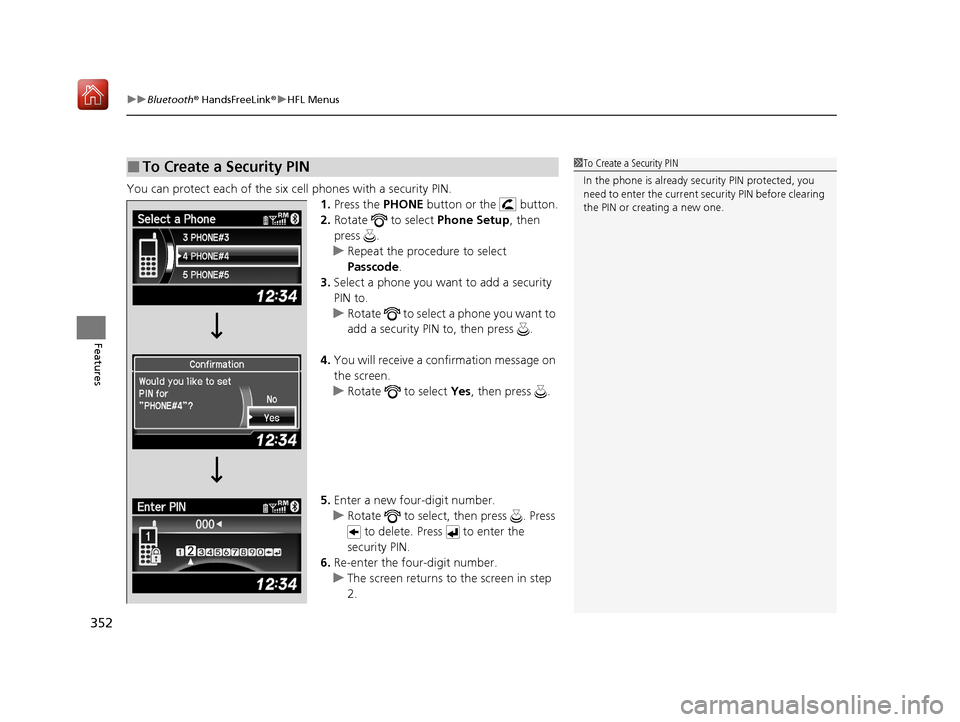
You can protect each of the six cell phones with a security PIN.
1.Press the PHONE button or the button.
2. Rotate to select Phone Setup, then
press .
u Repeat the procedure to select
Passcode .
3. Select a phone you want to add a security
PIN to.
u Rotate to select a phone you want to
add a security PIN to, then press .
4. You will receive a confirmation message on
the screen.
u Rotate to select Yes, then press .
5. Enter a new four-digit number.
u Rotate to select, then press . Press
to delete. Press to enter the
security PIN.
6. Re-enter the four-digit number.
u The screen returns to the screen in step
2.
■To Create a Security PIN1 To Create a Security PIN
In the phone is already secu rity PIN protected, you
need to enter the current security PIN before clearing
the PIN or creating a new one.
19 ACURA ILX-31TX66610.book 352 ページ 2020年4月17日 金曜日 午前8時52分