Page 320 of 621

319
uuCustomized Features u
Continued
Features
*1:Default SettingSetup
Group Customizable Features Desc
ription Selectable Settings
Vehicle
Settings
DefaultCancels/Resets all customized items in the
Vehicle Settings group as default.Yes/No
Driver
Assist
Forward Collision
Warning DistanceChanges at which distance CMBSTM alerts.Long /Normal*1/ Short
ACC Forward Vehicle
Detect BeepCauses the system to beep when the system
detects a vehicle, or when the vehicle goes out of
the ACC range.
On /Off*1
ACC Display Speed UnitChanges the speed unit for ACC on the multi-
information display.mph*1/km/h (U.S.)
mph /km/h*1 (Canada)
Road Departure
Mitigation SettingChanges the setting fo r the road departure
mitigation system.Normal*1/ Wide /
Warning Only
Lane Keeping Assist
Suspend BeepCauses the system to b eep when the LKAS is
suspended.On /Off*1
Blind Spot InfoChanges the setting for the blind spot
information.Audible And Visual
Alert*1/Visual Alert /
Off
19 ACURA ILX-31TX66610.book 319 ページ 2020年4月17日 金曜日 午前8時52分
Page 420 of 621

419
Driving
This chapter discusses driving and refueling.
Before Driving................................... 420
Maximum Load Limit........................ 423
Towing a Trailer ................................ 425
When Driving Starting the Engine .......................... 426
Dual Clutch Transmission ................. 432
Shifting ............................................ 433
Vehicle Stability Assist ® (VSA ®), aka
Electronic Stability Control (ESC),
System ........................................ 437
Blind spot information System*........... 439
Tire Pressure Monitoring System (TPMS) .. 442
Tire Pressure Monitoring System (TPMS) -
Required Federal Explanation ......... 444
AcuraWatch
TM................................... 446
Collision Mitigati on Braking SystemTM
(CMBSTM) ....................................... 449
Adaptive Cruise Control (ACC)......... 459
Lane Keeping Assist System (LKAS).... 474
Road Departure Mitigation (RDM) System ... 483
Front Sensor Camera ....................... 488
Radar Sensor.................................... 490
Braking Brake System ................................... 491 Anti-lock Brake System (ABS) ........... 493
Parking Your Vehicle When Stopped ................................ 495
Cross Traffic Monitor
*..................... 497
Multi-View Rear Camera .................. 500
Refueling Fuel Information .............................. 502
How to Refuel ................................. 503
Fuel Economy and CO
2 Emissions .... 504
Improving Fuel Economy and Reducing CO
2 Emissions ................................ 504
* Not available on all models
19 ACURA ILX-31TX66610.book 419 ページ 2020年4月17日 金曜日 午前8時52分
Page 440 of 621

439
uuWhen Driving uBlind spot information System*
Continued
Driving
Blind spot information System*
Is designed to detect vehicles in specified alert zones adjacent to your vehicle,
particularly in harder to see areas commonly known as “blind spots.”
When the system detects vehicles approach ing from behind in adjacent lanes, the
appropriate indicator comes on for a few seconds, providing assistance when you
change lanes.
■How the system works
1 Blind spot information System*
Important Safety Reminder
Like all assistance systems, blind spot information
system has limitations. Over reliance on blind spot
information system may result in a collision.
The system is for your convenience only. Even if an
object is within the alert zone, the following
situations may occur.
•The blind spot informatio n system alert indicator
may not come on due to obstruction (splashes,
etc.) even without the Blind Spot Info Not
Available multi-information display appearing.
•The blind spot informatio n system alert indicator
may come on even with the message appearing.
3WARNING
Failure to visually confirm that it is safe to
change lanes before doing so may result in
a crash and serious injury or death.
Do not rely only on the blind spot
information system wh en changing lanes.
Always look in your mi rrors, to either side
of your vehicle, and behind you for other
vehicles before changing lanes.
●The transmission is in ( D or (S.●Your vehicle speed is between 20 mph
(32 km/h) and 100 mph (160 km/h)
Alert zone range
A: Approx. 1.6 ft. (0.5 m)
B: Approx. 9.5 ft. (2.9 m)
C: Approx. 10 ft. (3 m) Radar Sensors:
underneath the
rear bumper
corners
Alert Zone
A
B
C
* Not available on all models
19 ACURA ILX-31TX66610.book 439 ページ 2020年4月17日 金曜日 午前8時52分
Page 447 of 621
446
Driving
AcuraWatchTM
AcuraWatchTM is a driver support system which employs the use of two distinctly
different kinds of sensors: a radar sens or located behind the emblem and a front
sensor camera mounted to th e interior side of the windshield, behind the rearview
mirror.
AcuraWatch
TM has the following functions.
■The functions whic h do not require switch operations to activate
• Collision Mitigation Braking SystemTM (CMBSTM) 2 P. 449
• Road Departure Mitigation (RDM) System 2 P. 483
■The functions wh ich require switch op erations to activate
• Adaptive Cruise Control (ACC)
2 P. 459
• Lane Keeping Assist System (LKAS) 2 P. 474
19 ACURA ILX-31TX66610.book 446 ページ 2020年4月17日 金曜日 午前8時52分
Page 461 of 621

uuAcuraWatchTMuAdaptive Cruise Control (ACC)
460
Driving
■How to activate the system1Adaptive Cruise Control (ACC)
You can read about handling information for the
camera equipped with this system.
2 Front Sensor Camera P. 488
When the MAIN button is pressed, both ACC and
the Lane Keeping Assist System (LKAS) are either
turned on or off.
ACC may not work properly under certai n conditions.
2 ACC Conditions and Limitations P. 464
When not using ACC: Turn off adaptive cruise by
pressing the MAIN button. This also will turn off the
Lane Keeping Assist System (LKAS).
Do not use ACC under the following conditions:
•On roads with heavy traf fic or while driving in
continuous stop and go traffic.
•On roads with sharp turns.
•On roads with steep downhill sections, as the set
vehicle speed can be exceeded by coasting. In such
cases, ACC will not apply the brakes to maintain
the set speed.
•On roads with toll collection facilities or other
objects between lanes of traffic, or in parking
areas, or faci lities with driv e through access.
■Press the MAIN button on
the steering wheel. ACC
(green) is on in the
instrument panel.
ACC is ready to use.
How to use
19 ACURA ILX-31TX66610.book 460 ページ 2020年4月17日 金曜日 午前8時52分
Page 475 of 621
474
uuAcuraWatchTMuLane Keeping Assist System (LKAS)
Driving
Lane Keeping Assist System (LKAS)
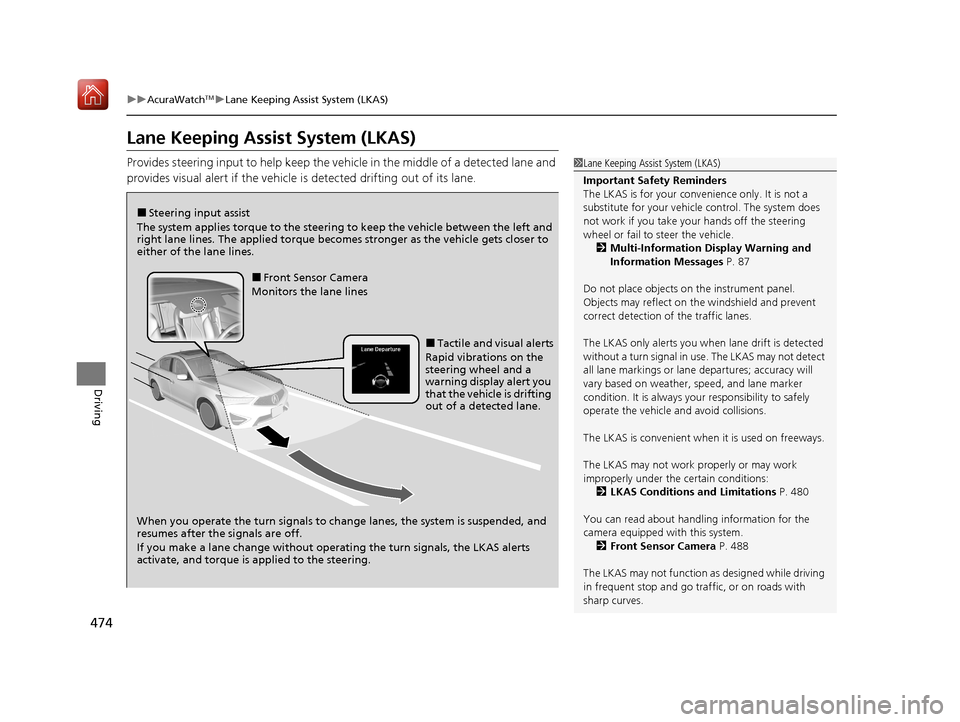
Provides steering input to help keep the vehicle in the middle of a detected lane and
provides visual alert if the vehicle is detected drifting out of its lane.1Lane Keeping Assist System (LKAS)
Important Safety Reminders
The LKAS is for your convenience only. It is not a
substitute for your vehicl e control. The system does
not work if you take y our hands off the steering
wheel or fail to steer the vehicle.
2 Multi-Information Display Warning and
Information Messages P. 87
Do not place objects on the instrument panel.
Objects may reflect on th e windshield and prevent
correct detection of the traffic lanes.
The LKAS only alerts you when lane drift is detected
without a turn signal in use. The LKAS may not detect
all lane markings or lane departures; accuracy will
vary based on weather, speed, and lane marker
condition. It is always your responsibility to safely
operate the vehicle an d avoid collisions.
The LKAS is convenient when it is used on freeways.
The LKAS may not work properly or may work
improperly under the certain conditions: 2 LKAS Conditions and Limitations P. 480
You can read about handling information for the
camera equipped with this system. 2 Front Sensor Camera P. 488
The LKAS may not function as designed while driving
in frequent stop and go traf fic, or on roads with
sharp curves.
■Steering input assist
The system applies torque to the steering to keep the vehicle between the left and
right lane lines. The applied torque becomes stronger as the vehicle gets closer to
either of the lane lines.
When you operate the turn signals to chan ge lanes, the system is suspended, and
resumes after the signals are off.
If you make a lane change without operating the turn signals, the LKAS alerts
activate, and torque is applied to the steering.
■Front Sensor Camera
Monitors the lane lines
■Tactile and visual alerts
Rapid vibrations on the
steering wheel and a
warning display alert you
that the vehicle is drifting
out of a detected lane.
19 ACURA ILX-31TX66610.book 474 ページ 2020年4月17日 金曜日 午前8時52分
Page 476 of 621
Continued475
uuAcuraWatchTMuLane Keeping Assist System (LKAS)
Driving
Provides assistance to keep the vehicle in the center of the lane. When the vehicle
nears a white or yellow line, steering force of the electric power steering will become
stronger.
When the vehicle enters the warning area, the LKAS alerts you with slight steering
wheel vibration as well as a warning display.
■Lane Keep Support Function1 Lane Keeping Assist System (LKAS)
When it fails to detect lanes, the system will
temporarily be canceled. When a lane is detected, the
system will recover automatically.
■Lane Departure Warning Function
Warning Area
Warning Area
19 ACURA ILX-31TX66610.book 475 ページ 2020年4月17日 金曜日 午前8時52分
Page 477 of 621

uuAcuraWatchTMuLane Keeping Assist System (LKAS)
476
Driving
The system can be used when the following conditions are met.
• The lane in which you are driving has dete ctable lane markers on both sides, and
your vehicle is in the center of the lane.
• The vehicle speed is between 45 and 90 mph (72 and 145 km/h).
• You are driving on a straight or slightly curved road.
• The turn signals are off.
• The brake pedal is not depressed.
• The wipers are not in continuous operation.
■How to activate the system
1.Press the MAIN button.
u The LKAS is on in the multi-information
display.
The system is ready to use.
2. Press the LKAS button.
u Lane outlines appear on the multi-
information display.
The system is activated.
■When the System can be Used1When the System can be Used
If the vehicle drifts toward ei t h e r l ef t o r r ight lane line
due to the system applying torque, turn off the LKAS
and have your vehicle checked by a dealer.
MAIN Button
LKAS Button
19 ACURA ILX-31TX66610.book 476 ページ 2020年4月17日 金曜日 午前8時52分

