2019.75 VAUXHALL CROSSLAND X infotainment
[x] Cancel search: infotainmentPage 13 of 247

In brief111Power windows .....................36
2 Exterior mirrors .....................33
3 Cruise control .....................139
Speed limiter ....................... 141
Heated steering wheel .........70
4 Turn lights ........................... 103
Headlight flash ....................101
High beam ........................... 100
High beam assist ...............100
Exit lighting ......................... 106
Parking lights ...................... 104
Buttons for Driver
Information Centre ................87
5 Side air vents ...................... 117
6 Instruments .......................... 77
Driver Information Centre ...... 87
7 Infotainment controls ...........70
8 Windscreen wiper and
washer, rear wiper and
washer ................................. 71
9 Head-up display ....................92
10 Centre air vents .................. 11711Hazard warning flashers ....102
12 Info Display .......................... 90
13 Centre air vent ....................118
14 Anti-theft alarm system
status LED ........................... 31
15 Central locking system ..........23
16 Glovebox .............................. 61
Fuse box ............................ 190
17 Controls for Info Display
operation ............................... 90
18 Climate control system ........ 108
19 USB port .............................. 74
20 Electronic Stability Control
and Traction Control ...........137
Lane departure warning .....162
Stop-start system ................125
Parking assist ..................... 149
Advanced parking assist ....152
Electric child locks ................ 28
21 Power outlet .......................... 74
22 Selector lever ...................... 132
23 Parking brake ......................136
24 Power button ....................... 122
25 Ignition switch .....................12226Steering wheel adjustment ..70
27 Horn ..................................... 71
28 Bonnet release lever ..........174
29 Storage ................................. 61
Fuse box ............................ 190
30 Head-up display ....................92
31 Light switch .......................... 99
Headlight range
adjustment ......................... 101
Front fog lights ...................103
Rear fog light ...................... 104
Instrument illumination .......105
Page 72 of 247

70Instruments and controlsControlsSteering wheel adjustment
Unlock lever, adjust steering wheel,
then engage lever and ensure it is
fully locked.
Do not adjust steering wheel unless
vehicle is stationary and steering
wheel lock has been released.
Steering wheel controls
Cruise control and speed limiter are
operated via the controls on the left
side of the steering wheel.
On the same side is located the
switch for the heated steering wheel.
Infotainment system can be operated
via the controls on the right side of the
steering wheel.
Driver assistance systems 3 139.
Further information is available in the
Infotainment manual.
Heated steering wheel 3 70.
Heated steering wheel
Activate heating by pressing *.
Activation is indicated by the LED in
the button.
Heating is operational when the
engine is running and during an
Autostop.
Stop-start system 3 125.
Page 76 of 247

74Instruments and controlsClockDate and time are shown in the
Info Display 3 90.
Setting date and time, see
Infotainment manual.
Power outlets
A 12 V power outlet is located in the
centre console.
Another power outlet is located in the
console between the front seats.
Do not exceed the maximum power
consumption of 120 W.
With ignition off, the power outlet is deactivated. Additionally, the poweroutlet is deactivated in the event of
low vehicle battery voltage.
Electrical accessories that are
connected must comply with the
electromagnetic compatibility
requirements laid down in
DIN VDE 40 839.
Do not connect any current-delivering
accessories, e.g. electrical charging
devices or batteries.
Do not damage the outlets by using
unsuitable plugs.
Stop-start system 3 125.
USB charging port
One or two USB ports are prepared
for charging devices.
When two USB ports are available,
the upper USB port can be used to
connect a phone for phone projection.
Notice
The sockets must always be kept
clean and dry.
USB port and phone projection see
Infotainment manual.
Page 92 of 247

90Instruments and controlsThe values of trip 1 page can be reset
by pressing SET/CLR for a few
seconds.
Trip 2 page:
Average speed
Display of average speed. The
measurement can be reset at any
time.
Average fuel consumption
Display of average consumption. The measurement can be reset at any
time and starts with a default value.
Distance travelled
Displays the current distance for trip
2 since a certain reset.
The values of trip 2 page can be reset
by pressing SET/CLR for a few
seconds.
Digital speed page
Digital display of the instantaneous
speed.
Stop and Start time counter
A time counter calculates the time
spent in STOP mode during a
journey. It resets to zero every time
the ignition is switched on.Compass page
Displays the geographic direction of
driving.
Blank page
No trip/fuel information is displayed.
AdBlue Press M or CHECK repeatedly until
the AdBlue menu is shown.
AdBlue range
Indicates an estimate of the AdBlue
level. A message indicates whether
the level is sufficient or low.
3 129.
Info Display The Info Display is located in the
instrument panel near the instrument
cluster.
Depending on the vehicle
configuration the vehicle has a
● Graphic Info Display
or
● 7'' Colour Info Display with
touchscreen functionalityor
● 8'' Colour Info Display with
touchscreen functionality
The Info Display can indicate: ● time 3 74
● outside temperature 3 73
● date 3 74
● Infotainment system, see description in the Infotainment
manual
● indication of rear view camera 3 160
● indication of panoramic view system 3 158
● indication of parking assist instructions 3 149
● navigation, see description in the
Infotainment manual
● vehicle and system messages 3 93
● settings for vehicle personalisation 3 94
Page 93 of 247

Instruments and controls91Graphic Info Display
Press X to switch on the display.
Press MENU to select main menu
page.
Press èäåé to select a menu page.
Press OK to confirm a selection.
Press BACK to exit a menu without
changing a setting.
For further information, see
Infotainment manual.
7'' Colour Info Display
Selecting menus and settings
Menus and settings are accessed via the touchscreen.
Press X to switch on the display.
Press ; to display the homepage.
Touch required menu display icon.
Touch a respective icon to confirm a
selection.
Touch 9 to return to the next higher
menu level.
Press ; to return to the homepage.
For further information, see
Infotainment manual.
Vehicle personalisation 3 94.
8'' Colour Info Display
Selecting menus and settings
There are three options to operate the
display:
● via buttons below the display
● by touching the touchscreen
● via speech recognitionButton and touch operation
Press X to switch on the display.
Press SET to select system settings
(units, language, time and date).
Press Í to select vehicle settings or
driving functions.
Page 94 of 247

92Instruments and controlsTouch required menu display icon or
a function.
Confirm a required function or
selection by touching.
Touch r on the display to exit a
menu without changing a setting.
For further information, see
Infotainment manual.Speech recognition
Description see Infotainment manual.
Vehicle personalisation 3 94.
Head-up display
The head-up display displays driver
information onto a foldable projection plane on the driver's side.
The information appears as an image
projected from a lense in the
instrument panel onto the projection
plane directly ahead in driver's view.
The image appears focused out
toward the front of the vehicle.Head-up display views:
● vehicle speed
● speed limits by the traffic sign recognition
● set speed of speed limiter
● set speed of cruise control
● navigation information.Adjust position of head-up display
image
1. Adjust the driver's seat.
2. Start the engine.
3. Press ä or å to centre the image.
It can only be adjusted up and
down, not side to side.
9 Warning
If the head-up display image is too
bright or too high in your field of
view, it may obstruct your view
when it is dark outside. Be sure to
Page 181 of 247
Vehicle care179● See the Owner's Manual forfurther information.
● Explosive gas may be present in the vicinity of the vehicle battery.
Power saving mode
This mode deactivates electrical
consumers to avoid excessive
discharging of the vehicle battery.
These consumers, such as the
infotainment system, windscreen
wipers, low beam headlights,
courtesy light, etc. can be used for a
total maximum time of about
40 minutes after ignition is switched
off.
Deactivating power saving mode
Power saving mode is deactivated
automatically when the engine is
restarted. Run the engine for a
sufficient charge:
● for less than 10 minutes to use the consumers for approx.
5 minutes
● for more than 10 minutes to use the consumers for up to approx.
30 minutesDiesel fuel system bleeding
If the tank has been run dry, the diesel fuel system must be bled. Switch on
the ignition three times for
15 seconds at a time. Then crank the
engine for a maximum of
40 seconds. Repeat this process after
no less than 5 seconds. If the engine fails to start, seek the assistance of a
workshop.
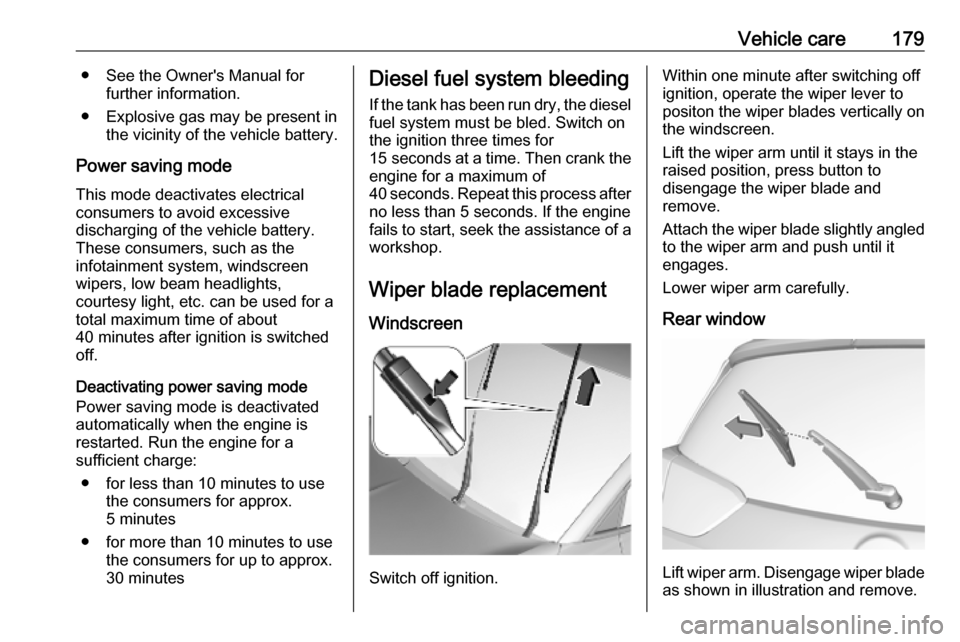
Wiper blade replacement
Windscreen
Switch off ignition.
Within one minute after switching off
ignition, operate the wiper lever to
positon the wiper blades vertically on
the windscreen.
Lift the wiper arm until it stays in the
raised position, press button to
disengage the wiper blade and
remove.
Attach the wiper blade slightly angled
to the wiper arm and push until it
engages.
Lower wiper arm carefully.
Rear window
Lift wiper arm. Disengage wiper blade as shown in illustration and remove.
Page 193 of 247

Vehicle care191No.Circuit7Heated steering wheel8Rear wiper9–10Central locking system11Central locking system12Instrument cluster13Climate control system, USB14OnStar15Instrument cluster, climate
control system16Brake, starter, retained power
off17Instrument cluster18Advanced parking assist19Top column module, trailer
control module20–21Anti-theft alarm system, start
buttonNo.Circuit22Rain sensor, front camera23Door module24Advanced parking assist,
camera, Infotainment25Airbag26Top column module27Anti-theft alarm system28–29Infotainment30–31Infotainment32Power outlet front33–34Heated exterior mirrors, door
moduleNo.Circuit35Instrument cluster, light switch,
advanced parking assist, trans‐
mission control module36Courtesy lights, sun visor lights,
glovebox light
Fuse box on the right side of the
instrument panel
In right-hand drive vehicles, the fuse
box is behind a cover in the
instrument panel. Disengage cover at
the side and remove.