Page 77 of 273
Storage75Behind the front seats
● There are installation openingson both sides in the roof frame
above the front seats: suspend
and engage rod of net at one
side, compress rod and suspend and engage at the other side.
● Attach hooks of safety net straps
to loops in the floor in front of the rear seats. To get access to the
loops, push in the perforated parts in the floor cover on both
sides.
● Tension both straps by pulling at the loose end.
● Push down head restraints and fold down rear seat backrests3 70.
Removal
Pull the flap at the tightener on both
sides to release the straps. Detach
hooks from the loops.
Unhook the safety net rods from the
installation openings in the roof
frame.
Roll up the net and secure with a
strap.
Page 94 of 273

92Instruments and controlsRetrieving service information
To retrieve the status of the service
information at any time press button
CHECK . The service information is
displayed for a few seconds.
Service information 3 238.
Control indicators The control indicators described are
not present in all vehicles. The
description applies to all instrument
versions. Depending on the
equipment, the position of the control indicators may vary. When the
ignition is switched on, most controlindicators will illuminate briefly as afunctionality test.
The control indicator colours mean:red:danger, important reminderyellow:warning, information, faultgreen:confirmation of activationblue:confirmation of activationwhite:confirmation of activation
See all control indicators on different
instrument clusters 3 88.
Turn lights
O illuminates or flashes green.
Illuminates briefly The parking lights are switched on.
Flashes
Turn lights or the hazard warning
flashers are activated.
Rapid flashing: failure of a turn light or associated fuse, failure of turn light on
trailer.
Bulb replacement 3 206.
Turn lights 3 114.
Seat belt reminder
Seat belt reminder on all seats
X illuminates or flashes red in the
instrument cluster together with the
indication in the roof console for each
seat belt.
● When the ignition is switched on,
X in the instrument cluster and
the symbol for the respective
seat in the roof console comes
Page 113 of 273
Lighting111
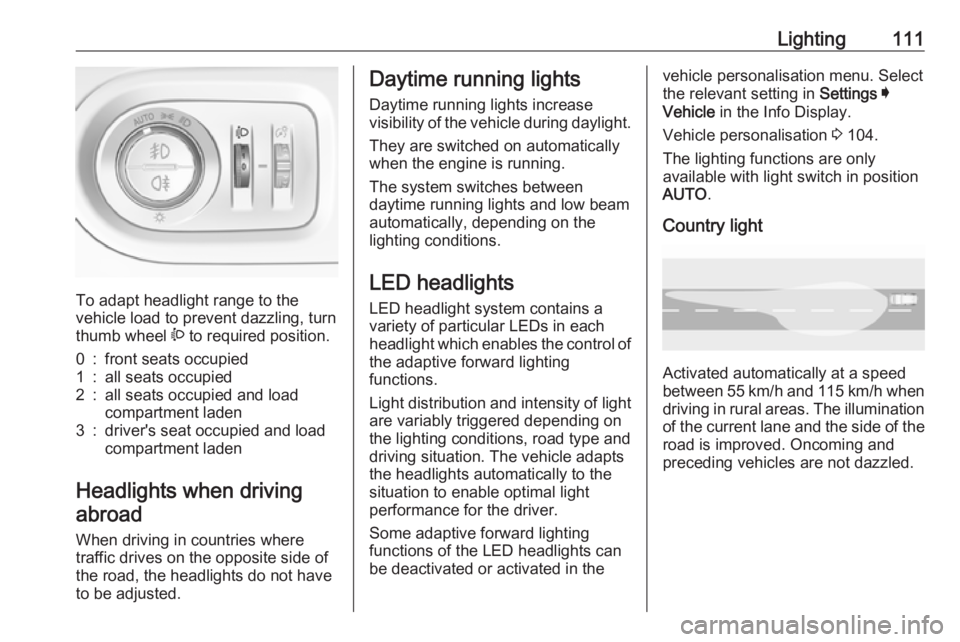
To adapt headlight range to the
vehicle load to prevent dazzling, turn
thumb wheel ? to required position.
0:front seats occupied1:all seats occupied2:all seats occupied and load
compartment laden3:driver's seat occupied and load
compartment laden
Headlights when driving
abroad
When driving in countries where
traffic drives on the opposite side of
the road, the headlights do not have
to be adjusted.
Daytime running lights
Daytime running lights increase
visibility of the vehicle during daylight.
They are switched on automatically
when the engine is running.
The system switches between
daytime running lights and low beam automatically, depending on the
lighting conditions.
LED headlights
LED headlight system contains a
variety of particular LEDs in each
headlight which enables the control of the adaptive forward lighting
functions.
Light distribution and intensity of light
are variably triggered depending on the lighting conditions, road type and
driving situation. The vehicle adapts
the headlights automatically to the
situation to enable optimal light
performance for the driver.
Some adaptive forward lighting
functions of the LED headlights can
be deactivated or activated in thevehicle personalisation menu. Select
the relevant setting in Settings I
Vehicle in the Info Display.
Vehicle personalisation 3 104.
The lighting functions are only
available with light switch in position
AUTO .
Country light
Activated automatically at a speed
between 55 km/h and 115 km/h when driving in rural areas. The illumination
of the current lane and the side of the road is improved. Oncoming and
preceding vehicles are not dazzled.
Page 121 of 273

Climate control119Climate controlClimate control systems.............119
Heating and ventilation system 119
Air conditioning system ...........120
Electronic climate control system .................................... 123
Auxiliary heater ........................127
Air vents ..................................... 127
Adjustable air vents .................127
Fixed air vents ......................... 128
Glovebox cooler ......................128
Maintenance .............................. 128
Air intake ................................. 128
Air conditioning regular
operation ................................ 129
Service .................................... 129Climate control systems
Heating and ventilation system
Controls for: ● temperature £
● air distribution l, M and K
● fan speed Z
● demisting and defrosting à
● heated rear window and exterior mirrors b
● heated seats ß
Heated rear window b 3 41.
Heated exterior mirrors b 3 38.
Heated seats ß 3 51.
Temperature
Adjust the temperature by turning £ to the desired temperature.red area:warmerblue area:colder
Heating will not be fully effective until
the engine has reached normal
operating temperature.
Air distribution
l:to windscreen and front door
windowsM:to head area via adjustable air
ventsK:to foot well and windscreen
All combinations are possible.
Fan speed
Adjust the air flow by turning Z to the
desired speed.
clockwise:increaseanticlockwise:decrease
Page 122 of 273
120Climate controlDemisting and defrosting
● Press à: the air distribution is
directed towards the windscreen.
● Set temperature controller £ to
warmest level.
● Set fan speed Z to highest level.
● Switch on heated rear window b.
● Open side air vents as required and direct them towards the doorwindows.
Heated rear window, windscreen and exterior mirrors b 3 41.
Heated seats ß 3 51.
Air conditioning system
Controls for:
● temperature £
● air distribution l, M and K
● fan speed Z
● demisting and defrosting à
● cooling A/C
● air recirculation 4
● heated rear window and exterior mirrors b
● heated windscreen ,
● heated seats ß
Heated rear window b3 41.
Heated exterior mirrors b3 38.
Heated windscreen , 3 42.
Heated seats ß 3 51.
Some setting changes are indicated
briefly in the Info Display. Activated
functions are indicated by the LED in
the respective button.
Temperature
Adjust the temperature by turning
£ to the desired temperature.
red area:warmerblue area:colder
Page 124 of 273
122Climate controlhumidity increases, so the
windows may mist up from inside.
The quality of the passenger
compartment air deteriorates,
which may cause the vehicle
occupants to feel drowsy.
In warm and very humid ambient air
conditions, the windscreen may mist
up from outside when cold air is
directed towards it. If windscreen
mists up from outside, activate
windscreen wiper and deactivate l.
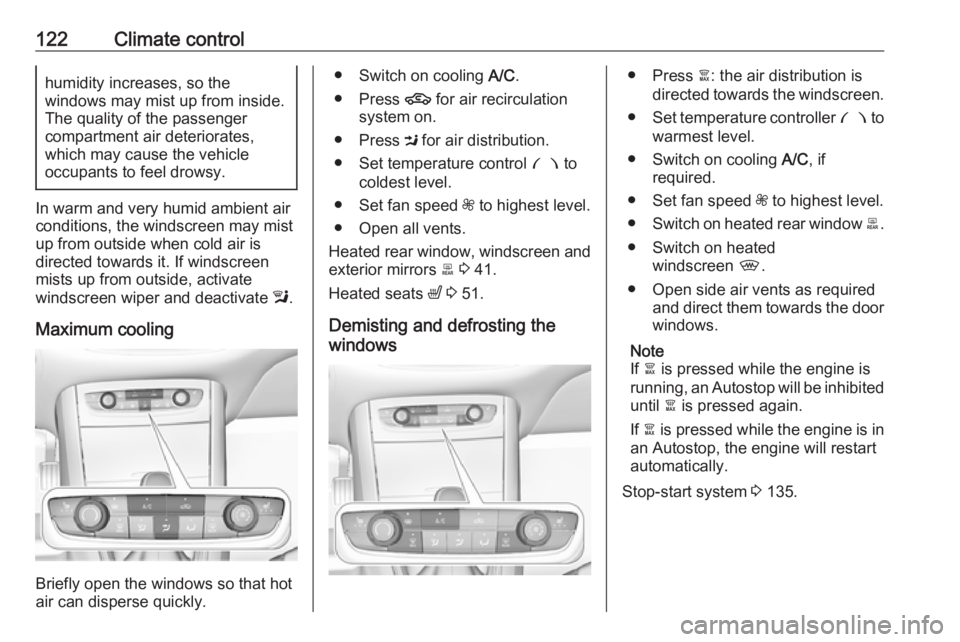
Maximum cooling
Briefly open the windows so that hot
air can disperse quickly.
● Switch on cooling A/C.
● Press 4 for air recirculation
system on.
● Press M for air distribution.
● Set temperature control £ to
coldest level.
● Set fan speed Z to highest level.
● Open all vents.
Heated rear window, windscreen and exterior mirrors b 3 41.
Heated seats ß 3 51.
Demisting and defrosting the
windows● Press à: the air distribution is
directed towards the windscreen.
● Set temperature controller £ to
warmest level.
● Switch on cooling A/C, if
required.
● Set fan speed Z to highest level.
● Switch on heated rear window b.
● Switch on heated windscreen ,.
● Open side air vents as required and direct them towards the doorwindows.
Note
If à is pressed while the engine is
running, an Autostop will be inhibited until à is pressed again.
If à is pressed while the engine is in
an Autostop, the engine will restart
automatically.
Stop-start system 3 135.
Page 125 of 273

Climate control123Electronic climate controlsystem
The dual zone climate control allows
different temperatures for driver side
and front passenger side.
In automatic mode, temperature, fan
speed and air distribution are
regulated automatically.
Controls for:
● temperature on driver side £
● MENU enters the Climate setting
menu in the Info Display
● fan speed Z
● automatic mode AUTO
● temperature on front passenger
side £
● cooling A/C
● manual air recirculation 4
● demisting and defrosting à
● heated rear window and exterior mirrors b
● heated windscreen ,
● heated seats ß
● ventilated seats A
Heated rear window Ü 3 41.
Heated exterior mirrors Ü 3 38.
Heated seats ß 3 51.
Ventilated seats A 3 51.
Activated functions are indicated by the LED in the respective control.
The electronic climate control system
is only fully operational when the
engine is running.
Make sure the sun sensor used by the
electronic climate control system is
not covered 3 10.Climate control settings menu
Press MENU to manually set the
following climate control funtions:
● air distribution l, M , K
● fan speed Z
● temperature for driver and passenger side
● dual zone temperature synchronisation MONO
● cooling A/C
● automatic mode AUTO
Page 127 of 273

Climate control125Touch in the Colour Info Display:l:to windscreen and front door
windowsM:to head area and rear seats via
adjustable air ventsK:to front and rear foot well and
windscreen
To return to automatic air distribution,
press AUTO .
Temperature preselection £
Set the preselected temperatures
separately for the driver and the front
passenger to the desired value using
the left and right rotary ring. The
rotary ring on the passenger side
changes the temperature of the
passenger side. The rotary ring on the driver's side changes the temperature
of the driver's side or of both sides,
depending on activation of
synchronisation MONO in the climate
settings menu. Press MENU to enter
the menu.
Recommended temperature is 22 °C .
Temperature is indicated in displays beside the rotary rings and in the
climate settings menu.
If the minimum temperature Lo is set,
the climate control system runs at maximum cooling, if cooling A/C is
switched on.
If the maximum temperature Hi is set,
the climate control system runs at maximum heating.
Note
If A/C is switched on, reducing the
set cabin temperature can cause the
engine to restart from an Autostop or inhibit an Autostop.
Stop-start system 3 135.Dual zone temperature
synchronisation MONO or SYNC
Press MENU to enter the menu.
Touch MONO or SYNC to link
passenger side temperature setting
to the driver side.
When passenger side control dial will be adjusted, synchronisation is
deactivated.
Air conditioning A/C
Press A/C to switch on cooling. The
LED in the button illuminates to
indicate activation. Cooling is only
functional when the engine is running and climate control fan is switched on.

