Page 87 of 253

Instruments and controls85Electronic Stability Controland Traction Control system
off
n illuminates yellow.
The systems are deactivated.
Engine coolant temperature
o illuminates red.
Illuminates when the engine is
running
Stop, switch off engine.Caution
Coolant temperature too high.
Check coolant level immediately
3 178.
If there is sufficient coolant, consult a workshop.
Preheating
! illuminates yellow.
Preheating of diesel engine is
activated. Only activates when
outside temperature is low. Start the
engine when control indicator
extinguishes.
Starting the engine 3 124.
Exhaust filter % or C illuminates yellow.
The exhaust filter requires cleaning.
Continue driving until the control
indicator extinguishes.
Illuminates temporarily Start of saturation of the exhaust filter.
Start cleaning process as soon as
possible by driving at a vehicle speed
of at least 60 km/h.
Illuminates constantlyIndication of a low additive level. Seek
the assistance of a workshop.
Exhaust filter 3 129.
AdBlue Y flashes or illuminates yellow.Illuminates yellow
The remaining driving range is
between 600 km and 2400 km.
Flashes yellow
The remaining driving range is
between 0 and 600 km.
AdBlue level is low. Refill AdBlue soon to avoid prevention of the
engine start.
AdBlue 3 130.
Deflation detection system
w illuminates or flashes yellow.
Illuminates
Tyre pressure loss in one or more
wheels. Stop immediately and check
tyre pressure.
Flashes
Fault in system. Consult a workshop.
Deflation detection system 3 197.
Engine oil pressure
I illuminates red.
Page 88 of 253

86Instruments and controlsIlluminates when the ignition is
switched on and extinguishes shortly
after the engine starts.
Illuminates when the engine is
runningCaution
Engine lubrication may be
interrupted. This may result in
damage to the engine and / or
locking of the drive wheels.
1. Select neutral gear.
2. Move out of the flow of traffic as quickly as possible without
impeding other vehicles.
3. Switch off ignition.
9 Warning
When the engine is off,
considerably more force is needed
to brake and steer.
During an Autostop, the brake
servo unit will still be operational.
Do not remove key until vehicle is stationary, otherwise the steeringwheel lock could engage
unexpectedly.
Keep engine turned off and let the
vehicle be towed to a workshop
3 177.
Low fuel o illuminates yellow.
Level in fuel tank is too low.
Refuelling 3 167.
Bleeding the diesel fuel system
3 181.
Autostop D illuminates or flashes green.
Illuminates green
Engine is in an Autostop.
Flashes green
Autostop is temporarily unavailable,
or Autostop mode is invoked
automatically.
Stop-start system 3 126.
Exterior light 8 illuminates green.
The exterior lights are on 3 100.
Low beam
9 illuminates green.
Illuminated when low beam is on.
High beam
C illuminates blue.
Illuminated when high beam is on or
during headlight flash 3 101.
High beam assist
f illuminates green.
The high beam assist is activated
3 101.
Front fog lights
> illuminates green.
The front fog lights are on 3 104.
Page 90 of 253
88Instruments and controlsDisplaysDriver Information Centre
The Driver Information Centre is
located in the instrument cluster.
Depending on the version, the Driver
Information Centre is available as
monochrome or colour display.
Driver Information Centre indicates: ● overall and trip odometer
● digital speed indication
● trip / fuel information menu
● gear shift indication
● service information
● vehicle and warning messages ● driver assistance messages
● pop-up messages
● AdBlue informationSelecting menus and functions
Turn the adjuster wheel to select a
page in the trip / fuel information
menu.
Press SET/CLR to confirm or reset a
function.
Vehicle and service messages are
popped up in the Driver Information
Centre if required. Scroll messages
by turning the adjuster wheel.
Confirm messages by pressing
SET/CLR .
Additionally, some menus can be selected via the left button:
Press M to switch between the
respective menus.
Or
Page 91 of 253

Instruments and controls89Press CHECK to switch between the
respective menus.
Vehicle messages 3 94.
Trip / fuel information menu,
monochrome display
Turn the adjuster wheel to select a
page:
Trip odometer
Trip odometer 3 78.
Average fuel consumption
Display of average consumption. The measurement can be reset at any
time and starts with a default value.
To reset, press SET/CLR for a few
seconds.
Average speed
Display of average speed. The
measurement can be reset at any
time.
To reset, press SET/CLR for a few
seconds.
Fuel range
Range is calculated from current fuel
level and current consumption. The
display shows average values.
After refuelling, the range is updated
automatically after a brief delay.
When the fuel level is low, a message
appears on the display and the
control indicator o in the fuel gauge
illuminates 3 86.
Instantaneous Fuel Consumption
Display of the instantaneous
consumption.Digital speed
Digital display of the instantaneous
speed.
Trip / fuel information menu,
colour display
Differerent pages with combined
information can be selected.
Turn the adjuster wheel to select a
page.
Information page:
Fuel range
Range is calculated from current fuel
level and current consumption. The
display shows average values.
Page 104 of 253

102LightingActivation
Activate high beam assist by pressingf . The LED of the button
illuminates.
The green control indicator f
illuminates continuously when the
high beam assist is activated, the blue
one 7 illuminates when high beam is
on.
Control indicator f 3 86, 7 3 86.
Deactivation
Deactivate high beam assist by
pressing f. The LED of the button
extinguishes.
If a headlight flash is activated when
the high beam assist is activated and low beam is on, the high beam assist
will be deactivated. The system
changes to high beam.
If a headlight flash is activated when
the high beam assist is activated and high beam is on, the high beam assistwill be deactivated. The system
changes to low beam.
To reactivate the high beam assist,
flash the headlights again.
Headlight flash
Pull to activate the headlight flash.
Pull to deactivate the high beam. Headlight range adjustment
Manual headlight range
adjustment
Headlight range can be adjusted
manually if vehicle is equipped with
halogen headlights. LED headlights
are adjusted automatically.
Dynamic automatic headlight
levelling 3 103.
To adapt headlight range to the
vehicle load to prevent dazzling: turn
thumb wheel ? to required position.
Page 106 of 253

104Lighting
Hazard warning flashers are switched
on automatically in the following
situations:
● braking in an emergency (depending on the force of
deceleration)
● in the event of an accident.
They are switched off by pressing ¨
or accelerating.
Turn lightsup:right turn lightdown:left turn light
A resistance point can be felt when
moving the lever.
Constant flashing is activated when
the lever is being moved beyond the
resistance point. It is deactivated
when the steering wheel is moved in
the opposite direction or lever is
manually moved back to its neutral
position.
After 20 seconds the volume of the audible signal will increase if the
speed is above 60 km/h.
Activate temporary flashing by
holding the lever just before the
resistance point. Turn lights will flash
until lever is being released.
To activate three flashes, tap the
lever briefly without passing the
resistance point.
Front fog lights
Operated by pressing >
.
Light switch in position AUTO:
switching on front fog lights will switch
headlights on automatically.
The fog lights should only be used in
very bad visibility conditions like fog,
snow or heavy rain.
Page 108 of 253
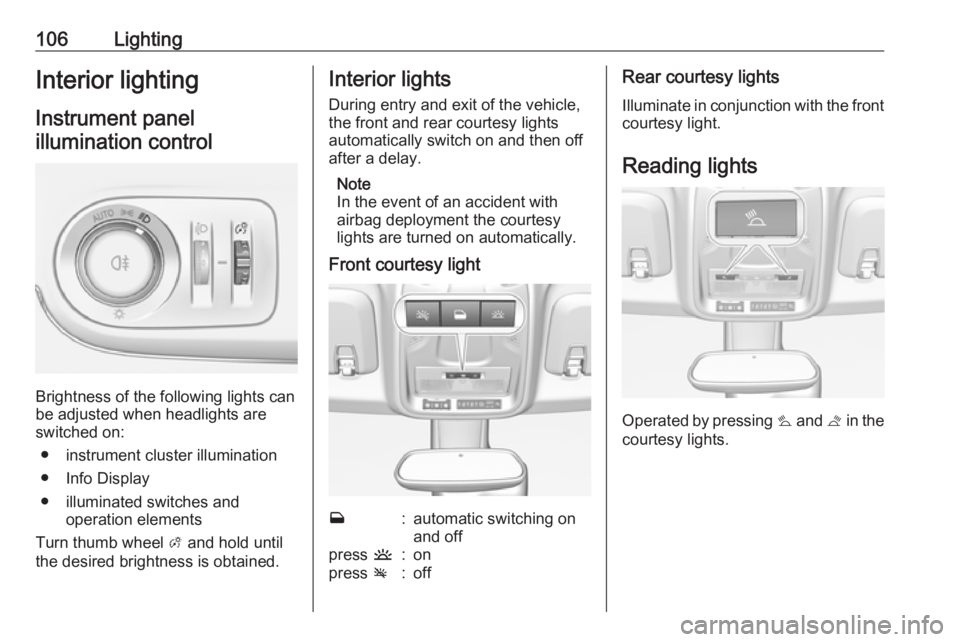
106LightingInterior lightingInstrument panelillumination control
Brightness of the following lights can
be adjusted when headlights are
switched on:
● instrument cluster illumination
● Info Display
● illuminated switches and operation elements
Turn thumb wheel A and hold until
the desired brightness is obtained.
Interior lights
During entry and exit of the vehicle,
the front and rear courtesy lights
automatically switch on and then off
after a delay.
Note
In the event of an accident with
airbag deployment the courtesy
lights are turned on automatically.
Front courtesy lightw:automatic switching on
and offpress u:onpress v:offRear courtesy lights
Illuminate in conjunction with the front courtesy light.
Reading lights
Operated by pressing s and t in the
courtesy lights.
Page 120 of 253
118Climate controlAir vents
Adjustable air vents At least two air vents must be open
while cooling is on.9 Warning
Do not attach any objects to the
slats of the air vents. Risk of
damage and injury in case of an
accident.
Centre air vents in the instrument
panel
Direct the flow of air by tilting and
swivelling the slats.
To close the vent, swivel the slats
inwards.
Outer air vents in the instrument
panel
Direct the flow of air by tilting and
swivelling the slats.
To close the vent, swivel the slats
outwards.
Centre air vent on top of the
instrument panel
Close air flow by turning the thumb
wheel to the front.