2018 YAMAHA XSR 900 engine
[x] Cancel search: enginePage 20 of 104
Instrument and control functions
3-5
1
23
4
5
6
7
8
9
10
11
12
TIP
For radiator-fan-equipped vehi-
cles, the radiator fan(s) automati-
cally switch on or off according to
the coolant temperature in the ra-
diator.
If the engine overheats, see page6-38 for further instructions.
EAU73171
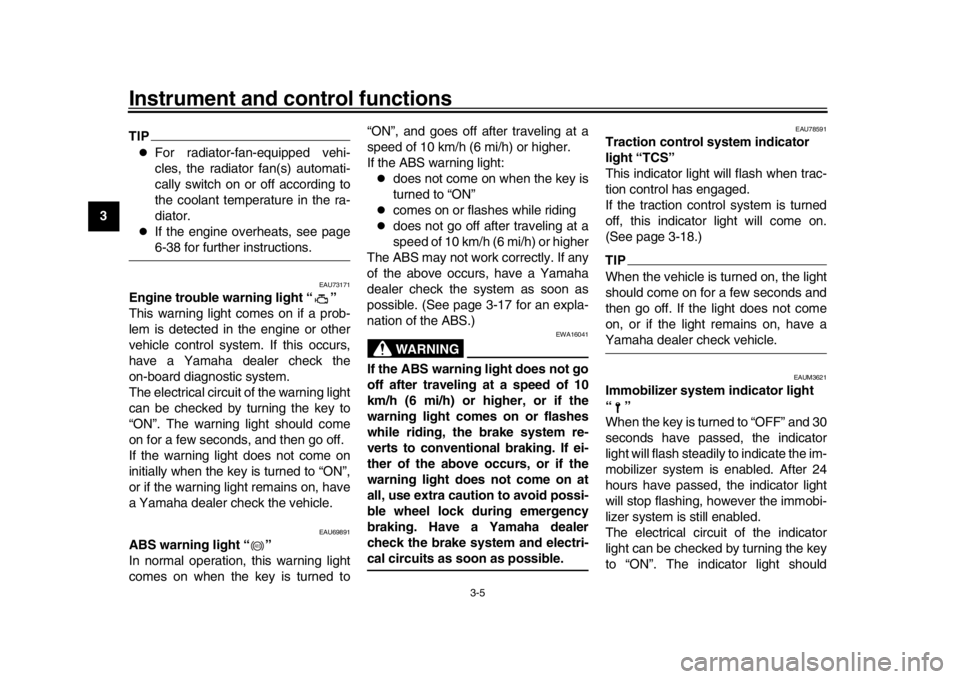
Engine trouble warning light “ ”
This warning light comes on if a prob-
lem is detected in the engine or other
vehicle control system. If this occurs,
have a Yamaha dealer check the
on-board diagnostic system.
The electrical circuit of the warning light
can be checked by turning the key to
“ON”. The warning light should come
on for a few seconds, and then go off.
If the warning light does not come on
initially when the key is turned to “ON”,
or if the warning light remains on, have
a Yamaha dealer check the vehicle.
EAU69891
ABS warning light “ ”
In normal operation, this warning light
comes on when the key is turned to “ON”, and goes off after traveling at a
speed of 10 km/h (6 mi/h) or higher.
If the ABS warning light:
does not come on when the key is
turned to “ON”
comes on or flashes while riding
does not go off after traveling at a
speed of 10 km/h (6 mi/h) or higher
The ABS may not work correctly. If any
of the above occurs, have a Yamaha
dealer check the system as soon as
possible. (See page 3-17 for an expla-
nation of the ABS.)WARNING
EWA16041
If the ABS warning light does not go
off after traveling at a speed of 10
km/h (6 mi/h) or higher, or if the
warning light comes on or flashes
while riding, the brake system re-
verts to conventional braking. If ei-
ther of the above occurs, or if the
warning light does not come on at
all, use extra caution to avoid possi-
ble wheel lock during emergency
braking. Have a Yamaha dealer
check the brake system and electri-cal circuits as soon as possible.
EAU78591
Traction control system indicator
light “TCS”
This indicator light will flash when trac-
tion control has engaged.
If the traction control system is turned
off, this indicator light will come on.
(See page 3-18.)TIPWhen the vehicle is turned on, the light
should come on for a few seconds and
then go off. If the light does not come
on, or if the light remains on, have aYamaha dealer check vehicle.
EAUM3621
Immobilizer system indicator light
“”
When the key is turned to “OFF” and 30
seconds have passed, the indicator
light will flash steadily to indicate the im-
mobilizer system is enabled. After 24
hours have passed, the indicator light
will stop flashing, however the immobi-
lizer system is still enabled.
The electrical circui t of the indicator
light can be checked by turning the key
to “ON”. The indicator light should
ABS
UB90E2.book 5 ページ 2018年6月5日 火曜日 午後5時40分
Page 21 of 104
Instrument and control functions
3-6
1
234
5
6
7
8
9
10
11
12
come on for a few seconds, and then
go off.
If the indicator light does not come on
initially when the key is turned to “ON”,
if the indicator light remains on, or if the
indicator light flashes in a pattern (if a
problem is detected in the immobilizer
system, the immobili
zer system indica-
tor light will flash in a pattern), have a
Yamaha dealer check the vehicle.
TIPIf the immobilizer system indicator light
flashes in the pattern, slowly 5 times
then quickly 2 times, this could be
caused by transponder interference. Ifthis occurs, try the following.
1. Make sure there are no other im- mobilizer keys close to the main
switch. Other immobilizer system
keys may cause signal interfer-
ence and prevent the engine from
starting.
2. Use the code re-registering key to start the engine.
3. If the engine starts, turn it off, and try starting the engine with the
standard keys.
4. If one or both of the standard keys do not start the engine, take the
vehicle and all 3 keys to a Yamaha
dealer to have the standard keys
re-registered.
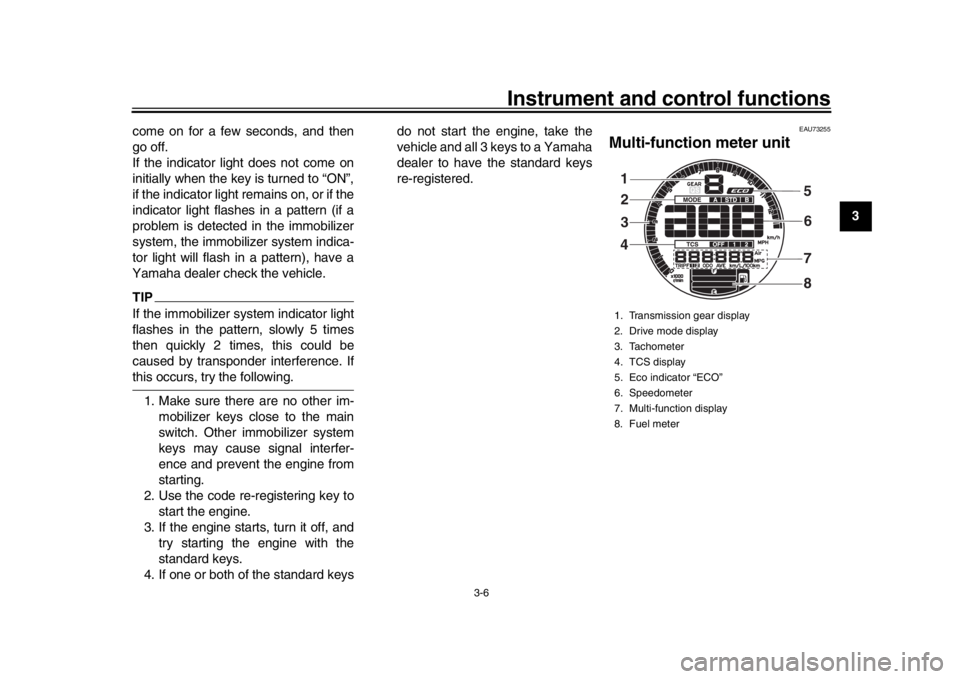
EAU73255
Multi-function meter unit1. Transmission gear display
2. Drive mode display
3. Tachometer
4. TCS display
5. Eco indicator “ECO”
6. Speedometer
7. Multi-function display
8. Fuel meter1
32
4 5
6
8
7
UB90E2.book 6 ページ 2018年6月5日 火曜日 午後5時40分
Page 22 of 104

Instrument and control functions
3-7
1
23
4
5
6
7
8
9
10
11
12
WARNING
EWA12423
Be sure to stop the vehicle before
making any setting changes to the
multi-function meter unit. Changing
settings while riding can distract the
operator and increase the risk of anaccident.
The multi-function meter unit is
equipped with the following:
a speedometer
a tachometer
a fuel meter
an eco indicator
a transmission gear display
a drive mode display
a traction control system display
a multi-function display
TIP
The “QS” icon does not function.
U.K. specification vehicles only:
The multi-function meter unit can
be switched between kilometers
and miles. Set the multi-function
display to the odometer mode or a
tripmeter mode, and then press
the bottom set button for three sec-onds.
Speedometer
The speedometer shows the vehicle’s
traveling speed. Tachometer
The tachometer allows the rider to
monitor the engine speed and keep it
within the ideal power range.
NOTICE
ECA10032
Do not operate the engine in the ta-
chometer red zone.Red zone: 11250 r/min and above
1. Top set button
2. Bottom set button
1
2
1. Speedometer
1
1. Tachometer
2. Tachometer red zone1 2
UB90E2.book 7 ページ 2018年6月5日 火曜日 午後5時40分
Page 23 of 104

Instrument and control functions
3-8
1
234
5
6
7
8
9
10
11
12
Fuel meter
The fuel meter indicates the amount of
fuel in the fuel tank. The display seg-
ments of the fuel meter disappear from
“F” (full tank) towards “E” (empty tank)
as the fuel level decreases. When the
last segment and frame start flashing,
refuel as soon as possible.
TIPThis fuel meter is equipped with a
self-diagnosis system. If a problem is
detected in the fuel tank electrical cir-
cuit, the fuel level segments, frame,
and “ ” will flash repeatedly. If this oc-
curs, have a Yamaha dealer check the
vehicle.
Eco indicator
This indicator comes on when the vehi-
cle is being operated in an environmen-
tally friendly, fuel-efficient manner. The
indicator goes off when the vehicle is
stopped.TIPConsider the following tips to reduce
fuel consumption:
Avoid high engine speeds during
acceleration.
Travel at a constant speed.
Select the transmission gear that
is appropriate for the vehicle
speed.
Transmission gear display
This display shows the selected gear.
The neutral position is indicated by “ ”
and by the neutral indicator light.
1. Frame
2. Segment1
2
1. Eco indicator “ECO”
1
1. Neutral indicator light “ ”
2. Transmission gear display12
UB90E2.book 8 ページ 2018年6月5日 火曜日 午後5時40分
Page 26 of 104

Instrument and control functions
3-11
1
23
4
5
6
7
8
9
10
11
12 traveled on 1.0 L of fuel under cur-
rent riding conditions.
“L/100 km”: The amount of fuel
necessary to travel 100 km under
current riding conditions.
“MPG”: The distance that can be
traveled on 1.0 Imp.gal of fuel un-
der current riding conditions.
To switch the instantaneous fuel con-
sumption display settings, push the
bottom set button for two seconds.
TIPIf traveling at speeds under 20 km/h (12mi/h), “_ _._” is displayed.
Average fuel consumption This display shows the average fuel
consumption since it was last reset.
The average fuel consumption display
can be set to either “AVE_ _._ km/L” or
“AVE_ _._ L/100 km”, or for UK-spec
vehicles, to “AVE_ _._ MPG” as well.
“AVE_ _._ km/L”: The average dis-
tance that can be traveled on 1.0 L
of fuel.
“AVE_ _._ L/100 km”: The average
amount of fuel necessary to travel
100 km.
“AVE_ _._ MPG”: The average
distance that can be traveled on
1.0 Imp.gal of fuel.
To switch the average fuel consump-
tion display settings, push the bottom
set button for two seconds.
To reset the average fuel consumption,
push the top set button for one second.
TIPAfter resetting the average fuel con-
sumption, “_ _._” will be shown until thevehicle has traveled 1 km (0.6 mi). Coolant temperature
This display shows the coolant temper-
ature from 40
C to 116 C in 1 C incre-
ments.
If the message “HI” flashes, stop the
vehicle, then stop the engine and let it
cool. (See page 6-38.)
TIP
When the coolant temperature is
below 40 C, “Lo” will be displayed.
The coolant temperature varies
with changes in the weather andengine load.
1. Average fuel consumption display
1
1. Coolant temperature display
1
UB90E2.book 11 ページ 2018年6月5日 火曜日 午後5時40分
Page 28 of 104

Instrument and control functions
3-13
1
23
4
5
6
7
8
9
10
11
12 To adjust the brightness
1. Turn the key to “OFF”.
2. Push and hold the bottom set but-
ton.
3. Turn the key to “ON” and continue pushing the bottom set button until
the display switches to the bright-
ness level display.
4. Push the top set button to set the brightness level.
5. Push the bottom set button to con- firm the selected brightness level
and exit the brightness level dis-
play.
EAU47636
D-mode (drive mode)D-mode is an electronically controlled
engine performance system with three
mode selections: “STD”, “A”, and “B”.
Push the drive mode switch “MODE” to
switch between modes. (See
page 3-15.)TIPBefore using D-mode, make sure you
understand its operation along with theoperation of the drive mode switch.
Mode “STD”
Mode “STD” is suitable for various rid-
ing conditions.
This mode allows the rider to enjoy smooth and sporty drivability from the
low-speed range to the high-speed
range.
Mode “A”
Mode “A” offers a sportier engine re-
sponse in the low- to mid-speed range
compared to mode “STD”.
Mode “B”
Mode “B” offers response that is some-
what less sharp compared to mode
“STD” for riding situations that require
especially sensitive throttle operation.1. Drive mode switch “MODE”
1
UB90E2.book 13 ページ 2018年6月5日 火曜日 午後5時40分
Page 30 of 104

Instrument and control functions
3-15
1
23
4
5
6
7
8
9
10
11
12 of the traction control system and
the TCS settings.
EAU54212
Stop/Run/Start switch “ / / ”
To crank the engine with the starter, set
this switch to “ ”, and then push the
switch down towards “ ”. See page
5-1 for starting instructions prior to
starting the engine.
Set this switch to “ ” to stop the engine
in case of an emergency, such as when
the vehicle overturns or when the throt-
tle cable is stuck.
EAU12735
Hazard switch “ ”
With the key in the “ON” or “ ” posi-
tion, use this switch to turn on the haz-
ard lights (simultaneous flashing of all
turn signal lights).
The hazard lights are used in case of
an emergency or to warn other drivers
when your vehicle is stopped where it
might be a traffic hazard.NOTICE
ECA10062
Do not use the hazard lights for an
extended length of time with the en- gine not running, otherwise the bat-
tery may discharge.
EAU73321
Drive mode switch “MODE”
WARNING
EWA18440
Do not change the drive mode whilethe vehicle is moving.
With the throttle grip closed, press this
switch to change the drive mode (page
3-13) in the following order:
A
B STD ATIP
The current drive mode is shown in
the drive mode display (page 3-9).
The current drive mode is savedwhen the vehicle is turned off.
EAU12822
Clutch leverThe clutch lever is located on the left
side of the handlebar. To disengage
the clutch, pull the lever toward the
handlebar grip. To engage the clutch,
release the lever. The lever should be
pulled rapidly and released slowly for
smooth clutch operation.
The clutch lever is equipped with a
clutch switch, which is part of the igni-
tion circuit cut-off system. (See
page 3-28.)1. Clutch lever
1
UB90E2.book 15 ページ 2018年6月5日 火曜日 午後5時40分
Page 33 of 104

Instrument and control functions
3-18
1
234
5
6
7
8
9
10
11
12
EAU74351
Traction control systemThe traction control system (TCS)
helps maintain traction when accelerat-
ing on slippery surfaces, such as un-
paved or wet roads. If sensors detect
that the rear wheel is starting to slip (un-
controlled spinning), the traction control
system assists by regulating engine
power as needed until traction is re-
stored.
WARNING
EWA15433
The traction control system is not a
substitute for riding appropriately
for the conditions. Traction control
cannot prevent loss of traction due
to excessive speed when entering
turns, when accelerating hard at a
sharp lean angle, or while braking,
and cannot prevent front wheel slip-
ping. As with any vehicle, approach
surfaces that may be slippery with
caution and avoid especially slip-pery surfaces.
The “ ” indicator light flashes when
traction control has engaged. You may
notice slight changes in engine and ex- haust sounds when the system has en-
gaged.
In certain conditions, the traction con-
trol system may be automatically dis-
abled. Should this happen, the “ ”
indicator light and the “ ” warning
light will come on.
The TCS display (page 3-9) indicates
the current TCS setting. There are
three settings.
TCS “OFF”
TCS “OFF” turns the traction control
system off.
TCS “1”
TCS “1” minimizes traction control sys-
tem assist.
TCS “2”
TCS “2” maximizes traction control as-
sist; wheel spin is most strongly con-
trolled.
TIP
Use the traction control switch
(page 3-14) to change TCS set-
tings.
Traction control can be turned on
1. Front wheel sensor
2. Front wheel sensor rotor
1. Rear wheel sensor
2. Rear wheel sensor rotor
1
2
12
UB90E2.book 18 ページ 2018年6月5日 火曜日 午後5時40分