Page 30 of 118
Instrument and control functions
4-4
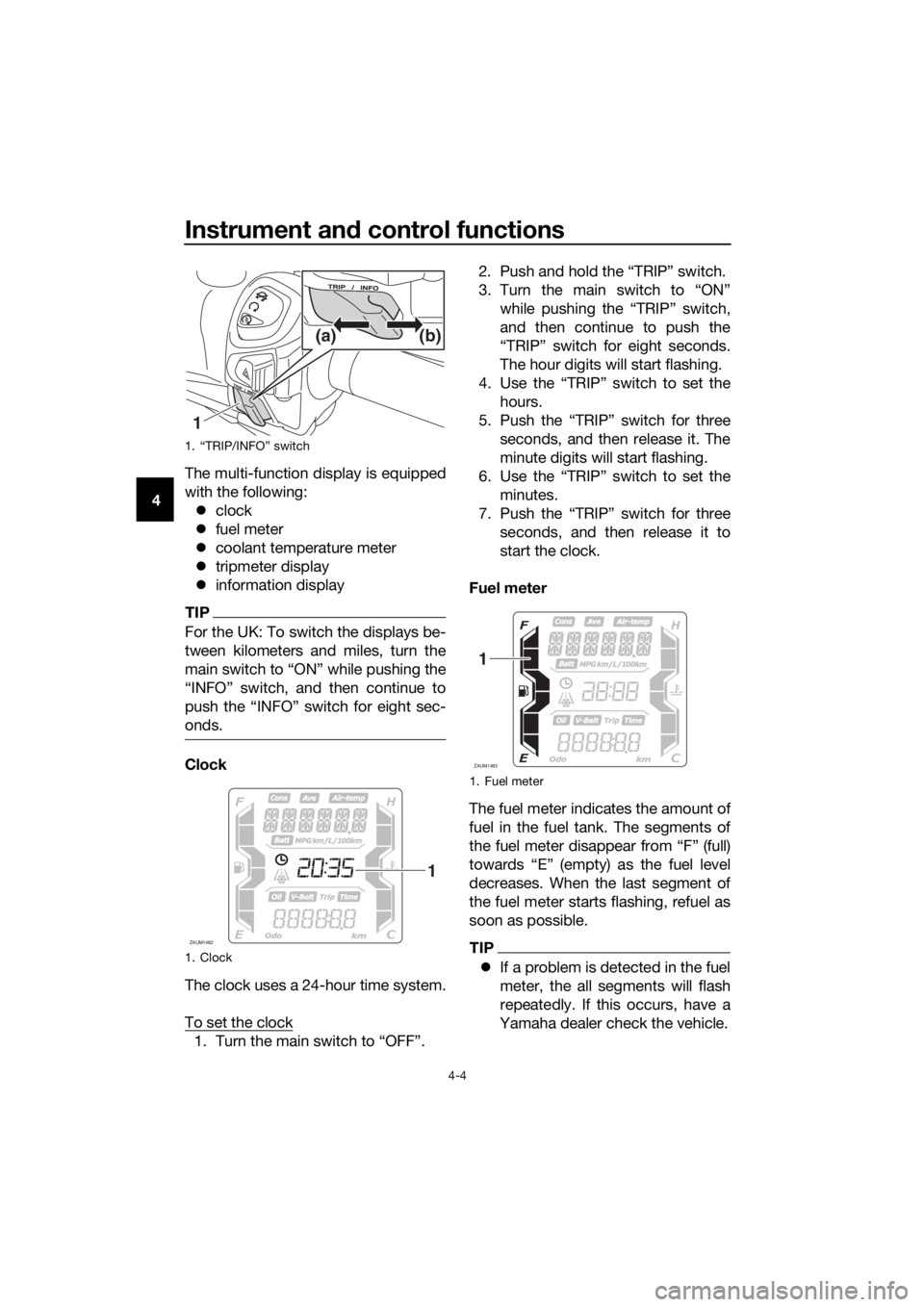
4The multi-function display is equipped
with the following:
clock
fuel meter
coolant temperature meter
tripmeter display
information display
TIP
For the UK: To switch the displays be-
tween kilometers and miles, turn the
onds.
Clock
The clock uses a 24-hour time system.
To set the clock
1. Turn the main switch to “OFF”.2. Push and hold the “TRIP” switch.
3. Turn the main switch to “ON”
while pushing the “TRIP” switch,
and then continue to push the
“TRIP” switch for eight seconds.
The hour digits will start flashing.
4. Use the “TRIP” switch to set the
hours.
5. Push the “TRIP” switch for three
seconds, and then release it. The
minute digits will start flashing.
6. Use the “TRIP” switch to set the
minutes.
7. Push the “TRIP” switch for three
seconds, and then release it to
start the clock.
Fuel meter
The fuel meter indicates the amount of
fuel in the fuel tank. The segments of
the fuel meter disappear from “F” (full)
towards “E” (empty) as the fuel level
decreases. When the last segment of
the fuel meter starts flashing, refuel as
soon as possible.
TIP
If a problem is detected in the fuel
meter, the all segments will flash
repeatedly. If this occurs, have a
Yamaha dealer check the vehicle.
1. “TRIP/INFO” switch
1. Clock
1(b) (a)
ZAUM1482
1
1. Fuel meter
ZAUM1483
1
UBL1E0E0.book Page 4 Thursday, May 11, 2017 8:51 AM
Page 32 of 118

Instrument and control functions
4-6
4Odometer “Odo” and tripmeter
“Trip”
The odometer shows the total distance
traveled by the vehicle.
The tripmeter shows the distance trav-
eled since it was last reset.
To reset the tripmeter, select it by
pushing the “TRIP” switch, and then
push the “TRIP” switch for three sec-
onds.
TIP
The odometer will lock at 999999.
The tripmeter will reset and con-
tinue counting after 9999.9 is
reached.
Time tripmeter “Time”
The time tripmeter displays the time
that has elapsed while the main switch
was in the “ON” position since it was
last reset.
The maximum time that can be shown
is 99:59.
TIP
To reset the time tripmeter, select it by
onds.
Fuel reserve tripmeter “F Trip”
When approximately 2.4 L (0.63 US
gal, 0.53 Imp.gal) of fuel remains in the
fuel tank, the last segment of the fuel
meter will start flashing. The display
will automatically change to the fuel re-
serve tripmeter “F Trip” and start
counting the distance traveled from
that point. In this case, push the “TRIP”
switch to switch the display in the fol-
lowing order:
F Trip → Oil Trip → V-Belt Trip → Odo
→ Trip → Trip Time → F Trip
To reset the fuel reserve tripmeter, se-
lect it by pushing the “TRIP” switch,
and then push the “TRIP” switch for
three seconds.
The fuel reserve tripmeter will reset au-
tomatically and disappear after refuel-
ing and traveling 5 km (3 mi).
1. Time tripmeter
ZAUM1486
1
1. Fuel reserve tripmeter
ZAUM1487
1
UBL1E0E0.book Page 6 Thursday, May 11, 2017 8:51 AM
Page 40 of 118

Instrument and control functions
4-14
4
EAU12952
Rear brake lever
The rear brake lever is located on the
left side of the handlebar. To apply the
rear brake, pull this lever toward the
handlebar grip.
EAU12964
Rear brake lock lever
This vehicle is equipped with a rear
brake lock lever to prevent the rear
wheel from moving while stopped at
traffic signals, railroad crossings, etc.
To lock the rear wheel
Push the rear brake lock lever to the
left until it snaps into place.
To unlock the rear wheel
Push the rear brake lock lever back to
the original position.
TIP
Be sure to check that the rear
wheel does not move when the
rear brake lock lever is applied.
To provide secure locking of the
rear wheel, apply the rear brake le-
ver first before moving the rear
brake lock lever to the left.
WARNING
EWA12362
Never move the rear brake lock lever
to the left while the vehicle is mov-
ing, otherwise loss of control or an
accident may result. Make sure that
1. Rear brake lever
1
1. Rear brake lock lever
1
UBL1E0E0.book Page 14 Thursday, May 11, 2017 8:51 AM
Page 41 of 118

Instrument and control functions
4-15
4 the vehicle is stopped before mov-
ing the rear brake lock lever to the
left.
EAU78200
ABS
The Yamaha ABS (Anti-lock Brake
System) features a dual electronic con-
trol system, which acts on the front and
rear brakes independently.
Operate the brakes with ABS as you
would conventional brakes. If the ABS
is activated, a pulsating sensation may
be felt at the brake levers. In this situa-
tion, continue to apply the brakes and
let the ABS work; do not “pump” the
brakes as this will reduce braking ef-
fectiveness.
WARNING
EWA16051
Always keep a sufficient distance
from the vehicle ahead to match the
riding speed even with ABS.
The ABS performs best with
long braking distances.
On certain surfaces, such as
rough or gravel roads, the brak-
ing distance may be longer with
the ABS than without.
The ABS is monitored by an ECU,
which will revert the system to conven-
tional braking if a malfunction occurs.
TIP
The ABS performs a self-diagno-
sis test each time the vehicle first
starts off after the main switch is
turned to “ON” and the vehicle has
traveled at a speed of 10 km/h (6
mi/h) or higher. During this test, a
“clicking” noise can be heard from
the front of the vehicle, and if ei-
ther brake lever is even slightly ap-
plied, a vibration can be felt at the
lever, but these do not indicate a
malfunction.
UBL1E0E0.book Page 15 Thursday, May 11, 2017 8:51 AM
Page 44 of 118
Instrument and control functions
4-18
4
EAU78502
Fuel tank cap
To remove the fuel tank cap
1. Turn the main switch to “ ” to
open the fuel tank cap lid.
2. Turn the fuel tank cap counter-
clockwise until the release
mark “ ” aligns with “ ”, and
then pull the cap off.
To install the fuel tank cap
1. Insert the fuel tank cap onto the
tank opening and turn it clockwise
until the install mark “ ” aligns
with “ ”.2. Close the fuel tank cap lid.
WARNING
EWA11092
Make sure that the fuel tank cap is
properly closed after filling fuel.
Leaking fuel is a fire hazard.
1. Fuel tank cap lid
1. Fuel tank cap
2. Release mark “ ”
1
1
2
1. Install mark Ž
1
UBL1E0E0.book Page 18 Thursday, May 11, 2017 8:51 AM
Page 46 of 118

Instrument and control functions
4-20
4
TIP
This mark identifies the recom-
mended fuel for this vehicle as
specified by European regulation
(EN228).
Check that gasoline nozzle has
the same identifier when fueling.
Your Yamaha engine has been de-
signed to use premium unleaded gas-
oline with a research octane number of
95 or higher. If knocking (or pinging)
occurs, use a gasoline of a different
brand. Use of unleaded fuel will extend
spark plug life and reduce mainte-
nance costs.
Gasohol
There are two types of gasohol: gaso-
hol containing ethanol and that con-
taining methanol. Gasohol containing
ethanol can be used if the ethanol con-
tent does not exceed 10% (E10). Gas-
ohol containing methanol is not
recommended by Yamaha because it
can cause damage to the fuel system
or vehicle performance problems.
EAU58301
Fuel tank overflow hose
Before operating the vehicle:
Check the fuel tank overflow hose
connection and routing.
Check the fuel tank overflow hose
for cracks or damage, and replace
it if necessary.
Make sure that the fuel tank over-
flow hose is not blocked, and
clean it if necessary.
E5E10
1. Fuel tank overflow hose
ZAUM1510
1
UBL1E1E0.book Page 20 Wednesday, May 23, 2018 11:03 AM
Page 48 of 118

Instrument and control functions
4-22
4Storage compartment A
To open storage compartment A, turn
the main switch to “OPEN” and then
push the “LID” button.
To close storage compartment A, push
the storage compartment lid until it is
closed.
Storage compartment B
To open storage compartment B, push
the storage compartment lid inward to
unlock it, and then pull to open.
To close storage compartment B, push
the storage compartment lid into the
original position.
Seat/rear storage compartment
To open the seat/rear storage com-
partment via the main switch
Turn the main switch to “OPEN”, and
then push the “SEAT” button.
To open the seat/rear storage com-
partment with the mechanical key
1. Open the keyhole cover.2. Insert the mechanical key into the
seat lock, and then turn it clock-
wise.
TIP
Be sure to close the seat and all stor-
age compartments before starting off.
NOTICE
ECA24020
Make sure that the keyhole cover is
installed when the mechanical key is
not being used.
NOTICE
ECA21150
Keep the following points in mind
when using the storage compart-
ment.
1. Lid
2. Storage compartment
12
1. Keyhole cover
1. Seat lock
2. Unlock.
1
1
2
UBL1E0E0.book Page 22 Thursday, May 11, 2017 8:51 AM
Page 68 of 118

Periodic maintenance and adjustment
7-4
7
EAU71372
General maintenance and lubrication chart
NO. ITEM
1*Diagnostic system
check• Perform dynamic inspection
using Yamaha diagnostic tool.
• Check the error codes.√√√√√√
2*Air filter element• Replace.√√
3Air filter case
check hose• Clean.√√√√√
4*V-belt case air fil-
ter element• Clean.
• Replace if necessary.√√√√√
5*Front brake• Check operation, fluid level,
and for fluid leakage.
• Replace brake pads if neces-
sary.√√√√√√
6*Rear brake• Check operation, fluid level,
and for fluid leakage.
• Replace brake pads if neces-
sary.√√√√√√
7*Brake hoses• Check for cracks or damage.√√√√√
• Replace. Every 4 years
8*Brake fluid• Change. Every 2 years
9Rear brake lock
cable• Check cable length.
• Adjust if necessary.At the initial interval and 4000
km (2400 mi) after the initial
1000 km (600 mi) and every
5000 km (3000 mi) thereafter.
10*Rear brake lock• Check operation.
•Adjust.√√√√√√
11*Wheels• Check runout and for damage.
• Replace if necessary.√√√√
12*Tires• Check tread depth and for
damage.
• Replace if necessary.
• Check air pressure.
• Correct if necessary.√√√√√
13*Wheel bearing
s• Check bearing for looseness or
damage.√√√√
X 1000 km CHECK OR
MAINTENANCE JOB
X 1000 miODOMETER
READINGSANNUAL CHECK
1 10203040
0.6 6 12 18 24
UBL1E0E0.book Page 4 Thursday, May 11, 2017 8:51 AM
