Page 49 of 122
Instrument and control functions
5-16
1
2
3
4
5
6
7
8
9
10
11
12
13
14
2. Push the “MENU” switch.
3. Use the select switch to select the
desired brightness level.
4. Push the “MENU” switch to return to the menu screen.
Setting the clock
TIP
The clock uses a 12-hour time system. 1. Use the select switch to highlight “Clock”.
2. Push the “MENU” switch.
3. When the hour digits start flashing, use the select switch to set the
hours.
4. Push the “MENU” switch, and the minute digits start flashing.
5. Use the select switch to set the minutes.
6. Push the “MENU” switch to return to the menu screen.
Resetting all of the display items
1. Use the select switch to highlight “All Reset”.
2. Push the “MENU” switch.
3. Use the select switch to highlight
UBV1E1_1.book 16 ページ 2018年4月27日 金曜日 午後4時41分
Page 50 of 122

Instrument and control functions
5-17
1
2
3
4
5
6
7
8
9
10
11
12
13
14 “YES”, and then push the “MENU”
switch. All items are reset to facto-
ry preset or default settings.
TIP
The odometer, clock, maintenance
counter item “Oil” and maintenance
counter item “V-Belt” will not be reset.
To exit the setting mode
1. Use the select switch to highlight
“Return”.
2. Push the “MENU” switch to exit the setting mode and return to the
standard display mode.
EAU44912
Front brake lever
The front brake lever is located on the
right side of the handlebar. To apply the
front brake, pull this lever toward the
throttle grip.
The front brake lever is equipped with a
position adjusting dial. To adjust the
distance between the front brake lever
and the throttle grip, turn the adjusting
dial while holding the front brake lever
pushed away from the throttle grip.
Make sure that the appropriate setting
on the adjusting dial is aligned with the
“ ” mark on the front brake lever.
1. Front brake lever
2. Brake lever position adjusting dial
3. “ ” mark
4. Distance between brake lever and handlebar grip
1
2
3 4
UBV1E1_1.book 17 ページ 2018年4月27日 金曜日 午後4時41分
Page 51 of 122

Instrument and control functions
5-18
1
2
3
4
5
6
7
8
9
10
11
12
13
14
EAU44922
Rear brake lever
The rear brake lever is located at the
left handlebar grip. To apply the rear
brake, pull this lever toward the handle-
bar grip.
The rear brake lever is equipped with a
position adjusting dial. To adjust the
distance between the rear brake lever
and the handlebar grip, turn the adjust-
ing dial while holding the rear brake le-
ver pushed away from the handlebar
grip. Make sure that the appropriate
setting on the adjusting dial is aligned
with the “ ” mark on the rear brake le-
ver.
EAU63230
Rear brake lock lever
This vehicle is equipped with a rear
brake lock lever to prevent the rear
wheel from moving while stopped at
traffic signals, railroad crossings, etc.
To lock the rear wheel
Push the rear brake lock lever to the left
until it snaps into place.
To unlock the rear wheel
Push the rear brake lock lever back to
the original position.
TIP
Be sure to check that the rear wheel
does not move when the rear brake
lock lever is applied.
WARNING
EWA12362
Never move the rear brake lock lever
to the left while the vehicle is mov-
ing, otherwise loss of control or an
accident may result. Make sure that
the vehicle is stopped before mov-
ing the rear brake lock lever to the
left.
1. Rear brake lever
2. Brake lever position adjusting dial
3. “ ” mark
4. Distance between brake lever and handlebar grip
54321
1 2
3
4
1. Rear brake lock lever
1
UBV1E1_1.book 18 ページ 2018年4月27日 金曜日 午後4時41分
Page 52 of 122

Instrument and control functions
5-19
1
2
3
4
5
6
7
8
9
10
11
12
13
14
EAU65582
Anti-lock brake system (ABS)
This model’s ABS features a dual elec-
tronic control system, which acts on the
front and rear brakes independently.
Operate the brakes with ABS as you
would conventional brakes. If the ABS
is activated, a pulsating sensation may
be felt at the brake levers. In this situa-
tion, continue to apply the brakes and
let the ABS work; do not “pump” the
brakes as this will reduce braking effec-
tiveness.
WARNING
EWA16051
Always keep a sufficient distance
from the vehicle ahead to match the
riding speed even with ABS.
The ABS performs best with
long braking distances.
On certain surfaces, such as
rough or gravel roads, the brak-
ing distance may be longer with
the ABS than without.
The ABS is monitored by an ECU,
which will revert the system to conven-
tional braking if a malfunction occurs.
TIP
The ABS performs a self-diagno-
sis test each time the vehicle is
turned on and travels at a speed of
10 km/h (6 mi/h) or higher. During
this test, a clicking noise can be
heard and if either brake lever is
even slightly applied, a vibration
can be felt at the lever, but this
does not indicate a malfunction.
This ABS has a test mode which
allows the owner to experience the
pulsation at the brake levers when
the ABS is operating. However, special tools are required, so
please consult your Yamaha deal-
er.
NOTICE
ECA20100
Be careful not to damage the wheel
sensor or wheel sensor rotor; other-
wise, improper performance of the
ABS will result.
1. Front wheel sensor rotor
2. Front wheel sensor
1. Rear wheel sensor rotor
2. Rear wheel sensor
1
2
1
2
UBV1E1_1.book 19 ページ 2018年4月27日 金曜日 午後4時41分
Page 53 of 122
Instrument and control functions
5-20
1
2
3
4
5
6
7
8
9
10
11
12
13
14
EAU77324
Fuel tank cap
To access the fuel tank, open the fuel
tank cap lid. (See page 3-11.)
To remove the fuel tank cap, press the
lock release button and turn the fuel
tank cap counterclockwise.
To install the fuel tank cap, turn it clock-
wise until the lock release button pops
out.
WARNING
EWA11263
Make sure that the fuel tank cap is
properly installed and locked in
place before operating the vehicle.
Leaking fuel is a fire hazard.
1. Fuel tank cap lid
1. Lock release button
1
1
1. Lock release button
2. Fuel tank cap
2 1
UBV1E1_1.book 20 ページ 2018年4月27日 金曜日 午後4時41分
Page 55 of 122

Instrument and control functions
5-22
1
2
3
4
5
6
7
8
9
10
11
12
13
14
TIP
This mark identifies the recom-
mended fuel for this vehicle as
specified by European regulation
(EN228).
Check that gasoline nozzle has the
same identifier when fueling.
Your Yamaha engine has been de-
signed to use regular unleaded gaso-
line with a research octane number of
95 or higher. If knocking (or pinging) oc-
curs, use a gasoline of a different
brand. Use of unleaded fuel will extend
spark plug life and reduce maintenance
costs.
Gasohol
There are two types of gasohol: gaso-
hol containing ethanol and that contain-
ing methanol. Gasohol containing
ethanol can be used if the ethanol con-
tent does not exceed 10% (E10). Gas-
ohol containing methanol is not
recommended by Yamaha because it
can cause damage to the fuel system
or vehicle performance problems.
EAU58301
Fuel tank overflow hose
Before operating the vehicle:
Check the fuel t ank overflow hose
connection and routing.
Check the fuel t ank overflow hose
for cracks or damage, and replace
it if necessary.
Make sure that the fuel tank over-
flow hose is not blocked, and clean
it if necessary.
E5E10
1. Fuel tank overflow hose
1
UBV1E1_1.book 22 ページ 2018年4月27日 金曜日 午後4時41分
Page 56 of 122
Instrument and control functions
5-23
1
2
3
4
5
6
7
8
9
10
11
12
13
14
EAU13434
Catalytic converter
This model is equipped with a catalytic
converter in the exhaust system.
WARNING
EWA10863
The exhaust system is hot after op-
eration. To prevent a fire hazard or
burns:
Do not park the vehicle near
possible fire hazards such as
grass or other materials that
easily burn.
Park the vehicle in a place
where pedestrians or children
are not likely to touch the hot
exhaust system.
Make sure that the exhaust sys-
tem has cooled down before do-
ing any maintenance work.
Do not allow the engine to idle
more than a few minutes. Long
idling can cause a build-up of
heat.
NOTICE
ECA10702
Use only unleaded gasoline. The use
of leaded gasoline will cause unre-
pairable damage to the catalytic
converter.
EAU77343
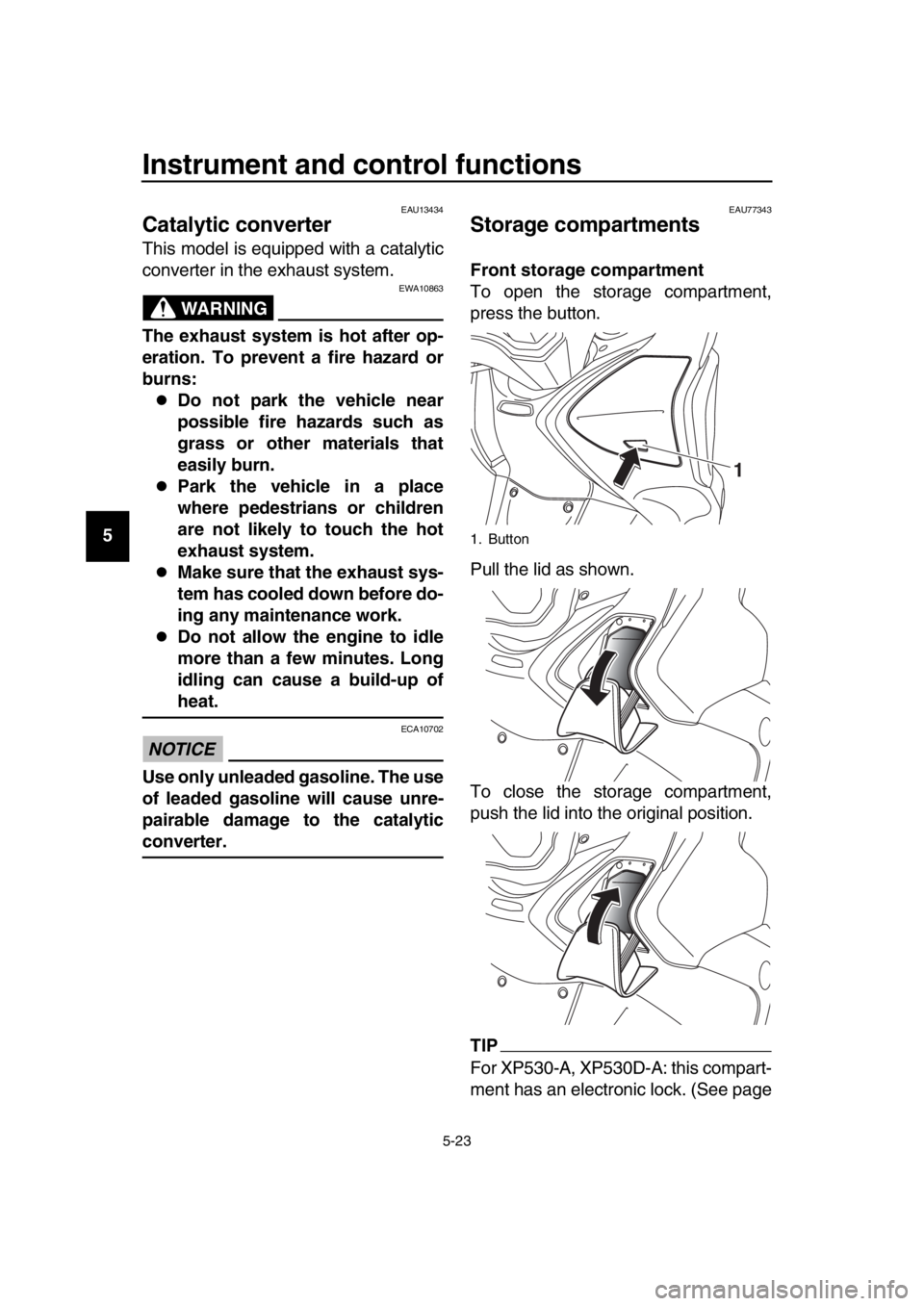
Storage compartments
Front storage compartment
To open the storage compartment,
press the button.
Pull the lid as shown.
To close the storage compartment,
push the lid into the original position.
TIP
For XP530-A, XP530D-A: this compart-
ment has an electronic lock. (See page
1. Button
1
UBV1E1_1.book 23 ページ 2018年4月27日 金曜日 午後4時41分
Page 57 of 122

Instrument and control functions
5-24
1
2
3
4
5
6
7
8
9
10
11
12
13
14
3-12.)
Rear storage compartment
This storage compartment was de-
signed to hold one full-faced helmet or
two 3/4-faced helmets. NOTICE: The
shaded area is not a storage com-
partment. To prevent damaging the
seat hinges, do not place any items
in this area.
[ECA16092]
TIP
Some helmets cannot be stored in
the rear storage compartment be-
cause of their size or shape.
Do not leave the vehicle unattend-
ed with the seat open.
Do not place the smart key inside
the rear storage compartment. It
may get locked inside and the
smart key system not operate nor-
mally.
NOTICE
ECA15964
Do not leave the seat open for
an extended period of time, oth-
erwise the light may cause the
battery to discharge.
Since the storage compartment
may get wet when washing the vehicle, wrap any articles stored
in the compartment in a plastic
bag.
To avoid humidity from spread-
ing through the storage com-
partment and to discourage
possible mold growth, wrap wet
articles in a plastic bag before
storing them in the compart-
ment.
Do not keep anything valuable
or breakable in the storage com-
partment.
Since the storage compartment
accumulates heat from the en-
gine and from direct sunlight,
do not store anything suscepti-
ble to heat, such as food or
flammable items, inside the
compartment.
WARNING
EWA15401
Do not exceed the maximum load of
199 kg (439 lb) (XP530D-A)
202 kg (445 lb) (XP530-A, XP530E-A)
for the vehicle.
1. Rear storage compartment
2. Shaded area
2
1
UBV1E1_1.book 24 ページ 2018年4月27日 金曜日 午後4時41分

