2018 YAMAHA NIKEN display
[x] Cancel search: displayPage 19 of 106

Instrument and control functions
3-4
3
Ri
ght
EAU73921
Dimmer/Pass switch “ / /PASS”
Set this switch to “ ” for the high
beam and to “ ” for the low beam.
To flash the high beam, push the pass
side “PASS” of the switch while the
headlights are on low beam.
EAU66040
Turn si gnal switch “ / ”
To signal a right-hand turn, push this
switch to “ ”. To signal a left-hand
turn, push this switch to “ ”. When
released, the switch returns to the cen- ter position. To cancel the turn signal
lights, push the switch in after it has re-
turned to the center position.
EAU66030
Horn switch “ ”
Press this switch to sound the horn.
EAU66060
Stop/Run/Start switch “ / / ”
To crank the engine with the starter,
set this switch to “ ”, and then push
the switch down towards “ ”. See
page 5-1 for starting instructions prior
to starting the engine.
Set this switch to “ ” to stop the en-
gine in case of an emergency, such as
when the vehicle overturns or when the
throttle cable is stuck.
EAU66010
Hazar
d switch “ ”
With the key in the “ON” or “ ” posi-
tion, use this switch to turn on the haz-
ard lights (simultaneous flashing of all
turn signal lights).
The hazard lights are used in case of an
emergency or to warn other drivers
when your vehicle is stopped where it
might be a traffic hazard.
NOTICE
ECA10062
Do not use the hazar d lig hts for an
exten ded len gth of time with the en-
g ine not runnin g, otherwise the bat-
tery may d ischarge.
EAU84250
Cruise control switches
See page 3-8 for an explanation of the
cruise control system.
EAU84520
“MENU” switch
This switch is used to set the clock,
display brightness, and shift indicator
light. (See page 3-11.)
EAU84530
“SELECT” switch
This switch is used to make setting
changes within the multi-function me-
ter unit. (See page 3-11.)
EAU84260
Drive mo de switch “MODE”
See page 3-18 for an explanation of
the drive mode.
1. Stop/Run/Start switch “ / / ”
2. Drive mode switch “MODE”
3. Hazard switch “ ”
1
3
2
UBD5E0E0.book Page 4 Wednesday, April 25, 2018 2:23 PM
Page 26 of 106

Instrument and control functions
3-11
3
EAU84540
Multi-function meter unit
WARNING
EWA12423
Be sure to stop the vehicle before
makin g any settin g chan ges to the
multi-function meter unit. Chan gin g
settin gs while ri din g can d istract the
operator an d increase the risk of an
acci dent.
The multi-function meter unit is
equipped with the following:
speedometer
tachometer
clock
fuel meter
eco indicator
transmission gear display
drive mode display
TCS display
QS indicator
multi-function display
brightness and shift light control
modeTIPThe multi-function meter unit can
be set to kilometers or miles. To
switch between kilometers and
miles, set the multi-function dis-
play to the odometer, and then
push the “RESET” button for one
second.
“ ” does not function.
1. “TCS” button
2. “RESET” button
1
2
1. Transmission gear display
2. QS indicator
3. Tachometer
4. Speedometer
5. Fuel meter
6. Eco indicator “ECO”
7. Multi-function display
8. Clock
9. TCS display
10.Drive mode display
3
4
5
12
6
7
8
9
10
UBD5E0E0.book Page 11 Wednesday, April 25, 2018 2:23 PM
Page 27 of 106

Instrument and control functions
3-12
3
Spee
dometer
The speedometer shows your traveling
speed.
Tachometer The tachometer shows the engine
speed.
NOTICE
ECA10032
Do not operate the en
gine in the ta-
chometer red zone.
Re d zone: 11200 r/min an d a boveClock
The clock uses a 12-hour time system.
To set the clock1. Turn the vehicle on.
2. Push the “MENU” switch for one
second, and the hour digits will
start flashing.
3. Push the “SELECT” switch up or down to set the hours. 4. Push the “MENU” switch, and the
minute digits will start flashing.
5. Push the “SELECT” switch up or down to set the minutes.
6. Push the “MENU” switch to start the clock.
Fuel meter
The fuel meter indicates the amount of
fuel in the fuel tank. The display seg-
ments of the fuel meter disappear from
“F” (full) towards “E” (empty) as the fuel
level decreases. When the last seg-
ment starts flashing, approximately 4.0
L (1.06 US gal, 0.88 Imp.gal) of fuel re-
mains. Refuel as soon as possible.
1. Speedometer
1. Tachometer
2. Tachometer red zone
1
1
2
1. Clock
1
1. Fuel meter
1
UBD5E0E0.book Page 12 Wednesday, April 25, 2018 2:23 PM
Page 28 of 106

Instrument and control functions
3-13
3
TIPIf a problem is detected in the electrical
circuit, the fuel level segments will flash
repeatedly. If this occurs, have a
Yamaha dealer check the vehicle.Eco in dicator
This indicator comes on when the vehi-
cle is being operated in an environ-
mentally friendly, fuel-efficient manner.
The indicator goes off when the vehicle
is stopped.TIPConsider the following tips to reduce
fuel consumption: Avoid high engine speeds during
acceleration.
Travel at a constant speed.
Select the transmission gear that
is appropriate for the vehicle
speed.
Transmission gear display
This display shows the selected gear.
The neutral position is indicated by “N”
and by the neutral indicator light. Drive mo
de display
This display indicates which drive
mode has been selected: “1”, “2” or
“3”. For more details on the modes and
on how to select them, see page 3-18.
TCS display
1. Eco indicator “ECO”
1
1. Neutral indicator light “ ”
2. Transmission gear display
1
2
1. Drive mode display
1. TCS display
1
1
UBD5E0E0.book Page 13 Wednesday, April 25, 2018 2:23 PM
Page 29 of 106

Instrument and control functions
3-14
3
This display indicates which traction
control system setting has been se-
lected: “1”, “2”, or “OFF”. For more de-
tails on the TCS settings and how to
select them, see page 3-21.
QS in
dicator
This indicator comes on when the
quick shift system (page 3-19) is turned
on. Multi-function
display
The multi-function display can show
the following: odometer (ODO)
two tripmeters (TRIP 1 and TRIP 2)
fuel reserve tripmeter (TRIP F)
instantaneous fuel consumption
average fuel consumption
coolant temperature
air temperature
TIPThe odometer will lock at 999999.
The tripmeters reset and continue
counting after 9999.9 is reached.
Push the “SELECT” switch to change
the display between the odometer
“ODO”, the tripmeters “TRIP 1” and
“TRIP 2”, instantaneous fuel consump-
tion “km/L”, “L/100 km”, or “MPG”, av-
erage fuel consumption “AVE – –.–
km/L”, “AVE – –.– L/100 km”, or “AVE
– –.– MPG”, coolant temperature “°C”,
and air temperature “°C Air”. When
pushing “ ”, the display will change
in the following order.
ODO → TRIP 1 → TRIP 2 → km/L,
L/100 km, or MPG → AVE – –.– km/L,
AVE – –.– L/100 km, or AVE – –.– MPG
→ °C (coolant) → °C Air → ODO
1. QS indicator1
1. Multi-function display
1
1. “SELECT” switch
1
UBD5E0E0.book Page 14 Wednesday, April 25, 2018 2:23 PM
Page 30 of 106
Instrument and control functions
3-15
3 When the last segment of the fuel me-
ter starts flashing, the display changes
to the fuel reserve tripmeter “TRIP F”
and starts counting the distance trav-
eled from that point. In this case,
push “ ” to change the display in the
following order.
TRIP F
→ km/L, L/100 km, or MPG →
AVE – –.– km/L, AVE – –.– L/100 km, or
AVE – –.– MPG → °C (coolant) → °C Air
→ ODO → TRIP 1 → TRIP 2 → TRIP F
TIP Push “ ” to change the display
in the opposite order.
To reset a tripmeter, push the
“RESET” button for one second.
The fuel reserve tripmeter can be
reset manually, or you can allow it
to reset automatically after refuel-
ing and traveling about 5 km (3
mi).
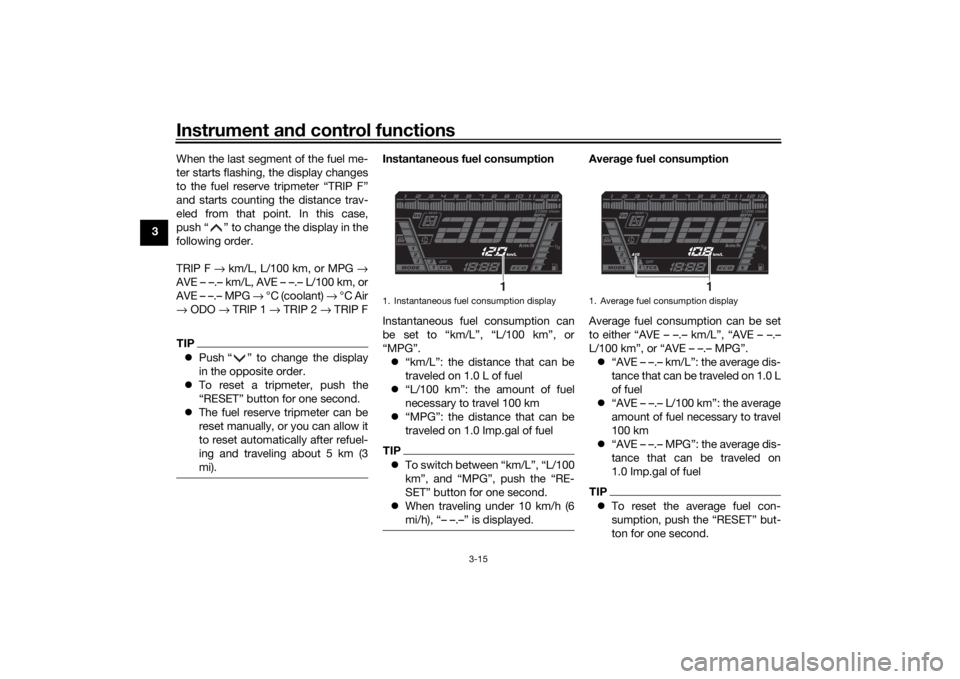
Instantaneous fuel consumption
Instantaneous fuel consumption can
be set to “km/L”, “L/100 km”, or
“MPG”.
“km/L”: the distance that can be
traveled on 1.0 L of fuel
“L/100 km”: the amount of fuel
necessary to travel 100 km
“MPG”: the distance that can be
traveled on 1.0 Imp.gal of fuelTIPTo switch between “km/L”, “L/100
km”, and “MPG”, push the “RE-
SET” button for one second.
When traveling under 10 km/h (6
mi/h), “– –.–” is displayed.
Averag e fuel consumption
Average fuel consumption can be set
to either “AVE – –.– km/L”, “AVE – –.–
L/100 km”, or “AVE – –.– MPG”. “AVE – –.– km/L”: the average dis-
tance that can be traveled on 1.0 L
of fuel
“AVE – –.– L/100 km”: the average
amount of fuel necessary to travel
100 km
“AVE – –.– MPG”: the average dis-
tance that can be traveled on
1.0 Imp.gal of fuelTIPTo reset the average fuel con-
sumption, push the “RESET” but-
ton for one second.
1. Instantaneous fuel consumption display
1
1. Average fuel consumption display
1
UBD5E0E0.book Page 15 Wednesday, April 25, 2018 2:23 PM
Page 31 of 106
Instrument and control functions
3-16
3
After resetting, “– –.–” will be
shown until the vehicle has trav-
eled a sufficient distance.
The display units cannot be
switched between “km/L”, “L/100
km”, and “MPG” in this mode;
change to the instantaneous fuel
consumption mode first.
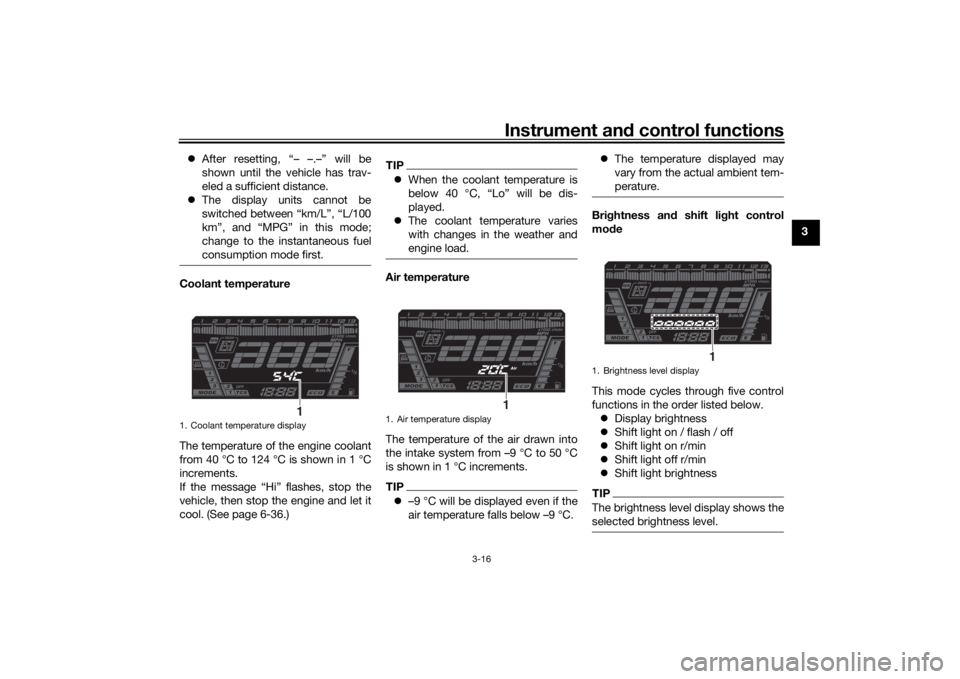
Coolant temperature
The temperature of the engine coolant
from 40 °C to 124 °C is shown in 1 °C
increments.
If the message “Hi” flashes, stop the
vehicle, then stop the engine and let it
cool. (See page 6-36.)
TIPWhen the coolant temperature is
below 40 °C, “Lo” will be dis-
played.
The coolant temperature varies
with changes in the weather and
engine load.Air temperature
The temperature of the air drawn into
the intake system from –9 °C to 50 °C
is shown in 1 °C increments.TIP–9 °C will be displayed even if the
air temperature falls below –9 °C.
The temperature displayed may
vary from the actual ambient tem-
perature.
Brig htness and shift light control
mo de
This mode cycles through five control
functions in the order listed below. Display brightness
Shift light on / flash / off
Shift light on r/min
Shift light off r/min
Shift light brightnessTIPThe brightness level display shows the
selected brightness level.
1. Coolant temperature display
1
1. Air temperature display
1
1. Brightness level display
1
UBD5E0E0.book Page 16 Wednesday, April 25, 2018 2:23 PM
Page 32 of 106

Instrument and control functions
3-17
3 To adjust the display brightness
1. Turn the key to “OFF”.
2. Push and hold the “MENU”
switch.
3. Turn the key to “ON”, and then re- lease the “MENU” switch after five
seconds.
4. Push the “SELECT” switch up or down to select the desired bright-
ness level.
5. Push the “MENU” switch to con- firm the selected brightness level.
The control mode changes to the
shift light on / flash / off setting
function.
To set the shift light on / flash / off1. Push the “SELECT” switch up or down to select one of the follow-
ing style settings: On setting: the shift light will
come on when the set engine
speed is reached. This setting
is selected when the indicator
light is lit continuously.
Flash setting: the shift light
will flash when the set engine
speed is reached. This setting is selected when the indicator
light flashes four times per
second.
Off setting: the shift light is
deactivated. This setting is
selected when the indicator
light flashes once every two
seconds.
2. Push the “MENU” switch to con- firm the selection. The control
mode changes to the shift light on
r/min setting function.
To set the shift light on r/min
The shift light can be set between 6000
r/min and 12000 r/min in increments of
200 r/min. 1. Push the “SELECT” switch up or down to select the desired engine
speed for activating the indicator
light.
2. Push the “MENU” switch to con- firm the selected engine speed.
The control mode changes to the
shift light off r/min setting function. To set the shift light off r/min
The shift light can be set between 6000
r/min and 12000 r/min in increments of
200 r/min. Be sure to set the off r/min
to a higher engine speed than the on
r/min setting, otherwise the shift light
will not come on.
1. Push the “SELECT” switch up or down to select the desired engine
speed for deactivating the indica-
tor light.
2. Push the “MENU” switch to con- firm the selected engine speed.
The control mode changes to the
shift light brightness setting func-
tion.
To adjust the shift light brightness1. Push the “SELECT” switch up or down to select the desired shift
light brightness level.
2. Push the “MENU” switch to con- firm the selected brightness level
and exit the control mode.
UBD5E0E0.book Page 17 Wednesday, April 25, 2018 2:23 PM