Page 39 of 172
4-10
4
EBU18102Start switch “ ”
Push this switch to crank the engine with the start-
er. See the starting instructions on page 6-1 prior
to starting the engine.EBU34123Light switch “ / /OFF”
Set this switch to “ ” to turn on the left and right
headlights (low beams) and the taillight. Set the
switch to “ ” to turn on the left and right head-
lights (high beams), the handlebar-mounted light
(YFM70KPXJ / YFM70KPAJ / YFM70KPHJ /
YFM70KPSJ), and the taillight. Set the switch to
“OFF” to turn off all the lights.NOTICEECB00046Do not use the headlights with the engine
turned off for an extended period of time. The
battery may discharge to the point that the
starter will not have enough power to crank the
engine. If this should happen, remove the bat-
tery and recharge it. (See page 8-53.) EBU18171Horn switch “ ”
Press the switch to sound the horn.
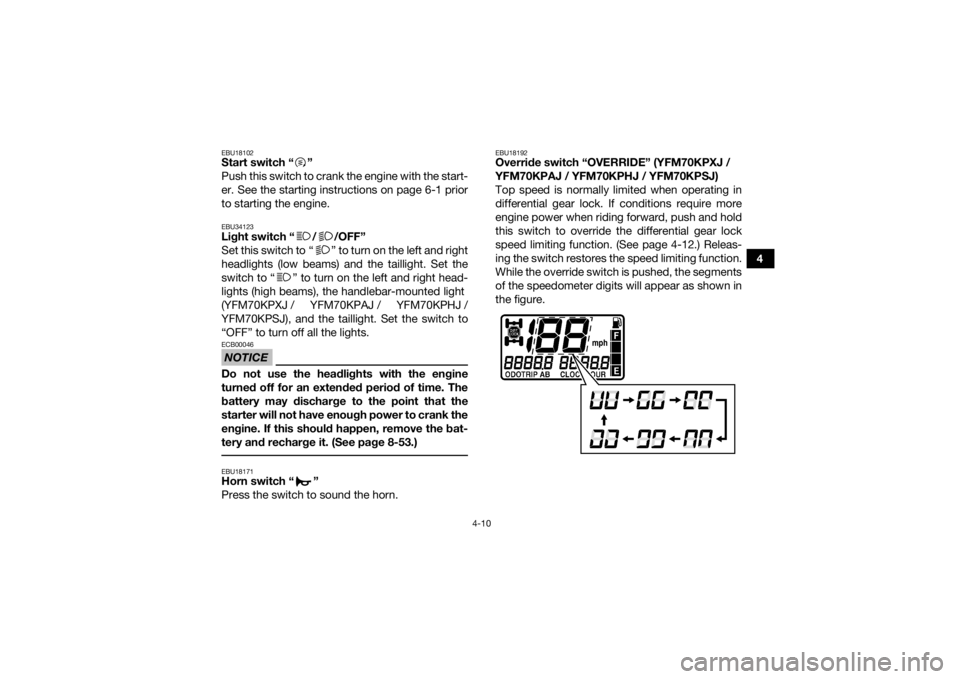
EBU18192Override switch “OVERRIDE” (YFM70KPXJ /
YFM70KPAJ / YFM70KPHJ / YFM70KPSJ)
Top speed is normally limited when operating in
differential gear lock. If conditions require more
engine power when riding forward, push and hold
this switch to override the differential gear lock
speed limiting function. (See page 4-12.) Releas-
ing the switch restores the speed limiting function.
While the override switch is pushed, the segments
of the speedometer digits will appear as shown in
the figure.
UB1662E0.book Page 10 Monday, April 17, 2017 11:39 AM
Page 41 of 172

4-12
4
EBU30466On-Command drive switch “4WD/LOCK”
(YFM70KPXJ / YFM70KPAJ / YFM70KPHJ /
YFM70KPSJ)
Stop the ATV and push this switch to change from
standard four-wheel drive to four-wheel drive with
the differential locked. Select the appropriate
switch position according to the terrain and the
conditions.
“4WD” (four-wheel drive): Power is supplied to
the front and rear wheels, with the front differen-
tial unlocked.
“LOCK” (four-wheel drive with the differential
gear locked): Power is supplied to the front and
rear wheels and the differential gear is locked.
Unlike in four-wheel drive, all wheels turn at the
same speed, giving maximum traction.
WARNING
EWB00132Always stop the ATV before changing from
four-wheel drive to four-wheel-drive differen-
tial gear lock or vice versa.
The ATV handles differently in four-wheel drive
than in differential gear lock in some circum-
stances. Changing from four-wheel drive to
differential gear lock or vice versa while mov-
ing may cause the ATV to handle differently un- expectedly. This could distract the operator
and increase the risk of losing control and
causing an accident.
To access the “4WD/LOCK” switch, set the
“2WD/4WD” switch to “4WD”, and then move the
drive switch lock lever to the right.TIP
When the switch is set to “LOCK” or “4WD”, the
differential gear lock icon and indicator light will
flash until the differential gear is completely
locked or unlocked.1. On-Command drive switch “4WD/LOCK”
2. Drive switch lock lever
LOCK4WD
1
2
UB1662E0.book Page 12 Monday, April 17, 2017 11:39 AM
Page 42 of 172

4-13
4
When the icon and indicator light are flashing,
turning the handlebar back and forth will help
the differential gear lock to engage or disen-
gage.
Riding before the differential gear is properly en-
gaged or disengaged (e.g., when the icon and
indicator light are flashing) will cause the vehicle
speed to be limited until the differential gear is
completely engaged or disengaged.
When the ATV is in four-wheel-drive differential
gear lock, the maximum traveling speed is limit-
ed to 35 km/h (22 mi/h). However, if conditions
require full engine power to be available, push
and hold the override switch to disable the dif-
ferential gear lock speed limiter. (See page
4-10.)
WARNING
EWB00141Always ride at a slow speed when the ATV is in
differential gear lock, and allow extra time and
distance for maneuvers.
All wheels turn at the same speed when the dif-
ferential gear is locked, so it takes more effort
to turn the ATV. The effort needed to turn in-
creases with the riding speed. You may lose control and have an accident if you cannot
make a sharp enough turn for the speed you
are traveling.
EBU37201Drive lever “2WD/4
WD” (YFM70KDXJ /
YFM70KDHJ)Stop the vehicle and move the lever to change
from two-wheel drive to four-wheel drive or vice
versa. Select the appropriate drive according to
the terrain and riding conditions.1. Drive lever “2WD / 4WD”
2. “2WD” position
3. “4WD” position
2WD
4WD
12
3
UB1662E0.book Page 13 Monday, April 17, 2017 11:39 AM
Page 46 of 172

4-17
4
EBU18722Fuel tank cap
Remove the fuel tank cap by turning it counter-
clockwise.EBU18758FuelMake sure there is sufficient gasoline in the tank.
WARNING
EWB02522Gasoline and gasoline vapors are extremely
flammable. To avoid fires and explosions and
to reduce the risk of injury when refueling, fol-
low these instructions. 1. Before refueling, turn off the engine and besure that no one is sitting on the vehicle. Nev-
er refuel while smoking, or while in the vicinity
of sparks, open flames, or other sources of
ignition such as the pilot lights of water heat-
ers and clothes dryers.
2. Do not overfill the fuel tank. When refueling, be sure to insert the pump nozzle into the fuel
tank filler hole. Stop filling when the fuel
reaches the bottom of the filler tube. Because
fuel expands when it heats up, heat from the
engine or the sun can cause fuel to spill out of
the fuel tank.
1. Drive select lever
1. Fuel tank cap
1
1
UB1662E0.book Page 17 Monday, April 17, 2017 11:39 AM
Page 53 of 172

4-24
4
EBU19185Auxiliary DC jackA 12-V accessory, such as a work light or radio
with the proper adapter, can be used when the en-
gine is running and the headlights are turned off.1. Start the engine. (See page 6-1.)
2. Turn the headlights off. (See page 4-10.)
3. Turn the accessory off.
4. Open the auxiliary DC jack cap.
5. Insert the accessory power plug into the jack. 6. Turn the accessory on.
TIP
When inserting or removing the accessory pow-
er plug, turn the accessory off.
When the auxiliary DC jack is not being used,
cover it with the cap. NOTICEECB00121Do not use accessories requiring more than
the above maximum capacity. This may
overload the circuit and cause the fuse to
blow.
If accessories are used without the engine
running or with the headlights turned on, the
battery will lose its charge and engine start-
ing may become difficult.
Do not use an automotive cigarette lighter or
other accessories with a plug that gets hot
because the jack can be damaged.
1. Auxiliary DC jack cap
2. Auxiliary DC jackAuxiliary DC jack maximum capacity:
10 A (120 W)
21
UB1662E0.book Page 24 Monday, April 17, 2017 11:39 AM
Page 55 of 172

5-2
5
Front brake• Check operation. If soft or spongy, have Yamaha dealer bleed hy-
draulic system.
• Check brake pads for wear, and replace if necessary.
• Check brake fluid level in reservoir, and add specified brake fluid to specified level if necessary.
• Check hydraulic system for leakage. Correct if necessary. 5-3, 8-42, 8-43, 8-45
Rear brake • Check operation, and correct if necessary.
• Lubricate cables if necessary.
• Check lever and pedal free play, and adjust if necessary. 5-3, 8-42, 8-45
Throttle lever • Make sure that operation is smooth. Lubricate cable and lever
housing if necessary.
• Check lever free play, and adjust if necessary. 5-4, 8-41
Control cables • Make sure that operation is smooth. Lubricate if necessary. 8-49
Wheels and tires • Check wheel condition, and replace if damaged.
• Check tire condition and tread depth. Replace if necessary.
• Check air pressure. Correct if necessary. 5-4
Brake pedal • Make sure that operation is smooth. Lubricate pedal pivoting point
if necessary. 8-50
Brake levers • Make sure that operation is smooth. Lubricate lever pivoting points
if necessary. 8-49
Axle boots • Check for cracks or damage, and replace if necessary. 8-48
Chassis fasteners • Make sure that all nuts, bolts and screws are properly tightened. 5-6
Instruments, lights and
switches • Check operation, and correct if necessary. 5-6
ITEM ROUTINE PAGE
UB1662E0.book Page 2 Monday, April 17, 2017 11:39 AM
Page 59 of 172

5-6
5
Aftermarket tires and rims
The tires and rims that came with your ATV were
designed to match the performance capabilities
and to provide the best combination of handling,
braking, and comfort. Other tires, rims, sizes, and
combinations may not be appropriate.
EBU19841Chassis fastenersMake sure that all nuts, bolts and screws are
properly tightened.EBU19851Instruments, lights and switchesCheck that all instruments, lights and switches are
working properly. Correct if necessary.
Front:
Manufacturer/model:CHENG SHIN/C828
(YFM70KDXJ_AUS/NZL,
YFM70KPXJ_AUS/NZL)
MAXXIS/MU19 (YFM70KDHJ,
YFM70KDXJ_EUR/FRA/GBR,
YFM70KPAJ, YFM70KPHJ,
YFM70KPSJ,
YFM70KPXJ_EUR/FRA/GBR)
Size: AT25 x 8-12
Ty p e : Tu b e l e s s
Rear: Manufacturer/model:CHENG SHIN/C828
(YFM70KDXJ_AUS/NZL,
YFM70KPXJ_AUS/NZL)
MAXXIS/MU20 (YFM70KDHJ,
YFM70KDXJ_EUR/FRA/GBR,
YFM70KPAJ, YFM70KPHJ,
YFM70KPSJ,
YFM70KPXJ_EUR/FRA/GBR)
Size:AT25 x 10-12
Ty p e : Tu b e l e s s
UB1662E0.book Page 6 Monday, April 17, 2017 11:39 AM
Page 60 of 172

6-1
6
EBU19882
OPERATION
EBU19902Read the Owner’s Manual carefully before riding
the ATV. If there is a control or function you do not
understand, ask your Yamaha dealer.
WARNING
EWB00632Read the Owner’s Manual carefully to become
familiar with all controls in order to help pre-
vent any loss of control, which could cause an
accident or injury. EBU34161Starting the engineNOTICEECB00151See the “Engine break-in” section on page 6-4
prior to operating the engine for the first time. 1. Turn the key to “ ” (on) and the engine stopswitch to “ ”.
The EPS warning light (for equipped models)
should come on and stay on until the engine
is started. The following warning lights should come on
for a few seconds, then go off.
Coolant temperature warning light
Engine trouble warning light
Fuel level warning light (for equipped mod-
els)
NOTICEECB00826To avoid possible damage, do not operate the
ATV if a warning light does not work as de-
scribed above. 2. Apply the brake pedal, and then shift the drive
select lever into the neutral or park position.
The corresponding indicator light should
come on. If the indicator light does not come
on, have a Yamaha dealer check the electrical
circuit.TIPThis model is equipped with an ignition circuit cut-
off system. The engine can be started under the
following conditions:
The drive select lever is in the neutral or park po-
sition.
UB1662E0.book Page 1 Monday, April 17, 2017 11:39 AM