Page 279 of 686
DRIVER SUPPORT
277
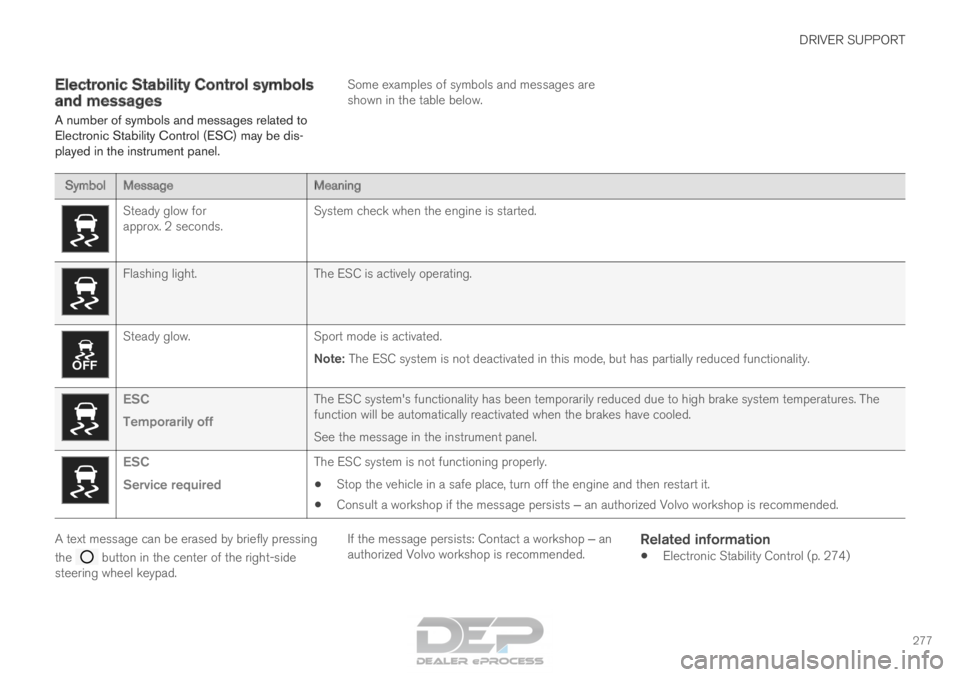
Electronic Stability Control symbols
and messages
A number of symbols and messages related to
Electronic Stability Control (ESC) may be dis-
played in the instrument panel. Some examples of symbols and messages are
shown in the table below.Symbol
Message MeaningSteady glow for
approx. 2 seconds.
System check when the engine is started.Flashing light.
The ESC is actively operating.Steady glow.
Sport mode is activated.
Note: The ESC system is not deactivated in this mode, but has partially reduc\
ed functionality. ESC
Temporarily off
The ESC system's functionality has been temporarily reduced due to hi\
gh brake system temperatures. The
function will be automatically reactivated when the brakes have cooled.
See the message in the instrument panel.ESC
Service required
The ESC system is not functioning properly.
• Stop the vehicle in a safe place, turn off the engine and then restart i\
t.
• Consult a workshop if the message persists ‒ an authorized Volvo workshop is recommended. A text message can be erased by briefly pressing
the
button in the center of the right-side
steering wheel keypad. If the message persists: Contact a workshop ‒ an
authorized Volvo workshop is recommended.
Related information
• Electronic Stability Control (p. 274)
Page 312 of 686
||DRIVER SUPPORT
* Option/accessory.
310 Symbol
Message MeaningThe symbol is WHITE.
The vehicle is maintaining the set speed.Adaptive cruise
Unavailable
The symbol is GRAY. Adaptive Cruise Control is in standby mode.Adaptive cruise
Service required
The symbol is GRAY. The system is not functioning as intended. Contact a workshop ‒ an authorized Volvo workshop is
recommended. Windscreen sensor
Sensor blocked, see Owner's manual
Clean the windshield in front of the camera and radar sensors.A text message can be erased by briefly pressing
the
button in the center of the right-side
steering wheel keypad.
If the message persists: Contact a workshop ‒ an
authorized Volvo workshop is recommended.
Related information
• Adaptive Cruise Control* (p. 295)
Page 348 of 686
DRIVER SUPPORT
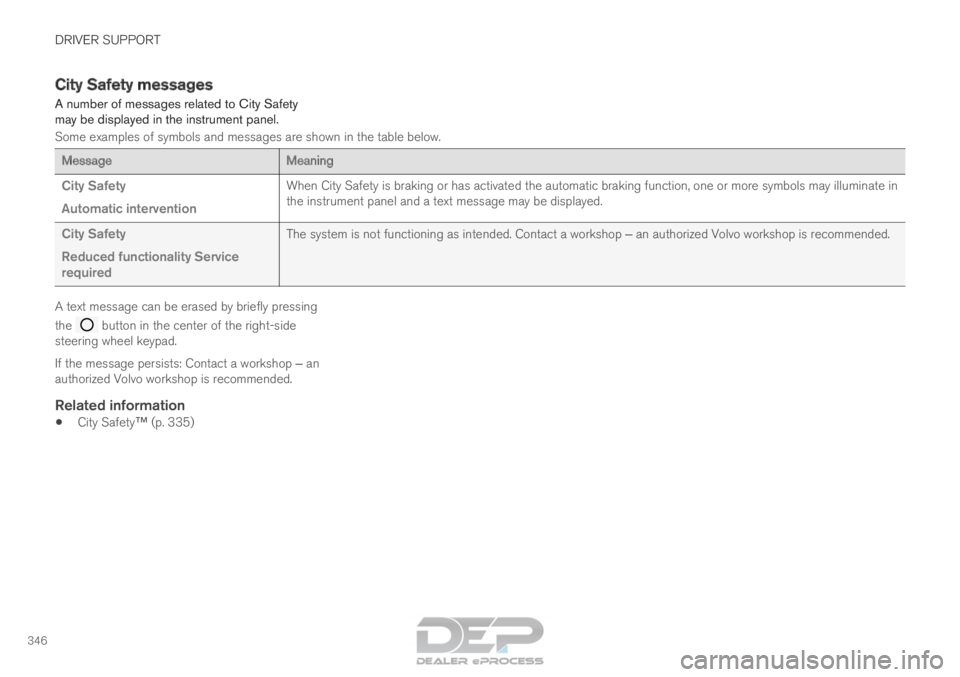
346City Safety messages
A number of messages related to City Safety
may be displayed in the instrument panel.
Some examples of symbols and messages are shown in the table below.
Message
Meaning
City Safety
Automatic intervention When City Safety is braking or has activated the automatic braking funct\
ion, one or more symbols may illuminate in
the instrument panel and a text message may be displayed.
City Safety
Reduced functionality Service
required The system is not functioning as intended. Contact a workshop ‒ an authorized Volvo workshop is recommended.A text message can be erased by briefly pressing
the
button in the center of the right-side
steering wheel keypad.
If the message persists: Contact a workshop ‒ an
authorized Volvo workshop is recommended.
Related information
• City Safety™ (p. 335)
Page 354 of 686
DRIVER SUPPORT
* Option/accessory.
352 BLIS messages
A number of messages related to BLIS 85
may
be displayed in the instrument panel.
Some examples of symbols and messages are shown in the table below. Message
Meaning
Blind spot sensor
Service required The system is not functioning as intended. Contact a workshop ‒ an authorized Volvo workshop is recommended.
Blind spot system off
Trailer attached BLIS and CTA have been deactivated because a trailer has been connected \
to the vehicle's electrical system.A text message can be erased by briefly pressing
the
button in the center of the right-side
steering wheel keypad.
If the message persists: Contact a workshop ‒ an
authorized Volvo workshop is recommended.
Related information
• BLIS* (p. 348) 85
Blind Spot Information
Page 358 of 686
DRIVER SUPPORT
* Option/accessory.
356 Cross Traffic Alert messages
A number of messages related to CTA 94
may be
displayed in the instrument panel.
Some examples of symbols and messages are shown in the table below. Message
Meaning
Blind spot sensor
Service required The system is not functioning as intended. Contact a workshop ‒ an authorized Volvo workshop is recommended.
Blind spot system off
Trailer attached BLIS and CTA have been deactivated because a trailer has been connected \
to the vehicle's electrical system.A text message can be erased by briefly pressing
the
button in the center of the right-side
steering wheel keypad.
If the message persists: Contact a workshop ‒ an
authorized Volvo workshop is recommended.
Related information
• Cross Traffic Alert* (p. 353) 94
Cross Traffic Alert
Page 371 of 686
DRIVER SUPPORT
}}
369
Lane Keeping Aid symbols and
messages
A number of symbols and messages related to
Lane Keeping Aid LKA 113
may be displayed in
the instrument panel. Some examples of symbols and messages are shown in the table below. Symbol
Message MeaningDriver support system
Reduced functionality Service required
The system is not functioning as intended. Contact a workshop ‒ an authorized Volvo work-
shop is recommended. Windscreen sensor
Sensor blocked, see Owner's manual
The camera's ability to detect the lane in front of the vehicle is re\
duced.Lane Keeping Aid
Apply steering
LKA's steering assistance is disabled when the driver's hands are \
not on the wheel. Follow
the instructions and steer the vehicle.Lane Keeping Aid
Standby until steering applied
LKA will go into standby mode until the driver begins steering the vehic\
le again.113
Lane Keeping Aid
Page 387 of 686
DRIVER SUPPORT
* Option/accessory.385
Park Assist symbols and messages
Symbols and messages for the Park Assist may
be displayed in the instrument panel and/or the
center display. Some examples of symbols and messages are shown in the table below. Symbol
Message Meaning The rear Park Assist sensors are turned off and no acoustic warnings for obstacles/objects will
be provided.
Park Assist System
Sensors blocked, cleaning nee-
ded One or more of the sensors are blocked. Check and clean/remove the obsta\
cle as soon as pos-
sible.
Park Assist System
Unavailable Service required The system is not functioning as intended. Contact a workshop ‒ an authorized Volvo workshop
is recommended. A text message can be erased by briefly pressing
the
button in the center of the right-side
steering wheel keypad.
If the message persists: Contact a workshop ‒ an
authorized Volvo workshop is recommended.
Related information
• Park Assist* (p. 381)
Page 396 of 686

DRIVER SUPPORT
* Option/accessory.
394 Park Assist Camera symbols and
messages
Symbols and messages for the Park Assist
Camera may be displayed in the instrument
panel and/or the center display.
Some examples of symbols and messages are shown in the table below. Symbol
Message Meaning The rear Park Assist sensors are turned off and no acoustic warnings or field markings for obsta-
cles/objects will be provided.
The camera is not functioning properly.
Park Assist System
Sensors blocked, cleaning
needed One or more of the sensors are blocked. Check and clean/remove the obsta\
cle as soon as possible.
Park Assist System
Unavailable Service required The system is not functioning as intended. Contact a workshop ‒ an authorized Volvo workshop is
recommended. A text message can be erased by briefly pressing
the
button in the center of the right-side
steering wheel keypad. If the message persists: Contact a workshop ‒ an
authorized Volvo workshop is recommended.
Related information
• Park Assist Camera* (p. 386)