2018 VOLVO XC90 TWIN ENGINE parking brake
[x] Cancel search: parking brakePage 402 of 686

DRIVER SUPPORT
* Option/accessory.
400 Park Assist Pilot* limitations
Park Assist Pilot PAP 127
may not be able to
detect all conditions in all situations and func-
tionality may therefore be limited.
WARNING •
The PAP function is supplementary driver
support intended to facilitate driving and
help make it safer – it cannot handle all
situations in all traffic, weather and road
conditions.
• Pay particular attention to people and
animals near the vehicle.
• Bear in mind that the front end of the
vehicle may swing out towards oncoming
traffic during the parking maneuver.
• Objects situated higher than the detec-
tion area of the sensors are not included
when the parking maneuver is calculated,
which could cause PAP to swing into the
parking space too early. Such parking
spaces should be avoided for this reason.
• PAP is not a substitute for the driver's
attention and judgment. The driver is
always responsible for ensuring the vehi-
cle is driven in a safe manner, at the
appropriate speed, with an appropriate
distance to other vehicles, and in accord-
ance with current traffic rules and regula-
tions.
The driver should be aware of the following limi-
tations for Park Assist Pilot:The parking sequence is cancelledA parking sequence will be cancelled if:
• the driver moves the steering wheel
• the vehicle's speed exceeds 7 km/h (4 mph)
• the driver taps
Cancel in the center display
• when the anti-lock brakes or the Electronic
stability control are engaged - e.g. when a
wheel loses grip on a slippery road
• when the power steering works at reduced
power - e.g. during cooling due to overheat-
ing (see section "Speed-dependent steering
force").
A message in the center display will explain why
the parking sequence was cancelled.
CAUTION Under certain circumstances, PAP may not be
able to find parking spaces – one reason may
be that the sensors are disrupted by external
sound sources that emit the same ultrasonic
frequencies that the system works with.
Examples of such sources include horns, wet
tires on asphalt, pneumatic brakes, exhaust
noise from motorcycles, etc.
127
Park Assist Pilot
Page 408 of 686

HYBRID INFORMATION
406General information about Twin
Engine
Twin Engine vehicles are driven just like any
other vehicle, but certain functions differ from a
vehicle powered exclusively by gasoline. The
electric motor powers the vehicle primarily at low
speeds; the gasoline engine is used at higher
speeds or during more active driving. The instrument panel displays Twin Engine-spe-
cific information - charging information, selected
drive mode, distance to discharged battery and
hybrid battery charge level.
Different drive modes can be selected while driv-
ing, e.g. electric power only or, if more power is
needed, a combination of electric and gasoline
power. The vehicle calculates the optimal combi-
nation of driveability, driving experience, environ-
mental impact and fuel economy for the selected
drive mode.
In order to function optimally, the hybrid battery
(and its electrical drive systems) and the gasoline
engine (and its drive systems) must be at the
correct operating temperature. Battery capacity
can be considerably reduced if the battery is too
cold or too hot. Preconditioning prepares the
vehicle's drive systems and passenger compart-
ment before driving to help reduce both wear and
energy consumption. It also helps increase the
hybrid battery's range.
The hybrid battery, which powers the electric
motor, is recharged using the charging cable. It
can also be recharged during light braking and through engine braking in gear position B. The
combustion engine can also help recharge the
hybrid battery.
Important
No electrical current
Keep in mind that if there is no electrical current
to the vehicle, i.e. the ignition is switched off or
the start battery is discharged, certain functions
such as brakes, power steering, etc. will not work.
WARNING If the vehicle does not have electrical current
and both the electric motor and the gasoline
engine are switched off, the brakes cannot be
used to stop the vehicle.
Towing not permitted
Never tow a Twin Engine vehicle behind another
vehicle, as this could damage the electric motor.
Exterior engine noise
WARNING
Keep in mind that the vehicle does not emit
any engine noise when using the electric
motor and may therefore be difficult to detect
for children, pedestrians, cyclists or animals.
This is especially true at low speeds, e.g. in
parking lots.
High-voltage electrical current
WARNING Several components in the vehicle work with
high voltage that can be hazardous in case of
an incorrect procedure. These components
and any orange wiring in the vehicle may only
be handled by trained and qualified Volvo
service technicians.
Do not touch anything that is not clearly descri-
bed in this Owner's Manual.
Related information
• Charging the hybrid battery (p. 407)
• Hybrid gauge (p. 87)
• Drive modes (p. 445)
• Starting and stopping preconditioning
(p. 231)
• Hybrid battery (p. 619)
• Factors affecting electric motor range
(p. 458)
• Gear selector positions for automatic trans-
missions (p. 439)
• Towing using a towline (p. 476)
Page 427 of 686

STARTING AND DRIVING
}}
425
In some situations, such as in cold weather or if
the hybrid battery's charge level is too low, the
gasoline engine will start instead.
The vehicle should not be started with the charg-
ing cable connected. However, if the cable can-
not be pulled out or if the vehicle incorrectly
detects a cable that is not connected, the vehicle
can be started using an override procedure:
1.
Press the brake pedal and turn the start
knob clockwise.
2. Charge cable Remove before start will
appear in the instrument panel.
3.
Turn the start knob clockwise again.
4. Removed? Turn and hold start knob 7s
will appear. Turn the knob clockwise and hold
it for 7 seconds to start the vehicle. Location of the backup reader in the tunnel console. If the
Vehicle key not found message is shown
in the instrument panel at start, place the remote
key at the backup reader and then make a new
start attempt.
NOTE When the remote key is placed in the backup
reader, make sure that no other vehicle keys,
metal objects or electronic devices (e.g. cellu-
lar phones, tablets, laptops or chargers) are in
the backup reader. Multiple vehicle keys close
to each other in the backup reader can dis-
rupt their functionality.
If Vehicle start System check, wait is dis-
played in the instrument panel while attempting
to start the vehicle, wait until the message disap-
pears and try again to start the vehicle.
CAUTION If the engine has not responded after 3
attempts – wait for 3 minutes before starting
a new attempt. Starting capability increases if
the starter battery is given time to recover.
NOTE
The vehicle cannot be started if the hybrid
battery is discharged.
WARNING •
Always remove the remote key from the
passenger compartment when you leave
the vehicle and make sure the ignition is
in mode 0.
• Always put the gear selector in P and
apply the parking brake before leaving
the vehicle. Never leave the vehicle unsu-
pervised while the engine is running.
• Always open the garage door fully and
make sure that ventilation is very good
before starting the engine in a garage.
The exhaust fumes produced by the vehi-
cle contain carbon monoxide, which is
invisible and odorless but very toxic.
WARNING Never remove the remote control key from
the vehicle while driving.
WARNING
Always take along the remote control key
when leaving the vehicle and make sure that
the vehicle electrical system is in ignition
mode 0 – especially if there are children in
the vehicle.
Page 431 of 686

STARTING AND DRIVING
}}
429
Brake functions
The vehicle's brakes are used to reduce speed
or prevent the vehicle from rolling.
In addition to the wheel brakes and parking
brakes, the vehicle is also equipped with a num-
ber of automatic brake assist functions. These
systems help the driver by e.g. keeping the vehi-
cle stationary when the brake pedal is not
depressed (e.g. at a traffic light or intersection),
when starting up a hill or when driving down a hill.
Depending on how the vehicle is equipped, the
following brake assist functions may be included:
• Auto-hold brakes (Auto Hold)
• Hill Start Assist (Hill Start Assist)
• Braking assist after a collision
• City Safety
• Hill Descent Control (Hill Descent Control)
Related information
•Brakes (p. 429)
• Parking brake (p. 432)
• Auto-hold brakes (p. 436)
• Braking assist after a collision (p. 437)
• Hill Start Assist (p. 437)
• City Safety™ (p. 335)
• Hill Descent Control (p. 454) Brakes
The brake pedal is used to apply the vehicle's
regular brakes, which are part of the brake sys-
tem.
The vehicle is equipped with two brake circuits. If
one brake circuit is damaged, the brake pedal will
go down further when depressed. More pressure
will then be required from the driver for normal
braking effect.
WARNING
If the vehicle does not have electrical current
and both the electric motor and the gasoline
engine are switched off, the brakes cannot be
used to stop the vehicle.
In very hilly areas or when driving with a heavy
load, gear position B can be used to augment the
brakes with engine braking.
Use the Off Road drive mode to increase the
engine braking effect when driving on steep
downgrades at low speeds.
Anti-lock brakesThe vehicle is equipped with an Anti-lock Braking
System (ABS), which can help prevent the
wheels from locking and help maintain steering
control when braking. Vibrations may be felt from
the brake pedal when ABS is operating, which is
normal.
After the vehicle is started, a brief test of the
ABS system is automatically performed when the driver releases the brake pedal. An additional
automatic test of the system may be performed
when the vehicle is traveling at a low speed. Dur-
ing the test, the brake pedal may feel as though it
is pulsating.
Light braking charges the hybrid batteryWhen the brakes are applied lightly, the electric
motor braking function is used. This converts the
vehicle's kinetic energy into electrical energy,
which is used to charge the hybrid battery. When
the battery is being charged with the electric
motor braking function, this will be indicated in
the instrument panel.
When the battery is being charged with the electric
motor braking function, this will be indicated in the
instrument panel.
This function is active at speeds in the range of
150-5 km/h (93-3 mph). When braking at
speeds outside of this range, or during harder
braking, the hydraulic braking system is used to
Page 434 of 686

STARTING AND DRIVING
432Maintenance of the brake system
Regularly check the brake system components
for wear. To keep the vehicle as safe and reliable as possi-
ble, follow the Volvo service schedule specified in
the Warranty and Maintenance Records Informa-
tion booklet. New and replaced brake pads and
brake discs do not provide optimal braking effect
until they are "broken in" by driving a few hun-
dred kilometers (miles). Compensate for the
reduced braking effect by applying greater pres-
sure to the brake pedal. Volvo recommends only
using brake pads approved for your Volvo.
CAUTION The brake system's components should be
regularly checked for wear.
Contact a workshop for advice on how to do
this or let a workshop perform the inspection
- an authorized Volvo workshop is recom-
mended.
Related information
•
Brakes (p. 429) Parking brake
The parking brake helps keep the vehicle sta-
tionary by mechanically locking two wheels.
The parking brake controls are located in the tunnel
console between the seats.
When the electric parking brake is being applied,
a faint sound can be heard from the brake's elec-
tric motor. This sound can also be heard during
the automatic function check of the parking
brake.
If the vehicle is stationary when the parking brake
is applied, it will only be applied to the rear
wheels. If it is applied while the vehicle is moving,
the normal brakes will be used on all four wheels.
Braking will be transferred to only the rear
wheels when the vehicle is almost stopped.
Related information
• Activating and deactivating the parking brake
(p. 433)
• Parking on a hill (p. 434)
• Parking brake malfunction (p. 435)
• Auto-hold brakes (p. 436)
Page 435 of 686
STARTING AND DRIVING
}}
433
Activating and deactivating the
parking brake
Use the parking brake to help keep the vehicle
stationary when it is parked.
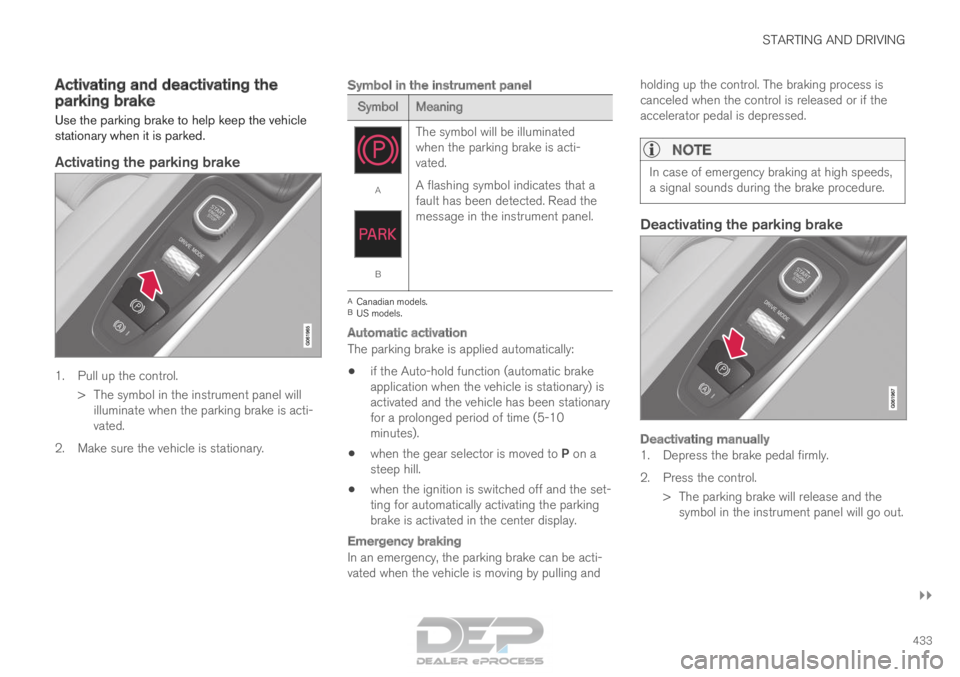
Activating the parking brake
1. Pull up the control.
>
The symbol in the instrument panel will
illuminate when the parking brake is acti-
vated.
2. Make sure the vehicle is stationary.
Symbol in the instrument panel Symbol
Meaning A
B
The symbol will be illuminated
when the parking brake is acti-
vated.
A flashing symbol indicates that a
fault has been detected. Read the
message in the instrument panel. A
Canadian models.
B US models.
Automatic activation
The parking brake is applied automatically:
• if the Auto-hold function (automatic brake
application when the vehicle is stationary) is
activated and the vehicle has been stationary
for a prolonged period of time (5-10
minutes).
• when the gear selector is moved to P on a
steep hill.
• when the ignition is switched off and the set-
ting for automatically activating the parking
brake is activated in the center display.
Emergency braking
In an emergency, the parking brake can be acti-
vated when the vehicle is moving by pulling and holding up the control. The braking process is
canceled when the control is released or if the
accelerator pedal is depressed.
NOTE In case of emergency braking at high speeds,
a signal sounds during the brake procedure.
Deactivating the parking brake
Deactivating manually
1. Depress the brake pedal firmly.
2. Press the control.
> The parking brake will release and thesymbol in the instrument panel will go out.
Page 436 of 686

||STARTING AND DRIVING
434
Deactivating automatically
1. Fasten your seat belt.
2. Depress the brake pedal firmly.
3. Start the vehicle.
4.
Move the gear selector to D or R and press
the accelerator pedal.
> The parking brake will release and the symbol in the instrument panel will go out.
NOTE When the vehicle is initially started, the park-
ing brake could disengage automatically even
if the driver's seat belt is not buckled.
Related information
•
Settings for automatically activating the park-
ing brake (p. 434)
• Parking brake malfunction (p. 435)
• Parking brake (p. 432)
• Parking on a hill (p. 434) Settings for automatically activating
the parking brake
Choose whether the parking brake should be
activated automatically when the vehicle is
switched off.
This selection is made in the Settings menu in
the center display.
1. Tap Settings in the Top view.
2.
Tap My Car Parking Brake and
Suspension and select or deselect the
Auto Activate Parking Brake function.
Related information
• Activating and deactivating the parking brake
(p. 433)
• Parking brake (p. 432) Parking on a hill
Always use the parking brake when parking on a
hill.
WARNING Always apply the parking brake when parking
on an incline. Selecting a gear or putting the
automatic transmission in P may not be suffi-
cient to keep the vehicle stationary in all sit-
uations.
If the vehicle is pointing uphill: • Turn the front wheels so they are pointing
away from the curb.
If the vehicle is pointing downhill:
• Turn the front wheels so they are pointing
toward the curb.
Heavy load uphill
Heavy loads, such as a trailer, could cause the
vehicle to roll backward when the parking brake
is released automatically on steep uphill gradi-
ents. To help avoid this, pull the control upward
while you are driving away. Release the control
when the vehicle gains traction.
Related information
• Activating and deactivating the parking brake
(p. 433)
Page 437 of 686

STARTING AND DRIVING
435
Parking brake malfunction
If you are unable to deactivate or activate the
parking brake after several attempts, contact an
authorized Volvo workshop.
A audible warning signal will sound if the parking
brake is applied while the vehicle is being driven.
If the vehicle must be parked before the problem
is rectified, turn the wheels as when parking on
an incline and put the gear selector in P.
Low battery charge levelIf the battery charge level is too low, it will not be
possible to apply or release the parking brake.
Connect an auxiliary battery to the vehicle if the
battery is discharged.
Replacing brake padsDue to the design of the electric parking brake,
the rear brake pads must be replaced by a work-
shop. An authorized Volvo workshop is recom-
mended.
Symbols in the instrument panel Symbol
Meaning A
B
A flashing symbol indicates that a
fault has been detected. See the
message in the instrument panel. A
B
Fault in the brake system. See the
message in the instrument panel. Information message in the instru-
ment panel.
A
Canadian models.
B US models.Related information
• Activating and deactivating the parking brake
(p. 433)
• Start battery (p. 615)
• Volvo's service program (p. 598)