2018 VOLVO XC90 T8 radio
[x] Cancel search: radioPage 481 of 686

STARTING AND DRIVING
}}
* Option/accessory.479
Programming HomeLink®
*12
Follow these instructions to program HomeLink ®
, reset all programming, or program
individual buttons.
NOTE
In some vehicles, the ignition must be on or in the "accessory position" before HomeLink ®
can be programmed or used. It can be a good idea to put new batteries in the remote con- trol being replaced by HomeLink ®
for faster
programming and better radio signal trans-mission. The HomeLink ®
buttons should be
reset before programming.
WARNING
While HomeLink ®
is being programmed, the
garage door or gate being programmed may be activated. Make sure that no one is nearthe door or gate during programming. Whenprogramming a garage door opener, it isadvised to park outside of the garage. 1.
Point the remote control at the HomeLink ®
button to be programmed and hold it about 2-8 cm (1-3 inches) from the button. Do not obstruct the HomeLink ®
indicator light.
Note: Some remote controls are more effec-
tive at programming HomeLink ®
from a dis-
tance of about 15-20 cm (6-12 inches). Try moving the remote control closer or furtheraway if you are experiencing any difficultiesprogramming.
2. Press and hold both the remote control but- ton and the HomeLink ®
button to be pro-
grammed.
3. Do not release the buttons until the indicator light has stopped flashing slowly (about oncea second) and either flashes quickly (about10 times a second) or glows steadily. >Steady glow: Indication that program-
ming is complete. Press the programmed button twice to activate. Flashing quickly: The device being pro-
grammed with HomeLink ®
may have a
security function that requires an extra step. Try pressing the programmed buttontwice to see whether the programmingworks. Otherwise, continue with the fol-lowing steps.
4. Locate the "training" button 13
on the
receiver for the e.g. garage door opener. It is usually located near the antenna bracket onthe receiver.
5. Press and release the "training" button once. Programming must be completed within 30seconds after pressing the button.
6. Press and release the HomeLink ®
button to
be programmed. Repeat the press/hold/release sequence a second time. For somereceivers, the sequence may need to berepeated a third time.
> Programming is now completed and the garage door, gate, etc. should now be activated when the programmed button ispressed.
If you experience any difficulties programming, please contact HomeLink ®
at:
12 Certain markets only.
13 The name and color of the button varies depending on the manufacturer.
Page 483 of 686

STARTING AND DRIVING
* Option/accessory.481
Type approval for HomeLink®
*14
FCC (USA) and IC (Canada)This device complies with FCC rules part 15 and Industry Canada RSS-210. Operation is subjectto the following two conditions: (1) This devicemay not cause harmful interference, and (2) Thisdevice must accept any interference that may bereceived including interference that may causeundesired operation.
WARNING
The transmitter has been tested and complies with FCC and IC rules. Changes or modifica-tions not expressly approved by the partyresponsible for compliance could void the user's authority to operate the device. 15
Type approval for EUGentex Corporation hereby declares that HomeLink®
Model UAHL5 complies with the
Radio equipment directive 2014/53/EU. Wavelengths within which the radio equipment operates:
• 433.05MHz-434.79MHz <10mW E.R.P.
• 868.00MHz-868.60MHz <25mW E.R.P.
• 868.70MHz-868.20MHz <25mW E.R.P.
• 869.40MHz-869.65MHz <25mW E.R.P. •
869.70MHz-870.00MHz <25mW E.R.P.
Certificate holder address: Gentex Corporation,600 North Centennial Street, Zeeland MI 49464,USA For more information, see support.volvocars.com.
Related information
• HomeLink ®
* (p. 478)
Compass
An integrated compass in the upper right corner of the rearview mirror shows the direction thevehicle is traveling.
Rearview mirror with compass.
Eight different compass directions are shown with the abbreviations: N (north), NE (northeast),E (east), SE (southeast), S (south), SW (south-
west), W (west) and NW (northwest).
Related information
• Activating and deactivating the compass (p. 482)
• Calibrating the compass (p. 482)
14
Certain markets only.
15 The term "IC:" before the certification/registration number only signifies that Industry Canada technical specifications were met.
Page 488 of 686

AUDIO, MEDIA AND INTERNET
* Option/accessory.
486
Audio, media and Internet
The audio and media system consists of a media player and a radio. A cellular phone can also beconnected through Bluetooth to use hands-freefunctions or play music in the vehicle. When thevehicle is connected to the Internet, it is alsopossible to use apps to play media.
Audio and media overview
The functions can be controlled using voice com- mands, the steering wheel keypad or the centerdisplay. The number of speakers and amplifiersvaries depending on the audio system installed inthe vehicle.
System updates
The audio and media system is continuously improved. When the vehicle has an Internet con-nection, system updates can be downloaded foroptimal functionality; see support.volvocars.com.
Related information
• Media player (p. 507)
• Radio (p. 490)
• Phone (p. 520)
• Internet-connected vehicle
* (p. 529)
• Apps (p. 487)
• Voice control (p. 145)
• Ignition modes (p. 427)
• Driver distraction (p. 39)
• Handling system updates via Download Cen-ter (p. 601)
• License agreement for audio and media(p. 539)
Sound settings
The audio system is precalibrated for optimal sound reproduction but these settings can bepersonalized.
The system's volume is normally adjusted using the volume control below the center display orthe right-side steering wheel keypad. Thisapplies, for example, when playing music or theradio or during phone calls and active traffic mes-sages.
Optimal sound reproductionThe audio system is precalibrated for optimalsound reproduction using digital signal process-ing. This calibration takes into account speakers,amplifiers, passenger compartment acoustics, lis-tener position, etc. for each combination of vehi-cle model and audio system. There is also adynamic calibration that takes into account thevolume control setting and the vehicle's speed.
Sound settings as needed
In Top view under SettingsSound, the fol-
lowing settings can be selected:
•
Tone — personal preference for bass, treble,
equalizer for example.
•
Balance - balance between right/left and
front/rear speakers.
•
System Volumes – adjusts volume in the
various systems of the car, e.g. Voice
Control, Park Assist and Phone Ringtone.
Page 490 of 686

||
AUDIO, MEDIA AND INTERNET
* Option/accessory.
488 Swipe the center display screen from right to left
1
to access the App view from the Home view.
This view displays downloaded apps (third-party apps) as well as apps for integrated functions, such as
FM radio.
App view. (generic illustration; basic apps vary depend- ing on market and model)
Several basic apps are always available. More apps such as web radio and music services can be downloaded when the car is connected to theInternet. Some apps can only be used when the vehicle is connected to the Internet. Start an app by pressing the app in the center display's app view.
Related information
•
Download apps (p. 488)
• Updating apps (p. 489)
• Deleting apps (p. 490)
• Apple ®
CarPlay ®
* (p. 515)
• Android Auto
* (p. 518)
• Internet-connected vehicle
* (p. 529)
• Hard disk storage space (p. 538)
• Terms of use and data sharing (p. 536)
Download apps
New apps can be downloaded when the vehicle is connected to the Internet.
NOTE
Data downloading can affect other services such as transfer data, e.g. web radio. If theaffect on other services is experienced asproblematic, the download can be interrupted.Alternatively, it may be appropriate to switchoff or cancel other services.
NOTE
When downloading using a phone, pay extra attention to the data traffic costs.
1. Open the Download Center app in App
view.
2. Select New apps to open a list of apps that
are available but are not installed in the vehi- cle.
1 Applies for left-hand drive vehicles. For right-hand drive vehicles, swipe in the other direction.
Page 491 of 686

AUDIO, MEDIA AND INTERNET
* Option/accessory.489
3. Tap on the row for an app in order to expand
in the list and get more information about the app.
4. Select
Install to start the download and
installation of the app.
> The current status of the download and installation will be shown. If a download cannot be started immedi- ately, a message will be displayed. Theapp will remain in the list and it will bepossible to reattempt downloading.
Canceling a download
–Tap Abort to cancel a download in progress.
Note that only a download can be cancelled. An installation cannot be cancelled once it hasbegun.
Related information
• Apps (p. 487)
• Updating apps (p. 489)
• Deleting apps (p. 490)
• Internet-connected vehicle
* (p. 529)
• Handling system updates via Download Cen-ter (p. 601)
• Hard disk storage space (p. 538)
Updating apps
Apps can be updated when the vehicle is con- nected to the Internet.
NOTE
Data downloading can affect other services such as transfer data, e.g. web radio. If theaffect on other services is experienced asproblematic, the download can be interrupted.Alternatively, it may be appropriate to switchoff or cancel other services.
NOTE
When downloading using a phone, pay extra attention to the data traffic costs.
If an app is being used while an update is in pro- gress, it will be restarted to complete the update.
Update all
1. Open the Download Center app in App
view.
2. Select Install all.
> The update will begin.
Update certain apps
1. Open the Download Center app in App
view.
2. Select
Application updates to open a list
of all available updates.
3. Find the desired app and select
Install.
> The update will begin.
Related information
• Apps (p. 487)
• Download apps (p. 488)
• Deleting apps (p. 490)
• Handling system updates via Download Cen- ter (p. 601)
• Internet-connected vehicle
* (p. 529)
Page 492 of 686

AUDIO, MEDIA AND INTERNET
* Option/accessory.
490
Deleting apps
When the vehicle is connected to the Internet, it is possible to uninstall apps.
If the app is being used, it must be closed before it can be uninstalled. 1. Open the
Download Center app in App
view.
2. Select Application updates to open a list
of all installed apps.
3. Find the desired app and select
Uninstall to
begin uninstalling the app.
> When the app has been uninstalled, it will be removed from the list.
Related information
• Apps (p. 487)
• Download apps (p. 488)
• Updating apps (p. 489)
• Handling system updates via Download Cen- ter (p. 601)
• Internet-connected vehicle
* (p. 529)
Radio The radio can receive broadcasting from the FM waveband with HD Radio ™ Technology and
SiriusXM ®
Satellite radio *. When the vehicle has
an Internet connection, it is also possible to lis- ten to web radio.
The radio can be controlled using voice commands, theright-side steering wheel key-pad or the center display.
Related information
• Starting the radio (p. 491)
• Changing waveband and radio station (p. 491)
• Storing radio favorites (p. 493)
• Radio settings (p. 493) •
RBDS (p. 494)
• HD Radio
™ (p. 494)
• SiriusXM ®
Satellite radio * (p. 498)
• Internet-connected vehicle
* (p. 529)
• Voice control for radio and media (p. 148)
• Media player (p. 507)
Page 493 of 686

AUDIO, MEDIA AND INTERNET
}}
491
Starting the radio The radio is started from the center display's App view.
1.Open the desired waveband (e.g. FM) from
App view.
2. Select a radio station.
Related information
• Radio (p. 490)
• Searching for a radio station (p. 492) •
Changing waveband and radio station (p. 491)
• Storing radio favorites (p. 493)
• Radio settings (p. 493)
• Voice control for radio and media (p. 148)
Changing waveband and radiostation
Instructions for changing wavebands, waveband lists and radio stations in the selected list areprovided here.
Changing wavebandsSwipe from App view on the center display and select the desired waveband (e.g. FM) or open
the App menu in the instrument panel with the right-side steering wheel keypad and make yourselection there.
Changing a list in a waveband
1. Tap Library.
2. Select playback from
Stations, Favorites orGenres.
3. Tap the desired station in the list.
Favorites – only plays selected favorite channels.
Page 494 of 686
||
AUDIO, MEDIA AND INTERNET
492
Genres - only plays channels broadcasting the
selected genre or program type, e.g. pop, classi- cal, etc.
Changing radio stations in a selected
list
–Press or under the center display
or on the right-side steering wheel keypad.
> Move step-by-step through the selected list.
It is also possible to change radio station in the selected list via the center display.
Related information
• Radio (p. 490)
• Searching for a radio station (p. 492)
• Voice control for radio and media (p. 148)
• Storing radio favorites (p. 493)
• Radio settings (p. 493)
• App menu in instrument panel (p. 103)
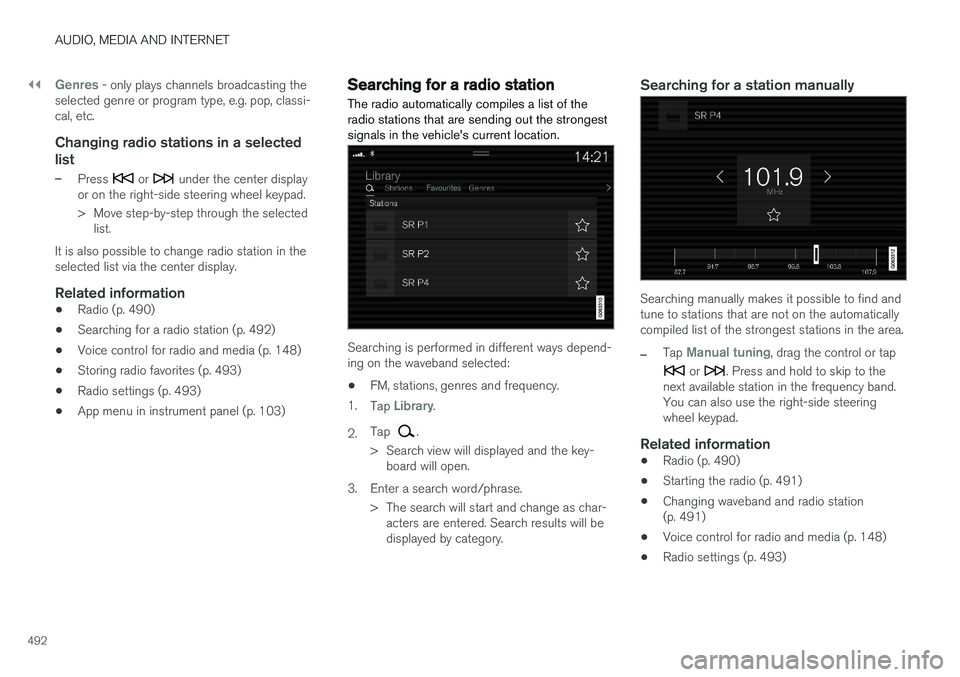
Searching for a radio station
The radio automatically compiles a list of the radio stations that are sending out the strongestsignals in the vehicle's current location.
Searching is performed in different ways depend- ing on the waveband selected:
• FM, stations, genres and frequency.
1. Tap
Library.
2. Tap
.
> Search view will displayed and the key- board will open.
3. Enter a search word/phrase. > The search will start and change as char-acters are entered. Search results will be displayed by category.
Searching for a station manually
Searching manually makes it possible to find and tune to stations that are not on the automaticallycompiled list of the strongest stations in the area.
–Tap Manual tuning, drag the control or tap
or . Press and hold to skip to the
next available station in the frequency band. You can also use the right-side steeringwheel keypad.
Related information
• Radio (p. 490)
• Starting the radio (p. 491)
• Changing waveband and radio station(p. 491)
• Voice control for radio and media (p. 148)
• Radio settings (p. 493)