2018 VOLVO XC90 overheating
[x] Cancel search: overheatingPage 452 of 666

||
STARTING AND DRIVING
* Option/accessory.
450 •
Follow applicable regulations regarding per- mitted speed and weight.
• Drive slowly when towing a trailer up a longand steep incline.
• The maximum trailer weights given only applyto altitudes up to 1000 meters (3280 feet)above sea level. At higher altitudes, enginepower (and thus the vehicle's climbing ability)is decreased due to the reduced air density,and the maximum trailer weight must there-fore be reduced. The weight of the vehicleand trailer must be decreased by 10% foreach additional 1000 m (3280 feet) or partthereof.
• Avoid driving with a trailer on inclines of morethan 12%.
• Avoid overloading and other incorrect use.
• The trailer's brakes must be balanced withthe vehicle's brakes to help ensure safestops (follow applicable local regulations).
CAUTION
•Bumper-attached trailer hitches must not be used on Volvos, nor should safetychains be attached to the bumper.
• Trailer hitches attaching to the vehiclerear axle must not be used.
• Never connect a trailer's hydraulic brakesystem directly to the vehicle brake sys-tem, nor a trailer's lighting system directlyto the vehicle lighting system. Consultyour nearest authorized Volvo retailer forcorrect installation.
• When towing a trailer, the trailer's safetychains or wire must be correctly fastenedto the attachment points provided in thetrailer hitch on the vehicle. The safetychain or wire must never be fastened toor wound around the towing ball.
NOTE
The optional detachable trailer hitch may not be available in all markets or on all models.Consult your Volvo retailer.
NOTE
Extreme weather conditions, towing a trailer, driving at high altitudes and fuel quality arefactors that significantly increase a vehicle'sfuel consumption.
Trailer weights
WARNING
Please adhere to the recommendations provi- ded for trailer weight. If the recommendationsare not followed, the vehicle and trailer maybe difficult to control during evasive maneu-vers and braking.
NOTE
The specified maximum trailer weights are those permitted by Volvo. National vehicleregulations may set additional restrictions ontrailer weight and speed. The trailer hitchesmay be certified for higher towing weightsthan the vehicle is permitted to tow.
Self-leveling suspension
*The vehicle's self-leveling system attempts to keep the vehicle at a constant level, regardless ofload (up to the maximum permitted weight).When the vehicle is stationary, the rear end of thevehicle will be slightly lowered, which is normal.
Driving in hilly terrain or hot weatherIn certain conditions, there is a risk of overheat-ing when driving with a trailer. If overheating ofthe engine and drive system is detected, a warn-ing symbol will illuminate in the instrument panelalong with a message.
Page 453 of 666

STARTING AND DRIVING
}}
* Option/accessory.451
The automatic transmission selects the optimal gear for the current load and engine speed.
Steep inclines
Do not lock the automatic transmission into a higher gear than what the engine can handle
‒ it
is not always preferable to drive in high gears at low rpm.
Parking on a hill
1. Depress the brake pedal.
2. Apply the parking brake.3. Put the gear selector in P.
4. Release the brake pedal.Put chocks behind the wheels when the vehicle is parked on a hill with a trailer attached.
Starting on a hill
1. Depress the brake pedal. 2. Put the gear selector in D.
3. Release the parking brake.
4. Release the brake pedal and start driving.
Related information
• Trailer Stability Assist
* (p. 451)
• Checking trailer lights (p. 452)
• Towing capacity and tongue weight (p. 642)
• Overheating of engine and transmission (p. 446)
Trailer Stability Assist
*
Trailer Stability Assist (TSA 8
) is a function
designed to help stabilize a vehicle that is tow- ing a trailer when the vehicle and trailer havebegun to sway. The function is part of the Elec- tronic Stability Control system ESC 9
.
Reasons for swayingA vehicle towing a trailer may begin to sway for various reasons. Normally this only occurs at highspeeds. However, if the trailer is overloaded orunevenly distributed, e.g. too far back, there is arisk of swaying even at low speeds. Swaying may be caused by factors such as:
• The vehicle and trailer are hit by a sudden, strong crosswind.
• The vehicle and trailer are traveling on anuneven road or over a bump.
• Sudden movements of the steering wheel.
Once swaying has begun, it can be difficult orimpossible to stop it. This makes the vehicle andtrailer difficult to control and there is a risk ofswerving into oncoming traffic or driving off theroad.
Trailer Stability Assist functionTrailer Stability Assist continuously monitors thevehicle's movements, particularly lateral move- ments. If swaying is detected, the brakes areapplied individually on the front wheels, which hasa stabilizing effect on the vehicle and trailer. Thisis often enough to enable the driver to regaincontrol of the vehicle. If the Trailer Stability Assist function's first attempt is not adequate to stop the swayingmotion, the brakes are applied on all wheels andengine power is temporarily reduced. As theswaying motion begins to decrease and the vehi-cle and trailer have once again become stable,TSA stops regulating the brakes/engine powerand the driver regains control of the vehicle.
NOTE
Trailer Stability Assist is deactivated if the driver selects the sport mode by deactivating
ESC in the center display's menu system.
Trailer Stability Assist may not intervene if the driver tries to compensate for the swaying motionby moving the steering wheel rapidly, becausethe system will then not be able to determine if itis the trailer or the driver causing the swaying.
8
Trailer Stability Assist
9 Electronic Stability Control
Page 555 of 666
WHEELS AND TIRES
}}
553
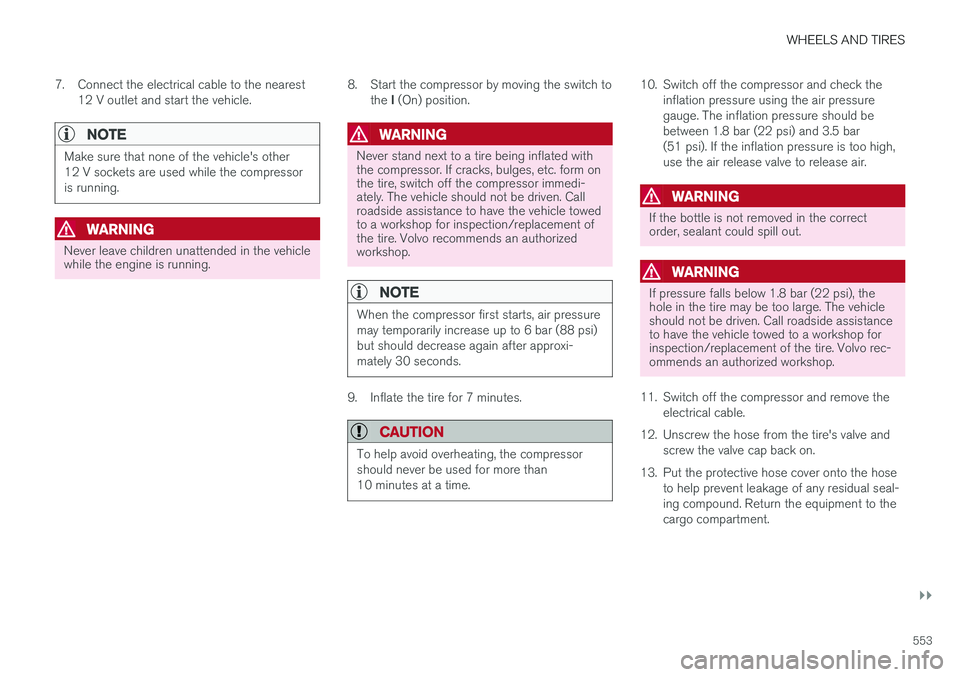
7. Connect the electrical cable to the nearest
12 V outlet and start the vehicle.
NOTE
Make sure that none of the vehicle's other 12 V sockets are used while the compressoris running.
WARNING
Never leave children unattended in the vehicle while the engine is running. 8. Start the compressor by moving the switch to
the I (On) position.
WARNING
Never stand next to a tire being inflated with the compressor. If cracks, bulges, etc. form onthe tire, switch off the compressor immedi-ately. The vehicle should not be driven. Callroadside assistance to have the vehicle towedto a workshop for inspection/replacement ofthe tire. Volvo recommends an authorizedworkshop.
NOTE
When the compressor first starts, air pressure may temporarily increase up to 6 bar (88 psi)but should decrease again after approxi-mately 30 seconds.
9. Inflate the tire for 7 minutes.
CAUTION
To help avoid overheating, the compressor should never be used for more than10 minutes at a time.
10. Switch off the compressor and check the
inflation pressure using the air pressure gauge. The inflation pressure should bebetween 1.8 bar (22 psi) and 3.5 bar(51 psi). If the inflation pressure is too high,use the air release valve to release air.
WARNING
If the bottle is not removed in the correct order, sealant could spill out.
WARNING
If pressure falls below 1.8 bar (22 psi), the hole in the tire may be too large. The vehicleshould not be driven. Call roadside assistanceto have the vehicle towed to a workshop forinspection/replacement of the tire. Volvo rec-ommends an authorized workshop.
11. Switch off the compressor and remove the electrical cable.
12. Unscrew the hose from the tire's valve and screw the valve cap back on.
13. Put the protective hose cover onto the hose to help prevent leakage of any residual seal- ing compound. Return the equipment to thecargo compartment.
Page 557 of 666

WHEELS AND TIRES
555
Inflate tires with the compressorincluded in the tire sealing system The vehicle's original tires can be inflated using the compressor in the tire sealing system.
1. The compressor must be switched off. Makesure that the switch is in the 0 (Off) position
and take out the electrical cable and the hose.
2. Unscrew the tire's valve cap and screw the hose's valve connector as far as possibleonto the valve. Be sure the air release valve on the com- pressor's hose is completely closed.
3. Connect the electrical cable to the nearest 12 V outlet and start the vehicle.
WARNING
Inhaling exhaust fumes could lead to serious injury. Never leave the engine running in anenclosed space or a space without sufficientventilation.
WARNING
Never leave children unattended in the vehicle while the engine is running.
4. Start the compressor by moving the switch to the I (On) position.
CAUTION
Risk of overheating. The compressor should not be running for longer than 10 minutes ata time.
5. Inflate the tire to the pressure specified on
the tire pressure decal on the driver's side door pillar. If the inflation pressure is toohigh, use the air release valve to release air.
6. Switch off the compressor. Remove the hose and the electrical cable.
7. Screw the valve cap back onto the tire.
NOTE
• After inflating a tire, always replace the valve cap to help prevent valve damagecaused by gravel, dirt, etc.
• Use plastic valve caps only. Metal capscould corrode and become difficult toremove.
NOTE
The compressor is an electric device. Follow local regulations for disposal.
Related information
• Recommended tire pressure (p. 537)
• Using the tire sealing system (p. 551)
• Tire sealing system (p. 550)
Page 558 of 666

WHEELS AND TIRES
556
Determining the vehicle's permittedweight
Properly loading your vehicle will provide maxi- mum return of vehicle design performance.
Weight designationsBefore loading your vehicle, familiarize yourself with the following terms for determining yourvehicle's weight ratings, with or without a trailer,from the vehicle's Federal/Canadian Motor Vehi-cle Safety Standards (FMVSS/CMVSS) label, andthe vehicle's tire information placard:
Curb weight
The weight of the vehicle including a full tank of fuel and all standard equipment. It does notinclude passengers, cargo, or optional equipment.
Capacity weight
All weight added to the curb weight, including cargo and optional equipment. When towing, tow-bar weight is also part of cargo weight.
Permissible axle weight
The maximum allowable weight that can be car- ried by a single axle (front or rear). These num-bers are shown on the Federal/Canadian MotorVehicle Safety Standards (FMVSS/CMVSS) label.The total load on each axle must never exceed itsmaximum permissible weight.
Gross vehicle weight (GVW)
The vehicle's curb weight + cargo + passengers.
Steps for Determining Correct Load Limit
1. Locate the statement "the combined weight of occupants and cargo should never exceed XXX kg or XXX lbs." on your vehicle's plac-ard.
2. Determine the combined weight of the driver and passengers that will be riding in yourvehicle.
3. Subtract the combined weight of the driver and passengers from XXX kg or XXX lbs.
4. The resulting figure equals the available amount of cargo and luggage load capacity.For example, if the "XXX" amount equals1400 lbs. and there will be five 150 lb. pas-sengers in your vehicle, the amount of availa-ble cargo and luggage load capacity is 650lbs. (1400 - 750 (5 × 150) = 650 lbs.)
5. Determine the combined weight of luggage and cargo being loaded on the vehicle. Thatweight may not safely exceed the availablecargo and luggage load capacity calculatedin Step 4.
6. If your vehicle will be towing a trailer, load from your trailer will be transferred to yourvehicle. Consult this manual to determinehow this reduces the available cargo and lug-gage load capacity of your vehicle.
WARNING
• Exceeding the permissible axle weight, gross vehicle weight, or any other weightrating limits can cause tire overheatingresulting in permanent deformation orcatastrophic failure.
• Do not use replacement tires with lowerload carrying capacities than the tires thatwere original equipment on the vehiclebecause this will lower the vehicle's GVWrating. Use only tires with the correct loadcarrying capacity. Consult your Volvoretailer for information.
Related information
• Loading recommendations (p. 564)
Page 653 of 666

INDEX
651
Child restraints 63, 65
booster cushions 71
convertible seats 69
infant seats 67
integrated booster cushion 76
ISOFIX/LATCH anchors 74
lower attachment points 74
recalls and registration 65
top tether anchors 72
Child safety 63
Child safety locks 257
City Safety 333, 334, 336, 337, 342, 344
City Safety in crossing traffic 339, 340 City Safety when evasive maneuver preven- ted 341
Cleaning 617, 619, 620 automatic car wash 623
car wash 620, 621, 623, 624, 625, 626
center display 615
Seat belts 617
textile upholstery 615, 617, 618
upholstery 615, 617, 618, 619, 620
wheels 626
Cleaning wheels 626
Cleaning wiper blades 624
Clean Zone 209
Clean Zone Interior Package 210
Climate 206 auto-regulation 223
blower control 228, 229
perceived temperature 207
Sensors 207
temperature control 230, 231, 232
voice control 208
zones 206
Climate controls 217 center display 217
rear seat 217
Climate system 206, 217 Refrigerant 646
repairs 586
Clock, setting 94
Collision 42, 47, 52, 61 Collision warner detection of pedestrians 337
radar sensor 324
Collision warning 333, 345
Color code, paintwork 628
Color codes 628
Compass 459, 460 calibration 460
Condensation in headlights 621, 623, 624, 625Connecting vehicle to InternetNo connection or poor connection 512
via a mobile device (WiFi) 509
via mobile device (Bluetooth) 509
via vehicle's modem 510
Connect phone 499
Contact information 26
Convertible seats 69
coolant 645
Coolant, filling 590 Cooling system overheating 446
Cornering illumination 162
Corner Traction Control 272
Corrosion protection 626Covering cargo compartment 568
Crash, see Collision 42
Crash event data 33
Cross Traffic Alert – CTA 351, 352, 353, 354
Cruise control 284, 285 manage speed 285, 286
temporary deactivation 287, 288
turn off 288
CTA – Cross Traffic Alert 351, 352, 353, 354
Curb weight 641
Page 654 of 666

INDEX
652CZIP (Clean Zone Interior Package) 210
D
Data
recording 33 transferring between vehicle and work-
shop 578
Data sharing 514
Daytime running lights 156Decals location of 636
Defrosting 225
Detection of cyclist 337
Dimensions 639
Dipstick, electronic 588
Direction of rotation 530
Disengaging the shiftlock 421
Display lighting 167
Distance Alert 289, 290, 291 limitations 292
DivX ®
490
Door mirrors 173, 175 compass 459, 460
dimming 174
outer 173, 175
power folding 175
resetting 175
Driveline transmission 417
Drive mode 423 changing 425
Driver Alert Control 360 operation 361, 362
Driver Alert Control limitations 362
Driver performance 92, 93
Driver profile 139 edit 141
select 140
Driver support system 270 Driving cooling system 446
with a trailer 449
Driving economy 438
Driving through standing water 441 driving with a trailer towball load 642
towing capacity 642E
ECO climate 426
ECO mode 426
activate with function button 428
Economical driving 426, 438
Electrical outlet 560 use 562
Electrical system 598
Electric parking brake 411
Electronic immobilizer 250
emergency brake lights 163
Emission inspection readiness 576 Engine overheating 446
start 404
Start/Stop 428
turn off 406
Engine braking, automatic 437 Engine compartment coolant 590
engine oil 587
overview 587
Engine drag control 272
Engine oil 587 filling 588
Page 658 of 666

INDEX
656Lighting, replacing bulbs 591
daytime running lights/front parking
lights 596
front turn signals 597
high beams 595
low beams 595
remove plastic cover 593
removing rectangular cover 593
Limp home 417 Load anchoring eyelets cargo compartment 567
Load anchoring hooks 566
Load carriers 566
Load index 532Loading general 564
load anchoring eyelets 567
long load 565
Lock indication 236 setting 237
Locking/unlocking Tailgate 241, 254
Locking wheel bolts 543 Locks Locking 239
unlocking 239
Low battery charge level
start battery 447
Low beams 157
Lower the rear end 565
Low oil level 588
Low-speed driving 435 activate with function button 436
M
Maintenance 576
corrosion protection 626
Max. axle weight 641
Max. roof load 641
Media player 485, 486, 487 compatible file formats 514, 515
voice control 150
Messages and symbols Adaptive Cruise Control 307
Collision warner with auto-brake 344
Messages in BLIS 350
Messages in display 106, 142 handling 107, 143
saved 109, 144
Mileage 89
Misting condensation in headlights 620, 623
Mood lighting 166, 167
N
Net cargo compartment 571
O
Occupant safety 43
Occupant weight sensor 56
Octane rating 443
Oil, see also Engine oil 644
On-board diagnostics 576
On-board Diagnostic socket 36
Option/accessory 21
Outside temperature gauge 94
Overheating 446, 449
Owner's information 16
OWNER'S MANUAL 21
environmental labeling 23
in cellular phone 20
in the center display 17, 18