2018 VOLVO XC90 brake sensor
[x] Cancel search: brake sensorPage 303 of 666

DRIVER SUPPORT
}}
301
To temporarily deactivate Adaptive Cruise Control and put it in standby mode:
–Press the button on the steering wheel
(2). > The
symbol in the instrument panel
changes color from WHITE to GRAY and the set speed in the center of the speed-ometer will change from BEIGE to GRAY.
WARNING
• If Adaptive Cruise Control is in standby mode, the driver must intervene and regu-late both speed and distance to the vehicleahead.
• If the vehicle comes too close to a vehicleahead when Adaptive Cruise Control is instandby mode, the driver is instead warnedof the short distance by the Distance Alertfunction.
Standby mode due to action by the driver
Adaptive Cruise Control will be temporarily deac- tivated and put in standby mode if:
• the brakes are applied.
• the gear selector is moved to
N
• the vehicle is driven faster than the setspeed for more than 1 minute Temporarily increasing speed using the accelera-
tor pedal, e.g. when passing another vehicle, willnot affect the setting. The vehicle will return tothe set speed when the accelerator pedal isreleased.
Automatic standby mode
Adaptive Cruise Control is dependent on other systems, such as Electronic Stability Control (ESC 50
). If any of these other systems stops
working, Adaptive Cruise Control will automati- cally switch off.
WARNING
With automatic standby mode, the driver is warned by an acoustic signal and a messageon the instrument panel. • The driver must then regulate vehicle speed, apply the brakes if necessary, andmaintain a safe distance to other vehicles.
Adaptive Cruise Control may go into standbymode if: • your vehicle's speed goes below 5 km/h(3 mph) and ACC cannot determine if thevehicle ahead is stationary or if it is anotherobject, e.g. a speed bump.
• your vehicle's speed goes under 5 km/h(3 mph) and the vehicle ahead turns so thatACC no longer has a vehicle to follow. •
the driver opens the door.
• the driver unbuckles the seat belt.
• the engine speed (rpm) is too low/high.
• one or more of the wheels lose traction.
• the brake temperature is high.
• the parking brake is applied.
• the camera/radar sensor is covered by snowor heavy rain (the camera lens/radar wavesare blocked)
Reactivating Adaptive Cruise Control
from standby mode
Note: This illustration is general and details may vary depending on model.
50 Electronic Stability Control
Page 312 of 666

||
DRIVER SUPPORT
310
WARNING
•The Pilot Assist function is supplementary driver support intended to facilitate driv-ing and help make it safer – it cannothandle all situations in all traffic, weatherand road conditions.
• The driver is advised to read all sectionsin the Owner's Manual about this functionto learn of its limitations, which the drivermust be aware of before using the func-tion (see the link list at the end of thisarticle).
• Pilot Assist should only be used if thereare clear lane lines painted on each sideof the lane. All other use will increase therisk of contact with nearby obstacles thatcannot be detected by the functions.
• Pilot Assist is not a substitute for the driv-er's attention and judgment. The driver isalways responsible for ensuring the vehi-cle is driven in a safe manner, at theproper position within the lane, at theappropriate speed, with an appropriatedistance to other vehicles, and in accord-ance with current traffic rules and regula-tions.
NOTE
Depending on market, this function may be either Standard or Optional.
Pilot Assist regulates speed by accelerating and braking. It is normal for the brakes to emit a slightsound when they are being used to adjust speed. Pilot Assist attempts to smoothly regulate speed. The driver must apply the brakes in situationsrequiring immediate braking. For example, whenthere are great differences in speed betweenvehicles or if the vehicle ahead brakes suddenly.Due to limitations in the camera and radar sen-sor, braking may occur unexpectedly or not at all. Pilot Assist is designed to follow a vehicle ahead in the same lane and maintain a time interval tothat vehicle set by the driver. If the radar sensordoes not detect a vehicle ahead, it will insteadmaintain the speed set by the driver. This will alsohappen if the speed of the vehicle aheadexceeds the set speed for your vehicle.
• Pilot Assist can follow another vehicle atspeeds from a standstill up to 200 km/h(125 mph).
• Pilot Assist can provide steering assistancefrom near-stationary speeds up to 140 km/h(87 mph).
WARNING
• Pilot Assist is not a collision avoidance system. The driver must intervene if thesystem fails to detect a vehicle ahead.
• Pilot Assist does not brake for people,animals, objects, small vehicles (e.g.cycles and motorcycles), low trailers aswell as oncoming, slow or stationary vehi-cles.
• Do not use Pilot Assist in demanding sit-uations, such as in city traffic, at intersec-tions, on slippery surfaces, with a lot ofwater or slush on the road, in heavy rain/snow, in poor visibility, on winding roads,on highway on- or off-ramps, or with atrailer connected to the vehicle.
CAUTION
Maintenance of the integrated components in Pilot Assist may only be performed by a work-shop – an authorized Volvo workshop is rec-ommended.
In curves and forks in the roadPilot Assist is designed to interact with the driver. The driver should never wait for steering assis-tance from Pilot Assist, but instead should alwaysbe ready to increase his or her own steeringefforts, particularly in curves.
Page 320 of 666

||
DRIVER SUPPORT
318
Automatic standby mode
Pilot Assist is dependent on other systems, such as Electronic Stability Control (ESC66
). If any of
these other systems stops working, Pilot Assist will automatically switch off.
WARNING
With automatic standby mode, the driver is warned by an acoustic signal and a messageon the instrument panel. • The driver must then regulate vehicle speed, apply the brakes if necessary, andmaintain a safe distance to other vehicles.
Adaptive Cruise Control may go into standbymode if, e.g.: • the driver opens the door.
• the brake temperature is high.
• the driver's hands are not on the steering wheel.
• the parking brake is applied.
• the engine speed (rpm) is too low/high.
• the driver unbuckles the seat belt.
• one or more of the wheels lose traction.
• the camera/radar sensor is covered by snowor heavy rain (the camera lens/radar wavesare blocked) •
your vehicle's speed goes below 5 km/h(3 mph) and Pilot Assist cannot determine ifthe vehicle ahead is stationary or if it isanother object, e.g. a speed bump.
• your vehicle's speed goes under 5 km/h(3 mph) and the vehicle ahead turns so thatPilot Assist no longer has a vehicle to follow.Reactivating Pilot Assist from standby
mode
Note: This illustration is general and details may vary depending on model.
To reactivate Pilot Assist:
–Press the button on the steering wheel
(1).
> Speed will be set to the most recently stored speed.
WARNING
A noticeable increase in speed may follow when the speed is resumed with the
steering wheel button.
Related information
• Pilot Assist (p. 309)
66
Electronic Stability Control
Page 324 of 666

||
DRIVER SUPPORT
* Option/accessory.
322
The driver is responsible for ensuring that the vehicle maintains a suitable distancefrom such obstacles.
• The camera and radar sensors do nothave the capacity to detect all oncomingobjects and obstacles in traffic environ-ments, e.g. potholes, stationary obstaclesor objects that completely or partiallyblock the route.
• Pilot Assist does not "see" pedestrians,animals, etc.
• The recommended steering input is lim-ited in force, which means that it cannotalways help the driver to steer and keepthe vehicle within the lane.
• Pilot Assist is switched off if the powersteering is working with reduced power -e.g. during cooling due to overheating(see section "Speed-dependent steeringforce").
The driver can always correct or adjust steeringassistance provided by Pilot Assist by turning thesteering wheel to the desired position.
Steep roads and/or heavy loadsPilot Assist is primarily intended to be driven onflat roads. The function may not be able to main-tain the correct time interval to the vehicle aheadwhen driving down steep hills. The driver should be extra attentive and prepared to apply thebrakes.
• Do not use Pilot Assist if the vehicle is carry-ing a heavy load or towing a trailer.
NOTE
Pilot Assist cannot be activated if a trailer, bike carrier or similar is connected to thevehicle electrical system.
Other limitations
•
The Off Road drive mode cannot be
selected when Pilot Assist is activated.
NOTE
The function uses the vehicle's camera unit, which has some general limitations – see thesection "Camera unit limitations".
NOTE
The function uses the vehicle's radar unit, which has some general limitations – see thesection "Radar unit limitations".
Related information
• Pilot Assist (p. 309)
• Speed-dependent steering wheel resistance (p. 270)
Pilot Assist
* symbols and messages
A number of symbols and messages relating to Pilot Assist may be displayed in the instrument panel and/or the head-up display *.
Page 335 of 666
DRIVER SUPPORT
}}
333
Recommended maintenance for thecamera/radar sensor
In order for the camera/radar sensor to function properly, the area of the windshield in front of theunit must be kept free of dirt, ice, snow, etc. andshould be washed regularly with water and carwashing detergent.
NOTE
Dirt, ice and snow covering the camera and radar unit reduce their function and can makemeasurement impossible. It could cause functions to be reduced, deac- tivated completely or produce an incorrectfunction response.
Related information
•Camera (p. 329)
City Safety
™
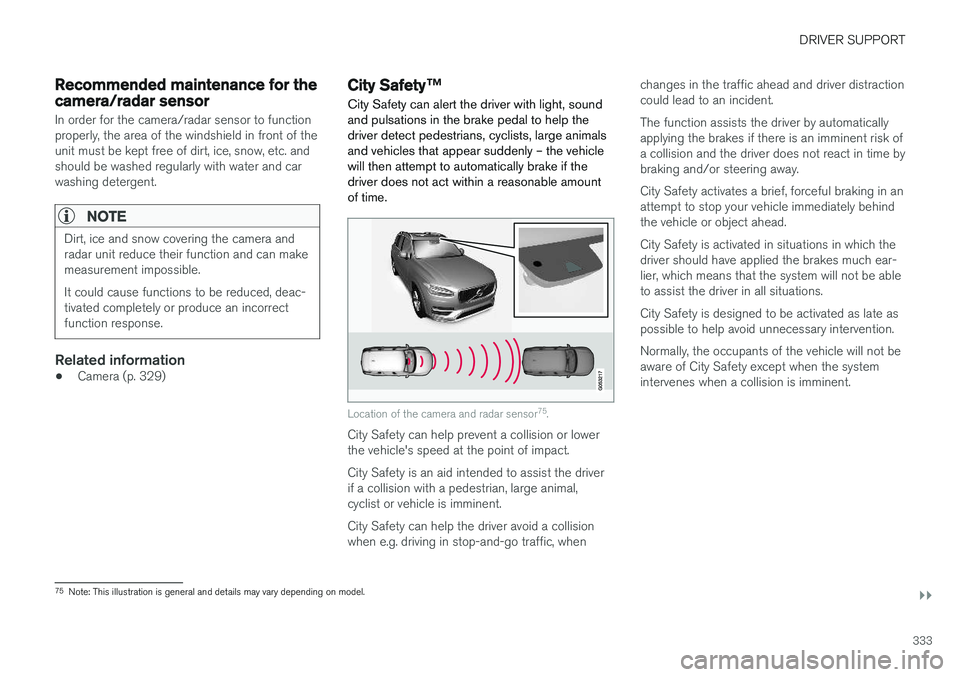
City Safety can alert the driver with light, sound and pulsations in the brake pedal to help thedriver detect pedestrians, cyclists, large animalsand vehicles that appear suddenly – the vehiclewill then attempt to automatically brake if thedriver does not act within a reasonable amountof time.
Location of the camera and radar sensor 75
.
City Safety can help prevent a collision or lower the vehicle's speed at the point of impact. City Safety is an aid intended to assist the driver if a collision with a pedestrian, large animal,cyclist or vehicle is imminent. City Safety can help the driver avoid a collision when e.g. driving in stop-and-go traffic, when changes in the traffic ahead and driver distractioncould lead to an incident. The function assists the driver by automatically applying the brakes if there is an imminent risk ofa collision and the driver does not react in time bybraking and/or steering away. City Safety activates a brief, forceful braking in an attempt to stop your vehicle immediately behindthe vehicle or object ahead. City Safety is activated in situations in which the driver should have applied the brakes much ear-lier, which means that the system will not be ableto assist the driver in all situations. City Safety is designed to be activated as late as possible to help avoid unnecessary intervention. Normally, the occupants of the vehicle will not be aware of City Safety except when the systemintervenes when a collision is imminent.
75
Note: This illustration is general and details may vary depending on model.
Page 337 of 666

DRIVER SUPPORT
}}
335
Large animals
If there is a risk of colliding with a large animal, City Safety can help reduce your vehicle's speedby up to 15 km/h (9 mph). The braking function for large animals is primarily intended to mitigate the force of a collision athigher speeds. Braking is most effective atspeeds above 70 km/h (43 mph) and less effec-tive at lower speeds.
City Safety sub-functions
Function overview76
.
Audio-visual collision warning
Camera/radar sensor distance monitoring City Safety carries out three steps in the follow- ing order:
1. Collision warning
2. Brake assistance
3. Auto-brakeDescriptions of what happens in these three steps are provided below.
1 - Collision warning
The driver is first alerted to the risk of an immi- nent collision. City Safety can detect pedestrians, cyclists or vehicles that are stationary, are moving in thesame direction as your vehicle and are ahead ofyour vehicle. City Safety can also detect pedes-trians, cyclists or large animals that are crossingthe road in front of your vehicle. If there is a risk of a collision with a pedestrian, large animal, cyclist or another vehicle, or with avehicle described in the section "City Safety incrossing traffic", the driver will be alerted withlight, sound and pulsations in the brake pedal. Atlower speeds, during hard braking or if the accel-erator pedal is pressed, the brake pedal pulsationwarning will not be given. The intensity of thebrake pedal pulsations varies according to thevehicle's speed.
2 - Brake assistance
If the risk of a collision increases after the colli- sion warning, brake support will be activated. If the system determines that the pressure the driver is exerting on the brake pedal is insufficientto prevent the collision, brake support willincrease pressure.
76
Note: This illustration is general and details may vary depending on model.
Page 345 of 666

DRIVER SUPPORT
343
Other limitations
WARNING
•Warnings and brake interventions can be triggered late or not at all if the traffic sit-uation or external influences prevent thecamera and radar unit from properlydetecting pedestrians, cyclists, large ani-mals or vehicles ahead of the vehicle.
• To be able to detect vehicles at night, itsfront and rear lights must work and illumi-nate clearly.
• The camera and radar unit have a limitedrange for pedestrians and cyclists – thesystem can provide effective warningsand brake interventions if the relativespeed is lower than 50 km/h (30 mph).For stationary or slow-moving vehicles,warnings and brake interventions areeffective at vehicle speeds of up to70 km/h (43 mph). Speed reduction forlarge animals is less than 15 km/h(9 mph) and can be achieved at vehiclespeeds over 70 km/h (43 mph). At lowerspeeds, the warning and brake interven-tion for large animals is less effective.
• Warnings for stationary or slow-movingvehicles and large animals can be disen-gaged due to darkness or poor visibility.
• Warnings and brake interventions for pedestrians and cyclists are disengagedat vehicle speeds over 80 km/h(50 mph).
• Do not place, affix or mount anything onthe inside or outside of the windshield, orin front of or around the camera andradar unit – this could disrupt camera-based functions.
• Objects, snow, ice or dirt in the area ofthe camera sensor can reduce the func-tion, disengage it completely or give animproper function response.
NOTE
The function uses the vehicle's camera unit, which has some general limitations – see thesection "Camera unit limitations".
NOTE
The function uses the vehicle's radar unit, which has some general limitations – see thesection "Radar unit limitations".
Market limitationsCity Safety is not available in all countries. If City Safety is not shown in the center display's
Settings menu, your vehicle is not equipped with
this function. In the center display's Top view, tap:
•
SettingsMy CarIntelliSafe
Related information
• City Safety
™ (p. 333)
Page 382 of 666

DRIVER SUPPORT
380
Park Assist front, rear and sides
Park Assist has different parameters depending on which part of the vehicle is approaching anobstacle.
Back
Note: This illustration is general and details may vary depending on model.
The rear sensors will be activated if the vehicle begins rolling backward or if reverse gear isengaged. The distance monitored begins approx. 1.5 meters (5 feet) behind the vehicle. The rear sensors will be automatically deactivated if the vehicle is backing up with a trailer attached.
NOTE
When reversing with e.g. a trailer or bike car- rier on the trailer hitch – without Volvo originaltrailer cables – the Parking Assist system mayhave to be turned off manually to prevent thesensors from reacting to these.
Side sensors
Park Assist's side sensors are automatically acti- vated when the engine is started. They are activeat speeds below 10 km/h (6 mph). The distance monitored begins approx. 30 cm (1 ft) from the sides. The audible signal for obsta-cles along the sides of the vehicle is emittedfrom the side speakers.
Front camera
Note: This illustration is general and details may vary depending on model.
Park Assist's front sensors are automatically acti- vated when the engine is started. The front sen-sors are active at speeds below 10 km/h(6 mph). The distance monitored begins approx. 80 cm (2.5 ft) in front of the vehicle.
NOTE
The Parking Assist system is deactivated when the parking brake is applied or when P
is selected on vehicles with automatic trans- mission.