2018 VOLVO XC60 T8 phone
[x] Cancel search: phonePage 492 of 674
||
AUDIO, MEDIA AND INTERNET
* Option/accessory.
490
iTunes taggingFrom the center display's Top view, tap SiriusXM
Settings. Tap the iTunes Tagging menu. Tap
the iTunes Tagging box to activate/deactivate
this function and tap Close to return to Home
view. Tap Tags List to display a list of all tagged
songs. If the function is activated, the
iTunes tag button
will be displayed in Home view. If a song is played that you would like to buy in the iTunes store, tapthis button while the song is playing to tag it. If a song with
iTunes Tagging information is availa-
ble, the button will be selectable. Tap the button to tag the song. If you would like to buy a taggedsong via iTunes, Tap the iTunes tag button. To buy a song in iTunes, begin by connecting an iPhone/iPod/iPad to the USB port in the tunnelconsole. The iTunes tagging list will automaticallybe transferred to the device and removed fromthe list in the vehicle. If the device is connectedwhen a song is tagged, the data will automaticallybe saved in the device. To purchase the song,consult the iTunes support page.
Related information
• SiriusXM ®
Satellite radio * (p. 488)
• Entering characters, letters and words byhand in the center display (p. 125)
• Settings for SiriusXM ®
Satellite radio *
(p. 490) •
Settings for SiriusXM ®
Satellite radio *
(p. 490)
• Connecting a device via the USB port(p. 504)
Settings for SiriusXM® Satellite
radio
*
There are numerous settings that can be made to enhance your SiriusXM ®
Satellite radio listen-
ing experience.
Settings
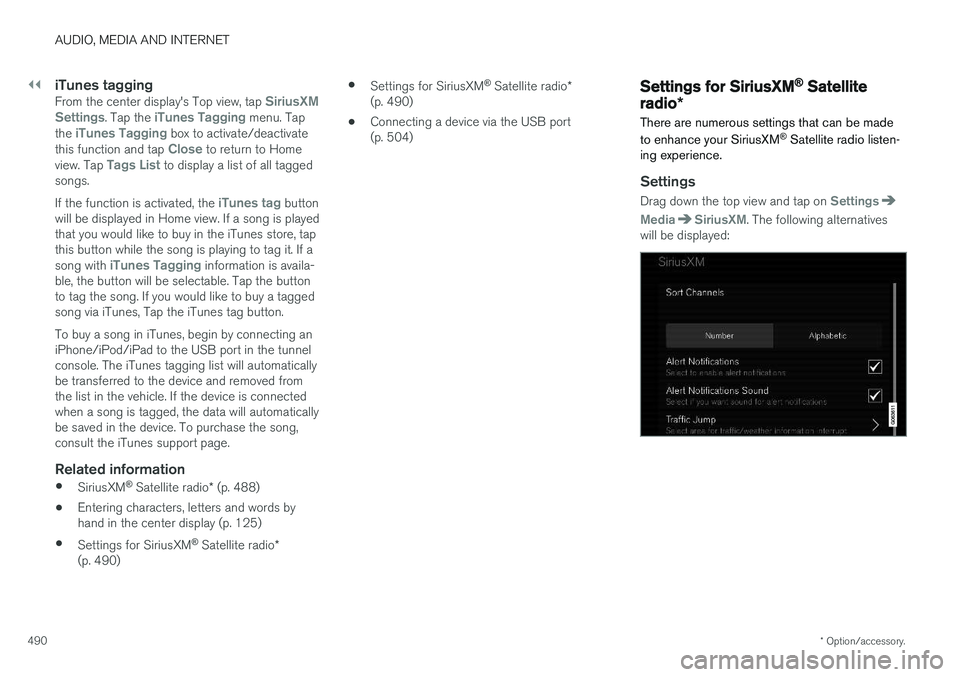
Drag down the top view and tap on Settings
MediaSiriusXM. The following alternatives
will be displayed:
Page 493 of 674
AUDIO, MEDIA AND INTERNET
* Option/accessory.491
Traffic Jump
Tap to display a list of cities from which you can choose to get traffic/weather information (or
Traffic jump off to deactivate the feature). Tap
to select a city (JUMP will be displayed on the
Home screen next to Library). Tap Back to
return to the list of settings or Close to return to
the Home screen. From the Home screen, tap
JUMP to activate the
function. When traffic/weather information is available from the selected city, the radio willautomatically tune to the channel providing theinformation. When the information/announce-ment is finished, the radio will automaticallyreturn to the channel that you were previously lis-tening to. During an announcement, tap
JUMP to interrupt
the message and return to the station that you were currently listening to.
Alert Notifications
Tap the box to activate/deactivate. When acti- vated, you will be notified if a song, artist, etc. thatyou have selected is playing. You will be asked ifyou want to listen.
Alert Notifications Sound
Opt to receive an audible alert when one of your selected choices is being played.
Sort Channels
Select how to sort your channels list.
iTunes Tagging
Tap to display a menu with the options: iTunes
Tagging and Tags List. With this feature acti-
vated, songs can be tagged for later purchase from the iTunes store.
Game Alerts
Tap to display a list of sports. Tap a sport to display a list of teams and tap a box on the right side of the screen to select ateam as a favorite. An alert will then be providedwhen information about the team is being broad-cast. Tap
Confirm below the list to return to the list of
sports. Tap
Back to return to the list of settings orClose to return to the main screen.
Unsubscribed Services
If you have a SiriusXM ®
Satellite radio subscrip-
tion, any channels not included in the subscrip- tion will be listed here. Call SiriusXM ™ to sub-
scribe. The phone number will be shown on the screen. If a cell phone is paired and connected tothe vehicle, tap the phone number to make thecall.
Skipped Stations
Tap to display a list of channels that you would like to skip (hide). Hide channels from the chan-nel list by tapping the boxes to the right of thescreen. Skipped (hidden) channels will not beshown in the channel list. However, a channel previously selected as a favorite will still be dis-played in the list of favorites, even it has beenadded to the skip list.
Skipped Categories
Tap to display a list of categories. Tap a category to skip (hide) it. It will not be displayed in the listof categories.
Related information
•
SiriusXM ®
Satellite radio * (p. 488)
• Using SiriusXM ®
Satellite radio * (p. 489)
Page 494 of 674

AUDIO, MEDIA AND INTERNET
* Option/accessory.
492
SiriusXM Travel Link®
*
SiriusXM Travel Link is a feature offered by
SiriusXM ®
Satellite radio * that can provide infor-
mation about e.g., weather forecasts, weather alerts, service stations, sports, etc. in the vicinityof the vehicle.
Starting SiriusXM Travel Link
NOTE
SiriusXM Travel Link services are only availa- ble in vehicles equipped with the SensusNavigation system.
From the center display's App view, tap Travel
Link to activate the feature. A disclaimer text will
be displayed. Tap OK to display a list of SiriusXM
Travel Link services: •
Alerts
•Fuel
•Sports
•Weather
•Favorites
In order to use one or more of these services, the user has to subscribe to the ones desired. To subscribe to a SiriusXM Travel Link service:
1. Open the center display's Top view.2. Tap
Settings. 3.
Press
SiriusXM Travel Link andSubscription Status.
> To subscribe, call the phone number listed on the screen.
Any services not subscribed will be grayed out and contain the text
Service not subscribed.
When the services have been activated (subscri- bed), tap the one of your choice to start it. The following applies for all of the
SiriusXM
Travel Link services:
• Pressing the
Back button will take you back
to the previous screen
• Pressing the
Close button will take you to
the SiriusXM Travel Link home screen.
NOTE
If the Close button is used to return to theSiriusXM Travel Link home screen, the fol-
lowing applies (the Weather service is used
here as an example):
• If you have already used the
Weatherfunction, tapping Weather again in theSiriusXM Travel Link home screen
before using any other SiriusXM
Travel Link service will return you to the
point where you left the Weather service.
• If another
SiriusXM Travel Link service
is used (e.g., Fuel, Sports, etc.) before
you return to the Weather service, you
will be returned to the default Weatherview (in this case, Local).
The same principle applies to all of the
SiriusXM Travel Link services.
FavoritesMany SiriusXM Travel Link selections can be saved for easy access as favorites by tapping the"star" icon next to the selection where applicable. To display a list of your favorites, tap the
Favorites application in the SiriusXM Travel Link
home screen.
Related information
• SiriusXM ®
Satellite radio * (p. 488)
• SiriusXM Travel Link ®
* - Fuel (p. 495)
Page 497 of 674
AUDIO, MEDIA AND INTERNET
}}
* Option/accessory.495
Information about a notification
If any notifications have been displayed on the screen, tap one for more detailed information (i.e.,the location of the weather problem on a mapand a description of the situation). If a phone number is available in a notification, a
Call button will be displayed. Tap this button for
additional information.
Related information
• SiriusXM Travel Link ®
* (p. 492)
• SiriusXM Travel Link ®
* - Fuel (p. 495)
• SiriusXM Travel Link ®
* - Sports (p. 496)
• SiriusXM Travel Link ®
* - Weather (p. 493)
SiriusXM Travel Link®
* - Fuel5
This SiriusXM Travel Link service provides infor- mation and guidance to service stations near thevehicle providing the type of fuel that you prefer/require for your vehicle.
From the SiriusXM Travel Link home screen, to show fuel information:
–Tap the Fuel button to display the main fuel
screen.
The following categories are shown:
• Search (the magnifying glass icon)
•
Nearby
•Recommended
•Favorites
•Brands
Tap one of the alternatives to display its screen.
NOTE
In each of the categories listed, tapping theSelect fuel type button near the bottom of
the screen opens a sub-view where you can specify the type of fuel preferred/required (
Regular, Midrange, Premium, Diesel,Electric 120V, etc.) Tap Done to return to
the previous screen.
SearchTap the magnifying glass icon. If the function is supported in the current context, a keyboard willappear on the screen. Enter the text of your choice and tap
Search for detailed information if
available.
NearbyTap for a list of service stations in the vicinity of the vehicle, with the nearest station at the top ofthe list. The following information will be provided where available:
• For vehicles using gasoline, the price infor-mation for regular gasoline (unless anothergrade/type of fuel has been selected in
Select fuel type)
• For electric vehicles/hybrids, information about charging stations, showing the totalnumber of charging ports and the number ofports currently not in use
• the distance to the station
• a star icon to set the service station as afavorite
Tap the name of a service station to display moredetailed information. For guidance to the service station, tap the
Start
navigation or Add as waypoint buttons. See
5 This service is not available in Canada.
Page 505 of 674
AUDIO, MEDIA AND INTERNET
503
Video settingsSome video playback settings can be adjusted, e.g. language.
The following can be adjusted by opening Top view and tapping
SettingsVideo or with the
video player in full-screen mode: Audio
Language, Off and Subtitle Language.
Related information
• Video (p. 502)
Streaming media via Bluetooth®
The vehicle's media player is equipped with Bluetooth and can play audio files fromBluetooth-enabled external devices such as cel-lular phones and tablets.
In order for the media player to be able to wire- lessly play audio files from an external device, thedevice must be connected to the vehicle viaBluetooth.
Related information
• Connecting a device via Bluetooth ®
(p. 503)
• Connecting a phone to the car via Bluetoothfor the first time (p. 511)
• Playing media (p. 498)
• Compatible file formats for media (p. 526)
Connecting a device via Bluetooth®
Connect a Bluetooth ®
device to the vehicle to
wirelessly play media and give the vehicle an Internet connection if it is available.
Many cellular phones on the market currently offer wireless Bluetooth ®
technology, but not all
phones are fully compatible with the vehicle. For additional information on compatibility, seesupport.volvocars.com. The procedure for connecting a media device is the same as for connecting a cellular phone to the vehicle via Bluetooth ®
.
Related information
• Streaming media via Bluetooth ®
(p. 503)
• Connecting a phone to the car via Bluetooth for the first time (p. 511)
• Playing media (p. 498)
Page 506 of 674

AUDIO, MEDIA AND INTERNET
* Option/accessory.
504
Playing media via the USB port External audio sources, such as an iPod ® or
MP3 player, can be connected to the audio sys- tem via the vehicle's USB port.
Devices with rechargeable batteries can be charged when they are connected via the USB port and the ignition is in mode I, II or the engine
is running. The content on the external source can be read faster if it only contains data of a compatible for-mat. Video files can also be played via the USBport. Some MP3 players have their own file system that the vehicle has support for.
Related information
• Connecting a device via the USB port(p. 504)
• Playing media (p. 498)
• Video (p. 502)
• Ignition modes (p. 417)
• Technical specifications for USB devices(p. 527)
• Apple ®
CarPlay ®
* (p. 505)
• Android Auto
* (p. 508)
Connecting a device via the USBport
External audio sources, such as an iPod ®
or
MP3 player, can be connected to the audio sys- tem via any of the vehicle's USB ports.
If the vehicle has two USB ports, the phone must be connected to the port with the white frame to use Apple CarPlay * or Android Auto *.
USB ports (type A) in the tunnel console. Route the cable forward to help avoid pinching when the cover isclosed.
Related information
• Playing media (p. 498)
• Playing media via the USB port (p. 504)
• Media player (p. 497)
• Technical specifications for USB devices (p. 527) •
Technical specifications for USB devices(p. 527)
• Apple ®
CarPlay ®
* (p. 505)
• Android Auto
* (p. 508)
Page 507 of 674

AUDIO, MEDIA AND INTERNET
}}
* Option/accessory.505
Apple® CarPlay®
*
With CarPlay, you can listen to music, make phone calls, get driving instructions, send/receive messages and use Siri, all while remain-ing focused on driving.
CarPlay works with select Apple devices. If the car doesnot already support CarPlay,this can be retrofitted. Contacta Volvo retailer to installCarPlay.
Information about supported apps and compati- ble phones is available on the Apple website:www.apple.com/ios/carplay/. Using apps that arenot compatible with CarPlay could cause the con-nection between iPhone and the vehicle to belost. Please note that Volvo is not responsible forthe content of CarPlay. When using map navigation via CarPlay, guidance will only be shown on the center display and notin the instrument panel or head-up display. CarPlay apps can be controlled from the center display, a phone or with the right-side steeringwheel keypad (for certain functions). The appscan also be voice-controlled using Siri. Press and hold the
button on the steering wheel to
start voice control with Siri. Press briefly to acti- vate the vehicle's own voice control system. If Siri cuts off too soon, press and hold the
6
but-
ton on the steering wheel.
By using Apple CarPlay you acknowledge the following: Apple CarPlay is a serviceprovided by Apple Inc. under its terms andconditions. Volvo Cars is thus notresponsible for Apple CarPlay or itsfeatures/applications. When using AppleCarPlay, certain information from your car(including its position) is transferred to youriPhone. In relation to Volvo Cars, you arefully responsible for your and any othersperson
Page 508 of 674
||
AUDIO, MEDIA AND INTERNET
* Option/accessory.
506 5. Tap the desired app.
> The app will start up.
Starting CarPlay
CarPlay can be started as follows after an iPhone is connected.
1. Connect an iPhone to the USB port. If there are two USB ports, use the one with the white frame. >If the auto start setting is selected -
the name of the phone will be displayed.
2. Tap the name of the phone - the CarPlay tile will open and compatible apps will be dis- played.
3. If the CarPlay tile does not open, tap
Apple
CarPlay in App view.
> The CarPlay tile will open and compatible apps will be displayed.
4. Tap the desired app. > The app will start up.
CarPlay will run in the background if another app is started in the same tile. To display CarPlay inthe tile, tap the CarPlay icon in App view.
Switching connection between CarPlay and iPod
CarPlay to iPod
1. Tap Settings in the Top view. 2. Proceed to
CommunicationApple
CarPlay.
3. Uncheck the box for the Apple device that should no longer start CarPlay automatically when the USB cable is connected.
4. Remove and then reinsert the Apple device into the USB port.
5. Open the
iPod app from App view.
iPod to CarPlay
1.Tap Apple CarPlay in App view.
2. Read the information in the pop-up window and then tap
OK.
3. Remove and then reinsert the Apple device into the USB port.
> The Apple CarPlay tile will open and com-
patible apps will be displayed 7
.
Related information
• Connecting a device via the USB port (p. 504)
• Apple ®
CarPlay ®
* (p. 505)
• Settings for Apple ®
CarPlay ®
* (p. 506)
• Connecting the car to the Internet via amobile device (Wi-Fi) (p. 521)
• Connect the car to the Internet via carmodem (SIM card) (p. 522)
• Voice control (p. 141)
Settings for Apple® CarPlay®
*
Settings for an Apple device connected through CarPlay 8
.
Automatic start1. Tap Settings in the Top view.
2. Tap
CommunicationApple CarPlay and
select the desired setting:
• Check the box - CarPlay will start auto- matically when the USB cable is con-nected.
• Uncheck the box - CarPlay will not startautomatically when the USB cable is con-nected.
A maximum of 20 Apple devices can be stored inthe list. When the list is full and a new device isconnected, the oldest one will be deleted. To delete the list, the settings must be rest in the center display (factory reset).
System Volumes1. Tap Settings in the Top view.
2. Tap
SoundSystem Volumes to change
the settings for the following:
•
Voice Control
•Navi Voice Guidance
•Phone Ringtone
7 Apple, CarPlay, iPhone and iPod are registered trademarks of Apple Inc.