2018 VOLVO XC60 T8 change time
[x] Cancel search: change timePage 296 of 674
DRIVER SUPPORT
* Option/accessory.
294
Passing assistance with AdaptiveCruise Control Adaptive Cruise Control (ACC 50
) can assist the
driver when passing other vehicles.
How passing assistance worksWhen ACC is following another vehicle and you indicate that you intend to pass that vehicle by using the turn signal 51
, Adaptive Cruise Control
will begin accelerating toward the vehicle ahead before your vehicle has moved into the passing
lane. The function will then delay a speed reduction to avoid early braking as your vehicle approaches aslower-moving vehicle. The function remains active until your vehicle has passed the other vehicle.
WARNING
Please note that this function can be acti- vated in more situations than just passinganother vehicle, such as when a direction indi-cator is used to indicate a lane change orbefore exiting to another road – the vehiclewill then briefly accelerate.
Related information
• Adaptive Cruise Control
* (p. 285)
Starting passing assistance withAdaptive Cruise Control
Requirements for passing assistanceIn order to activate passing assistance:
• your vehicle must be following a vehicle ahead (target vehicle)
• your vehicle's
current speed must be
at least 70 km/h (43 mph)
• the set speed
for ACC must be high
enough to safely pass another vehicle.
Starting parking assistanceTo start passing assistance:
–Turn on the left turn signal.
> Passing assistance will start.
Related information
• Adaptive Cruise Control
* (p. 285)
Limitations of passing assistancewith Adaptive Cruise Control
Passing assistance functionality may be reduced in certain situations.
WARNING
The driver should be aware that if conditions suddenly change when using Parking Assis-tance, the function may implement an unde-sired acceleration in certain conditions. Some situations should be avoided, e.g. if: • the vehicle is approaching an exit in the same direction as passing would normallyoccur
• the vehicle ahead slows before your vehi-cle has had time to switch to the passinglane
• traffic in the passing lane slows down
• a vehicle for right-hand traffic is driven ina country with left-hand traffic (or viceversa).
Situations of this type can be avoided by tempo- rarily putting ACC 52
in standby mode.
Related information
• Adaptive Cruise Control
* (p. 285)
50
Adaptive Cruise Control
51 Only the left-hand turn signal for left-hand drive vehicles, or right-hand turn signal for right-hand drive vehicles.
52 Adaptive Cruise Control
Page 299 of 674
DRIVER SUPPORT
}}
* Option/accessory.297
Related information
•Adaptive Cruise Control
* (p. 285)
Switching between Cruise Controland Adaptive Cruise Control
In vehicles equipped with Adaptive Cruise Con- trol (ACC 56
), the driver can switch between
Cruise Control (CC 57
) and ACC.
A symbol in the instrument panel indicates which cruise control system is active
CCACC
AA
Cruise control Adaptive Cruise Control
A WHITE symbol: The function is active. GRAY symbol: Standby mode
Switching from ACC to CCTo do so: 1. Press the
button on the steering wheel
keypad to put Adaptive Cruise Control in standby mode. 2.
Tap the
Cruise Control button in the center
display's Function view. The button's indica- tor will change from GRAY to GREEN.
> The symbol in the instrument panel will
change from
ACC to CC, indicating that Adaptive Cruise Con- trol is off and Cruise Control is in standbymode.
3. Pressing the
button on the steering
wheel keypad.
> Cruise Control will start and the vehicle's current speed will be set.
WARNING
Switching from ACC to CC means that the vehicle:
• will no longer maintain a preset time interval to the vehicle ahead.
• will only follow the stored speed and thedriver must therefore apply the brakeswhen necessary.
If CC is active when the engine is turned off, ACC
will be automatically activated the next time theengine is started.
56 Adaptive Cruise Control
57 Cruise Control
Page 300 of 674
||
DRIVER SUPPORT
* Option/accessory.
298
Switching from CC to ACCTo do so: 1. Press the
button on the steering wheel
keypad to put Cruise Control in standby mode.
2. Tap the
Cruise Control button in Function
view. The button's indicator will change from GREEN to GRAY.
> The symbols in the instrument panel will
switch from
CC to ACC
to indicate that Adaptive Cruise Control is in standby mode.
3. Pressing the
button on the steering
wheel keypad.
> Adaptive Cruise Control will go into active mode and set the vehicle's current speed and the selected time interval to the vehi-cle ahead.
Related information
• Adaptive Cruise Control
* (p. 285)
Page 303 of 674

DRIVER SUPPORT
}}
301
Pilot Assist
Pilot Assist helps the driver keep the vehicle in the current traffic lane by providing steeringassistance and maintaining an even speed and aset time interval to the vehicle ahead.
How Pilot Assist worksThe Pilot Assist function is primarily intended for use on highways and other major roads where itcan help provide a more comfortable and relaxingdriving experience.
The camera/radar sensor monitors the distance to the vehicle ahead and detects lane markings 61
.
Camera and radar sensor
Distance monitor
Lane marker line monitors The driver sets the desired speed and distance to the vehicle ahead. Pilot Assist monitors the dis-tance to the vehicle ahead and the traffic lane'sside markers using the camera and radar sensor.The system maintains the set time interval to thevehicle ahead by automatically adjusting yourvehicle's speed and keeps your vehicle in its laneby providing steering assistance. Pilot Assist's steering assistance is based on monitoring the direction of the vehicle ahead andthe traffic lane's side marker lines. The driver canoverride Pilot Assist's steering recommendationsat any time and steer in another direction, e.g. tochange lanes or avoid obstacles on the road. If the camera/radar sensor cannot detect the lane's side marker lines or if Pilot Assist is unablefor some other reason to clearly interpret thelane, Pilot Assist will temporarily deactivate steer-ing assistance until it can once again interpretthe lane markings. However, the speed and dis-tance warnings will remain active.
WARNING
Pilot Assist is deactivated automatically and resumes working without prior notice.
The color of the steering wheel symbol indicates the currentstatus of steering assistance: • GREEN indicates that steer- ing assistance is active • GRAY (as shown in illustra-
tion) indicates that steering assistance is deacti- vated.
61 Note: This illustration is general and details may vary depending on model.
Page 308 of 674
||
DRIVER SUPPORT
306With Adaptive Cruise Control in
standby mode:
1. Press the
▶ button on the steering wheel (6).
> The
symbol will change to Pilot
Assist in standby mode (8).
2. Press the
button on the steering wheel
(2).
> Pilot Assist will start and the current speed will be stored, which will be shown by numbers in the center of the speedom-eter.
...or... With Adaptive Cruise Control started:
–Press the ▶ button on the steering wheel (6).
> Pilot Assist will start.
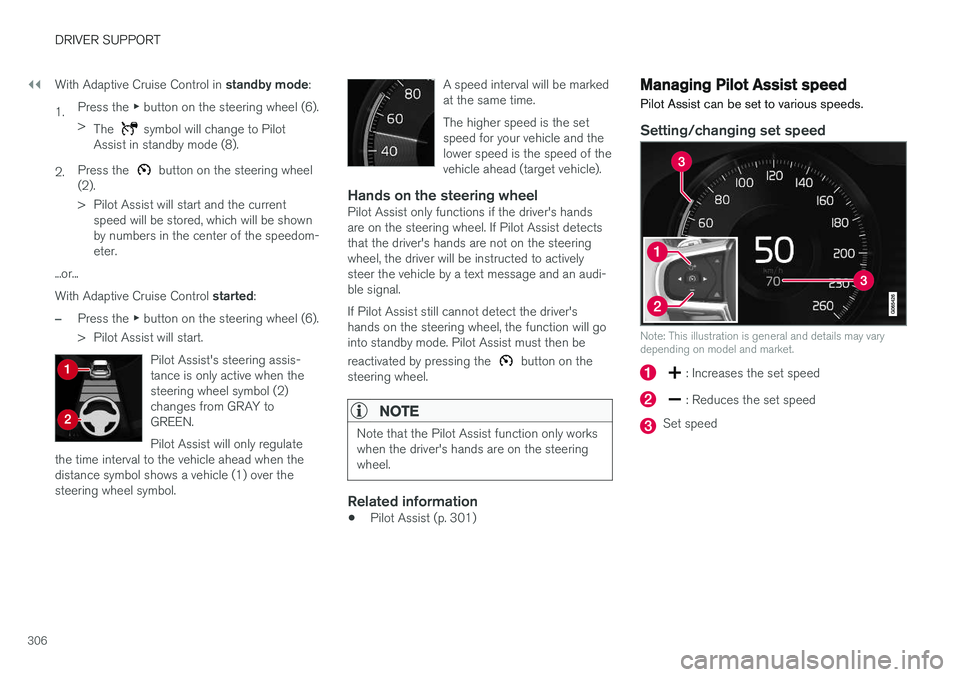
Pilot Assist's steering assis- tance is only active when thesteering wheel symbol (2)changes from GRAY toGREEN. Pilot Assist will only regulate
the time interval to the vehicle ahead when the distance symbol shows a vehicle (1) over thesteering wheel symbol.
A speed interval will be marked at the same time. The higher speed is the set speed for your vehicle and thelower speed is the speed of thevehicle ahead (target vehicle).
Hands on the steering wheelPilot Assist only functions if the driver's hands are on the steering wheel. If Pilot Assist detectsthat the driver's hands are not on the steeringwheel, the driver will be instructed to activelysteer the vehicle by a text message and an audi-ble signal. If Pilot Assist still cannot detect the driver's hands on the steering wheel, the function will gointo standby mode. Pilot Assist must then be reactivated by pressing the
button on the
steering wheel.
NOTE
Note that the Pilot Assist function only works when the driver's hands are on the steeringwheel.
Related information
• Pilot Assist (p. 301)
Managing Pilot Assist speed Pilot Assist can be set to various speeds.
Setting/changing set speed
Note: This illustration is general and details may vary depending on model and market.
: Increases the set speed
: Reduces the set speed
Set speed
Page 309 of 674
DRIVER SUPPORT
}}
307
–Change a set speed by pressing the (1)
or
(2) buttons briefly or by pressing and
holding them:
• Press briefly
: Press briefly: each press
changes the speed in +/- 5 mph (+/- 5 km/h) increments.
• Press
and hold: Release the button when
the set speed indicator (3) has moved tothe desired speed.
• The most recently set speed will be stored.
If speed is increased by depressing the accelera- tor pedal while pressing the
button on the
steering wheel, the vehicle's speed when the but- ton is pressed will be stored as the set speed. Temporarily increasing speed using the accelera- tor pedal, e.g. when passing another vehicle, willnot affect the setting. The vehicle will return tothe set speed when the accelerator pedal isreleased.
Automatic transmission
Pilot Assist can follow another vehicle at speeds from a standstill up to 200 km/h (125 mph). The lowest speed that can be set for Pilot Assist is 30 km/h (20 mph). When following anothervehicle, ACC can monitor that vehicle's speedand slow your own vehicle down to a standstill,but it is not possible to set speeds lower than30 km/h (20 mph). The highest possible speed that can be set is200 km/h (125 mph).
Related information
•
Pilot Assist (p. 301)
Setting a time interval for PilotAssist
Pilot Assist can be set to different time intervals.
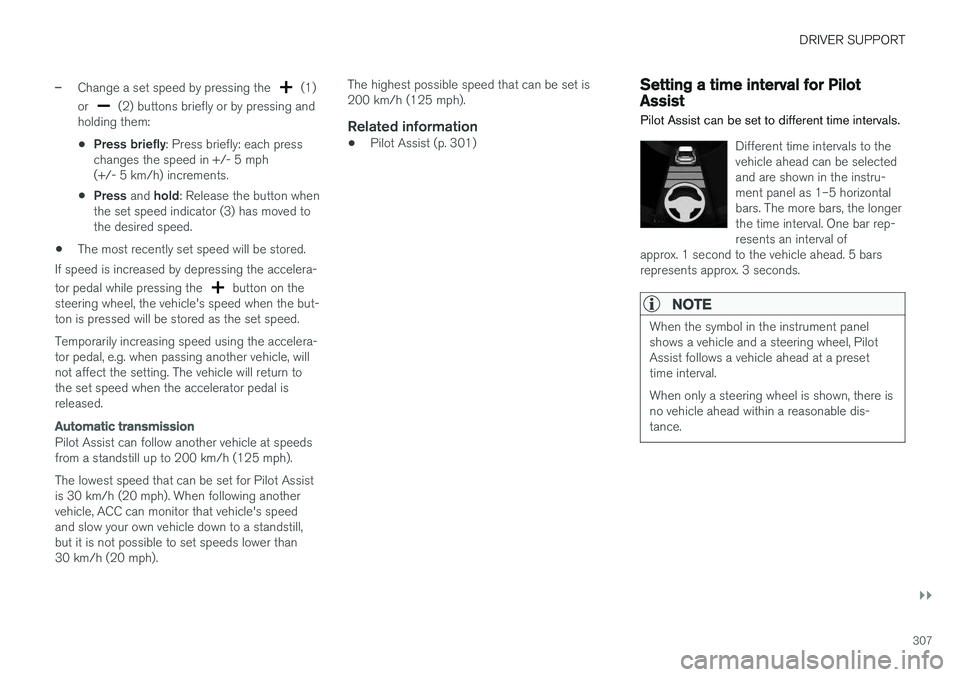
Different time intervals to the vehicle ahead can be selectedand are shown in the instru-ment panel as 1–5 horizontalbars. The more bars, the longerthe time interval. One bar rep-resents an interval of
approx. 1 second to the vehicle ahead. 5 barsrepresents approx. 3 seconds.
NOTE
When the symbol in the instrument panel shows a vehicle and a steering wheel, PilotAssist follows a vehicle ahead at a presettime interval. When only a steering wheel is shown, there is no vehicle ahead within a reasonable dis-tance.
Page 313 of 674
DRIVER SUPPORT
311
Passing assistance with Pilot Assist
Pilot Assist can assist the driver when passing other vehicles.
How passing assistance worksWhen Pilot Assist is following another vehicle and you indicate that you intend to pass that vehicle by using the turn signal 66
, Pilot Assist will
begin accelerating toward the vehicle ahead before your vehicle has moved into the passing
lane. The function will then delay a speed reduction to avoid early braking as your vehicle approaches aslower-moving vehicle. The function remains active until your vehicle has passed the other vehicle.
WARNING
Please note that this function can be acti- vated in more situations than just passinganother vehicle, such as when a direction indi-cator is used to indicate a lane change orbefore exiting to another road – the vehiclewill then briefly accelerate.
Related information
• Pilot Assist (p. 301)
Starting passing assistance withPilot Assist
Requirements for passing assistanceIn order to activate passing assistance:
• your vehicle must be following a vehicle ahead (target vehicle)
• your vehicle's
current speed must be
at least 70 km/h (43 mph)
• the set speed
for Pilot Assist must be high
enough to safely pass another vehicle.
Starting parking assistanceTo start passing assistance:
–Turn on the left turn signal.
> Passing assistance will start.
Related information
• Pilot Assist (p. 301)
Passing assistance with Pilot Assistlimitations
Passing assistance functionality may be reduced in certain situations.
WARNING
The driver should be aware that if conditions suddenly change when using Parking Assis-tance, the function may implement an unde-sired acceleration in certain conditions. Some situations should be avoided, e.g. if: • the vehicle is approaching an exit in the same direction as passing would normallyoccur
• the vehicle ahead slows before your vehi-cle has had time to switch to the passinglane
• traffic in the passing lane slows down
• a vehicle for right-hand traffic is driven ina country with left-hand traffic (or viceversa).
Situations of this type can be avoided by tempo-rarily putting Pilot Assist in standby mode.
Related information
• Pilot Assist (p. 301)
66
Only the left-hand turn signal for left-hand drive vehicles, or right-hand turn signal for right-hand drive vehicles.
Page 314 of 674

DRIVER SUPPORT
312
Switching target vehicles with PilotAssist
At certain speeds, models with automatic trans-
missions and Pilot Assist can switch target vehi-cles.
Switching target vehicles
If the target vehicle ahead turns suddenly, there may be stationary traffic ahead.
When Pilot Assist is actively following another vehicle at speeds under 30 km/h (20 mph) and
switches targets from a moving vehicle to a sta-
tionary vehicle, Pilot Assist will brake for the sta-tionary vehicle.
WARNING
When Pilot Assist follows another vehicle at speeds over approx. 30 km/h (20 mph) and
changes target vehicle – from a moving vehi- cle to a stationary one – Pilot Assist will ignore the stationary vehicle and instead
accelerate to the stored speed.
• The driver must then intervene and apply the brakes.
Automatic standby mode when switching
targets
Pilot Assist disengages and goes into standby mode if:
• your vehicle's speed goes below 5 km/h(3 mph) and Pilot Assist cannot determine ifthe target object is a stationary vehicle oranother object, e.g. a speed bump.
• your vehicle's speed goes under 5 km/h(3 mph) and the vehicle ahead turns so thatPilot Assist no longer has a vehicle to follow.
Related information
•Pilot Assist (p. 301)
Automatic braking with Pilot Assist
Pilot Assist has a special braking function in slow traffic and at a standstill.
Braking function in slow traffic and at a standstill
In slow-moving, stop-and-go traffic or when stop- ped at a traffic light, driving will resume automati-cally if the vehicle is stopped for less thanapprox. 3 seconds. If it takes more than 3 sec-onds for the vehicle ahead to begin moving again,Pilot Assist will go into standby mode and theAuto-hold brake function will activate.
–Pilot Assist can be reactivated by:
• Pressing the
button on the steering
wheel keypad.
• Pressing the accelerator pedal.
> Pilot Assist will resume following the vehi- cle ahead if it begins to move within approx. 6 seconds.
NOTE
Pilot Assist can keep the vehicle stationary for no more than 5 minutes – after that timethe parking brake is applied and the functionis deactivated. The parking brake must be released before Pilot Assist can be reactivated.