2018 VOLVO XC60 T8 Service
[x] Cancel search: ServicePage 105 of 674

DISPLAYS AND VOICE CONTROL
}}
103
Handling messages saved from theinstrument panel
Messages saved from the instrument panel and center displays are handled in the center display.
Saved messages can be viewed in the Car Status app.
The messages displayed in the instrument panel that need to be saved are stored in the
Car
status app in the center dis-
play. The message Car
message stored in Car Status application
will simul-
taneously appear in the center display.
Reading saved messages
To read a saved message immediately:
–Tap the button to the right of the messageCar message stored in Car Status application in the center display.
> The saved message will be displayed in the
Car status app.
To read saved messages at a later time: 1. Open the
Car status app from App view in
the center display.
> The app will open in the bottom tile of Home view.
2. Select the
Messages tab in the app.
> A list of saved messages will be displayed.
3. Tap a message to expand/minimize it. > More information about the message willappear in the list and the image to the left of the app will display information aboutthe message in graphic form.
Handling saved messages
In expanded form, some messages have two but- tons available for booking service or reading theOwner's Manual. Booking service for saved messages:
–With the message in expanded form, tapRequest appoint.Call to make Appointment3
for assistance booking serv-
ice. > With
Request appoint.: TheAppointments tab will open in the app
and create a request for a service/repair appointment. With
Call to make Appointment: The
phone app will open and call a service center to make an appointment for serviceor repairs.
Reading the Owner's Manual for saved mes-sages:
–With the message in expanded form, tapOwner's manual to read relevant informa-
tion about the message in the Owner's Man- ual.
> The Owner's Manual will open in the cen- ter display and provide information related to the message.
Saved messages in the app are automaticallydeleted each time the engine is started.
3 Market dependent. Volvo ID and selected workshop also need to be registered
Page 132 of 674
DISPLAYS AND VOICE CONTROL
130
Changing settings in the centerdisplay You can change
Settings and information for
many of the vehicle's functions via the center display.
1. Open Top view by tapping the tab or by drag- ging/swiping from the top of the screen downward.
2. Tap
Settings to open the Settings menu.
3. Tap one of the categories and sub-catego- ries to navigate to the desired setting.
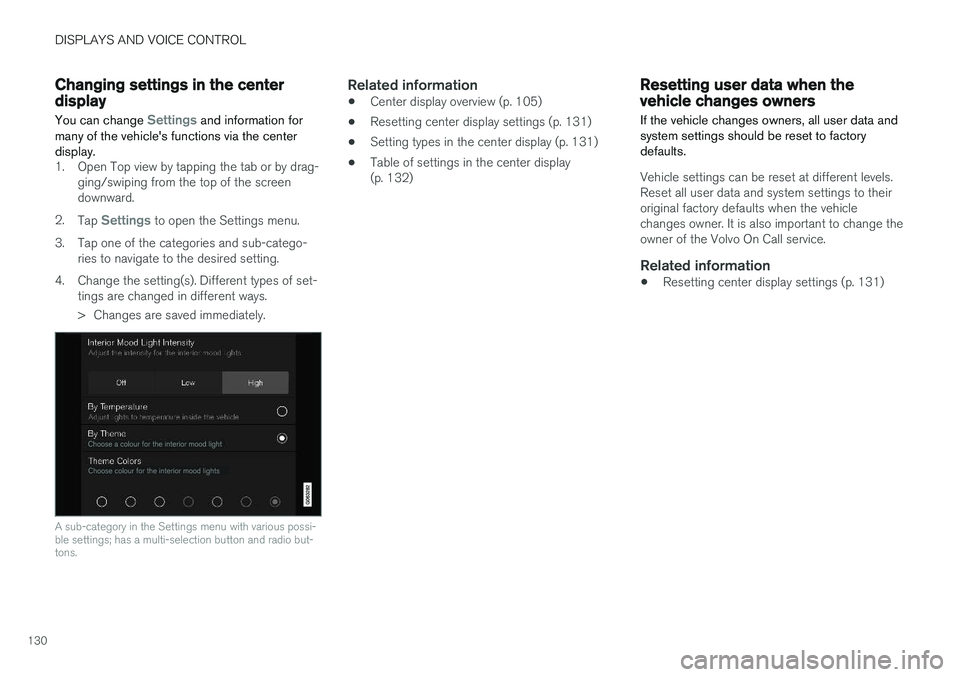
4. Change the setting(s). Different types of set- tings are changed in different ways.
> Changes are saved immediately.
A sub-category in the Settings menu with various possi- ble settings; has a multi-selection button and radio but-tons.
Related information
• Center display overview (p. 105)
• Resetting center display settings (p. 131)
• Setting types in the center display (p. 131)
• Table of settings in the center display (p. 132)
Resetting user data when thevehicle changes owners
If the vehicle changes owners, all user data and system settings should be reset to factorydefaults.
Vehicle settings can be reset at different levels. Reset all user data and system settings to theiroriginal factory defaults when the vehiclechanges owner. It is also important to change theowner of the Volvo On Call service.
Related information
• Resetting center display settings (p. 131)
Page 135 of 674

DISPLAYS AND VOICE CONTROL
}}
* Option/accessory.133
Sub-categories
Gracenote®
Video
Communication
Sub-categories
Phone Text Messages Android Auto
*
Apple CarPlay*
Bluetooth Devices Wi-FiVehicle Wi-Fi HotspotVehicle Modem Internet Volvo On Call Volvo Service Networks
ClimateThe Climate main category does not have any
sub-categories.
System
Sub-categories
Driver Profile Date and TimeSystem Languages and UnitsPrivacy and dataKeyboard Layouts Voice Control
*
Factory Reset System Information
Related information
• Center display overview (p. 105)
• Changing settings in the center display (p. 130)
• Resetting center display settings (p. 131)
Driver profiles
Many of the vehicle's settings can be custom- ized to the driver's personal preferences andsaved in one or more driver profiles.
These personal settings are automatically saved in the active driver profile. Each key can be linkedto one driver profile. When the linked key is used,the vehicle is customized to the specific settingsof that driver profile.
Which settings are saved in driver profiles?
The vehicle has settings that can be made eitherpersonal or global. The personal settings aresaved in driver profiles. Settings that can be saved in a driver profile include, among other things, screens, mirrors, front seats, navigation *, audio and media system,
language and voice control. Some settings are global settings. These settings can be changed but are not saved to a specificdriver profile. Changes to global settings affect allprofiles.
Page 174 of 674
WINDOWS, GLASS AND MIRRORS
* Option/accessory.
172
Using the windshield wipers
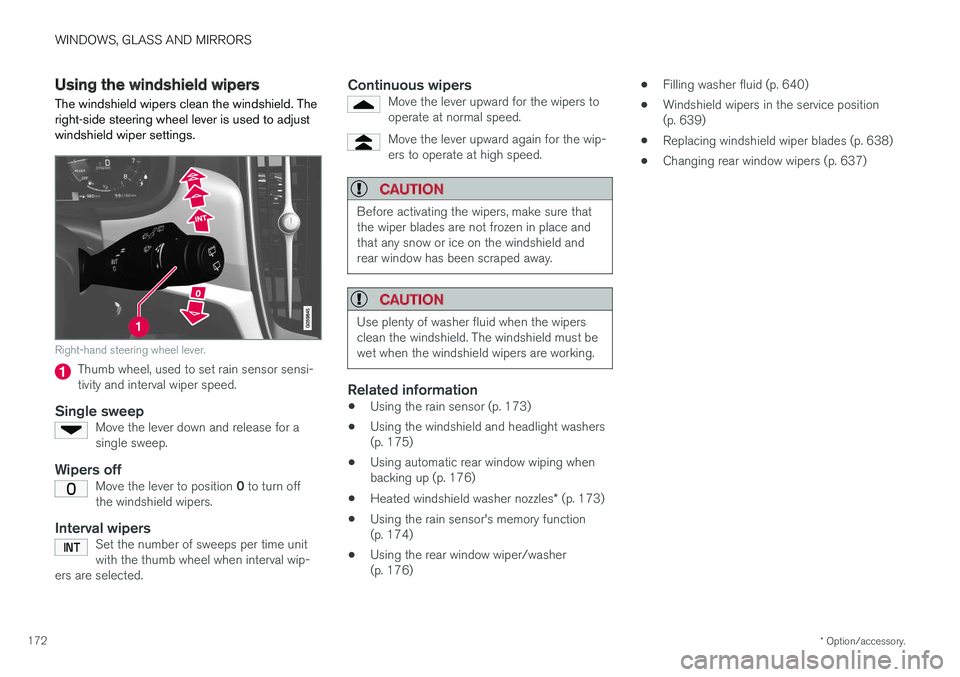
The windshield wipers clean the windshield. The right-side steering wheel lever is used to adjustwindshield wiper settings.
Right-hand steering wheel lever.
Thumb wheel, used to set rain sensor sensi- tivity and interval wiper speed.
Single sweepMove the lever down and release for asingle sweep.
Wipers offMove the lever to position 0 to turn off
the windshield wipers.
Interval wipersSet the number of sweeps per time unit with the thumb wheel when interval wip-
ers are selected.
Continuous wipersMove the lever upward for the wipers to operate at normal speed.
Move the lever upward again for the wip- ers to operate at high speed.
CAUTION
Before activating the wipers, make sure that the wiper blades are not frozen in place andthat any snow or ice on the windshield andrear window has been scraped away.
CAUTION
Use plenty of washer fluid when the wipers clean the windshield. The windshield must bewet when the windshield wipers are working.
Related information
• Using the rain sensor (p. 173)
• Using the windshield and headlight washers (p. 175)
• Using automatic rear window wiping whenbacking up (p. 176)
• Heated windshield washer nozzles
* (p. 173)
• Using the rain sensor's memory function(p. 174)
• Using the rear window wiper/washer(p. 176) •
Filling washer fluid (p. 640)
• Windshield wipers in the service position(p. 639)
• Replacing windshield wiper blades (p. 638)
• Changing rear window wipers (p. 637)
Page 175 of 674

WINDOWS, GLASS AND MIRRORS
}}
* Option/accessory.173
Heated windshield washer nozzles *
The washer nozzles are heated automatically in cold weather to prevent the washer fluid fromfreezing.
Related information
• Using the rain sensor (p. 173)
• Using the windshield and headlight washers (p. 175)
• Using automatic rear window wiping whenbacking up (p. 176)
• Using the rain sensor's memory function(p. 174)
• Using the rear window wiper/washer(p. 176)
• Filling washer fluid (p. 640)
• Windshield wipers in the service position(p. 639)
• Replacing windshield wiper blades (p. 638)
• Changing rear window wipers (p. 637)
• Using the windshield wipers (p. 172)
Using the rain sensor The rain sensor monitors the amount of water on the windshield and automatically starts the wind-shield wipers. Rain sensor sensitivity can beadjusted using the thumb wheel on the right-hand steering wheel lever.
Right-hand steering wheel lever.
Rain sensor button
Thumb wheel, sensitivity/interval wiper speed
When the rain sensor is activated, the
rain
sensor symbol will be displayed in the instrument panel.
Activating the rain sensorWhen the rain sensor is activated, the engine must be running or the ignition must be in mode I
or II. The windshield wiper lever must also be in
position 0 or in the single sweep position. Activate the rain sensor by pressing the rain sen- sor button
.
If the lever is pressed down, the wipers will make additional sweeps across the windshield. Turn the thumb wheel upward for increased sen- sitivity and downward for decreased sensitivity.The wipers will make one extra sweep when thethumb wheel is turned upward.
Deactivate the rain sensor
Deactivate the rain sensor by pressing the rain sensor button or moving the lever upward to another wiper mode. The rain sensor is automatically deactivated in ignition mode 0 or when the engine is switched
off. The rain sensor is also automatically deactivated when the wiper blades are put in the serviceposition. The rain sensor will reactivate whenservice mode is switched off.
CAUTION
The windshield wipers may start inadvertently and be damaged in automatic car washes.Deactivate the rain sensor when the engine is running or when the ignition is in mode I or II.
The symbol in the instrument panel will go out.
Page 176 of 674

||
WINDOWS, GLASS AND MIRRORS
* Option/accessory.
174
Related information
• Using the windshield and headlight washers (p. 175)
• Using automatic rear window wiping whenbacking up (p. 176)
• Heated windshield washer nozzles
* (p. 173)
• Using the rain sensor's memory function(p. 174)
• Using the rear window wiper/washer (p. 176)
• Filling washer fluid (p. 640)
• Windshield wipers in the service position (p. 639)
• Replacing windshield wiper blades (p. 638)
• Changing rear window wipers (p. 637)
• Using the windshield wipers (p. 172)
Using the rain sensor's memoryfunction The rain sensor monitors the amount of water on the windshield and automatically starts the wind-shield wipers.
Activating/deactivating memory function
The rain sensor's memory function can be set to activate so that the rain sensor button does notneed to be pressed each time the engine isstarted: 1.
Tap
Settings in the Top view in the center
display.
2. Tap
My CarWipers.
3. Select
Rain Sensor Memory to activate/
deactivate the memory function.
Related information
• Using the rain sensor (p. 173)
• Using the windshield and headlight washers (p. 175)
• Using automatic rear window wiping whenbacking up (p. 176)
• Heated windshield washer nozzles
* (p. 173)
• Using the rear window wiper/washer(p. 176)
• Filling washer fluid (p. 640) •
Windshield wipers in the service position(p. 639)
• Replacing windshield wiper blades (p. 638)
• Changing rear window wipers (p. 637)
• Using the windshield wipers (p. 172)
Page 177 of 674

WINDOWS, GLASS AND MIRRORS
* Option/accessory.175
Using the windshield and headlightwashers
The windshield and headlight washers clean the windshield and headlights. Use the right-sidesteering wheel lever to start the windshield andheadlight washers.
Starting the windshield and headlight washers
Washing function, right-hand steering wheel lever.
–Move the right-hand steering wheel lever toward the steering wheel to start the wind-shield and headlight washers.
> After the lever is released, the wipers make several extra sweeps.
CAUTION
Avoid activating the washer system when it is frozen or the fluid reservoir is empty. Other-wise, there is a risk of damaging the pump.
Headlight washer *To save washer fluid, the headlights are washed automatically according to a defined intervalwhen the headlights are on.
Reduced washingWhen there is about 1 liter (1 qt) of washer fluid left in the reservoir and the Washer fluid Level
low, refill message is displayed in the instrument
panel together with the
symbol, the washer
fluid supply to the headlights is cut off. This is to prioritize windshield cleaning and visibilitythrough it. The headlights are only washed if highor low beam is on.
Related information
• Using the rain sensor (p. 173)
• Using automatic rear window wiping whenbacking up (p. 176)
• Heated windshield washer nozzles
* (p. 173)
• Using the rain sensor's memory function(p. 174)
• Using the rear window wiper/washer(p. 176)
• Filling washer fluid (p. 640) •
Windshield wipers in the service position(p. 639)
• Replacing windshield wiper blades (p. 638)
• Changing rear window wipers (p. 637)
• Using the windshield wipers (p. 172)
Page 178 of 674

WINDOWS, GLASS AND MIRRORS
* Option/accessory.
176
Using the rear window wiper/washer
The rear window wiper/washer cleans the rear window. Use the right-side steering wheel leverto start and control the wiper/washer.
Activating the rear window wiper/ washer
NOTE
The rear window wiper is equipped with over- heating protection that switches off the motorwiper if it becomes overheated. The rear win-dow wiper can be operated again after a cool-ing-down period.
Select for interval rear window wiper.
Select for continuous rear window
wiper.
–Move the right-side steering wheel lever for- ward to wash/wipe the rear window.
Related information
• Using the rain sensor (p. 173)
• Using the windshield and headlight washers(p. 175)
• Using automatic rear window wiping whenbacking up (p. 176)
• Heated windshield washer nozzles
* (p. 173)
• Using the rain sensor's memory function(p. 174)
• Filling washer fluid (p. 640)
• Windshield wipers in the service position(p. 639)
• Replacing windshield wiper blades (p. 638)
• Changing rear window wipers (p. 637)
• Using the windshield wipers (p. 172)
Using automatic rear window wipingwhen backing up
If reverse gear is engaged while the windshield wipers are on, the rear window wipers will start.This function is deactivated when a differentgear is selected.
1. Tap Settings in the Top view in the center
display.
2. Tap
My CarWipers.
3. Select
Auto Rear Wiper to activate/deacti-
vate automatic rear window wiping when backing up.
If the rear window wipers are already in continu-ous wiper mode, no change will be made.
Related information
• Using the rain sensor (p. 173)
• Using the windshield and headlight washers(p. 175)
• Heated windshield washer nozzles
* (p. 173)
• Using the rain sensor's memory function(p. 174)
• Using the rear window wiper/washer(p. 176)
• Filling washer fluid (p. 640)
• Windshield wipers in the service position(p. 639)
• Replacing windshield wiper blades (p. 638)