2018 VOLVO V90 ABS
[x] Cancel search: ABSPage 593 of 656

MAINTENANCE AND SERVICE
591
Specifications
BatteryH7 AGMH8 AGM
Voltage (V) 12 12
Cold start capacity A
- CCA B
(A) 800
850
Dimensions, L×W×H 315×175×190 mm (12.4×6.9×7.5 inches) 353×175×190 mm (13.9×6.9×7.5 inches)
Capacity (Ah) 80 95
A
According to EN standard.
B Cold Cranking Amperes.
Volvo recommends that batteries are replaced by an authorized Volvo workshop.
CAUTION
When replacing the starter battery or support battery, an AGM 19
battery must be installed.
CAUTION
If replacing the starter battery, make sure you replace it with a battery with the same coldstart capacity and type as the original battery(see the decal on the battery).
NOTE
The size of the starter battery should conform to the dimensions of the original battery.
Related information
• Battery symbols (p. 593)
• Support battery (p. 592)
• Jump starting using another battery (p. 439)
19
Absorbed Glass Mat.
Page 595 of 656
MAINTENANCE AND SERVICE
}}
593
NOTE
If the starter battery is discharged to the extent that the vehicle does not have normalelectrical functions and the engine must thenbe jump-started with an external battery or abattery charger, the Start/Stop function mayremain activated. If the Start/Stop functionshortly thereafter auto-stops the engine, thereis a huge risk that auto-start of the engine willfail due to insufficient battery capacity sincethe battery had not had time to recharge. If the vehicle has been jump-started or if there has not been enough time for the bat-tery to be charged with a battery charger, it isadvisable to temporarily deactivate theStart/Stop function until the battery has beenrecharged by the vehicle. At an ambient tem-perature of about +15°C (about 60°F), thebattery must be charged by the vehicle for atleast one hour. At lower ambient tempera-tures, the charging time can increase to3-4 hours. It is advisable to charge the batterywith an external battery charger.
Specifications
Voltage (V) 12 Cold start capacityA
-
CCA B
(A) 170
Dimensions, L×W×H150×90×130 mm
(5.9×3.5×5.1 inches)
Capacity (Ah) 10
A According to EN standard.
B Cold Cranking Amperes.
CAUTION
When replacing the starter battery or support battery, an AGM 20
battery must be installed.
Related information
• Start battery (p. 589)
• Start/Stop function (p. 424)
• Battery symbols (p. 593)
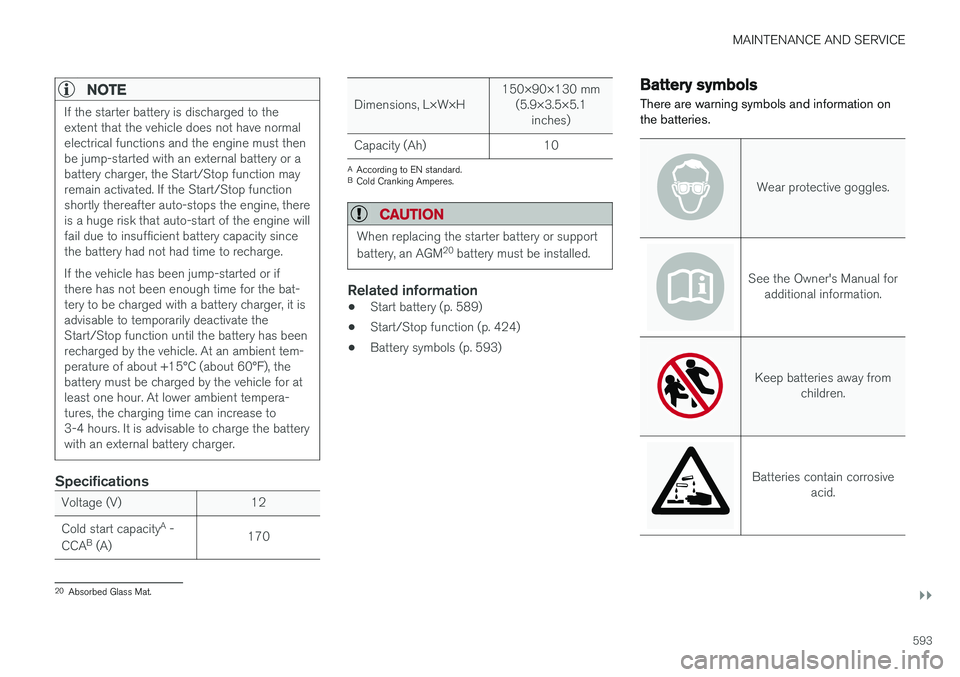
Battery symbols
There are warning symbols and information on the batteries.
Wear protective goggles.
See the Owner's Manual for additional information.
Keep batteries away from children.
Batteries contain corrosive acid.
20Absorbed Glass Mat.
Page 600 of 656

||
MAINTENANCE AND SERVICE
* Option/accessory.
598
FunctionAA
Right-side headlight, some mod- els with LED B 15
– –
Heated windshield
*, left side Shunt
Heated windshield
*, left side 40
Headlight washers
*25
Windshield washer 25
Transmission control module 15
Horn 20
Alarm siren
* 5
Brake system control module (valves, parking brake) 40
Wipers 30
Rear window washer 25
Heated windshield
*, right side 40
Parking heater
* 20
Brake system control module (ABS pump) 40
FunctionAA
– –
Heated windshield
*, right side Shunt
Fed when ignition is on: engine control module, transmissioncomponents, electrical powersteering, central electrical mod-ule, brake system control mod-ule 5
– –
Right-side headlight 7.5 Right-side headlight, some mod- els with LED
B 15
– –
– –
Battery connection control mod- ule 5
Airbags 5
FunctionAA
Left-side headlight 7.5 Left-side headlight, some mod- els with LED
B 15
Accelerator pedal sensor 5
A
Ampere
B LED (Light Emitting Diode)
Related information
• Fuses and fuseboxes (p. 594)
• Replacing fuses (p. 595)
Page 612 of 656

||
MAINTENANCE AND SERVICE
610
Cleaning the leather upholstery
1. Apply the leather cleaner to a damp spongeand squeeze it until the cleaner foams.
2. Move the sponge in circular motions to apply the foam to the stain.
3. Dampen the stain thoroughly with the sponge. Let the sponge absorb the stain and do not rub.
4. Dry the stain using a soft towel and let the leather dry completely.
Protecting the leather upholstery
1. Apply a small amount of leather protector toa cloth and then apply the protector to the leather using light circular movements.
2. Let it dry for approximately 20 minutes. Protecting the leather upholstery makes it better able to withstand sunlight's harmful UV rays.
Related information
• Cleaning the interior (p. 606)
• Cleaning the center display (p. 606)
• Cleaning fabric upholstery and ceiling liner(p. 608)
• Cleaning the seat belt (p. 608)
• Cleaning floor mats and inlay mats (p. 608)
• Cleaning the leather steering wheel(p. 610)
• Cleaning interior plastic, metal and wood sur-faces (p. 611)
Cleaning the leather steering wheel
Only use cleaning agents and car care products recommended by Volvo. Clean regularly andtreat stains immediately for best results. It isimportant to vacuum before using a cleaningagent.
Leather steering wheelLeather needs to breathe. Never cover the leather steering wheel with a plastic protector.Volvo Leather Care Kit 951 0251 and LeatherSoftener 943 7429 are recommended for clean-ing the leather steering wheel. First, remove dirt,dust, etc. with a damp sponge or cloth.
CAUTION
Sharp objects such as rings could damage the leather on the steering wheel.
If there are stains on the steering wheel:
Type 1 (ink, wine, coffee, milk, sweat or blood)
–Use a soft cloth or sponge. Wipe the steering wheel using a solution of 5% ammonia. Forblood stains, mix approximately 2 dl(1 cup) ofwater with 25 g (one ounce) of salt and wipethe stain.
Type 2 (grease, oil, sauces or chocolate)
1. Same procedure as for Type 1 stains.
2. Finish by wiping the wheel with an absorbent paper or towel. Type 3
(dry dirt or dust)
1. Remove the dirt/dust using a soft brush.
2. Same procedure as for Type 1 stains.
Related information
• Cleaning the interior (p. 606)
• Cleaning the center display (p. 606)
• Cleaning fabric upholstery and ceiling liner (p. 608)
• Cleaning the seat belt (p. 608)
• Cleaning floor mats and inlay mats (p. 608)
• Cleaning leather upholstery (p. 609)
• Cleaning interior plastic, metal and wood sur-faces (p. 611)
Page 641 of 656

INDEX
639
1, 2, 3 ...
4WD 419
A
ABSanti-lock brakes 405
AC (Air conditioning) 229
ACC - Adaptive Cruise Control 289, 292, 293, 294, 295, 296, 298, 299, 300, 301, 303
Accessories and extra equipment 35 installation 36
Accessory installation warning 36
Active Bending Lights 161
Adapting driving characteristics 266, 419
Adaptive Cruise Control 289, 292, 293, 294, 295, 296, 298, 299, 300, 301, 303
change cruise control functionality 301
function 289
manage speed 293, 294
pass 298
radar sensor 320
set time interval 295, 296
troubleshooting 300
Adjusting the steering wheel 200
Airbag 52 activation/deactivation 56
driver's side 53
passenger side 53, 56
Air bag, see Airbag 52
Air conditioning 229Air conditioning, fluid volume and grade 636
Air distribution 208 air vents 208, 209
changing 208
defrosting 222
recirculation 221
table showing options 211
Air quality 205, 206 allergy and asthma 206
passenger compartment filter 207
Air recirculation 221
Alarm 261 deactivating 262
Allergy and asthma-inducing substances 206
All Wheel Drive, AWD 419
All Wheel Drive (AWD) 419
All Wheel Drive (four-wheel drive) 419
Android Auto 486, 488 Antenna location 251Apple CarPlay 483, 485
Approach lighting 164
Apps 455
Assistance at risk of collision 366, 367, 368, 369, 370, 371, 372, 374
Audio and media 454Audio system HD digital radio 465 SiriusXM ® Satellite radio 466, 467, 468
Auto-climate 220
Auto hold 411
Auto-hold brakes 411 activate and deactivate 412
after collision 413
Automatic car wash 614 Automatic engine stop auto-stop 424
Automatic high beam 159
Automatic locking 255
Automatic relocking 235, 248
Automatic Speed Limiter 276, 278, 279
Automatic transmission 414 kickdown 418
oil 635
Trailer 440
INDEX
Page 642 of 656

INDEX
640
B
Backrestfront seat, adjusting 188, 189, 192, 193 , 194
rear seat, folding 196
Battery jump-start 439
Maintenance 589
start 589
support 592
symbols on the battery 593
warning symbols 593
BLIS 342, 343, 344, 345 Blower adjusting 225, 226
air distribution 208
air vents 209
Bluetooth connect 481
connecting vehicle to Internet 499
phone 488
settings 497
Book service and repair 570
Booster cushions 71Brake assist after collision 413
Brake fluidgrade 635
Brake functions 404
Brake light 163
Brakes 405 anti-lock brakes, ABS 405
automatic when stationary 411
Brake Assist System, BAS 406
brake lights 163
brake system 404
emergency brake lights 163
handbrake 407
Maintenance 407
on salted roads 407
on wet roads 406
brake system fluid 635
C
Camera sensor 338
Camera unit 325
Capacity weight 546, 631
Cargo compartment 555
attachment points 557
cargo net 562
electrical outlet 550, 552
Lighting 166
Cargo compartment cover 558, 559
cargo net 562
Car wash 611, 612, 614, 615, 616, 617
Catalytic converter 437 recovery 444
CD player 479
Cell phone, see Phone 489
Center console 549Center display change appearance 133
cleaning 606
climate controls 214
Function view 124
keyboard 128
messages 142, 143, 144
operation 114, 117, 121, 126
overview 111
settings 134, 135, 136
switch off and change volume 133
symbols in status bar 126
views 117
Central locking 251
Change of owner 136
Changing a wheel 532
Checking engine oil level 579