2018 VOLVO V90 CROSS COUNTRY climate settings
[x] Cancel search: climate settingsPage 423 of 662
STARTING AND DRIVING
* Option/accessory.421
3.
Under
Presets, select one of the following
drive modes as a basis: Eco, Comfort orDynamic.
The following settings can be modified: •
Driver Display
•Steering force
•Powertrain Characteristics
•Brake Characteristics
•Suspension Control
•ECO Climate
•Start/Stop.
Related information
• Changing drive mode
* (p. 421)
• ECO drive mode (p. 422)
• Economical driving (p. 433)
• Start/Stop function (p. 424)
• Low Speed Control (p. 430)
• Hill Descent Control (p. 431)
• All Wheel Drive (AWD) (p. 419)
Changing drive mode
*
The drive mode is changed using the control in the tunnel console.
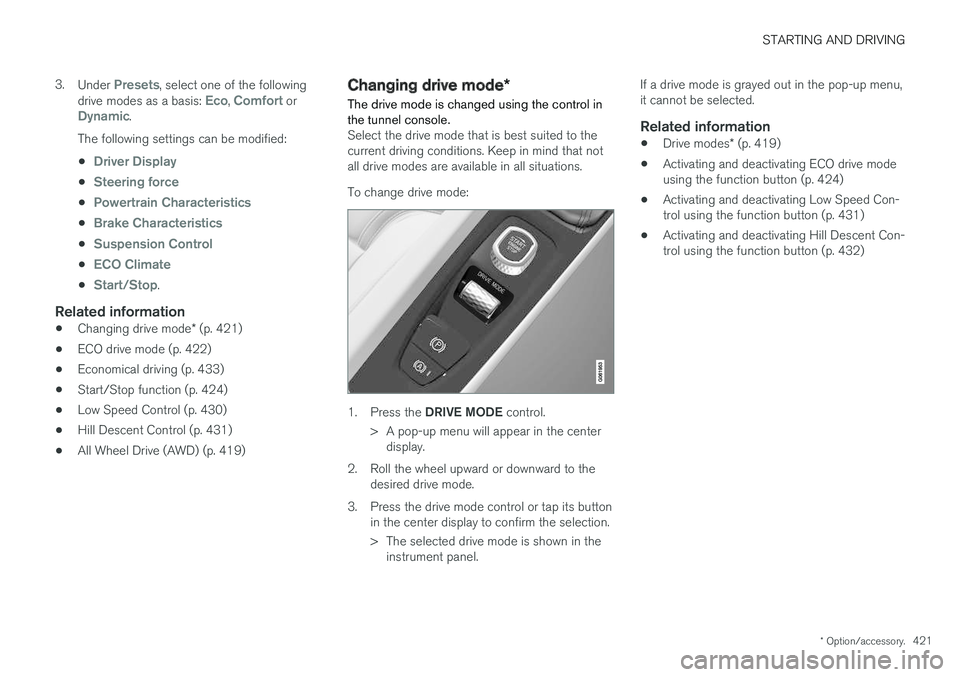
Select the drive mode that is best suited to the current driving conditions. Keep in mind that notall drive modes are available in all situations. To change drive mode:
1. Press the DRIVE MODE control.
> A pop-up menu will appear in the center display.
2. Roll the wheel upward or downward to the desired drive mode.
3. Press the drive mode control or tap its button in the center display to confirm the selection.
> The selected drive mode is shown in theinstrument panel. If a drive mode is grayed out in the pop-up menu, it cannot be selected.
Related information
•
Drive modes
* (p. 419)
• Activating and deactivating ECO drive modeusing the function button (p. 424)
• Activating and deactivating Low Speed Con-trol using the function button (p. 431)
• Activating and deactivating Hill Descent Con-trol using the function button (p. 432)
Page 424 of 662
STARTING AND DRIVING
* Option/accessory.
422
ECO drive mode
The Eco drive mode optimizes the vehicle's driv- ing characteristics for more fuel-efficient andeco-friendly driving.
Use this mode to save fuel and promote eco- friendly driving. When ECO mode is activated, the following cha- racteristics are modified:
• The automatic transmission's shifting points.
• Engine control and accelerator pedalresponse.
• Eco Coast functionality is activated andengine braking is disabled when the acceler-ator pedal is released at speeds between65 and 140 km/h (40 and 87 mph).
• Some of the climate system settings will bereduced or switched off.
• Information will be shown in the ECO gaugein the instrument panel to help promotemore eco-friendly and economical driving.
Coast function Eco CoastEco Coast essentially deactivates engine braking,allowing the vehicle's kinetic energy to be used to roll greater distances. When the driver releases the accelerator pedal, the transmission is auto- matically disengaged from the engine. Enginespeed is reduced to idling speed to reduce fuelconsumption. This function is most effective in driving situa-tions where the vehicle can roll freely for a longdistance, e.g. on roads with slight downgrades orwhen a decrease in speed is anticipated, such aswhen approaching an area with a lower speedlimit.
Activating Eco Coast
The function is activated when the accelerator pedal is fully released and the following condi-tions are met:
• Eco drive mode is activated.
• The gear selector is in
D.
• The vehicle's speed is approximately65-140 km/h (40-87 mph).
• The gradient of the downgrade is less thanapproximately 6%.
COASTING will be displayed in the instrument
panel when Eco Coast is being used.
Limitations
Eco Coast is not available if:
• The engine and/or transmission are not at normal working temperatures.
• The gear selector is moved from
D to manual
shifting mode.
• The vehicle's speed is not within the65-140 km/h (40-87 mph) range.
• The gradient of the downgrade is more thanapproximately 6%. •
The steering wheel paddles
* are being used
for manual shifting.
Deactivating and turning off Eco Coast
In certain situations, it may be advisable to deac- tivate or turn off Eco Coast so that engine brak-ing can be used. These situations might includedriving down steep hills or before passinganother vehicle to help ensure this can be doneas safely as possible. Deactivate Eco Coast by:
• Pressing the accelerator or brake pedal.
• Moving the gear selector to manual mode.
• Using the steering wheel paddles
* to shift.
Turn off Eco Coast by:
• Switching drive mode
* or switching off drive
mode Eco in Function view.
It is possible to roll short distances even without Eco Coast in order to help conserve fuel. How-ever, for the best fuel economy, Eco Coast shouldbe activated and used to roll longer distances.
Cruise control Eco CruiseWhen cruise control is activated in the Eco drivemode, the vehicle's acceleration and decelerationwill be slower than in other drive modes to helpfurther conserve fuel. Because of this, the vehi-cle's actual speed may be slightly above or belowthe set speed.
Page 425 of 662
STARTING AND DRIVING
* Option/accessory.423
•
On a level road, the vehicle's actual speed may differ from the set speed when cruisecontrol is active and the vehicle is coasting.
• On a steep uphill gradient, the vehicle'sspeed is reduced until the transmissiondownshifts. Reduced acceleration is then ini-tiated in order to reach the set speed.
• On a downhill gradient in which the vehicle iscoasting, the vehicle's actual speed may beslightly above or below the set speed. Thefunction uses engine braking to keep the setspeed. If necessary, the normal brakes arealso applied.
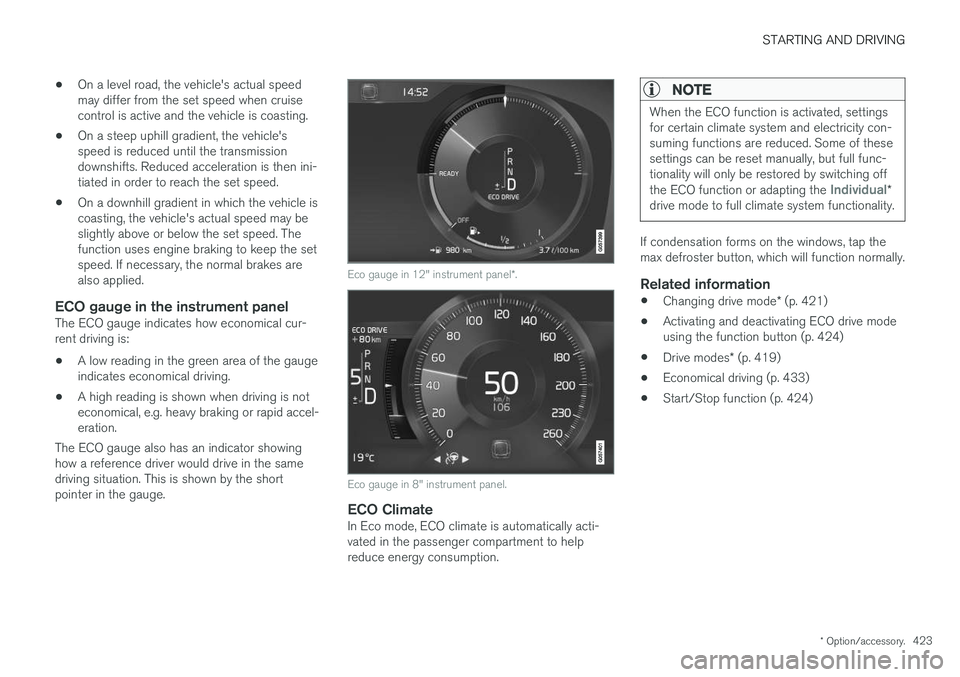
ECO gauge in the instrument panelThe ECO gauge indicates how economical cur-rent driving is:
• A low reading in the green area of the gaugeindicates economical driving.
• A high reading is shown when driving is noteconomical, e.g. heavy braking or rapid accel-eration.
The ECO gauge also has an indicator showinghow a reference driver would drive in the samedriving situation. This is shown by the shortpointer in the gauge.
Eco gauge in 12" instrument panel *.
Eco gauge in 8" instrument panel.
ECO ClimateIn Eco mode, ECO climate is automatically acti- vated in the passenger compartment to helpreduce energy consumption.
NOTE
When the ECO function is activated, settings for certain climate system and electricity con-suming functions are reduced. Some of thesesettings can be reset manually, but full func-tionality will only be restored by switching off the ECO function or adapting the
Individual*
drive mode to full climate system functionality.
If condensation forms on the windows, tap the max defroster button, which will function normally.
Related information
• Changing drive mode
* (p. 421)
• Activating and deactivating ECO drive modeusing the function button (p. 424)
• Drive modes
* (p. 419)
• Economical driving (p. 433)
• Start/Stop function (p. 424)
Page 428 of 662
STARTING AND DRIVING
426
Temporarily deactivating the Start/Stop function
In certain situations, it may be advisable to tem- porarily turn the Start/Stop function off.
To turn off Start/Stop, tap theStart/Stop function button in
the center display's Function view. The indicator light in thebutton will go out when thefunction has been turned off.
The function will remain turned off until:
• it is reactivated
• the drive mode is changed to Eco or Comfort
• the engine is restarted.
Related information
•
Driving with the Start/Stop function (p. 424)
• Conditions for the Start/Stop function (p. 426)
Conditions for the Start/Stopfunction Certain conditions must be met for Start/Stop to function.
If any condition is not met, this will be indicated in the instrument panel.
The engine does not auto-stopThe engine will not auto-stop if: •
the vehicle has not reached a speed of ca 10 km/h (6 mph) after starting.
• after several auto-stops, the speed mustagain exceed approximately ca 10 km/h(6 mph) before the next auto-stop.
• the driver's seat belt is unbuckled.
• the start battery's charge is below the mini-mum level.
• the engine is not running at its normal oper-ating temperature.
• the ambient temperature is under approxi-mately -5 °C (23 °F) or over approximately30 °C (86 °F).
• windshield heating is activated.
• the climate system settings and the actualclimate in the passenger compartment differ.
• the vehicle is backing up.
• the start battery's temperature is above orbelow the permitted limits.
• the driver is turning the steering wheel hard. •
the road gradient is very steep.
• the hood is open.
• driving at high altitude and the engine hasnot reached its normal operating tempera-ture.
• ABS has been activated.
• hard braking (even if the ABS system hasnot been activated).
• many starts during a short period of timehave triggered the starter motor's overheat-ing protection.
• a trailer's electrical system is connected tothe vehicle's electrical system.
• the transmission is not running at its normaloperating temperature.
• The gear selector is in mode
M (±).
The engine does not auto-startThe engine will not auto-start after an auto-stopif: • the driver is not wearing a seat belt, the gear selector is in the
P position and the driver's
door is open. The engine must be started normally.
The engine auto-starts while the brake
pedal is depressed
In the following situations, the engine will auto-start even if the brake pedal is depressed:
Page 429 of 662
STARTING AND DRIVING
427
•
High levels of condensation on the inside of the windows.
• the climate system settings and the actualclimate in the passenger compartment differ.
• Electrical current consumption is temporarilyhigh or the start battery's charge is below theminimum level.
• The brake pedal is pumped repeatedly.
• The hood is open.
• The vehicle begins to roll or increases speedslightly if the engine auto-stopped before thevehicle was at a standstill.
• The driver's seat belt is unbuckled with the gear selector in the
D or N positions.
• The gear selector is moved from
D to R or M
( ± ).
• The driver's door is opened with the gearselector in
D. An audible signal and a text
message informs the driver that the ignition is on.
WARNING
Do not open the hood if the engine has auto- stopped. Turn off the engine by switching offthe ignition before lifting the hood.
Related information
• Start/Stop function (p. 424)
• Driving with the Start/Stop function (p. 424) •
Temporarily deactivating the Start/Stop func- tion (p. 426)
Page 648 of 662
INDEX
646
B
Backrestfront seat, adjusting 188, 189, 192, 193 , 194
rear seat, folding 196
Battery jump-start 442
Maintenance 595
start 595
support 598
symbols on the battery 599
warning symbols 599
BLIS 342, 343, 344, 345 Blower adjusting 225, 226
air distribution 208
air vents 209
Bluetooth connect 487
connecting vehicle to Internet 505
phone 494
settings 503
Book service and repair 576
Booster cushions 71Brake assist after collision 413
Brake fluidgrade 641
Brake functions 404
Brake light 163
Brakes 405 anti-lock brakes, ABS 405
automatic when stationary 411
Brake Assist System, BAS 406
brake lights 163
brake system 404
emergency brake lights 163
handbrake 407
Maintenance 407
on salted roads 407
on wet roads 406
brake system fluid 641
C
Camera sensor 338
Camera unit 325
Capacity weight 552, 637
Cargo compartment 561
attachment points 563
cargo net 568
electrical outlet 556, 558
Lighting 166
Cargo compartment cover 564, 565
cargo net 568
Car wash 617, 618, 620, 621, 622, 623
Catalytic converter 440 recovery 449
CD player 485
Cell phone, see Phone 495
Center console 555Center display change appearance 133
cleaning 612
climate controls 214
Function view 124
keyboard 128
messages 142, 143, 144
operation 114, 117, 121, 126
overview 111
settings 134, 135, 136
switch off and change volume 133
symbols in status bar 126
views 117
Central locking 251
Change of owner 136
Changing a wheel 538
Checking engine oil level 585
Page 656 of 662

INDEX
654Rain sensor 181, 182
Rain sensor's memory function 182
Rear camera 380, 381, 382, 384, 385,
387, 388
Rear door sun shade 173
Rear seat blower 226
climate 214
folding backrest 196
head restraint 198
heating 217
temperature 228
Rear sensors 375, 376, 377, 378, 379 Rearview/door mirrors dimming 174
heating 224
interior 173
Rearview mirror 173 dimming 174
Rear window heating 224
washers 184, 185
wipers 184, 185
Recalls 45
Recommendations when driving 434
Recommendations when loading 561
Recovery 452
Red Key 242 settings 243
Refrigerant 582 climate system 642
Refueling filling 436
fuel filler door, fuel flap 436
Remote immobilizer 246
Remote key 233 battery replacement 238
connecting to driver profile 141
detachable key blade 244
loss 242
Range 237
Remote updates 575
Reporting safety defects 44
Resetting door mirrors 175
Resetting settings 137 change of owner 136
Driver profile 141
Resetting trip odometer 92
Retractable towbar 443
Road Sign Information 351, 352, 353 limitations 355
operation 352, 353, 354, 355
Road trip 434Roll Stability Control 267
Roof load, max. weight 637
RSC (Roll Stability Control) 267
Run-off Mitigation 367, 368
S
Safety 42 pregnancy 43
Safety belt, see Seat belt 47
Safety defects, reporting 44
Safety mode 61 starting/moving 62
Sealing compound 546
Seat, see Seats 188
Seat belt reminder 51
Seat belts 47 Automatic locking retractor/Emergency
locking retractor 65
buckling/unbuckling 48
pregnancy 43
seat belt reminder 51
seat belt tensioner 50
securing child restraint systems 67, 69, 71
Seat belt tensioner 50 resetting 51
Page 657 of 662

INDEX
655
Seats
heating 216, 217
manual front seat 188
memory function front seat 190, 191
power front seats 189
ventilation 218
whiplash protection 46
Sensors air quality 207
climate 203
Sensus connection and entertainment 30
Sensus Navigation 353
Service position 628
Service program 572
Set time interval 287
settings 137 Categories 138
contextual 135
resetting 137
settings menu 137
Shiftlock 417 deactivate 417
Side airbag 59
Side Impact Protection System 59, 60
SIM card 507
SIPS (Side Impact Protection System) 59, 60
Sirius Satellite radio Travel link 476
SiriusXM ® Satellite radio
traffic information 472, 473, 474
Ski hatch 564
Slippery conditions 435
Slippery road conditions 435
Software updates 33
Sound settings 460, 501 phone 502
playing media 482, 483
text message 501
Spare tire 543, 544
Speed camera 355
Speed Limiter 272, 275, 276, 279 getting started 273
shut down 275
temporary deactivation 274
Speed symbols, tires 528
Spin control 268
Stability and traction control system 268, 271 operation 269, 270
Stability system 268
Stains 612, 614, 615, 616, 617
Start/Stop 424 deactivate 426Driving 424
limitations 426
Start and lock system type designations 246
Start battery 442, 595 overload 441
Start engine 400 Starting the engine after a collision 62
Start the vehicle 400
Steel cargo grid 566Steering assistance at risk of colli-
sion 366, 367, 368, 369, 370, 371, 372, 374 Steering assistance at risk of rear-end col-
lision 371, 372 Steering power level, see Steering wheel
resistance 266 Steering resistance at risk of head-on colli-
sion 369, 370
Steering wheel 199, 200 heating 219, 220
keypad 199
paddle 199
steering wheel adjustment 200
Steering wheel keypad 199
Steering wheel paddles 415