Page 63 of 404
SAFETY
}}
61
•
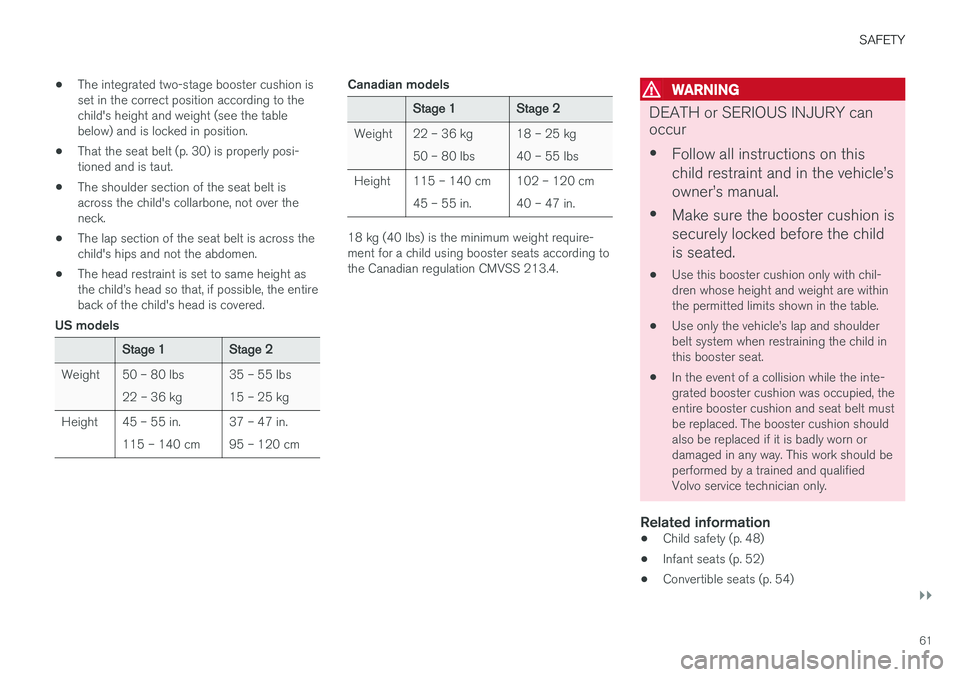
The integrated two-stage booster cushion is set in the correct position according to thechild's height and weight (see the tablebelow) and is locked in position.
• That the seat belt (p. 30) is properly posi-tioned and is taut.
• The shoulder section of the seat belt isacross the child's collarbone, not over theneck.
• The lap section of the seat belt is across thechild's hips and not the abdomen.
• The head restraint is set to same height asthe child
Page 64 of 404
SAFETY
62•
Booster cushions (p. 56)
• Seat belts – general (p. 30)
Integrated booster cushion – using
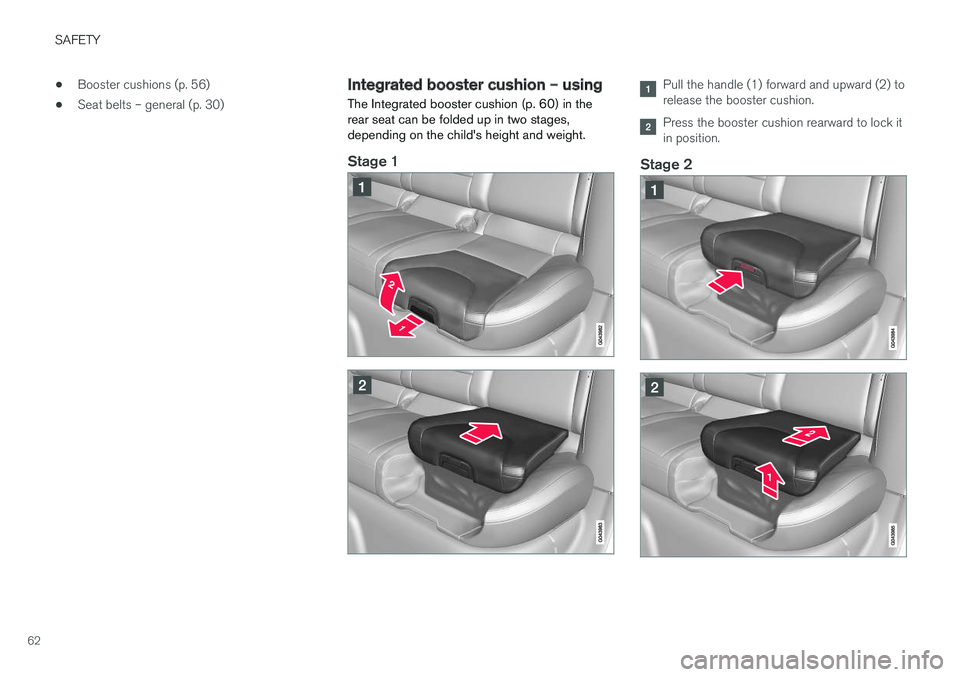
The Integrated booster cushion (p. 60) in the rear seat can be folded up in two stages,depending on the child's height and weight.
Stage 1
Pull the handle (1) forward and upward (2) to release the booster cushion.
Press the booster cushion rearward to lock it in position.
Stage 2
Page 65 of 404
SAFETY
63
With the booster cushion in the stage 1 posi- tion, press the button (see the arrow in illus-tration 1).
Lift the front edge of the booster cushion and press it rearward toward the backrest tolock it in position.
WARNING
DEATH or SERIOUS INJURY can occur •Follow all instructions on this child restraint and in the vehicle
Page 67 of 404

SAFETY
}}
* Option/accessory.65
Related information
•Integrated booster cushion – using (p. 62)
• Integrated booster cushion – general infor- mation (p. 60)
Child safety locks
Power child safety locks * help prevent children
from inadvertently opening one of the rear doors or windows from inside the vehicle.
Manual child safety locks
Child safety locks – rear doors
The controls are located on the rear door jambs. Use the remote control's key blade or a screw-driver to adjust these controls.
The rear doors can only be opened from the outside when the slot is in the horizontalposition.
The rear doors can be opened from the inside when the slot is in the vertical position.
Power child safety locks and disengaging rear door windows *
Driver's door control panel
The power child safety locks can be activated/ deactivated when the remote key is in mode I (p. 82) or higher. Activation/deactivation
can be done up to 2 minutes after the engine has been switched off (if no door has beenopened). To activate the child safety locks:1. Put the ignition in mode I or higher, or start
the engine.
2. Press the button on the driver's door control panel (see the illustration). >
Rear child locks Activated will be dis-
played in the instrument panel and the indicator light in the button will illuminatewhen the function is activated.
Page 68 of 404
||
SAFETY
66When the child safety locks are activated: •
The rear door windows can only be opened from the driver's door control panel
• The rear doors cannot be opened from theinside
The child safety locks' current setting is storedwhen the engine is switched off. If these lockswere activated when the engine was switched off,they will also be active when the engine is restar-ted.
Related information
• Detachable key blade – general information(p. 157)
• Locking/unlocking – from inside (p. 166)
Page 72 of 404

||
INSTRUMENTS AND CONTROLS
* Option/accessory.
70
Function See
Controls for menus and messages, turn signals,high/low beams, tripcomputer(p. 79),(p. 99),(p. 92),(p. 118)
Paddles for manually shifting gears
*(p. 265)
Cruise control (p. 180)
Horn, airbag (p. 91),
(p. 35)
Main instrument panel (p. 71)
Infotainment system/ Bluetooth hands-freecontrolsSensus Info-tainment sup-plement
START/STOP ENGINE button
(p. 81)
Ignition slot (p. 81)
Display for infotainment system functions andmenus(p. 116), Sen-sus Infotain-ment supple-ment
Door handle -
Function
See
In-door control panels (power windows, mir-rors, central locking but-ton)(p. 105),(p. 106),(p. 166)
Hazard warning flashers (p. 98)
Controls for the info- tainment system andmenus
(p. 79),(p. 132), Sen-sus Infotain-ment supple-ment
Climate system controls (p. 132)
Gear selector (p. 263)
Not in use -
Wipers and washers (p. 102),
(p. 103)
Steering wheel adjust- ment(p. 91)
Hood opening control (p. 337)
Parking brake (p. 280)
Function
See
Power seat* adjustment
controls (p. 84)
Lighting panel, buttons for opening fuel fillerdoor and unlocking thetailgate(p. 92),(p. 289),(p. 168)
Related information
•
Information displays – ambient temperature sensor (p. 80)
• Information displays – trip odometer andclock (p. 81)
Page 77 of 404

INSTRUMENTS AND CONTROLS
}}
* Option/accessory.75
Utilized power
The larger, lower indicator shows the amount of engine power that has been utilized 2
. The higher
the reading on the scale, the greater the amount of power that is being utilized. The larger the gap between the two indicators, the greater the amount of power remaining.Information displays – indicator symbols
The indicator symbols alert the driver when cer- tain functions are activated, that a system isactively working or that a fault may have occur-red in a system or function.
Symbol Description
Fault in the Active Bending Light (ABL)*system
Malfunction indicator light
Anti-lock brake system (ABS)
Rear fog lights on
Stability system
The stability system's Sport mode is activated
Low fuel level
Information symbol, read the text displayed in the instrument panel
High beam indicator
Symbol Description
Left turn signal indicator
Right turn signal indicator
Tire pressure monitoring sensor (TPMS)A
The Eco function is on.
TheStart/Stop function is active (the engine has auto-stopped)
A
Option in Canada
Fault in the Active Bending Light (ABL)
system
This symbol will illuminate if there is a fault in the ABL system. See Active Bending Lights (ABL) *
(p. 95) for more information about this system.
2 Depending on rpm
Page 78 of 404

||
INSTRUMENTS AND CONTROLS
* Option/accessory.
76
Malfunction Indicator Light
As you drive, a computer called On-Board Diag- nostics II (OBDII) monitors your vehicle's engine,transmission, electrical and emission systems. The malfunction indicator light will illuminate if the computer senses a condition that potentiallymay need correcting. When this happens, pleasehave your vehicle checked by a trained and quali-fied Volvo service technician as soon as possible. A malfunction indicator light may have many cau- ses. Sometimes, you may not notice a change inyour car's behavior. Even so, an uncorrected con-dition could hurt fuel economy, emission controls,and drivability. Extended driving without correct-ing the cause could even damage other compo-nents in your vehicle. This light may illuminate if the fuel filler cap is not closed tightly or if the engine was running whilethe vehicle was refueled.
Anti-lock Brake System (ABS)
If the warning light comes on, there may be a malfunction in the ABS system (the standardbraking system will still function). Check the sys-tem by:
1. Stopping in a safe place and switching off
the ignition.
2. Restart the engine.
3. If the warning light goes off, no further action is required. If the indicator light remains on, the vehicle should be driven to a trained and qualified Volvoservice technician for inspection, see Brakes –general (p. 277) for additional information.
Rear fog lights
This symbol indicates that the rear fog lights are on.
Stability system
This indicator symbol flashes when the stability system is actively working to stabilize the vehicle,see Stability system – introduction (p. 174) formore detailed information.
Stability system - Sport mode
This symbol illuminates to indicate that the stabil- ity system's
Sport mode has been activated to
help provide maximum tractive force, for example when driving with snow chains, or driving in deepsnow or loose sand.
Low fuel level
When this light comes on, the vehicle should be refueled as soon as possible. See Refueling –fuel requirements (p. 286) for information aboutfuel and refueling.
Information symbol
The information symbol lights up and a text mes- sage is displayed to provide the driver with nec-essary information about one of the vehicle's sys-tems. The message can be erased and the sym- bol can be turned off by pressing the OK button
(see Information display – menu controls (p. 116) for information) or this will take place automatically after a short time (the length oftime varies, depending on the function affected). The information symbol may also illuminate together with other symbols.
High beam indicator
This symbol illuminates when the high beam headlights are on, or if the high beam flash func-tion is used.
Left turn signal indicator Right turn signal indicator
NOTE
•
Both turn signal indicators will flash when the hazard warning flashers are used.
• If either of these indicators flash fasterthan normal, the direction indicators arenot functioning properly.
Tire pressure monitoring system (TPMS)
*
This symbol illuminates to indicate that tire pres- sure in one or more tires is low, see Tire PressureMonitoring System (TPMS) – general information(p. 320) for detailed information.
Eco* function on
The symbol will illuminate when the Eco function is activated.
Start/stop *
The symbol illuminates when the engine has auto-stopped.