2018 VOLVO S60 INSCRIPTION ignition
[x] Cancel search: ignitionPage 138 of 396
LOADING AND STORAGE
* Option/accessory.
136
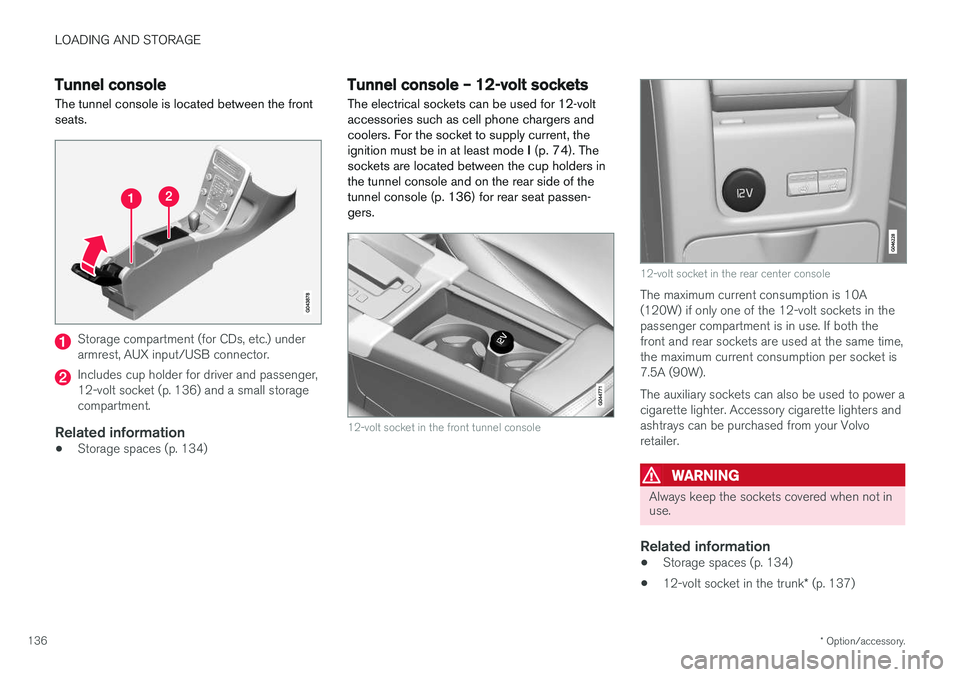
Tunnel console The tunnel console is located between the front seats.
Storage compartment (for CDs, etc.) under armrest, AUX input/USB connector.
Includes cup holder for driver and passenger, 12-volt socket (p. 136) and a small storagecompartment.
Related information
• Storage spaces (p. 134)
Tunnel console – 12-volt sockets
The electrical sockets can be used for 12-volt accessories such as cell phone chargers andcoolers. For the socket to supply current, theignition must be in at least mode I (p. 74). The
sockets are located between the cup holders inthe tunnel console and on the rear side of thetunnel console (p. 136) for rear seat passen-gers.
12-volt socket in the front tunnel console
12-volt socket in the rear center console
The maximum current consumption is 10A (120W) if only one of the 12-volt sockets in thepassenger compartment is in use. If both thefront and rear sockets are used at the same time,the maximum current consumption per socket is7.5A (90W). The auxiliary sockets can also be used to power a cigarette lighter. Accessory cigarette lighters andashtrays can be purchased from your Volvoretailer.
WARNING
Always keep the sockets covered when not in use.
Related information
• Storage spaces (p. 134)
• 12-volt socket in the trunk
* (p. 137)
Page 139 of 396
LOADING AND STORAGE
* Option/accessory.137
Glove compartment
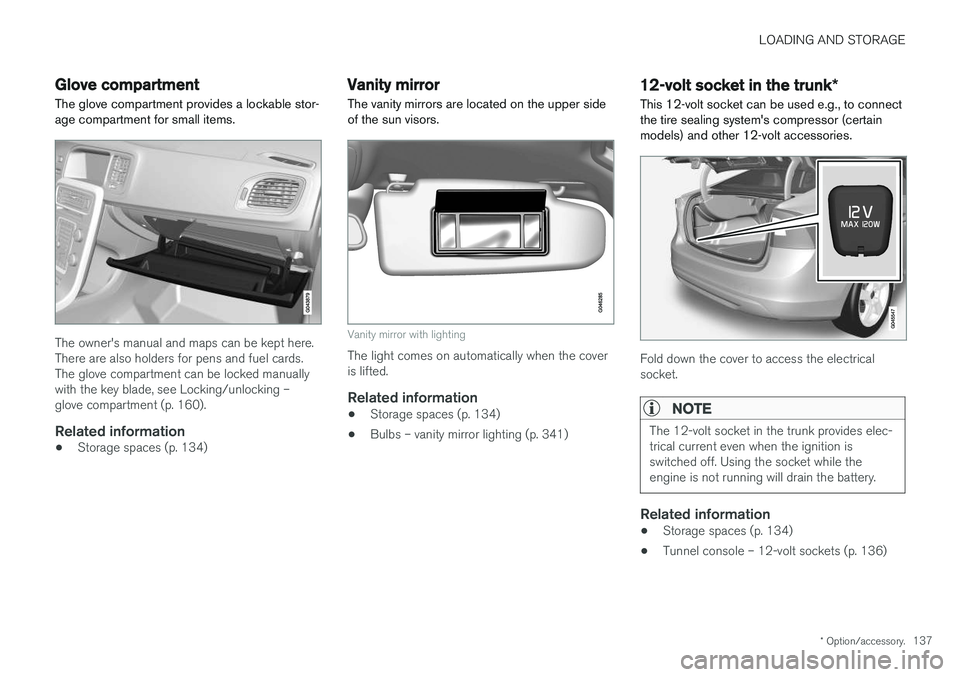
The glove compartment provides a lockable stor- age compartment for small items.
The owner's manual and maps can be kept here. There are also holders for pens and fuel cards.The glove compartment can be locked manuallywith the key blade, see Locking/unlocking –glove compartment (p. 160).
Related information
• Storage spaces (p. 134)
Vanity mirror
The vanity mirrors are located on the upper side of the sun visors.
Vanity mirror with lighting
The light comes on automatically when the cover is lifted.
Related information
• Storage spaces (p. 134)
• Bulbs – vanity mirror lighting (p. 341)
12-volt socket in the trunk
*
This 12-volt socket can be used e.g., to connect the tire sealing system's compressor (certainmodels) and other 12-volt accessories.
Fold down the cover to access the electrical socket.
NOTE
The 12-volt socket in the trunk provides elec- trical current even when the ignition isswitched off. Using the socket while theengine is not running will drain the battery.
Related information
• Storage spaces (p. 134)
• Tunnel console – 12-volt sockets (p. 136)
Page 146 of 396
LOCKS AND ALARM
144
Remote key and key blade
Two remote keys are provided with your vehicle. They enable you to unlock the doors and trunk,and also function as ignition keys to start thevehicle or operate electrical components. Theremote keys contain detachable metal keyblades for manually locking or unlocking the driv-er's door and the glove compartment. The visibleends of these key blades are unique to make iteasier to identify "your" remote key. Up to sixremotes can be programmed for use on thesame vehicle.
WARNING
Never leave the remote key in the ignition slot if children are to remain in the vehicle.
For more information on the various ignition modes, see Ignition modes (p. 74).
Related information
• Remote key – functions (p. 147)
• Remote key – functions (p. 147)
• Remote key – range (p. 148)
Remote key – loss
If either of the remote keys (p. 144) is lost, the other should be taken with the vehicle to a Volvoretailer. As an anti-theft measure, the code of thelost remote key must be erased from the system.
NOTE
Additional or duplicate remote control keys can be obtained from any authorized Volvoretailer. You can also obtain additional or duplicate remote control keys from certain independentrepair facilities and locksmiths that are quali-fied to make remote control keys. Each keymust be programmed to work with your vehi-cle. California Only: A list of independent repair facilities and/or locksmiths known to Volvo that can cut andcode replacement keys can be found: • on the Volvo website at http://www.volvocars.com/us/keys
• by calling Volvo Customer Care at1-800-458-1552
The number of registered keys for the vehicle can be found by pressing
MY CAR and going into
SettingsInformationNumber of keys.For a description of the menu system, see My Car – introduction (p. 71). USA-5WK49264FCC ID:KR55WK49264 + Siemens VDO 5WK49236 FCC ID:KR55WK49236, 5WK49266FCC ID:KR55WK49266 + Siemens VDO 5WK49233 FCC ID:KR55WK49233This device complies with part 15 of the FCC rules and RSS-210. Operation is subject to thefollowing conditions: (1) This device may notcause harmful interference, and (2) this devicemust accept any interference received, includinginterference that may cause undesired operation. Canada-5WK49264IC:267T-5WK49264 + Siemens VDO 5WK49236 IC:267T-5WK49236, 5WK49266IC:267T-5WK49266 + Siemens VDO 5WK49233 IC:267T-5WK49233Operation is subject to the following conditions: (1) this device may not cause interference, and(2) this device must accept any interference,including interference that may cause undesiredoperation of the device.
Page 148 of 396
LOCKS AND ALARM
* Option/accessory.
146
Locking/unlocking confirmation Settings can be made in the menu system for audible and visual confirmation when the vehiclehas been locked or unlocked. With these func-tions activated, the following will occur when thevehicle is locked/unlocked:
Locking confirmation
• The turn signals flash once, an audible signal sounds and the door mirrors will fold
* in.
Confirmation will only be given when all doors and the trunk are properly closed and locked.
NOTE
If you do not receive confirmation when lock- ing the vehicle, check whether a door or thetrunk is ajar, or if this feature has been turnedoff in the menu.
Unlocking confirmation
• The turn signals will flash twice and the door mirrors will fold
* out.
Making a setting
Different alternatives for locking/unlocking con- firmation can be selected in the menus by press- ing MY CAR on the center console control panel.
• To activate visual confirmation: go to
SettingsCar settingsLight settingsand select Door lock confirmation light
and/or Unlock confirmation light by
pressing OK/MENU .
• To activate audible confirmation: go to
SettingsCar settingsLock settingsand select Audible confirmation by press-
ing OK/MENU .
For a description of the menu system, see My Car – introduction (p. 71).
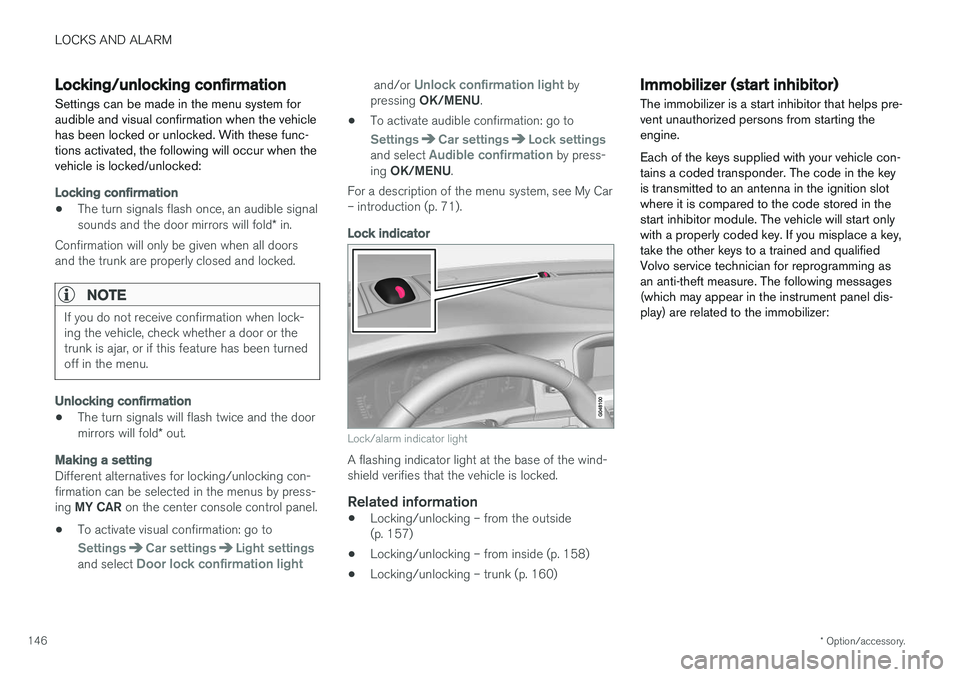
Lock indicator
Lock/alarm indicator light
A flashing indicator light at the base of the wind- shield verifies that the vehicle is locked.
Related information
• Locking/unlocking – from the outside(p. 157)
• Locking/unlocking – from inside (p. 158)
• Locking/unlocking – trunk (p. 160)
Immobilizer (start inhibitor)
The immobilizer is a start inhibitor that helps pre- vent unauthorized persons from starting theengine. Each of the keys supplied with your vehicle con- tains a coded transponder. The code in the keyis transmitted to an antenna in the ignition slotwhere it is compared to the code stored in thestart inhibitor module. The vehicle will start onlywith a properly coded key. If you misplace a key,take the other keys to a trained and qualifiedVolvo service technician for reprogramming asan anti-theft measure. The following messages(which may appear in the instrument panel dis-play) are related to the immobilizer:
Page 149 of 396
LOCKS AND ALARM
}}
* Option/accessory.147
MessageMeaning
Insert car keyRemote key not recognized dur- ing start. Try to start the vehicleagain.
Car key not foundVehicles with keyless drive *
only. Remote key not recog- nized during start. Try to startthe vehicle again. If the problem continues, insert the remote key into the ignitionslot and try to start the vehicleagain.
Immobil- izer Trystart againRemote key fault during start. Contact an authorized Volvoworkshop.
CAUTION
Never use force when inserting the remote key in the ignition slot. The vehicle cannot bestarted if the transponder is damaged.
USA–FCC ID: LTQWFS 125VO This device complies with part 15 of the FCC rules. Operation is subject to the following condi-tion: (1) This device may not cause harmful inter-ference, and (2) this device must accept anyinterference received, including interference thatmay cause undesired operation. Canada–IC: 3659A-WFS125VO Operation is subject to the following conditions: (1) this device may not cause interference, and(2) this device must accept any interference,including interference that may cause undesiredoperation of the device. For information on starting the vehicle, see Star- ting the engine (p. 250).
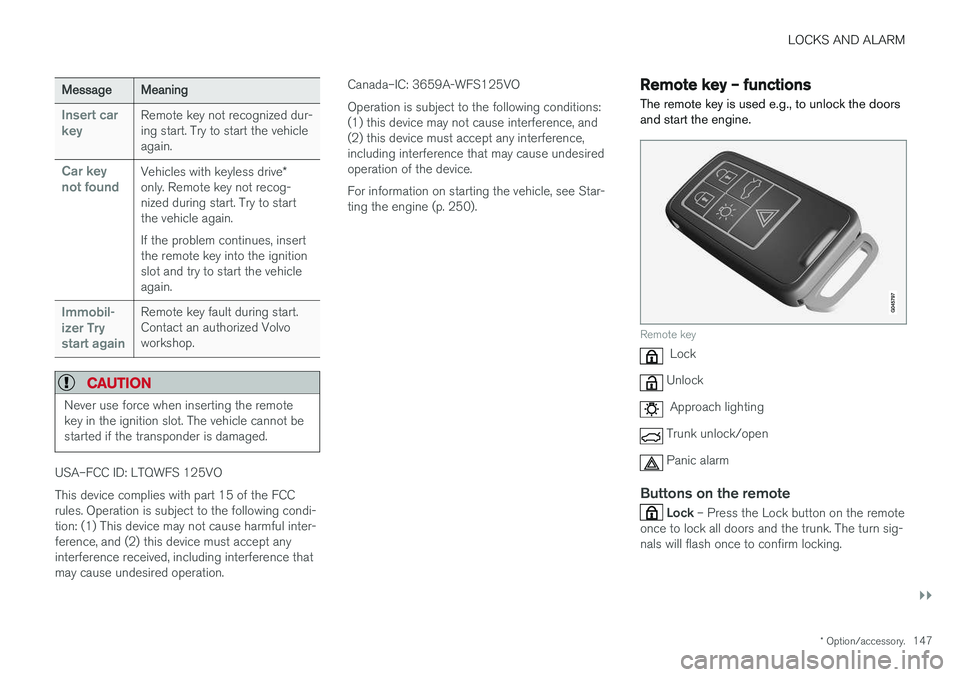
Remote key – functions
The remote key is used e.g., to unlock the doors and start the engine.
Remote key
Lock
Unlock
Approach lighting
Trunk unlock/open
Panic alarm
Buttons on the remote
Lock – Press the Lock button on the remote
once to lock all doors and the trunk. The turn sig- nals will flash once to confirm locking.
Page 150 of 396
||
LOCKS AND ALARM
* Option/accessory.
148
Unlock – Press the Unlock button on the
remote once to unlock the driver's door. After a short pause, press the Unlock button a second time within 10 seconds to unlock theother doors and the trunk. This function can be changed so that all doors unlock at the same time by pressing My Car and
going to
SettingsCar settingsLock
settings
Change doors unlock setting. For
a description of the menu system, see My Car – introduction (p. 71).
Approach lighting – As you approach the
vehicle, press the button on the remote key to light the interior lighting, parking lights, license plate lighting and the lights in the door mirrors *.
These lights will switch off automatically after 30, 60 or 90 seconds. For a description of the menusystem, see My Car – introduction (p. 71).
Unlock/open trunk
Press once: This unlocks the trunk (but does
not open it) and disarms the alarm (the alarm indicator light on the dashboard will go out). If thetrunk is not opened within two minutes it willautomatically relock and the alarm will berearmed. Press twice: This both unlocks the trunk and
pops it open slightly.
NOTE
Any excess weight (snow, etc.) on the trunk lid may prevent it from opening.
For information on opening the trunk from the passenger compartment, see Locking/unlocking– trunk (p. 160). After closing, the trunk will not automatically relock. Press Lock to relock it and rearm thealarm.
Panic alarm – This button can be used to
attract attention during emergency situations. To activate the panic alarm, press and hold this button for at least 3 seconds or press it twicewithin 3 seconds. The turn signals and horn willbe activated. The panic alarm will stop automati-cally after 2 minutes and 45 seconds. To deactivate, wait approximately 5 seconds and press the button again. The Panic alarm button will not unlock the vehi- cle.
Related information
• Locking/unlocking – from inside (p. 158)
• Locking/unlocking – from the outside(p. 157)
• Locking/unlocking confirmation (p. 146)
Remote key – range The remote key has a range of approximately 60 ft. (20 m) from the vehicle.
NOTE
Buildings or other obstacles may interfere with the function of the remote key. The vehi-cle can also be locked or unlocked with thekey blade, see Alarm-related functions(p. 164).
If the remote key is removed from the vehicle while the engine is running or if the ignition is in mode
I or II and all of the doors are closed, a
message will appear in the instrument panel dis- play and there will be an audible signal. When the remote key is returned to the vehicle, the message will be erased and the audible sig-nal will stop after one of the following has beendone:
• The remote key is inserted in the ignition slot
• The vehicle's speed exceeds 20 mph(30 km/h)
• The
OK button on the left steering wheel
lever is pressed
Related information
• Remote key – functions (p. 147)
Page 152 of 396
LOCKS AND ALARM
150
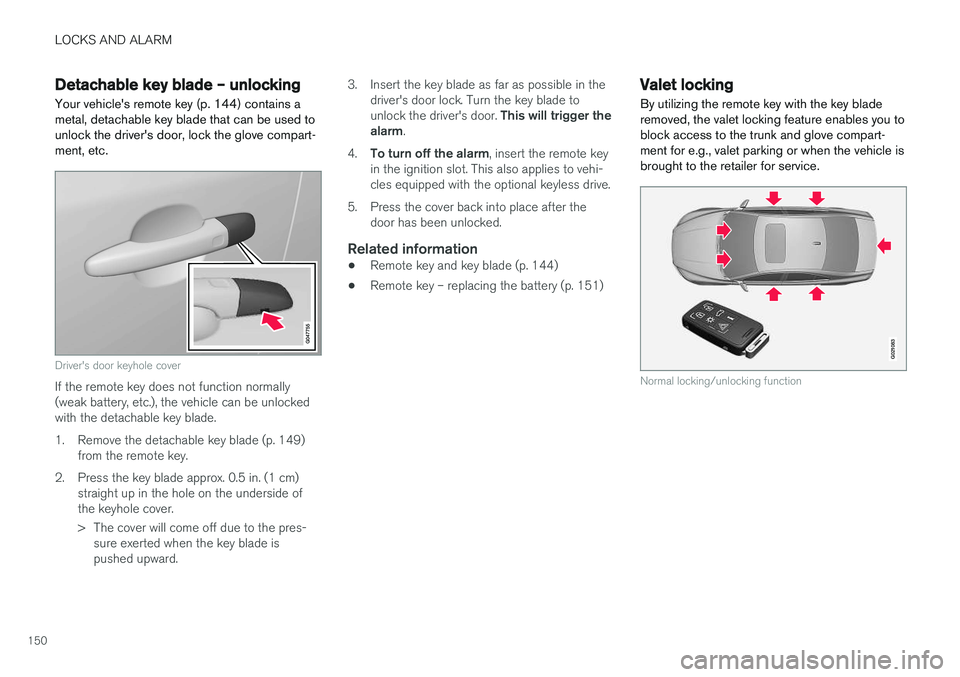
Detachable key blade – unlockingYour vehicle's remote key (p. 144) contains a metal, detachable key blade that can be used tounlock the driver's door, lock the glove compart-ment, etc.
Driver's door keyhole cover
If the remote key does not function normally (weak battery, etc.), the vehicle can be unlockedwith the detachable key blade.
1. Remove the detachable key blade (p. 149) from the remote key.
2. Press the key blade approx. 0.5 in. (1 cm) straight up in the hole on the underside of the keyhole cover.
> The cover will come off due to the pres-sure exerted when the key blade is pushed upward. 3. Insert the key blade as far as possible in the
driver's door lock. Turn the key blade to unlock the driver's door. This will trigger the
alarm .
4. To turn off the alarm , insert the remote key
in the ignition slot. This also applies to vehi- cles equipped with the optional keyless drive.
5. Press the cover back into place after the door has been unlocked.
Related information
• Remote key and key blade (p. 144)
• Remote key – replacing the battery (p. 151)
Valet locking By utilizing the remote key with the key blade removed, the valet locking feature enables you toblock access to the trunk and glove compart-ment for e.g., valet parking or when the vehicle isbrought to the retailer for service.
G021083
Normal locking/unlocking function
Page 155 of 396

LOCKS AND ALARM
}}
* Option/accessory.153
Keyless drive *– locking/unlocking
This system makes it possible to unlock and lock the vehicle without having to press any buttonson the remote key. It is only necessary to have akeyless drive remote key in your possession tooperate the central locking system.
G020577
Range of the keyless drive remote key–5 ft (1.5 meters)
NOTE
• The gear selector must in the
P position
before the vehicle can be locked and the alarm can be armed.
• The buttons on the keyless drive remotekey can also be used to lock and unlockthe vehicle. For more information, seeRemote key and key blade (p. 144).
Both of the remote keys provided with the vehicle have the keyless function, and additional onescan be ordered. The system can accommodateup to six remote keys. The red rings in the illustration indicate the area around the vehicle that is within range of the key-less drive antennas.
Locking the vehicle
Models with keyless drive have a pressure-sensitive area on the outside door handles and a rubber-covered but-ton next to the trunk opening control
The doors and the trunk can be locked by press- ing the pressure-sensitive area on each of theoutside door handles or the rubber-covered but-ton next to the trunk opening control. The lockindicator on the dash will begin to flash.
NOTE
On keyless drive vehicles, the gear selector must be in the Park (
P) position, all doors and
the trunk must be closed and the ignition must be switched off before the vehicle canbe locked.
Unlocking the vehicle
• A keyless drive remote key must be on the same side of the vehicle as the door to beopened, and be within 5 feet (1.5 meters) ofthe door's lock or the trunk (see the shadedareas in the illustration).
• Pull a door handle to unlock and open thedoor or press the trunk opening control onthe trunk lid.
The number of doors that are unlocked at thesame time can be set in the vehicle's menu sys- tem. Press MY CAR and go to
Car settings
Lock settingsKeyless entry. For a descrip-
tion of the menu system, see My Car – introduc- tion (p. 71).
NOTE
In some cases, wearing thick gloves or pulling the door handle too quickly may affect theunlocking function. If this occurs, try pullingthe door handle again or pull it after taking offthe glove.