2018 VAUXHALL ZAFIRA TOURER ad blue
[x] Cancel search: ad bluePage 185 of 341

Infotainment system183on all mobile phone networks; it ispossible that they cannot be made
when certain network services
and/or telephone functions are
active. You can enquire about this
with the local network operators.
The emergency call number can
differ depending on the region and country. Please enquire
beforehand about the correct
emergency call number for the
relevant region.
Making an emergency call
Dial the emergency call number (e.g.
112 ).
The telephone connection to the
emergency call centre is set up.
Answer when the service personnel
questions you about the emergency.
9 Warning
Do not end the call until you are
requested to do so by the
emergency call centre.
Operation
As soon as a connection via
Bluetooth has been set up between
your mobile phone and the
Infotainment system, you can operate many functions of your mobile phone
via the Infotainment system.
Notice
In the hands-free mode, mobile
phone operation is still possible, e.g.
taking a call or adjusting the volume.
After setup of a connection between
the mobile phone and the
Infotainment system, mobile phone data is transmitted to the Infotainment
system. This can take some time
depending on the mobile phone and
the amount of data to be transferred.
During this period, operation of the
mobile phone via the Infotainment
system is possible only to a limited extent.
Notice
Not every mobile phone supports all functions of the phone portal.
Therefore, deviations from the range
of functions described below are
possible.Phone main menu
Press ; and then select PHONE to
display the respective menu.
Notice
The Phone main menu is only
available if a mobile phone is connected to the Infotainment
system via Bluetooth. For a detailed
description 3 180.
Many functions of the mobile phone can now be controlled via the phone
main menu (and associated
submenus), and via the phone-
specific controls on the steering
wheel.
Page 186 of 341

184Infotainment systemInitiating a phone call
Entering a phone number
Press ; and then select Phone.
Enter a telephone number using the keypad in the phone main menu.
To delete one or more entered
characters, touch or touch and hold
⇦.
Touch v on the screen or press qw
on the steering wheel to start dialling.
Using the phone book Notice
When pairing a mobile phone with
the Infotainment system via
Bluetooth, the phone book of the
mobile phone is downloaded
automatically 3 180.
Press ; and then select Phone.
Select Contacts in the phone main
menu.
Notice
The g symbol next to a phone
number indicates that the contact is stored on the SIM card.
Quick search 1. Select u to display a list of all
contacts.
2. Scroll through the list of contacts entries.
3. Touch the contact you wish to call.
A menu with all phone numbers
stored for the selected contact is
displayed.
4. Select the desired phone number to initiate the call.Search menu
If the phone book contains a great
number of entries, you can search for
the desired contact via the search
menu.
Select o in the Contacts menu to
display the search tab.
The letters are organised in
alphabetical groups on the screen
buttons: abc, def , ghi , jkl , mno , pqrs ,
tuv , and wxyz.
Use ⇦ to delete an entered group of
letters.
1. Select the button containing the first letter of the contact you wish
to search for.
Page 187 of 341

Infotainment system185For example: If the contact you
wish to search for starts with 'g'
select the ghi screen button.
All contacts containing one of the
letters on this button, in the
example 'g', 'h', and 'i', are
displayed.
2. Select the button containing the second letter of the contact you
wish to search for.
3. Continue to enter more letters of the contact you wish to search foruntil the desired contact is
displayed.
4. Touch the contact you wish to call.
A menu with all phone numbers
stored for the selected contact is
displayed.
5. Select the desired phone number to initiate the call. The following
display is shown.Contacts settings
The contacts list can be sorted by last name or first name.
Press ; and then select Settings to
display the respective menu.
Select Bluetooth and then Sort
Order . Activate the desired option.
Using the call history
All incoming, outgoing, or missed
calls are registered.
Press ; and then select Phone.
Select Call History in the phone main
menu.
Select q for outgoing calls, r for
missed calls, s for incoming calls
and p for all calls. The respective call
list is displayed.
Select the desired entry to initiate a
call.
Redialling a number
The last dialled phone number can be
redialled.
Press ; and then select Phone.
Select v on the screen or press qw
on the steering wheel.
Page 188 of 341
186Infotainment systemUsing speed dial numbers
Speed dial numbers that are stored
on the mobile phone can also be
dialled using the keypad of the phone
main menu.
Press ; and then select Phone.
Touch and hold the respective digit on the keypad to initiate the call.
Incoming phone call
Taking a call
If an audio mode, e.g. the radio or
USB mode, is active at the moment a call comes in, the audio source is
muted and stays muted until the call
ends.
A message with the caller's phone
number or name (if available) is
displayed.
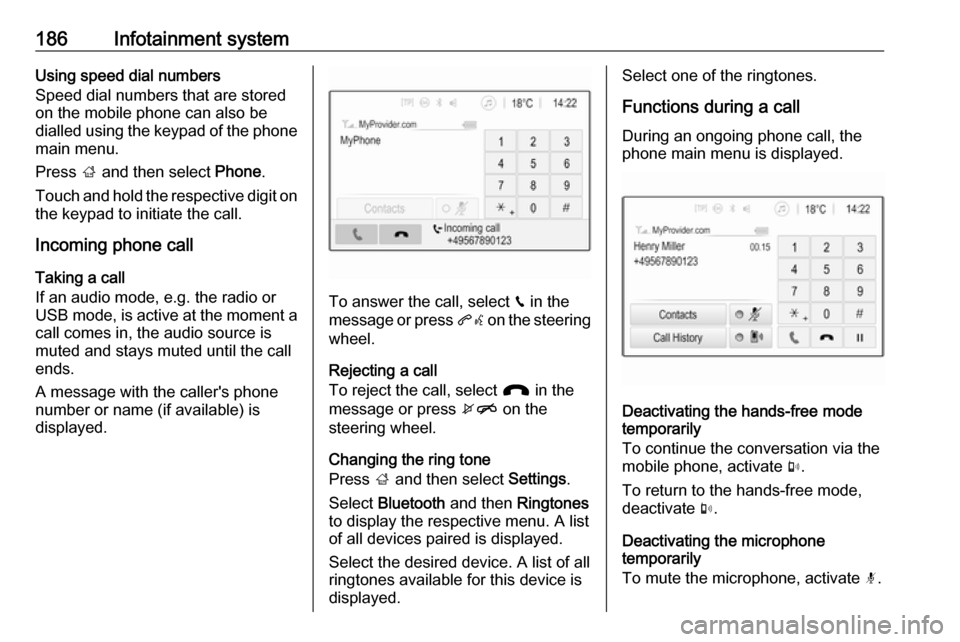
To answer the call, select v in the
message or press qw on the steering
wheel.
Rejecting a call
To reject the call, select J in the
message or press xn on the
steering wheel.
Changing the ring tone
Press ; and then select Settings.
Select Bluetooth and then Ringtones
to display the respective menu. A list
of all devices paired is displayed.
Select the desired device. A list of all
ringtones available for this device is
displayed.
Select one of the ringtones.
Functions during a call
During an ongoing phone call, the
phone main menu is displayed.
Deactivating the hands-free mode
temporarily
To continue the conversation via the mobile phone, activate m.
To return to the hands-free mode,
deactivate m.
Deactivating the microphone
temporarily
To mute the microphone, activate n.
Page 189 of 341

Infotainment system187To reactivate the microphone,
deactivate n.
Ending a phone call
Select J to end the call.
Voice mail box
You may operate your voice mail box via the Infotainment system.
Voice mail number
Press ; and then select Settings.
Select Bluetooth . Scroll through the
list and select Voice Mail Numbers .
A list of all devices paired is displayed.
Select the respective phone. A
keypad is displayed.
Enter the voice mail number for the
respective phone.
Calling the voice mail box
Press ; and then select Phone.
Select t on the screen. The mail
box is called.
Alternatively, enter the voice mail
number via the phone keypad.Mobile phones and CB radio
equipment
Installation instructions and
operating guidelines
The vehicle specific installation
instructions and the operating
guidelines of the mobile phone and
hands-free manufacturer must be
observed when installing and
operating a mobile telephone. Failure to do so could invalidate the vehicle
type approval (EU directive 95/54/
EC).
Recommendations for fault-free
operation:
● Professionally installed exterior antenna to obtain the maximum
range possible
● Maximum transmission power 10 watts
● Installation of the phone in a suitable spot, consider relevant
Note in the Owner's Manual,
section Airbag system .
Seek advice on predetermined
installation points for the external
antenna or equipment holder andways of using devices with a
transmission power exceeding
10 watts.
Use of a hands-free attachment without external antenna with mobile
telephone standards GSM
900/1800/1900 and UMTS is only
permitted if the maximum
transmission power of the mobile
telephone is 2 watts for GSM 900 or
1 watt for the other types.
For reasons of safety, do not use the
phone while driving. Even use of a hands-free set can be a distraction
while driving.9 Warning
Operation of radio equipment and
mobile telephones which fail to
meet above mentioned mobile
telephone standards is only
permitted using an antenna
located outside of the vehicle.
Page 191 of 341

Climate control189Climate controlClimate control systems.............189
Heating and ventilation system 189
Air conditioning system ...........190
Electronic climate control system .................................... 191
Auxiliary heater ........................195
Air vents ..................................... 195
Adjustable air vents .................195
Fixed air vents ......................... 196
Maintenance .............................. 196
Air intake ................................. 196
Pollen filter ............................... 196
Air conditioning regular
operation ................................ 196
Service .................................... 196Climate control systems
Heating and ventilation system
Controls for: ● temperature
● air distribution
● fan speed
● demisting and defrosting
Heated rear window Ü 3 33.
Temperature
red:warmblue:coldHeating will not be fully effective until
the engine has reached normal
operating temperature.
Air distributionl:to windscreen and front door
windowsM:to head area via adjustable air
ventsK:to foot well and windscreen
All combinations are possible.
Fan speed
Adjust the air flow by switching the fan to the desired speed.
Demisting and defrosting ● Press V: fan automatically
switches to higher speed, the air
distribution is directed towards
the windscreen.
● Set temperature control to warmest level.
● Switch on heated rear window Ü.
● Open side air vents as required and direct them towards the doorwindows.
Page 199 of 341

Driving and operating197Driving and
operatingDriving hints ............................... 198
Control of the vehicle ...............198
Steering ................................... 198
Starting and operating ...............198
New vehicle running-in ............198
Ignition switch positions ...........198
Retained power off ..................199
Starting the engine ..................199
Overrun cut-off ........................ 200
Stop-start system ....................201
Parking .................................... 203
Engine exhaust .......................... 204
Diesel particle filter ..................204
Catalytic converter ...................205
AdBlue ..................................... 206
Automatic transmission ..............209
Transmission display ...............209
Selector lever .......................... 209
Manual mode ........................... 210
Electronic driving programmes 210
Fault ........................................ 211
Interruption of power supply ....211
Manual transmission ..................212Brakes........................................ 213
Antilock brake system .............213
Parking brake .......................... 213
Brake assist ............................. 215
Hill start assist ......................... 215
Ride control systems .................216
Traction Control system ..........216
Electronic Stability Control ......217
Interactive driving system ........218
Driver assistance systems .........219
Cruise control .......................... 219
Speed limiter ........................... 221
Adaptive cruise control ............222
Forward collision alert .............229
Following distance indication ...232
Active Emergency Braking ......233
Parking assist .......................... 234
Side blind spot alert .................237
Rear view camera ...................239
Traffic sign assistant ................240
Lane departure warning ..........244
Fuel ............................................ 245
Fuel for petrol engines .............245
Fuel for diesel engines ............246
Fuel for natural gas operation . 247
Fuel for liquid gas operation ....247
Refuelling ................................ 247
Fuel consumption - CO 2-
Emissions .............................. 252Trailer hitch................................ 253
General information .................253
Driving characteristics and towing tips .............................. 254
Trailer towing ........................... 254
Towing equipment ...................255
Trailer stability assist ...............257
Page 208 of 341

206Driving and operatingAdBlue
General information The selective catalytic reduction
(BlueInjection) is a method to
substantially reduce the nitrogen
oxides in the exhaust emission. This
is achieved by injecting a Diesel
Exhaust Fluid (DEF) into the exhaust system. The ammonia released by
the fluid reacts with nitrous gases
(NO x) from the exhaust and turns it
into nitrogen and water.
The designation of this fluid is
AdBlue ®
. It is a non-toxic, non-
flammable, colourless and odourless
fluid which consists of 32% urea and
68% water.9 Warning
Avoid contact of your eyes or skin
with AdBlue.
In case of eye or skin contact,
rinse off with water.
Caution
Avoid contact of the paintwork with AdBlue.
In case of contact, rinse off with water.
AdBlue freezes at a temperature of
approx. -11 °C. As the vehicle is
equipped with an AdBlue pre-heater,
the emissions reduction at low
temperatures is ensured. The AdBlue
pre-heater works automatically.
The typical AdBlue consumption is
approx. 1.2 litres per 600 miles for vehicles with engine B16DTH or
B16DTJ and approx. two litres per
600 miles for vehicles with engine B20DTH. The consumption can also
be higher depending on driving
behaviour (e.g. high load or towing).
AdBlue tank
At a remaining volume of approx. five litres, there is a liquid level switch.
Warning messages are displayed
only below that threshold. Tank
volume 3 317.
Level warnings
Depending on the calculated range of AdBlue, different messages are
displayed in the Driver Information
Centre. The messages and the
restrictions are a legal requirement.
The first possible warning is AdBlue
Range: 1500 mi .
This warning will show up once briefly with the calculated range. Driving is
possible without any restrictions.
The next warning level is entered with
a range below 1090 miles. The
message with the current range will
always be displayed when ignition is
switched on and needs to be
confirmed 3 116 . Refill AdBlue before
entering the next warning level.
At an AdBlue range below 560 miles,
the following warning messages are
alternately displayed and cannot be
dismissed:
● AdBlue Low Refill Now
● Engine Restart Prevented in 560
miles .
Additionally, control indicator Y
flashes continuously.