2018 VAUXHALL ZAFIRA TOURER Car play
[x] Cancel search: Car playPage 182 of 341
180Infotainment systemImportant information for
operation and traffic safety9 Warning
Mobile phones have effects on
your environment. For this reason safety regulations and directions
have been prepared. You should
be familiar with the related
directions before you use the
telephone function.
9 Warning
Use of the hands-free facility while
driving can be dangerous because
your concentration is reduced
when telephoning. Park your
vehicle before you use the hands- free facility. Follow the stipulations
of the country in which you find
yourself at present.
Do not forget to follow the special
regulations that apply in specific
areas and always switch off the
mobile phone if the use of mobile
phones is prohibited, if
interference is caused by the
mobile phone or if dangerous
situations can occur.
Bluetooth
The Phone portal is certified by the
Bluetooth Special Interest Group
(SIG).
You can find further information about the specification on the internet at
http://www.bluetooth.com.
Bluetooth connection
Bluetooth is a radio standard for the
wireless connection of e.g. mobile
phones, smartphones or other
devices.
Via the Bluetooth menu, pairing (PIN
code exchange between Bluetooth
device and Infotainment system) and
connecting of the Bluetooth devices
to the Infotainment system are carried out.
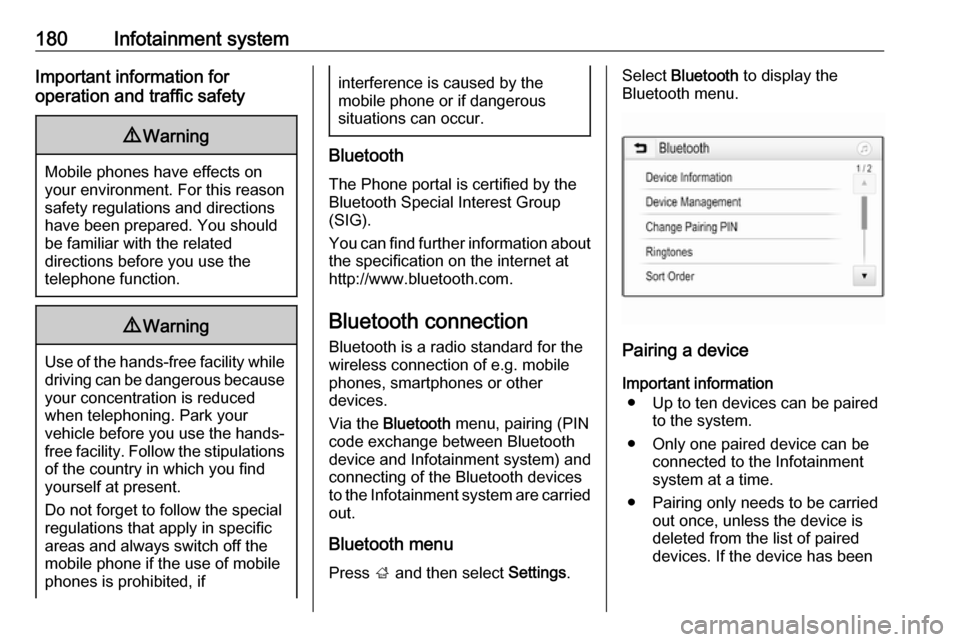
Bluetooth menu Press ; and then select Settings.
Select Bluetooth to display the
Bluetooth menu.
Pairing a device
Important information ● Up to ten devices can be paired to the system.
● Only one paired device can be connected to the Infotainment
system at a time.
● Pairing only needs to be carried out once, unless the device is
deleted from the list of paired
devices. If the device has been
Page 184 of 341

182Infotainment systemmessages displayed on the
Bluetooth device.
If this function is not supported by the Bluetooth device, a
corresponding message is displayed.
Changing the Bluetooth PIN code
Press ; and then select Settings.
Select Bluetooth and then Change
Pairing PIN to display the respective
submenu. A keypad is displayed.
Enter the desired four-digit PIN code.
To delete an entered number, select
⇦.
Confirm your input by selecting Enter.
Connecting a paired device
Press ; and then select Settings.
Select Bluetooth and then Device
Management to display the
respective menu.
Select the Bluetooth device you wish to connect. The device is connected.
Notice
The connected device and the
available options are highlighted.Disconnecting a device
Press ; and then select Settings.
Select Bluetooth and then Device
Management to display the
respective menu.
Select the Bluetooth device currently connected. You are prompted with a
message.
Select Yes to disconnect the device.
Deleting a device Press ; and then select Settings.
Select Bluetooth and then Device
Management to display the
respective menu.
Select e next to the Bluetooth device.
You are prompted with a message.
Select Yes to delete the device.
Device info
Press ; and then select Settings.
Select Bluetooth and then Device
Information to display the respective
menu.The information displayed includes
Device Name , Address , and PIN
Code .
Emergency call9 Warning
Connection setup cannot be
guaranteed in all situations.For this reason you should not rely
exclusively on a mobile phone
when a vitally important
communication (e.g. a medical
emergency) is concerned.
In some networks it may be
necessary for a valid SIM card to
be properly inserted in the mobile
phone.
9 Warning
Bear in mind that you can make
and receive calls with the mobile
phone if it is in a service area with
a sufficiently strong signal. Under
certain circumstances,
emergency calls cannot be made
Page 186 of 341

184Infotainment systemInitiating a phone call
Entering a phone number
Press ; and then select Phone.
Enter a telephone number using the keypad in the phone main menu.
To delete one or more entered
characters, touch or touch and hold
⇦.
Touch v on the screen or press qw
on the steering wheel to start dialling.
Using the phone book Notice
When pairing a mobile phone with
the Infotainment system via
Bluetooth, the phone book of the
mobile phone is downloaded
automatically 3 180.
Press ; and then select Phone.
Select Contacts in the phone main
menu.
Notice
The g symbol next to a phone
number indicates that the contact is stored on the SIM card.
Quick search 1. Select u to display a list of all
contacts.
2. Scroll through the list of contacts entries.
3. Touch the contact you wish to call.
A menu with all phone numbers
stored for the selected contact is
displayed.
4. Select the desired phone number to initiate the call.Search menu
If the phone book contains a great
number of entries, you can search for
the desired contact via the search
menu.
Select o in the Contacts menu to
display the search tab.
The letters are organised in
alphabetical groups on the screen
buttons: abc, def , ghi , jkl , mno , pqrs ,
tuv , and wxyz.
Use ⇦ to delete an entered group of
letters.
1. Select the button containing the first letter of the contact you wish
to search for.
Page 209 of 341

Driving and operating207Notice
In case of high AdBlue consumption,
the Driver Information Centre may
display this warning without the
previous warning stages.
The last warning level is entered
when the AdBlue tank is empty.
Restart of the engine is not possible.
The following warning messages are
alternately displayed and cannot be
dismissed:
● AdBlue Empty Refill Now
● Engine Will Not Restart .
Additionally, control indicator Y
flashes continuously.
With active prevention of an engine
start, the following message will be
displayed:
Refill AdBlue To Start Vehicle .
The tank must be refilled completely
with AdBlue, otherwise restarting of the engine is not possible.High emission warnings
If the exhaust emission rises above a
certain value, warnings similar to the
range warnings will be displayed in
the Driver Information Centre.
Requests to have the exhaust system checked and finally the
announcement of the prevention of
an engine restart are displayed.
These restrictions are a legal
requirement.
Consult a workshop for assistance.
Refilling AdBlueCaution
Only use AdBlue that complies
with European standards
DIN 70 070 and ISO 22241-1.
Do not use additives.
Do not dilute AdBlue.
Otherwise the selective catalytic
reduction system could be
damaged.
Notice
Whenever a filling pump with a
nozzle for passenger cars is not
available at a filling station, use only
AdBlue bottles or canisters with a
sealed refill adapter for refilling, to
prevent splashback and overspill,
and in order to ensure that the fumes
from the tank are captured and do
not emerge. AdBlue in bottles or
canisters is available in many filling
stations and can be purchased e.g. at Vauxhall dealers and other retail
outlets.
Since AdBlue has a limited
durability, check the date of expiry
before refilling.
Notice
The refilling of AdBlue is only
detected by the system when the
abovementioned liquid level switch
in the tank is activated.
In case AdBlue refill is not
successfully detected:
Page 221 of 341

Driving and operating219changes the settings within the
selected driving mode or, when
recognising greater variations, the
driving mode is changed for the
length of variation.
If, for example, Normal mode is
selected and DMC detects a sporty
driving behaviour, DMC changes
several settings of the Normal mode
into sporty settings. The DMC
changes to SPORT mode in case of
very sporty driving behaviour.
If, for example, TOUR mode is
selected and whilst driving on a
winding road a sudden hard brake is
necessary, DMC will detect the
dynamic vehicle condition and
changes the settings for suspension
to SPORT mode to increase vehicle
stability.
When the driving characteristic or the
dynamic vehicle state returns to
former state, DMC will change the
settings to the preselected driving
mode.Personalised settings in the Sport
mode
The driver can select the functions of
the SPORT mode when SPORT is
pressed.
Select the relevant settings in
Settings in the Info-Display.
Info-Display 3 121.
Vehicle personalisation 3 123.Driver assistance
systems9 Warning
Driver assistance systems are
developed to support the driver
and not to replace the driver's
attention.
The driver accepts full
responsibility when driving the
vehicle.
When using driver assistance
systems, always take care
regarding the current traffic
situation.
Cruise control
The cruise control can store and
maintain speeds of approx. 20 mph to maximum vehicle speed. Deviations
from the stored speeds may occur
when driving uphill or downhill.
For safety reasons, the cruise control cannot be activated until the foot
brake has been operated once.
Activation in first gear is not possible.
Page 228 of 341

226Driving and operatingDeactivation
Adaptive cruise control is deactivated by the driver when:
● y is pressed.
● Brake pedal is applied.
● Clutch pedal is depressed for more than four seconds.
● Selector lever of automatic transmission is moved to N.
The system is also automatically
deactivated when:
● Vehicle speed accelerates above
120 mph or slows down below
28 mph.
● The Traction Control system is operating.
● Electronic Stability Control is operating.
● There is no traffic and nothing detected on the road sides forseveral minutes. In this casethere are no radar echoes and
the sensor may report that it is
blocked.
● The active emergency braking system is applying the brakes.● Driving on steep inclines.
● Radar sensor is blocked by an ice
or water film.
● A fault is detected in the radar, engine or brake system.
When adaptive cruise control is
deactivated, the control indicator m
changes from green to white and a
pop-up message is displayed in the
Driver Information Centre.
The stored speed is maintained and
indicated in brackets in the Driver
Information Centre. The system is
deactivated but not switched off.
9 Warning
When adaptive cruise control is
deactivated, the driver must take
over full brake and engine control.
Switching off
Press C to switch off adaptive cruise
control. The control indicator m and
C in the Driver Information Centre
extinguish. The stored speed is
deleted.
Switching off the ignition also
switches off adaptive cruise control
and deletes the stored speed.
Driver's attention ● Use adaptive cruise control carefully on bends or mountain
roads, as it can lose the vehicle
ahead and require time to detect
it again.
● Do not use the system on slippery roads as it can create
rapid changes in tyre traction
(wheel spinning), so that you
could lose control of the vehicle.
● Do not use adaptive cruise control during rain, snow or
heavy dirt, as the radar sensor
can be covered by a water film,
dust, ice or snow. This reduces or completely suppresses the
Page 239 of 341

Driving and operating237external noise sources may causethe system to fail to detect
obstacles.
Special attention must be paid to low obstacles which can damage
the lower part of the bumper.Caution
Performance of the system can be reduced when sensors are
covered, e.g. by ice or snow.
Performance of the parking assist
system can be reduced due to
heavy loading.
Special conditions apply if there
are taller vehicles in the vicinity
(e.g. off-road vehicles, mini vans,
vans). Object identification and correct distance indication in the
upper part of these vehicles
cannot be guaranteed.
Objects with a very small reflection
cross-section, e.g. objects of
narrow size or soft materials, may
not be detected by the system.
Parking assist systems do not
detect objects outside the
detection range.
Notice
The parking assist system
automatically detects factory-fitted
towing equipment. It is deactivated
when the connector is plugged in.
It is possible that the sensor detects a non-existing object (echo
disturbance) caused by external acoustical or mechanic
disturbances.
Notice
If engaging a forward gear and
exceeding a certain speed, the rear
parking assist will be deactivated
when the rear carrier system is
extended.
If engaging reverse gear first, the
parking assist will detect the rear
carrier system and provide a buzzing
sound. Press r briefly to
deactivate the parking assist.
Side blind spot alert
The side blind spot alert system
detects and reports objects on either
side of the vehicle, within a specified
"blind spot" zone. The system
displays a visual alert in each exterior
mirror, when detecting objects that
may not be visible in the interior and
exterior mirrors.
The system's sensors are located in
the bumper on the left and right side
of the vehicle.9 Warning
Side blind spot alert does not
replace driver vision.
The system does not detect:
● vehicles outside the side blind zones which may be rapidly
approaching
● pedestrians, cyclists or animals
Before changing a lane, always
check all mirrors, look over the
shoulder and use the turn signal.
Page 285 of 341

Vehicle care283off ignition. After adjusting tyre
pressure, switch on ignition and
select the appropriate setting on the
page Tyre load in the Driver
Information Centre, 3 116.
Temperature dependency
The tyre pressure depends on the temperature of the tyre. During
driving, tyre temperature and
pressure increase. Tyre pressure
values provided on the tyre
information label and tyre pressure
chart are valid for cold tyres, which
means at 20 °C.
The pressure increases by nearly
1.5 psi for a 10 °C temperature
increase. This must be considered
when warm tyres are checked.
The tyre pressure value displayed in
the Driver Information Centre shows
the real tyre pressure. A cooled down tyre will show a decreased value,
which does not indicate an air leak.Tyre pressure monitoring
system
The tyre pressure monitoring system
checks the pressure of all four tyres
once a minute when vehicle speed
exceeds a certain limit.Caution
Tyre pressure monitoring system
warns only about low tyre pressure condition and does not replace
regular tyre maintenance by the
driver.
All wheels must be equipped with pressure sensors and the tyres must
have the prescribed pressure.
Notice
In countries where the tyre pressure
monitoring system is legally
required, the use of wheels without
pressure sensors will invalidate the
vehicle operating permit.
The current tyre pressures can be
shown in the Driver Information
Centre.
Select the menu by the buttons on the turn signal lever.
Select Tyre pressure page under
Vehicle Information Menu ? 3 116.